Windows 10 / 11 post WU installation cleanup script


Hey, folks,

Thanks to a lot of wonderful folks here, we've made mention in a previous Insider topic about cleanup steps that can be run after Windows Update performs a major version install.

Though these have been mentioned before by many, many people, it was this post by @IanMosley that started me on implementing this as an step to clean up both my main Windows installation and all the VMs I have for testing:

A few posts later, @geneo offered some good advice on how to streamline that set of commands in this post:


Which, eventually, led me to mentioning that I had put them all in a batch file to run after major WU installs:


Thus far I've just been right clicking the file and selecting Run as Administrator to run it - not all that hard. But, today, I went in search of a self-elevation script for batch files so I can just double click the file and let it do its thing.

I found a good thread at Stack Overflow that has a few methods mentioned, including direct self-elevation, elevation via WSH, via VBScripting, and even via Powershell. I tested several ones, and found that this particular script works best and is no nonsense and has no fuss:


I've also added a pause command at the end so that the window remains on screen after completing so you can see the results, and a simple keypress will close it out.

So, here is the code as I'm using it now:

Batch:
:: Elevation script from StackOverflow
:: https://stackoverflow.com/a/28467343

:: Begin Elevation script

@ECHO OFF
setlocal EnableDelayedExpansion

::net file to test privileges, 1>NUL redirects output, 2>NUL redirects errors
NET FILE 1>NUL 2>NUL
if '%errorlevel%' == '0' ( goto START ) else ( goto getPrivileges )

:getPrivileges
if '%1'=='ELEV' ( goto START )

set "batchPath=%~f0"
set "batchArgs=ELEV"

::Add quotes to the batch path, if needed
set "script=%0"
set script=%script:"=%
IF '%0'=='!script!' ( GOTO PathQuotesDone )
    set "batchPath=""%batchPath%"""
:PathQuotesDone

::Add quotes to the arguments, if needed.
:ArgLoop
IF '%1'=='' ( GOTO EndArgLoop ) else ( GOTO AddArg )
    :AddArg
    set "arg=%1"
    set arg=%arg:"=%
    IF '%1'=='!arg!' ( GOTO NoQuotes )
        set "batchArgs=%batchArgs% "%1""
        GOTO QuotesDone
        :NoQuotes
        set "batchArgs=%batchArgs% %1"
    :QuotesDone
    shift
    GOTO ArgLoop
:EndArgLoop

::Create and run the vb script to elevate the batch file
ECHO Set UAC = CreateObject^("Shell.Application"^) > "%temp%\OEgetPrivileges.vbs"
ECHO UAC.ShellExecute "cmd", "/c ""!batchPath! !batchArgs!""", "", "runas", 1 >> "%temp%\OEgetPrivileges.vbs"
"%temp%\OEgetPrivileges.vbs"
exit /B

:START
::Remove the elevation tag and set the correct working directory
IF '%1'=='ELEV' ( shift /1 )
cd /d %~dp0

::Do your adminy thing here...

:: End Elevation Script
:: Begin cleanup script

start /B /wait rundll32.exe pnpclean.dll,RunDLL_PnpClean /drivers/maxclean
start /B /wait dism /Online /Cleanup-Image /CheckHealth
start /B /wait sfc /scannow
start /B /wait dism /Online /Cleanup-Image /RestoreHealth
start /B /wait dism /online /Cleanup-Image /Startcomponentcleanup /resetbase

pause

You can copy the contents and save it to a file with a .BAT extension and it should work just fine, tested across Windows 10 and Windows 10 Insider Preview, plus Windows 11 (RTM, Release Preview, Beta, Dev and Canary current builds).

If you'd rather just download the batch file, here you go.

Download

Enjoy!

P.S. - if you have any suggestions on improving it / adding more functionality / expanding the scope of the cleanup, feel free to comment below!

P.P.S. - Here are a couple of alternatives.
1. Same commands but written into a GUI: Windows 10 / 11 post WU installation cleanup script

2. A whole batch of commands, including the ones in the batch script I put together, all in a neat little GUI package: Windows 10 / 11 post WU installation cleanup script

3. A direct DISM GUI (one of several available from the Internet): Windows 10 / 11 post WU installation cleanup script
 
Windows Build/Version
Windows 10 / Windows 11

Attachments

Last edited:
I don't think browser tabs open have anything to do with the processor usage unless there's something like a continuous script running on them. Here's mine with ten Firefox tabs open sitting on static pages. It was at 2% before I hit the screen capture button.

View attachment 138444
Ofcourse it does, Chrome is very demanding on memory and everything else. This goes jumps anywhere from 27% to 103%.
1751738888155.webp
And this is only the Chrome Beta side.

This is the Chrome Dev side.
1751739067821.webp

See https://support.google.com/chrome/thread/60223994/constant-high-cpu-usage for a better explanation. Each tab is a separate chrome.exe process so one tab can crash and it won't effect the others, atleast that's what Google claims.
 

My Computer

System One

  • OS
    WindowsXP/7/8/8.1/10/11,Linux,Android,FreeBSD Unix
    Computer type
    Laptop
    Manufacturer/Model
    Dell XPS 15 9570
    CPU
    Intel® Core™ i7-8750H 8th Gen 2.2Ghz up to 4.1Ghz
    Motherboard
    Dell XPS 15 9570
    Memory
    64GB using 2x32GB CL16 Mushkin redLine modules
    Graphics Card(s)
    Intel UHD 630 & NVIDIA GeForce GTX 1050 Ti with 4GB DDR5
    Sound Card
    Realtek ALC3266-CG
    Monitor(s) Displays
    15.6" 4K Touch UltraHD 3840x2160 made by Sharp
    Screen Resolution
    3840x2160 4K UltraHD
    Hard Drives
    Samsung MZ-V9P4T0B/AM 990 PRO 4TB PCIe®4.0 NVMe™ M.2 SSD was Toshiba KXG60ZNV1T02 NVMe 1TB SSD
    PSU
    Dell XPS 15 9570
    Case
    Dell XPS 15 9570
    Cooling
    Stock
    Keyboard
    Stock
    Mouse
    SwitftPoint ProPoint
    Internet Speed
    Comcast/XFinity 1.44Gbps/42.5Mbps
    Browser
    Microsoft EDGE (Chromium based) & Google Chrome
    Antivirus
    Windows Defender that came with Windows
Sort of.

If you look at this, it makes it (more) clear it is referring to used because it also shows the total and then the percentage:

View attachment 138512

Red points to used and Green points to total

Or even more so in my own:

View attachment 138522

But I should have realized it didn't write the word used but meant it anyway lol - it's been a while since I used PH....

As for the laptop and increased CPU usage, you'll probably have a lot of other things that are laptop specific too that I don't have on my home built desktop, so I can allow for a 48% CPU load at any given time, I know I've seen similar in the past on older laptops I've owned, too.


None needed, the topic is fascinating in and of itself, and the thread has maxed itself on content as the script is not being developed any further, and alternatives are also now mentioned.


Which, for all intents and purposes, any web page that displays dynamic advertising will, in fact, contain. So, there is that.

And corporate private pages (for employee use) can be notorious for connection monitoring and aggressive (generally accepted) threat alleviation and prevention, too, so...


I'm not 100% convinced, even with my explanation above of dynamic advertising being an actively running script in any given browser tab.

I think the real thing missed is that laptops also have a ton more CPU scheduling and active throttling going on by default, not to mention a ton of 'utilities' that run in the background, like active software for thermal mgmt, trackpad monitoring, hotkey monitoring, and more. That, coupled with what I can see in the screenshot that you posted in reply to me earlier, from System Informer, shows a few apps running like acrotray, monitoring for use of acrobat, The Adobe CollabSync, monitoring for file generation to sync with their servers, if memory serves me correctly, Alexa, which will be monitoring for voice instructions, BitWarden (normal AV, any AV on a machine will have active processes for real time protection so cannot really be concerned about this one), Anydesk, monitoring for remote connections, etc....

There is a lot running there and that is just the first two letters of the alphabet lol.

I bet if you close your browser completely, you'll barely save 5% of your CPU usage, those are more than likely not the actual culprit here. The 'culrpit' is going to be the sum, the amalgamation of everything running - aka death by 1000 cuts.

Remember you are looking at the bigger more detailed information just like if you look at what I showed in post #95, I can also show the System Information which also works the same way as Task Manager, it's more of how each thing presents it, and why would it matter because it already shows you the total percentage anyways and it's not that hard to add 2 numbers together as the % obviously will add up to 100%. Ofcourse the more detailed will show memory which is Physical + Swap added together but the right still tells you it's 64GB installed. 32GB is officially supported by Dell since 64GB memory was not available when the machine was originally introduced so anything more than 32GB is not supported and in fact, other than memory bought from Dell, it's not supported as many people bought Crucial and other brands only that they didn't work and Dell's official answer is their engineering does not support non-Dell purchased memory when people had problems. It's in this thread and Dell's official answer from engineering about using memory not bought from Dell:


1751739588549.webp

Yes, remember a laptop is limited in air flow by design among other things and this one happens to have the CPU and GPU mounted on the side facing the table and not the facing up to the keyboard so it makes it a lot harder for the heat to escape.

As for closing the browser, give me a few minutes since the beauty of Process Hacker/System Informer is that I can kill/restart more than one process at a time. You already see what it uses above with the browsers running. Let's see what it shows after the chrome.exe processes are killed.

Usually, laptops comes with third party software but Microsoft Signature Edition which is hardware sold by Microsoft Store online and their stores after learning what it meant was it didn't come with anything other than the OS itself which is true because I don't have anything other than the drivers on top of the OS. Acrobat and acrotray are stuff I added recently. Same with the other stuff you mentioned, those are all stuff I added.

I forgot to screenshot the # of processes for before but the after is 518 processes with chrome.exe not running and this is the result without the browser running, the CPU% went as low as 16%:
1751740931938.webp
Notice the big difference for both the CPU and Memory with Chrome closed. I did not mention that I have atleadt 5 gmail.com sessions running to different accounts and those are major resource hogs. For my main account, I have a extra one running so I can read the current days email in the main one and the extra one is to go back to the 1,000 messages per day for the last 40 days which also adds to it.

I should mention that even though I do not have MS Edge opened, there are many instances of 48 msedgewebview2.exe processes and 18 msedge.exe processes running in the background.

So atleast this proves the browser does use both CPU and Memory big time. Even based on screenshots alone as it's hard to capture the low numbers without doing a video capture and that drives the CPU up higher. But the CPU basically went down 72% and the memory usage went down 40.4GB.

A lot of the CPU is also taken up by SystemInformer which I have always running since it's handy when I need it and I like looking at it from time to time.
 
Last edited:

My Computer

System One

  • OS
    WindowsXP/7/8/8.1/10/11,Linux,Android,FreeBSD Unix
    Computer type
    Laptop
    Manufacturer/Model
    Dell XPS 15 9570
    CPU
    Intel® Core™ i7-8750H 8th Gen 2.2Ghz up to 4.1Ghz
    Motherboard
    Dell XPS 15 9570
    Memory
    64GB using 2x32GB CL16 Mushkin redLine modules
    Graphics Card(s)
    Intel UHD 630 & NVIDIA GeForce GTX 1050 Ti with 4GB DDR5
    Sound Card
    Realtek ALC3266-CG
    Monitor(s) Displays
    15.6" 4K Touch UltraHD 3840x2160 made by Sharp
    Screen Resolution
    3840x2160 4K UltraHD
    Hard Drives
    Samsung MZ-V9P4T0B/AM 990 PRO 4TB PCIe®4.0 NVMe™ M.2 SSD was Toshiba KXG60ZNV1T02 NVMe 1TB SSD
    PSU
    Dell XPS 15 9570
    Case
    Dell XPS 15 9570
    Cooling
    Stock
    Keyboard
    Stock
    Mouse
    SwitftPoint ProPoint
    Internet Speed
    Comcast/XFinity 1.44Gbps/42.5Mbps
    Browser
    Microsoft EDGE (Chromium based) & Google Chrome
    Antivirus
    Windows Defender that came with Windows
The number of browser tabs open increasing processor usage sure isn't universal as I opened ten and it didn't change my usage at all. I agree that if there is active content continually running as a result of opening that page, that's something else.
 

My Computers

System One System Two

  • OS
    Win 11 Pro 25H2, Build 26200.8524
    Computer type
    PC/Desktop
    Manufacturer/Model
    Home Brew
    CPU
    Intel Core i5 14500
    Motherboard
    Gigabyte B760M G P WIFI
    Memory
    64GB DDR4
    Graphics Card(s)
    GeForce RTX 4060
    Sound Card
    Chipset Realtek
    Monitor(s) Displays
    LG 45" Ultragear, Acer 24" 1080p
    Screen Resolution
    5120x1440, 1920x1080
    Hard Drives
    Crucial P310 2TB 2280 PCIe Gen4 3D NAND NVMe M.2 SSD (O/S)
    Silicon Power 2TB US75 NVMe PCIe Gen4 M.2 2280 SSD (backup)
    Crucial BX500 2TB 3D NAND (2nd backup)
    Seagate 4TB Ironwolf, rotating HDD archive files
    External off-line backup Drives: 2 NVMe 4TB drives in external enclosures
    PSU
    Thermaltake Toughpower GF3 750W
    Case
    LIAN LI LANCOOL 216 E-ATX PC Case
    Cooling
    Lots of fans!
    Keyboard
    Microsoft Comfort Curve 2000
    Mouse
    Logitech G305
    Internet Speed
    Verizon FiOS 1GB
    Browser
    Firefox
    Antivirus
    Malware Bytes & Windows Defender Security
  • Operating System
    Win 11 Pro 25H2, Build 26200.8524
    Computer type
    PC/Desktop
    Manufacturer/Model
    Home Brew
    CPU
    Intel Core i5 14400
    Motherboard
    Gigabyte B760M DS3H AX
    Memory
    32GB DDR5
    Graphics card(s)
    Intel 700 Embedded GPU
    Sound Card
    Realtek Embedded
    Monitor(s) Displays
    27" HP 1080p
    Screen Resolution
    1920x1080
    Hard Drives
    Crucial P310 2TB 2280 PCIe Gen4 eD NAND PCIe SSD
    Samsung EVO 990 2TB NVMe Gen4 SSD
    Samsung 2TB SATA SSD
    PSU
    Thermaltake Smart BM3 650W
    Case
    Okinos Micro ATX Case
    Cooling
    Fans
    Keyboard
    Microsoft Comfort Curve 2000
    Mouse
    Logitech G305
    Internet Speed
    Verizon FiOS 1GB
    Browser
    Firefox
    Antivirus
    Malware Bytes & Windows Defender Security
The number of browser tabs open increasing processor usage sure isn't universal as I opened ten and it didn't change my usage at all. I agree that if there is active content continually running as a result of opening that page, that's something else.
You also don't open gmail that has 1M+ messages for each process among other things. Yes, you can open 10 but it depends what you are running in the browser tabs. A lot has to do with Chrome requiring extensions to work a certain way. Before, I had a extension that suspended all tabs that were idle after awhile so the CPU % was way lower. It was called Great Suspender but becuase it didn't meet Chrome's new extension requirements, I can no longer use it. Try opening gmail even in one tab and then scroll through 10 pages of 100 messages per page or open Facebook in tabs and then scroll through about 10-20 pages. Both are resource hogs as I might start with 70 in Chrome Beta for example but for like 10 minutes, I can have another 20 tabs, one for each notification in Facebook alone since I don't want to view and then back, open notification again and view and keep repeating so I will have 90 and then spend a few minutes on each tab and then close it after I am done.

1751746912865.webp
as a example. I have over 10 elevenforum tabs opened because there are somethings I haven't done yet which are part of the 70. I have another 20 Amazon.com tabs opened for different items I still need to look through later.

This happened just now on Chrome for Applying Loctite on laptop screws - Page 2 - Internal Hardware
so Chrome apparently thinks this page is a resource hog...

1751749954333.webp
 
Last edited:

My Computer

System One

  • OS
    WindowsXP/7/8/8.1/10/11,Linux,Android,FreeBSD Unix
    Computer type
    Laptop
    Manufacturer/Model
    Dell XPS 15 9570
    CPU
    Intel® Core™ i7-8750H 8th Gen 2.2Ghz up to 4.1Ghz
    Motherboard
    Dell XPS 15 9570
    Memory
    64GB using 2x32GB CL16 Mushkin redLine modules
    Graphics Card(s)
    Intel UHD 630 & NVIDIA GeForce GTX 1050 Ti with 4GB DDR5
    Sound Card
    Realtek ALC3266-CG
    Monitor(s) Displays
    15.6" 4K Touch UltraHD 3840x2160 made by Sharp
    Screen Resolution
    3840x2160 4K UltraHD
    Hard Drives
    Samsung MZ-V9P4T0B/AM 990 PRO 4TB PCIe®4.0 NVMe™ M.2 SSD was Toshiba KXG60ZNV1T02 NVMe 1TB SSD
    PSU
    Dell XPS 15 9570
    Case
    Dell XPS 15 9570
    Cooling
    Stock
    Keyboard
    Stock
    Mouse
    SwitftPoint ProPoint
    Internet Speed
    Comcast/XFinity 1.44Gbps/42.5Mbps
    Browser
    Microsoft EDGE (Chromium based) & Google Chrome
    Antivirus
    Windows Defender that came with Windows
The number of browser tabs open increasing processor usage sure isn't universal as I opened ten and it didn't change my usage at all. I agree that if there is active content continually running as a result of opening that page, that's something else.
You also don't open gmail that has 1M+ messages for each process among other things. Yes, you can open 10 but it depends what you are running in the browser tabs. A lot has to do with Chrome requiring extensions to work a certain way. Before, I had a extension that suspended all tabs that were idle after awhile so the CPU % was way lower. It was called Great Suspender but becuase it didn't meet Chrome's new extension requirements, I can no longer use it. Try opening gmail even in one tab and then scroll through 10 pages of 100 messages per page or open Facebook in tabs and then scroll through about 10-20 pages.
Which is exactly what I said in the previous post. :unsure:
 

My Computers

System One System Two

  • OS
    Win 11 Pro 25H2, Build 26200.8524
    Computer type
    PC/Desktop
    Manufacturer/Model
    Home Brew
    CPU
    Intel Core i5 14500
    Motherboard
    Gigabyte B760M G P WIFI
    Memory
    64GB DDR4
    Graphics Card(s)
    GeForce RTX 4060
    Sound Card
    Chipset Realtek
    Monitor(s) Displays
    LG 45" Ultragear, Acer 24" 1080p
    Screen Resolution
    5120x1440, 1920x1080
    Hard Drives
    Crucial P310 2TB 2280 PCIe Gen4 3D NAND NVMe M.2 SSD (O/S)
    Silicon Power 2TB US75 NVMe PCIe Gen4 M.2 2280 SSD (backup)
    Crucial BX500 2TB 3D NAND (2nd backup)
    Seagate 4TB Ironwolf, rotating HDD archive files
    External off-line backup Drives: 2 NVMe 4TB drives in external enclosures
    PSU
    Thermaltake Toughpower GF3 750W
    Case
    LIAN LI LANCOOL 216 E-ATX PC Case
    Cooling
    Lots of fans!
    Keyboard
    Microsoft Comfort Curve 2000
    Mouse
    Logitech G305
    Internet Speed
    Verizon FiOS 1GB
    Browser
    Firefox
    Antivirus
    Malware Bytes & Windows Defender Security
  • Operating System
    Win 11 Pro 25H2, Build 26200.8524
    Computer type
    PC/Desktop
    Manufacturer/Model
    Home Brew
    CPU
    Intel Core i5 14400
    Motherboard
    Gigabyte B760M DS3H AX
    Memory
    32GB DDR5
    Graphics card(s)
    Intel 700 Embedded GPU
    Sound Card
    Realtek Embedded
    Monitor(s) Displays
    27" HP 1080p
    Screen Resolution
    1920x1080
    Hard Drives
    Crucial P310 2TB 2280 PCIe Gen4 eD NAND PCIe SSD
    Samsung EVO 990 2TB NVMe Gen4 SSD
    Samsung 2TB SATA SSD
    PSU
    Thermaltake Smart BM3 650W
    Case
    Okinos Micro ATX Case
    Cooling
    Fans
    Keyboard
    Microsoft Comfort Curve 2000
    Mouse
    Logitech G305
    Internet Speed
    Verizon FiOS 1GB
    Browser
    Firefox
    Antivirus
    Malware Bytes & Windows Defender Security
Which is exactly what I said in the previous post. :unsure:
Except you said active content, a forum thread like this with 5 messages displayed should not be a resource hog which Chrome apparently thinks it is.

I have 20 posts per page and this is page 6 of the this thread with exactly 5 messages shown for page 6 and take a look at the resources it is taking:
1751901747023.webp
283MB and 32.5% CPU.

By comparison, the Gmail tab which has the notification e-mail for your post above takes 1.7GB and 0.1% CPU and I can understand the memory being bigger because it is displaying 100 emails per page:
1751902205776.webp

Turn on the task manager in the browser and watch how it changes even with 10 tabs of www.google.com over a longer time period. It will not take much resources when you first launch the browser but it will gradually take up more depending how long the browser process is actually running.

It does matter though because even in the Windows XP/2000 days, there are many people who open a lot of tabs and unless the following is edited in the registry, the system will run out of resources:
HKEY_LOCAL_MACHINE\SYSTEM\CurrentControlSet\Control\Session Manager\SubSystems\Windows
Windows SharedSection=
which can have a maximum of 48MB combined.
and then there is for Windows 10/11:
HKEY_LOCAL_MACHINE\SOFTWARE\Microsoft\Windows NT\CurrentVersion\Windows\GDIProcessHandleQuota
HKEY_LOCAL_MACHINE\SOFTWARE\WOW6432Node\Microsoft\Windows NT\CurrentVersion\Windows\GDIProcessHandleQuota
which maxes out at 64MB

HKEY_LOCAL_MACHINE\SOFTWARE\Microsoft\Windows NT\CurrentVersion\Windows\USERProcessHandleQuota
HKEY_LOCAL_MACHINE\SOFTWARE\WOW6432Node\Microsoft\Windows NT\CurrentVersion\Windows\USERProcessHandleQuota
which maxes out at 17.5MB

With the new motherboard, I did not do the above yet and I do run out of resources after a few days. With the old motherboard, unless I do the above, it will only take hours before the system is extremely sluggish.

Those limits are the maximum allowed to be set regardless of the amount of memory one has.

Windows itself has always been poor at managing resources regardless how much memory one has. The only reason I even use it is because of the software available for it, not because of the quality of the OS.
 
Last edited:

My Computer

System One

  • OS
    WindowsXP/7/8/8.1/10/11,Linux,Android,FreeBSD Unix
    Computer type
    Laptop
    Manufacturer/Model
    Dell XPS 15 9570
    CPU
    Intel® Core™ i7-8750H 8th Gen 2.2Ghz up to 4.1Ghz
    Motherboard
    Dell XPS 15 9570
    Memory
    64GB using 2x32GB CL16 Mushkin redLine modules
    Graphics Card(s)
    Intel UHD 630 & NVIDIA GeForce GTX 1050 Ti with 4GB DDR5
    Sound Card
    Realtek ALC3266-CG
    Monitor(s) Displays
    15.6" 4K Touch UltraHD 3840x2160 made by Sharp
    Screen Resolution
    3840x2160 4K UltraHD
    Hard Drives
    Samsung MZ-V9P4T0B/AM 990 PRO 4TB PCIe®4.0 NVMe™ M.2 SSD was Toshiba KXG60ZNV1T02 NVMe 1TB SSD
    PSU
    Dell XPS 15 9570
    Case
    Dell XPS 15 9570
    Cooling
    Stock
    Keyboard
    Stock
    Mouse
    SwitftPoint ProPoint
    Internet Speed
    Comcast/XFinity 1.44Gbps/42.5Mbps
    Browser
    Microsoft EDGE (Chromium based) & Google Chrome
    Antivirus
    Windows Defender that came with Windows
Remember you are looking at the bigger more detailed information just like if you look at what I showed in post #95, I can also show the System Information which also works the same way as Task Manager, it's more of how each thing presents it, and why would it matter because it already shows you the total percentage anyways and it's not that hard to add 2 numbers together as the % obviously will add up to 100%.

But if you don't know that there is a difference, then you won't realize the mistake.

I'm done arguing about this - the value as I already acknowledged is showing used, and I've used the same software in the past.
 

My Computers

System One System Two

  • OS
    Windows 11 23H2 Current build
    Computer type
    PC/Desktop
    Manufacturer/Model
    HomeBrew
    CPU
    AMD Ryzen 9 3950X
    Motherboard
    MSI MEG X570 GODLIKE
    Memory
    4 * 32 GB - Corsair Vengeance 3600 MHz
    Graphics Card(s)
    EVGA GeForce RTX 3080 Ti XC3 ULTRA GAMING (12G-P5-3955-KR)
    Sound Card
    Realtek® ALC1220 Codec
    Monitor(s) Displays
    2x Eve Spectrum ES07D03 4K Gaming Monitor (Matte) | Eve Spectrum ES07DC9 4K Gaming Monitor (Glossy)
    Screen Resolution
    3x 3840 x 2160
    Hard Drives
    3x Samsung 980 Pro NVMe PCIe 4 M.2 2 TB SSD (MZ-V8P2T0B/AM) } 3x Sabrent Rocket NVMe 4.0 1 TB SSD (USB)
    PSU
    PC Power & Cooling’s Silencer Series 1050 Watt, 80 Plus Platinum
    Case
    Fractal Design Define 7 XL Dark ATX Full Tower Case
    Cooling
    Arctic Liquid Freezer III 420 RGB + Air 3x 140mm case fans (pull front) + 1x 120 mm (push back) and 1 x 120 mm (pull bottom)
    Keyboard
    SteelSeries Apex Pro Wired Gaming Keyboard
    Mouse
    Logitech MX Master 3S | MX Master 3 for Business
    Internet Speed
    AT&T LightSpeed Gigabit Duplex Ftth
    Browser
    Nightly (default) + Firefox (stable), Chrome, Edge , Arc
    Antivirus
    Defender + MB 5 Beta
  • Operating System
    ChromeOS Flex Dev Channel (current)
    Computer type
    Laptop
    Manufacturer/Model
    Dell Latitude E5470
    CPU
    Intel(R) Core(TM) i5-6300U CPU @ 2.40GHz, 2501 Mhz, 2 Core(s), 4 Logical Processor(s)
    Motherboard
    Dell
    Memory
    16 GB
    Graphics card(s)
    Intel(R) HD Graphics 520
    Sound Card
    Intel(R) HD Graphics 520 + RealTek Audio
    Monitor(s) Displays
    Dell laptop display 15"
    Screen Resolution
    1920 * 1080
    Hard Drives
    Toshiba 128GB M.2 22300 drive
    INTEL Cherryville 520 Series SSDSC2CW180A 180 GB SATA III SSD
    PSU
    Dell
    Case
    Dell
    Cooling
    Dell
    Keyboard
    Dell
    Mouse
    Logitech MX Master 3S (shared w. Sys 1) | Dell TouchPad
    Internet Speed
    AT&T LightSpeed Gigabit Duplex Ftth
But if you don't know that there is a difference, then you won't realize the mistake.

I'm done arguing about this - the value as I already acknowledged is showing used, and I've used the same software in the past.
Yes, you have a valid point since it's similar if one actually used that product or not to realize it. System Informer supposedly is after someone else took over the project and the name change had something to do with Microsoft keep flagging it as something bad... I guess the H word isn't exactly something good to use.
 

My Computer

System One

  • OS
    WindowsXP/7/8/8.1/10/11,Linux,Android,FreeBSD Unix
    Computer type
    Laptop
    Manufacturer/Model
    Dell XPS 15 9570
    CPU
    Intel® Core™ i7-8750H 8th Gen 2.2Ghz up to 4.1Ghz
    Motherboard
    Dell XPS 15 9570
    Memory
    64GB using 2x32GB CL16 Mushkin redLine modules
    Graphics Card(s)
    Intel UHD 630 & NVIDIA GeForce GTX 1050 Ti with 4GB DDR5
    Sound Card
    Realtek ALC3266-CG
    Monitor(s) Displays
    15.6" 4K Touch UltraHD 3840x2160 made by Sharp
    Screen Resolution
    3840x2160 4K UltraHD
    Hard Drives
    Samsung MZ-V9P4T0B/AM 990 PRO 4TB PCIe®4.0 NVMe™ M.2 SSD was Toshiba KXG60ZNV1T02 NVMe 1TB SSD
    PSU
    Dell XPS 15 9570
    Case
    Dell XPS 15 9570
    Cooling
    Stock
    Keyboard
    Stock
    Mouse
    SwitftPoint ProPoint
    Internet Speed
    Comcast/XFinity 1.44Gbps/42.5Mbps
    Browser
    Microsoft EDGE (Chromium based) & Google Chrome
    Antivirus
    Windows Defender that came with Windows
This is my latest. I can't say I know how to test it via manipulating or causing issues that need to be repaired, but I can say that I have seen it fix something at some point with each menu entry including reclaiming packages. (But not for 1 PNPCLEAN)

Right click batch file, Run As Admin.

Win-1859.webp

Batch:
@echo off
title Windows 11 System Maintenance

:: Color codes
:: 0A = Green  | 0E = Yellow  | 0C = Red  | 07 = Default

:MENU
cls
color 0A
echo ==============================
echo   Windows 11 Maintenance Menu
echo ==============================
echo.
echo 1. PnPClean only
echo 2. CheckHealth only
echo 3. RestoreHealth only
echo 4. RestoreHealth + SFC
echo 5. Analyze Component Store only
echo 6. Clean Component Store only
echo 7. Analyze + Clean Component Store
echo 8. SFC only
echo 9. FULL (PnPClean + CheckHealth + RestoreHealth + Analyze + Clean + SFC)
echo 10. Exit
echo.
set /p choice="Select an option (1-10): "
color 07

if "%choice%"=="1" goto PNPONLY
if "%choice%"=="2" goto CHECK
if "%choice%"=="3" goto RESTORE
if "%choice%"=="4" goto RESTORESFC
if "%choice%"=="5" goto ANALYZESTORE
if "%choice%"=="6" goto CLEANSTORE
if "%choice%"=="7" goto ANALYZECLEAN
if "%choice%"=="8" goto SFCONLY
if "%choice%"=="9" goto FULL
if "%choice%"=="10" exit
goto MENU

:PNPONLY
call :PNPCLEAN
pause
goto MENU

:CHECK
call :CHECKHEALTH
pause
goto MENU

:RESTORE
call :RESTOREHEALTH
pause
goto MENU

:RESTORESFC
call :RESTOREHEALTH
call :SFC
color 0A
echo RestoreHealth + SFC completed successfully.
color 07
pause
goto MENU

:ANALYZESTORE
color 0A
echo Running AnalyzeComponentStore...
color 07
dism /Online /Cleanup-Image /AnalyzeComponentStore
if errorlevel 1 (
    color 0C
    echo [ERROR] AnalyzeComponentStore failed.
) else (
    color 0A
    echo AnalyzeComponentStore completed successfully.
)
color 07
pause
goto MENU

:CLEANSTORE
color 0A
echo Running StartComponentCleanup...
color 07
dism /Online /Cleanup-Image /StartComponentCleanup
if errorlevel 1 (
    color 0C
    echo [ERROR] StartComponentCleanup failed.
) else (
    color 0A
    echo Component Store cleanup completed successfully.
)
color 07
pause
goto MENU

:ANALYZECLEAN
call :ANALYZESTORE
call :CLEANSTORE
color 0A
echo Analyze + Clean Component Store completed successfully.
color 07
pause
goto MENU

:SFCONLY
call :SFC
pause
goto MENU

:FULL
call :PNPCLEAN
call :CHECKHEALTH
call :RESTOREHEALTH
call :ANALYZESTORE
call :CLEANSTORE
call :SFC
color 0A
echo All steps completed successfully.
color 07
pause
goto MENU

:PNPCLEAN
color 0A
echo Running PnPClean...
color 07
rundll32.exe pnpclean.dll,RunDLL_PnpClean /drivers/maxclean
if errorlevel 1 (
    color 0C
    echo [ERROR] PnPClean failed.
) else (
    color 0A
    echo PnPClean completed successfully.
)
color 07
goto :EOF

:CHECKHEALTH
color 0A
echo Running CheckHealth...
color 07
set "tempfile=%TEMP%\checkhealth.txt"
dism /Online /Cleanup-Image /CheckHealth > "%tempfile%" 2>&1
if errorlevel 1 (
    color 0C
    echo [ERROR] CheckHealth failed.
) else (
    findstr /C:"No component store corruption detected" "%tempfile%" >nul
    if not errorlevel 1 (
        color 0E
        echo No corruption detected.
    ) else (
        color 0A
        echo Corruption detected.
    )
)
color 07
del "%tempfile%" >nul 2>&1
goto :EOF

:RESTOREHEALTH
color 0A
echo Running RestoreHealth...
color 07
dism /Online /Cleanup-Image /RestoreHealth
if errorlevel 1 (
    color 0C
    echo [ERROR] RestoreHealth failed.
) else (
    color 0A
    echo RestoreHealth completed successfully.
)
color 07
goto :EOF

:SFC
color 0A
echo Running SFC scan...
color 07
:: Run SFC directly so progress percentage is shown live
sfc /scannow
if errorlevel 1 (
    color 0C
    echo [ERROR] SFC scan encountered issues.
) else (
    color 0A
    echo SFC completed successfully.
)
color 07
goto :EOF
 

Attachments

Last edited:

My Computers

System One System Two

  • OS
    Windows 11 Pro 25H2 Build 26200.8524
    Computer type
    PC/Desktop
    Manufacturer/Model
    Sin-built 2013
    CPU
    Intel(R) Core(TM) i7-4770K CPU @ 3.50GHz
    Motherboard
    ASUS ROG Maximus VI Formula
    Memory
    32.0 GB of I forget and the box is in storage.
    Graphics Card(s)
    Gigabyte nVidia GeForce GTX 1660 Super OC 6GB
    Sound Card
    Onboard thingy
    Monitor(s) Displays
    5 x LG 25MS500-B - 1 x 24MK430H-B - 1 x Wacom Pro 22" Touch Screen Tablet
    Screen Resolution
    All over the place
    Hard Drives
    Too many to list.
    OS on Samsung 1TB 870 QVO SATA
    PSU
    Silverstone 1500
    Case
    NZXT Phantom 820 Full-Tower Case
    Cooling
    Noctua NH-D15 Elite Class Dual Tower CPU Cooler / 6 x EziDIY 120mm / 2 x Corsair 140mm somethings / 1 x 140mm Thermaltake something / 2 x 200mm Corsair.
    Keyboard
    Corsair K95 / Logitech diNovo Edge Wireless
    Mouse
    Logitech: G402 / G502 / Mx Masters / Mx Air Cordless
    Internet Speed
    2000/500Mbps
    Browser
    All sorts
    Antivirus
    Kaspersky Premium
    Other Info
    ㅤㅤㅤㅤㅤㅤㅤㅤㅤㅤㅤㅤㅤㅤㅤㅤㅤㅤㅤㅤㅤㅤㅤㅤㅤㅤㅤㅤㅤㅤㅤㅤㅤㅤㅤㅤㅤㅤㅤㅤ⠀⠀⠀⠀⠀⠀⠀⠀⠀⠀
    TP-Link BE9300 WiFi 7 Bluetooth 5.4 (Archer TBE550E)
    TP-Link TX201 V1 2.5GB Lan

    Grandstream HT812 - VoIP
    ASUS DSL-AX82U - Mesh
    ASUS RT-AC68U - Mesh
    ASUS RT-BE88U Router

    Brother MFC-L2880DW Printer

    I’m on a horse.
  • Operating System
    Windows 11 Pro 25H2 Build 26200.8524
    Computer type
    Laptop
    Manufacturer/Model
    LENOVO Yoga 7 14IRL8 - 7i EVO OLED 14" Touchscreen i5 12 Core 16GB/512GB
    CPU
    Intel Core 12th Gen i5-1240P Processor (1.7 - 4.4GHz)
    Memory
    16GB LPDDR5 RAM
    Graphics card(s)
    Intel Iris Xe Graphics Processor
    Sound Card
    Optimized with Dolby Atmos®
    Screen Resolution
    QHD 2880 x 1800 OLED
    Hard Drives
    M.2 512GB
    Antivirus
    Defender / Malwarebytes
    Other Info
    …still on a horse.
It breaks if I try to make it restart as admin. I'd like to be able to fix that so I'm working on it. For now I have to run as admin.
 

My Computers

System One System Two

  • OS
    Windows 11 Pro 25H2 Build 26200.8524
    Computer type
    PC/Desktop
    Manufacturer/Model
    Sin-built 2013
    CPU
    Intel(R) Core(TM) i7-4770K CPU @ 3.50GHz
    Motherboard
    ASUS ROG Maximus VI Formula
    Memory
    32.0 GB of I forget and the box is in storage.
    Graphics Card(s)
    Gigabyte nVidia GeForce GTX 1660 Super OC 6GB
    Sound Card
    Onboard thingy
    Monitor(s) Displays
    5 x LG 25MS500-B - 1 x 24MK430H-B - 1 x Wacom Pro 22" Touch Screen Tablet
    Screen Resolution
    All over the place
    Hard Drives
    Too many to list.
    OS on Samsung 1TB 870 QVO SATA
    PSU
    Silverstone 1500
    Case
    NZXT Phantom 820 Full-Tower Case
    Cooling
    Noctua NH-D15 Elite Class Dual Tower CPU Cooler / 6 x EziDIY 120mm / 2 x Corsair 140mm somethings / 1 x 140mm Thermaltake something / 2 x 200mm Corsair.
    Keyboard
    Corsair K95 / Logitech diNovo Edge Wireless
    Mouse
    Logitech: G402 / G502 / Mx Masters / Mx Air Cordless
    Internet Speed
    2000/500Mbps
    Browser
    All sorts
    Antivirus
    Kaspersky Premium
    Other Info
    ㅤㅤㅤㅤㅤㅤㅤㅤㅤㅤㅤㅤㅤㅤㅤㅤㅤㅤㅤㅤㅤㅤㅤㅤㅤㅤㅤㅤㅤㅤㅤㅤㅤㅤㅤㅤㅤㅤㅤㅤ⠀⠀⠀⠀⠀⠀⠀⠀⠀⠀
    TP-Link BE9300 WiFi 7 Bluetooth 5.4 (Archer TBE550E)
    TP-Link TX201 V1 2.5GB Lan

    Grandstream HT812 - VoIP
    ASUS DSL-AX82U - Mesh
    ASUS RT-AC68U - Mesh
    ASUS RT-BE88U Router

    Brother MFC-L2880DW Printer

    I’m on a horse.
  • Operating System
    Windows 11 Pro 25H2 Build 26200.8524
    Computer type
    Laptop
    Manufacturer/Model
    LENOVO Yoga 7 14IRL8 - 7i EVO OLED 14" Touchscreen i5 12 Core 16GB/512GB
    CPU
    Intel Core 12th Gen i5-1240P Processor (1.7 - 4.4GHz)
    Memory
    16GB LPDDR5 RAM
    Graphics card(s)
    Intel Iris Xe Graphics Processor
    Sound Card
    Optimized with Dolby Atmos®
    Screen Resolution
    QHD 2880 x 1800 OLED
    Hard Drives
    M.2 512GB
    Antivirus
    Defender / Malwarebytes
    Other Info
    …still on a horse.
It breaks if I try to make it restart as admin. I'd like to be able to fix that so I'm working on it. For now I have to run as admin.

I've been using "System Minion" for a good while now. I'm wondering what your program does that system minion can't do?

I know system minion is just a package that uses standard windows commands, like SFC, dism, etc. So what does your program do differently?

Thanks.
 

My Computers

System One System Two

  • OS
    win 11 pro, 25H2
    Computer type
    PC/Desktop
    Manufacturer/Model
    Dell 790 (Mt)
    CPU
    i5-2400
    Motherboard
    Dell
    Memory
    32 GB DDR-3
    Graphics Card(s)
    Intel HD Graphics 2000 (on-board)
    Sound Card
    Intel Cougar Point PCH [B2] (On-Board)
    Monitor(s) Displays
    LG 27MN60T
  • Operating System
    Windows 11 home, 25H2
    Computer type
    Laptop
    Manufacturer/Model
    Dell Inspiron 17R SE 7720
    CPU
    Intel I7-3630QM
    Memory
    16GB DDR3
    Hard Drives
    Samsung 500GB SSD
I've been using "System Minion" for a good while now. I'm wondering what your program does that system minion can't do?

I know system minion is just a package that uses standard windows commands, like SFC, dism, etc. So what does your program do differently?

Thanks.

It’s just a batch script that contains everything in the image. A quicker way to run DISM’s & SFC
It’s nothing special, just convenient for me.

I don’t use 3rd party apps to do what Windows already can.

The above batch file is a result of working on it for a couple of months (on & off) prompting Ai to help me create the script. It can be tiresome. But I am pretty happy with what I have concocted.
 

My Computers

System One System Two

  • OS
    Windows 11 Pro 25H2 Build 26200.8524
    Computer type
    PC/Desktop
    Manufacturer/Model
    Sin-built 2013
    CPU
    Intel(R) Core(TM) i7-4770K CPU @ 3.50GHz
    Motherboard
    ASUS ROG Maximus VI Formula
    Memory
    32.0 GB of I forget and the box is in storage.
    Graphics Card(s)
    Gigabyte nVidia GeForce GTX 1660 Super OC 6GB
    Sound Card
    Onboard thingy
    Monitor(s) Displays
    5 x LG 25MS500-B - 1 x 24MK430H-B - 1 x Wacom Pro 22" Touch Screen Tablet
    Screen Resolution
    All over the place
    Hard Drives
    Too many to list.
    OS on Samsung 1TB 870 QVO SATA
    PSU
    Silverstone 1500
    Case
    NZXT Phantom 820 Full-Tower Case
    Cooling
    Noctua NH-D15 Elite Class Dual Tower CPU Cooler / 6 x EziDIY 120mm / 2 x Corsair 140mm somethings / 1 x 140mm Thermaltake something / 2 x 200mm Corsair.
    Keyboard
    Corsair K95 / Logitech diNovo Edge Wireless
    Mouse
    Logitech: G402 / G502 / Mx Masters / Mx Air Cordless
    Internet Speed
    2000/500Mbps
    Browser
    All sorts
    Antivirus
    Kaspersky Premium
    Other Info
    ㅤㅤㅤㅤㅤㅤㅤㅤㅤㅤㅤㅤㅤㅤㅤㅤㅤㅤㅤㅤㅤㅤㅤㅤㅤㅤㅤㅤㅤㅤㅤㅤㅤㅤㅤㅤㅤㅤㅤㅤ⠀⠀⠀⠀⠀⠀⠀⠀⠀⠀
    TP-Link BE9300 WiFi 7 Bluetooth 5.4 (Archer TBE550E)
    TP-Link TX201 V1 2.5GB Lan

    Grandstream HT812 - VoIP
    ASUS DSL-AX82U - Mesh
    ASUS RT-AC68U - Mesh
    ASUS RT-BE88U Router

    Brother MFC-L2880DW Printer

    I’m on a horse.
  • Operating System
    Windows 11 Pro 25H2 Build 26200.8524
    Computer type
    Laptop
    Manufacturer/Model
    LENOVO Yoga 7 14IRL8 - 7i EVO OLED 14" Touchscreen i5 12 Core 16GB/512GB
    CPU
    Intel Core 12th Gen i5-1240P Processor (1.7 - 4.4GHz)
    Memory
    16GB LPDDR5 RAM
    Graphics card(s)
    Intel Iris Xe Graphics Processor
    Sound Card
    Optimized with Dolby Atmos®
    Screen Resolution
    QHD 2880 x 1800 OLED
    Hard Drives
    M.2 512GB
    Antivirus
    Defender / Malwarebytes
    Other Info
    …still on a horse.
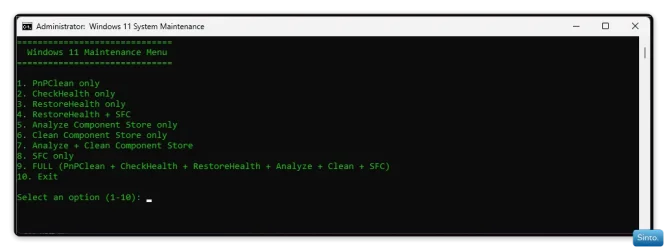
Allows you to run the following, either individually, grouped or ALL at once, as shown in the image.

1. PnPClean only
2. CheckHealth only
3. RestoreHealth only
4. RestoreHealth + SFC
5. Analyze Component Store only
6. Clean Component Store only
7. Analyze + Clean Component Store
8. SFC only
9. FULL (PnPClean + CheckHealth + RestoreHealth + Analyze + Clean + SFC)
10. Exit

IMG_5708.webp

After a command runs, it will ask you to press any key on your keyboard which will return you to the menu.
You can click the X top right to close, or just type in 10 at the menu.
 

My Computers

System One System Two

  • OS
    Windows 11 Pro 25H2 Build 26200.8524
    Computer type
    PC/Desktop
    Manufacturer/Model
    Sin-built 2013
    CPU
    Intel(R) Core(TM) i7-4770K CPU @ 3.50GHz
    Motherboard
    ASUS ROG Maximus VI Formula
    Memory
    32.0 GB of I forget and the box is in storage.
    Graphics Card(s)
    Gigabyte nVidia GeForce GTX 1660 Super OC 6GB
    Sound Card
    Onboard thingy
    Monitor(s) Displays
    5 x LG 25MS500-B - 1 x 24MK430H-B - 1 x Wacom Pro 22" Touch Screen Tablet
    Screen Resolution
    All over the place
    Hard Drives
    Too many to list.
    OS on Samsung 1TB 870 QVO SATA
    PSU
    Silverstone 1500
    Case
    NZXT Phantom 820 Full-Tower Case
    Cooling
    Noctua NH-D15 Elite Class Dual Tower CPU Cooler / 6 x EziDIY 120mm / 2 x Corsair 140mm somethings / 1 x 140mm Thermaltake something / 2 x 200mm Corsair.
    Keyboard
    Corsair K95 / Logitech diNovo Edge Wireless
    Mouse
    Logitech: G402 / G502 / Mx Masters / Mx Air Cordless
    Internet Speed
    2000/500Mbps
    Browser
    All sorts
    Antivirus
    Kaspersky Premium
    Other Info
    ㅤㅤㅤㅤㅤㅤㅤㅤㅤㅤㅤㅤㅤㅤㅤㅤㅤㅤㅤㅤㅤㅤㅤㅤㅤㅤㅤㅤㅤㅤㅤㅤㅤㅤㅤㅤㅤㅤㅤㅤ⠀⠀⠀⠀⠀⠀⠀⠀⠀⠀
    TP-Link BE9300 WiFi 7 Bluetooth 5.4 (Archer TBE550E)
    TP-Link TX201 V1 2.5GB Lan

    Grandstream HT812 - VoIP
    ASUS DSL-AX82U - Mesh
    ASUS RT-AC68U - Mesh
    ASUS RT-BE88U Router

    Brother MFC-L2880DW Printer

    I’m on a horse.
  • Operating System
    Windows 11 Pro 25H2 Build 26200.8524
    Computer type
    Laptop
    Manufacturer/Model
    LENOVO Yoga 7 14IRL8 - 7i EVO OLED 14" Touchscreen i5 12 Core 16GB/512GB
    CPU
    Intel Core 12th Gen i5-1240P Processor (1.7 - 4.4GHz)
    Memory
    16GB LPDDR5 RAM
    Graphics card(s)
    Intel Iris Xe Graphics Processor
    Sound Card
    Optimized with Dolby Atmos®
    Screen Resolution
    QHD 2880 x 1800 OLED
    Hard Drives
    M.2 512GB
    Antivirus
    Defender / Malwarebytes
    Other Info
    …still on a horse.
It’s just a batch script that contains everything in the image. A quicker way to run DISM’s & SFC
It’s nothing special, just convenient for me.

I don’t use 3rd party apps to do what Windows already can.

The above batch file is a result of working on it for a couple of months (on & off) prompting Ai to help me create the script. It can be tiresome. But I am pretty happy with what I have concocted.

Sounds good. Maybe you can get it working with an automatic elevation to admin. I've seen code to do that, but no way I can remember where or how. It would be a nice touch instead of having to OK it every time you run the batch.
 

My Computers

System One System Two

  • OS
    win 11 pro, 25H2
    Computer type
    PC/Desktop
    Manufacturer/Model
    Dell 790 (Mt)
    CPU
    i5-2400
    Motherboard
    Dell
    Memory
    32 GB DDR-3
    Graphics Card(s)
    Intel HD Graphics 2000 (on-board)
    Sound Card
    Intel Cougar Point PCH [B2] (On-Board)
    Monitor(s) Displays
    LG 27MN60T
  • Operating System
    Windows 11 home, 25H2
    Computer type
    Laptop
    Manufacturer/Model
    Dell Inspiron 17R SE 7720
    CPU
    Intel I7-3630QM
    Memory
    16GB DDR3
    Hard Drives
    Samsung 500GB SSD
Sounds good. Maybe you can get it working with an automatic elevation to admin. I've seen code to do that, but no way I can remember where or how. It would be a nice touch instead of having to OK it every time you run the batch.

Yeah, exactly. I have the code, thanks to Josey. But something is breaking it. I think it may be the colour coding in the script.
The thing with AI is, if you’re not very, very specific, it breaks a script, also, it can break a script anyway.
You have to prompt for only one thing at a time. Otherwise when you get to the point in a script, like I have above, it’s more and more likely it will bust it.

I used 3 different Ai’s to complete it.

ChatGPT
CoPilot
Google

I think I’ll be paying the $30 a month to get more out of ChatGPT. It has branches you can use, like Code construction.
The free version has a very limited allotment for prompting. And I swear sometimes it purposely provokes you so you waste them. But that’s possibly just a conspiracy. I should ask Ai if I am correct. lol
 

My Computers

System One System Two

  • OS
    Windows 11 Pro 25H2 Build 26200.8524
    Computer type
    PC/Desktop
    Manufacturer/Model
    Sin-built 2013
    CPU
    Intel(R) Core(TM) i7-4770K CPU @ 3.50GHz
    Motherboard
    ASUS ROG Maximus VI Formula
    Memory
    32.0 GB of I forget and the box is in storage.
    Graphics Card(s)
    Gigabyte nVidia GeForce GTX 1660 Super OC 6GB
    Sound Card
    Onboard thingy
    Monitor(s) Displays
    5 x LG 25MS500-B - 1 x 24MK430H-B - 1 x Wacom Pro 22" Touch Screen Tablet
    Screen Resolution
    All over the place
    Hard Drives
    Too many to list.
    OS on Samsung 1TB 870 QVO SATA
    PSU
    Silverstone 1500
    Case
    NZXT Phantom 820 Full-Tower Case
    Cooling
    Noctua NH-D15 Elite Class Dual Tower CPU Cooler / 6 x EziDIY 120mm / 2 x Corsair 140mm somethings / 1 x 140mm Thermaltake something / 2 x 200mm Corsair.
    Keyboard
    Corsair K95 / Logitech diNovo Edge Wireless
    Mouse
    Logitech: G402 / G502 / Mx Masters / Mx Air Cordless
    Internet Speed
    2000/500Mbps
    Browser
    All sorts
    Antivirus
    Kaspersky Premium
    Other Info
    ㅤㅤㅤㅤㅤㅤㅤㅤㅤㅤㅤㅤㅤㅤㅤㅤㅤㅤㅤㅤㅤㅤㅤㅤㅤㅤㅤㅤㅤㅤㅤㅤㅤㅤㅤㅤㅤㅤㅤㅤ⠀⠀⠀⠀⠀⠀⠀⠀⠀⠀
    TP-Link BE9300 WiFi 7 Bluetooth 5.4 (Archer TBE550E)
    TP-Link TX201 V1 2.5GB Lan

    Grandstream HT812 - VoIP
    ASUS DSL-AX82U - Mesh
    ASUS RT-AC68U - Mesh
    ASUS RT-BE88U Router

    Brother MFC-L2880DW Printer

    I’m on a horse.
  • Operating System
    Windows 11 Pro 25H2 Build 26200.8524
    Computer type
    Laptop
    Manufacturer/Model
    LENOVO Yoga 7 14IRL8 - 7i EVO OLED 14" Touchscreen i5 12 Core 16GB/512GB
    CPU
    Intel Core 12th Gen i5-1240P Processor (1.7 - 4.4GHz)
    Memory
    16GB LPDDR5 RAM
    Graphics card(s)
    Intel Iris Xe Graphics Processor
    Sound Card
    Optimized with Dolby Atmos®
    Screen Resolution
    QHD 2880 x 1800 OLED
    Hard Drives
    M.2 512GB
    Antivirus
    Defender / Malwarebytes
    Other Info
    …still on a horse.
You could always add a Task to run the script elevated. Then use the Task instead.
 

My Computers

System One System Two

  • OS
    Windows 11 Pro 25H2 Build 26200.8524
    Computer type
    PC/Desktop
    Manufacturer/Model
    Sin-built 2013
    CPU
    Intel(R) Core(TM) i7-4770K CPU @ 3.50GHz
    Motherboard
    ASUS ROG Maximus VI Formula
    Memory
    32.0 GB of I forget and the box is in storage.
    Graphics Card(s)
    Gigabyte nVidia GeForce GTX 1660 Super OC 6GB
    Sound Card
    Onboard thingy
    Monitor(s) Displays
    5 x LG 25MS500-B - 1 x 24MK430H-B - 1 x Wacom Pro 22" Touch Screen Tablet
    Screen Resolution
    All over the place
    Hard Drives
    Too many to list.
    OS on Samsung 1TB 870 QVO SATA
    PSU
    Silverstone 1500
    Case
    NZXT Phantom 820 Full-Tower Case
    Cooling
    Noctua NH-D15 Elite Class Dual Tower CPU Cooler / 6 x EziDIY 120mm / 2 x Corsair 140mm somethings / 1 x 140mm Thermaltake something / 2 x 200mm Corsair.
    Keyboard
    Corsair K95 / Logitech diNovo Edge Wireless
    Mouse
    Logitech: G402 / G502 / Mx Masters / Mx Air Cordless
    Internet Speed
    2000/500Mbps
    Browser
    All sorts
    Antivirus
    Kaspersky Premium
    Other Info
    ㅤㅤㅤㅤㅤㅤㅤㅤㅤㅤㅤㅤㅤㅤㅤㅤㅤㅤㅤㅤㅤㅤㅤㅤㅤㅤㅤㅤㅤㅤㅤㅤㅤㅤㅤㅤㅤㅤㅤㅤ⠀⠀⠀⠀⠀⠀⠀⠀⠀⠀
    TP-Link BE9300 WiFi 7 Bluetooth 5.4 (Archer TBE550E)
    TP-Link TX201 V1 2.5GB Lan

    Grandstream HT812 - VoIP
    ASUS DSL-AX82U - Mesh
    ASUS RT-AC68U - Mesh
    ASUS RT-BE88U Router

    Brother MFC-L2880DW Printer

    I’m on a horse.
  • Operating System
    Windows 11 Pro 25H2 Build 26200.8524
    Computer type
    Laptop
    Manufacturer/Model
    LENOVO Yoga 7 14IRL8 - 7i EVO OLED 14" Touchscreen i5 12 Core 16GB/512GB
    CPU
    Intel Core 12th Gen i5-1240P Processor (1.7 - 4.4GHz)
    Memory
    16GB LPDDR5 RAM
    Graphics card(s)
    Intel Iris Xe Graphics Processor
    Sound Card
    Optimized with Dolby Atmos®
    Screen Resolution
    QHD 2880 x 1800 OLED
    Hard Drives
    M.2 512GB
    Antivirus
    Defender / Malwarebytes
    Other Info
    …still on a horse.
Also, when it comes to Analyze + Clean Component Store, it works for me in 23H2 but I am unsure of how it will go in 24H2, due to the issues it’s been having with left over packages.

People have posted other scripts in this thread, it’s a matter of reading the whole thread. It’s all interesting, as are the offerings from members. Thanks to @johnlgalt

I just wanted to play. Nothing about my script is better than anyone elses. It’s just a project and practical, for me.

Thank you for your interest, Jimminy 🙏
 
Last edited:

My Computers

System One System Two

  • OS
    Windows 11 Pro 25H2 Build 26200.8524
    Computer type
    PC/Desktop
    Manufacturer/Model
    Sin-built 2013
    CPU
    Intel(R) Core(TM) i7-4770K CPU @ 3.50GHz
    Motherboard
    ASUS ROG Maximus VI Formula
    Memory
    32.0 GB of I forget and the box is in storage.
    Graphics Card(s)
    Gigabyte nVidia GeForce GTX 1660 Super OC 6GB
    Sound Card
    Onboard thingy
    Monitor(s) Displays
    5 x LG 25MS500-B - 1 x 24MK430H-B - 1 x Wacom Pro 22" Touch Screen Tablet
    Screen Resolution
    All over the place
    Hard Drives
    Too many to list.
    OS on Samsung 1TB 870 QVO SATA
    PSU
    Silverstone 1500
    Case
    NZXT Phantom 820 Full-Tower Case
    Cooling
    Noctua NH-D15 Elite Class Dual Tower CPU Cooler / 6 x EziDIY 120mm / 2 x Corsair 140mm somethings / 1 x 140mm Thermaltake something / 2 x 200mm Corsair.
    Keyboard
    Corsair K95 / Logitech diNovo Edge Wireless
    Mouse
    Logitech: G402 / G502 / Mx Masters / Mx Air Cordless
    Internet Speed
    2000/500Mbps
    Browser
    All sorts
    Antivirus
    Kaspersky Premium
    Other Info
    ㅤㅤㅤㅤㅤㅤㅤㅤㅤㅤㅤㅤㅤㅤㅤㅤㅤㅤㅤㅤㅤㅤㅤㅤㅤㅤㅤㅤㅤㅤㅤㅤㅤㅤㅤㅤㅤㅤㅤㅤ⠀⠀⠀⠀⠀⠀⠀⠀⠀⠀
    TP-Link BE9300 WiFi 7 Bluetooth 5.4 (Archer TBE550E)
    TP-Link TX201 V1 2.5GB Lan

    Grandstream HT812 - VoIP
    ASUS DSL-AX82U - Mesh
    ASUS RT-AC68U - Mesh
    ASUS RT-BE88U Router

    Brother MFC-L2880DW Printer

    I’m on a horse.
  • Operating System
    Windows 11 Pro 25H2 Build 26200.8524
    Computer type
    Laptop
    Manufacturer/Model
    LENOVO Yoga 7 14IRL8 - 7i EVO OLED 14" Touchscreen i5 12 Core 16GB/512GB
    CPU
    Intel Core 12th Gen i5-1240P Processor (1.7 - 4.4GHz)
    Memory
    16GB LPDDR5 RAM
    Graphics card(s)
    Intel Iris Xe Graphics Processor
    Sound Card
    Optimized with Dolby Atmos®
    Screen Resolution
    QHD 2880 x 1800 OLED
    Hard Drives
    M.2 512GB
    Antivirus
    Defender / Malwarebytes
    Other Info
    …still on a horse.
Also, when it comes to Analyze + Clean Component Store, it works for me in 23H2 but I am unsure of how it will go in 24H2, due to the issues it’s been having with left over packages.

People have posted other scripts in this thread, it’s a matter of reading the whole thread. It’s all interesting, as are the offerings from members. Thanks to Josey

I just wanted to play. Nothing about my script is better than anyone elses. It’s just a project and practical, for me.

Thank you for your interest, Jimminy 🙏

I've not used AI for very much. I still don't trust it, but I do like the summary info it can provide (like at the top of a google search). I guess you could say I'm still just a luddite :)

Everything will work out in the end though. Keep at it, and it will work!
 

My Computers

System One System Two

  • OS
    win 11 pro, 25H2
    Computer type
    PC/Desktop
    Manufacturer/Model
    Dell 790 (Mt)
    CPU
    i5-2400
    Motherboard
    Dell
    Memory
    32 GB DDR-3
    Graphics Card(s)
    Intel HD Graphics 2000 (on-board)
    Sound Card
    Intel Cougar Point PCH [B2] (On-Board)
    Monitor(s) Displays
    LG 27MN60T
  • Operating System
    Windows 11 home, 25H2
    Computer type
    Laptop
    Manufacturer/Model
    Dell Inspiron 17R SE 7720
    CPU
    Intel I7-3630QM
    Memory
    16GB DDR3
    Hard Drives
    Samsung 500GB SSD

Latest Support Threads

Back
Top Bottom