JavaScript is disabled. For a better experience, please enable JavaScript in your browser before proceeding.
You are using an out of date browser. It may not display this or other websites correctly.
You should upgrade or use an
alternative browser .
Solved Windows 10 1607 Removing "Automatically pick an accent color from my background" via GPO
Hello, long time creeper, first time poster. I am an administrator of a large corporate network running windows 10 enterprise (v1607) and server 2012 R2. I am trying to remove the option to "Automatically pick an accent color from my background" so users cannot click this via a GPO setting. I have tried all the settings I have found online and the selection still remains available to the users. I have disabled all user capability to change this via Personalization settings in the .admx, I have tried forcing the Auto Colorization to 0, I cannot find any other ways to attempt to disable this via a GPO / Registry setting.
What am I missing?
Thank you in Advance.
Windows Build/Version
Windows 10 1607
AutoColorization.png
63.2 KB
· Views: 3
OS
Windows 10 1607
Computer type
PC/Desktop
Antidisestablishmentarianist
Pro User
VIP
Hey,
@Novalogic , and welcome to the Windows 11 forum!
From what I see online, this setting in GP is supposed to do the trick:
Be sure to read the outlined text.
Give it a shot and let us know if that was the trick.
OS
Windows 11 23H2 Current build
Computer type
PC/Desktop
Manufacturer/Model
HomeBrew
CPU
AMD Ryzen 9 3950X
Motherboard
MSI MEG X570 GODLIKE
Memory
4 * 32 GB - Corsair Vengeance 3600 MHz
Graphics Card(s)
EVGA GeForce RTX 3080 Ti XC3 ULTRA GAMING (12G-P5-3955-KR)
Sound Card
Realtek® ALC1220 Codec
Monitor(s) Displays
2x Eve Spectrum ES07D03 4K Gaming Monitor (Matte) | Eve Spectrum ES07DC9 4K Gaming Monitor (Glossy)
Screen Resolution
3x 3840 x 2160
Hard Drives
3x Samsung 980 Pro NVMe PCIe 4 M.2 2 TB SSD (MZ-V8P2T0B/AM) } 3x Sabrent Rocket NVMe 4.0 1 TB SSD (USB)
PSU
PC Power & Cooling’s Silencer Series 1050 Watt, 80 Plus Platinum
Case
Fractal Design Define 7 XL Dark ATX Full Tower Case
Cooling
Arctic Liquid Freezer III 420 RGB + Air 3x 140mm case fans (pull front) + 1x 120 mm (push back) and 1 x 120 mm (pull bottom)
Keyboard
SteelSeries Apex Pro Wired Gaming Keyboard
Mouse
Logitech MX Master 3S | MX Master 3 for Business
Internet Speed
AT&T LightSpeed Gigabit Duplex Ftth
Browser
Nightly (default) + Firefox (stable), Chrome, Edge , Arc
Antivirus
Defender + MB 5 Beta
Operating System
ChromeOS Flex Dev Channel (current)
Computer type
Laptop
Manufacturer/Model
Dell Latitude E5470
CPU
Intel(R) Core(TM) i5-6300U CPU @ 2.40GHz, 2501 Mhz, 2 Core(s), 4 Logical Processor(s)
Motherboard
Dell
Memory
16 GB
Graphics card(s)
Intel(R) HD Graphics 520
Sound Card
Intel(R) HD Graphics 520 + RealTek Audio
Monitor(s) Displays
Dell laptop display 15"
Screen Resolution
1920 * 1080
Hard Drives
Toshiba 128GB M.2 22300 drive
INTEL Cherryville 520 Series SSDSC2CW180A 180 GB SATA III SSD
PSU
Dell
Case
Dell
Cooling
Dell
Keyboard
Dell
Mouse
Logitech MX Master 3S (shared w. Sys 1) | Dell TouchPad
Internet Speed
AT&T LightSpeed Gigabit Duplex Ftth
New member
Thread Starter
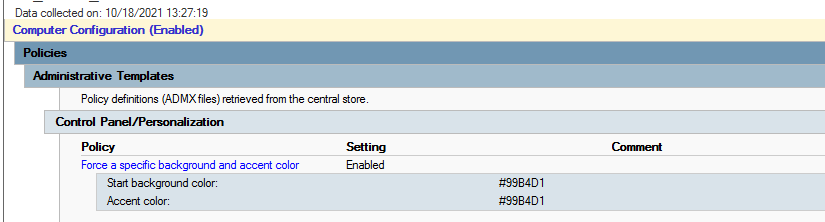
Hey John! Thanks for the response. I already have this set, and it works for the accent colors no problem:
However, my issue is still trying to disable the following box (I have all personalization settings set to disable users ability to change colors and this is the only item not greyed out):
If a user checks this, it will reset the accent color; I am simply trying to disable this setting. None of the standard personalization settings seem to work on this checkbox in particular.
OS
Windows 10 1607
Computer type
PC/Desktop
Antidisestablishmentarianist
Pro User
VIP
Odd. That other setting is supposed to disable this one.
Is it perhaps because the color is not achieving a 2:1 ratio, as mentioned in the comments I highlighted?
Test it with a basic white or black color and see if it grays the box out....
OS
Windows 11 23H2 Current build
Computer type
PC/Desktop
Manufacturer/Model
HomeBrew
CPU
AMD Ryzen 9 3950X
Motherboard
MSI MEG X570 GODLIKE
Memory
4 * 32 GB - Corsair Vengeance 3600 MHz
Graphics Card(s)
EVGA GeForce RTX 3080 Ti XC3 ULTRA GAMING (12G-P5-3955-KR)
Sound Card
Realtek® ALC1220 Codec
Monitor(s) Displays
2x Eve Spectrum ES07D03 4K Gaming Monitor (Matte) | Eve Spectrum ES07DC9 4K Gaming Monitor (Glossy)
Screen Resolution
3x 3840 x 2160
Hard Drives
3x Samsung 980 Pro NVMe PCIe 4 M.2 2 TB SSD (MZ-V8P2T0B/AM) } 3x Sabrent Rocket NVMe 4.0 1 TB SSD (USB)
PSU
PC Power & Cooling’s Silencer Series 1050 Watt, 80 Plus Platinum
Case
Fractal Design Define 7 XL Dark ATX Full Tower Case
Cooling
Arctic Liquid Freezer III 420 RGB + Air 3x 140mm case fans (pull front) + 1x 120 mm (push back) and 1 x 120 mm (pull bottom)
Keyboard
SteelSeries Apex Pro Wired Gaming Keyboard
Mouse
Logitech MX Master 3S | MX Master 3 for Business
Internet Speed
AT&T LightSpeed Gigabit Duplex Ftth
Browser
Nightly (default) + Firefox (stable), Chrome, Edge , Arc
Antivirus
Defender + MB 5 Beta
Operating System
ChromeOS Flex Dev Channel (current)
Computer type
Laptop
Manufacturer/Model
Dell Latitude E5470
CPU
Intel(R) Core(TM) i5-6300U CPU @ 2.40GHz, 2501 Mhz, 2 Core(s), 4 Logical Processor(s)
Motherboard
Dell
Memory
16 GB
Graphics card(s)
Intel(R) HD Graphics 520
Sound Card
Intel(R) HD Graphics 520 + RealTek Audio
Monitor(s) Displays
Dell laptop display 15"
Screen Resolution
1920 * 1080
Hard Drives
Toshiba 128GB M.2 22300 drive
INTEL Cherryville 520 Series SSDSC2CW180A 180 GB SATA III SSD
PSU
Dell
Case
Dell
Cooling
Dell
Keyboard
Dell
Mouse
Logitech MX Master 3S (shared w. Sys 1) | Dell TouchPad
Internet Speed
AT&T LightSpeed Gigabit Duplex Ftth
New member
Thread Starter
Testing Now with Black / White.
OS
Windows 10 1607
Computer type
PC/Desktop
New member
Thread Starter
It actually ended up "breaking" the background policy and resetting the taskbar back to default blue when I tried this. Odd behavior. But when it was applied for both white and black the box was still enabled.
Will have to scrap that test.
OS
Windows 10 1607
Computer type
PC/Desktop
Antidisestablishmentarianist
Pro User
VIP
Odd. I wonder if black / white are not considered 2:1 then?
Maybe gray / white? black / gray?
It's supposed to work. Getting it to is, obviously, as you've found, easier said than done lol.
OS
Windows 11 23H2 Current build
Computer type
PC/Desktop
Manufacturer/Model
HomeBrew
CPU
AMD Ryzen 9 3950X
Motherboard
MSI MEG X570 GODLIKE
Memory
4 * 32 GB - Corsair Vengeance 3600 MHz
Graphics Card(s)
EVGA GeForce RTX 3080 Ti XC3 ULTRA GAMING (12G-P5-3955-KR)
Sound Card
Realtek® ALC1220 Codec
Monitor(s) Displays
2x Eve Spectrum ES07D03 4K Gaming Monitor (Matte) | Eve Spectrum ES07DC9 4K Gaming Monitor (Glossy)
Screen Resolution
3x 3840 x 2160
Hard Drives
3x Samsung 980 Pro NVMe PCIe 4 M.2 2 TB SSD (MZ-V8P2T0B/AM) } 3x Sabrent Rocket NVMe 4.0 1 TB SSD (USB)
PSU
PC Power & Cooling’s Silencer Series 1050 Watt, 80 Plus Platinum
Case
Fractal Design Define 7 XL Dark ATX Full Tower Case
Cooling
Arctic Liquid Freezer III 420 RGB + Air 3x 140mm case fans (pull front) + 1x 120 mm (push back) and 1 x 120 mm (pull bottom)
Keyboard
SteelSeries Apex Pro Wired Gaming Keyboard
Mouse
Logitech MX Master 3S | MX Master 3 for Business
Internet Speed
AT&T LightSpeed Gigabit Duplex Ftth
Browser
Nightly (default) + Firefox (stable), Chrome, Edge , Arc
Antivirus
Defender + MB 5 Beta
Operating System
ChromeOS Flex Dev Channel (current)
Computer type
Laptop
Manufacturer/Model
Dell Latitude E5470
CPU
Intel(R) Core(TM) i5-6300U CPU @ 2.40GHz, 2501 Mhz, 2 Core(s), 4 Logical Processor(s)
Motherboard
Dell
Memory
16 GB
Graphics card(s)
Intel(R) HD Graphics 520
Sound Card
Intel(R) HD Graphics 520 + RealTek Audio
Monitor(s) Displays
Dell laptop display 15"
Screen Resolution
1920 * 1080
Hard Drives
Toshiba 128GB M.2 22300 drive
INTEL Cherryville 520 Series SSDSC2CW180A 180 GB SATA III SSD
PSU
Dell
Case
Dell
Cooling
Dell
Keyboard
Dell
Mouse
Logitech MX Master 3S (shared w. Sys 1) | Dell TouchPad
Internet Speed
AT&T LightSpeed Gigabit Duplex Ftth