Solved Windows 10-like Start Menu in 11?


BrokenDaily

Member
Local time
12:43 AM
Posts
10
OS
Windows 10
im futzing around with an unactivated windows 11 instance in virtualbox, and.....yeah, not liking the start menu. But i am pretty much used to the start menu of Windows 10, so is there a way to bring a Win10 start menu like appearance back to windows 11 through some program, either shareware(paid)/free, or is there hopefully some registry trick i can use otherwise?
 

My Computer

System One

  • OS
    Windows 10
    Computer type
    PC/Desktop
    Manufacturer/Model
    n/a (Not a pre-fab, Custom Build)
    CPU
    Ryzen 9 7950X3D
    Motherboard
    Asus ROG STRIX X670E-E GAMING WIFI
    Memory
    G.SKILL Trident Z5 Neo Series (AMD Expo) DDR5 RAM 64GB (2x32GB) 6000MT/s CL30-40-40-96
    Graphics Card(s)
    AMD RX 7900 XT (Reference Card)
    Sound Card
    n/a (Using Default Mobo Sound Tech)
    Monitor(s) Displays
    LG MP59HT
    Screen Resolution
    1920x1080
    Hard Drives
    WD_Black SN850X (2 TB NVMe)
    WD_Black SN850X (4 TB NVMe)
    PSU
    EVGA SuperNOVA 1200 P3 80 Plus Platinum
    Case
    Corsair 7000D (Used, Ebay)
    Cooling
    CORSAIR iCUE LINK H170i RGB Liquid CPU Cooler
    Keyboard
    Corsair K100 RGB (Amazon Refurb)
    Mouse
    Razer Basilisk V3
    Internet Speed
    Optimal (Fiber Optic)
    Browser
    Firefox (Stable, 64-Bit)
    Antivirus
    Default Windows Security
    Other Info
    Despite my name, my stuff isn't broken daily, but its annoying when it does; my current setup is FAR more powerful than before, and i consider it to be my very last
You can have just about any sort of start menu you desire with Stardock Start11.
Plus you get the option to keep the Windows 11 start menu if you wish. You can open either one at any time.


My Computers

System One System Two

  • OS
    Windows 11 Pro
    Computer type
    PC/Desktop
    Manufacturer/Model
    Stigg's Build
    CPU
    Intel Core i9-10900X
    Motherboard
    GIGABYTE X299X DESIGNARE 10G
    Memory
    Corsair 64 GB (4 x 16 GB) CMW64GX4M4C3000C15 Vengeance RGB Pro 3000Mhz DDR4
    Graphics Card(s)
    GIGABYTE GeForce GTX 1660 Super Mini ITX 6 GB OC
    Sound Card
    Realtek ALC1220
    Monitor(s) Displays
    Samsung 27" FHD LED FreeSync Gaming Monitor (LS27F350FHEXXY)
    Screen Resolution
    1920 x 1080
    Hard Drives
    Samsung 970 Pro Series 1TB M.2 2280 NVMe SSD
    Western Digital Red Pro WD8003FFBX-68B9AN0 8 TB, 7200 RPM, SATA-III
    Western Digital Red Pro WD8003FFBX-68B9AN0 8 TB, 7200 RPM, SATA-III
    PSU
    Corsair HX1200 1200W 80 Plus Platinum
    Case
    Fractal Design Define 7 Black Solid Case
    Cooling
    Noctua NH-D15 Chromax Black
    Keyboard
    Razer Ornata V2
    Mouse
    Razer DeathAdder Essential
    Internet Speed
    FTTN 100Mbps / 40Mbps
    Browser
    Mozilla Firefox
    Antivirus
    N/A
    Other Info
    Logitech BRIO 4k Ultra HD USB-C Webcam
  • Operating System
    Windows 10 Pro
    Computer type
    Laptop
    Manufacturer/Model
    ASUS ROG Zephyrus M GM501GS
    CPU
    Core i7-8750H
    Motherboard
    Zephyrus M GM501GS
    Memory
    SK Hynix 32 GB (2 x 16 GB) HMA82GS6CJR8N-VK 16 GB DDR4-2666 DDR4 SDRAM
    Graphics card(s)
    NVIDIA GeForce GTX 1070
    Sound Card
    Realtek ALC294
    Monitor(s) Displays
    AU Optronics B156HAN07.1 [15.6" LCD]
    Screen Resolution
    1920 x 1080
    Hard Drives
    Samsung MZVKW512HMJP-00000 512 GB, PCI-E 3.0 x4
    Samsung SSD 860 QVO 4TB 4 TB, SATA-III
    PSU
    N/A
    Case
    N/A
    Cooling
    N/A
    Keyboard
    PC/AT Enhanced PS2 Keyboard (101/102-Key)
    Mouse
    Razer DeathAdder Essential
    Internet Speed
    FTTN 100Mbps / 40Mbps
    Browser
    Mozilla Firefox
    Antivirus
    N/A
    Other Info
    USB2.0 HD UVC Webcam
+ 1 on Start11
 

My Computers

System One System Two

  • OS
    Windows 11 Pro 25H2 Build 26200.8655
    Computer type
    PC/Desktop
    Manufacturer/Model
    Sin-built 2013
    CPU
    Intel(R) Core(TM) i7-4770K CPU @ 3.50GHz
    Motherboard
    ASUS ROG Maximus VI Formula
    Memory
    32.0 GB of I forget and the box is in storage.
    Graphics Card(s)
    Gigabyte nVidia GeForce GTX 1660 Super OC 6GB
    Sound Card
    Onboard thingy
    Monitor(s) Displays
    5 x LG 25MS500-B - 1 x 24MK430H-B - 1 x Wacom Pro 22" Touch Screen Tablet
    Screen Resolution
    All over the place
    Hard Drives
    Too many to list.
    OS on Samsung 1TB 870 QVO SATA
    PSU
    Silverstone 1500
    Case
    NZXT Phantom 820 Full-Tower Case
    Cooling
    Noctua NH-D15 Elite Class Dual Tower CPU Cooler / 6 x EziDIY 120mm / 2 x Corsair 140mm somethings / 1 x 140mm Thermaltake something / 2 x 200mm Corsair.
    Keyboard
    Corsair K95 / Logitech diNovo Edge Wireless
    Mouse
    Logitech: G402 / G502 / Mx Masters / Mx Air Cordless
    Internet Speed
    2000/500Mbps
    Browser
    All sorts
    Antivirus
    Kaspersky Premium
    Other Info
    ㅤㅤㅤㅤㅤㅤㅤㅤㅤㅤㅤㅤㅤㅤㅤㅤㅤㅤㅤㅤㅤㅤㅤㅤㅤㅤㅤㅤㅤㅤㅤㅤㅤㅤㅤㅤㅤㅤㅤㅤ⠀⠀⠀⠀⠀⠀⠀⠀⠀⠀
    TP-Link BE9300 WiFi 7 Bluetooth 5.4 (Archer TBE550E)
    TP-Link TX201 V1 2.5GB Lan

    Grandstream HT812 - VoIP
    ASUS DSL-AX82U - Mesh
    ASUS RT-AC68U - Mesh
    ASUS RT-BE88U Router

    Brother MFC-L2880DW Printer

    I’m on a horse.
  • Operating System
    Windows 11 Pro 25H2 Build 26200.8655
    Computer type
    Laptop
    Manufacturer/Model
    LENOVO Yoga 7 14IRL8 - 7i EVO OLED 14" Touchscreen i5 12 Core 16GB/512GB
    CPU
    Intel Core 12th Gen i5-1240P Processor (1.7 - 4.4GHz)
    Memory
    16GB LPDDR5 RAM
    Graphics card(s)
    Intel Iris Xe Graphics Processor
    Sound Card
    Optimized with Dolby Atmos®
    Screen Resolution
    QHD 2880 x 1800 OLED
    Hard Drives
    M.2 512GB
    Antivirus
    Defender / Malwarebytes
    Other Info
    …still on a horse.
OpenShell.... allows you to use versions of the Windows Start Menu going back to Windows 95. Open source and free.
 

My Computers

System One System Two

  • OS
    Windows 11 Education For 25H2
    Computer type
    Laptop
    Manufacturer/Model
    HP ZBook G2
    CPU
    Intel® Core i7 5500u
    Motherboard
    HP
    Memory
    8 GB
    Graphics Card(s)
    Intel HD Family Graphics 5500 AMD Firepro 4150M
    Sound Card
    Realtek High Audio
    Hard Drives
    1 TB SSD
    Mouse
    HP USB Mouse
    Antivirus
    Windows Defender
  • Operating System
    Windows 11 Pro For Workstations 25H2
    Computer type
    Laptop
    Manufacturer/Model
    HP Zbook G4
    CPU
    Xeon 1535m v6
    Motherboard
    HP
    Memory
    32 GB
    Graphics card(s)
    AMD Quadro Pro 4100
    Sound Card
    Bang and Olufson Audio
    Hard Drives
    1TB SSD
    Mouse
    HP USB Mouse
    Antivirus
    Windows Defender
You can have just about any sort of start menu you desire with Stardock Start11.
Plus you get the option to keep the Windows 11 start menu if you wish. You can open either one at any time.

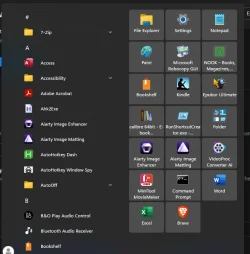
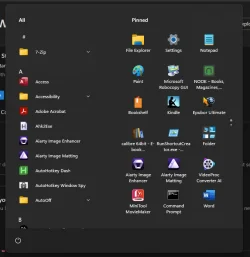
ok, i just saw the slideshow screenshots presentation and i immediately saw the windows 10-like start menu. this might be the ONE software i will choose to buy if it works in the VM ok

Edit: i should've mentioned earlier, i DID try OpenShell at first, but the menu styles didn't really jive with me anymore, not even Windows 7 (which was my PREVIOUS OS before i took the free windows 10 upgrade option many years back), and i tried StartAllBack (Windows 11) in the VM after i uninstalled OpenShell, and while it DID move the start menu to the left, it gave me a few error prompts and i decided "nah, not for me"
 

My Computer

System One

  • OS
    Windows 10
    Computer type
    PC/Desktop
    Manufacturer/Model
    n/a (Not a pre-fab, Custom Build)
    CPU
    Ryzen 9 7950X3D
    Motherboard
    Asus ROG STRIX X670E-E GAMING WIFI
    Memory
    G.SKILL Trident Z5 Neo Series (AMD Expo) DDR5 RAM 64GB (2x32GB) 6000MT/s CL30-40-40-96
    Graphics Card(s)
    AMD RX 7900 XT (Reference Card)
    Sound Card
    n/a (Using Default Mobo Sound Tech)
    Monitor(s) Displays
    LG MP59HT
    Screen Resolution
    1920x1080
    Hard Drives
    WD_Black SN850X (2 TB NVMe)
    WD_Black SN850X (4 TB NVMe)
    PSU
    EVGA SuperNOVA 1200 P3 80 Plus Platinum
    Case
    Corsair 7000D (Used, Ebay)
    Cooling
    CORSAIR iCUE LINK H170i RGB Liquid CPU Cooler
    Keyboard
    Corsair K100 RGB (Amazon Refurb)
    Mouse
    Razer Basilisk V3
    Internet Speed
    Optimal (Fiber Optic)
    Browser
    Firefox (Stable, 64-Bit)
    Antivirus
    Default Windows Security
    Other Info
    Despite my name, my stuff isn't broken daily, but its annoying when it does; my current setup is FAR more powerful than before, and i consider it to be my very last
or EP or Windhawk. plenty of options. windhawk you can actually make it win 10 style but keep the modern fluent ui appeal of win 11.
 

My Computer

System One

  • OS
    Windows 11 Pro
Ok, i think i am in love with Start11, and i might just buy a license for it (on the big IF, i ever decide to switch to windows 11), since its Windows 10 Style looks EXACTLY like what i want. Just one small issue, its a bit too W I D E
Start11.webp

there's quite a bit of extra space to the right, and if i could figure out how to shrink that back a bit, i'd be happy. I mean, this right here is more than enough icon space for me
Win10 Menu.webp

any way for me to shrink the Start11 Menu space so its a bit more compact?
 

My Computer

System One

  • OS
    Windows 10
    Computer type
    PC/Desktop
    Manufacturer/Model
    n/a (Not a pre-fab, Custom Build)
    CPU
    Ryzen 9 7950X3D
    Motherboard
    Asus ROG STRIX X670E-E GAMING WIFI
    Memory
    G.SKILL Trident Z5 Neo Series (AMD Expo) DDR5 RAM 64GB (2x32GB) 6000MT/s CL30-40-40-96
    Graphics Card(s)
    AMD RX 7900 XT (Reference Card)
    Sound Card
    n/a (Using Default Mobo Sound Tech)
    Monitor(s) Displays
    LG MP59HT
    Screen Resolution
    1920x1080
    Hard Drives
    WD_Black SN850X (2 TB NVMe)
    WD_Black SN850X (4 TB NVMe)
    PSU
    EVGA SuperNOVA 1200 P3 80 Plus Platinum
    Case
    Corsair 7000D (Used, Ebay)
    Cooling
    CORSAIR iCUE LINK H170i RGB Liquid CPU Cooler
    Keyboard
    Corsair K100 RGB (Amazon Refurb)
    Mouse
    Razer Basilisk V3
    Internet Speed
    Optimal (Fiber Optic)
    Browser
    Firefox (Stable, 64-Bit)
    Antivirus
    Default Windows Security
    Other Info
    Despite my name, my stuff isn't broken daily, but its annoying when it does; my current setup is FAR more powerful than before, and i consider it to be my very last
The XP two column start menu is easy to navigate. Nothing better has come along.
 

My Computers

System One System Two

  • OS
    Windows 11 Education For 25H2
    Computer type
    Laptop
    Manufacturer/Model
    HP ZBook G2
    CPU
    Intel® Core i7 5500u
    Motherboard
    HP
    Memory
    8 GB
    Graphics Card(s)
    Intel HD Family Graphics 5500 AMD Firepro 4150M
    Sound Card
    Realtek High Audio
    Hard Drives
    1 TB SSD
    Mouse
    HP USB Mouse
    Antivirus
    Windows Defender
  • Operating System
    Windows 11 Pro For Workstations 25H2
    Computer type
    Laptop
    Manufacturer/Model
    HP Zbook G4
    CPU
    Xeon 1535m v6
    Motherboard
    HP
    Memory
    32 GB
    Graphics card(s)
    AMD Quadro Pro 4100
    Sound Card
    Bang and Olufson Audio
    Hard Drives
    1TB SSD
    Mouse
    HP USB Mouse
    Antivirus
    Windows Defender

My Computer

System One

  • OS
    Windows 10
    Computer type
    PC/Desktop
    Manufacturer/Model
    n/a (Not a pre-fab, Custom Build)
    CPU
    Ryzen 9 7950X3D
    Motherboard
    Asus ROG STRIX X670E-E GAMING WIFI
    Memory
    G.SKILL Trident Z5 Neo Series (AMD Expo) DDR5 RAM 64GB (2x32GB) 6000MT/s CL30-40-40-96
    Graphics Card(s)
    AMD RX 7900 XT (Reference Card)
    Sound Card
    n/a (Using Default Mobo Sound Tech)
    Monitor(s) Displays
    LG MP59HT
    Screen Resolution
    1920x1080
    Hard Drives
    WD_Black SN850X (2 TB NVMe)
    WD_Black SN850X (4 TB NVMe)
    PSU
    EVGA SuperNOVA 1200 P3 80 Plus Platinum
    Case
    Corsair 7000D (Used, Ebay)
    Cooling
    CORSAIR iCUE LINK H170i RGB Liquid CPU Cooler
    Keyboard
    Corsair K100 RGB (Amazon Refurb)
    Mouse
    Razer Basilisk V3
    Internet Speed
    Optimal (Fiber Optic)
    Browser
    Firefox (Stable, 64-Bit)
    Antivirus
    Default Windows Security
    Other Info
    Despite my name, my stuff isn't broken daily, but its annoying when it does; my current setup is FAR more powerful than before, and i consider it to be my very last
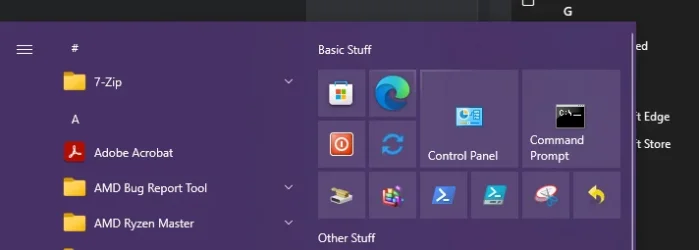
well, i tried out windhawk, and the three style mods (taskbar, notifications, start menu), and i managed to get it looking close to windows 10 like your previous screenshots showed, but it still felt weird. But then i stumbled onto what might be the solution i needed after all after trying to find a way to remove the recommended list in start menu in a windowsclub article. A program called ExplorerPatcher

i installed it, ran it, and after changing some settings, the taskbar AND start menu now look EXACTLY like the windows 10 start menu. one tiny little gripe about the ExplorerPatcher method, is when i leave the start menu, it briefly lingers around as a grey-ish box for a few seconds before it closes, but i could deal with that. Though i'll keep the past suggestions in mind, i do think if i ever decide to go to windows 11, ill be relying on ExplorerPatcher to make the start menu look like windows 10 again

only bigger gripe ill have to deal with is having to see how many of my windows 10 tweaks i usually use will be overwritten by windows 11, making them invalid. But that'll be a different & separate topic to explorer later on
 

My Computer

System One

  • OS
    Windows 10
    Computer type
    PC/Desktop
    Manufacturer/Model
    n/a (Not a pre-fab, Custom Build)
    CPU
    Ryzen 9 7950X3D
    Motherboard
    Asus ROG STRIX X670E-E GAMING WIFI
    Memory
    G.SKILL Trident Z5 Neo Series (AMD Expo) DDR5 RAM 64GB (2x32GB) 6000MT/s CL30-40-40-96
    Graphics Card(s)
    AMD RX 7900 XT (Reference Card)
    Sound Card
    n/a (Using Default Mobo Sound Tech)
    Monitor(s) Displays
    LG MP59HT
    Screen Resolution
    1920x1080
    Hard Drives
    WD_Black SN850X (2 TB NVMe)
    WD_Black SN850X (4 TB NVMe)
    PSU
    EVGA SuperNOVA 1200 P3 80 Plus Platinum
    Case
    Corsair 7000D (Used, Ebay)
    Cooling
    CORSAIR iCUE LINK H170i RGB Liquid CPU Cooler
    Keyboard
    Corsair K100 RGB (Amazon Refurb)
    Mouse
    Razer Basilisk V3
    Internet Speed
    Optimal (Fiber Optic)
    Browser
    Firefox (Stable, 64-Bit)
    Antivirus
    Default Windows Security
    Other Info
    Despite my name, my stuff isn't broken daily, but its annoying when it does; my current setup is FAR more powerful than before, and i consider it to be my very last
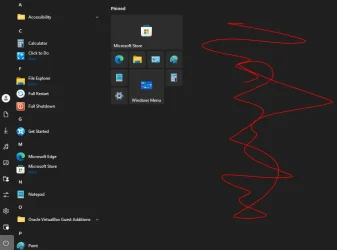
For me windows 11 start menu better, it looks more aesthetic and the animation.. 👌
 

My Computers

System One System Two

  • OS
    windows 11 home 23H2 22631.6199
    Computer type
    Laptop
    Manufacturer/Model
    HP
    CPU
    Intel core i7 (2nd gen) Turbo 3.10 ghz
    Memory
    6gb
    Graphics Card(s)
    Amd Radeon HD 7400m 1GB & Intel hd graphics
    Sound Card
    BeatsAudio
    Hard Drives
    128gb SSD
  • Operating System
    macOS Sequoia
    Computer type
    PC/Desktop
    Manufacturer/Model
    iMac 24"
    CPU
    M1 3.2 ghz
    Memory
    8gb onboard
    Graphics card(s)
    igpu
    Monitor(s) Displays
    Retina 4.5K
    Screen Resolution
    4480x2520
    Hard Drives
    512gb SSD
one tiny little gripe about the ExplorerPatcher method, is when i leave the start menu, it briefly lingers around as a grey-ish box for a few seconds before it closes,
I just found out that I was having this same exact issue (on Windows 11 version 25H2 build 26200.6901). Simply re-installing ExplorerPatcher 26100.4946.69.5 fixed it for me.
 

My Computers

System One System Two

  • OS
    11 Home
    Computer type
    Laptop
    Manufacturer/Model
    Asus TUF Gaming F16 (2024)
    CPU
    i7 13650HX
    Memory
    16GB DDR5
    Graphics Card(s)
    GeForce RTX 4060 Mobile
    Sound Card
    Eastern Electric MiniMax DAC Supreme; Emotiva UMC-200; Astell & Kern AK240
    Monitor(s) Displays
    Sony Bravia XR-55X90J
    Screen Resolution
    3840×2160
    Hard Drives
    512GB SSD internal
    37TB external
    PSU
    Li-ion
    Cooling
    2× Arc Flow Fans, 4× exhaust vents, 5× heatpipes
    Keyboard
    Logitech K800
    Mouse
    Logitech G402
    Internet Speed
    30Mbit/s up, 500Mbit/s down
    Browser
    FF
    Antivirus
    What's an antivirus?
  • Operating System
    11 Home
    Computer type
    Laptop
    Manufacturer/Model
    Medion S15450
    CPU
    i5 1135G7
    Memory
    16GB DDR4
    Graphics card(s)
    Intel Iris Xe
    Sound Card
    Eastern Electric MiniMax DAC Supreme; Emotiva UMC-200; Astell & Kern AK240
    Monitor(s) Displays
    Sony Bravia XR-55X90J
    Screen Resolution
    3840×2160
    Hard Drives
    2TB SSD internal
    37TB external
    PSU
    Li-ion
    Keyboard
    Logitech K800
    Mouse
    Logitech G402
    Internet Speed
    30Mbit/s up, 500Mbit/s down
    Browser
    FF
oddly enough, when i rebooted my VM yesterday, that start menu lag went away.......weird

now all that's left is for the "Pin to Start" functions with the ExplorerPatcher app to get fixed up, and then i can doll up my pinned items section again
 

My Computer

System One

  • OS
    Windows 10
    Computer type
    PC/Desktop
    Manufacturer/Model
    n/a (Not a pre-fab, Custom Build)
    CPU
    Ryzen 9 7950X3D
    Motherboard
    Asus ROG STRIX X670E-E GAMING WIFI
    Memory
    G.SKILL Trident Z5 Neo Series (AMD Expo) DDR5 RAM 64GB (2x32GB) 6000MT/s CL30-40-40-96
    Graphics Card(s)
    AMD RX 7900 XT (Reference Card)
    Sound Card
    n/a (Using Default Mobo Sound Tech)
    Monitor(s) Displays
    LG MP59HT
    Screen Resolution
    1920x1080
    Hard Drives
    WD_Black SN850X (2 TB NVMe)
    WD_Black SN850X (4 TB NVMe)
    PSU
    EVGA SuperNOVA 1200 P3 80 Plus Platinum
    Case
    Corsair 7000D (Used, Ebay)
    Cooling
    CORSAIR iCUE LINK H170i RGB Liquid CPU Cooler
    Keyboard
    Corsair K100 RGB (Amazon Refurb)
    Mouse
    Razer Basilisk V3
    Internet Speed
    Optimal (Fiber Optic)
    Browser
    Firefox (Stable, 64-Bit)
    Antivirus
    Default Windows Security
    Other Info
    Despite my name, my stuff isn't broken daily, but its annoying when it does; my current setup is FAR more powerful than before, and i consider it to be my very last
After reading this thread I seem to recall that in the early days of Windows 11 it was possible to get Windows 10's Start Menu with something like a simple Registry edit.

The exact Windows 10 Start Menu with no extra software needed to do it. Which suggested to me that Windows 11 was really nothing more than Windows 10 with a few more 'bells and whistles' added and a bit of a 'facelift'. Plus a lot of things were moved around of course and, in a lot of cases made more difficult to use and harder to find (extra clicks required to do the same thing than what was needed in Windows 10 and earlier versions of Windows).

Oh, and the alleged 'extra security'.

Then, shortly after this means of enabling the Windows 10 Start Menu in 11 was discovered, MS promptly removed it. Funny about that.
 

My Computer

System One

  • OS
    Windows 11 Professional 25H2
    Computer type
    PC/Desktop
    Manufacturer/Model
    Home Built
    CPU
    12th Gen Intel(R) Core(TM) i5-12400F 2.50 GHz
    Motherboard
    Gigabyte B760 DS3H AX DDR4
    Memory
    32GB (4x8GB) Kingston Fury RGB DDR4
    Graphics Card(s)
    NVIDIA GeForce GTX 1650
    Sound Card
    Onboard Sound
    Monitor(s) Displays
    BenQ GL2460 (24 inch - oldie but a goodie)
    Screen Resolution
    1920x1080
    Hard Drives
    Samsung SSD 870 EVO x 2 (250GB and 500GB) plus several external Samsung SSD's.
    PSU
    Corsair HX 750
    Case
    DeepCool
    Cooling
    Stock CPU cooler. 5 case fans (2 front, 2 top and 1 rear)
    Keyboard
    Logitech
    Mouse
    Logitech
    Internet Speed
    500/40 Fibre
    Browser
    Mozilla Firefox and Microsoft Edge
    Antivirus
    Windows Security
After reading this thread I seem to recall that in the early days of Windows 11 it was possible to get Windows 10's Start Menu with something like a simple Registry edit.

The exact Windows 10 Start Menu with no extra software needed to do it.
Yeah. New Windows 11 Build Removes Classic Start Menu Option
Which suggested to me that Windows 11 was really nothing more than Windows 10 with a few more 'bells and whistles' added and a bit of a 'facelift'. Plus a lot of things were moved around of course and, in a lot of cases made more difficult to use and harder to find (extra clicks required to do the same thing than what was needed in Windows 10 and earlier versions of Windows).

Oh, and the alleged 'extra security'.

Then, shortly after this means of enabling the Windows 10 Start Menu in 11 was discovered, MS promptly removed it. Funny about that.


My Computers

System One System Two

  • OS
    11 Home
    Computer type
    Laptop
    Manufacturer/Model
    Asus TUF Gaming F16 (2024)
    CPU
    i7 13650HX
    Memory
    16GB DDR5
    Graphics Card(s)
    GeForce RTX 4060 Mobile
    Sound Card
    Eastern Electric MiniMax DAC Supreme; Emotiva UMC-200; Astell & Kern AK240
    Monitor(s) Displays
    Sony Bravia XR-55X90J
    Screen Resolution
    3840×2160
    Hard Drives
    512GB SSD internal
    37TB external
    PSU
    Li-ion
    Cooling
    2× Arc Flow Fans, 4× exhaust vents, 5× heatpipes
    Keyboard
    Logitech K800
    Mouse
    Logitech G402
    Internet Speed
    30Mbit/s up, 500Mbit/s down
    Browser
    FF
    Antivirus
    What's an antivirus?
  • Operating System
    11 Home
    Computer type
    Laptop
    Manufacturer/Model
    Medion S15450
    CPU
    i5 1135G7
    Memory
    16GB DDR4
    Graphics card(s)
    Intel Iris Xe
    Sound Card
    Eastern Electric MiniMax DAC Supreme; Emotiva UMC-200; Astell & Kern AK240
    Monitor(s) Displays
    Sony Bravia XR-55X90J
    Screen Resolution
    3840×2160
    Hard Drives
    2TB SSD internal
    37TB external
    PSU
    Li-ion
    Keyboard
    Logitech K800
    Mouse
    Logitech G402
    Internet Speed
    30Mbit/s up, 500Mbit/s down
    Browser
    FF
Just curious which of the programs mentioned in this thread use DLL hijacking? Which use just registry entries for 2H24 or 2H25.
 

My Computer

System One

  • OS
    Windows 11 2H25
    Computer type
    PC/Desktop
    Manufacturer/Model
    DIY
    CPU
    AMD 9900X
    Motherboard
    MSI X870E Carbon
    Memory
    64 GB
    Graphics Card(s)
    AMD 9070 XT
    Sound Card
    built-in
    Monitor(s) Displays
    Dell 24"
    Hard Drives
    Sabrent 1 TB NVMe, 4 x SSD (need to check models), 4 x 3.5" HDD, 8-16 TB, all WD
    PSU
    Seasonic 850
    Case
    Fractal Design North XL (which I likw)
    Cooling
    Corsair AIO for CPU, fans for case
    Keyboard
    Das Keyboard 4
    Mouse
    Corsair M65 (white)
    Internet Speed
    1 TB download
    Browser
    Firefox
    Antivirus
    Bitdefender
    Other Info
    Also have Lenovo T14S laptop (me) and Lenovo Slim 71 (wife)

Latest Support Threads

Back
Top Bottom