Windows 11 version 22H2 build 22621.521
 www.elevenforum.com
Source:
 blogs.windows.com
See also:
www.elevenforum.com
 www.elevenforum.com
 www.elevenforum.com
 www.elevenforum.com
 www.elevenforum.com
How to get the Windows 11 2022 Update (22H2)
Windows 11 version 22H2 build 22621.521+ It is recommended to wait until Windows 11 22H2 is available via Windows Update. Today, Panos Panay announced the release and availability of the Windows 11 2022 Update, the latest version of Windows 11. Windows is a key component of how more than a...
www.elevenforum.com
Today, the Windows 11 2022 Update rolls out in 190+ countries.
The last few years have brought enduring changes in the ways we live, work and learn, with the PC playing a more critical role in our daily lives. Online options that didn’t previously exist for meetings, appointments, everyday tasks and access to entertainment emerged out of necessity, but remain due to convenience and efficiency. We formed new habits; and they stuck. The PC has fundamentally connected us in more emotional ways than ever before.
The rapid move to more flexible work and life also dramatically increased security threats for individuals and businesses, with 921 password attacks every second.
With last year’s launch of Windows 11 we gave the PC a modern refresh, making it faster and easier for you to accomplish the tasks you have relied on your PCs for most. We added foundational security built into Windows at home and at work to help keep you safe and with Windows 365, we took Windows to the cloud, empowering organizations to stream the full Windows experience on any device. More people are using Windows and spending more time on their PCs. In fact, Windows 11 is the most used and most loved version of Windows ever; this is both humbling and energizing for the team and I.
Our work is never done to ensure Windows evolves and adapts to you. With our first major update to Windows 11, we are taking the next step on our journey, focusing our innovation in four key areas to make your everyday easier:
- Making the PC easier and safer to use for everyone
- Empowering people to be more productive
- Making Windows the best place to connect, create and play
- Delivering added security, management and flexibility to the workplace
Making the PC easier and safer to use for everyone
Windows 11 brought a sense of ease to the PC, with an intuitive design people love. We’re building on that foundation with new features to ensure the content and information you need is always at your fingertips, including updates to the Start menu, faster and more accurate search, Quick Settings, improved local and current events coverage in your Widgets board, and the No. 1 ask from you, tabs in File Explorer1. All of this helps Windows anticipate your needs and save you time.
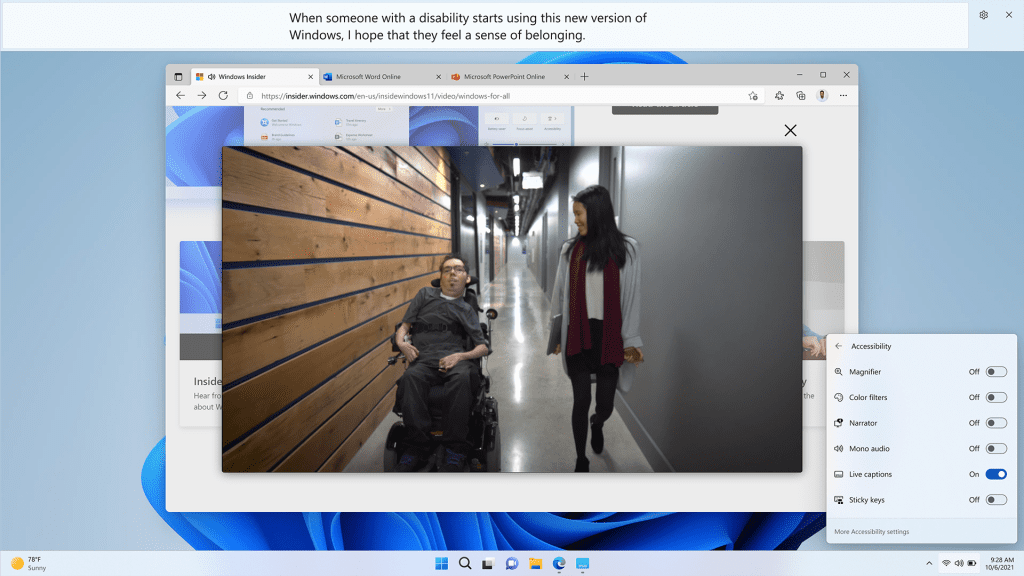
System wide live captions in Windows 11
Technology has the power to empower each of us – to remove barriers and help people participate and connect. Nearly 1 in 5 people benefit from accessibility features on the PC and with this release we are continuing our commitment to make Windows work for everyone. We will deliver a set of new accessibility features including system wide live captions2 to automatically generate captions from any form of audio content on Windows 11, voice access (preview)2, which allows you to control your PC and author text using only your voice, and Natural Voices for Narrator2, which mirrors natural speech more closely, creating more pleasant-sounding audio to assist in reading or browsing the web.

Turn On or Off Live Captions in Windows 11
This tutorial will show you how to turn on or off Live Captions for your account in Windows 11. Microsoft introduced the Live Captions feature in Windows 11 build 22557. Live captions will help everyone, including people who are deaf or hard of hearing, better understand audio by viewing...
Online safety, data privacy and security are top concerns for people and their families. Windows 11 is the most secure version of Windows yet. Microsoft uses over 43 trillion security signals daily to inform our comprehensive security solutions. Now we’re introducing Smart App control3 so you can confidently download any app you need without worry. We also know that security threats don’t stop when you shut your laptop, which is why we’ve built the Defender app for Microsoft 365 Personal and Family subscribers. Microsoft Defender for individuals extends Windows’ built-in security and expands device protection to your Android and iOS phones and Macs. Microsoft 365 customers in the U.S. will soon receive identity theft monitoring to help keep themselves, and their family’s personal information, safer online as part of their Microsoft 365 Personal or Family subscription.
Turn On or Off Smart App Control in Windows 11
This tutorial will show you how to manually turn on or off Smart App Control in Windows 11. Smart App Control (SAC) is a new security feature starting with Windows 11 build 22567. Smart App Control can work alongside your other security software, such as Microsoft Defender, for added...
Empowering people to be more productive
The PC has always been where people come to get things done – especially when it comes to tackling complex tasks. With enhancements to Snap layouts, the new Focus feature, and performance and battery optimizations, the new Windows 11 2022 update will help you be your most productive yet.
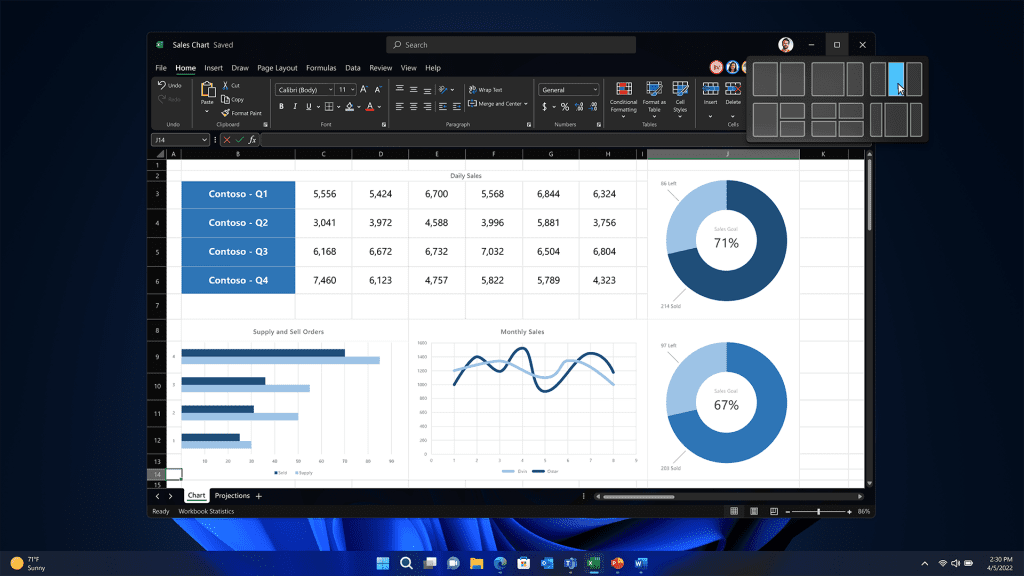
Enhancements to Snap layouts
Snap layouts on Windows 11 have been a game changer for multitasking, helping people optimize their view when they need to have multiple apps or documents in front of them at the same time. With the new update, we’re making Snap layouts more versatile with better touch navigation and the ability to snap multiple browser tabs in Microsoft Edge.

Snap windows into Layouts in Windows 11
This tutorial will show you different ways to Snap windows into zone layouts for your account in Windows 11. You can use Snap windows in Windows 11 to automatically resize and arrange all your open windows into zone layouts using the mouse (drag), keyboard, or the Snap Assist feature. Snap...
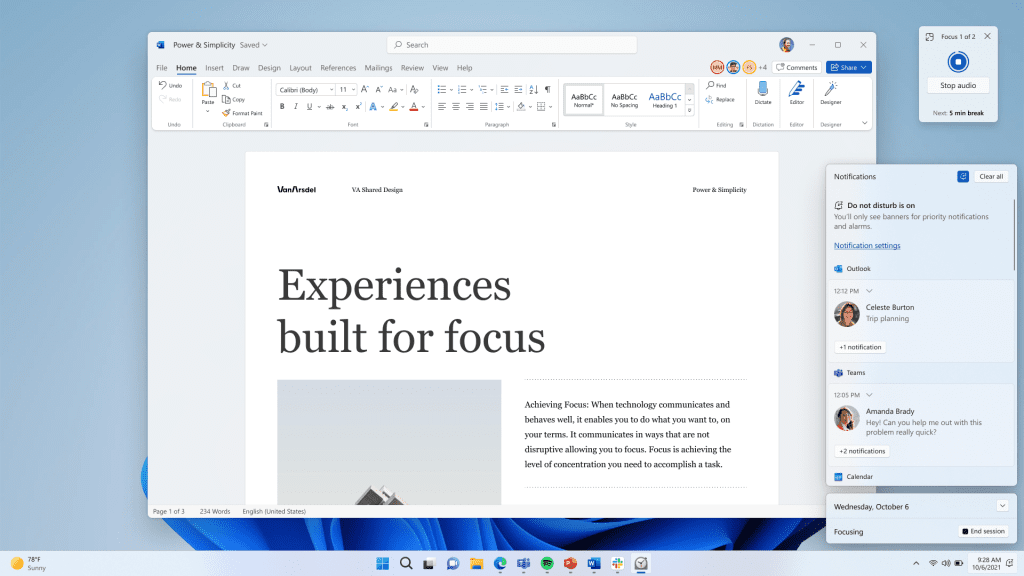
Focus session and Do Not Disturb in Windows 11
We’re introducing Focus sessions and Do Not Disturb to help you minimize distractions that pull you away from the task at hand. As you start a new focus session, Windows will turn on Do Not Disturb, which silences notifications, and turn off taskbar badges and application notifications in your taskbar. Focus is also integrated with the Clock App, launching a timer to help you focus, even reminding you to take breaks.

Turn On or Off Focus Assist in Windows 11
Starting with Windows 11 build 22557, Microsoft reimagined focus assist experiences on Windows. It is now called Do not disturb. Do not disturb makes it easy to silence notifications. Additionally, you can set priority notifications to control whether calls, reminders, and specific apps break...
Turn On or Off Do Not Disturb for Notifications in Windows 11
This tutorial will show you how to turn on or off Do not disturb mode for your account in Windows 11. Notifications are alerts from apps, system, and other senders. Starting with Windows 11 build 22557, Microsoft reimagined focus assist experiences on Windows. Do not disturb makes it easy to...
Making Windows the best place to connect, create and play
What we hear from our customers, from you, is that you’re using your PC for a wider variety of things than ever before. PC use is up for communications, creativity and gaming, as more people turn to Windows to connect, express themselves and play. With this update we’ve added features to make those experiences even better with Windows Studio Effects4 to improve video and audio calls, new creator tools, additional gaming features and updates to the Microsoft Store experience.
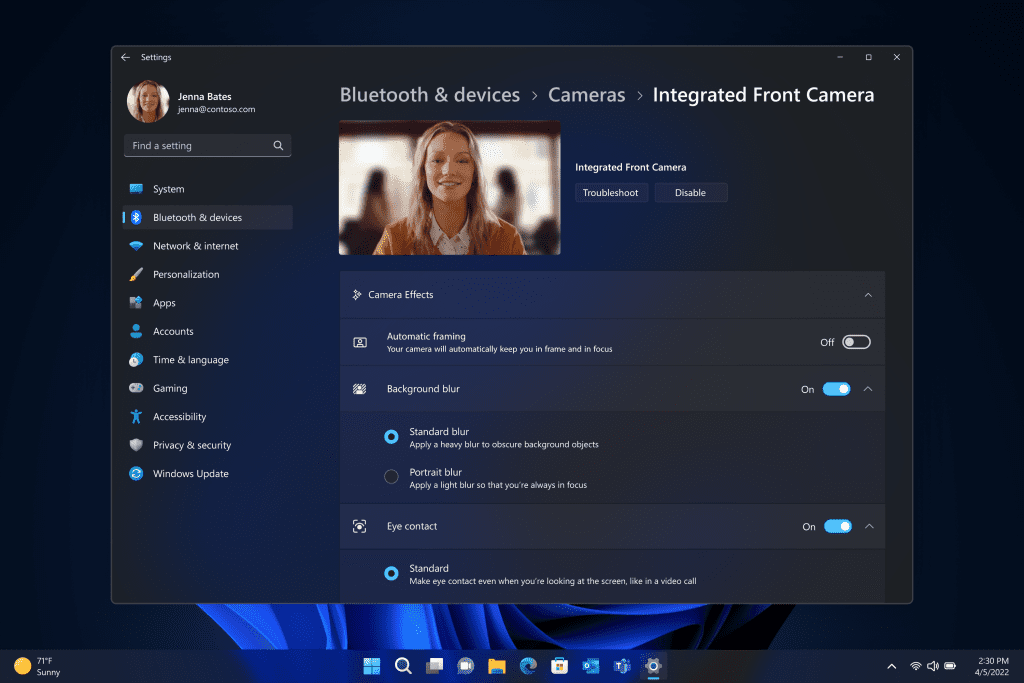
Windows Studio effects in Windows 11
From work to community meetings to connecting with friends and family, video calls have become one of the essential tasks that defines the PC. New Windows Studio camera and audio effects help you look and sound your best on conference calls, enabled by advanced AI – with Voice Focus to filter out background noise and make sure you are heard, Background Blur so only you are seen, Eye Contact to help you make a better connection with people you’re talking to and Automatic Framing so the camera stays with you as you move.
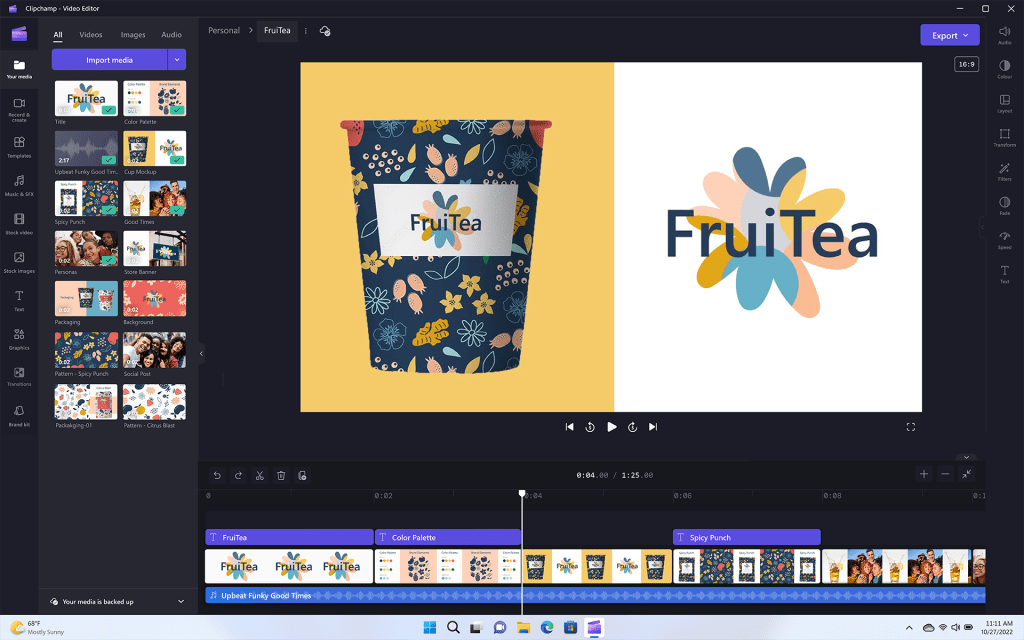
Clipchamp in Windows 11
As the creator economy continues to grow, people are generating more creative content on Windows, including video. With this update, we’re excited to welcome Clipchamp as an inbox app to Windows 11 to make video editing fun and simple for you — with templates, effects and more.
We also want to continue to make Windows the best place to play games. This update will deliver performance optimizations to improve latency and unlock features like Auto HDR and Variable Refresh Rate on windowed games. And with Game Pass built right into Windows 11 through the Xbox app, players can access hundreds of high-quality PC games. To learn more about what’s new in gaming, visit Xbox Wire.

Turn On or Off Auto HDR in Windows 11
This tutorial will show you how to turn on or off Auto HDR to enhance eligible games from SDR to HDR in Windows 11. HDR content offers better brightness and color capabilities compared to traditional content (sometimes called standard dynamic range [SDR] content). Traditional content typically...
Having the right content fuels a great PC experience. A year ago, we redesigned the Microsoft Store on Windows to be more open and easier-to-use – a one-stop shop for the apps, games and TV shows you love. Today, through our partnership with Amazon, we are expanding the Amazon Appstore Preview to international markets, bringing more than 20,000 Android™ apps and games to Windows 11 devices that meet the feature-specific hardware requirements. In addition to a growing catalog of apps and games, we are also excited to share that we are moving to the next stage of the Microsoft Store Ads pilot – helping developers get content in front of the right customers. To learn about upcoming features for the Microsoft Store on Windows, visit this blog.

Install Windows Subsystem for Android (WSA) in Windows 11
This tutorial will show you how to install Windows Subsystem for Android (WSA) feature in Windows 11. Windows Subsystem for Android (WSA) enables your Windows 11 device to run Android apps available from the Amazon Appstore. Windows Subsystem for Android is only available in countries and...
Delivering added security, management and flexibility to the workplace
The PC is the single most powerful productivity tool for today’s workforce. To keep employees productive and engaged, we know organizations need the tools to manage multiple Windows endpoints securely and easily, no matter where their people are working. To meet the needs of this increasingly complex landscape, the new Windows 11 2022 Update delivers the critically important new security features and new management tools for increased IT efficiency.
Windows 11 provides layers of hardware and software integrated for powerful, out-of-the box protection from the moment you start your device – and we’re continuing to innovate. The new Microsoft Defender SmartScreen identifies when people are entering their Microsoft credentials into a malicious application or hacked website and alerts them. We’ve added a presence sensing optional feature to Windows Hello for Business, so that devices equipped with presence sensors work with Windows Hello to securely log you in when you approach and lock your device when you leave. And if you’re an IT professional, you can provide secure, real-time support through the cloud with remote help.
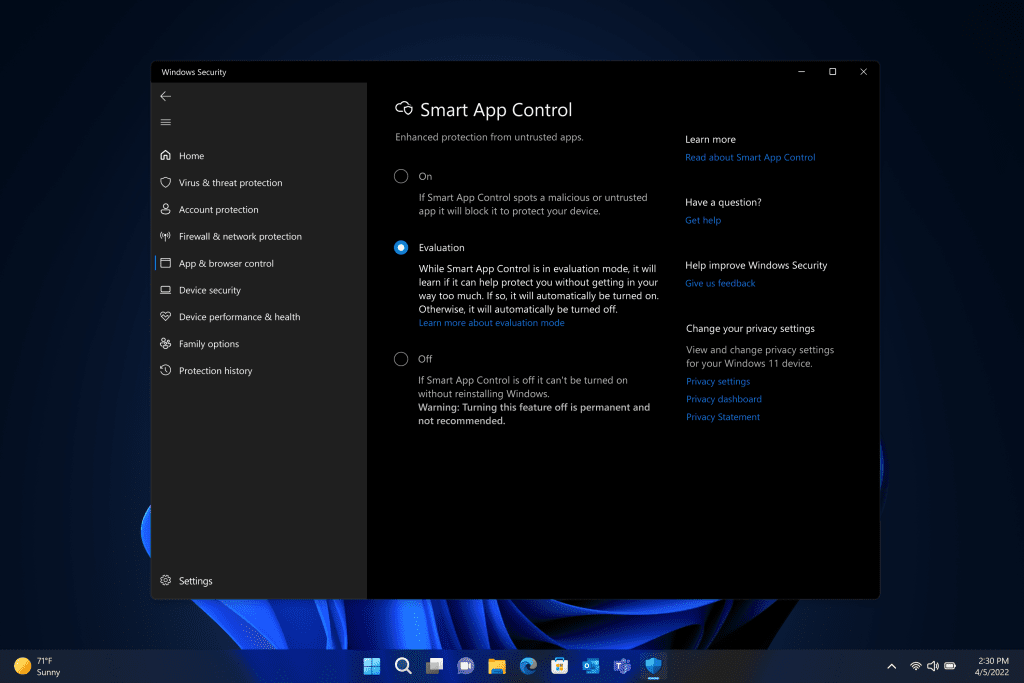
Smart App Control in Windows 11
Smart App Control is also a valuable feature for businesses of all sizes. Available on new Windows 11 devices or with clean installations of the Windows 11 Update 2022, Smart App Control blocks untrusted or unsigned applications, script files and malicious macros from running on Windows 11. As a result, your employees can use the tools they want and need, while you can relax knowing your organization is protected. Built on the same AI used in Windows Defender Application Control, Smart App Control can predict the safety of an application in real-time before it runs on your device. This is a great solution for organizations who are not yet using a modern device management (MDM) tool like Microsoft Intune.
To learn more about what’s new in the update for commercial customers and IT, visit the Microsoft 365 Blog and for more on security, check out our Security Blog.
Turn On or Off Smart App Control in Windows 11
This tutorial will show you how to manually turn on or off Smart App Control in Windows 11. Smart App Control (SAC) is a new security feature starting with Windows 11 build 22567. Smart App Control can work alongside your other security software, such as Microsoft Defender, for added...
Delivering continuous Windows innovation and value
With the PC continuing to play a more meaningful role in our lives, we are committed to delivering continuous value and innovation into Windows and with Microsoft services like Microsoft Edge, Microsoft 365 and PC Game Pass.
You have heard me say before that details matter. The Windows 11 2022 Update has so many subtle, but important changes that come together to help you be your most productive and your most creative.
With this update we’re also taking steps to improve the Windows Update experience. Windows Update is now carbon aware, making it easier for your devices to reduce carbon emissions. When devices are plugged in, turned on, connected to the Internet and regional carbon intensity data is available, Windows Update will schedule installations at specific times of the day when doing so may result in lower carbon emissions because a higher proportion of electricity is coming from lower-carbon sources on the electric grid. We’ve also made some changes to the default power setting for Sleep and Screen off to help reduce carbon emissions when PCs are idle.
As we shared back in February, you’ll see us release new features into Windows 11 more frequently in addition to our annual update. We do this by leveraging the variety of update mechanisms we have in place including servicing, and Microsoft Store updates. Today, we’re excited to build on this with an additional set of experiences coming in October.
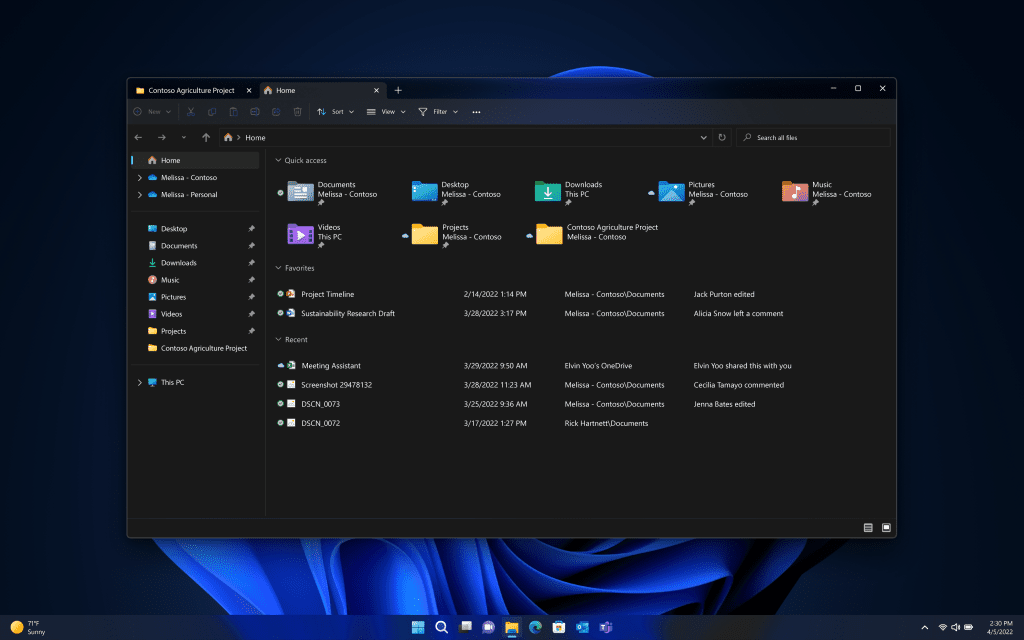
Tabs in File Explorer
- Enhancements to File Explorer, including bringing tabs to File Explorer to help you organize your File Explorer sessions like you do in Microsoft Edge. The new homepage in File Explorer gives you quick access to your favorite and recent files, so you can pin important files for quick and easy access – even including information at a glance of colleagues’ actions on your shared files through the power of OneDrive and personalized suggestions based on your Microsoft 365 account.
Open and Close Tabs in File Explorer in Windows 11
This tutorial will help show you different ways to open and close tabs in File Explorer for your account in Windows 11. Starting with Windows 11 build 25136 and build 22621.160, the title bar of File Explorer now has tabs to help you work across multiple locations at the same time. Starting...
Switch Between File Explorer Tabs in Windows 11
This tutorial will help show you different ways to switch between open tabs in File Explorer for your account in Windows 11. Starting with Windows 11 build 25136 and build 22621.160, the title bar of File Explorer now has tabs to help you work across multiple locations at the same time. Tabs...- Photos app: In an update to the Photos app in Windows 11, we will be introducing a new photos-managing experience that brings a gorgeous gallery, simplifying browsing, finding, management and consumption of your collection of photos. It also allows you to easily backup your photos with OneDrive and enjoy powerful experiences on Windows devices, and offers a delightful “Memories” experience.
Updated Photos app for Windows 11 begins rolling out to Windows Insiders
Hello Windows Insiders, As Panos mentioned in his blog post yesterday, we will be releasing an update to the Photos app in Windows 11 that introduces a new photos-managing experience. We are beginning to roll a preview of this update for the Photos app to Windows Insiders in the Dev Channel...- Suggested Actions on Copy: Copy phone numbers, future dates and get suggested actions such as making a call with Teams or Skype or adding an event in the Calendar app.

Enable or Disable Suggested Actions in Windows 11
This tutorial will show you how to turn on or off Suggested Actions for your account in Windows 11. Suggested actions that appear when you copy a phone number or future date in Windows 11 are now deprecated. Microsoft is disabling this feature...- Taskbar Overflow: Taskbar will offer an entry point to an overflow menu that allows you to view all your overflowed apps in one space.
- Share to more devices: Discover and share to more devices including desktops using nearby share.
How to get the Windows 11 2022 Update – there’s never been a better time to buy a new PC
With all of the exciting new features coming in this update, there’s never been a better time to purchase a new PC. We’re proud to offer Windows 11 on a broad array of devices from across the ecosystem. The best way to experience the magic of the update is on a new PC from Surface or our incredible ecosystem partners Acer, ASUS, Dell, HP, Lenovo, Samsung and Razer. Some of the latest new PCs include:
Availability of the update begins today. To learn more about the roll out approach for the Windows 11 2022 Update, visit this blog post from John Cable.
- Acer TravelMate Spin P6 – Available for $1499, the Acer TravelMate Spin P6 makes a great business travel companion – sporting military-grade durability, a spill resistant keyboard and technology to improve your Microsoft Teams meetings.
- ASUS ExpertBook B9 – The ASUS ExpertBook B9, starting at around $1699, features a lightweight, durable magnesium alloy design and an LED-illuminated numeric keypad on the touchpad that’s perfect for crunching numbers.
- Dell Latitude 7330 – With configurations starting at $1749, the Dell Latitude 7330 offers a premium experience for connectivity and collaboration – powered by latest 12th Gen Intel Core processors and built with an enhanced FHD camera, WiFi-6E and optional 4G LTE connectivity.
- HP Dragonfly Folio G3 – Powered by Intel vPro with 12th Gen Intel Core processors, HP Dragonfly Folio G3 features a pull-forward design that transitions from laptop to tablet making it easy to create and capture ideas. Starting at $2379.
- Lenovo ThinkPad X1 Fold – The next-gen Lenovo ThinkPad X1 Fold, starting at $2499, is a sleek and full performance 16.3 inch foldable PC – with a 100% recycled woven performance fabric back cover and memory options up to 32GB.
- The Samsung Galaxy Book Go 5G – Keeps you always connected starting at just $609. Designed to keep its cool without a fan, the Galaxy Book Go 5G features a lightweight design and is powered by the advanced, energy-efficient Snapdragon 8cx Gen 2 Compute Platform. With instant-on performance that draws less power and keeps the battery charged longer, you can be productive from anywhere.
- Surface Laptop Studio – Seamlessly transition from laptop to entertainment-ready stage to portable creative canvas with our most powerful Surface Laptop – starting at $1,599.
- Razer Blade 14 – Features the ultra-fast AMD Ryzen 9 6900HX processor and up to an NVIDIA GeForce RTX 3080Ti graphics card, enabling some of the most powerful gaming possible while on the go. With a buttery smooth QHD 165Hz display and improved DDR5 memory, the Blade 14 allows players to take full advantage of the powerful hardware inside, starting at just $1999.
We’re excited to take this next step with Windows 11, to inspire journeys like yours. Windows 11 was designed to bring people together, to help people play and have fun, to empower productivity and inspire creativity. Serving more than a billion people, Windows is the platform for the world’s innovation. For consumers, Windows 11 will make your everyday easier. For businesses, Windows 11 is the operating system for hybrid work and the most secure version of Windows yet. For developers and creators, Windows 11 is the open platform creating even greater economic opportunity for your creations. We will continue to invest in delivering Windows experiences that enrich people’s lives as we aspire to meet your evolving needs.
We can’t wait to see what you are inspired to do and create with the latest update.
Source:
Available today: The Windows 11 2022 Update
Today, the Windows 11 2022 Update rolls out in 190+ countries. The last few years have brought enduring changes in the ways we live, work and learn, with the PC playing a
blogs.windows.com
See also:
How to get the Windows 11 2022 Update (22H2)
Windows 11 version 22H2 build 22621.521+ It is recommended to wait until Windows 11 22H2 is available via Windows Update. Today, Panos Panay announced the release and availability of the Windows 11 2022 Update, the latest version of Windows 11. Windows is a key component of how more than a...
www.elevenforum.com
What is new in Windows 11 version 22H2
Windows 11, version 22H2 is a feature update for Windows 11. It includes all features and fixes in previous cumulative updates to Windows 11, version 21H2, the original Windows 11 release version. This article lists the new and updated features IT Pros should know. Windows 11, version 22H2...
www.elevenforum.com
What is new for IT pros in Windows 11 version 22H2
Today, I'm going to walk you through a few of the new features and capabilities for IT pros in Windows 11, version 22H2—and outline the resources available to help you update or upgrade the devices across your organization. First, I'm happy to share that Windows 11, version 22H2, also known as...
www.elevenforum.com
Faster. Smaller. Windows 11 version 22H2 update fundamentals
With the release of Windows 11, version 21H2, Microsoft made significant improvements to Windows's strong update foundation. This included a redesigned cumulative update resulting in a 40% reduced package size, reduced download size for those devices more current than others, improved update...
www.elevenforum.com
Download Official Windows 11 ISO file from Microsoft
This tutorial will show you how to download an official Windows Server or Windows 11 64-bit or ARM64 ISO file from Microsoft. Microsoft provides ISO files for Windows Server and Windows 11 to download. You can use these ISO files to clean install or in-place upgrade Windows 11. The Flight Hub...
www.elevenforum.com
Last edited: