- Local time
- 7:48 PM
- Posts
- 74
- OS
- Windows 11 Pro X64 Version 25H2 Build 26200.8328
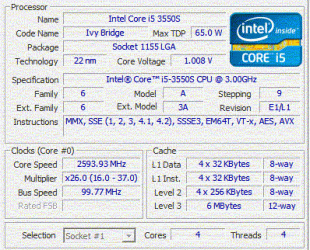
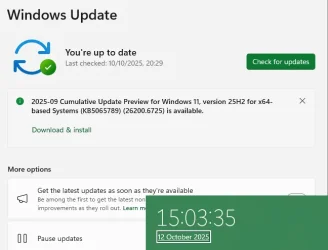
As per the heading, my Windows 11 23H2 has stopped updating, and I have tried the following. So please help. I know that 23H2 ends next month, and as the age of the PC will not allow me to upgrade to 24H2, a replacement will need to be sought, but for now, this is all I have.
C:\Windows\System32>net stop bits
C:\Windows\System32>net stop wuauserv
C:\Windows\System32>net stop appidsvc
Smartlocker Filter Driver
Do you want to continue this operation? (Y/N) [N]: y
The Smartlocker Filter Driver service was stopped successfully.
The Application Identity service is stopping.
The Application Identity service was stopped successfully.
C:\Windows\System32>net stop cryptsvc
C:\Windows\System32>cd \
C:\>cd "Program Files"
C:\Program Files>cd \ProgramData
C:\ProgramData>cd "Application Data"
C:\ProgramData\Application Data>cd Microsoft
C:\ProgramData\Application Data\Microsoft>cd Network
C:\ProgramData\Application Data\Microsoft\Network>cd Downloader
C:\ProgramData\Application Data\Microsoft\Network\Downloader>
C:\ProgramData\Application Data\Microsoft\Network\Downloader>dir
Volume in drive C is Big Bob
Volume Serial Number is 4AFB-07CB
Directory of C:\ProgramData\Application Data\Microsoft\Network\Downloader
10/10/2025 00:41 <DIR> .
29/09/2025 06:47 <DIR> ..
11/10/2025 13:39 8,192 edb.chk
11/10/2025 13:39 1,310,720 edb.log
10/10/2025 00:41 1,310,720 edb00007.log
28/09/2025 22:01 1,310,720 edbres00001.jrs
28/09/2025 22:01 1,310,720 edbres00002.jrs
07/10/2025 09:06 1,310,720 edbtmp.log
11/10/2025 13:39 1,048,576 qmgr.db
11/10/2025 13:39 16,384 qmgr.jfm
8 File(s) 7,626,752 bytes
2 Dir(s) 414,739,083,264 bytes free
C:\ProgramData\Application Data\Microsoft\Network\Downloader>del *.*
C:\ProgramData\Application Data\Microsoft\Network\Downloader\*.*, Are you sure (Y/N)? y
C:\ProgramData\Application Data\Microsoft\Network\Downloader>dir
Volume in drive C is Big Bob
Volume Serial Number is 4AFB-07CB
Directory of C:\ProgramData\Application Data\Microsoft\Network\Downloader
11/10/2025 14:15 <DIR> .
29/09/2025 06:47 <DIR> ..
11/10/2025 14:15 8,192 edb.chk
11/10/2025 14:15 1,310,720 edb.log
11/10/2025 14:15 1,310,720 edbres00001.jrs
11/10/2025 14:15 1,310,720 edbres00002.jrs
11/10/2025 14:15 1,310,720 edbtmp.log
11/10/2025 14:15 786,432 qmgr.db
11/10/2025 14:15 16,384 qmgr.jfm
7 File(s) 6,053,888 bytes
2 Dir(s) 414,739,410,944 bytes free
C:\ProgramData\Application Data\Microsoft\Network\Downloader>cd \
C:\>cd Windows
C:\Windows>rename SoftwareDistribution Software_old
C:\Windows>cd System32
C:\Windows\System32>rmdir CatRoot2 /S /Q
CatRoot2\{127D0~1\catdb - The process cannot access the file because it is being used by another process.
CatRoot2\{127D0~1\catdb.jfm - The process cannot access the file because it is being used by another process.
CatRoot2\{F750E~1\catdb - The process cannot access the file because it is being used by another process.
CatRoot2\{F750E~1\catdb.jfm - The process cannot access the file because it is being used by another process.
C:\Windows\System32>sc.exe sdset bits D A;;CCLCSWRPWPDTLOCRRC;;;SY)(A;;CCDCLCSWRPWPDTLOCRSDRCWDWO;;;BA)(A;;CCLCSWLOCRRC;;;AU)(A;;CCLCSWRPWPDTLOCRRC;;;PU)
[SC] SetServiceObjectSecurity SUCCESS
C:\Windows\System32>sc.exe sdset wuauserv DA;;CCLCSWRPWPDTLOCRRC;;;SY)(A;;CCDCLCSWRPWPDTLOCRSDRCWDWO;;;BA)(A;;CCLCSWLOCRRC;;;AU)(A;;CCLCSWRPWPDTLOCRRC;;;PU)
[SC] SetServiceObjectSecurity SUCCESS
C:\Windows\System32>explorer .
C:\Windows\System32>WInUpdate.bat
'WInUpdate.bat' is not recognized as an internal or external command,
operable program or batch file.
C:\Windows\System32>WInUpdate.bat
'WInUpdate.bat' is not recognized as an internal or external command,
operable program or batch file.
C:\Windows\System32>Wupdate.bat
C:\Windows\System32>regsvr32.exe /s atl.dll
C:\Windows\System32>regsvr32.exe /s urlmon.dll
C:\Windows\System32>regsvr32.exe /s mshtml.dll
C:\Windows\System32>regsvr32.exe /s shdocvw.dll
C:\Windows\System32>regsvr32.exe /s browseui.dll
C:\Windows\System32>regsvr32.exe /s jscript.dll
C:\Windows\System32>regsvr32.exe /s vbscript.dll
C:\Windows\System32>regsvr32.exe /s scrrun.dll
C:\Windows\System32>regsvr32.exe /s msxml.dll
C:\Windows\System32>regsvr32.exe /s msxml3.dll
C:\Windows\System32>regsvr32.exe /s msxml6.dll
C:\Windows\System32>regsvr32.exe /s actxprxy.dll
C:\Windows\System32>regsvr32.exe /s softpub.dll
C:\Windows\System32>regsvr32.exe /s wintrust.dll
C:\Windows\System32>regsvr32.exe /s dssenh.dll
C:\Windows\System32>regsvr32.exe /s rsaenh.dll
C:\Windows\System32>regsvr32.exe /s gpkcsp.dll
C:\Windows\System32>regsvr32.exe /s sccbase.dll
C:\Windows\System32>regsvr32.exe /s slbcsp.dll
C:\Windows\System32>regsvr32.exe /s cryptdlg.dll
C:\Windows\System32>regsvr32.exe /s oleaut32.dll
C:\Windows\System32>regsvr32.exe /s ole32.dll
C:\Windows\System32>regsvr32.exe /s shell32.dll
C:\Windows\System32>regsvr32.exe /s initpki.dll
C:\Windows\System32>regsvr32.exe /s wuapi.dll
C:\Windows\System32>regsvr32.exe /s wuaueng.dll
C:\Windows\System32>regsvr32.exe /s wuaueng1.dll
C:\Windows\System32>regsvr32.exe /s wucltui.dll
C:\Windows\System32>regsvr32.exe /s wups.dll
C:\Windows\System32>regsvr32.exe /s wups2.dll
C:\Windows\System32>regsvr32.exe /s wuweb.dll
C:\Windows\System32>regsvr32.exe /s qmgr.dll
C:\Windows\System32>regsvr32.exe /s qmgrprxy.dll
C:\Windows\System32>regsvr32.exe /s wucltux.dll
C:\Windows\System32>regsvr32.exe /s muweb.dll
C:\Windows\System32>regsvr32.exe /s wuwebv.dll
C:\Windows\System32>netsh winsock reset
Sucessfully reset the Winsock Catalog.
You must restart the computer in order to complete the reset.
C:\Windows\System32>netsh winsock reset proxy
Sucessfully reset the Winsock Catalog.
You must restart the computer in order to complete the reset.
C:\Windows\System32>netsh int ip reset
Resetting Compartment Forwarding, OK!
Resetting Compartment, OK!
Resetting Control Protocol, OK!
Resetting Echo Sequence Request, OK!
Resetting Global, OK!
Resetting Interface, OK!
Resetting Anycast Address, OK!
Resetting Multicast Address, OK!
Resetting Unicast Address, OK!
Resetting Neighbor, OK!
Resetting Path, OK!
Resetting Potential, OK!
Resetting Prefix Policy, OK!
Resetting Proxy Neighbor, OK!
Resetting Route, OK!
Resetting Site Prefix, OK!
Resetting Subinterface, OK!
Resetting Wakeup Pattern, OK!
Resetting Resolve Neighbor, OK!
Resetting , OK!
Resetting , OK!
Resetting , OK!
Resetting , OK!
Resetting , failed.
Access is denied.
Resetting , OK!
Resetting , OK!
Resetting , OK!
Resetting , OK!
Resetting , OK!
Resetting , OK!
Resetting , OK!
Resetting , OK!
Restart the computer to complete this action.
C:\Windows\System32>ipconfig /flushdns
Windows IP Configuration
Successfully flushed the DNS Resolver Cache.
C:\Windows\System32>net start bits
The Background Intelligent Transfer Service service is starting..
The Background Intelligent Transfer Service service was started successfully.
C:\Windows\System32>net start wuauserv
The Windows Update service is starting.
The Windows Update service was started successfully.
C:\Windows\System32>net start appidsvc
The Application Identity service is starting.
The Application Identity service was started successfully.
C:\Windows\System32>net start cryptsvc
The requested service has already been started.
More help is available by typing NET HELPMSG 2182.
C:\Windows\System32>exit
The tried the DISM commands
To check Windows image for issues (Doesn't do repairs)
DISM /Online /Cleanup-Image /CheckHealth
more advanced scan
DISM /Online /Cleanup-Image /ScanHealth
Fix problems
DISM /Online /Cleanup-Image /RestoreHealth
This might get stuck sometimes. Just wait for it to finish.
use offline image
DISM /Online /Cleanup-Image /RestoreHealth /Source :\Sources\install.esd
to disable windows update in the scan add (/LimitAccess)
SFC
to just verify run
sfc /verifyonly
to fix run
SFC /scannow
So what have I missed
C:\Windows\System32>net stop bits
C:\Windows\System32>net stop wuauserv
C:\Windows\System32>net stop appidsvc
Smartlocker Filter Driver
Do you want to continue this operation? (Y/N) [N]: y
The Smartlocker Filter Driver service was stopped successfully.
The Application Identity service is stopping.
The Application Identity service was stopped successfully.
C:\Windows\System32>net stop cryptsvc
C:\Windows\System32>cd \
C:\>cd "Program Files"
C:\Program Files>cd \ProgramData
C:\ProgramData>cd "Application Data"
C:\ProgramData\Application Data>cd Microsoft
C:\ProgramData\Application Data\Microsoft>cd Network
C:\ProgramData\Application Data\Microsoft\Network>cd Downloader
C:\ProgramData\Application Data\Microsoft\Network\Downloader>
C:\ProgramData\Application Data\Microsoft\Network\Downloader>dir
Volume in drive C is Big Bob
Volume Serial Number is 4AFB-07CB
Directory of C:\ProgramData\Application Data\Microsoft\Network\Downloader
10/10/2025 00:41 <DIR> .
29/09/2025 06:47 <DIR> ..
11/10/2025 13:39 8,192 edb.chk
11/10/2025 13:39 1,310,720 edb.log
10/10/2025 00:41 1,310,720 edb00007.log
28/09/2025 22:01 1,310,720 edbres00001.jrs
28/09/2025 22:01 1,310,720 edbres00002.jrs
07/10/2025 09:06 1,310,720 edbtmp.log
11/10/2025 13:39 1,048,576 qmgr.db
11/10/2025 13:39 16,384 qmgr.jfm
8 File(s) 7,626,752 bytes
2 Dir(s) 414,739,083,264 bytes free
C:\ProgramData\Application Data\Microsoft\Network\Downloader>del *.*
C:\ProgramData\Application Data\Microsoft\Network\Downloader\*.*, Are you sure (Y/N)? y
C:\ProgramData\Application Data\Microsoft\Network\Downloader>dir
Volume in drive C is Big Bob
Volume Serial Number is 4AFB-07CB
Directory of C:\ProgramData\Application Data\Microsoft\Network\Downloader
11/10/2025 14:15 <DIR> .
29/09/2025 06:47 <DIR> ..
11/10/2025 14:15 8,192 edb.chk
11/10/2025 14:15 1,310,720 edb.log
11/10/2025 14:15 1,310,720 edbres00001.jrs
11/10/2025 14:15 1,310,720 edbres00002.jrs
11/10/2025 14:15 1,310,720 edbtmp.log
11/10/2025 14:15 786,432 qmgr.db
11/10/2025 14:15 16,384 qmgr.jfm
7 File(s) 6,053,888 bytes
2 Dir(s) 414,739,410,944 bytes free
C:\ProgramData\Application Data\Microsoft\Network\Downloader>cd \
C:\>cd Windows
C:\Windows>rename SoftwareDistribution Software_old
C:\Windows>cd System32
C:\Windows\System32>rmdir CatRoot2 /S /Q
CatRoot2\{127D0~1\catdb - The process cannot access the file because it is being used by another process.
CatRoot2\{127D0~1\catdb.jfm - The process cannot access the file because it is being used by another process.
CatRoot2\{F750E~1\catdb - The process cannot access the file because it is being used by another process.
CatRoot2\{F750E~1\catdb.jfm - The process cannot access the file because it is being used by another process.
C:\Windows\System32>sc.exe sdset bits D
A;;CCLCSWRPWPDTLOCRRC;;;SY)(A;;CCDCLCSWRPWPDTLOCRSDRCWDWO;;;BA)(A;;CCLCSWLOCRRC;;;AU)(A;;CCLCSWRPWPDTLOCRRC;;;PU)[SC] SetServiceObjectSecurity SUCCESS
C:\Windows\System32>sc.exe sdset wuauserv D
A;;CCLCSWRPWPDTLOCRRC;;;SY)(A;;CCDCLCSWRPWPDTLOCRSDRCWDWO;;;BA)(A;;CCLCSWLOCRRC;;;AU)(A;;CCLCSWRPWPDTLOCRRC;;;PU)[SC] SetServiceObjectSecurity SUCCESS
C:\Windows\System32>explorer .
C:\Windows\System32>WInUpdate.bat
'WInUpdate.bat' is not recognized as an internal or external command,
operable program or batch file.
C:\Windows\System32>WInUpdate.bat
'WInUpdate.bat' is not recognized as an internal or external command,
operable program or batch file.
C:\Windows\System32>Wupdate.bat
C:\Windows\System32>regsvr32.exe /s atl.dll
C:\Windows\System32>regsvr32.exe /s urlmon.dll
C:\Windows\System32>regsvr32.exe /s mshtml.dll
C:\Windows\System32>regsvr32.exe /s shdocvw.dll
C:\Windows\System32>regsvr32.exe /s browseui.dll
C:\Windows\System32>regsvr32.exe /s jscript.dll
C:\Windows\System32>regsvr32.exe /s vbscript.dll
C:\Windows\System32>regsvr32.exe /s scrrun.dll
C:\Windows\System32>regsvr32.exe /s msxml.dll
C:\Windows\System32>regsvr32.exe /s msxml3.dll
C:\Windows\System32>regsvr32.exe /s msxml6.dll
C:\Windows\System32>regsvr32.exe /s actxprxy.dll
C:\Windows\System32>regsvr32.exe /s softpub.dll
C:\Windows\System32>regsvr32.exe /s wintrust.dll
C:\Windows\System32>regsvr32.exe /s dssenh.dll
C:\Windows\System32>regsvr32.exe /s rsaenh.dll
C:\Windows\System32>regsvr32.exe /s gpkcsp.dll
C:\Windows\System32>regsvr32.exe /s sccbase.dll
C:\Windows\System32>regsvr32.exe /s slbcsp.dll
C:\Windows\System32>regsvr32.exe /s cryptdlg.dll
C:\Windows\System32>regsvr32.exe /s oleaut32.dll
C:\Windows\System32>regsvr32.exe /s ole32.dll
C:\Windows\System32>regsvr32.exe /s shell32.dll
C:\Windows\System32>regsvr32.exe /s initpki.dll
C:\Windows\System32>regsvr32.exe /s wuapi.dll
C:\Windows\System32>regsvr32.exe /s wuaueng.dll
C:\Windows\System32>regsvr32.exe /s wuaueng1.dll
C:\Windows\System32>regsvr32.exe /s wucltui.dll
C:\Windows\System32>regsvr32.exe /s wups.dll
C:\Windows\System32>regsvr32.exe /s wups2.dll
C:\Windows\System32>regsvr32.exe /s wuweb.dll
C:\Windows\System32>regsvr32.exe /s qmgr.dll
C:\Windows\System32>regsvr32.exe /s qmgrprxy.dll
C:\Windows\System32>regsvr32.exe /s wucltux.dll
C:\Windows\System32>regsvr32.exe /s muweb.dll
C:\Windows\System32>regsvr32.exe /s wuwebv.dll
C:\Windows\System32>netsh winsock reset
Sucessfully reset the Winsock Catalog.
You must restart the computer in order to complete the reset.
C:\Windows\System32>netsh winsock reset proxy
Sucessfully reset the Winsock Catalog.
You must restart the computer in order to complete the reset.
C:\Windows\System32>netsh int ip reset
Resetting Compartment Forwarding, OK!
Resetting Compartment, OK!
Resetting Control Protocol, OK!
Resetting Echo Sequence Request, OK!
Resetting Global, OK!
Resetting Interface, OK!
Resetting Anycast Address, OK!
Resetting Multicast Address, OK!
Resetting Unicast Address, OK!
Resetting Neighbor, OK!
Resetting Path, OK!
Resetting Potential, OK!
Resetting Prefix Policy, OK!
Resetting Proxy Neighbor, OK!
Resetting Route, OK!
Resetting Site Prefix, OK!
Resetting Subinterface, OK!
Resetting Wakeup Pattern, OK!
Resetting Resolve Neighbor, OK!
Resetting , OK!
Resetting , OK!
Resetting , OK!
Resetting , OK!
Resetting , failed.
Access is denied.
Resetting , OK!
Resetting , OK!
Resetting , OK!
Resetting , OK!
Resetting , OK!
Resetting , OK!
Resetting , OK!
Resetting , OK!
Restart the computer to complete this action.
C:\Windows\System32>ipconfig /flushdns
Windows IP Configuration
Successfully flushed the DNS Resolver Cache.
C:\Windows\System32>net start bits
The Background Intelligent Transfer Service service is starting..
The Background Intelligent Transfer Service service was started successfully.
C:\Windows\System32>net start wuauserv
The Windows Update service is starting.
The Windows Update service was started successfully.
C:\Windows\System32>net start appidsvc
The Application Identity service is starting.
The Application Identity service was started successfully.
C:\Windows\System32>net start cryptsvc
The requested service has already been started.
More help is available by typing NET HELPMSG 2182.
C:\Windows\System32>exit
The tried the DISM commands
To check Windows image for issues (Doesn't do repairs)
DISM /Online /Cleanup-Image /CheckHealth
more advanced scan
DISM /Online /Cleanup-Image /ScanHealth
Fix problems
DISM /Online /Cleanup-Image /RestoreHealth
This might get stuck sometimes. Just wait for it to finish.
use offline image
DISM /Online /Cleanup-Image /RestoreHealth /Source
:\Sources\install.esd to disable windows update in the scan add (/LimitAccess)
SFC
to just verify run
sfc /verifyonly
to fix run
SFC /scannow
So what have I missed
- Windows Build/Version
- Microsoft Windows Version 23H2 (OS Build 22631.5984)
My Computer
At a glance
Windows 11 Pro X64 Version 25H2 Build 26200.8328Core i5-8500 3.00 GHz16 GB
- OS
- Windows 11 Pro X64 Version 25H2 Build 26200.8328
- Computer type
- PC/Desktop
- Manufacturer/Model
- HP
- CPU
- Core i5-8500 3.00 GHz
- Memory
- 16 GB