Windows 11 24H2/25H2 Supports Being Installed To And Booting Natively From ReFS


TechnoFlash7560

Well-known member
Member
Local time
8:21 PM
Posts
40
OS
Windows 11 v25H2 / Windows vNext Enterprise
As the title says...
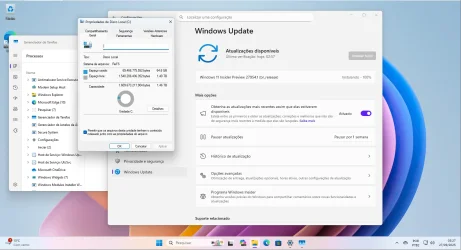
Version 24H2/25H2 seems to fully support being installed to and booting from an ReFS system drive.
Everything seems to work fine, tried upgrading to the latest Canary build from 25H2 to check if in-place upgrades would work.. they do.

So far the only thing that does not work is system restore, which throws out a weird error.
Everything else works.

Build 27954.1 ships a newer version of ReFS, 3.15.


Note: For obvious reasons I am testing this on a VM.
 
Windows Build/Version
26200.6584 and 27954.1

Attachments

  • REFSDEMO.webp
    REFSDEMO.webp
    95.4 KB · Views: 2

My Computer My Computer

At a glance

Windows 11 v25H2 / Windows vNext EnterpriseIntel Core i5-1140032GB DDR4 3200MHzAMD Radeon RX 5500 XT 8GB GDDR6 / Intel UHD G...
OS
Windows 11 v25H2 / Windows vNext Enterprise
Computer type
PC/Desktop
Manufacturer/Model
Custom Built Tower
CPU
Intel Core i5-11400
Motherboard
MSI B560M-A PRO
Memory
32GB DDR4 3200MHz
Graphics Card(s)
AMD Radeon RX 5500 XT 8GB GDDR6 / Intel UHD Graphics 730
Sound Card
Onboard Realtek ALC897
Monitor(s) Displays
LG 22MP58VQ-P 21.5" IPS LED
Screen Resolution
1920x1080
Hard Drives
1x 500GB Kingston Fury Renegade PCIe Gen4x4 NVMe SSD
PSU
Corsair CS850M 850W 80 Plus Gold
Case
Sharkoon M25-W Mid-Tower Case
Cooling
2x 240mm fans on the front, 1x 240mm fan on the back
Keyboard
Skiller Mechanical RGB Keyboard
Mouse
HP RGB Optical Mouse
Internet Speed
500Mbps Fiber
Browser
Microsoft Edge
Antivirus
Microsoft Defender
ReFS doesn't support encrypted folders and files, so that will break paid Store apps. CompactOS is not available, or extended file attributes.
 

My Computer My Computer

At a glance

Windows 7
OS
Windows 7
As the title says...
Version 24H2/25H2 seems to fully support being installed to and booting from an ReFS system drive.
Everything seems to work fine, tried upgrading to the latest Canary build from 25H2 to check if in-place upgrades would work.. they do.

So far the only thing that does not work is system restore, which throws out a weird error.
Everything else works.

Build 27954.1 ships a newer version of ReFS, 3.15.


Note: For obvious reasons I am testing this on a VM.
and boot time improved? Is it faster in any way or the same as NTFS?

e o tempo de boot melhorou? É mais rápido de alguma forma ou igual ao NTFS?

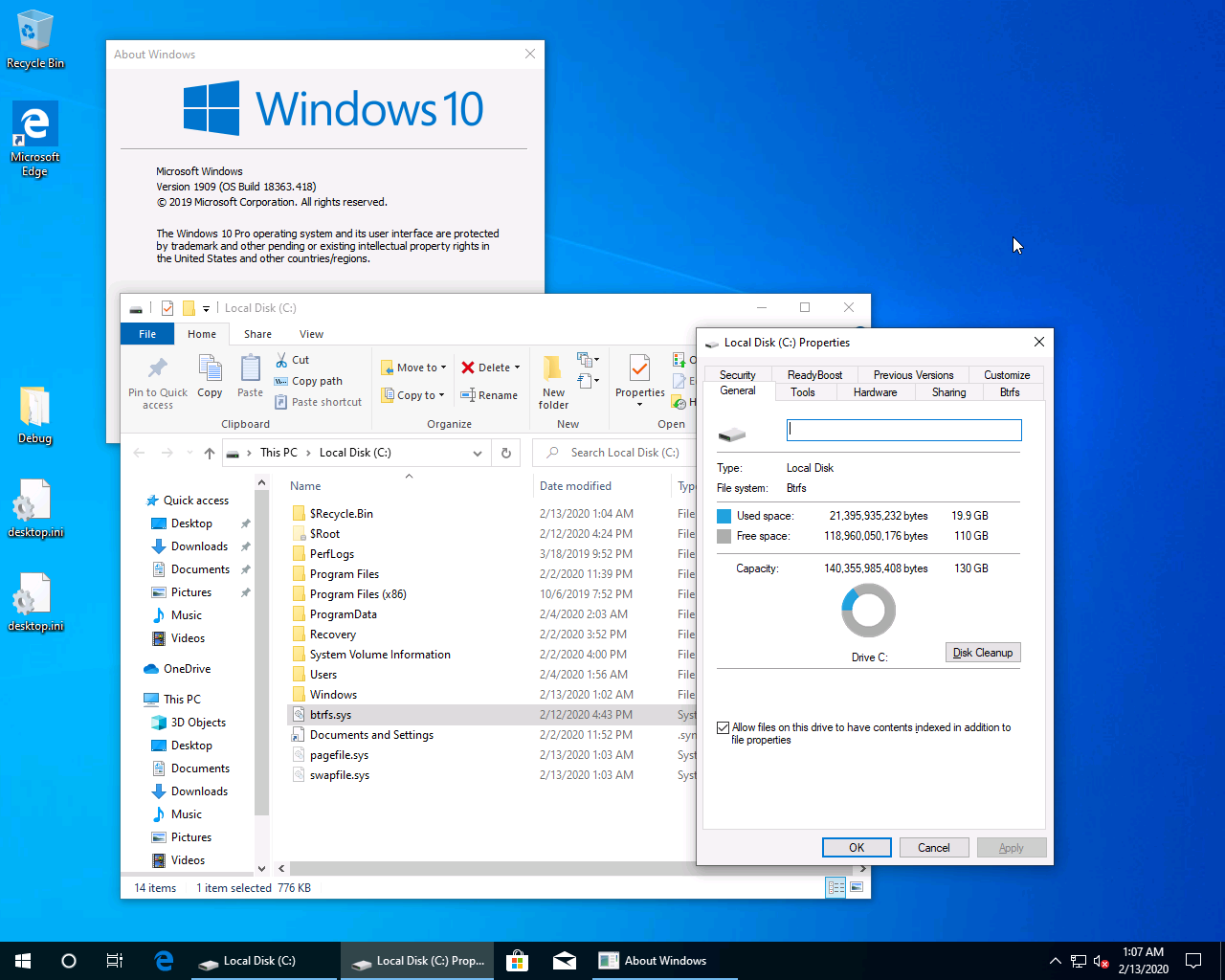
winbtrfs support boot win too


1909.png
 
Last edited:

My Computer My Computer

At a glance

Windows 11 Iot Enterprise 21h2 22000.3260xeon E5-2697v232gb 8x4gb ddr3 1333 mhzgtx 570 poit of view
OS
Windows 11 Iot Enterprise 21h2 22000.3260
Computer type
PC/Desktop
Manufacturer/Model
Asus
CPU
xeon E5-2697v2
Motherboard
rampage iv extreme
Memory
32gb 8x4gb ddr3 1333 mhz
Graphics Card(s)
gtx 570 poit of view
Sound Card
realtek HD (ALC898)
Monitor(s) Displays
samsung b2030
Screen Resolution
1600x900
Hard Drives
2tb hd 5400 rpm
3tb hd 5400 rpm
1tb nvme pcie 3.0
PSU
hx850w
Keyboard
mtek
Internet Speed
500/250 gpon
Browser
r3dfox 146.0
Antivirus
none
NTFS vs. ReFS is the comparison of two Microsoft file systems: NTFS is the older, default choice for general use, providing robust security and backward compatibility, while ReFS is a newer system designed for extreme reliability and scalability in enterprise environments, offering advanced features like automatic corruption correction[/URL], and massive volume support, though it lacks some NTFS features and is not suitable for system drives.


NTFS (New Technology File System)

Purpose: The standard, default file system for most Windows installations.

Key Features:

Security:
Strong access control lists (ACLs) and file permissions.

Compatibility: High compatibility with previous Windows versions and various devices.

Journaling: Provides data integrity through journaling, but lacks advanced self-repair.


Limitations: May struggle with extremely large datasets and lacks some of ReFS's modern data integrity features.

ReFS (Resilient File System)

Purpose:
Designed for large-scale data storage and virtualization in enterprise-level environments.

Key Features:

Data Integrity:
Uses checksums for metadata and data to detect and automatically correct file system corruption, working with Storage Spaces.

Scalability: Supports significantly larger file and volume sizes compared to NTFS, up to 35 PB.

Resilience: Features like "copy-on-write" prevent data loss during power failures, and proactive "scrubbers" scan for errors.


Limitations:

Compatibility:
Not fully supported on all Windows versions and cannot be used for system drives.

Features: Lacks features like file system compression, disk quotas, and Encrypted File System (EFS).


When to Use Which

Use NTFS for:

Standard desktops and laptops.

Boot drives.

Situations requiring file compression, disk quotas, or encryption.


Use ReFS for:

Large-scale storage systems and data-intensive applications.

Enterprise environments with virtualization and Storage Spaces integration.

Any scenario where data integrity and resilience are paramount.
 
Last edited:

My Computers My Computers

  • At a glance

    Win 11 Home ♦♦♦26300.9457 ♦♦♦♦♦♦♦26H2AMD Ryzen 7 3700XG.Skill (F4-3200C14D-16GTZKW)EVGA RTX 2070 (08G-P4-2171-KR)
    OS
    Win 11 Home ♦♦♦26300.9457 ♦♦♦♦♦♦♦26H2
    Computer type
    PC/Desktop
    Manufacturer/Model
    Built by Ghot® [May 2020]
    CPU
    AMD Ryzen 7 3700X
    Motherboard
    Asus Pro WS X570-ACE (BIOS 5302)
    Memory
    G.Skill (F4-3200C14D-16GTZKW)
    Graphics Card(s)
    EVGA RTX 2070 (08G-P4-2171-KR)
    Sound Card
    Realtek ALC1220P / ALC S1220A
    Monitor(s) Displays
    Dell U3011 30"
    Screen Resolution
    2560 x 1600
    Hard Drives
    2x Samsung 860 EVO 500GB,
    WD 4TB Black FZBX - SATA III,
    WD 8TB Black FZBX - SATA III,
    DRW-24B1ST CD/DVD Burner
    PSU
    PC Power & Cooling 750W Quad EPS12V
    Case
    Cooler Master ATCS 840 Tower
    Cooling
    CM Hyper 212 EVO (push/pull)
    Keyboard
    Ducky DK9008 Shine II Blue LED
    Mouse
    Logitech Optical M-100
    Internet Speed
    300/300
    Browser
    Firefox (latest)
    Antivirus
    Bitdefender Total Security
    Other Info
    Speakers: Klipsch Pro Media 2.1
  • At a glance

    Windows XP Pro 32bit w/SP3AMD Athlon 64 X2 5000+ (OC'd @ 3.2Ghz)TWIN2X2048-6400C4DHX (2 x 1GB, DDR2 800)EVGA 256-P2-N758-TR GeForce 8600GT SSC
    Operating System
    Windows XP Pro 32bit w/SP3
    Computer type
    PC/Desktop
    Manufacturer/Model
    Built by Ghot® (not in use)
    CPU
    AMD Athlon 64 X2 5000+ (OC'd @ 3.2Ghz)
    Motherboard
    ASUS M2N32-SLI Deluxe Wireless Edition
    Memory
    TWIN2X2048-6400C4DHX (2 x 1GB, DDR2 800)
    Graphics card(s)
    EVGA 256-P2-N758-TR GeForce 8600GT SSC
    Sound Card
    Onboard
    Monitor(s) Displays
    ViewSonic G90FB Black 19" Professional (CRT)
    Screen Resolution
    up to 2048 x 1536
    Hard Drives
    WD 36GB 10,000rpm Raptor SATA
    Seagate 80GB 7200rpm SATA
    Lite-On LTR-52246S CD/RW
    Lite-On LH-18A1P CD/DVD Burner
    PSU
    PC Power & Cooling Silencer 750 Quad EPS12V
    Case
    Generic Beige case, 80mm fans
    Cooling
    ZALMAN 9500A 92mm CPU Cooler
    Keyboard
    Logitech Classic Keybooard 200
    Mouse
    Logitech Optical M-BT96a
    Internet Speed
    300/300
    Browser
    Firefox 3.x ??
    Antivirus
    Symantec (Norton)
    Other Info
    Still assembled, still runs. Haven't turned it on for 15 years?
Back
Top Bottom