Windows 11 24H2 Monthly Updates Failing after Restart at 37%


lafargeotte

Well-known member
Member
VIP
Local time
1:51 AM
Posts
261
Location
France
OS
Windows 11 25H2
I upgraded Windows 11 23H2 to 24H2 back when it became available in early October.

When the regular 'Patch Tuesday' updates were issued in October (KB5044284) and November (KB5046617), I tried to install them and both failed after rebooting at 37%, and rolled back.

After much searching and retrying, I found that the only way to successfully update my PC was the Repair Install in Windows Update (Reinstall Now).
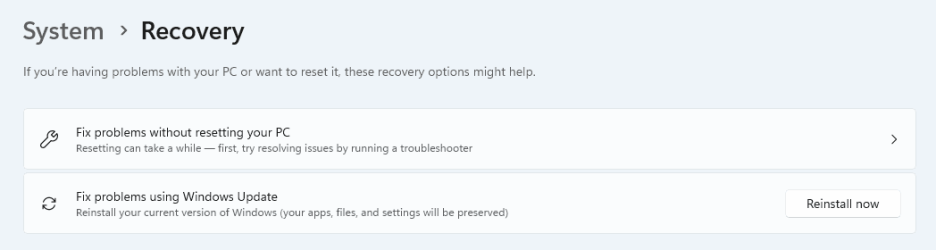
45db11c2-c5b5-4183-8c52-81d2e6e08d53.png

I was expecting the most recent update to not have the same problem having done a Repair Install.

My worry now is that it might happen again in the next Windows Update.

Any thoughts?

TIA.
 
Windows Build/Version
Windows 11 Pro x64 24H2 Build 26100.2314, AMD Ryzen 5 2600, Asus PRIME B350M-A

My Computer My Computer

At a glance

Windows 11 25H2AMD Ryzen 5 1600 - 6 Core32GBNvidia 1030GT
OS
Windows 11 25H2
Computer type
PC/Desktop
Manufacturer/Model
Custom Build
CPU
AMD Ryzen 5 1600 - 6 Core
Motherboard
Asus
Memory
32GB
Graphics Card(s)
Nvidia 1030GT
Monitor(s) Displays
Iiyama24
I upgraded Windows 11 23H2 to 24H2 back when it became available in early October.
After much searching and retrying, I found that the only way to successfully update my PC was the Repair Install in Windows Update (Reinstall Now).

My worry now is that it might happen again in the next Windows Update.

Any thoughts?

TIA.
Sorry but we cannot help you with rhetorical assumption.
You can worry if you like but I suspect it will not help you.
 

My Computers My Computers

  • At a glance

    All Branches but ReleaseAMD Ryzen 7 7735HS 3200-4500 Mhz 8 cores x 232 GB DDR5Radeon Graphic / NVIDIA GeForce RTX 4060 8 GB...
    OS
    All Branches but Release
    Computer type
    Laptop
    Manufacturer/Model
    Acer Nitro ANV15-51
    CPU
    AMD Ryzen 7 7735HS 3200-4500 Mhz 8 cores x 2
    Motherboard
    Sportage_RBH
    Memory
    32 GB DDR5
    Graphics Card(s)
    Radeon Graphic / NVIDIA GeForce RTX 4060 8 GB GDDR6
    Sound Card
    AMD/Realtek(R) Audio
    Monitor(s) Displays
    Integrated Monitor (15.3"vis)
    Screen Resolution
    FHD 1920X1080 16:9 144Hz
    Hard Drives
    KINGSTON OM8SEP4512Q-AA 1TB
    Western Digital 256GB
    PSU
    19V DC 6.32 A 120 W
    Cooling
    Dual Fans
    Mouse
    MS Bluetooth
    Internet Speed
    Fiber 1GB Cox -us & 1GB Orange-fr
    Browser
    Edge Canary- Firefox Nightly-Chrome Dev-Chrome Dev
    Antivirus
    Windows Defender
  • At a glance

    Windows 11 BetaAMD A9-94208 GB of DDR4AMD Radeon R5
    Operating System
    Windows 11 Beta
    Computer type
    Laptop
    Manufacturer/Model
    Asus X751BP
    CPU
    AMD A9-9420
    Memory
    8 GB of DDR4
    Graphics card(s)
    AMD Radeon R5
    Screen Resolution
    1600x900
    Hard Drives
    Seagate 1 TB
Sorry but we cannot help you with rhetorical assumption.
You can worry if you like but I suspect it will not help you.
OK, maybe a badly worded initial post.

Any thoughts on why this is happening please?
 

My Computer My Computer

At a glance

Windows 11 25H2AMD Ryzen 5 1600 - 6 Core32GBNvidia 1030GT
OS
Windows 11 25H2
Computer type
PC/Desktop
Manufacturer/Model
Custom Build
CPU
AMD Ryzen 5 1600 - 6 Core
Motherboard
Asus
Memory
32GB
Graphics Card(s)
Nvidia 1030GT
Monitor(s) Displays
Iiyama24
OK, maybe a badly worded initial post.

Any thoughts on why this is happening please?


A lot of us had to do this...


If you have any trouble with regular Cumulative updates after upgrading to 24H2, you can do the following...
Credit to @boombastik for figuring this out. :-)

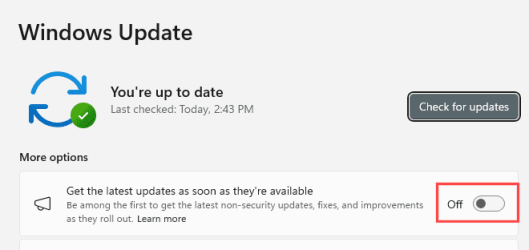
1) In Windows Update, disable the option: Get the latest updates as soon as they're available.
2) Restart the computer.
3) Search for updates.
4) This should allow the Cumulative updates to install without errors.
5) If you still have update errors after this... you have something else causing the problem.

Image1.png
 
Last edited:

My Computers My Computers

  • At a glance

    Win 11 Home ♦♦♦26200.8737 ♦♦♦♦♦♦♦25H2AMD Ryzen 7 3700XG.Skill (F4-3200C14D-16GTZKW)EVGA RTX 2070 (08G-P4-2171-KR)
    OS
    Win 11 Home ♦♦♦26200.8737 ♦♦♦♦♦♦♦25H2
    Computer type
    PC/Desktop
    Manufacturer/Model
    Built by Ghot® [May 2020]
    CPU
    AMD Ryzen 7 3700X
    Motherboard
    Asus Pro WS X570-ACE (BIOS 5302)
    Memory
    G.Skill (F4-3200C14D-16GTZKW)
    Graphics Card(s)
    EVGA RTX 2070 (08G-P4-2171-KR)
    Sound Card
    Realtek ALC1220P / ALC S1220A
    Monitor(s) Displays
    Dell U3011 30"
    Screen Resolution
    2560 x 1600
    Hard Drives
    2x Samsung 860 EVO 500GB,
    WD 4TB Black FZBX - SATA III,
    WD 8TB Black FZBX - SATA III,
    DRW-24B1ST CD/DVD Burner
    PSU
    PC Power & Cooling 750W Quad EPS12V
    Case
    Cooler Master ATCS 840 Tower
    Cooling
    CM Hyper 212 EVO (push/pull)
    Keyboard
    Ducky DK9008 Shine II Blue LED
    Mouse
    Logitech Optical M-100
    Internet Speed
    300/300
    Browser
    Firefox (latest)
    Antivirus
    Bitdefender Total Security
    Other Info
    Speakers: Klipsch Pro Media 2.1
  • At a glance

    Windows XP Pro 32bit w/SP3AMD Athlon 64 X2 5000+ (OC'd @ 3.2Ghz)TWIN2X2048-6400C4DHX (2 x 1GB, DDR2 800)EVGA 256-P2-N758-TR GeForce 8600GT SSC
    Operating System
    Windows XP Pro 32bit w/SP3
    Computer type
    PC/Desktop
    Manufacturer/Model
    Built by Ghot® (not in use)
    CPU
    AMD Athlon 64 X2 5000+ (OC'd @ 3.2Ghz)
    Motherboard
    ASUS M2N32-SLI Deluxe Wireless Edition
    Memory
    TWIN2X2048-6400C4DHX (2 x 1GB, DDR2 800)
    Graphics card(s)
    EVGA 256-P2-N758-TR GeForce 8600GT SSC
    Sound Card
    Onboard
    Monitor(s) Displays
    ViewSonic G90FB Black 19" Professional (CRT)
    Screen Resolution
    up to 2048 x 1536
    Hard Drives
    WD 36GB 10,000rpm Raptor SATA
    Seagate 80GB 7200rpm SATA
    Lite-On LTR-52246S CD/RW
    Lite-On LH-18A1P CD/DVD Burner
    PSU
    PC Power & Cooling Silencer 750 Quad EPS12V
    Case
    Generic Beige case, 80mm fans
    Cooling
    ZALMAN 9500A 92mm CPU Cooler
    Keyboard
    Logitech Classic Keybooard 200
    Mouse
    Logitech Optical M-BT96a
    Internet Speed
    300/300
    Browser
    Firefox 3.x ??
    Antivirus
    Symantec (Norton)
    Other Info
    Still assembled, still runs. Haven't turned it on for 15 years?
A lot of us had to do this...


If you have any trouble with regular Cumulative updates after upgrading to 24H2, you can do the following...
Credit to @boombastik for figuring this out. :-)

1) In Windows Update, disable the option: Get the latest updates as soon as they're available.
2) Restart the computer.
3) Search for updates.
4) This should allow the Cumulative updates to install without errors.
5) If you still have update errors after this... you have something else causing the problem.

View attachment 116362
Hi,
I don't have trouble getting the updates, it is just that they won't install, always stoping at 37%, and then rolling back.
I always have the get latest updates set to off.
 

My Computer My Computer

At a glance

Windows 11 25H2AMD Ryzen 5 1600 - 6 Core32GBNvidia 1030GT
OS
Windows 11 25H2
Computer type
PC/Desktop
Manufacturer/Model
Custom Build
CPU
AMD Ryzen 5 1600 - 6 Core
Motherboard
Asus
Memory
32GB
Graphics Card(s)
Nvidia 1030GT
Monitor(s) Displays
Iiyama24
I always have the get latest updates set to off.


I dunno then.

Maybe try reseting the Windows Update components?


My Computers My Computers

  • At a glance

    Win 11 Home ♦♦♦26200.8737 ♦♦♦♦♦♦♦25H2AMD Ryzen 7 3700XG.Skill (F4-3200C14D-16GTZKW)EVGA RTX 2070 (08G-P4-2171-KR)
    OS
    Win 11 Home ♦♦♦26200.8737 ♦♦♦♦♦♦♦25H2
    Computer type
    PC/Desktop
    Manufacturer/Model
    Built by Ghot® [May 2020]
    CPU
    AMD Ryzen 7 3700X
    Motherboard
    Asus Pro WS X570-ACE (BIOS 5302)
    Memory
    G.Skill (F4-3200C14D-16GTZKW)
    Graphics Card(s)
    EVGA RTX 2070 (08G-P4-2171-KR)
    Sound Card
    Realtek ALC1220P / ALC S1220A
    Monitor(s) Displays
    Dell U3011 30"
    Screen Resolution
    2560 x 1600
    Hard Drives
    2x Samsung 860 EVO 500GB,
    WD 4TB Black FZBX - SATA III,
    WD 8TB Black FZBX - SATA III,
    DRW-24B1ST CD/DVD Burner
    PSU
    PC Power & Cooling 750W Quad EPS12V
    Case
    Cooler Master ATCS 840 Tower
    Cooling
    CM Hyper 212 EVO (push/pull)
    Keyboard
    Ducky DK9008 Shine II Blue LED
    Mouse
    Logitech Optical M-100
    Internet Speed
    300/300
    Browser
    Firefox (latest)
    Antivirus
    Bitdefender Total Security
    Other Info
    Speakers: Klipsch Pro Media 2.1
  • At a glance

    Windows XP Pro 32bit w/SP3AMD Athlon 64 X2 5000+ (OC'd @ 3.2Ghz)TWIN2X2048-6400C4DHX (2 x 1GB, DDR2 800)EVGA 256-P2-N758-TR GeForce 8600GT SSC
    Operating System
    Windows XP Pro 32bit w/SP3
    Computer type
    PC/Desktop
    Manufacturer/Model
    Built by Ghot® (not in use)
    CPU
    AMD Athlon 64 X2 5000+ (OC'd @ 3.2Ghz)
    Motherboard
    ASUS M2N32-SLI Deluxe Wireless Edition
    Memory
    TWIN2X2048-6400C4DHX (2 x 1GB, DDR2 800)
    Graphics card(s)
    EVGA 256-P2-N758-TR GeForce 8600GT SSC
    Sound Card
    Onboard
    Monitor(s) Displays
    ViewSonic G90FB Black 19" Professional (CRT)
    Screen Resolution
    up to 2048 x 1536
    Hard Drives
    WD 36GB 10,000rpm Raptor SATA
    Seagate 80GB 7200rpm SATA
    Lite-On LTR-52246S CD/RW
    Lite-On LH-18A1P CD/DVD Burner
    PSU
    PC Power & Cooling Silencer 750 Quad EPS12V
    Case
    Generic Beige case, 80mm fans
    Cooling
    ZALMAN 9500A 92mm CPU Cooler
    Keyboard
    Logitech Classic Keybooard 200
    Mouse
    Logitech Optical M-BT96a
    Internet Speed
    300/300
    Browser
    Firefox 3.x ??
    Antivirus
    Symantec (Norton)
    Other Info
    Still assembled, still runs. Haven't turned it on for 15 years?

My Computer My Computer

At a glance

Windows 11 25H2AMD Ryzen 5 1600 - 6 Core32GBNvidia 1030GT
OS
Windows 11 25H2
Computer type
PC/Desktop
Manufacturer/Model
Custom Build
CPU
AMD Ryzen 5 1600 - 6 Core
Motherboard
Asus
Memory
32GB
Graphics Card(s)
Nvidia 1030GT
Monitor(s) Displays
Iiyama24
Again, and again ...........another reason for not upgrading to this "upgrade " ..........
Lost several software (" not compatible with 24H2" ) , loooong booting , and " bla, bla , copilot ", etc, etc .
Will wait untill next year ..........maybe , not at all..............!! :wink:
 

My Computers My Computers

  • At a glance

    Windows11 Pro 25H2i732GBnVidia
    OS
    Windows11 Pro 25H2
    Computer type
    PC/Desktop
    Manufacturer/Model
    Asus
    CPU
    i7
    Motherboard
    z97k
    Memory
    32GB
    Graphics Card(s)
    nVidia
    Sound Card
    Realtek
    Hard Drives
    3
    Cooling
    air
    Browser
    Edge
    Antivirus
    ESET
  • At a glance

    Windows11 ProIntel i516GBIntel
    Operating System
    Windows11 Pro
    Computer type
    PC/Desktop
    Manufacturer/Model
    ASUS
    CPU
    Intel i5
    Motherboard
    ASUS Basic
    Memory
    16GB
    Graphics card(s)
    Intel
    Sound Card
    Realtek
    Monitor(s) Displays
    Samsung
    Hard Drives
    one intern , 0ne extern, OS on SSD
    Cooling
    air
    Keyboard
    wireless Logitech
    Mouse
    wireless Logitech
    Internet Speed
    1GB
    Browser
    Edge
    Antivirus
    ESET
Still the same.

I tried the recent prevuew update, KB5046740, and the same problem recurred.

So, despite doing repair installs nothing has changed or improved!

Weird behaviour on my Desktop PC (compatible), yet the updates install fine on 2 laptops (that are not Win11 compatible).


My Computer My Computer

At a glance

Windows 11 25H2AMD Ryzen 5 1600 - 6 Core32GBNvidia 1030GT
OS
Windows 11 25H2
Computer type
PC/Desktop
Manufacturer/Model
Custom Build
CPU
AMD Ryzen 5 1600 - 6 Core
Motherboard
Asus
Memory
32GB
Graphics Card(s)
Nvidia 1030GT
Monitor(s) Displays
Iiyama24
Back
Top Bottom