Windows 11 and Outlook 2024 (Part of Office 2024)


mattgod69

Well-known member
Local time
4:27 PM
Posts
8
OS
11
I have a slightly odd and annoying issue in that Outlook 2024 (part of Office 2024 - not the free desktop product) will not display images when first started. Closing and restating the program does not work. Running as an administrator does not work. The only thing that seems to work is restarting the PC, whereupon it is fine.

I have obviously unchecked the Trust Centre boxes, disabled enhanced security etc. Disabling add-ins and turning off AVG makes no difference.

I cannot believe I am the only one with this issue. It is only happening on one of my PCs, the others are similar config (setup and programs etc) and they are fine.

If anyone has any ideas it would be greatly appreciated.

Matt
 

My Computer

System One

  • OS
    11
    Computer type
    PC/Desktop
    Manufacturer/Model
    Cyberpower
    CPU
    i9-12900KF
    Motherboard
    Mag Z790 Tomahawk Wifi
    Memory
    32GB
    Graphics Card(s)
    NVIDIA GeForce RTX 4090
    Sound Card
    Built in
    Monitor(s) Displays
    57" G95NC Odyssey Neo G9 240Hz Dual UHD Monitor
    Screen Resolution
    7680 x 2160
    Hard Drives
    SSDs
Matt,

Perhaps Office repair will help.
Repair an Office application - MSSupport

I have not seen a report of your problem before. I don't know if this will help or not.
Open Outlook in Safe mode - MSSupport

And this seems far too drastic.
Download and install or reinstall Office - MSSupport


Best of luck,
Denis


Welcome to ElevenForum.

It's really worth making time to browse through the ElevenForum Tutorial index - there's a shortcut to it at the top of every ElevenForum page [within the Tutorials dropdown list].
- At the foot of the ElevenForum Tutorial index is a shortcut to download it as a spreadsheet.
- I download a new copy each month.
- By downloading it as a spreadsheet I can benefit from Excel's excellent filtering capabilities when I search for topics of interest.
- ElevenForum tutorials are also listed at Tutorials and there's a shortcut to that at the top of every page.

You can search ElevenForum using the search box in the top-right corner of all ElevenForum webpages or using Advanced Search - ElevenForum
You can also search ElevenForum threads in many general search engines, such as Google, by adding site:elevenforum.com after your search term. For example,
Taskbar setup site:elevenforum.com
 

My Computer

System One

  • OS
    Windows 11 Home x64 Version 25H2 Build 26200.8037
Hi Denis

Thank you for the message... i have previously tried office repair, this does not work.

Regards.

Matt
 

My Computer

System One

  • OS
    11
    Computer type
    PC/Desktop
    Manufacturer/Model
    Cyberpower
    CPU
    i9-12900KF
    Motherboard
    Mag Z790 Tomahawk Wifi
    Memory
    32GB
    Graphics Card(s)
    NVIDIA GeForce RTX 4090
    Sound Card
    Built in
    Monitor(s) Displays
    57" G95NC Odyssey Neo G9 240Hz Dual UHD Monitor
    Screen Resolution
    7680 x 2160
    Hard Drives
    SSDs
[Classic Outlook 2024] will not display images when first started .. only thing that seems to work is restarting the PC
I have obviously unchecked the Trust Centre boxes, disabled enhanced security etc. Disabling add-ins and turning off AVG makes no difference.
Please excuse me for covering the same ground again, but just to be sure:

1 -- You are talking about Links in an email that pull images from a web site. Not embedded images. Pics that were copy/pasted into the email body by the sender.

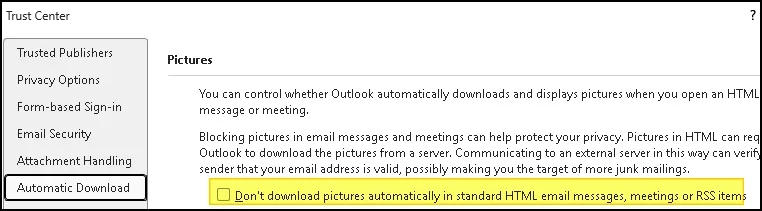
2 -- Your Trust Center Settings are:

1774997694566.webp

3 -- You do NOT see a "Click here to download pictures ..." header on any messages containing links to images?

1774997729787.webp

4 -- Do I understand the sequence right?

4A -- Boot up the PC. Open Outlook - Images display.
4B -- Close Outlook. Open Outlook - Images do NOT display.
4C -- Restart the PC. Open Outlook - Images display.

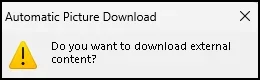
5 -- If you open an email that should display pictures but doesn't and Forward it, do you get a warning?

1774998485552.webp
 

My Computer

System One

  • OS
    Windows 10, Windows 11
    Computer type
    PC/Desktop
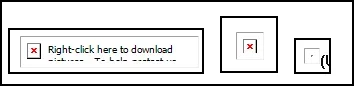
When images are not being displayed - Do you see an "image placeholder Red X", or nothing at all where the image should be?

1774999775192.webp
 

My Computer

System One

  • OS
    Windows 10, Windows 11
    Computer type
    PC/Desktop
I'm grasping at straws here, but - Close Outlook. Open Task Manager. Are there still any outlook.exe processes running?
 

My Computer

System One

  • OS
    Windows 10, Windows 11
    Computer type
    PC/Desktop
Please excuse me for covering the same ground again, but just to be sure:

1 -- You are talking about Links in an email that pull images from a web site. Not embedded images. Pics that were copy/pasted into the email body by the sender.

2 -- Your Trust Center Settings are:

View attachment 167405

3 -- You do NOT see a "Click here to download pictures ..." header on any messages containing links to images?

View attachment 167406

4 -- Do I understand the sequence right?

4A -- Boot up the PC. Open Outlook - Images display.
4B -- Close Outlook. Open Outlook - Images do NOT display.
4C -- Restart the PC. Open Outlook - Images display.

5 -- If you open an email that should display pictures but doesn't and Forward it, do you get a warning?

View attachment 167407
Thank you for the message.

To answer your questions:

1. correct, I am talking about links in an email or pull images from a website, not embedded images.

2.correct.

3. No, the message click here to download pictures does not appear.

4. no, the sequence is, boot up PC, open outlook - images do not display. close Outlook, restart PC (if you shut down and boot again images do not display), open outlook - images appear.

5. actually not tried that. I will find out and report back.

Many thanks.

Matt
 

My Computer

System One

  • OS
    11
    Computer type
    PC/Desktop
    Manufacturer/Model
    Cyberpower
    CPU
    i9-12900KF
    Motherboard
    Mag Z790 Tomahawk Wifi
    Memory
    32GB
    Graphics Card(s)
    NVIDIA GeForce RTX 4090
    Sound Card
    Built in
    Monitor(s) Displays
    57" G95NC Odyssey Neo G9 240Hz Dual UHD Monitor
    Screen Resolution
    7680 x 2160
    Hard Drives
    SSDs

My Computer

System One

  • OS
    11
    Computer type
    PC/Desktop
    Manufacturer/Model
    Cyberpower
    CPU
    i9-12900KF
    Motherboard
    Mag Z790 Tomahawk Wifi
    Memory
    32GB
    Graphics Card(s)
    NVIDIA GeForce RTX 4090
    Sound Card
    Built in
    Monitor(s) Displays
    57" G95NC Odyssey Neo G9 240Hz Dual UHD Monitor
    Screen Resolution
    7680 x 2160
    Hard Drives
    SSDs

My Computer

System One

  • OS
    11
    Computer type
    PC/Desktop
    Manufacturer/Model
    Cyberpower
    CPU
    i9-12900KF
    Motherboard
    Mag Z790 Tomahawk Wifi
    Memory
    32GB
    Graphics Card(s)
    NVIDIA GeForce RTX 4090
    Sound Card
    Built in
    Monitor(s) Displays
    57" G95NC Odyssey Neo G9 240Hz Dual UHD Monitor
    Screen Resolution
    7680 x 2160
    Hard Drives
    SSDs
no, the sequence is, boot up PC, open outlook - images do not display. close Outlook, restart PC (if you shut down and boot again images do not display), open outlook - images appear.
So your Outlook acts differently after a "Cold Boot" (starting from power off) than it does after a "Warm Boot" (restart without power off)?

Google AI has a couple of suggestions that seem reasonable:

[AI GENERATED]

1 -- Disable Windows Fast Startup
https://www.windowscentral.com/how-disable-windows-10-fast-startup

Theory is that this is about the only real difference between a Cold Boot and a Warm Boot.

2 -- Adjust "Encrypted Pages" Security Setting
How to get the pictures to download when settings are correct in Outlook Classic - Microsoft Q&A

Not so sure about this one. But there are reports from users that have all the Outlook image settings correct and still don't see images.
 

My Computer

System One

  • OS
    Windows 10, Windows 11
    Computer type
    PC/Desktop
If you want to explore some of the less reasonable sounding suggestions, here's the prompt I used for the Google AI

Classic Outlook for Windows. After doing a Cold Boot (starting with Power Off) Outlook does not display images from links in an email. After a Warm Boot (Restart without the power being removed) it displays the images from links. When it is not displaying images from links it does show the "Red X Image Placeholder" but does not have the "Click here to download pictures ..." header. All Trust Center settings and other possible restrictions on displaying images from links are set correctly to always show images.
 

My Computer

System One

  • OS
    Windows 10, Windows 11
    Computer type
    PC/Desktop
Theory is that this is about the only real difference between a Cold Boot and a Warm Boot.
No, there can be other observed differences.
Just for example, when I have a particular problem with audio distortion, even with Fast start off,​
- If I merely restart, the problem might continue, whereas​
- If I shutdown then start again, the problem stops.​


All the best,
Denis
 

My Computer

System One

  • OS
    Windows 11 Home x64 Version 25H2 Build 26200.8037
Interestingly, this AM the PC was ok from a cold boot. So whilst it nearly always happens and a reboot is necessary, it is not every time.
this
Regards.

Matt
 

My Computer

System One

  • OS
    11
    Computer type
    PC/Desktop
    Manufacturer/Model
    Cyberpower
    CPU
    i9-12900KF
    Motherboard
    Mag Z790 Tomahawk Wifi
    Memory
    32GB
    Graphics Card(s)
    NVIDIA GeForce RTX 4090
    Sound Card
    Built in
    Monitor(s) Displays
    57" G95NC Odyssey Neo G9 240Hz Dual UHD Monitor
    Screen Resolution
    7680 x 2160
    Hard Drives
    SSDs
Images were not showing from a cold boot this am..... if i forward the image (with blocked image in), the image is showing ok.....
 

My Computer

System One

  • OS
    11
    Computer type
    PC/Desktop
    Manufacturer/Model
    Cyberpower
    CPU
    i9-12900KF
    Motherboard
    Mag Z790 Tomahawk Wifi
    Memory
    32GB
    Graphics Card(s)
    NVIDIA GeForce RTX 4090
    Sound Card
    Built in
    Monitor(s) Displays
    57" G95NC Odyssey Neo G9 240Hz Dual UHD Monitor
    Screen Resolution
    7680 x 2160
    Hard Drives
    SSDs
Please excuse me for covering the same ground again, but just to be sure:

1 -- You are talking about Links in an email that pull images from a web site. Not embedded images. Pics that were copy/pasted into the email body by the sender.

2 -- Your Trust Center Settings are:

View attachment 167405

3 -- You do NOT see a "Click here to download pictures ..." header on any messages containing links to images?

View attachment 167406

4 -- Do I understand the sequence right?

4A -- Boot up the PC. Open Outlook - Images display.
4B -- Close Outlook. Open Outlook - Images do NOT display.
4C -- Restart the PC. Open Outlook - Images display.

5 -- If you open an email that should display pictures but doesn't and Forward it, do you get a warning?

View attachment 167407
Images were not showing from a cold boot this am..... if i forward the image (with blocked image in), the image is showing ok..... but there are no warnings....
 

My Computer

System One

  • OS
    11
    Computer type
    PC/Desktop
    Manufacturer/Model
    Cyberpower
    CPU
    i9-12900KF
    Motherboard
    Mag Z790 Tomahawk Wifi
    Memory
    32GB
    Graphics Card(s)
    NVIDIA GeForce RTX 4090
    Sound Card
    Built in
    Monitor(s) Displays
    57" G95NC Odyssey Neo G9 240Hz Dual UHD Monitor
    Screen Resolution
    7680 x 2160
    Hard Drives
    SSDs
Images were not showing from a cold boot this am..... if i forward the image (with blocked image in), the image is showing ok
I am sorry. But I'm out of ideas. All I can suggest is that you try to get help from some other sources.

Post your question on the Microsoft Q&A Forum:
Sign In | Microsoft Learn
(Please put a link to your Q&A post here, so the rest of us can follow)

Contact Microsoft Support:
From Outlook do Help -> Contact Support
 

My Computer

System One

  • OS
    Windows 10, Windows 11
    Computer type
    PC/Desktop

Latest Support Threads

Back
Top Bottom