Windows 11 bitlocker problems


sevenup777

New member
Local time
8:22 PM
Posts
3
OS
Windows 11
Hello, I have windows 11 pro x64, 21H2, I have a problem with bitlocker, I have a main hard drive with the operating system, 480gb in GPT , when I go to encrypt the hard drive with bitlocker it asks me to either put an unlock Pin to the start the system, or insert a usb memory, but it does not let me combine the two options (if there is a usb memory inserted, it unlocks automatically, if there is no usb memory inserted, it sends you to memer the pin or insert the flash drive. In windows 10 It allowed me to combine the 2, but in windows 11 it doesn't let me combine the 2 options (either one or the other), I hope you can help me, thanks
 

My Computer My Computer

At a glance

Windows 11
OS
Windows 11
Bitlocker does not support a Pin & Starup Key alone. You can add the TPMandPinandStartUp key protector though which does support that combo but only with the TPM included.
 

My Computer My Computer

At a glance

Linux Mint
OS
Linux Mint
Computer type
Laptop
Manufacturer/Model
System76 Lemur Pro
From the policy description in gpedit.msc:

"On a computer with a compatible TPM, four types of authentication methods can be used at startup to provide added protection for encrypted data. When the computer starts, it can use only the TPM for authentication, or it can also require insertion of a USB flash drive containing a startup key, the entry of a 6-digit to 20-digit personal identification number (PIN), or both.

Note: If you want to require the use of a startup PIN and a USB flash drive, you must configure BitLocker settings using the command-line tool manage-bde instead of the BitLocker Drive Encryption setup wizard."
 

My Computer My Computer

At a glance

Windows 11
OS
Windows 11
Hello, I have windows 11 pro x64, 21H2, I have a problem with bitlocker, I have a main hard drive with the operating system, 480gb in GPT , when I go to encrypt the hard drive with bitlocker it asks me to either put an unlock Pin to the start the system, or insert a usb memory, but it does not let me combine the two options (if there is a usb memory inserted, it unlocks automatically, if there is no usb memory inserted, it sends you to memer the pin or insert the flash drive. In windows 10 It allowed me to combine the 2, but in windows 11 it doesn't let me combine the 2 options (either one or the other), I hope you can help me, thanks
Does your system have either a hardware TPM or a Firmware TPM? If so, enabling it would be the best course of action.

If you tell me what kind of system (or the MB / CPU if it is a self-built system), I'll lookup what capabilities you should have.
 

My Computers My Computers

  • At a glance

    Win11 Pro 25H2 (RTM+)Intel i7-14650HX32 GBNo GPU - Built-in Intel Graphics
    OS
    Win11 Pro 25H2 (RTM+)
    Computer type
    PC/Desktop
    Manufacturer/Model
    Acemagic
    CPU
    Intel i7-14650HX
    Memory
    32 GB
    Graphics Card(s)
    No GPU - Built-in Intel Graphics
    Sound Card
    Integrated
    Monitor(s) Displays
    Varies as machine will often be moved to locations with different monitors
    Screen Resolution
    Varies
    Hard Drives
    1 x 1TB Gen 4 NVMe SSD
    PSU
    120W Power Brick
    Keyboard
    Corsair K70 Max RGB Magnetic Keyboard
    Mouse
    Logitech MX Master 3
    Internet Speed
    1Gb Up / 1 Gb Down
    Browser
    Edge
    Antivirus
    Windows Defender
  • At a glance

    Win11 Pro 25H2 (RTM+)Intel i7-1255U16 GBIntel Iris Xe Graphics
    Operating System
    Win11 Pro 25H2 (RTM+)
    Computer type
    Laptop
    Manufacturer/Model
    Lenovo ThinkBook 13x Gen 2
    CPU
    Intel i7-1255U
    Memory
    16 GB
    Graphics card(s)
    Intel Iris Xe Graphics
    Sound Card
    Realtek® ALC3306-CG codec
    Monitor(s) Displays
    13.3-inch IPS Display
    Screen Resolution
    WQXGA (2560 x 1600)
    Hard Drives
    2 TB 4 x 4 NVMe SSD
    PSU
    USB-C / Thunderbolt 4 Power / Charging
    Keyboard
    Backlit, spill resistant keyboard
    Mouse
    Buttonless Glass Precision Touchpad
    Internet Speed
    1Gb Up / 1Gb Down
    Browser
    Edge
    Antivirus
    Windows Defender
    Other Info
    WiFi 6e / Bluetooth 5.1 / Facial Recognition / Fingerprint Sensor / ToF (Time of Flight) Human Presence Sensor
The syntax would be:

manage-bde -protectors -add C: -TPMandPINandStartupKey -tp 12345678 -tsk E:

["12345678" being the PIN and e:\ being the usb key's drive letter]
 

My Computer My Computer

At a glance

Win11
OS
Win11
Hello, I finally have free time and I can use the computer, thanks for the answers, I have been trying what you have told me, first of all my computer is an asus gl753v if it has tmp and it is activated (in uefi it says security boot: enable .)
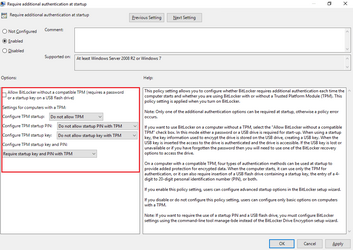
I have done tests in gpedit and it only works for me like the attached photo, and if this happens to me, when I start the system bitlocker appears and it asks me for the pin, if I turn off the computer and turn it on again and now it asks me to insert a usb memory where The recovery key was saved, every time I start and shut down the computer it asks me once for a pin and the next time for a USB flash drive and so on.


1032173.png
 

My Computer My Computer

At a glance

Windows 11
OS
Windows 11
if it has tmp and it is activated (in uefi it says security boot: enable .)
Secure Boot has absolutely nothing to do with the TPM. Having Secure Boot enabled in way indicates that the TPM is enabled nor does it even mean that a TPM is present in the system. Sorry :-)
 

My Computers My Computers

  • At a glance

    Win11 Pro 25H2 (RTM+)Intel i7-14650HX32 GBNo GPU - Built-in Intel Graphics
    OS
    Win11 Pro 25H2 (RTM+)
    Computer type
    PC/Desktop
    Manufacturer/Model
    Acemagic
    CPU
    Intel i7-14650HX
    Memory
    32 GB
    Graphics Card(s)
    No GPU - Built-in Intel Graphics
    Sound Card
    Integrated
    Monitor(s) Displays
    Varies as machine will often be moved to locations with different monitors
    Screen Resolution
    Varies
    Hard Drives
    1 x 1TB Gen 4 NVMe SSD
    PSU
    120W Power Brick
    Keyboard
    Corsair K70 Max RGB Magnetic Keyboard
    Mouse
    Logitech MX Master 3
    Internet Speed
    1Gb Up / 1 Gb Down
    Browser
    Edge
    Antivirus
    Windows Defender
  • At a glance

    Win11 Pro 25H2 (RTM+)Intel i7-1255U16 GBIntel Iris Xe Graphics
    Operating System
    Win11 Pro 25H2 (RTM+)
    Computer type
    Laptop
    Manufacturer/Model
    Lenovo ThinkBook 13x Gen 2
    CPU
    Intel i7-1255U
    Memory
    16 GB
    Graphics card(s)
    Intel Iris Xe Graphics
    Sound Card
    Realtek® ALC3306-CG codec
    Monitor(s) Displays
    13.3-inch IPS Display
    Screen Resolution
    WQXGA (2560 x 1600)
    Hard Drives
    2 TB 4 x 4 NVMe SSD
    PSU
    USB-C / Thunderbolt 4 Power / Charging
    Keyboard
    Backlit, spill resistant keyboard
    Mouse
    Buttonless Glass Precision Touchpad
    Internet Speed
    1Gb Up / 1Gb Down
    Browser
    Edge
    Antivirus
    Windows Defender
    Other Info
    WiFi 6e / Bluetooth 5.1 / Facial Recognition / Fingerprint Sensor / ToF (Time of Flight) Human Presence Sensor
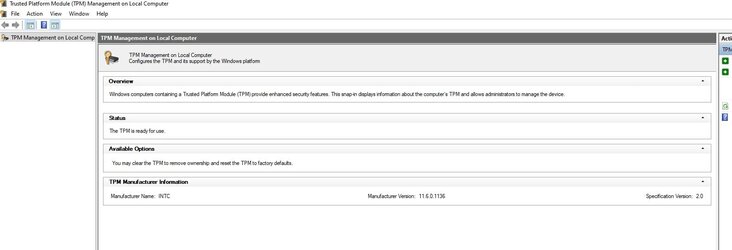
this is the tmp that i have

Untitled.jpg
 

My Computer My Computer

At a glance

Windows 11
OS
Windows 11

Latest Support Threads

Back
Top Bottom