Windows 11 BSODs during normal desktop use after clean reinstall (PAGE_FAULT_IN_NONPAGED_AREA, SYSTEM_SERVICE_EXCEPTION, dumps included)


cisco999

New member
Local time
1:14 AM
Posts
6
OS
windows 11
Hello everyone,
excuse my english i prefered chatgpt describing writing this over me

I've been troubleshooting a system that's been experiencing recurring BSODs for quite some time, and after exhausting the troubleshooting steps I could think of, I'm hoping to get some insight from people with more experience in WinDbg and kernel debugging.

System​

  • Windows 11 Pro 25H2 (Build 26200.x)
  • Intel Core i9-14900KS
  • ASUS ROG Strix Z790-E Gaming WiFi II
  • G.Skill Trident Z5 RGB 48GB (2×24GB) DDR5-8400
  • NVIDIA RTX 5080
  • Crucial T705 Gen5 NVMe SSD

Summary​

The crashes originally started before I reformatted Windows. Because the bugchecks and faulting modules kept changing, I performed a clean installation of Windows to rule out OS corruption.

Unfortunately, the same type of instability continues after the reinstall.

The BSODs are not tied to one specific activity. I've had crashes while gaming, during normal desktop use, and even shortly after boot with nothing significant running.

Besides the BSODs, Windows itself has been unstable:

  • Task Manager occasionally opens and immediately closes by itself.
  • Corsair iCUE crashes every 30 mins or less.
  • Google Chrome also crashes memory acess violation especially during video running on youtube
  • and every windows program almost
I'm mentioning these in case they're relevant to the overall picture.

Bugchecks observed​

Before reinstall:

  • MEMORY_MANAGEMENT
  • PAGE_FAULT_IN_NONPAGED_AREA
  • SYSTEM_SERVICE_EXCEPTION
  • KMODE_EXCEPTION_NOT_HANDLED
  • INTERRUPT_EXCEPTION_NOT_HANDLED
  • ATTEMPTED_EXECUTE_OF_NOEXECUTE_MEMORY
After reinstall:
  • Chrome crashes with STATUS_ACCESS_VIOLATION / memory access violation, especially while watching YouTube videos.
  • PAGE_FAULT_IN_NONPAGED_AREA
  • HYPERVISOR_ERROR

WinDbg​

Across different dumps, WinDbg has pointed to different Microsoft components, including:

  • ntoskrnl.exe
  • WdFilter.sys
  • Ntfs.sys
  • win32kbase.sys
Since the reported module changes from crash to crash, I'm unsure whether these are the true source of the problem or simply where Windows eventually detects the failure.

Troubleshooting already performed​

  • Clean Windows installation
  • BIOS updated
  • Latest chipset and GPU drivers installed
  • sfc /scannow completed successfully
  • Disabled XMP and currently running memory at default JEDEC settings
  • Ran the motherboard's built-in MemTest from BIOS after disabling XMP (no errors reported at default settings)
  • Collected multiple crash dumps and Event Viewer logs

Installed software that may be relevant​

Some software on the system installs kernel components or low-level drivers. I'm not suggesting any of these are responsible, but I'm listing them for completeness:

  • Aimware cheat
  • VMware
If there are other installed drivers you'd like me to list, I'm happy to provide them.

Files included​

I've attached mediafirelink MediaFire or
  • MSINFO32
  • System and Application Event Logs
  • driverquery.csv
  • systeminfo.txt
  • dxdiag.txt
  • WinDbg outputs
Thanks in advance for taking the time to look at it.
 
Windows Build/Version
Windows 11 Pro 25H2 (Build 26200.x)
Last edited:

My Computer My Computer

At a glance

windows 11
OS
windows 11
Computer type
PC/Desktop
Manufacturer/Model
asus

Please follow directions in the link above. @zbook will be the one to assist you as time permits.
As well, you need to fill out your system specs in your profile please.
 

My Computers My Computers

  • At a glance

    All Branches but ReleaseAMD Ryzen 7 7735HS 3200-4500 Mhz 8 cores x 232 GB DDR5Radeon Graphic / NVIDIA GeForce RTX 4060 8 GB...
    OS
    All Branches but Release
    Computer type
    Laptop
    Manufacturer/Model
    Acer Nitro ANV15-51
    CPU
    AMD Ryzen 7 7735HS 3200-4500 Mhz 8 cores x 2
    Motherboard
    Sportage_RBH
    Memory
    32 GB DDR5
    Graphics Card(s)
    Radeon Graphic / NVIDIA GeForce RTX 4060 8 GB GDDR6
    Sound Card
    AMD/Realtek(R) Audio
    Monitor(s) Displays
    Integrated Monitor (15.3"vis)
    Screen Resolution
    FHD 1920X1080 16:9 144Hz
    Hard Drives
    KINGSTON OM8SEP4512Q-AA 1TB
    Western Digital 256GB
    PSU
    19V DC 6.32 A 120 W
    Cooling
    Dual Fans
    Mouse
    MS Bluetooth
    Internet Speed
    Fiber 1GB Cox -us & 1GB Orange-fr
    Browser
    Edge Canary- Firefox Nightly-Chrome Dev-Chrome Dev
    Antivirus
    Windows Defender
  • At a glance

    Windows 11 BetaAMD A9-94208 GB of DDR4AMD Radeon R5
    Operating System
    Windows 11 Beta
    Computer type
    Laptop
    Manufacturer/Model
    Asus X751BP
    CPU
    AMD A9-9420
    Memory
    8 GB of DDR4
    Graphics card(s)
    AMD Radeon R5
    Screen Resolution
    1600x900
    Hard Drives
    Seagate 1 TB
Instead of mediafire please use one of these for share links for the V2 log collector:

Google drive
Drop box
www.GoFile.io
 

My Computer My Computer

At a glance

Windows 10Intel(R) Core(TM) i7-4800MQ CPU @ 2.70GHz16 GB Total: Manufacturer : Samsung MemoryTyp...NVIDIA Quadro K3100M; Intel(R) HD Graphics 4600
OS
Windows 10
Computer type
Laptop
Manufacturer/Model
HP
CPU
Intel(R) Core(TM) i7-4800MQ CPU @ 2.70GHz
Motherboard
Product : 190A Version : KBC Version 94.56
Memory
16 GB Total: Manufacturer : Samsung MemoryType : DDR3 FormFactor : SODIMM Capacity : 8GB Speed : 1600
Graphics Card(s)
NVIDIA Quadro K3100M; Intel(R) HD Graphics 4600
Sound Card
IDT High Definition Audio CODEC; PNP Device ID HDAUDIO\FUNC_01&VEN_111D&DEV_76E0
Hard Drives
Model Hitachi HTS727575A9E364
Antivirus
Microsoft Defender
Other Info
Mobile Workstation
Please run the V2 log collector > post a share link into the newest post


My Computer My Computer

At a glance

Windows 10Intel(R) Core(TM) i7-4800MQ CPU @ 2.70GHz16 GB Total: Manufacturer : Samsung MemoryTyp...NVIDIA Quadro K3100M; Intel(R) HD Graphics 4600
OS
Windows 10
Computer type
Laptop
Manufacturer/Model
HP
CPU
Intel(R) Core(TM) i7-4800MQ CPU @ 2.70GHz
Motherboard
Product : 190A Version : KBC Version 94.56
Memory
16 GB Total: Manufacturer : Samsung MemoryType : DDR3 FormFactor : SODIMM Capacity : 8GB Speed : 1600
Graphics Card(s)
NVIDIA Quadro K3100M; Intel(R) HD Graphics 4600
Sound Card
IDT High Definition Audio CODEC; PNP Device ID HDAUDIO\FUNC_01&VEN_111D&DEV_76E0
Hard Drives
Model Hitachi HTS727575A9E364
Antivirus
Microsoft Defender
Other Info
Mobile Workstation
Please perform the following steps:


1) Add WMIC:

Code:
DISM /Online /Add-Capability /CapabilityName:WMIC~~~~


2) Run Tuneup plus > post a share link


3) The BIOS 2001 (2025/03/07)

Upgrade the BIOS: 2001 > 2107 (2025/12/15)


4) The installed RAM: G Skill: F5-8400J4052G24G

Swap test the installed RAM with RAM displayed on the Qualified Vendor List (QVL)


My Computer My Computer

At a glance

Windows 10Intel(R) Core(TM) i7-4800MQ CPU @ 2.70GHz16 GB Total: Manufacturer : Samsung MemoryTyp...NVIDIA Quadro K3100M; Intel(R) HD Graphics 4600
OS
Windows 10
Computer type
Laptop
Manufacturer/Model
HP
CPU
Intel(R) Core(TM) i7-4800MQ CPU @ 2.70GHz
Motherboard
Product : 190A Version : KBC Version 94.56
Memory
16 GB Total: Manufacturer : Samsung MemoryType : DDR3 FormFactor : SODIMM Capacity : 8GB Speed : 1600
Graphics Card(s)
NVIDIA Quadro K3100M; Intel(R) HD Graphics 4600
Sound Card
IDT High Definition Audio CODEC; PNP Device ID HDAUDIO\FUNC_01&VEN_111D&DEV_76E0
Hard Drives
Model Hitachi HTS727575A9E364
Antivirus
Microsoft Defender
Other Info
Mobile Workstation
Additional information: Before installing WMIC, I attempted to run Tuneup Plus and the system crashed approximately 5 times during the collection process. The crashes included APC_INDEX_MISMATCH (0x00000001) DRIVER_OVERRAN_STACK_BUFFER. After that I installed WMIC successfully and will rerun Tuneup Plus.
Microsoft Windows 11 Pro Version 25H2 (OS Build 26200.8875)

==================================================================

Started on 23/07/2026 at 5:20:12.99

[SFC /ScanNow]

Beginning system scan. This process will take some time.

Results:

Windows Resource Protection did not find any integrity violations.

==================================================================

Started on 23/07/2026 at 5:21:05.90

[DISM /online /cleanup-image /ScanHealth]

Deployment Image Servicing and Management tool
Version: 10.0.26100.8737

Image Version: 10.0.26200.8875

No component store corruption detected.

The operation completed successfully.

==================================================================

Started on 23/07/2026 at 5:22:19.29

[DISM /online /cleanup-image /RestoreHealth]

Deployment Image Servicing and Management tool
Version: 10.0.26100.8737

Image Version: 10.0.26200.8875

The restore operation completed successfully.

The operation completed successfully.

==================================================================

The second "SFC /ScanNow" was skipped, as the first output the following:

Windows Resource Protection did not find any integrity violations.

==================================================================

Started on 23/07/2026 at 5:33:29.15

[ChkDsk /Scan]

The type of the file system is NTFS.

Stage 1: Examining basic file system structure ...
1360384 file records processed.
File verification completed.
Phase duration (File record verification): 4.13 seconds.
25333 large file records processed.
Phase duration (Orphan file record recovery): 6.27 milliseconds.
0 bad file records processed.
Phase duration (Bad file record checking): 0.06 milliseconds.

Stage 2: Examining file name linkage ...
456 reparse records processed.
1514880 index entries processed.
Index verification completed.
Phase duration (Index verification): 5.81 seconds.
0 unindexed files scanned.
Phase duration (Orphan reconnection): 754.98 milliseconds.
0 unindexed files recovered to lost and found.
Phase duration (Orphan recovery to lost and found): 0.08 milliseconds.
456 reparse records processed.
Phase duration (Reparse point and Object ID verification): 2.47 milliseconds.

Stage 3: Examining security descriptors ...
Security descriptor verification completed.
Phase duration (Security descriptor verification): 24.83 milliseconds.
77249 data files processed.
Phase duration (Data attribute verification): 0.03 milliseconds.
CHKDSK is verifying Usn Journal...
35077752 USN bytes processed.
Usn Journal verification completed.
Phase duration (USN journal verification): 26.67 milliseconds.

Windows has scanned the file system and found no problems.

No further action is required.

1952515071 KB total disk space.
1011893588 KB in 619423 files.
439308 KB in 77250 indexes.
0 KB in bad sectors.
1532751 KB in use by the system.
65536 KB occupied by the log file.
938649424 KB available on disk.

4096 bytes in each allocation unit.
488128767 total allocation units on disk.
234662356 allocation units available on disk.
Total duration: 10.76 seconds (10766 ms).

==================================================================

Started on 23/07/2026 at 5:33:46.07

AutoReboot

TRUE

==================================================================

[Set AutoReboot = False]

Updating property(s) of '\\DESKTOP-ET6RLN8\ROOT\CIMV2:Win32_OSRecoveryConfiguration.Name="Microsoft Windows 11 Pro|C:\\WINDOWS|\\Device\\Harddisk2\\Partition3"'
Property(s) update successful.
==================================================================

AutoReboot

FALSE

==================================================================

DebugInfoType

3

==================================================================

[Set DebugInfoType = 7]

Updating property(s) of '\\DESKTOP-ET6RLN8\ROOT\CIMV2:Win32_OSRecoveryConfiguration.Name="Microsoft Windows 11 Pro|C:\\WINDOWS|\\Device\\Harddisk2\\Partition3"'
Property(s) update successful.
==================================================================

DebugInfoType

7

==================================================================

[WMIC PageFile list]

AllocatedBaseSize=3072
CurrentUsage=0
Description=C:\pagefile.sys
InstallDate=20260723045542.970925+180
Name=C:\pagefile.sys
PeakUsage=0
Status=
TempPageFile=FALSE

==================================================================

AutomaticManagedPagefile

TRUE

==================================================================

[Set AutomaticManagedPagefile = True]

Updating property(s) of '\\DESKTOP-ET6RLN8\ROOT\CIMV2:Win32_ComputerSystem.Name="DESKTOP-ET6RLN8"'
Property(s) update successful.
==================================================================

AutomaticManagedPagefile

TRUE

==================================================================

[BcdEdit /enum {badmemory}]

RAM Defects
-----------
identifier {badmemory}

==================================================================

Finished on 23/07/2026 at 5:33:47.10
It took 13 minutes and 35 seconds to complete the operations.


im gnna go update my bios right nowand test
regarding Swap test the installed RAM with RAM displayed on the Qualified Vendor List (QVL) i dont have any sper motherboard to test my rams eventho i ran the memetest on bios ran for 7 hrs 0 prob ,
I have one suspicion: the CS2 software Aimware may be interfering with a kernel-level driver or causing kernel instability.

What confuses me is that the system was completely stable for around 5–6 months while using the same software and hardware configuration. The crashes only started recently, so I'm not sure why it would suddenly become a problem now.

Could a Windows update, BIOS update, driver change, or security feature change cause a previously stable kernel-level application/driver to start causing BSODs?
i was running xmp2 7000mhz when the issues started occuring and then i turned xmp off and still occured ,
I also want to mention that the Windows reinstall may not have been a completely clean format.

I used a fresh Windows image and the installation felt much faster afterward, but I noticed that my old games folder was still present on the C: drive after reinstalling Windows. Because of this, I'm not 100% sure whether everything from the previous installation was completely removed.

Could leftover files, drivers, or old software components from the previous installation still affect the current Windows installation?
 

My Computer My Computer

At a glance

windows 11
OS
windows 11
Computer type
PC/Desktop
Manufacturer/Model
asus

My Computer My Computer

At a glance

Windows 10Intel(R) Core(TM) i7-4800MQ CPU @ 2.70GHz16 GB Total: Manufacturer : Samsung MemoryTyp...NVIDIA Quadro K3100M; Intel(R) HD Graphics 4600
OS
Windows 10
Computer type
Laptop
Manufacturer/Model
HP
CPU
Intel(R) Core(TM) i7-4800MQ CPU @ 2.70GHz
Motherboard
Product : 190A Version : KBC Version 94.56
Memory
16 GB Total: Manufacturer : Samsung MemoryType : DDR3 FormFactor : SODIMM Capacity : 8GB Speed : 1600
Graphics Card(s)
NVIDIA Quadro K3100M; Intel(R) HD Graphics 4600
Sound Card
IDT High Definition Audio CODEC; PNP Device ID HDAUDIO\FUNC_01&VEN_111D&DEV_76E0
Hard Drives
Model Hitachi HTS727575A9E364
Antivirus
Microsoft Defender
Other Info
Mobile Workstation
ive just updated my bios , the crashes maintan , i encoutered these 2 dmp upon the freshly updated bios
PAGE_FAULT_IN_NONPAGED_AREA (50)
ATTEMPTED_EXECUTE_OF_NOEXECUTE_MEMORY
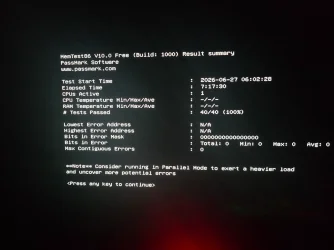
regarding the memetest ran it last week , result in attachment
 

Attachments

  • meme.webp
    meme.webp
    261.5 KB · Views: 1

My Computer My Computer

At a glance

windows 11
OS
windows 11
Computer type
PC/Desktop
Manufacturer/Model
asus
Please swap test the RAM with QVL RAM.

For any new BSOD during the swap testing post a new V2 share link into the newest post.


The Passmark software image did not display the RAM tested.

Typically there is a report with the RAM tested.

The Memtest86+ software will display the RAM tested.
 

My Computer My Computer

At a glance

Windows 10Intel(R) Core(TM) i7-4800MQ CPU @ 2.70GHz16 GB Total: Manufacturer : Samsung MemoryTyp...NVIDIA Quadro K3100M; Intel(R) HD Graphics 4600
OS
Windows 10
Computer type
Laptop
Manufacturer/Model
HP
CPU
Intel(R) Core(TM) i7-4800MQ CPU @ 2.70GHz
Motherboard
Product : 190A Version : KBC Version 94.56
Memory
16 GB Total: Manufacturer : Samsung MemoryType : DDR3 FormFactor : SODIMM Capacity : 8GB Speed : 1600
Graphics Card(s)
NVIDIA Quadro K3100M; Intel(R) HD Graphics 4600
Sound Card
IDT High Definition Audio CODEC; PNP Device ID HDAUDIO\FUNC_01&VEN_111D&DEV_76E0
Hard Drives
Model Hitachi HTS727575A9E364
Antivirus
Microsoft Defender
Other Info
Mobile Workstation
Most likely a memory issue. Updated Bios and memory test.
 

My Computer My Computer

At a glance

Ryzen 5800X64GB GSkill DDR4MSI RX6750 XT OC
Computer type
PC/Desktop
Manufacturer/Model
MSI
CPU
Ryzen 5800X
Motherboard
MSI X570S Carbon Pro
Memory
64GB GSkill DDR4
Graphics Card(s)
MSI RX6750 XT OC
Monitor(s) Displays
Dell U2711
Screen Resolution
1920 x 1080
Hard Drives
Nexstorage NN4LE 2TB2C
PSU
850 watt
Cooling
Corsair H100i
after bios update ive started encountering compete full pc freez mouse freez led lights of all fans stop responding and change color
SYSTEM_SERVICE_EXCEPTION
DRIVER_OVERRAN_STACK_BUFFER

The attached MemTest86 screenshot was performed with my G.Skill F5-8400J4052G24G kit running at JEDEC/default settings after disabling XMP, and it completed 40/40 tests with 0 errors.


I understand your recommendation to swap test with QVL RAM. At the moment I don't have access to another DDR5 kit, but I'll try to borrow one if possible and post a new V2 log if I encounter further BSODs.
 

My Computer My Computer

At a glance

windows 11
OS
windows 11
Computer type
PC/Desktop
Manufacturer/Model
asus
Did you know about the vmin‑shift issue affecting Intel 13th and 14th‑gen CPUs?

You’re using a high‑risk i9‑14900KS, and even after a clean OS reinstall and reverting your RAM to default JEDEC settings, you’re still getting random memory‑related BSODs.
At this point, the most likely cause is that your CPU has degraded due to vmin‑shift.

Remember, the CPU itself contains memory (L1/L2/L3 cache).
That’s why you can still get RAM‑related BSODs even if your DIMMs pass MemTest86 without errors.

I strongly recommend testing with another 12th–14th gen CPU — even a cheap one — before spending more time troubleshooting.
If all the issues disappear after swapping CPUs, you should RMA your 14900KS.

Intel provides extended warranty coverage, and your 14900KS should be eligible for replacement (if you have purchased as brand new).
Warranty Policy for Intel® Boxed and Tray Processors
 

My Computer My Computer

At a glance

Windows 11Intel Core Ultra 7 265KF32GBx2 DDR5-6400 CUDIMM (SK Hynix Genuine)SAPPHIRE PULSE Radeon RX 9070 GAMING 16GB
OS
Windows 11
Computer type
PC/Desktop
Manufacturer/Model
DIY
CPU
Intel Core Ultra 7 265KF
Motherboard
MSI PRO Z890-A WIFI
Memory
32GBx2 DDR5-6400 CUDIMM (SK Hynix Genuine)
Graphics Card(s)
SAPPHIRE PULSE Radeon RX 9070 GAMING 16GB
Monitor(s) Displays
Alienware 34 AW3425DWM
Screen Resolution
3440x1440
Hard Drives
HIKSEMI FUTURE Gen4 NVMe 2TBx2 (Intel VMD RAID1)
PSU
SUPERFLOWER LEADEX VII PLATINUM PRO 1000W WT
Case
Fractal Design North TG
Cooling
CPS RZ620
Keyboard
RealForce R3SA11
Whichever hardware component(s) is/are available can be swap tested (QVL RAM or CPU).
 

My Computer My Computer

At a glance

Windows 10Intel(R) Core(TM) i7-4800MQ CPU @ 2.70GHz16 GB Total: Manufacturer : Samsung MemoryTyp...NVIDIA Quadro K3100M; Intel(R) HD Graphics 4600
OS
Windows 10
Computer type
Laptop
Manufacturer/Model
HP
CPU
Intel(R) Core(TM) i7-4800MQ CPU @ 2.70GHz
Motherboard
Product : 190A Version : KBC Version 94.56
Memory
16 GB Total: Manufacturer : Samsung MemoryType : DDR3 FormFactor : SODIMM Capacity : 8GB Speed : 1600
Graphics Card(s)
NVIDIA Quadro K3100M; Intel(R) HD Graphics 4600
Sound Card
IDT High Definition Audio CODEC; PNP Device ID HDAUDIO\FUNC_01&VEN_111D&DEV_76E0
Hard Drives
Model Hitachi HTS727575A9E364
Antivirus
Microsoft Defender
Other Info
Mobile Workstation
Back
Top Bottom