Windows 11 CBS 25H2


EB2XR6

Active member
Member
VIP
Local time
10:46 PM
Posts
546
OS
Windows 11
Hi I keep seeing this group of messages in the CBS

Skip FODs not currently installed: Microsoft-Windows-Client-LanguagePack-Package~31bf3856ad364e35~amd64~en-US~10.0.26100.1742, state: Staged
Skip FODs not currently installed: Microsoft-Windows-LanguageFeatures-TextToSpeech-en-us-Package~31bf3856ad364e35~amd64~~10.0.26100.1742, state: Staged
Skip FODs not currently installed: Microsoft-Windows-LanguageFeatures-Speech-en-us-Package~31bf3856ad364e35~amd64~~10.0.26100.1742, state: Staged
Skip FODs not currently installed: Microsoft-Windows-LanguageFeatures-OCR-en-us-Package~31bf3856ad364e35~amd64~~10.0.26100.1742, state: Staged
Skip FODs not currently installed: Microsoft-Windows-LanguageFeatures-OCR-en-gb-Package~31bf3856ad364e35~amd64~~10.0.26100.1, state: Staged
Skip FODs not currently installed: Microsoft-Windows-LanguageFeatures-Handwriting-en-us-Package~31bf3856ad364e35~amd64~~10.0.26100.1742, state: Staged
Skip FODs not currently installed: Microsoft-Windows-LanguageFeatures-Basic-en-us-Package~31bf3856ad364e35~amd64~~10.0.26100.1742, state: Staged
Skip FODs not currently installed: Microsoft-Windows-LanguageFeatures-Basic-en-gb-Package~31bf3856ad364e35~amd64~~10.0.26100.1, state: Staged
Skip FODs not currently installed: Microsoft-Windows-LanguageFeatures-Basic-en-au-Package~31bf3856ad364e35~amd64~~10.0.26100.1, state: Staged
Skip FODs not currently installed: Microsoft-Windows-Client-LanguagePack-Package~31bf3856ad364e35~amd64~en-US~10.0.26100.1742, state: Staged

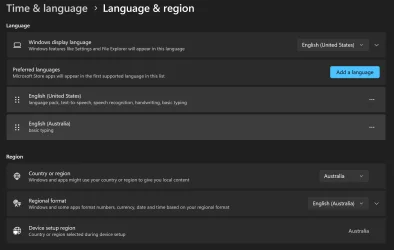
I am in Australia, FOD's I believe is Feature on Demand.
The Windows install was done from a US ISO with Australia as the Location.
I am wondering why Windows keeps repeating this routine?
Have Ran as Admin DISM /Online /Cleanup-Image /CheckHealth, DISM /Online /Cleanup-Image /ScanHealth, DISM /Online /Cleanup-Image /RestoreHealth and SFC /Scannow with no errors.

Regards EB2XR6.
 

Attachments
  • Lanaguge & Regions.webp
    Lanaguge & Regions.webp
    82.7 KB · Views: 1
Last edited:

My Computer

System One

  • OS
    Windows 11
    Computer type
    PC/Desktop
    Manufacturer/Model
    Generic
    CPU
    AMD Ryzen 8700G
    Motherboard
    Gigabyte B650 UD AC
    Memory
    64 GB
    Graphics Card(s)
    Onboard
    Sound Card
    Onboard
    Monitor(s) Displays
    Del U2723QE
    Screen Resolution
    3840 x 2160
    Hard Drives
    Corsiar MP600 1TB
    PSU
    Silverstone 750 GOLD
    Case
    Silverstone FARA 513

Have Ran as Admin DISM /Online /Cleanup-Image /CheckHealth, DISM /Online /Cleanup-Image /ScanHealth, DISM /Online /Cleanup-Image /RestoreHealth and SFC /Scannow with no errors.
If everything is okay then why are you concerned about what it says in the log? Don't look. You will be happier not looking for trouble. Never trouble trouble until trouble troubles you.
 

My Computers

System One System Two

  • OS
    Windows 11 Pro
    Computer type
    PC/Desktop
    Manufacturer/Model
    GMKtec K11
    CPU
    AMD Ryzen 9 8945HS
    Memory
    32GB DDR5 SO-DIMM
    Graphics Card(s)
    Integrated AMD Radeon 780M (4.00 GHz)
    Monitor(s) Displays
    Benq 2250HM
    Screen Resolution
    1920 x 1080
    Hard Drives
    1 TB PCIe 4.0 NVMe M.2 SSD
  • Operating System
    Windows 11 Home
    Computer type
    Laptop
    Manufacturer/Model
    ASUS Zenbook 14 OLED 14" Laptop - UX3405CA-QL192W
    CPU
    Intel® Core™ Ultra 7 - 255H processor
    Memory
    16 GB LPDDR5 SDRAM
    Graphics card(s)
    Intel Arc 140T onboard graphics
    Screen Resolution
    1920 x 1200 (16:10 WUXGA resolution) OLED Touchscreen
    Hard Drives
    1TB SSD
As always "If it ain't broke -- don't fix it".

Cheers
jimbo
 

My Computer

System One

  • OS
    Windows XP,11 Linux Fedora Rawhide pre-release 45
    Computer type
    PC/Desktop
    CPU
    2 X Intel i7
    Screen Resolution
    4KUHD X 2
If everything is okay then why are you concerned about what it says in the log? Don't look. You will be happier not looking for trouble. Never trouble trouble until trouble troubles you.
As always "If it ain't broke -- don't fix it".

Cheers
jimbo
Thank you for the replies.
Windows 11 is repeating this operation constantly and I was hoping someone may be to explain why?
I have had a number of issues with Windows 11, the last one happened during a repair install for a reason I have no idea why, a second language version of Micrsoft 365 was installed, The ENG-US version installed and after the repair the ENG-GB was also installed.
 

My Computer

System One

  • OS
    Windows 11
    Computer type
    PC/Desktop
    Manufacturer/Model
    Generic
    CPU
    AMD Ryzen 8700G
    Motherboard
    Gigabyte B650 UD AC
    Memory
    64 GB
    Graphics Card(s)
    Onboard
    Sound Card
    Onboard
    Monitor(s) Displays
    Del U2723QE
    Screen Resolution
    3840 x 2160
    Hard Drives
    Corsiar MP600 1TB
    PSU
    Silverstone 750 GOLD
    Case
    Silverstone FARA 513
Thank you for the replies.
Windows 11 is repeating this operation constantly and I was hoping someone may be to explain why?
I have had a number of issues with Windows 11, the last one happened during a repair install for a reason I have no idea why, a second language version of Micrsoft 365 was installed, The ENG-US version installed and after th365e repair the ENG-GB was also installed.
Open a MS365 app (I used Outlook below) and navigate thus File => Options => Language

1.webp

and remove those you don't require.
 

My Computer

System One

  • OS
    Windows 11 Pro 25H2 (Build 26200.8728)
    Computer type
    PC/Desktop
    Manufacturer/Model
    Dell Pro Max Tower T2 FCT2250
    CPU
    Intel Core Ultra 9 285 5.6 GHz
    Motherboard
    64-bit operating system, x64-based processor
    Memory
    32.00 GB
    Graphics Card(s)
    Intel Integrated Graphics (128 MB)
    Sound Card
    Realtek Audio
    Monitor(s) Displays
    Dell P2714H Monitor
    Screen Resolution
    1920 x 1080
    Hard Drives
    1 x 512GB M.2 XG10d SED KIOXIA PCIe solid state drive (Internal)
    1 x 2TB Seagate ST2000DM008-2UB102 HDD (Internal)
    1 x 1TB Seagate STGX4000400 External HDD
    1 x 4TB Seagate STGX4000400 External HDD
    1 x 6TB WD Elements AE 2689 External HDD
    PSU
    500 Watts
    Cooling
    Air
    Keyboard
    Microsoft Wired Keyboard 600
    Mouse
    Microsoft USB Basic Optical Mouse v2.0
    Browser
    Firefox
    Antivirus
    Windows Defender + Malwarebytes Premium
    Other Info
    BaseBoard Manufacturer Dell Inc.
    BaseBoard Product 022RY57
    BaseBoard Version A01
There's nothing wrong with CBS. When you install a Windows image, it has a number of "stub" packages to remind itself which FOD's exist for your Windows edition. Staged means DISM knows the feature exists, but it's not currently enabled.

According to you, the base install was en-US edition and en-GB was applied over it as a repair install. Now your Windows knows about en-US, en-GB and en-AU language FOD's. Since you now have "merged" image, it's safer to leave the en-US components in place.

A common mistake is for someone in Commonwealth country using the en-US ISO instead of the en-GB ("English International") edition.
 

My Computer

System One

  • OS
    Windows 7
There's nothing wrong with CBS. When you install a Windows image, it has a number of "stub" packages to remind itself which FOD's exist for your Windows edition. Staged means DISM knows the feature exists, but it's not currently enabled.

According to you, the base install was en-US edition and en-GB was applied over it as a repair install. Now your Windows knows about en-US, en-GB and en-AU language FOD's. Since you now have "merged" image, it's safer to leave the en-US components in place.

A common mistake is for someone in Commonwealth country using the en-US ISO instead of the en-GB ("English International") edition.
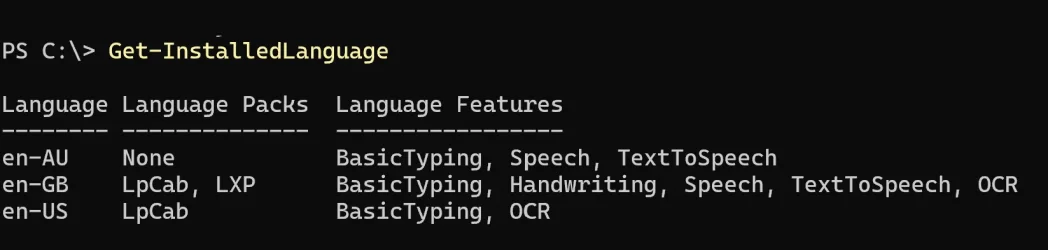
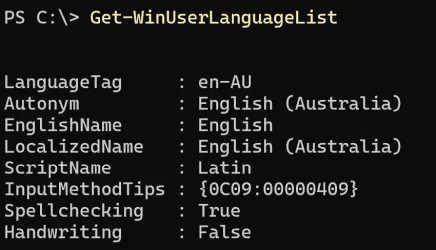
Thank you Garlin, I wiped the Hard Drive and reinstalled using the en-GB ISO. Australia uses a US-keybaord layout there is 3 Languages installed to vaying degrees,
 

My Computer

System One

  • OS
    Windows 11
    Computer type
    PC/Desktop
    Manufacturer/Model
    Generic
    CPU
    AMD Ryzen 8700G
    Motherboard
    Gigabyte B650 UD AC
    Memory
    64 GB
    Graphics Card(s)
    Onboard
    Sound Card
    Onboard
    Monitor(s) Displays
    Del U2723QE
    Screen Resolution
    3840 x 2160
    Hard Drives
    Corsiar MP600 1TB
    PSU
    Silverstone 750 GOLD
    Case
    Silverstone FARA 513
Thank you Garlin, I wiped the Hard Drive and reinstalled using the en-GB ISO. Australia uses a US-keybaord layout there is 3 Languages installed to vaying degrees,
Further to my reply.
The Australian Govt website recommends using US International Keyboard Settings however when I do, the " ' characters do not display on Screen until I type the next character, however when using the US Keyboard setting " ' display when typed.
I did some reseaerch on the " ' are a known issue with the US International Keyboard Setting.
 

Attachments

  • Installed Langauges.webp
    Installed Langauges.webp
    31.4 KB · Views: 2
  • Language List.webp
    Language List.webp
    33.3 KB · Views: 2
Last edited:

My Computer

System One

  • OS
    Windows 11
    Computer type
    PC/Desktop
    Manufacturer/Model
    Generic
    CPU
    AMD Ryzen 8700G
    Motherboard
    Gigabyte B650 UD AC
    Memory
    64 GB
    Graphics Card(s)
    Onboard
    Sound Card
    Onboard
    Monitor(s) Displays
    Del U2723QE
    Screen Resolution
    3840 x 2160
    Hard Drives
    Corsiar MP600 1TB
    PSU
    Silverstone 750 GOLD
    Case
    Silverstone FARA 513
Further to my reply.
The Australian Govt website recommends using US International Keyboard Settings however when I do, the " ' characters do not display on Screen until I type the next character, however when using the US Keyboard setting " ' display when typed.
I did some reseaerch on the " ' are a known issue with the US International Keyboard Setting.
I think US International keyboard layout has some dead keys in order to type accented Latin characters, similarly to Greek typing nothing when you press the ; (next to L) as it is the Greek accent and waits to press the vowel in order to display the respective accented vowel. Why use that? Add the "regular" US keyboard and remove the US International.
 

My Computers

System One System Two

  • OS
    Windows 11 Pro 23H2 (5699), 25H2 (8655)
    Computer type
    Laptop
    Manufacturer/Model
    Acer Extensa 5630EZ
    CPU
    Mobile DualCore Intel Core 2 Duo T7250, 2000 MHz
    Motherboard
    Acer Extensa 5630
    Memory
    4GB
    Graphics Card(s)
    Mobile Intel(R) GMA 4500M (Mobile 4 series)
    Sound Card
    Realtek ALC268 @ Intel 82801IB ICH9 - High Definition Audio Controller
    Monitor(s) Displays
    1
    Screen Resolution
    1280x800
    Hard Drives
    Samsung SSD 850 EVO 250GB SATA Device (250 GB, SATA-III)
    Internet Speed
    VDSL 50 Mbps
    Browser
    MICROSOFT EDGE
    Antivirus
    WINDOWS DEFENDER
    Other Info
    Legacy MBR installation, no TPM, no Secure Boot, no WDDM 2.0 graphics drivers, no SSE4.2, cannot get more unsupported ;) This is only my test laptop. I had installed Windows 11 here before upgrading my main PC. For my main PC I use everyday see my 2nd system specs.
  • Operating System
    Windows 11 Pro v25H2 (build 26200.8655)
    Computer type
    PC/Desktop
    Manufacturer/Model
    Custom-built PC
    CPU
    Intel Core-i7 3770 3.40GHz s1155 (3rd generation)
    Motherboard
    Asus P8H61 s1155 ATX
    Memory
    2x Kingston Hyper-X Blu 8GB DDR3-1600
    Graphics card(s)
    GIGABYTE GeForce RTX 3050 WINDFORCE OC V2 6GB (GV-N3050WF2OCV2-6GD)
    Sound Card
    Realtek HD audio (ALC887)
    Monitor(s) Displays
    Sony Bravia KDL-19L4000 19" LCD TV via VGA
    Screen Resolution
    1440x900 32-bit 60Hz
    Hard Drives
    WD Blue SA510 2.5 1000GB SSD as system disk, Western Digital Caviar Purple 4TB SATA III (WD40PURZ) as second
    PSU
    Thermaltake Litepower RGB 550W Full Wired
    Case
    SUPERCASE MIDI-TOWER
    Cooling
    Deepcool Gamma Archer CPU cooler, 1x 8cm fan at the back
    Keyboard
    Mitsumi 101-key PS/2
    Mouse
    Sunnyline OptiEye PS/2
    Internet Speed
    100Mbps
    Browser
    Microsoft Edge, Mozilla Firefox
    Antivirus
    Microsoft Windows Defender
    Other Info
    Legacy BIOS (MBR) installation, no TPM, no Secure Boot, WDDM 3.0 graphics drivers, WEI score 7.4
The preferred keyboard standard in Australia is the US International layout. But you don't need to install EN-US Windows in order to have it. Outside of the Windows Single Language edition, you can add extra language support (and keyboards) to an existing Windows.

The correct route would be to install EN-GB Windows, if you live in Australia, and then add the US Int'l keyboard after installation.

You don't install EN-US Windows simply to get an US keyboard. That's not how Windows designed support for additional locales.
 

My Computer

System One

  • OS
    Windows 7
I wiped the Hard Drive and reinstalled using the en-GB ISO
I know it's too late now but Bree posted a method of resolving a language mixture without a re-install - running a Repair install using a desired-language ISO of the currently-installed Windows version.
Convert en-US to en-GB in a Repair install using the same version ISO - Bree post #34 - ElevenForum
I would guess that an MSOffice repair procedure might well avoid having to reinstall that afterwards.
Repair an Office application - MSSupport


Denis
 

My Computer

System One

  • OS
    Windows 11 Home x64 Version 25H2 Build 26200.8037
I've got a long list of those Skip FOD listings in the cbs.log on my desktop PC which has a 3-week-old clean install of Windows 11 25H2. They don't read like they're error messages so I'm not going to worry about it. Most of the FOD listings are for features or devices I've disabled like the WiFi and the Sound Recorder.

It means afaik that a feature isn't installed.
 

My Computers

System One System Two

  • OS
    Windows 11 Pro 25H2
    Computer type
    PC/Desktop
    Manufacturer/Model
    Homebuilt
    CPU
    Intel Core i9 13900K
    Motherboard
    Asus ProArt Z790 Creator WiFi - Bios 3107
    Memory
    Corsair Dominator Platinum 64gb 5600MT/s DDR5 Dual Channel
    Graphics Card(s)
    Sapphire NITRO+ AMD Radeon RX 7900 XTX Vapor-X 24GB
    Sound Card
    External DAC: Cambridge Audio DACMagic200M - Headphone Amp: Topping L50
    Monitor(s) Displays
    Panasonic MX950 Mini LED 55" TV 120hz
    Screen Resolution
    3840 x 2160 120hz
    Hard Drives
    Samsung 980 Pro 2TB (OS)
    Samsung 980 Pro 1TB (Files)
    Lexar NZ790 4TB
    LaCie d2 Professional 6TB external - USB 3.1
    Seagate Expansion 16TB external - USB 3.2
    Seagate One Touch 18TB external HD - USB 3.0
    PSU
    Corsair RM1200x Shift
    Case
    Corsair RGB Smart Case 5000x (white)
    Cooling
    Corsair iCue H150i Elite Capellix XT
    Keyboard
    Incase Ergonomic USB (Microsoft clone)
    Mouse
    Logitech MX Master 3S
    Internet Speed
    Fibre 900/500 Mbps
    Browser
    Microsoft Edge Chromium
    Antivirus
    Bitdefender Total Security
    Other Info
    AMD Radeon Software & Drivers 26.1.1
    Hasleo Backup Suite
    Dashlane password manager
    Kensington Verimark fingerprint reader
    Logitech Brio 4K webcam
    Orico 10-port powered USB 3.0 hub
  • Operating System
    Windows 11 Pro 25H2
    Computer type
    Laptop
    Manufacturer/Model
    Asus Vivobook X1605VA
    CPU
    Intel® Core™ i9-13900H
    Motherboard
    Asus X1605VA bios 309
    Memory
    32GB DDR4-3200 Dual channel
    Graphics card(s)
    *Intel Iris Xᵉ Graphics G7
    Sound Card
    Realtek | Intel SST Bluetooth & USB
    Monitor(s) Displays
    16.0-inch, WUXGA 16:10 aspect ratio, IPS-level Panel
    Screen Resolution
    1920 x 1200 60hz
    Hard Drives
    512GB M.2 NVMe™ PCIe® 3.0 SSD
    Mouse
    Logitech MX Ergo Trackball
    Antivirus
    Bitdefender Total Security
    Other Info
    720p Webcam
    WiFi & USB to ethernet
Back
Top Bottom