
Windows 11 constant micro accessing the HDD


Tonyeh

Member
Member
Local time
10:12 AM
Posts
10
OS
Windows 11
Hi,

I recently installed Windows 11 on a new HDD (not an SSD) and I've noticed that the disk is constantly being accessed. Not in a major way, just constant little accesses all of the time. The little blue light on the top of my PC case that indicates hard disk activity is flashing all of the time too when these little jabs are happening to the disk. I've never seen this before with either XP, 7, or 10.

Is there any way that I can stop Windows from constantly do this because it is very annoying. I can hear the disk being accessed continuously even though the Task Manager says that the disk hovers around 0% when idling

I've been thinking of getting an SSD for the OS for a more silent operation, but I'd still like to know if there's a way to just make Windows 11 stop doing this because I'm not too sure that I want an SSD to getting accessed all the time either.
 

My Computer

System One

  • OS
    Windows 11
    Computer type
    PC/Desktop
    Manufacturer/Model
    Intel
    CPU
    i7 4790K 4.00GHz (Devil's Canyon) Socket LGA 1150
    Motherboard
    Gigabyte z97x SLI
    Memory
    Corsair Vengeance Pro 32gb DDR3
    Graphics Card(s)
    MSI RTX 2060 6gb
    Sound Card
    Sound blaster 5.1
    Monitor(s) Displays
    Dell
    Screen Resolution
    1080p
    Hard Drives
    16tb Seagate Baracuda
    PSU
    Superflower Leadex Gold 1000w
    Case
    Bitfenix Shinobi ATX
    Cooling
    Raijintek Aidos Direct Contact CPU Cooler
Hi,

I'm not too sure that I want an SSD to getting accessed all the time either.
There is a difference of operation between reading and writing; on a SSD only writing will affect its longevity.
Please get an SSD for W11, you will be so much happier with the performance.
There are so many things running that are undetectable via task manager but the disk is indeed accessed constantly.
I am actually surprised that MS hasn't made it a 'recommended requirement'.

BTW, fill out your specs in your profile as RAM has a role to play as well.
 

My Computers

System One System Two

  • OS
    All Branches but Release
    Computer type
    Laptop
    Manufacturer/Model
    Acer Nitro ANV15-51
    CPU
    AMD Ryzen 7 7735HS 3200-4500 Mhz 8 cores x 2
    Motherboard
    Sportage_RBH
    Memory
    32 GB DDR5
    Graphics Card(s)
    Radeon Graphic / NVIDIA GeForce RTX 4060 8 GB GDDR6
    Sound Card
    AMD/Realtek(R) Audio
    Monitor(s) Displays
    Integrated Monitor (15.3"vis)
    Screen Resolution
    FHD 1920X1080 16:9 144Hz
    Hard Drives
    KINGSTON OM8SEP4512Q-AA 1TB
    Western Digital 256GB
    PSU
    19V DC 6.32 A 120 W
    Cooling
    Dual Fans
    Mouse
    MS Bluetooth
    Internet Speed
    Fiber 1GB Cox -us & 1GB Orange-fr
    Browser
    Edge Canary- Firefox Nightly-Chrome Dev-Chrome Dev
    Antivirus
    Windows Defender
  • Operating System
    Windows 11 Beta
    Computer type
    Laptop
    Manufacturer/Model
    Asus X751BP
    CPU
    AMD A9-9420
    Memory
    8 GB of DDR4
    Graphics card(s)
    AMD Radeon R5
    Screen Resolution
    1600x900
    Hard Drives
    Seagate 1 TB
I have an SSD and I have also noticed a large number of micro-accesses to the disk when the computer is not in use. I noticed this especially since I upgraded from 22H2 to 23H2. When I installed version 22H2, the light on the SSD barely illuminated. Since 23H2, usage is almost constant. I understand that when the computer is not in use, the disk is used for updates, optimizations, etc., but since 23H2 I find it very excessive.
 

My Computer

System One

  • OS
    Win 11 Pro 23H2
    Computer type
    PC/Desktop
    CPU
    13700K
    Motherboard
    MAG Z790 TOMAHAWK WIFI (7D91vHH - 0x12F)
    Memory
    32GB DDR5 Kingston Fury Renegade @6400
    Graphics Card(s)
    MSI GeForce RTX 4070 Ti Gaming X Slim White 12G
    Sound Card
    Creative Sound Blaster Z SE
    Monitor(s) Displays
    ASUS VA24DQ
    Hard Drives
    WD Black SN850X 2TB (main)
    SAMSUNG SSD 990 Pro 2TB
    WD Blue 1TB 7200rpm
    PSU
    Corsair RM1000x SHIFT
    Case
    DeepCool CH560 WH
    Cooling
    Noctua NH-D15S
    Keyboard
    Ducky One 3 Pro Nazca Line
    Mouse
    Logitech G403 HERO
SI neatly shows, what process is using I/O access.

capture_09282025_215853.webp

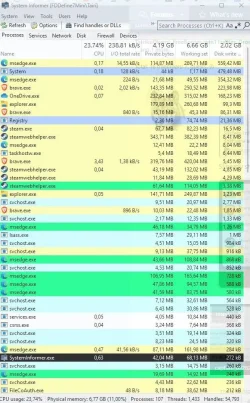
Also, which processes cause the most disk writes.

capture_09282025_220009.webp
 

My Computer

System One

  • OS
    Home26H2Can
    Computer type
    PC/Desktop
    CPU
    AMD Ryzen 5 8600G (07/24)
    Motherboard
    ASROCK B650M-HDV/M.2 (07/24) BIOS 4.21 AGESA ComboAM5 1.3.0.1 (04/26)
    Memory
    2x32GB Kingston FURY DDR5 5600 MHz CL36 @5200 CL36 (07/24)
    Graphics Card(s)
    ASROCK Radeon RX 6600 Challenger D 8G @48FPS (08/24)
    Sound Card
    Creative Sound BlasterX AE-5 Plus (05/24)
    Monitor(s) Displays
    24" Philips 24M1N3200ZS/00 (05/24)
    Screen Resolution
    1920×1080@165Hz via DP1.4
    Hard Drives
    Kingston KC3000 NVMe 2TB (05/24)
    ADATA XPG GAMMIX S11 Pro 512GB (07/19)
    PSU
    Seasonic Core GM 550 Gold (04/24)
    Case
    Fractal Design Define 7 Mini with 3x Noctua NF-P14s/12@555rpm (04/24)
    Cooling
    Noctua NH-U12S with Noctua NF-P12 (04/24)
    Keyboard
    HP Pavilion Wired Keyboard 300 (07/24) + Rabalux 76017 Parker (01/24)
    Mouse
    Logitech M330 Silent Plus (01/26)
    Internet Speed
    500/100 Mbps via RouterOS (05/21) & TCP Optimizer
    Browser
    Edge, Brave for YouTube, LibreWolf for FB
    Antivirus
    NextDNS blocking 1/3 Traffic
    Other Info
    Phone: Motorola Moto G86 (02/26)
    Backup: Hasleo Backup Suite (PreOS)
    Headphones: Sennheiser RS170 (09/10)
    Chair: Huzaro Force 4.4 Grey Mesh (05/24)
    Notifier: Xiaomi Mi Band 9 Milanese (10/24)
    FlexCore USB-C 3.2 Gen 1 (M) to LAN (F) (08/25)
My drive light intermittently blinks even when idle and it always has with every kind of drive I've used from hdd to ssd to nvme. Just because I'm not doing anything doesn't mean that windows or one of my applications isn't. Does mine blink more with 11 than it did with 10? I'm not sure because I've never worried about it and monitored the blinks.
 

My Computers

System One System Two

  • OS
    Windows 11 Pro 25H2
    Computer type
    PC/Desktop
    Manufacturer/Model
    Dell Optiplex 7080
    CPU
    i9-10900 10 core 20 threads
    Motherboard
    DELL 0J37VM
    Memory
    32 gb
    Graphics Card(s)
    none-Intel UHD Graphics 630
    Sound Card
    Integrated Realtek
    Monitor(s) Displays
    Benq 27
    Screen Resolution
    2560x1440
    Hard Drives
    2x1tb Solidigm m.2 nvme /External drives 512gb Samsung m.2 sata+2tb Kingston m2.nvme
    PSU
    500w
    Case
    MT
    Cooling
    Dell Premium
    Keyboard
    Logitech wired
    Mouse
    Logitech wireless
    Internet Speed
    so slow I'm too embarrassed to tell
    Browser
    #1 Edge #2 Firefox
    Antivirus
    Defender+MWB Premium
  • Operating System
    Windows 11 Pro 24H2 26200.8457
    Computer type
    PC/Desktop
    Manufacturer/Model
    Beelink Mini PC SER5
    CPU
    AMD Ryzen 7 6800U
    Memory
    32 gb
    Graphics card(s)
    integrated
    Sound Card
    integrated
    Monitor(s) Displays
    Benq 27
    Screen Resolution
    2560x1440
    Hard Drives
    1TB Crucial nvme
    Keyboard
    Logitech wired
    Mouse
    Logitech wireless
    Internet Speed
    still too embarrassed to tell
    Browser
    Firefox
    Antivirus
    Defender
    Other Info
    System 3 is non compliant Dell 9020 i7-4770/24gb ram Win11 PRO 26200.8457
See if placing the computer into clean boot makes a difference:


Other available tools: Systernals > process utilities

Autoruns
Process monitor
Process explorer
etc.
 

My Computer

System One

  • OS
    Windows 10
    Computer type
    Laptop
    Manufacturer/Model
    HP
    CPU
    Intel(R) Core(TM) i7-4800MQ CPU @ 2.70GHz
    Motherboard
    Product : 190A Version : KBC Version 94.56
    Memory
    16 GB Total: Manufacturer : Samsung MemoryType : DDR3 FormFactor : SODIMM Capacity : 8GB Speed : 1600
    Graphics Card(s)
    NVIDIA Quadro K3100M; Intel(R) HD Graphics 4600
    Sound Card
    IDT High Definition Audio CODEC; PNP Device ID HDAUDIO\FUNC_01&VEN_111D&DEV_76E0
    Hard Drives
    Model Hitachi HTS727575A9E364
    Antivirus
    Microsoft Defender
    Other Info
    Mobile Workstation
In my case, Firefox is what writes permanently to the SSD, according to System Informer. I don´t know why.
 

My Computer

System One

  • OS
    Windows 10
I don’t understand the problem? If the light flashing affects you, put tape over it. Otherwise, let Windows do what it has to do.
 

My Computers

System One System Two

  • OS
    Windows 11 Pro 25H2 Build 26200.8524
    Computer type
    PC/Desktop
    Manufacturer/Model
    Sin-built 2013
    CPU
    Intel(R) Core(TM) i7-4770K CPU @ 3.50GHz
    Motherboard
    ASUS ROG Maximus VI Formula
    Memory
    32.0 GB of I forget and the box is in storage.
    Graphics Card(s)
    Gigabyte nVidia GeForce GTX 1660 Super OC 6GB
    Sound Card
    Onboard thingy
    Monitor(s) Displays
    5 x LG 25MS500-B - 1 x 24MK430H-B - 1 x Wacom Pro 22" Touch Screen Tablet
    Screen Resolution
    All over the place
    Hard Drives
    Too many to list.
    OS on Samsung 1TB 870 QVO SATA
    PSU
    Silverstone 1500
    Case
    NZXT Phantom 820 Full-Tower Case
    Cooling
    Noctua NH-D15 Elite Class Dual Tower CPU Cooler / 6 x EziDIY 120mm / 2 x Corsair 140mm somethings / 1 x 140mm Thermaltake something / 2 x 200mm Corsair.
    Keyboard
    Corsair K95 / Logitech diNovo Edge Wireless
    Mouse
    Logitech: G402 / G502 / Mx Masters / Mx Air Cordless
    Internet Speed
    2000/500Mbps
    Browser
    All sorts
    Antivirus
    Kaspersky Premium
    Other Info
    ㅤㅤㅤㅤㅤㅤㅤㅤㅤㅤㅤㅤㅤㅤㅤㅤㅤㅤㅤㅤㅤㅤㅤㅤㅤㅤㅤㅤㅤㅤㅤㅤㅤㅤㅤㅤㅤㅤㅤㅤ⠀⠀⠀⠀⠀⠀⠀⠀⠀⠀
    TP-Link BE9300 WiFi 7 Bluetooth 5.4 (Archer TBE550E)
    TP-Link TX201 V1 2.5GB Lan

    Grandstream HT812 - VoIP
    ASUS DSL-AX82U - Mesh
    ASUS RT-AC68U - Mesh
    ASUS RT-BE88U Router

    Brother MFC-L2880DW Printer

    I’m on a horse.
  • Operating System
    Windows 11 Pro 25H2 Build 26200.8524
    Computer type
    Laptop
    Manufacturer/Model
    LENOVO Yoga 7 14IRL8 - 7i EVO OLED 14" Touchscreen i5 12 Core 16GB/512GB
    CPU
    Intel Core 12th Gen i5-1240P Processor (1.7 - 4.4GHz)
    Memory
    16GB LPDDR5 RAM
    Graphics card(s)
    Intel Iris Xe Graphics Processor
    Sound Card
    Optimized with Dolby Atmos®
    Screen Resolution
    QHD 2880 x 1800 OLED
    Hard Drives
    M.2 512GB
    Antivirus
    Defender / Malwarebytes
    Other Info
    …still on a horse.
  • Like
Reactions: OAT
Any machine I have with a disk activity light is active when Windows is booted, clearly it's normal.
 

My Computers

System One System Two

  • OS
    Win 11 Pro 25H2, Build 26200.8524
    Computer type
    PC/Desktop
    Manufacturer/Model
    Home Brew
    CPU
    Intel Core i5 14500
    Motherboard
    Gigabyte B760M G P WIFI
    Memory
    64GB DDR4
    Graphics Card(s)
    GeForce RTX 4060
    Sound Card
    Chipset Realtek
    Monitor(s) Displays
    LG 45" Ultragear, Acer 24" 1080p
    Screen Resolution
    5120x1440, 1920x1080
    Hard Drives
    Crucial P310 2TB 2280 PCIe Gen4 3D NAND NVMe M.2 SSD (O/S)
    Silicon Power 2TB US75 NVMe PCIe Gen4 M.2 2280 SSD (backup)
    Crucial BX500 2TB 3D NAND (2nd backup)
    Seagate 4TB Ironwolf, rotating HDD archive files
    External off-line backup Drives: 2 NVMe 4TB drives in external enclosures
    PSU
    Thermaltake Toughpower GF3 750W
    Case
    LIAN LI LANCOOL 216 E-ATX PC Case
    Cooling
    Lots of fans!
    Keyboard
    Microsoft Comfort Curve 2000
    Mouse
    Logitech G305
    Internet Speed
    Verizon FiOS 1GB
    Browser
    Firefox
    Antivirus
    Malware Bytes & Windows Defender Security
  • Operating System
    Win 11 Pro 25H2, Build 26200.8524
    Computer type
    PC/Desktop
    Manufacturer/Model
    Home Brew
    CPU
    Intel Core i5 14400
    Motherboard
    Gigabyte B760M DS3H AX
    Memory
    32GB DDR5
    Graphics card(s)
    Intel 700 Embedded GPU
    Sound Card
    Realtek Embedded
    Monitor(s) Displays
    27" HP 1080p
    Screen Resolution
    1920x1080
    Hard Drives
    Crucial P310 2TB 2280 PCIe Gen4 eD NAND PCIe SSD
    Samsung EVO 990 2TB NVMe Gen4 SSD
    Samsung 2TB SATA SSD
    PSU
    Thermaltake Smart BM3 650W
    Case
    Okinos Micro ATX Case
    Cooling
    Fans
    Keyboard
    Microsoft Comfort Curve 2000
    Mouse
    Logitech G305
    Internet Speed
    Verizon FiOS 1GB
    Browser
    Firefox
    Antivirus
    Malware Bytes & Windows Defender Security
  • Like
Reactions: OAT
My drive light intermittently blinks even when idle and it always has with every kind of drive I've used from hdd to ssd to nvme. Just because I'm not doing anything doesn't mean that windows or one of my applications isn't. Does mine blink more with 11 than it did with 10? I'm not sure because I've never worried about it and monitored the blinks.

Sure, but this is constantly and it's not the light that the issue, it's the noise from the HDD. It's all the time like a bird tapping at the window every few seconds.

Oddly enough, when the drive is under some load it's completely silent! ¯\_(ツ)_/¯

In any case I just bought an SSD. Can't be having that stupid noise going on all day. :-)
 
Last edited:

My Computer

System One

  • OS
    Windows 11
    Computer type
    PC/Desktop
    Manufacturer/Model
    Intel
    CPU
    i7 4790K 4.00GHz (Devil's Canyon) Socket LGA 1150
    Motherboard
    Gigabyte z97x SLI
    Memory
    Corsair Vengeance Pro 32gb DDR3
    Graphics Card(s)
    MSI RTX 2060 6gb
    Sound Card
    Sound blaster 5.1
    Monitor(s) Displays
    Dell
    Screen Resolution
    1080p
    Hard Drives
    16tb Seagate Baracuda
    PSU
    Superflower Leadex Gold 1000w
    Case
    Bitfenix Shinobi ATX
    Cooling
    Raijintek Aidos Direct Contact CPU Cooler
I don’t understand the problem? If the light flashing affects you, put tape over it. Otherwise, let Windows do what it has to do.
It's not the light. It's the noise.
 

My Computer

System One

  • OS
    Windows 11
    Computer type
    PC/Desktop
    Manufacturer/Model
    Intel
    CPU
    i7 4790K 4.00GHz (Devil's Canyon) Socket LGA 1150
    Motherboard
    Gigabyte z97x SLI
    Memory
    Corsair Vengeance Pro 32gb DDR3
    Graphics Card(s)
    MSI RTX 2060 6gb
    Sound Card
    Sound blaster 5.1
    Monitor(s) Displays
    Dell
    Screen Resolution
    1080p
    Hard Drives
    16tb Seagate Baracuda
    PSU
    Superflower Leadex Gold 1000w
    Case
    Bitfenix Shinobi ATX
    Cooling
    Raijintek Aidos Direct Contact CPU Cooler
Sure, but this is constantly and it's not the light that the issue, it's the noise from the HDD. It's all the time like a bird tapping at the window every few seconds.

Oddly enough, when the drive is under some load it's completely silent! ¯\_(ツ)_/¯

In any case I just bought an SSD. Can't be having that stupid noise going on all day. :-)
I have a 4TB Seagate IronWolf as a secondary backup in my system. The rotating memory is to give me a different media than the SSD backup drive, so I have two copies of everything on my primary system drives. Although I see the light flashing, the only logical disks being accessed appear to be the working system, none of the backup drives have any activity. I also don't hear anything from that disk.

The boot drive is the only one doing anything when I'm idle.

1759157354652.webp
 

My Computers

System One System Two

  • OS
    Win 11 Pro 25H2, Build 26200.8524
    Computer type
    PC/Desktop
    Manufacturer/Model
    Home Brew
    CPU
    Intel Core i5 14500
    Motherboard
    Gigabyte B760M G P WIFI
    Memory
    64GB DDR4
    Graphics Card(s)
    GeForce RTX 4060
    Sound Card
    Chipset Realtek
    Monitor(s) Displays
    LG 45" Ultragear, Acer 24" 1080p
    Screen Resolution
    5120x1440, 1920x1080
    Hard Drives
    Crucial P310 2TB 2280 PCIe Gen4 3D NAND NVMe M.2 SSD (O/S)
    Silicon Power 2TB US75 NVMe PCIe Gen4 M.2 2280 SSD (backup)
    Crucial BX500 2TB 3D NAND (2nd backup)
    Seagate 4TB Ironwolf, rotating HDD archive files
    External off-line backup Drives: 2 NVMe 4TB drives in external enclosures
    PSU
    Thermaltake Toughpower GF3 750W
    Case
    LIAN LI LANCOOL 216 E-ATX PC Case
    Cooling
    Lots of fans!
    Keyboard
    Microsoft Comfort Curve 2000
    Mouse
    Logitech G305
    Internet Speed
    Verizon FiOS 1GB
    Browser
    Firefox
    Antivirus
    Malware Bytes & Windows Defender Security
  • Operating System
    Win 11 Pro 25H2, Build 26200.8524
    Computer type
    PC/Desktop
    Manufacturer/Model
    Home Brew
    CPU
    Intel Core i5 14400
    Motherboard
    Gigabyte B760M DS3H AX
    Memory
    32GB DDR5
    Graphics card(s)
    Intel 700 Embedded GPU
    Sound Card
    Realtek Embedded
    Monitor(s) Displays
    27" HP 1080p
    Screen Resolution
    1920x1080
    Hard Drives
    Crucial P310 2TB 2280 PCIe Gen4 eD NAND PCIe SSD
    Samsung EVO 990 2TB NVMe Gen4 SSD
    Samsung 2TB SATA SSD
    PSU
    Thermaltake Smart BM3 650W
    Case
    Okinos Micro ATX Case
    Cooling
    Fans
    Keyboard
    Microsoft Comfort Curve 2000
    Mouse
    Logitech G305
    Internet Speed
    Verizon FiOS 1GB
    Browser
    Firefox
    Antivirus
    Malware Bytes & Windows Defender Security
So, I ended getting a 1TB SSD and still the HDD is getting these little accesses and spins every couple of seconds. There's not even any files on it?

Might try sending the HDD back to Amazon and see if I can't get a refund on it.

I can't have that stupid rattling going on all day.
 

My Computer

System One

  • OS
    Windows 11
    Computer type
    PC/Desktop
    Manufacturer/Model
    Intel
    CPU
    i7 4790K 4.00GHz (Devil's Canyon) Socket LGA 1150
    Motherboard
    Gigabyte z97x SLI
    Memory
    Corsair Vengeance Pro 32gb DDR3
    Graphics Card(s)
    MSI RTX 2060 6gb
    Sound Card
    Sound blaster 5.1
    Monitor(s) Displays
    Dell
    Screen Resolution
    1080p
    Hard Drives
    16tb Seagate Baracuda
    PSU
    Superflower Leadex Gold 1000w
    Case
    Bitfenix Shinobi ATX
    Cooling
    Raijintek Aidos Direct Contact CPU Cooler
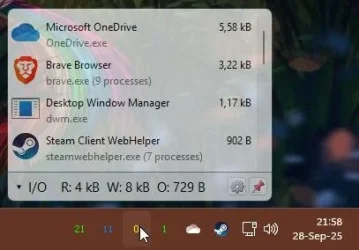
That's really odd, the only disk in my system that's getting any action is the boot disk. I can't imagine why any of the others are accessed regularly. I have one rotating memory disk in my system, it's a 4TB drive for backup on dissimilar media for insurance. It looks like this whenever I check it unless the backup is running.

___disk access.webp
 

My Computers

System One System Two

  • OS
    Win 11 Pro 25H2, Build 26200.8524
    Computer type
    PC/Desktop
    Manufacturer/Model
    Home Brew
    CPU
    Intel Core i5 14500
    Motherboard
    Gigabyte B760M G P WIFI
    Memory
    64GB DDR4
    Graphics Card(s)
    GeForce RTX 4060
    Sound Card
    Chipset Realtek
    Monitor(s) Displays
    LG 45" Ultragear, Acer 24" 1080p
    Screen Resolution
    5120x1440, 1920x1080
    Hard Drives
    Crucial P310 2TB 2280 PCIe Gen4 3D NAND NVMe M.2 SSD (O/S)
    Silicon Power 2TB US75 NVMe PCIe Gen4 M.2 2280 SSD (backup)
    Crucial BX500 2TB 3D NAND (2nd backup)
    Seagate 4TB Ironwolf, rotating HDD archive files
    External off-line backup Drives: 2 NVMe 4TB drives in external enclosures
    PSU
    Thermaltake Toughpower GF3 750W
    Case
    LIAN LI LANCOOL 216 E-ATX PC Case
    Cooling
    Lots of fans!
    Keyboard
    Microsoft Comfort Curve 2000
    Mouse
    Logitech G305
    Internet Speed
    Verizon FiOS 1GB
    Browser
    Firefox
    Antivirus
    Malware Bytes & Windows Defender Security
  • Operating System
    Win 11 Pro 25H2, Build 26200.8524
    Computer type
    PC/Desktop
    Manufacturer/Model
    Home Brew
    CPU
    Intel Core i5 14400
    Motherboard
    Gigabyte B760M DS3H AX
    Memory
    32GB DDR5
    Graphics card(s)
    Intel 700 Embedded GPU
    Sound Card
    Realtek Embedded
    Monitor(s) Displays
    27" HP 1080p
    Screen Resolution
    1920x1080
    Hard Drives
    Crucial P310 2TB 2280 PCIe Gen4 eD NAND PCIe SSD
    Samsung EVO 990 2TB NVMe Gen4 SSD
    Samsung 2TB SATA SSD
    PSU
    Thermaltake Smart BM3 650W
    Case
    Okinos Micro ATX Case
    Cooling
    Fans
    Keyboard
    Microsoft Comfort Curve 2000
    Mouse
    Logitech G305
    Internet Speed
    Verizon FiOS 1GB
    Browser
    Firefox
    Antivirus
    Malware Bytes & Windows Defender Security
The constant HDD access in W11 is usually caused by a combination of normal background services. When W11 is installed on a HDD it's more noticeable. You can reduce it by turning off Copilot, windows search and indexing if it's slowing your machine down.
 

My Computer

System One

  • OS
    Windows 11 22H2 Pro (X-lite Micro 11 version)
    Computer type
    Laptop
    Manufacturer/Model
    Dell/ Precision 7680
    CPU
    i7 13850HX (20 cores, 28 threads)
    Motherboard
    Dell
    Memory
    32GB DDR5
    Graphics Card(s)
    Intel UHD/ RTX 1000 ADA
    Sound Card
    Realtek
    Monitor(s) Displays
    4K UHD Touchscreen
    Screen Resolution
    3840 x 2400
    Hard Drives
    Samsung 512GB system drive
    WD Blue 1TB game drive
    PSU
    240W AC adapter, 1800W when docked
    Internet Speed
    1 gigabit symmetrical
    Browser
    Firefox, Librewolf
    Antivirus
    None. Manully configured so nobody except me can change any critical system files. (Don't ask how, it's probably against some rule somewhere)
The constant HDD access in W11 is usually caused by a combination of normal background services. When W11 is installed on a HDD it's more noticeable. You can reduce it by turning off Copilot, windows search and indexing if it's slowing your machine down.
Copilot has been deleted off the system. Windows 11 has been installed on the SSD. There's, literally, nothing on the HDD.
 

My Computer

System One

  • OS
    Windows 11
    Computer type
    PC/Desktop
    Manufacturer/Model
    Intel
    CPU
    i7 4790K 4.00GHz (Devil's Canyon) Socket LGA 1150
    Motherboard
    Gigabyte z97x SLI
    Memory
    Corsair Vengeance Pro 32gb DDR3
    Graphics Card(s)
    MSI RTX 2060 6gb
    Sound Card
    Sound blaster 5.1
    Monitor(s) Displays
    Dell
    Screen Resolution
    1080p
    Hard Drives
    16tb Seagate Baracuda
    PSU
    Superflower Leadex Gold 1000w
    Case
    Bitfenix Shinobi ATX
    Cooling
    Raijintek Aidos Direct Contact CPU Cooler
Copilot has been deleted off the system. Windows 11 has been installed on the SSD. There's, literally, nothing on the HDD.
In your case, I can't imagine what is accessing the drive, as I showed you, I have an active backup drive and there's no random access to it unless I'm doing a backup.
 

My Computers

System One System Two

  • OS
    Win 11 Pro 25H2, Build 26200.8524
    Computer type
    PC/Desktop
    Manufacturer/Model
    Home Brew
    CPU
    Intel Core i5 14500
    Motherboard
    Gigabyte B760M G P WIFI
    Memory
    64GB DDR4
    Graphics Card(s)
    GeForce RTX 4060
    Sound Card
    Chipset Realtek
    Monitor(s) Displays
    LG 45" Ultragear, Acer 24" 1080p
    Screen Resolution
    5120x1440, 1920x1080
    Hard Drives
    Crucial P310 2TB 2280 PCIe Gen4 3D NAND NVMe M.2 SSD (O/S)
    Silicon Power 2TB US75 NVMe PCIe Gen4 M.2 2280 SSD (backup)
    Crucial BX500 2TB 3D NAND (2nd backup)
    Seagate 4TB Ironwolf, rotating HDD archive files
    External off-line backup Drives: 2 NVMe 4TB drives in external enclosures
    PSU
    Thermaltake Toughpower GF3 750W
    Case
    LIAN LI LANCOOL 216 E-ATX PC Case
    Cooling
    Lots of fans!
    Keyboard
    Microsoft Comfort Curve 2000
    Mouse
    Logitech G305
    Internet Speed
    Verizon FiOS 1GB
    Browser
    Firefox
    Antivirus
    Malware Bytes & Windows Defender Security
  • Operating System
    Win 11 Pro 25H2, Build 26200.8524
    Computer type
    PC/Desktop
    Manufacturer/Model
    Home Brew
    CPU
    Intel Core i5 14400
    Motherboard
    Gigabyte B760M DS3H AX
    Memory
    32GB DDR5
    Graphics card(s)
    Intel 700 Embedded GPU
    Sound Card
    Realtek Embedded
    Monitor(s) Displays
    27" HP 1080p
    Screen Resolution
    1920x1080
    Hard Drives
    Crucial P310 2TB 2280 PCIe Gen4 eD NAND PCIe SSD
    Samsung EVO 990 2TB NVMe Gen4 SSD
    Samsung 2TB SATA SSD
    PSU
    Thermaltake Smart BM3 650W
    Case
    Okinos Micro ATX Case
    Cooling
    Fans
    Keyboard
    Microsoft Comfort Curve 2000
    Mouse
    Logitech G305
    Internet Speed
    Verizon FiOS 1GB
    Browser
    Firefox
    Antivirus
    Malware Bytes & Windows Defender Security
In your case, I can't imagine what is accessing the drive, as I showed you, I have an active backup drive and there's no random access to it unless I'm doing a backup.
I don't know either. But the fact is that it was getting these little micro accesses every few seconds which was causing it to shudder and rattle the drive cage.

In any case, I've packed it up and sent it back to Amazon.

Pity having to give up 16tb of storage. But there's no point in keeping it if it's going to drive me nuts.. I have my eye now on a Samsung 4tb SSD or a Sandisk 4tb SSD. Going to check to see which is the better drive.
 

My Computer

System One

  • OS
    Windows 11
    Computer type
    PC/Desktop
    Manufacturer/Model
    Intel
    CPU
    i7 4790K 4.00GHz (Devil's Canyon) Socket LGA 1150
    Motherboard
    Gigabyte z97x SLI
    Memory
    Corsair Vengeance Pro 32gb DDR3
    Graphics Card(s)
    MSI RTX 2060 6gb
    Sound Card
    Sound blaster 5.1
    Monitor(s) Displays
    Dell
    Screen Resolution
    1080p
    Hard Drives
    16tb Seagate Baracuda
    PSU
    Superflower Leadex Gold 1000w
    Case
    Bitfenix Shinobi ATX
    Cooling
    Raijintek Aidos Direct Contact CPU Cooler
All my Windows installs have had and have "irregular" (not like a car blinker) access to the HDDs.

Maybe the 16 TB disk was defective in the noise, but from the SMR technology I'd expect nearly anything.. Maybe the 16TB disk was parking its heads constantly???

All my desktops HDDs now are Seagates, ST1000DM003 or ST2000DM006. I've also used an ST1000DM010 until recently (it's perfectly fine, but I replaced it with the 2TB model, that I found very cheap as 2nd hand). All of them are silent under heavy linear work, under heavy random work, under light work or under no work (I must say that desktops have fans, that make a constant and in my case light noise in idle, maybe the HDDs or even the SSDs :p do some noise under this level). At shutting down these disks park their heads and they do a noticeable metallic sound, about some tenths or 1 second before the fans and the rest stop. These computers have 10 or 7, not 11


My W11 PC is a miniPC with an internal silent eMMC :p:p, and an external USB HDD.

At first this disk was a 500 GB "Maxone" from Amazon (the computer started with W10 but in a month or two it was upgraded to 11 through WU). At first its activity behaviour was normal, but from a given time on the LED started to have a regular pattern in idle intervals for no apparent reason, I mean like a car blinker but a more complicated pattern, the LED is constantly ON but it has a blinking interval every 2 seconds or so, that lasts about 1 second. If the disk's working the LED is solid ON. This began in the middle of the 22H2 age (I know it b/c I upgraded it in July 2023 and the "behaviour" started several months or about 1 year before).

I upgraded it to a 2TB Toshiba HDTB420EK3AA (the 500GB disk is fine and I didn't upgrade it for its activity pattern nor LED activity pattern). The stock behaviour of this new HDD was to be stopped until it has to read or write anything, then stops again. I found it adequate for a disk that has my data (which I access relatively seldom) in a smaller partition and my Windows disk images in a bigger partition, although I don't know if it's better to have it ON (spinning) constantly, some or many users think this way (I have my desktops HDDs constantly ON in powercfg etc since the stone age, possibly I heard it's better). But this stock behavior ended when I copied the data and images from the previous disk, and it began to do exactly the same as the previous disk.

As for noise, the heads of neither disk are audible. The Toshiba motor is slightly audible specially when switching on the computer if the ambient is silent, for the contrast. But in the middle of the session you forget it (unlike with the desktops fans). I cannot recall if the Maxone motor was audible.
 

My Computer

System One

  • OS
    Windows 11
    Manufacturer/Model
    MeLE Quieter 2Q (fanless miniPC)
    CPU
    Celeron J4125 (10th gen)
    Memory
    8GB DDR4
    Monitor(s) Displays
    Samsung SyncMaster T260
    Screen Resolution
    1920x1200
    Hard Drives
    256GB eMMC (Windows)
    2TB USB3 HDD Toshiba (Data)
Windows has been doing this ever since it was invented. It is just how Windows works. It annoys the crap out of me though.

Anyways...either learn to live with it or switch to another OS.
 

My Computers

System One System Two

  • OS
    Win 11 Pro 25H2 26200.8457 / Linux Mint 22.3
    Computer type
    Laptop
    Manufacturer/Model
    Lenovo A485
    CPU
    Ryzen 7 2700U Pro
    Motherboard
    Lenovo (WiFi/BT module upgraded to Intel Wireless-AC-9260)
    Memory
    32GB
    Graphics Card(s)
    iGPU Vega 10
    Sound Card
    Realtek
    Monitor(s) Displays
    14" FHD (built-in) + 14" Lenovo Thinkvision M14t (touch+pen) + 32" Asus PB328
    Screen Resolution
    FHD + FHD + 1440p
    Hard Drives
    Intel 660p m.2 nVME PCIe3.0 x2 512GB
    PSU
    125W(Dock)/65W(Travel Adapter)
    Keyboard
    Thinkpad / Logitech MX Keys
    Mouse
    Logitech MX Master 2S
    Internet Speed
    1/1Gbit
    Browser
    Firefox
    Antivirus
    Windows Defender
    Other Info
    SecureBoot: Enabled
    TPM2.0: Enabled
    AMD-V: Enabled
  • Operating System
    Win 11 Pro 25H2 26200.8521(RP)
    Computer type
    PC/Desktop
    Manufacturer/Model
    Custom
    CPU
    i7-7700k @4.8GHz
    Motherboard
    Asus PRIME Z270-A
    Memory
    32GB 2x16GB 2133MHz CL15
    Graphics card(s)
    EVGA GTX1080Ti FTW 11GB
    Sound Card
    Integrated
    Monitor(s) Displays
    32" 10-bit Asus PB328Q
    Screen Resolution
    WQHD 2560x1440
    Hard Drives
    512GB ADATA SX8000NP NVMe PCIe Gen 3 x4
    PSU
    850W
    Case
    Fractal Design Define 7
    Cooling
    Noctua NH-D15 chromax.black
    Keyboard
    Logitech MX Keys
    Mouse
    Logitech MX Master 2S
    Internet Speed
    1/1Gbit
    Browser
    Firefox
    Antivirus
    Windows Defender
    Other Info
    AC WiFi Card
Back
Top Bottom






