Windows 11 error


Wally C

Member
Local time
9:26 AM
Posts
13
OS
Windows 11 25H2
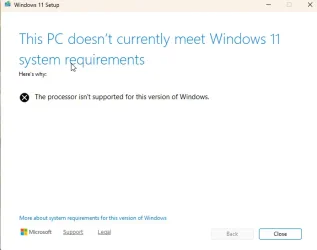
I installed Windows 11 Update on one of my old PCs. I thought it was ok because I allowed the install for computers not compatible with Win 11. But when I tried to do windows updates, it gave me an error message like you see below. Any suggestions?
1762047781155.webp
 

My Computer

System One

  • OS
    Windows 11 25H2
    Computer type
    PC/Desktop
    Manufacturer/Model
    HP
    CPU
    11th Gen Intel(R) Core(TM) i7-1165G7 @ 2.80GHz (2.80 GH
    Memory
    16.0 GB (15.6 GB usable)
    Graphics Card(s)
    2 GB
    Monitor(s) Displays
    17in
    Keyboard
    wireless
    Mouse
    wireless
    Antivirus
    Norton 365
Please run > post a share link


My Computer

System One

  • OS
    Windows 10
    Computer type
    Laptop
    Manufacturer/Model
    HP
    CPU
    Intel(R) Core(TM) i7-4800MQ CPU @ 2.70GHz
    Motherboard
    Product : 190A Version : KBC Version 94.56
    Memory
    16 GB Total: Manufacturer : Samsung MemoryType : DDR3 FormFactor : SODIMM Capacity : 8GB Speed : 1600
    Graphics Card(s)
    NVIDIA Quadro K3100M; Intel(R) HD Graphics 4600
    Sound Card
    IDT High Definition Audio CODEC; PNP Device ID HDAUDIO\FUNC_01&VEN_111D&DEV_76E0
    Hard Drives
    Model Hitachi HTS727575A9E364
    Antivirus
    Microsoft Defender
    Other Info
    Mobile Workstation
you already installed it on unsupported. Just run this .cmd and it’ll let you use it like it’s supported. Only need to run once and it stays applied


My Computer

System One

  • OS
    Windows 11 Pro
@Wally C:

Windows Update automatically installs security and cumulative updates on unsupported Windows 11 computers, but feature updates are not offered.

Also, neither of the options below will work if your computer doesn’t meet the Windows 11 system requirements; you’ll get an error message saying "This PC doesn't currently meet Windows 11 system requirements."

  • Option One: Repair Install Windows 11 using Windows Update
  • Option Two: Repair Install Windows 11 using ISO or USB Installation Media

Just run this .cmd and it’ll let you use it like it’s supported. Only need to run once and it stays applied

Skip_TPM_Check_on_Dynamic_Update v7.cmd

Code:
#:: v7 dynamically skips the anti-consumer windows 11 setup checks via /Product Server trick
#:: it is most reliable, and only has a 'Windows Server' label cosmetic-ish difference

If you don’t want to mess with the Windows Registry, use the command setup.exe /product server.

Download the Windows 11 ISO file. Select either "Create Windows 11 Installation Media" or "Download Windows 11 Disk Image (ISO) for x64 devices."

Mount the ISO file.

Run the following command, replacing "X" with the drive letter of the mounted ISO file:

Code:
X:\setup.exe /product server

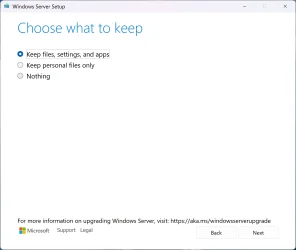
In this mode, the Windows 11 installer thinks it’s installing Windows Server Edition (see image below) and therefore skips the Windows 11 system requirements check.

Windows 11.webp
 
Last edited:

My Computers

System One System Two

  • OS
    Windows 11 Pro
    Computer type
    PC/Desktop
    CPU
    AMD Ryzen 9 9950X3D
    Motherboard
    ASRock B650E Taichi Lite
    Memory
    Kingston FURY Beast 64GB (2x32GB) DDR5 6000MT/s
    Graphics Card(s)
    ASUS TUF Gaming Radeon RX 9070 OC Edition 16GB GDDR6
    Hard Drives
    Solidigm P44 Pro 2TB M.2 NVMe SSD
  • Operating System
    Windows 11 Home
    Computer type
    Laptop
    Manufacturer/Model
    Lenovo Legion Pro 7i Gen 10 16"
    CPU
    Intel Core Ultra 9 275HX
    Memory
    64GB (2x 32GB) DDR5-6400
    Graphics card(s)
    NVIDIA GeForce RTX 5080 16GB GDDR7 Laptop GPU
    Hard Drives
    2x 1TB M.2 NVMe SSD (SK Hynix)
@Wally C:

Windows Update automatically installs security and cumulative updates on unsupported Windows 11 computers, but feature updates are not offered.

Also, neither of the options below will work if your computer doesn’t meet the Windows 11 system requirements; you’ll get an error message saying "This PC doesn't currently meet Windows 11 system requirements."

  • Option One: Repair Install Windows 11 using Windows Update
  • Option Two: Repair Install Windows 11 using ISO or USB Installation Media


Skip_TPM_Check_on_Dynamic_Update v7.cmd

Code:
#:: v7 dynamically skips the anti-consumer windows 11 setup checks via /Product Server trick
#:: it is most reliable, and only has a 'Windows Server' label cosmetic-ish difference

If you don’t want to mess with the Windows Registry, use the command setup.exe /product server.

Download the Windows 11 ISO file. Select either "Create Windows 11 Installation Media" or "Download Windows 11 Disk Image (ISO) for x64 devices."

Mount the ISO file.

Run the following command, replacing "X" with the drive letter of the mounted ISO file:

Code:
X:\setup.exe /product server

In this mode, the Windows 11 installer thinks it’s installing Windows Server Edition and therefore skips the Windows 11 system requirements check.
Nice , does this method Windows Pro also............?
 

My Computer

System One

  • OS
    Windows11 Pro 25H2
    Computer type
    PC/Desktop
    Manufacturer/Model
    Asus
    CPU
    i7
    Motherboard
    z97k
    Memory
    32GB
    Graphics Card(s)
    nVidia
    Sound Card
    Realtek
    Hard Drives
    3
    Cooling
    air
    Browser
    Edge
    Antivirus
    ESET

My Computers

System One System Two

  • OS
    Windows 11 Pro
    Computer type
    PC/Desktop
    CPU
    AMD Ryzen 9 9950X3D
    Motherboard
    ASRock B650E Taichi Lite
    Memory
    Kingston FURY Beast 64GB (2x32GB) DDR5 6000MT/s
    Graphics Card(s)
    ASUS TUF Gaming Radeon RX 9070 OC Edition 16GB GDDR6
    Hard Drives
    Solidigm P44 Pro 2TB M.2 NVMe SSD
  • Operating System
    Windows 11 Home
    Computer type
    Laptop
    Manufacturer/Model
    Lenovo Legion Pro 7i Gen 10 16"
    CPU
    Intel Core Ultra 9 275HX
    Memory
    64GB (2x 32GB) DDR5-6400
    Graphics card(s)
    NVIDIA GeForce RTX 5080 16GB GDDR7 Laptop GPU
    Hard Drives
    2x 1TB M.2 NVMe SSD (SK Hynix)

My Computer

System One

  • OS
    Windows11 Pro 25H2
    Computer type
    PC/Desktop
    Manufacturer/Model
    Asus
    CPU
    i7
    Motherboard
    z97k
    Memory
    32GB
    Graphics Card(s)
    nVidia
    Sound Card
    Realtek
    Hard Drives
    3
    Cooling
    air
    Browser
    Edge
    Antivirus
    ESET
Possible to repair Win11 Pro also , without internet ............?
Works in both Home and Pro editions.

It doesn’t matter whether the internet is connected or not.

It doesn’t matter whether Windows is installed on a GPT or MBR disk.
 

My Computers

System One System Two

  • OS
    Windows 11 Pro
    Computer type
    PC/Desktop
    CPU
    AMD Ryzen 9 9950X3D
    Motherboard
    ASRock B650E Taichi Lite
    Memory
    Kingston FURY Beast 64GB (2x32GB) DDR5 6000MT/s
    Graphics Card(s)
    ASUS TUF Gaming Radeon RX 9070 OC Edition 16GB GDDR6
    Hard Drives
    Solidigm P44 Pro 2TB M.2 NVMe SSD
  • Operating System
    Windows 11 Home
    Computer type
    Laptop
    Manufacturer/Model
    Lenovo Legion Pro 7i Gen 10 16"
    CPU
    Intel Core Ultra 9 275HX
    Memory
    64GB (2x 32GB) DDR5-6400
    Graphics card(s)
    NVIDIA GeForce RTX 5080 16GB GDDR7 Laptop GPU
    Hard Drives
    2x 1TB M.2 NVMe SSD (SK Hynix)
I used a few times to repair with a Rufus-USB , without internet .
After repair the updates went fine , untill next update ; had to repair again ( 0x800f0983 )..............
So , wonder which way is best for repair.................
 

My Computer

System One

  • OS
    Windows11 Pro 25H2
    Computer type
    PC/Desktop
    Manufacturer/Model
    Asus
    CPU
    i7
    Motherboard
    z97k
    Memory
    32GB
    Graphics Card(s)
    nVidia
    Sound Card
    Realtek
    Hard Drives
    3
    Cooling
    air
    Browser
    Edge
    Antivirus
    ESET
So , wonder which way is best for repair.................
I've always had a successful repair installation, whether I have an internet connection or not.

It shouldn't matter whether you use a Rufus USB stick or the "setup.exe /product server" command.
 

My Computers

System One System Two

  • OS
    Windows 11 Pro
    Computer type
    PC/Desktop
    CPU
    AMD Ryzen 9 9950X3D
    Motherboard
    ASRock B650E Taichi Lite
    Memory
    Kingston FURY Beast 64GB (2x32GB) DDR5 6000MT/s
    Graphics Card(s)
    ASUS TUF Gaming Radeon RX 9070 OC Edition 16GB GDDR6
    Hard Drives
    Solidigm P44 Pro 2TB M.2 NVMe SSD
  • Operating System
    Windows 11 Home
    Computer type
    Laptop
    Manufacturer/Model
    Lenovo Legion Pro 7i Gen 10 16"
    CPU
    Intel Core Ultra 9 275HX
    Memory
    64GB (2x 32GB) DDR5-6400
    Graphics card(s)
    NVIDIA GeForce RTX 5080 16GB GDDR7 Laptop GPU
    Hard Drives
    2x 1TB M.2 NVMe SSD (SK Hynix)
Ok , next repair ( if the november-updates fail ) , will try repair with Rufus , with internet connected...............!
Will see..........
 

My Computer

System One

  • OS
    Windows11 Pro 25H2
    Computer type
    PC/Desktop
    Manufacturer/Model
    Asus
    CPU
    i7
    Motherboard
    z97k
    Memory
    32GB
    Graphics Card(s)
    nVidia
    Sound Card
    Realtek
    Hard Drives
    3
    Cooling
    air
    Browser
    Edge
    Antivirus
    ESET
1) When available please update the progress with post #2.


2) Download and install:


Post an image or share link.
 

My Computer

System One

  • OS
    Windows 10
    Computer type
    Laptop
    Manufacturer/Model
    HP
    CPU
    Intel(R) Core(TM) i7-4800MQ CPU @ 2.70GHz
    Motherboard
    Product : 190A Version : KBC Version 94.56
    Memory
    16 GB Total: Manufacturer : Samsung MemoryType : DDR3 FormFactor : SODIMM Capacity : 8GB Speed : 1600
    Graphics Card(s)
    NVIDIA Quadro K3100M; Intel(R) HD Graphics 4600
    Sound Card
    IDT High Definition Audio CODEC; PNP Device ID HDAUDIO\FUNC_01&VEN_111D&DEV_76E0
    Hard Drives
    Model Hitachi HTS727575A9E364
    Antivirus
    Microsoft Defender
    Other Info
    Mobile Workstation
Back
Top Bottom