Windows 11 explorer TABs ?


Flourgrader

Well-known member
Local time
7:10 AM
Posts
25
OS
Windows 10_&_11
Hi All,
I wonder if some very knowledgeable windows 11 user
Can help me out with what I thought should have been a very simple thing to do!
Question:
When I open windows 11 explorer, right at the very top of the open window
You can add TABs. I add my drives to the TABs as so: C: D: E: F: G: H
But once I close explorer I have lost my setting.
I have to re assign my drives to the TABs every time I open explorer which is very frustrating.
I was wanting to know if I could edit the Windows 11 registry and make changes here to permanently set all my drives to appear on the TAB bar when I open the explorer?
Thank You
 
Windows Build/Version
Windows 11 22H2 (OS Build 22621.2361)

My Computer My Computer

At a glance

Windows 10_&_11Intel Core i7-8700K32 GBNvidia Geforce
OS
Windows 10_&_11
Computer type
PC/Desktop
Manufacturer/Model
Home_Made
CPU
Intel Core i7-8700K
Motherboard
ASUS ROG MAXIMUS X HERO
Memory
32 GB
Graphics Card(s)
Nvidia Geforce
Screen Resolution
4K
Hard Drives
8 H/D
This has been asked a lot of times here on the forum and upvoted in the feedback hub numerous times.
Microsoft's official response is
"This isn't something that we currently support....Feedback has been shared with the team for future consideration"

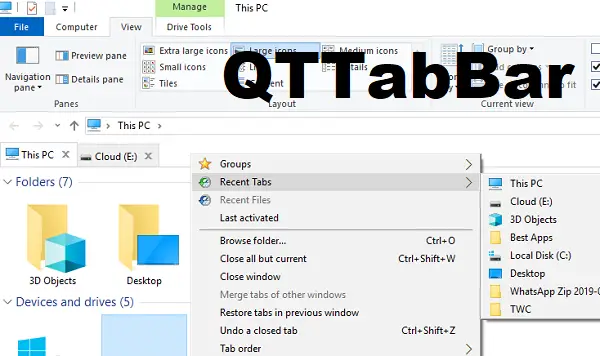
Currently, if one wants previously opened tabs to open on restart, one has to use a tool like QTTabbar or one of the other third party explorer apps to have this feature.
Since I do not use such tools, I cannot recommend anything else.
 

My Computers My Computers

  • At a glance

    Windows 11 Pro 25H2 26200.8655i9-10900 10 core 20 threads32 gbnone-Intel UHD Graphics 630
    OS
    Windows 11 Pro 25H2 26200.8655
    Computer type
    PC/Desktop
    Manufacturer/Model
    Dell Optiplex 7080
    CPU
    i9-10900 10 core 20 threads
    Motherboard
    DELL 0J37VM
    Memory
    32 gb
    Graphics Card(s)
    none-Intel UHD Graphics 630
    Sound Card
    Integrated Realtek
    Monitor(s) Displays
    Benq 27
    Screen Resolution
    2560x1440
    Hard Drives
    2x1tb Solidigm m.2 nvme /External drives 512gb Samsung m.2 sata+2tb Kingston m2.nvme
    PSU
    500w
    Case
    MT
    Cooling
    Dell Premium
    Keyboard
    Logitech wired
    Mouse
    Logitech wireless
    Internet Speed
    so slow I'm too embarrassed to tell
    Browser
    #1 Edge #2 Firefox
    Antivirus
    Defender+MWB Premium
  • At a glance

    Windows 11 Pro 24H2 26200.8457AMD Ryzen 7 6800U32 gbintegrated
    Operating System
    Windows 11 Pro 24H2 26200.8457
    Computer type
    PC/Desktop
    Manufacturer/Model
    Beelink Mini PC SER5
    CPU
    AMD Ryzen 7 6800U
    Memory
    32 gb
    Graphics card(s)
    integrated
    Sound Card
    integrated
    Monitor(s) Displays
    Benq 27
    Screen Resolution
    2560x1440
    Hard Drives
    1TB Crucial nvme
    Keyboard
    Logitech wired
    Mouse
    Logitech wireless
    Internet Speed
    still too embarrassed to tell
    Browser
    Firefox
    Antivirus
    Defender
    Other Info
    System 3 is non compliant Dell 9020 i7-4770/24gb ram Win11 PRO 26200.8457
Thank you glasskuter the info was very much appreciated (y)
 

My Computer My Computer

At a glance

Windows 10_&_11Intel Core i7-8700K32 GBNvidia Geforce
OS
Windows 10_&_11
Computer type
PC/Desktop
Manufacturer/Model
Home_Made
CPU
Intel Core i7-8700K
Motherboard
ASUS ROG MAXIMUS X HERO
Memory
32 GB
Graphics Card(s)
Nvidia Geforce
Screen Resolution
4K
Hard Drives
8 H/D

Latest Support Threads

Back
Top Bottom