Solved Windows 11 image/ backup?


Scotty: "Cap'n, I can no say why, but the teleporter is duplicating everything we beam up to the ship".
To dematerialize an object “here” and re-materialize it “over there” would require that you send the energy from here to there - we can’t move energy around like that. :LOL:
 

My Computer My Computer

At a glance

Windows XP (Stable, iconic) 7/8.1/10/ Tiny11 ...Intel i7 4790K32GB DDR3 1600 MHzATI Radeon HD 7770 2GB GDDR5
OS
Windows XP (Stable, iconic) 7/8.1/10/ Tiny11 25H2
Computer type
PC/Desktop
Manufacturer/Model
Alienware PC
CPU
Intel i7 4790K
Motherboard
ASROCK Z97 EXTREME4
Memory
32GB DDR3 1600 MHz
Graphics Card(s)
ATI Radeon HD 7770 2GB GDDR5
Sound Card
Onboard
Monitor(s) Displays
SAMSUNG UE57 Series 28-Inch 4K UHD
Hard Drives
SAMSUNG 860 EVO 250 gigabyte SSD
PSU
EVGA 850 watt
Case
Alienware Area 51 Black Tower Case
Keyboard
HyperX - Alloy Elite 2 Mechanical Gaming Keyboard.
Mouse
Microsoft Wireless
Internet Speed
1.2 GHz
Browser
Chrome..Edge..Firefox
OH yeah OK, there's no need to download and install anything, a waste of time.

Hasleo says you have to format it, you click "Proceed"
When it hits 100% it's finished.
Click Close
The formatting of the drive and the creation of the media is the same process.

If you look at the USB drive you'll probably find it is empty.
For some reason, Hasleo hides the content.
Enabling Hidden files in File Explorer will show you the rescue media.
On booting to the USB, Hasleo will know what to do (y)

You can boot to it and see as a test, Hasleo will eventually load.
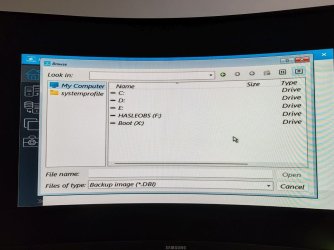
I managed to boot from the USB and it loads Hasleo, however I'm unsre where to go from that point as it asks for a .DBI file to be located... and as you've probably guessed; I have no idea what or where that is located :eek1:

The pics attached are the point I get to. The image should be on drive /F but when I open it, it's empy. I also have no idea where the /X drive came from...

Also, I really do appreciate all the support you guys have given me.
 

Attachments

  • 1.jpg
    1.jpg
    85.5 KB · Views: 2
  • 2.jpg
    2.jpg
    90.8 KB · Views: 2

My Computer My Computer

At a glance

Windows 11Ryzen 7800x3d32GB DDR5 6000mhzSapphire RX 7900 XTX NITRO+ 24GB GDDR6
OS
Windows 11
Computer type
PC/Desktop
Manufacturer/Model
Custom
CPU
Ryzen 7800x3d
Motherboard
Asrock x670E Pro RS
Memory
32GB DDR5 6000mhz
Graphics Card(s)
Sapphire RX 7900 XTX NITRO+ 24GB GDDR6
Sound Card
Onboard
Monitor(s) Displays
27 inch Samsung Odyssey G7 (1440p 240hz)
Screen Resolution
2560 x 1440
Hard Drives
1 x Samsung nvme 256GB (for OS), 1 x Samsung SSD 1TB (games installations), 1 x Samsung SSD 500GB.
PSU
Corsair RM850x 80 PLUS Gold
Case
corsair 7000d airflow
Cooling
Arctic Freezer II 420 with 3 x Noctua 140mm fans (CPU), 4 x Noctua 140mm fans (Case)
Keyboard
Razor
Mouse
Razor
Internet Speed
Up to 68mb
Browser
Firefox
Antivirus
Kaspersky
Would it work just the same if I used my USB to boot into Hasleo like the pictures above and then selected the .DBI bacup that is saved to drive /D? Or copying the same .DBI to the same USB stick that Hasleo boots from?

I feel I've become a right pain in the backside at this point, so I can only apologise...
 

My Computer My Computer

At a glance

Windows 11Ryzen 7800x3d32GB DDR5 6000mhzSapphire RX 7900 XTX NITRO+ 24GB GDDR6
OS
Windows 11
Computer type
PC/Desktop
Manufacturer/Model
Custom
CPU
Ryzen 7800x3d
Motherboard
Asrock x670E Pro RS
Memory
32GB DDR5 6000mhz
Graphics Card(s)
Sapphire RX 7900 XTX NITRO+ 24GB GDDR6
Sound Card
Onboard
Monitor(s) Displays
27 inch Samsung Odyssey G7 (1440p 240hz)
Screen Resolution
2560 x 1440
Hard Drives
1 x Samsung nvme 256GB (for OS), 1 x Samsung SSD 1TB (games installations), 1 x Samsung SSD 500GB.
PSU
Corsair RM850x 80 PLUS Gold
Case
corsair 7000d airflow
Cooling
Arctic Freezer II 420 with 3 x Noctua 140mm fans (CPU), 4 x Noctua 140mm fans (Case)
Keyboard
Razor
Mouse
Razor
Internet Speed
Up to 68mb
Browser
Firefox
Antivirus
Kaspersky
I feel I've become a right pain in the backside at this point, so I can only apologise...
Not at all, you shouldn’t think that. It’s 2.30am in Australia and I need some sleep.
I’ll be up in a few hours, I’f someone hasn’t helped you by then I certainly will.
 

My Computers My Computers

  • At a glance

    Windows 11 Pro 25H2 Build 26200.8894Intel(R) Core(TM) i7-4770K CPU @ 3.50GHz32.0 GB of I forget and the box is in storage.Gigabyte nVidia GeForce GTX 1660 Super OC 6GB
    OS
    Windows 11 Pro 25H2 Build 26200.8894
    Computer type
    PC/Desktop
    Manufacturer/Model
    Sin-built 2013
    CPU
    Intel(R) Core(TM) i7-4770K CPU @ 3.50GHz
    Motherboard
    ASUS ROG Maximus VI Formula
    Memory
    32.0 GB of I forget and the box is in storage.
    Graphics Card(s)
    Gigabyte nVidia GeForce GTX 1660 Super OC 6GB
    Sound Card
    ROG SupremeFX Formula 8-Channel High Definition Audio
    Monitor(s) Displays
    5 x LG 25MS500-B - 1 x 24MK430H-B - 1 x Wacom Pro 22" Touch Screen Tablet
    Screen Resolution
    All over the place
    Hard Drives
    Too many to list. OS on Samsung 1TB 870 QVO SATA
    PSU
    Silverstone 1500
    Case
    NZXT Phantom 820 Full-Tower Case
    Cooling
    Noctua NH-D15 Elite Class Dual Tower CPU Cooler / 6 x EziDIY 120mm / 2 x Corsair 140mm somethings / 1 x 140mm Thermaltake something / 2 x 200mm Corsair.
    Keyboard
    Corsair K95 / Logitech diNovo Edge Wireless
    Mouse
    Logitech: G402 / G502 / Mx Masters / Mx Air Cordless
    Internet Speed
    2000/500Mbps
    Browser
    All sorts
    Antivirus
    Kaspersky Premium
    Other Info
    ㅤㅤㅤㅤㅤㅤㅤㅤㅤㅤㅤㅤㅤㅤㅤㅤㅤㅤㅤㅤㅤㅤㅤㅤㅤㅤㅤㅤㅤㅤㅤㅤㅤㅤㅤㅤㅤㅤㅤㅤ⠀⠀⠀⠀⠀⠀⠀⠀⠀⠀
    TP-Link BE9300 WiFi 7 Bluetooth 5.4 (Archer TBE550E)
    TP-Link TX201 V1 2.5GB Lan

    Grandstream HT812 - VoIP
    ASUS DSL-AX82U - Mesh
    ASUS RT-AC68U - Mesh
    ASUS RT-BE88U Router

    Brother MFC-L2880DW Printer

    I’m on a horse.
  • At a glance

    Windows 11 Pro 25H2 Build 26200.8894 (Wifes)13th Generation Intel® Core™ i5-1340P Process...16GB LPDDR5-52001x Intel® Iris® Xe Graphics
    Operating System
    Windows 11 Pro 25H2 Build 26200.8894 (Wifes)
    Computer type
    Laptop
    Manufacturer/Model
    LENOVO Yoga 7 14IRL8 - Type 82YL
    CPU
    13th Generation Intel® Core™ i5-1340P Processor(Core™ i5-1340P)
    Memory
    16GB LPDDR5-5200
    Graphics card(s)
    1x Intel® Iris® Xe Graphics
    Sound Card
    Optimized with Dolby Atmos®
    Screen Resolution
    QHD 2880 x 1800 OLED
    Hard Drives
    M.2 512 GB SSD PCIe
    Mouse
    Logiteck MX Master 3S
    Internet Speed
    2000/500
    Antivirus
    Defender / Malwarebytes
    Other Info
    …still on a horse.


    Wireless Network: Wi-Fi 6E 2x2 AX; Bluetooth® 5.1 or above
    Ports: 1x 1 Novo button; 2 in 1 Audio Combo jack; Micro SD Card Reader; HDMI 1.4b; 2 x USB Type-C (TBT4)
    USB 3.2 Gen 2 DP 1.4a
    PD 3.0); 1 x USB 3.2 Gen1 Type A
    Camera
    1x 1080P FHD IR/RGB Hybrid with Privacy Shutter and Dual Array Microphone
    Graphics
    1x Intel® Iris® Xe Graphics
    Monitor
    14" WUXGA
    Form Factor
    Convertible Notebook
  • Windows 11 Pro 25H2 Build 26200.8894 (Wifes)

    Yoga 7 2-in-1 14IML9 - Type 83DJ

    Processor: Intel® Core™ Ultra 7 155H Processor(Core™ Ultra 7 155H)

    Memory: 32GB LPD5X-7467

    Hard Drive: 1 TB SSD PCIe

    Wireless Network: 1x Wi-Fi 6E 2x2 AX; Bluetooth® 5.1 or above

    Ports: 1 x HDMI 2.1 TMDS; 1 x Novo Button; 1 x Combo Audio Jack
    2 x USB-C (USB 4.0)
    1 x USB-A 3.2 Gen 1

    Camera: 1080P FHD IR Hybrid with Dual Microphone

    Graphics: Intel® Arc™ Graphics

    Monitor: 14" 2.8K

    ...Where's my horse?
I would create an image from within Windows first as it will appear easier. You could create a folder on your USB connected backup drive first with an easy to remember name so you can browse to. In your second image don't forget to scroll to the right for more info and also remember the drive letter your imaging to. Once you're happy then try the emergency USB flash drive.


two.png

A YT video that might help- YT
 

My Computers My Computers

  • At a glance

    Win 11 ProAMD Ryzen™ 7 7730U24GB Dual-Channel DDR4 @ 1596MHz (22-22-22-52)512MB ATI AMD Radeon Graphics (ASUStek Comput...
    OS
    Win 11 Pro
    Computer type
    Laptop
    Manufacturer/Model
    ASUS Vivobook
    CPU
    AMD Ryzen™ 7 7730U
    Motherboard
    M1605YA
    Memory
    24GB Dual-Channel DDR4 @ 1596MHz (22-22-22-52)
    Graphics Card(s)
    512MB ATI AMD Radeon Graphics (ASUStek Computer Inc)
    Monitor(s) Displays
    Generic PnP Monitor (1920x1200@60Hz) - P1 PLUS (1920x1080@59Hz)
    Screen Resolution
    1920 X 1200
    Hard Drives
    953GB Western Digital WD
    PSU
    45 Watts
    Mouse
    Lenovo Bluetooth.
    Internet Speed
    500 Mbps
    Browser
    Edge
    Antivirus
    Defender
  • At a glance

    Windows 11AMD Ryzen 7 5800H / 3.2 GHz32 GB DDR4 SDRAM 3200 MHzNVIDIA GeForce RTX 3060 6 GB GDDR6 SDRAM
    Operating System
    Windows 11
    Computer type
    Laptop
    Manufacturer/Model
    ACER NITRO
    CPU
    AMD Ryzen 7 5800H / 3.2 GHz
    Motherboard
    CZ Scala_CAS (FP6)
    Memory
    32 GB DDR4 SDRAM 3200 MHz
    Graphics card(s)
    NVIDIA GeForce RTX 3060 6 GB GDDR6 SDRAM
    Sound Card
    Realtek Audio. NVIDIA High Definition Audio
    Monitor(s) Displays
    15.6" LED backlight 1920 x 1080 (Full HD) 144 Hz
    Screen Resolution
    1920 x 1080 (Full HD)
    Hard Drives
    Samsung 970 Evo Plus 2TB NVMe M.2
    PSU
    180 Watt, 19.5 V
    Mouse
    Lenovo Bluetooth
    Internet Speed
    500 Mbps
    Browser
    Edge
    Antivirus
    Defender
You haven’t created a system image yet?


You can create one from the USB but they’re really only for recovery.
 

My Computers My Computers

  • At a glance

    Windows 11 Pro 25H2 Build 26200.8894Intel(R) Core(TM) i7-4770K CPU @ 3.50GHz32.0 GB of I forget and the box is in storage.Gigabyte nVidia GeForce GTX 1660 Super OC 6GB
    OS
    Windows 11 Pro 25H2 Build 26200.8894
    Computer type
    PC/Desktop
    Manufacturer/Model
    Sin-built 2013
    CPU
    Intel(R) Core(TM) i7-4770K CPU @ 3.50GHz
    Motherboard
    ASUS ROG Maximus VI Formula
    Memory
    32.0 GB of I forget and the box is in storage.
    Graphics Card(s)
    Gigabyte nVidia GeForce GTX 1660 Super OC 6GB
    Sound Card
    ROG SupremeFX Formula 8-Channel High Definition Audio
    Monitor(s) Displays
    5 x LG 25MS500-B - 1 x 24MK430H-B - 1 x Wacom Pro 22" Touch Screen Tablet
    Screen Resolution
    All over the place
    Hard Drives
    Too many to list. OS on Samsung 1TB 870 QVO SATA
    PSU
    Silverstone 1500
    Case
    NZXT Phantom 820 Full-Tower Case
    Cooling
    Noctua NH-D15 Elite Class Dual Tower CPU Cooler / 6 x EziDIY 120mm / 2 x Corsair 140mm somethings / 1 x 140mm Thermaltake something / 2 x 200mm Corsair.
    Keyboard
    Corsair K95 / Logitech diNovo Edge Wireless
    Mouse
    Logitech: G402 / G502 / Mx Masters / Mx Air Cordless
    Internet Speed
    2000/500Mbps
    Browser
    All sorts
    Antivirus
    Kaspersky Premium
    Other Info
    ㅤㅤㅤㅤㅤㅤㅤㅤㅤㅤㅤㅤㅤㅤㅤㅤㅤㅤㅤㅤㅤㅤㅤㅤㅤㅤㅤㅤㅤㅤㅤㅤㅤㅤㅤㅤㅤㅤㅤㅤ⠀⠀⠀⠀⠀⠀⠀⠀⠀⠀
    TP-Link BE9300 WiFi 7 Bluetooth 5.4 (Archer TBE550E)
    TP-Link TX201 V1 2.5GB Lan

    Grandstream HT812 - VoIP
    ASUS DSL-AX82U - Mesh
    ASUS RT-AC68U - Mesh
    ASUS RT-BE88U Router

    Brother MFC-L2880DW Printer

    I’m on a horse.
  • At a glance

    Windows 11 Pro 25H2 Build 26200.8894 (Wifes)13th Generation Intel® Core™ i5-1340P Process...16GB LPDDR5-52001x Intel® Iris® Xe Graphics
    Operating System
    Windows 11 Pro 25H2 Build 26200.8894 (Wifes)
    Computer type
    Laptop
    Manufacturer/Model
    LENOVO Yoga 7 14IRL8 - Type 82YL
    CPU
    13th Generation Intel® Core™ i5-1340P Processor(Core™ i5-1340P)
    Memory
    16GB LPDDR5-5200
    Graphics card(s)
    1x Intel® Iris® Xe Graphics
    Sound Card
    Optimized with Dolby Atmos®
    Screen Resolution
    QHD 2880 x 1800 OLED
    Hard Drives
    M.2 512 GB SSD PCIe
    Mouse
    Logiteck MX Master 3S
    Internet Speed
    2000/500
    Antivirus
    Defender / Malwarebytes
    Other Info
    …still on a horse.


    Wireless Network: Wi-Fi 6E 2x2 AX; Bluetooth® 5.1 or above
    Ports: 1x 1 Novo button; 2 in 1 Audio Combo jack; Micro SD Card Reader; HDMI 1.4b; 2 x USB Type-C (TBT4)
    USB 3.2 Gen 2 DP 1.4a
    PD 3.0); 1 x USB 3.2 Gen1 Type A
    Camera
    1x 1080P FHD IR/RGB Hybrid with Privacy Shutter and Dual Array Microphone
    Graphics
    1x Intel® Iris® Xe Graphics
    Monitor
    14" WUXGA
    Form Factor
    Convertible Notebook
  • Windows 11 Pro 25H2 Build 26200.8894 (Wifes)

    Yoga 7 2-in-1 14IML9 - Type 83DJ

    Processor: Intel® Core™ Ultra 7 155H Processor(Core™ Ultra 7 155H)

    Memory: 32GB LPD5X-7467

    Hard Drive: 1 TB SSD PCIe

    Wireless Network: 1x Wi-Fi 6E 2x2 AX; Bluetooth® 5.1 or above

    Ports: 1 x HDMI 2.1 TMDS; 1 x Novo Button; 1 x Combo Audio Jack
    2 x USB-C (USB 4.0)
    1 x USB-A 3.2 Gen 1

    Camera: 1080P FHD IR Hybrid with Dual Microphone

    Graphics: Intel® Arc™ Graphics

    Monitor: 14" 2.8K

    ...Where's my horse?
Here are a couple of tips for you.
This is just how I do it, there are most likely other ways.

  • When you open Hasleo, you can click on the little drop arrow at the top right of the window to open a context menu.


Win-1218.png


In settings, there are options.
I create a default storage folder on the drive where my backups will live, so that:
  • I don't have to set a destination every time I create a System Backup
  • I Know exactly where all my backups are going to be located
  • To make it easier when having to restore a system backup


Win-1219.png

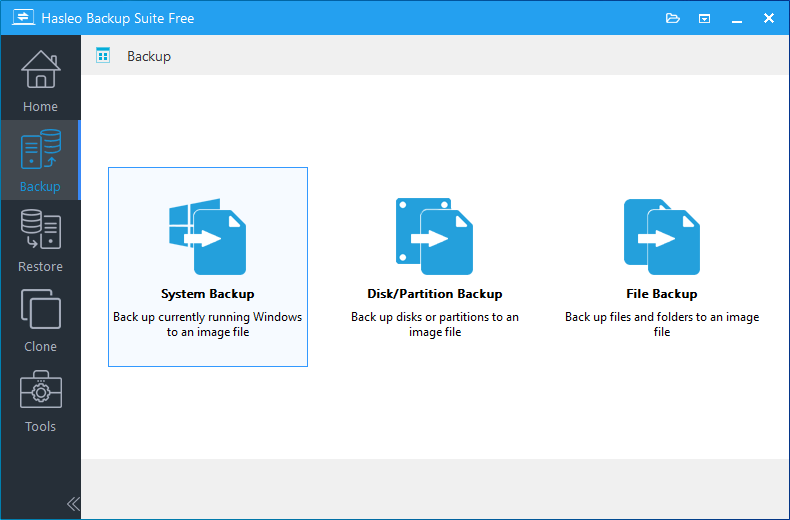
  • To make a System Backup I click on the Backup Icon (1)
  • I click on "System Backup" (2)


Win-1220.png

  • The partitions that make up your OS drive are automatically selected (3)
    • You don't need to add or change anything
  • The Task Name can be altered (4) I name mine as per the current build number
    • There is no reason why you can't leave the Task Names as they are.
    • For each backup, the Task Name will increase by number so the higher the number the newer the backup
  • You can see that the drive and folder I set to be the defaults, are already selected (5)
    • The new image will be placed in a sub-folder within the default folder. The folder will have the same name as the Task Name (Image name)
  • You can write a description if needed (6)


Win-1222.png

  • I click the "Backup Options" (7)
  • I select "Advanced" (8)
  • I enable "Check the integrity of the backup image files on completion" (9)
  • I can choose from a "Quick Image check" or a "Complete image check" (10)
    • It's probably best to do a "Complete image check"
    • This has to be set each new backup
  • I can now click proceed (11)


Win-1224.png

  • Hasleo will start the System Image backup procedure. You will be notified when the task is completed.


Win-1226.png

⚠️ An important note:​


If your User Folders are in their default location on the C: drive (Meaning you haven't moved them to a new default on another drive)

A system image restore will replace files in your user folders. It replaces everything on the C: drive.

So: If you have documents that you have altered, like a word document or an image etc. These files will be replaced with copies made from the time when the System Image was created.​
Therefore; It is important that you employ a separate backup method to save your User Folders​

I use FreeFileSync, but that's a whole new thread.

Hasleo can do file & folder backups but I am yet to try it so I can not yet advise you.
I am sure it is as easy as doing a System Backup.

If you use OneDrive you should be fine, but again, I know nothing of OneDrive either.

Hasleo File Backup:

Win-1227.pngWin-1228.png

I hope this helps you somewhat.

Regards 🙏

P.S.

Please don't think that you're being a bother. The whole purpose of z3r010's forums is to help people.
If you have problems, post your questions.
Feel free to create new threads about new problems, they attract more members than ongoing threads.
 
Last edited:

My Computers My Computers

  • At a glance

    Windows 11 Pro 25H2 Build 26200.8894Intel(R) Core(TM) i7-4770K CPU @ 3.50GHz32.0 GB of I forget and the box is in storage.Gigabyte nVidia GeForce GTX 1660 Super OC 6GB
    OS
    Windows 11 Pro 25H2 Build 26200.8894
    Computer type
    PC/Desktop
    Manufacturer/Model
    Sin-built 2013
    CPU
    Intel(R) Core(TM) i7-4770K CPU @ 3.50GHz
    Motherboard
    ASUS ROG Maximus VI Formula
    Memory
    32.0 GB of I forget and the box is in storage.
    Graphics Card(s)
    Gigabyte nVidia GeForce GTX 1660 Super OC 6GB
    Sound Card
    ROG SupremeFX Formula 8-Channel High Definition Audio
    Monitor(s) Displays
    5 x LG 25MS500-B - 1 x 24MK430H-B - 1 x Wacom Pro 22" Touch Screen Tablet
    Screen Resolution
    All over the place
    Hard Drives
    Too many to list. OS on Samsung 1TB 870 QVO SATA
    PSU
    Silverstone 1500
    Case
    NZXT Phantom 820 Full-Tower Case
    Cooling
    Noctua NH-D15 Elite Class Dual Tower CPU Cooler / 6 x EziDIY 120mm / 2 x Corsair 140mm somethings / 1 x 140mm Thermaltake something / 2 x 200mm Corsair.
    Keyboard
    Corsair K95 / Logitech diNovo Edge Wireless
    Mouse
    Logitech: G402 / G502 / Mx Masters / Mx Air Cordless
    Internet Speed
    2000/500Mbps
    Browser
    All sorts
    Antivirus
    Kaspersky Premium
    Other Info
    ㅤㅤㅤㅤㅤㅤㅤㅤㅤㅤㅤㅤㅤㅤㅤㅤㅤㅤㅤㅤㅤㅤㅤㅤㅤㅤㅤㅤㅤㅤㅤㅤㅤㅤㅤㅤㅤㅤㅤㅤ⠀⠀⠀⠀⠀⠀⠀⠀⠀⠀
    TP-Link BE9300 WiFi 7 Bluetooth 5.4 (Archer TBE550E)
    TP-Link TX201 V1 2.5GB Lan

    Grandstream HT812 - VoIP
    ASUS DSL-AX82U - Mesh
    ASUS RT-AC68U - Mesh
    ASUS RT-BE88U Router

    Brother MFC-L2880DW Printer

    I’m on a horse.
  • At a glance

    Windows 11 Pro 25H2 Build 26200.8894 (Wifes)13th Generation Intel® Core™ i5-1340P Process...16GB LPDDR5-52001x Intel® Iris® Xe Graphics
    Operating System
    Windows 11 Pro 25H2 Build 26200.8894 (Wifes)
    Computer type
    Laptop
    Manufacturer/Model
    LENOVO Yoga 7 14IRL8 - Type 82YL
    CPU
    13th Generation Intel® Core™ i5-1340P Processor(Core™ i5-1340P)
    Memory
    16GB LPDDR5-5200
    Graphics card(s)
    1x Intel® Iris® Xe Graphics
    Sound Card
    Optimized with Dolby Atmos®
    Screen Resolution
    QHD 2880 x 1800 OLED
    Hard Drives
    M.2 512 GB SSD PCIe
    Mouse
    Logiteck MX Master 3S
    Internet Speed
    2000/500
    Antivirus
    Defender / Malwarebytes
    Other Info
    …still on a horse.


    Wireless Network: Wi-Fi 6E 2x2 AX; Bluetooth® 5.1 or above
    Ports: 1x 1 Novo button; 2 in 1 Audio Combo jack; Micro SD Card Reader; HDMI 1.4b; 2 x USB Type-C (TBT4)
    USB 3.2 Gen 2 DP 1.4a
    PD 3.0); 1 x USB 3.2 Gen1 Type A
    Camera
    1x 1080P FHD IR/RGB Hybrid with Privacy Shutter and Dual Array Microphone
    Graphics
    1x Intel® Iris® Xe Graphics
    Monitor
    14" WUXGA
    Form Factor
    Convertible Notebook
  • Windows 11 Pro 25H2 Build 26200.8894 (Wifes)

    Yoga 7 2-in-1 14IML9 - Type 83DJ

    Processor: Intel® Core™ Ultra 7 155H Processor(Core™ Ultra 7 155H)

    Memory: 32GB LPD5X-7467

    Hard Drive: 1 TB SSD PCIe

    Wireless Network: 1x Wi-Fi 6E 2x2 AX; Bluetooth® 5.1 or above

    Ports: 1 x HDMI 2.1 TMDS; 1 x Novo Button; 1 x Combo Audio Jack
    2 x USB-C (USB 4.0)
    1 x USB-A 3.2 Gen 1

    Camera: 1080P FHD IR Hybrid with Dual Microphone

    Graphics: Intel® Arc™ Graphics

    Monitor: 14" 2.8K

    ...Where's my horse?
Thank you for detailed walkthrough. I have created the image onto another drive. Is it then just a case of opening Hasleo and using the restore feature to restore Windows?
 

My Computer My Computer

At a glance

Windows 11Ryzen 7800x3d32GB DDR5 6000mhzSapphire RX 7900 XTX NITRO+ 24GB GDDR6
OS
Windows 11
Computer type
PC/Desktop
Manufacturer/Model
Custom
CPU
Ryzen 7800x3d
Motherboard
Asrock x670E Pro RS
Memory
32GB DDR5 6000mhz
Graphics Card(s)
Sapphire RX 7900 XTX NITRO+ 24GB GDDR6
Sound Card
Onboard
Monitor(s) Displays
27 inch Samsung Odyssey G7 (1440p 240hz)
Screen Resolution
2560 x 1440
Hard Drives
1 x Samsung nvme 256GB (for OS), 1 x Samsung SSD 1TB (games installations), 1 x Samsung SSD 500GB.
PSU
Corsair RM850x 80 PLUS Gold
Case
corsair 7000d airflow
Cooling
Arctic Freezer II 420 with 3 x Noctua 140mm fans (CPU), 4 x Noctua 140mm fans (Case)
Keyboard
Razor
Mouse
Razor
Internet Speed
Up to 68mb
Browser
Firefox
Antivirus
Kaspersky
Thank you for detailed walkthrough. I have created the image onto another drive. Is it then just a case of opening Hasleo and using the restore feature to restore Windows?
Yes, it’s very straight forward. I can make you another walkthrough if you need one.

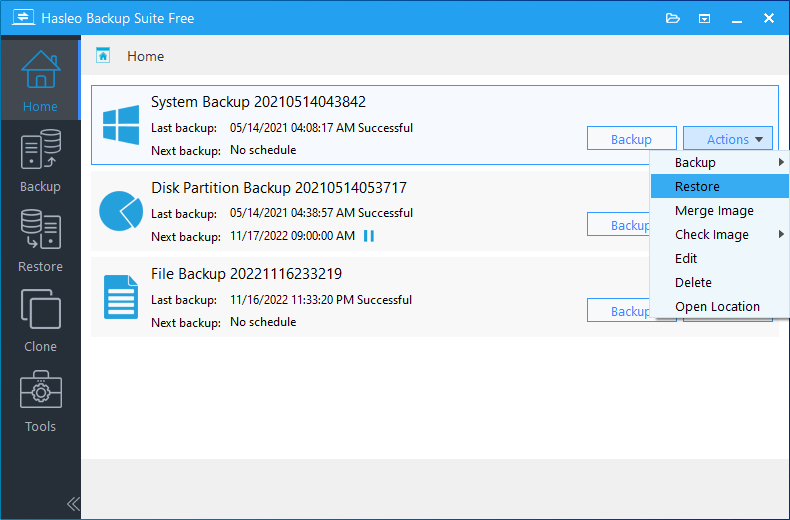
In the meantime, these are the steps to do it through Windows.
The steps are basically the same using the rescue media. You will need to use the rescue media if you cannot get into Windows due to OS issues and you want to restore.


My Computers My Computers

  • At a glance

    Windows 11 Pro 25H2 Build 26200.8894Intel(R) Core(TM) i7-4770K CPU @ 3.50GHz32.0 GB of I forget and the box is in storage.Gigabyte nVidia GeForce GTX 1660 Super OC 6GB
    OS
    Windows 11 Pro 25H2 Build 26200.8894
    Computer type
    PC/Desktop
    Manufacturer/Model
    Sin-built 2013
    CPU
    Intel(R) Core(TM) i7-4770K CPU @ 3.50GHz
    Motherboard
    ASUS ROG Maximus VI Formula
    Memory
    32.0 GB of I forget and the box is in storage.
    Graphics Card(s)
    Gigabyte nVidia GeForce GTX 1660 Super OC 6GB
    Sound Card
    ROG SupremeFX Formula 8-Channel High Definition Audio
    Monitor(s) Displays
    5 x LG 25MS500-B - 1 x 24MK430H-B - 1 x Wacom Pro 22" Touch Screen Tablet
    Screen Resolution
    All over the place
    Hard Drives
    Too many to list. OS on Samsung 1TB 870 QVO SATA
    PSU
    Silverstone 1500
    Case
    NZXT Phantom 820 Full-Tower Case
    Cooling
    Noctua NH-D15 Elite Class Dual Tower CPU Cooler / 6 x EziDIY 120mm / 2 x Corsair 140mm somethings / 1 x 140mm Thermaltake something / 2 x 200mm Corsair.
    Keyboard
    Corsair K95 / Logitech diNovo Edge Wireless
    Mouse
    Logitech: G402 / G502 / Mx Masters / Mx Air Cordless
    Internet Speed
    2000/500Mbps
    Browser
    All sorts
    Antivirus
    Kaspersky Premium
    Other Info
    ㅤㅤㅤㅤㅤㅤㅤㅤㅤㅤㅤㅤㅤㅤㅤㅤㅤㅤㅤㅤㅤㅤㅤㅤㅤㅤㅤㅤㅤㅤㅤㅤㅤㅤㅤㅤㅤㅤㅤㅤ⠀⠀⠀⠀⠀⠀⠀⠀⠀⠀
    TP-Link BE9300 WiFi 7 Bluetooth 5.4 (Archer TBE550E)
    TP-Link TX201 V1 2.5GB Lan

    Grandstream HT812 - VoIP
    ASUS DSL-AX82U - Mesh
    ASUS RT-AC68U - Mesh
    ASUS RT-BE88U Router

    Brother MFC-L2880DW Printer

    I’m on a horse.
  • At a glance

    Windows 11 Pro 25H2 Build 26200.8894 (Wifes)13th Generation Intel® Core™ i5-1340P Process...16GB LPDDR5-52001x Intel® Iris® Xe Graphics
    Operating System
    Windows 11 Pro 25H2 Build 26200.8894 (Wifes)
    Computer type
    Laptop
    Manufacturer/Model
    LENOVO Yoga 7 14IRL8 - Type 82YL
    CPU
    13th Generation Intel® Core™ i5-1340P Processor(Core™ i5-1340P)
    Memory
    16GB LPDDR5-5200
    Graphics card(s)
    1x Intel® Iris® Xe Graphics
    Sound Card
    Optimized with Dolby Atmos®
    Screen Resolution
    QHD 2880 x 1800 OLED
    Hard Drives
    M.2 512 GB SSD PCIe
    Mouse
    Logiteck MX Master 3S
    Internet Speed
    2000/500
    Antivirus
    Defender / Malwarebytes
    Other Info
    …still on a horse.


    Wireless Network: Wi-Fi 6E 2x2 AX; Bluetooth® 5.1 or above
    Ports: 1x 1 Novo button; 2 in 1 Audio Combo jack; Micro SD Card Reader; HDMI 1.4b; 2 x USB Type-C (TBT4)
    USB 3.2 Gen 2 DP 1.4a
    PD 3.0); 1 x USB 3.2 Gen1 Type A
    Camera
    1x 1080P FHD IR/RGB Hybrid with Privacy Shutter and Dual Array Microphone
    Graphics
    1x Intel® Iris® Xe Graphics
    Monitor
    14" WUXGA
    Form Factor
    Convertible Notebook
  • Windows 11 Pro 25H2 Build 26200.8894 (Wifes)

    Yoga 7 2-in-1 14IML9 - Type 83DJ

    Processor: Intel® Core™ Ultra 7 155H Processor(Core™ Ultra 7 155H)

    Memory: 32GB LPD5X-7467

    Hard Drive: 1 TB SSD PCIe

    Wireless Network: 1x Wi-Fi 6E 2x2 AX; Bluetooth® 5.1 or above

    Ports: 1 x HDMI 2.1 TMDS; 1 x Novo Button; 1 x Combo Audio Jack
    2 x USB-C (USB 4.0)
    1 x USB-A 3.2 Gen 1

    Camera: 1080P FHD IR Hybrid with Dual Microphone

    Graphics: Intel® Arc™ Graphics

    Monitor: 14" 2.8K

    ...Where's my horse?
Something to consider though.

Unless you have been hit by ransomeware (unlikely) it is recommended you do a file backup before a system restore (if you can get into Windows.)
Because as I mentioned above, all files on the C; Drive will be replaced.

So…
Before a System Image restore, backup your User Folders with a File & Folder backup image.
After restore, replace your User Folders from the File & Folder backup image
This way, after the OS restore, you’ll have up to date user files that you may of added/created/edited.

You should be able to setup a schedule for Files & Folder backups, which may be useful. I am yet to try it. I will soon so I can better help people.
You should always keep an up to date backup of User Folders with whatever software you choose to use.
 
Last edited:

My Computers My Computers

  • At a glance

    Windows 11 Pro 25H2 Build 26200.8894Intel(R) Core(TM) i7-4770K CPU @ 3.50GHz32.0 GB of I forget and the box is in storage.Gigabyte nVidia GeForce GTX 1660 Super OC 6GB
    OS
    Windows 11 Pro 25H2 Build 26200.8894
    Computer type
    PC/Desktop
    Manufacturer/Model
    Sin-built 2013
    CPU
    Intel(R) Core(TM) i7-4770K CPU @ 3.50GHz
    Motherboard
    ASUS ROG Maximus VI Formula
    Memory
    32.0 GB of I forget and the box is in storage.
    Graphics Card(s)
    Gigabyte nVidia GeForce GTX 1660 Super OC 6GB
    Sound Card
    ROG SupremeFX Formula 8-Channel High Definition Audio
    Monitor(s) Displays
    5 x LG 25MS500-B - 1 x 24MK430H-B - 1 x Wacom Pro 22" Touch Screen Tablet
    Screen Resolution
    All over the place
    Hard Drives
    Too many to list. OS on Samsung 1TB 870 QVO SATA
    PSU
    Silverstone 1500
    Case
    NZXT Phantom 820 Full-Tower Case
    Cooling
    Noctua NH-D15 Elite Class Dual Tower CPU Cooler / 6 x EziDIY 120mm / 2 x Corsair 140mm somethings / 1 x 140mm Thermaltake something / 2 x 200mm Corsair.
    Keyboard
    Corsair K95 / Logitech diNovo Edge Wireless
    Mouse
    Logitech: G402 / G502 / Mx Masters / Mx Air Cordless
    Internet Speed
    2000/500Mbps
    Browser
    All sorts
    Antivirus
    Kaspersky Premium
    Other Info
    ㅤㅤㅤㅤㅤㅤㅤㅤㅤㅤㅤㅤㅤㅤㅤㅤㅤㅤㅤㅤㅤㅤㅤㅤㅤㅤㅤㅤㅤㅤㅤㅤㅤㅤㅤㅤㅤㅤㅤㅤ⠀⠀⠀⠀⠀⠀⠀⠀⠀⠀
    TP-Link BE9300 WiFi 7 Bluetooth 5.4 (Archer TBE550E)
    TP-Link TX201 V1 2.5GB Lan

    Grandstream HT812 - VoIP
    ASUS DSL-AX82U - Mesh
    ASUS RT-AC68U - Mesh
    ASUS RT-BE88U Router

    Brother MFC-L2880DW Printer

    I’m on a horse.
  • At a glance

    Windows 11 Pro 25H2 Build 26200.8894 (Wifes)13th Generation Intel® Core™ i5-1340P Process...16GB LPDDR5-52001x Intel® Iris® Xe Graphics
    Operating System
    Windows 11 Pro 25H2 Build 26200.8894 (Wifes)
    Computer type
    Laptop
    Manufacturer/Model
    LENOVO Yoga 7 14IRL8 - Type 82YL
    CPU
    13th Generation Intel® Core™ i5-1340P Processor(Core™ i5-1340P)
    Memory
    16GB LPDDR5-5200
    Graphics card(s)
    1x Intel® Iris® Xe Graphics
    Sound Card
    Optimized with Dolby Atmos®
    Screen Resolution
    QHD 2880 x 1800 OLED
    Hard Drives
    M.2 512 GB SSD PCIe
    Mouse
    Logiteck MX Master 3S
    Internet Speed
    2000/500
    Antivirus
    Defender / Malwarebytes
    Other Info
    …still on a horse.


    Wireless Network: Wi-Fi 6E 2x2 AX; Bluetooth® 5.1 or above
    Ports: 1x 1 Novo button; 2 in 1 Audio Combo jack; Micro SD Card Reader; HDMI 1.4b; 2 x USB Type-C (TBT4)
    USB 3.2 Gen 2 DP 1.4a
    PD 3.0); 1 x USB 3.2 Gen1 Type A
    Camera
    1x 1080P FHD IR/RGB Hybrid with Privacy Shutter and Dual Array Microphone
    Graphics
    1x Intel® Iris® Xe Graphics
    Monitor
    14" WUXGA
    Form Factor
    Convertible Notebook
  • Windows 11 Pro 25H2 Build 26200.8894 (Wifes)

    Yoga 7 2-in-1 14IML9 - Type 83DJ

    Processor: Intel® Core™ Ultra 7 155H Processor(Core™ Ultra 7 155H)

    Memory: 32GB LPD5X-7467

    Hard Drive: 1 TB SSD PCIe

    Wireless Network: 1x Wi-Fi 6E 2x2 AX; Bluetooth® 5.1 or above

    Ports: 1 x HDMI 2.1 TMDS; 1 x Novo Button; 1 x Combo Audio Jack
    2 x USB-C (USB 4.0)
    1 x USB-A 3.2 Gen 1

    Camera: 1080P FHD IR Hybrid with Dual Microphone

    Graphics: Intel® Arc™ Graphics

    Monitor: 14" 2.8K

    ...Where's my horse?
Something to consider though.

Unless you have been hit by ransomeware (unlikely) it is recommended you do a file backup before a restore (if you can get into Windows.)
Because as I mentioned above, all files on the C; Drive will be replaced.

So…
Before a System Image restore, backup your User Folders with a File & Folder backup image.
After restore, replace your User Folders from the File & Folder backup image
This way, after the OS restore, you’ll have up to date user files that you may of added/created/edited.

You should be able to setup a schedule for Files & Folder backups, which may be useful. I am yet to try it. I will soon so I can better help people.
You should always keep an up to date backup of User Folders with whatever software you choose to use.
Ok, I think I may finaly have the gist :dizzy: So far I've got a system image and now documents backup through Hasleo. Hopefully if the time comes, I should have convidence to restore my system to it's current glory.

I honestly can't thank you all enough for the help!
 

My Computer My Computer

At a glance

Windows 11Ryzen 7800x3d32GB DDR5 6000mhzSapphire RX 7900 XTX NITRO+ 24GB GDDR6
OS
Windows 11
Computer type
PC/Desktop
Manufacturer/Model
Custom
CPU
Ryzen 7800x3d
Motherboard
Asrock x670E Pro RS
Memory
32GB DDR5 6000mhz
Graphics Card(s)
Sapphire RX 7900 XTX NITRO+ 24GB GDDR6
Sound Card
Onboard
Monitor(s) Displays
27 inch Samsung Odyssey G7 (1440p 240hz)
Screen Resolution
2560 x 1440
Hard Drives
1 x Samsung nvme 256GB (for OS), 1 x Samsung SSD 1TB (games installations), 1 x Samsung SSD 500GB.
PSU
Corsair RM850x 80 PLUS Gold
Case
corsair 7000d airflow
Cooling
Arctic Freezer II 420 with 3 x Noctua 140mm fans (CPU), 4 x Noctua 140mm fans (Case)
Keyboard
Razor
Mouse
Razor
Internet Speed
Up to 68mb
Browser
Firefox
Antivirus
Kaspersky
I honestly can't thank you all enough for the help!

You’re welcome. I enjoyed it.
Holler if needed, if I can I’ll try help.

Cheers 🙏
 
Last edited:

My Computers My Computers

  • At a glance

    Windows 11 Pro 25H2 Build 26200.8894Intel(R) Core(TM) i7-4770K CPU @ 3.50GHz32.0 GB of I forget and the box is in storage.Gigabyte nVidia GeForce GTX 1660 Super OC 6GB
    OS
    Windows 11 Pro 25H2 Build 26200.8894
    Computer type
    PC/Desktop
    Manufacturer/Model
    Sin-built 2013
    CPU
    Intel(R) Core(TM) i7-4770K CPU @ 3.50GHz
    Motherboard
    ASUS ROG Maximus VI Formula
    Memory
    32.0 GB of I forget and the box is in storage.
    Graphics Card(s)
    Gigabyte nVidia GeForce GTX 1660 Super OC 6GB
    Sound Card
    ROG SupremeFX Formula 8-Channel High Definition Audio
    Monitor(s) Displays
    5 x LG 25MS500-B - 1 x 24MK430H-B - 1 x Wacom Pro 22" Touch Screen Tablet
    Screen Resolution
    All over the place
    Hard Drives
    Too many to list. OS on Samsung 1TB 870 QVO SATA
    PSU
    Silverstone 1500
    Case
    NZXT Phantom 820 Full-Tower Case
    Cooling
    Noctua NH-D15 Elite Class Dual Tower CPU Cooler / 6 x EziDIY 120mm / 2 x Corsair 140mm somethings / 1 x 140mm Thermaltake something / 2 x 200mm Corsair.
    Keyboard
    Corsair K95 / Logitech diNovo Edge Wireless
    Mouse
    Logitech: G402 / G502 / Mx Masters / Mx Air Cordless
    Internet Speed
    2000/500Mbps
    Browser
    All sorts
    Antivirus
    Kaspersky Premium
    Other Info
    ㅤㅤㅤㅤㅤㅤㅤㅤㅤㅤㅤㅤㅤㅤㅤㅤㅤㅤㅤㅤㅤㅤㅤㅤㅤㅤㅤㅤㅤㅤㅤㅤㅤㅤㅤㅤㅤㅤㅤㅤ⠀⠀⠀⠀⠀⠀⠀⠀⠀⠀
    TP-Link BE9300 WiFi 7 Bluetooth 5.4 (Archer TBE550E)
    TP-Link TX201 V1 2.5GB Lan

    Grandstream HT812 - VoIP
    ASUS DSL-AX82U - Mesh
    ASUS RT-AC68U - Mesh
    ASUS RT-BE88U Router

    Brother MFC-L2880DW Printer

    I’m on a horse.
  • At a glance

    Windows 11 Pro 25H2 Build 26200.8894 (Wifes)13th Generation Intel® Core™ i5-1340P Process...16GB LPDDR5-52001x Intel® Iris® Xe Graphics
    Operating System
    Windows 11 Pro 25H2 Build 26200.8894 (Wifes)
    Computer type
    Laptop
    Manufacturer/Model
    LENOVO Yoga 7 14IRL8 - Type 82YL
    CPU
    13th Generation Intel® Core™ i5-1340P Processor(Core™ i5-1340P)
    Memory
    16GB LPDDR5-5200
    Graphics card(s)
    1x Intel® Iris® Xe Graphics
    Sound Card
    Optimized with Dolby Atmos®
    Screen Resolution
    QHD 2880 x 1800 OLED
    Hard Drives
    M.2 512 GB SSD PCIe
    Mouse
    Logiteck MX Master 3S
    Internet Speed
    2000/500
    Antivirus
    Defender / Malwarebytes
    Other Info
    …still on a horse.


    Wireless Network: Wi-Fi 6E 2x2 AX; Bluetooth® 5.1 or above
    Ports: 1x 1 Novo button; 2 in 1 Audio Combo jack; Micro SD Card Reader; HDMI 1.4b; 2 x USB Type-C (TBT4)
    USB 3.2 Gen 2 DP 1.4a
    PD 3.0); 1 x USB 3.2 Gen1 Type A
    Camera
    1x 1080P FHD IR/RGB Hybrid with Privacy Shutter and Dual Array Microphone
    Graphics
    1x Intel® Iris® Xe Graphics
    Monitor
    14" WUXGA
    Form Factor
    Convertible Notebook
  • Windows 11 Pro 25H2 Build 26200.8894 (Wifes)

    Yoga 7 2-in-1 14IML9 - Type 83DJ

    Processor: Intel® Core™ Ultra 7 155H Processor(Core™ Ultra 7 155H)

    Memory: 32GB LPD5X-7467

    Hard Drive: 1 TB SSD PCIe

    Wireless Network: 1x Wi-Fi 6E 2x2 AX; Bluetooth® 5.1 or above

    Ports: 1 x HDMI 2.1 TMDS; 1 x Novo Button; 1 x Combo Audio Jack
    2 x USB-C (USB 4.0)
    1 x USB-A 3.2 Gen 1

    Camera: 1080P FHD IR Hybrid with Dual Microphone

    Graphics: Intel® Arc™ Graphics

    Monitor: 14" 2.8K

    ...Where's my horse?
Hi, algypan, welcome to the ElevenForums 🙏


After paying some decent money on backup software, I ended up deciding to use Hasleo Backup Suite Free.
It has a basic interface, it’s simple to use, there are many here that could help you with it.

You can backup to any drive, internal or external drive, as long as the drive is larger than your OS drive, a 500GB external or internal would be fine and a 1TB drive even better. You can buy Samsung SSD’s fairly cheap, depending on your budget.

You can not (or should not) save (backup) an image to the same drive as your OS (C: Drive)

The terms image and backup can be ambiguous in their use. But a software with the word backup in it can mean a system image backup process.
Backup can mean simple backups of folders and files etc (Hasleo can do this also) A system image is exactly that, an image (or backup) of a drive, most importantly your OS (Operating System) drive.

There are 3 quite common ones used in here: Hasleo, Macrium Reflect & AOMEI. There are others also.

This thread will most likely attract a lot of attention. The minute you say backup software people have opinions, which of course is fine, and helpful.
It will not start a war (I hope) unless you also include the term OneDrive 😄 In which case, hire security and buy a flak jacket.

I hope I haven’t confused the issue.

Hey, Sinto.....ya, ol' post but, hey, this Hasleo is a way bitchen B/U prog...... me likes it WAAAY better than old M-Reflect Free- 'tis FAST, Settings & Functions very intuitive.....yeah, best I've ever used!......MUCHAS GRACIAS!

Timbo
 

My Computers My Computers

  • At a glance

    Windows 11 Pro 25H2 OS Build 26200.7705Gen 5 Haswell i7-477032 GB G. SKILL DDR-3 Ripjaws X- 8GB x 4Integrated Intel 4600 (112MB)
    OS
    Windows 11 Pro 25H2 OS Build 26200.7705
    Computer type
    PC/Desktop
    Manufacturer/Model
    HP ENVY 700-515xt CTO (mATX platform)
    CPU
    Gen 5 Haswell i7-4770
    Motherboard
    OEM (Asus)
    Memory
    32 GB G. SKILL DDR-3 Ripjaws X- 8GB x 4
    Graphics Card(s)
    Integrated Intel 4600 (112MB)
    Sound Card
    OEM
    Monitor(s) Displays
    HP 27eb
    Screen Resolution
    1920 x 1080
    Hard Drives
    Samsung 860 PRO 256GB, SG ST1000DM003-1CH162, Barracuda 7200.14 Series, 1 TB storage, 64MB cache and a SATA 6Gb/s interface (Hard drive is used for Storage only)
    PSU
    OEM 350W
    Case
    OEM
    Cooling
    OEM (ACPI fans)
    Keyboard
    Logitech K120
    Mouse
    Logitech M100
    Internet Speed
    440.1 Down/ 11.2 Up, 13 ms latency, server based in Chicago, IP- Spectrum in Midland, MI
    Browser
    Google Chrome
    Antivirus
    MS Defender
  • At a glance

    Android 15Qualcomm Snapdragon 8 Gen 28GB LPDDR5X (ramped to 12GB, borrowed from 51...Integrated Adreno 740 GPU
    Operating System
    Android 15
    Manufacturer/Model
    Motorola Edge+ 2023
    CPU
    Qualcomm Snapdragon 8 Gen 2
    Motherboard
    What's that???.....
    Memory
    8GB LPDDR5X (ramped to 12GB, borrowed from 512GB UFS 4.0 storage)
    Graphics card(s)
    Integrated Adreno 740 GPU
    Sound Card
    Dolby Atmos
    Monitor(s) Displays
    Display Technology - pOLED, HDR10+, 10-bit; Over a billion shades of color, DCI-P3 color space, Dolby Vision®, 165Hz refresh rate, Touch rate: 360Hz, Peak Brightness: 1300 nits
    Screen Resolution
    Resolution - FHD+ (2400 x 1080) | 394ppi
    Hard Drives
    UFS 4.0 internal storage, which is the standard type of high-speed flash storage for modern flagship smartphones.
    PSU
    5100mAh Li-Ion, Charging - 68W TurboPower™ charging | 15W wireless charging | 5W wireless power sharing
    Case
    Sandblasted aluminum
    Keyboard
    GBoard and Google Voice typing
    Mouse
    Yep.....primarily rt. index finger
    Internet Speed
    499.23 down, 11.53 up, 12 ms latency
    Browser
    Chrome
    Antivirus
    Nah......built in Motorola Security
    Other Info
    This device smokes the Samsung Galaxy S25 Ultra, for $400-$500 less, except the Camera specs. My eyes can't tell the difference!
Back
Top Bottom