Insider Windows 11 Insider Canary 26080.1 and Dev 26080.1300 (KB5037139) or 26080.1400 (KB5037140) - March 18


UPDATE 3/20:


 Windows Blogs:

UPDATE 3/18: We are starting to roll out two servicing updates to Windows Insiders in the Dev Channel. Both these updates do not include anything new and are designed to test our servicing pipeline for Windows 11, version 24H2. Most Insiders in the Dev Channel will receive Cumulative Update Build 26080.1300 (KB5037139). However, Insiders that have Virtualization Based Security (VBS) turned on will receive Build 26080.1400 (KB5037140) and may not experience a restart upon installing the update. Arm64 devices, even with VBS turned on, will only receive Build 26080.1300 (KB5037139).


UPDATE 3/15: We are starting to roll out Cumulative Update Build 26080.1201 (KB5037135) to Windows Insiders in the Dev Channel. This update does not include anything new and is designed to test our servicing pipeline.


Hello Windows Insiders, today we are releasing Windows 11 Insider Preview Build 26080 to the Canary and Dev Channels. We are releasing ISOs for this build – they can be downloaded here.

Insiders in the Canary Channel will receive Build 26080.1 while Insiders in the Dev Channel will receive Build 26080.1100 (KB5037133) as we test delivery of a full build and a servicing update at the same time. There is no difference between the two of these as Build 26068.1100 does not include any additional code.

Two important notes:
  • If you’re experiencing an issue with Settings crashing or not loading the Windows Update settings page to download and install Build 26080 – you may have to reboot to correct the issue.
  • Insiders on Build 26080 and higher who have Dev Drives should no longer see their Dev Drives breaking when rolling back as long as you roll back to Build 26063 and higher. (Insiders in the Dev Channel will need to wait for another new build to get released to ensure rollback happens to build that has this issue fixed.)
The Canary and Dev Channels receiving the same builds is only temporary. During the times in which the Canary and Dev Channels are on the same builds (e.g. Build 26080), the window is open for Insiders in the Canary Channel to switch to the Dev Channel. At some point in the future, the Canary Channel will jump to higher build numbers and the window will be closed.

NOTE: Some features may begin rolling out to the Canary Channel first before the Dev Channel even if the two channels have the same build.
What’s new in Build 26080

Updates to Microsoft Teams in Windows 11

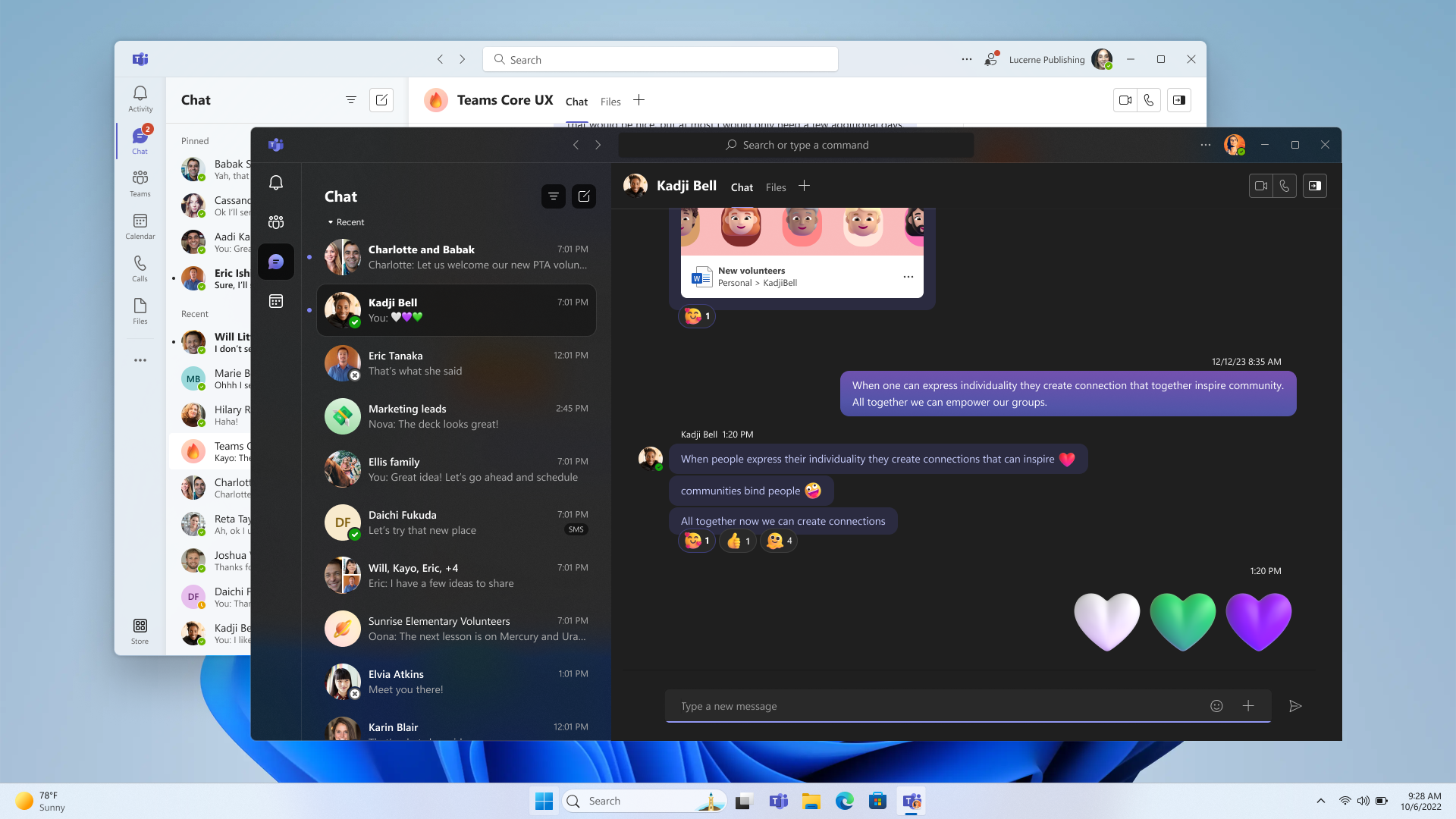
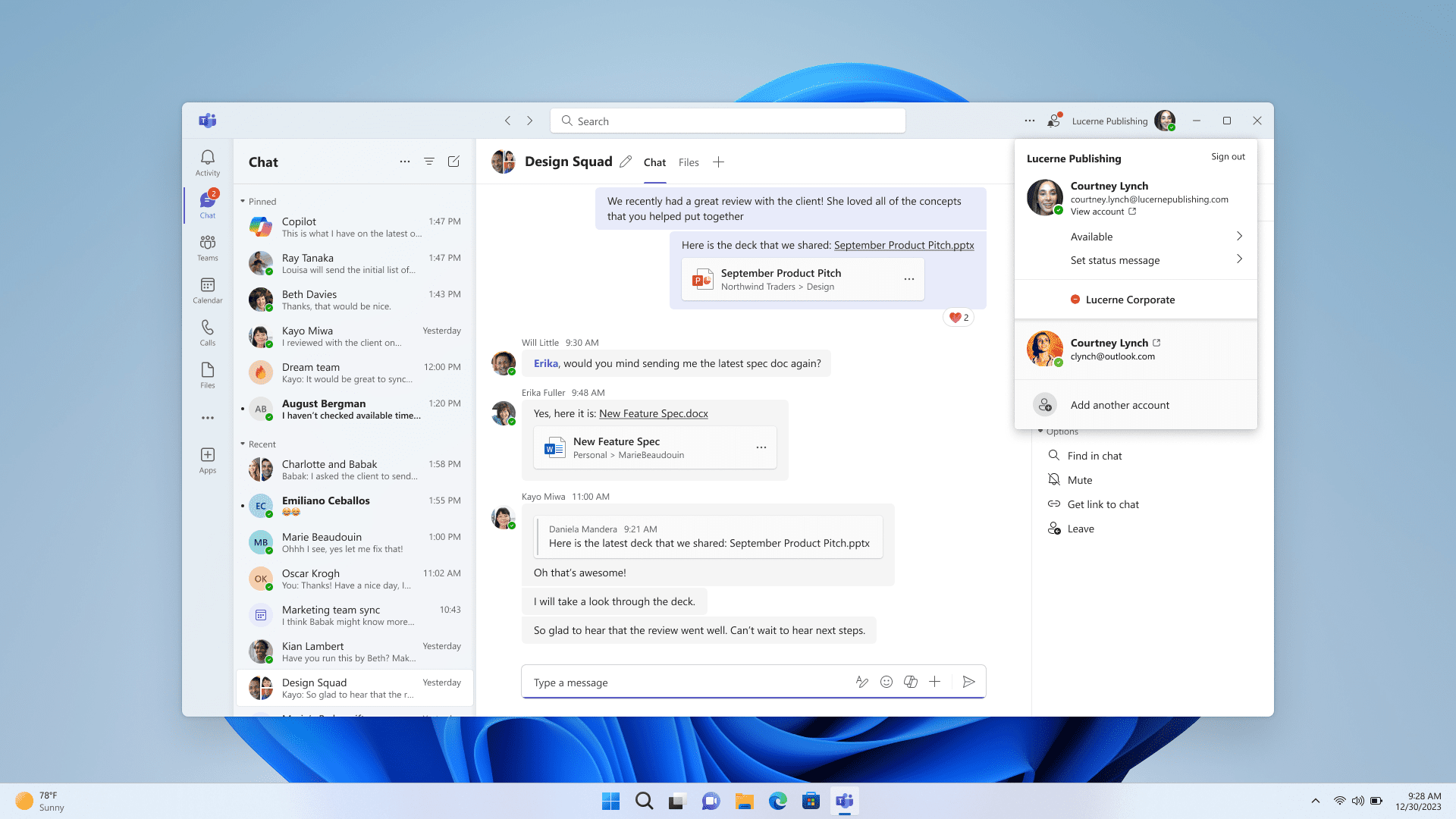
Starting with Windows 11, version 24H2, Teams users will get access to a preview experience of the new, unified Microsoft Teams experience on Windows. In this preview, Microsoft Teams will be available as a single application, enabling users to seamlessly switch between multiple cloud environments, tenants, and account types across personal and work. This new, unified application will soon be rolled out to commercial customers as well, through the normal update process. To add or access additional accounts, select your profile picture at the upper right corner of Teams when you sign into Teams.

Teams work user interface showing the Me control open with both work and personal account.

We received consistent feedback from personal and work users: you prefer a single Teams app that allows you to easily access and switch between personal and work accounts. This update lets you use one app for all kinds of Teams accounts.
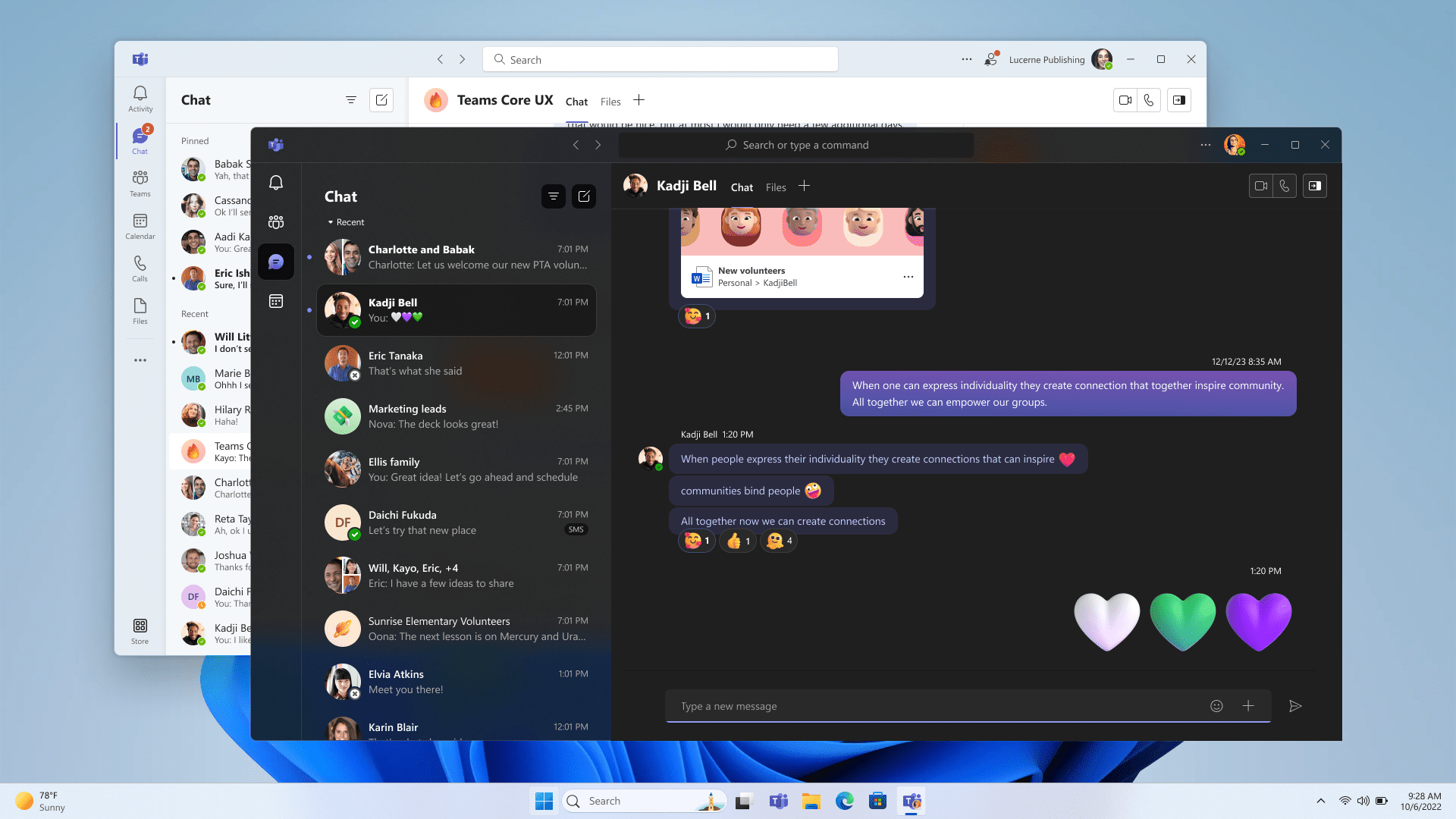
Teams personal account user interface over Teams work user interface.

You can join any Teams meeting with ease. In upcoming builds, when you are joining a meeting, you can select the account you want to use. You will also be able to join a meeting without signing in.
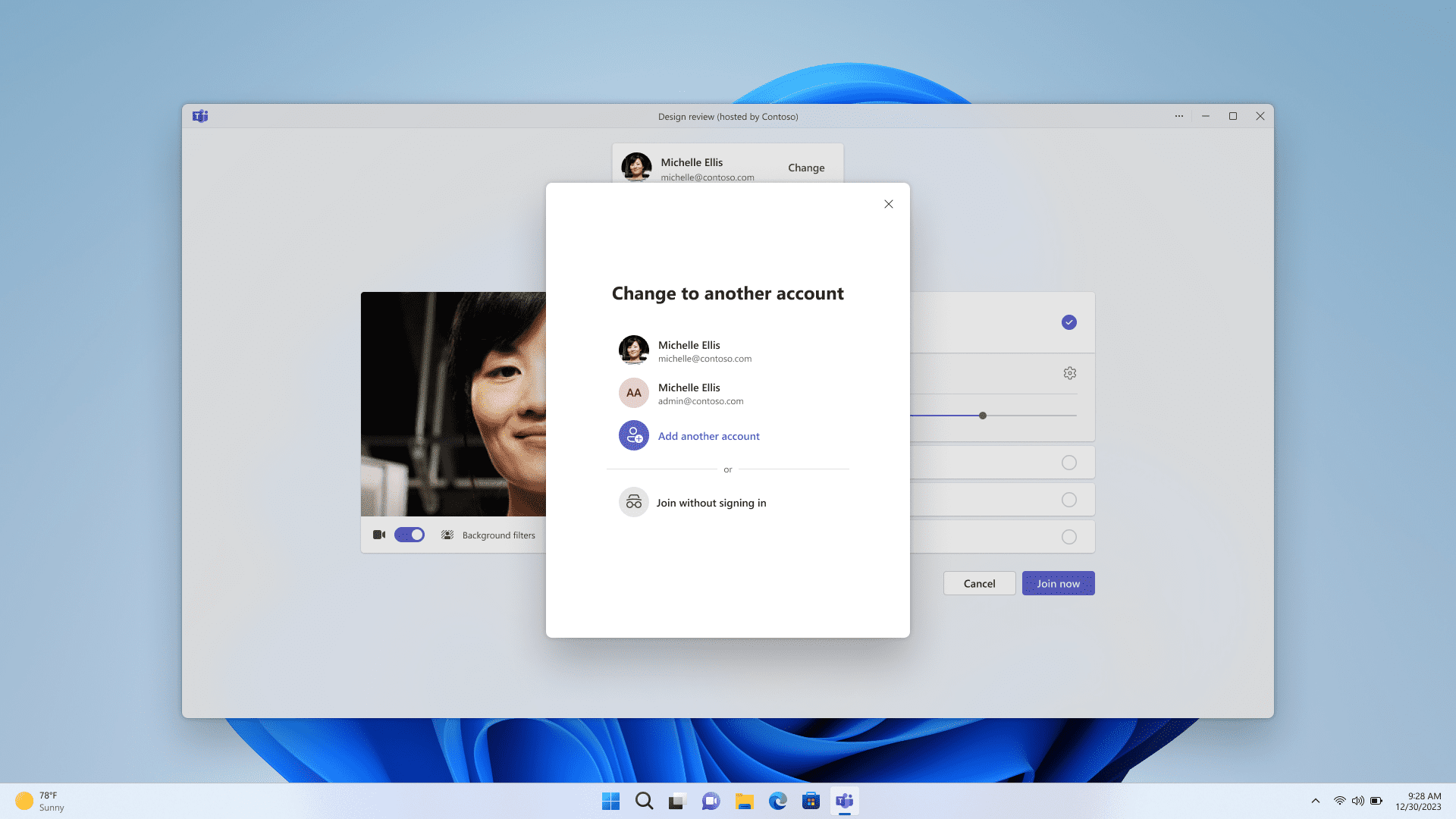
Teams user selecting which account to use to join a meeting.

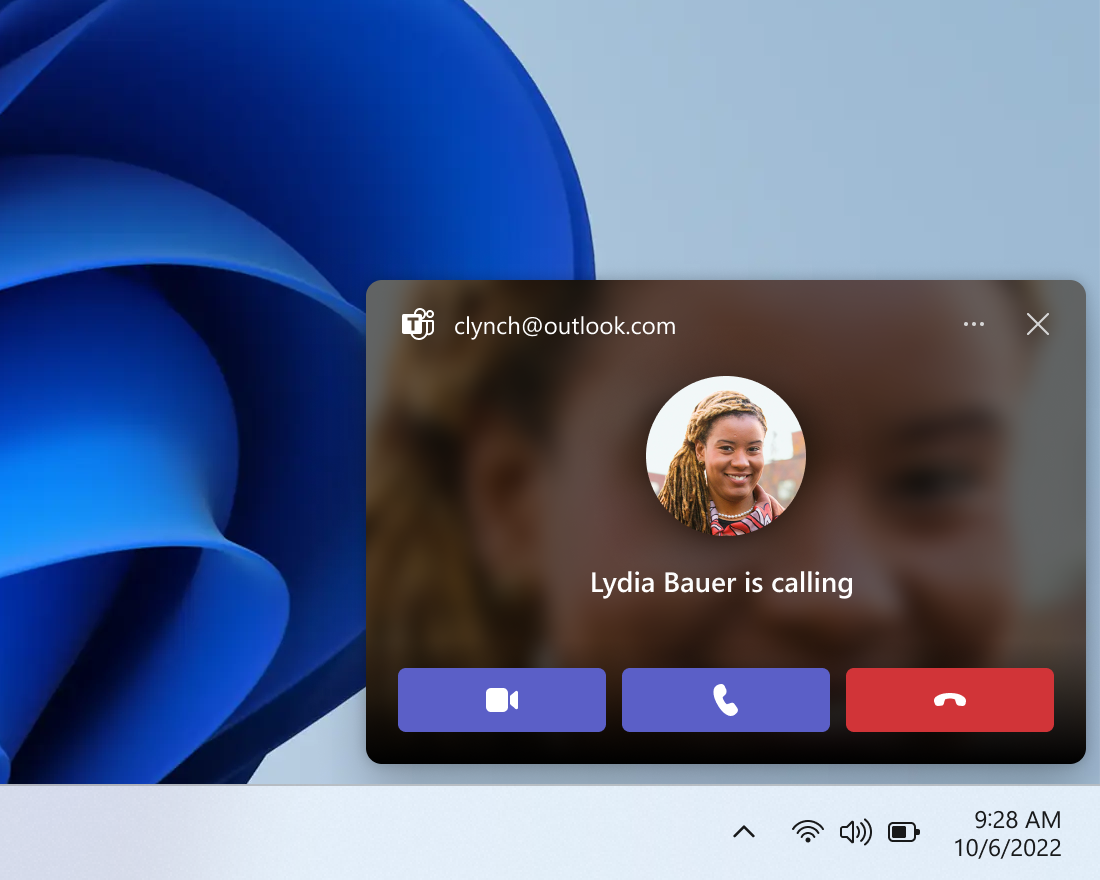
Notifications have been improved, showing which Teams account they belong to. In addition, personal notifications have more details, giving clear and easy actions from the notification banner.
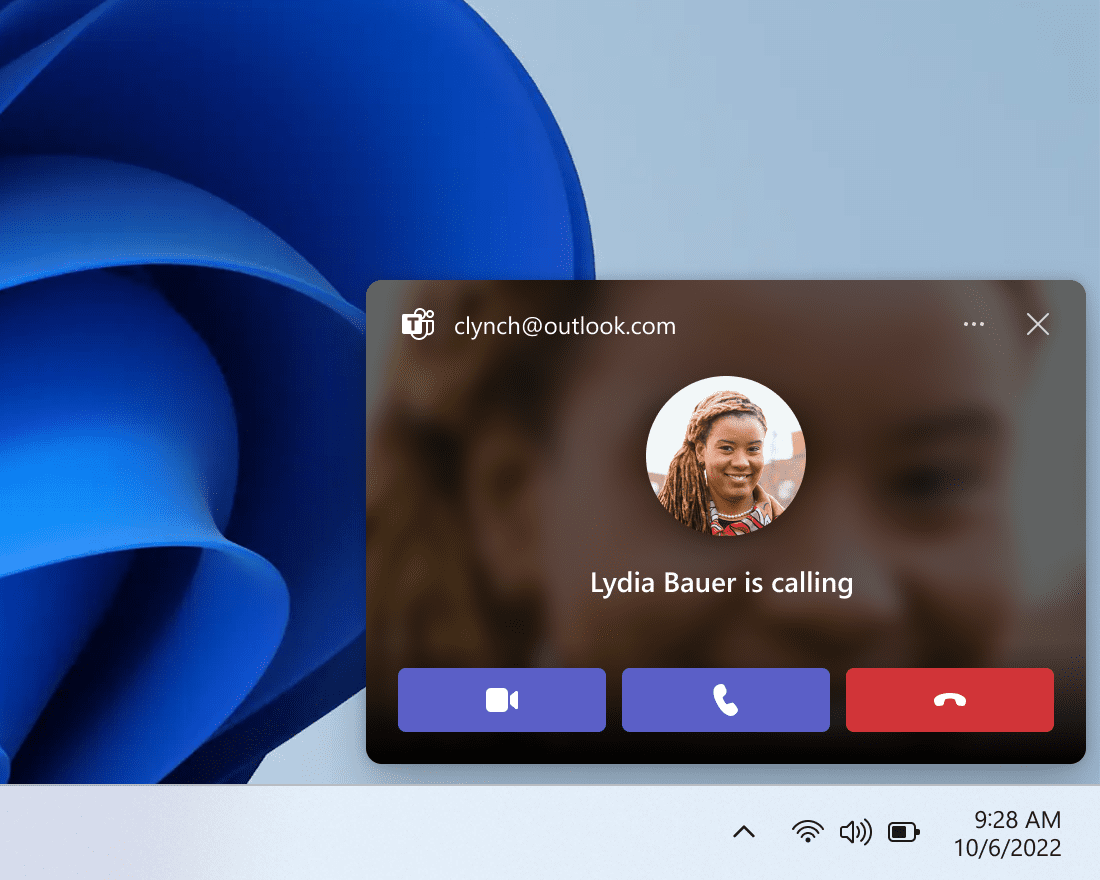
A Teams notification that someone is calling.

You can now launch personal and work accounts simultaneously with separate icons on the taskbar. We listened to users about their communication needs in various aspects of their lives and how they want to use Teams. The feedback was clear that a multi-window experience is preferred.

Other things to know:
  • This unified preview app experience is labeled “Microsoft Teams (work or school)”. The app name will be automatically updated to “Microsoft Teams” in future releases.
  • This is a preview release, and you will notice some changes from your current experience using Microsoft Teams (free) and Microsoft Teams (work or school). These changes and more updates will continue until we reach general availability. Notably in this release, Teams will launch into a separate icon for single accounts.
  • We will remove the standalone consumer app, “Microsoft Teams (free)”, in future releases.
  • If you lose access to either Teams applications through use of the Windows Insiders Program, you can access your preferred Teams application from this download page.
  • For Enterprise Admins, the ability to sign in with Microsoft accounts will be part of a normal monthly update, there is no new app to install if you have new Teams. The functionality is targeted for preview in April and general availability in May. The ability for users to sign in with Microsoft accounts will follow all sign in restriction polices as it has for all versions of Teams. Admins can learn more in Message Center (MC719659).
  • [ADDED] This preview version of Microsoft Teams is immediately available on clean installs of Windows 11 Insider Preview Build 26080 and higher.
  • [ADDED] Existing Windows Insiders need to be on Microsoft Teams version 24057.2000.2723.3544 or higher to see this capability, which is rolling out gradually.

Improvements to Copilot in Windows* now rolling out to more Windows Insiders

We have been trying out a new runtime for Copilot in Windows* that allows you to manage more settings via Copilot, including accessibility-focused settings, and use Power Automate Desktop through Copilot! We are now rolling out these Copilot in Windows improvements to more Windows Insiders in the Canary Channel (which first began rolling out on 2/20) and beginning to roll these improvements out to Windows Insiders in the Dev Channel.

More built-in capabilities via Copilot in Windows


Try asking Copilot to turn on Narrator or Live Captions, turn on battery saver, show you available networks, even empty your recycle bin or clean up your storage. Here’s the full list of things you can ask Copilot to do!

New with this update:
  • Ask for available wireless networks.
  • Ask for system or device information.
  • Ask for battery information.
  • Ask to clean storage.
  • Ask to empty recycle bin.
  • Ask to toggle battery saver.
  • Ask to show startup apps.
  • Ask for your IP address.
  • Ask for system, device, or storage information.
Try accessibility features:
  • Ask to turn on narrator.
  • Ask to open voice access.
  • Ask to turn on magnifier.
  • Ask to change text size.
  • Ask to start live captions.
  • Ask to turn on high-contrast.
  • Ask to start voice typing.
Already live, now on the new runtime:
  • Ask to toggle dark/light theme.
  • Ask to toggle Bluetooth.
  • Ask to toggle do not disturb.
  • Ask to add a device.
  • Ask to take a screenshot.
  • Ask to cast your screen to another monitor.
  • Ask to change your background image.
  • Ask to set volume, change volume, or mute/unmute volume.
  • Ask to launch an application.
  • State that certain parts of your PC aren’t working: Audio, Windows Update, Camera, Bluetooth, Printer, Network, others.
  • Ask to snap a window.
  • Ask to start a focus session.
Introducing Power Automate via Copilot in Windows

Power Automate is a low-code automation solution that is part of the Power Platform. We’re excited to introduce the Power Automate plugin in Copilot in Windows. This first release of the plugin offers automation features for Excel, PDF manipulation and file management.

To use the plugin, download or update Power Automate Desktop to the latest version from the Microsoft Store. Currently plugins are only accessible if you are signed in to Copilot in Windows with a Microsoft account.

After you have Power Automate installed and you activate the plugin in the plugins section in Copilot in Windows, you can ask for tasks such as:
  • Write an email to my team wishing everyone a happy weekend.
  • List the top 5 highest mountains in the world in an Excel file.
  • Rename all PDF files in a folder to add the word final at the end.
  • Move all word documents to another folder.
  • I need to split a PDF by the first page. Can you help?
Do you want to share your feedback on the Power Automate plugin or do you have other automation scenarios that you would like us to support? Feel free to contact us: [email protected].

[The rollout continues for these Copilot in Windows improvements to Windows Insiders in the Canary and Dev Channels today, so the experience isn’t available to all Insiders just yet.]

FEEDBACK: Because of an issue with our feedback pipeline, please do not use the in-line feedback form that opens from thumbs up/down for these actions right now, and instead file feedback about using these in Feedback Hub (WIN + F) under Desktop Environment > Copilot in Windows.

Changes and Improvements

[Copilot in Windows*]

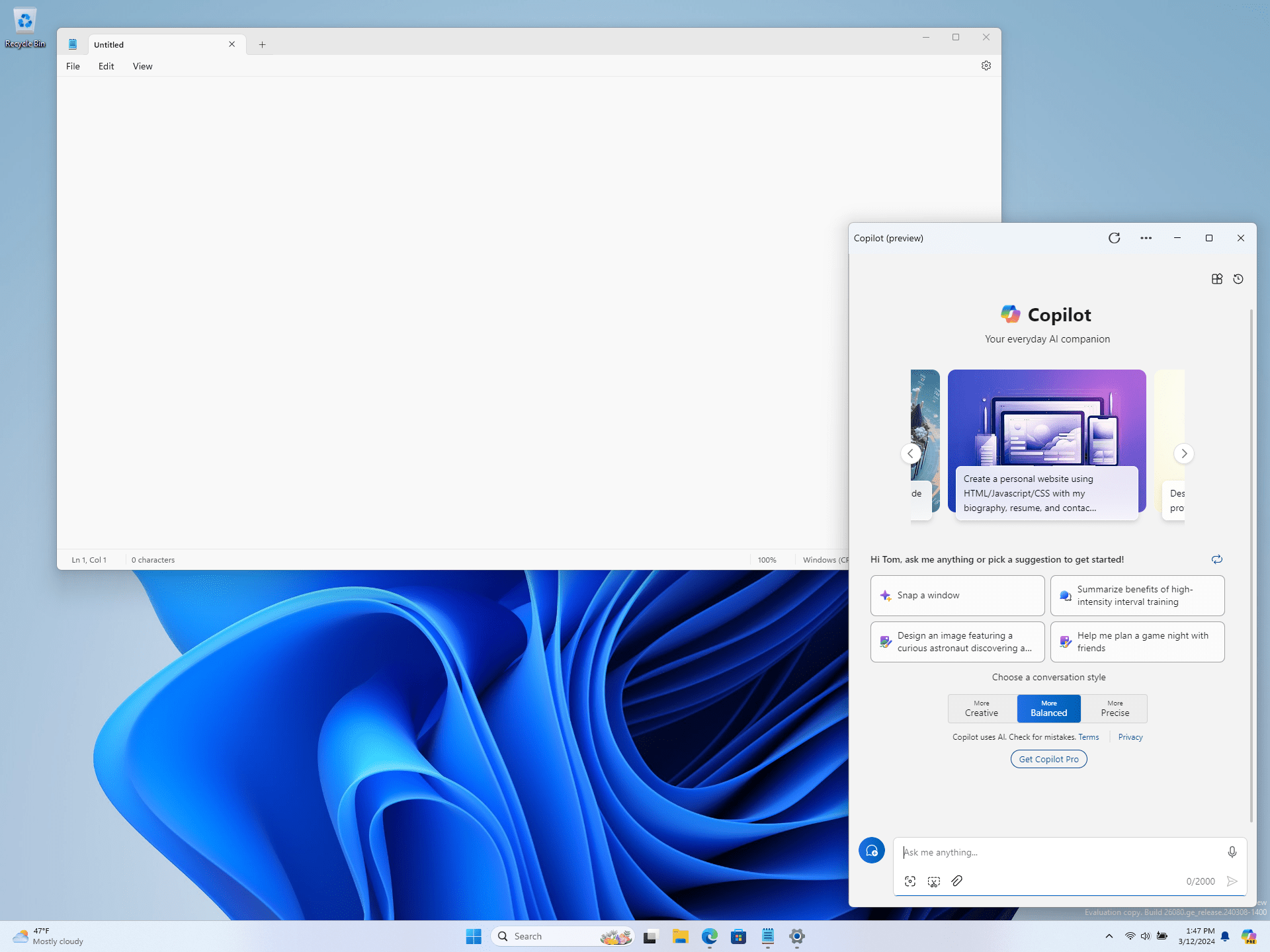
  • We are beginning to roll-out an updated Copilot in Windows experience that adds the ability to switch between the existing “docked” behavior that attaches Copilot to the side of your desktop, and a new mode where it acts like a normal application window which you can resize and move around your screen. As part of this change, we’re also introducing some under-the-hood improvements as well. This experience is beginning to roll out to Windows Insiders in the Canary Channel As always, please report any issues you experience to us via Feedback Hub.


    Copilot in Windows undocked and shown next to Notepad like a normal application window.
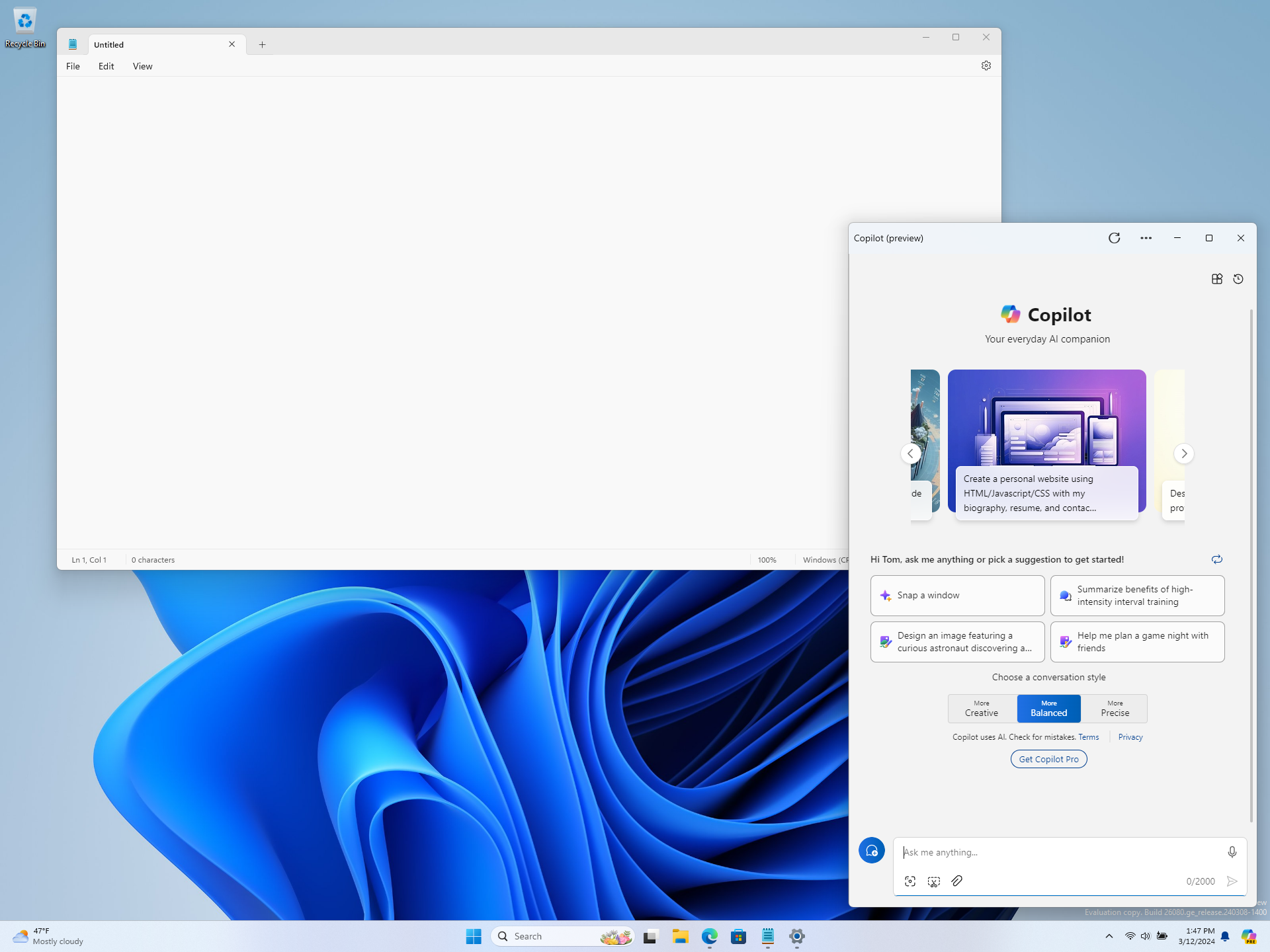
    Copilot in Windows undocked and shown next to Notepad like a normal application window.

[Taskbar & System Tray]

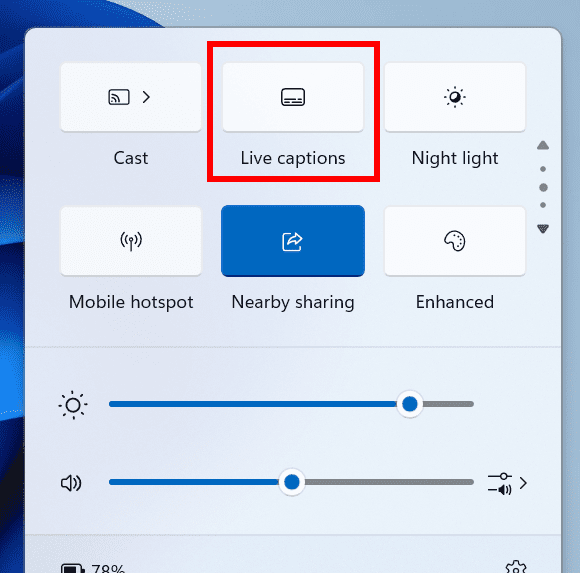
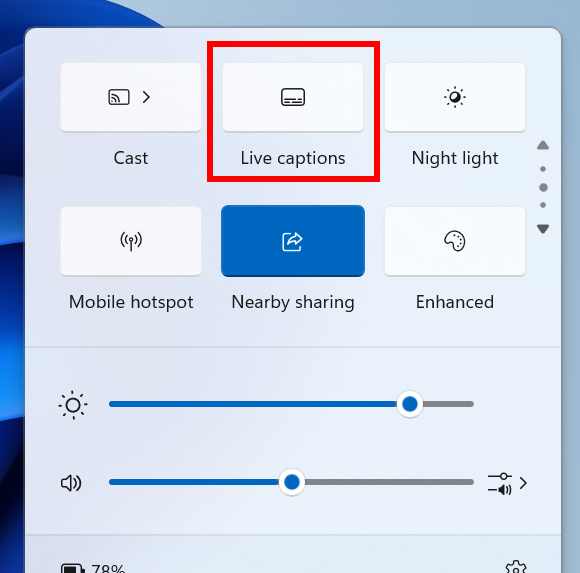
  • You can turn on live captions more quickly by using the new quick setting. Just open quick settings from the system tray, scroll down, then select the live captions quick setting.


    The new live captions quick setting highlighted with a red box in the quick settings flyout from the system on the taskbar.
    The new live captions quick setting highlighted with a red box in the quick settings flyout from the system on the taskbar.
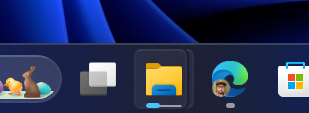
  • Updated the design of the progress bar under app icons to help make it easier to see. This will appear on the taskbar as well as the Start menu.
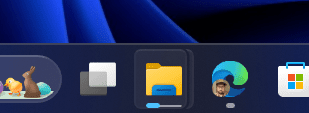
    Design of progress bar under app icons has been updated to show a thin line under the colored progress bar to make it easier to see.
    Design of progress bar under app icons has been updated to show a thin line under the colored progress bar to make it easier to see.

[File Explorer]

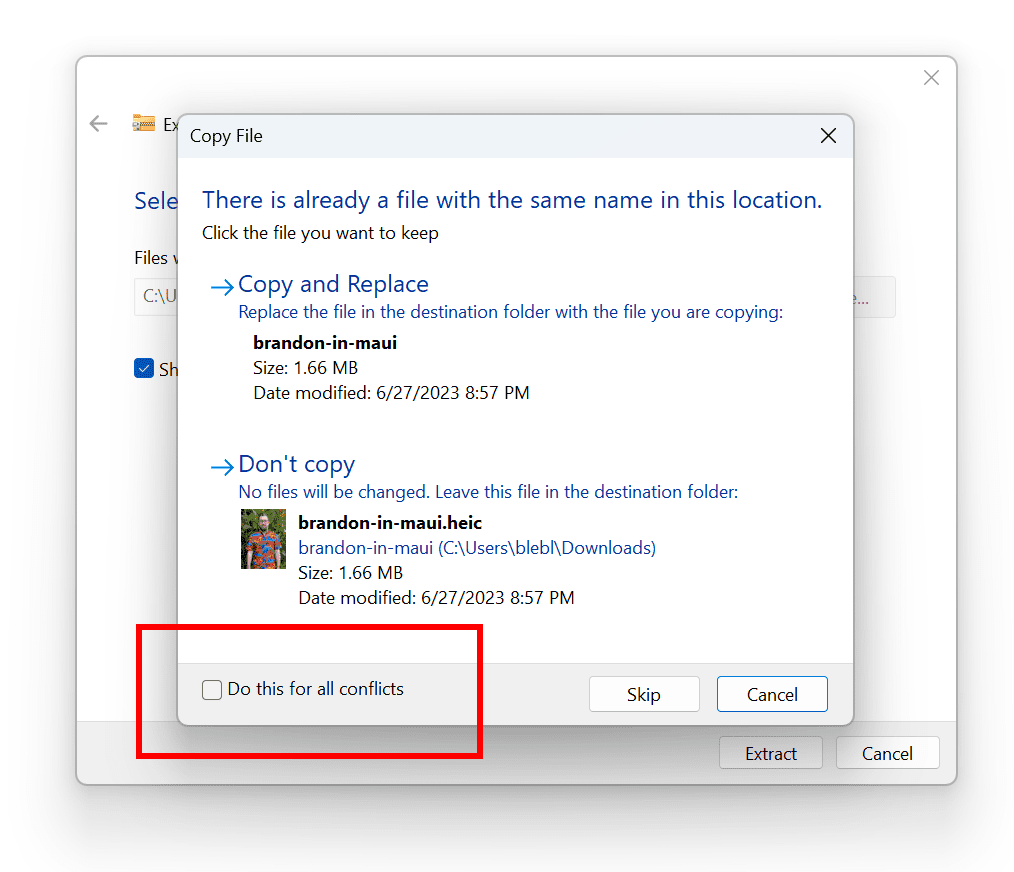
  • When extracting files, if there is a file name conflict you can now choose to apply your selected action (skip, replace) for all conflicts.


    New option highlighted for choosing to apply your selected action (skip, replace) for all conflicts when extracting files in File Explorer.
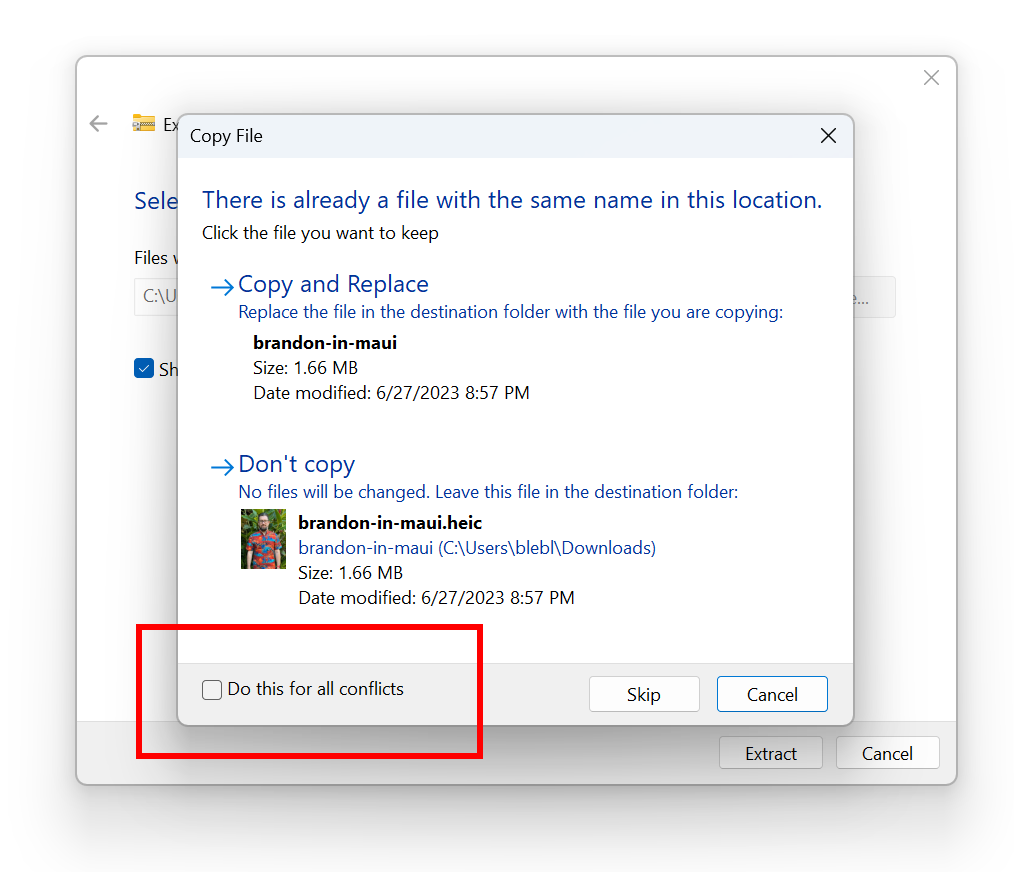
    New option highlighted for choosing to apply your selected action (skip, replace) for all conflicts when extracting files in File Explorer.

[Windows Update]

  • Removed the What’s New link in Windows Update history for Windows Insiders – it will only show now for retail (released) versions of Windows. To check what’s new in Insider builds, please follow this blog.

[Printing]

  • [ADDED] Building off the printer improvements first introduced with Build 26020, we have added the ability to rename your printer directly from Settings > Bluetooth & devices > Printers & scanner.
Fixes for known issues

[General]

  • IMPORTANT NOTE FOR DEV DRIVE USERS: Insiders on Build 26068 and higher who have Dev Drives should no longer see their Dev Drives breaking when rolling back as long as you roll back to Build 26063 and higher. Rolling back to earlier builds may still result in issues with Dev Drives.
  • IMPORTANT NOTE: Fixed an issue causing Windows Update in Settings to not load or crash in Build 26063. If you are still on Build 26063 and encounter this, rebooting may resolve the issue. If it doesn’t, the update should still eventually download on its own – appreciate your patience.
  • Fixed an issue for Narrator not working when setting up a device or in Advanced Startup.

[Copilot in Windows*]

  • Fixed an issue where if you turned the Copilot icon off and back on in Settings never showed it on your taskbar again.

[Taskbar & System Tray]

  • Fixed a memory leak related to showing the tooltip for the date and time in the taskbar when you had enabled additional clocks.

[File Explorer]

  • Fixed an underlying issue believed to be the cause of some Insiders finding File Explorer had started freezing and using unexpectedly high CPU in the last couple builds. Please file feedback in the Feedback Hub if you continue experiencing this after upgrading.
  • Fixed an issue where your preference for “Show extracted files when complete” when extracting files in File Explorer wasn’t persisting across upgrades.
  • Fixed a timing issue where when you start a search from Home in File Explorer, it might unexpectedly show no results the first time you tried.
  • Fixed an issue causing the Details view in File Explorer to be unexpectedly cramped in recent builds when using compact mode.
  • Made a change to help address an issue where after a DWM crash, when you opened File Explorer it could just show a blank area on top instead of rendering the area correctly.
  • Fixed an issue where the 7zip and ZIP compression options weren’t displaying correctly for Insiders with the English (United Kingdom) display language.

[Task Manager]

  • Fixed an issue which could lead to your GPU showing as -1 in Task Manager.
  • Fixed an issue where Task Manager may unexpectedly show no GPU % used (when that was not the case).
  • Fixed an issue impacting Task Manager reliability.

 
Last edited:
New ISO files released for Windows Insiders: :alien:

Windows 11 Canary and Dev Channels - 26080


My Computers

System One System Two

  • OS
    Windows 11 Pro for Workstations
    Computer type
    PC/Desktop
    Manufacturer/Model
    Custom self build
    CPU
    Intel i7-8700K 5 GHz
    Motherboard
    ASUS ROG Maximus XI Formula Z390
    Memory
    64 GB (4x16GB) G.SKILL TridentZ RGB DDR4 3600 MHz (F4-3600C18D-32GTZR)
    Graphics Card(s)
    ASUS ROG-STRIX-GTX1080TI-O11G-GAMING (11GB GDDR5X)
    Sound Card
    Integrated Digital Audio (S/PDIF)
    Monitor(s) Displays
    2 x Samsung Odyssey G75 27"
    Screen Resolution
    2560x1440
    Hard Drives
    1TB Samsung 990 PRO M.2,
    4TB Samsung 990 PRO M.2,
    TerraMaster F8 SSD Plus NAS
    PSU
    Seasonic Prime Titanium 850W
    Case
    Thermaltake Core P3 wall mounted
    Cooling
    Corsair Hydro H115i
    Keyboard
    Amazon Basics Wired Full Keyboard MD005
    Mouse
    Logitech MX Master 4
    Internet Speed
    2 Gbps Download and 100 Mbps Upload
    Browser
    Chrome and Edge
    Antivirus
    Microsoft Defender
    Other Info
    Logitech Z625 speaker system,
    Logitech BRIO 4K Pro webcam,
    HP Color LaserJet Pro MFP M477fdn,
    CyberPower CP1500PFCLCD
    Galaxy S23 Plus phone
  • Operating System
    Windows 11 Pro
    Computer type
    Laptop
    Manufacturer/Model
    Surface Laptop 7 Copilot+ PC
    CPU
    Snapdragon X Elite (12 core) 3.42 GHz
    Memory
    16 GB LPDDR5x-7467 MHz
    Monitor(s) Displays
    15" HDR
    Screen Resolution
    2496 x 1664
    Hard Drives
    1 TB SSD
    Internet Speed
    Wi-Fi 7 and Bluetooth 5.4
    Browser
    Chrome and Edge
    Antivirus
    Microsoft Defender
1710357040897.png
 

My Computer

System One

  • OS
    Windows 11 Pro Insider Preview Dev
    Computer type
    PC/Desktop
    Manufacturer/Model
    To be filled by O.E.M.
    CPU
    AMD Ryzen™ 5 5600G with Radeon Graphics 3.90 GHz
    Motherboard
    MSI B450 GAMING PLUS MAX
    Memory
    16,0 GB
    Graphics Card(s)
    NVIDIA GeForce GT 720, NVIDIA compatible
    Sound Card
    NVIDIA High Definition Audio
    Monitor(s) Displays
    BenQ GW2270 Color Profile.D6500
    Screen Resolution
    1920 x 1080
    Hard Drives
    Samsung SSD 850 EVO 250GB + CT1000BX500SSD1 + ST2000DM006-2DM164 + WDC WD5000AAKS-07TMA0 +WDC WD10EARX-00N0YB0
    PSU
    EVGA 600 W2, 80+ WHITE 600W, 3 Year Warranty, Power Supply 100-W2-0600-K2 (EU)
    Case
    RAIJINTEK Agos - mid tower - ATX
    Cooling
    Cooler Master Hyper 212 Evo heatsink + Fans: 2 front+1 back+1 up
    Keyboard
    Logitech Internet 350 Keyboard
    Mouse
    Logitech MX Revolution
    Internet Speed
    Download 159.29 Mbps - Upload 80.14 Mbps
    Browser
    Google Crome Dev
    Antivirus
    Microsoft Windows Security
Updated on Canary.

Edition Windows 11 Pro
Version 24H2
Installed on ‎3/‎13/‎2024
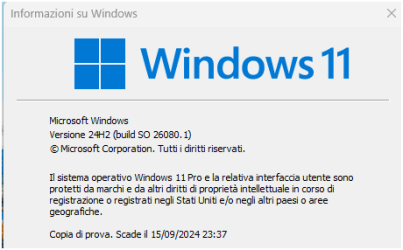
OS build 26080.1
Experience Windows Feature Experience Pack 1000.26100.1.0
 

My Computer

System One

  • OS
    Windows 11 Pro 25H2
    Computer type
    PC/Desktop
    Manufacturer/Model
    Dell XPS 8930
    CPU
    Intel I9-9900K
    Memory
    64GB
    Graphics Card(s)
    NVIDIA RTX 2060
    Sound Card
    NVIDIA High Definition Audio
    Monitor(s) Displays
    4k Samsung
    Screen Resolution
    3840 x 2160
    Hard Drives
    512GB NVMe, ADATA SU 800, 2TB HDD
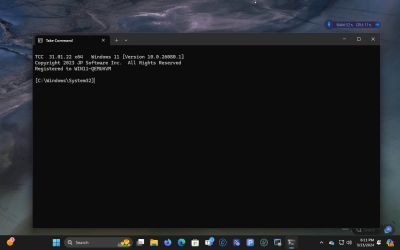
Finally. And in VMware which installed perfectly on Kernel 6..8 final.

TCC 31.01.22 x64 Windows 11 [Version 10.0.26080.1]
 

My Computer

System One

  • OS
    Fedora Silverblue Rawhide Debian 13 Ubuntu 25.10,
    Computer type
    PC/Desktop
    Manufacturer/Model
    HomeBrew
    CPU
    AMD Ryzen 7 7800X3D 8-Core
    Motherboard
    Gigabyte
    Memory
    64GB
    Graphics Card(s)
    Nvidia
    Monitor(s) Displays
    Dell
    Hard Drives
    3 ssd 2 spinners configured as raid 0
    Keyboard
    Eluktronics
    Mouse
    Eluktronics
    Browser
    Firefox and Chromium
    Other Info
    Gnome 46
 

My Computers

System One System Two

  • OS
    Windows 11 Pro for Workstations
    Computer type
    PC/Desktop
    Manufacturer/Model
    Custom self build
    CPU
    Intel i7-8700K 5 GHz
    Motherboard
    ASUS ROG Maximus XI Formula Z390
    Memory
    64 GB (4x16GB) G.SKILL TridentZ RGB DDR4 3600 MHz (F4-3600C18D-32GTZR)
    Graphics Card(s)
    ASUS ROG-STRIX-GTX1080TI-O11G-GAMING (11GB GDDR5X)
    Sound Card
    Integrated Digital Audio (S/PDIF)
    Monitor(s) Displays
    2 x Samsung Odyssey G75 27"
    Screen Resolution
    2560x1440
    Hard Drives
    1TB Samsung 990 PRO M.2,
    4TB Samsung 990 PRO M.2,
    TerraMaster F8 SSD Plus NAS
    PSU
    Seasonic Prime Titanium 850W
    Case
    Thermaltake Core P3 wall mounted
    Cooling
    Corsair Hydro H115i
    Keyboard
    Amazon Basics Wired Full Keyboard MD005
    Mouse
    Logitech MX Master 4
    Internet Speed
    2 Gbps Download and 100 Mbps Upload
    Browser
    Chrome and Edge
    Antivirus
    Microsoft Defender
    Other Info
    Logitech Z625 speaker system,
    Logitech BRIO 4K Pro webcam,
    HP Color LaserJet Pro MFP M477fdn,
    CyberPower CP1500PFCLCD
    Galaxy S23 Plus phone
  • Operating System
    Windows 11 Pro
    Computer type
    Laptop
    Manufacturer/Model
    Surface Laptop 7 Copilot+ PC
    CPU
    Snapdragon X Elite (12 core) 3.42 GHz
    Memory
    16 GB LPDDR5x-7467 MHz
    Monitor(s) Displays
    15" HDR
    Screen Resolution
    2496 x 1664
    Hard Drives
    1 TB SSD
    Internet Speed
    Wi-Fi 7 and Bluetooth 5.4
    Browser
    Chrome and Edge
    Antivirus
    Microsoft Defender
Just got it as we speak... Let's hope it updates peacefully without any 0xc1900101 - 0x20017 errors or rollbacks...
1710360744103.png
 

My Computer

System One

  • OS
    Win11 Insider[Always the latest Dev/Beta releases]
    Computer type
    Laptop
    Manufacturer/Model
    Asus TUF Gaming FA506IU Laptop
    CPU
    AMD Ryzen 7 4800H with Radeon Graphics
    Motherboard
    AMD K17.6 FCH, AMD K17.6 IMC
    Memory
    G.SKILL [Samsung Die] DRR4 - 3200Mhz CL18 (18-19-19-36) - 32GB(16GBx2)
    Graphics Card(s)
    nVidia GTX 1660ti GDDR6 6GB(90W) 2.02Ghz Core & +548Mhz Mem-OC'ed [VBIOS Unlocked]
    Sound Card
    Realtek ALC256 @ AMD K17.6
    Monitor(s) Displays
    LM156LF-2F03 144HZ with Adaptive SYNC
    Screen Resolution
    1920x1080 - 144Hz
    Hard Drives
    WDC PC SN530 SDBPNPZ-256G-1002 + SHGP31-500GM-2 + ST1000LM035-1RK172 + Samsung SSD 870 QVO 1TB 1000.2 GB
    PSU
    ASUS Power Brick 180W
    Case
    Laptop Case with Dual Fan
    Cooling
    Dual Fans Design with Self-Cleaning Cooling
    Keyboard
    Asus Aura RGB with Overstroke technology
    Mouse
    ROG SICA Gaming Mouse
    Internet Speed
    100Mbps FiberOptic [100 Mbps Down - 50 Mbps Up]
    Browser
    Chrome/Firefox/Tor
    Antivirus
    Symantec Endpoint Protection with Windows Defender (Active Mode) + Custom DNS Server
    Other Info
    CPU with -15 Curve Optimizer all cores and -50 Cure optimizer on iGPU
    BCLK OC to 101.6Mhz
    Benchmark Scores:-
    CineBench R23 Single core:- 1290 points
    CineBench R23 Multi core:- 11111 points
The only disappointment so far is the hit that StartallBack took. Something about DisableWin10Taskbar being enabled by default, though vivetool'g it (42537950) disabled again had no effect for me.
 

My Computer

System One

  • OS
    Windows 11
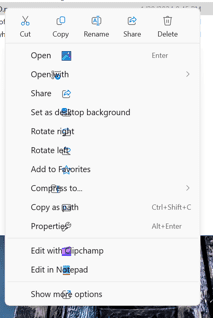
As stated in the Blog, this is still not fixed.

  • When opening the context menu in File Explorer, the icons may appear out of place and overlapping text.

1710364129023.png
 

My Computer

System One

  • OS
    Windows 11 Pro 25H2
    Computer type
    PC/Desktop
    Manufacturer/Model
    Dell XPS 8930
    CPU
    Intel I9-9900K
    Memory
    64GB
    Graphics Card(s)
    NVIDIA RTX 2060
    Sound Card
    NVIDIA High Definition Audio
    Monitor(s) Displays
    4k Samsung
    Screen Resolution
    3840 x 2160
    Hard Drives
    512GB NVMe, ADATA SU 800, 2TB HDD
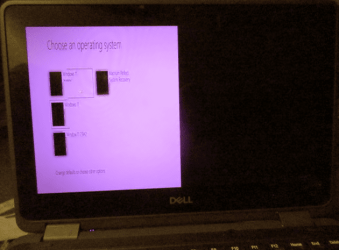
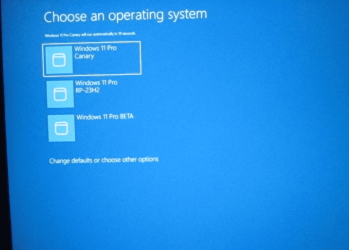
Remember that problem of the 'invisible/broken' boot menu on a multi-boot machine where the Canary build was left as the default OS?

Well it's back in Dev 26080.1100 (sort of). This time it's bright pink and half width, squeezed into the left half of the screen....

1710364144968.png

This is on my fully supported device, System Five in 'My Computers > Other Info'.

I'll let you know how it looks on my unsupported System Four when it finally finishes installing....


Edit: ironically, on my unsupported device the boot menu works flawlessly.... :doh:
 
Last edited:

My Computers

System One System Two

  • OS
    Windows 11 Home
    Computer type
    Laptop
    Manufacturer/Model
    Acer Aspire 3 A315-23-R9VY
    CPU
    AMD Athlon Silver 3050U
    Memory
    8GB
    Graphics Card(s)
    Radeon Graphics
    Monitor(s) Displays
    laptop screen
    Screen Resolution
    1366x768 native resolution, up to 2560x1440 with Radeon Virtual Super Resolution
    Hard Drives
    1TB Samsung EVO 870 SSD (from April 2026: 250GB EVO 850)
    Internet Speed
    150 Mbps
    Browser
    Edge, Firefox
    Antivirus
    Defender
    Other Info
    fully 'Windows 11 ready' laptop. Windows 10 C: partition migrated from my old unsupported 'main machine' then upgraded to 11. A test migration ran Insider builds for 2 months. When 11 was released on 5th October 2021 it was re-imaged back to 10 and was offered the upgrade in Windows Update on 20th October. Windows Update offered the 22H2 Feature Update on 20th September 2022. It got the 23H2 Feature Update on 4th November 2023 through Windows Update, 24H2 on 3rd October 2024 through Windows Update by setting the Target Release Version for 24H2, and 25H2 on 30th September 2025 through Windows Update by setting the Target Release Version for 25H2.

    UPDATE - 11 April 2026: due to mechanical deterioration this PC has been retired from active duty. The OS with all software and files has been migrated to my System Seven below to carry on as my general purpose 'main machine'.

    My SYSTEM THREE is a Dell Latitude 5410, i7-10610U, 32GB RAM, 512GB NVMe ssd, supported device running Windows 11 Pro.

    My SYSTEM FOUR is a 2-in-1 convertible Lenovo Yoga 11e 20DA, Celeron N2930, 8GB RAM, 256GB ssd. Unsupported device: currently running Win10 Pro, plus Win11 Pro RTM and Insider Dev, Beta, and RP 24H2 as native boot vhdx.

    My SYSTEM FIVE is a Dell Latitude 3190 2-in-1, Pentium Silver N5030, 8GB RAM, 1TB NVMe ssd, supported device running Windows 11 Pro, plus Insider Beta, Dev, and Canary builds (and a few others) as a native boot .vhdx.

    My SYSTEM SIX is a Dell Latitude 5550, Core Ultra 7 165H, 64GB RAM, 1TB NVMe SSD, supported device, Windows 11 Pro 24H2, Hyper-V host machine. Updated to 25H2 on 30th September 2025.

    My SYSTEM SEVEN is a Lenovo Thinkpad T580, Intel Core i7-8650U, 16GB RAM, 512GB NVMe SSD + 2nd 512GB NVMe SSD, a supported device for Windows 11. This is my current general purpose 'main machine'. The installed Windows 11 Home from my System One has been migrated to this machine.
  • Operating System
    Windows 11 Pro
    Computer type
    Laptop
    Manufacturer/Model
    Dell Latitude E4310
    CPU
    Intel® Core™ i5-520M
    Motherboard
    0T6M8G
    Memory
    8GB
    Graphics card(s)
    (integrated graphics) Intel HD Graphics
    Screen Resolution
    1366x768
    Hard Drives
    500GB Crucial MX500 SSD
    Browser
    Firefox, Edge
    Antivirus
    Defender
    Other Info
    unsupported machine: Legacy bios, MBR, TPM 1.2, upgraded from W10 to W11 using W10/W11 hybrid install media workaround. In-place upgrade to 22H2 using ISO and a workaround. Feature Update to 23H2 by manually installing the Enablement Package. In-place upgrade to 24H2 using hybrid 23H2/24H2 install media. Upgraded to 25H2 by Enablement Package. Also running Insider Dev, and Canary builds and Windows 10 as native boot .vhdx.

    My SYSTEM THREE is a Dell Latitude 5410, i7-10610U, 32GB RAM, 512GB NVMe ssd, supported device running Windows 11 Pro.

    My SYSTEM FOUR is a 2-in-1 convertible Lenovo Yoga 11e 20DA, Celeron N2930, 8GB RAM, 256GB ssd. Unsupported device: currently running Win10 Pro, plus Win11 Pro RTM and Insider Dev, Beta, and RP 24H2 as native boot vhdx.

    My SYSTEM FIVE is a Dell Latitude 3190 2-in-1, Pentium Silver N5030, 8GB RAM, 1TB NVMe ssd, supported device running Windows 11 Pro, plus Insider Beta, Dev, and Canary builds (and a few others) as a native boot .vhdx.

    My SYSTEM SIX is a Dell Latitude 5550, Core Ultra 7 165H, 64GB RAM, 1TB NVMe SSD, supported device, Windows 11 Pro 24H2, Hyper-V host machine. Updated to 25H2 on 30th September 2025.

    My SYSTEM SEVEN is a Lenovo Thinkpad T580, Intel Core i7-8650U, 16GB RAM, 512GB NVMe SSD + 2nd 512GB NVMe SSD, a supported device for Windows 11. This is my current general purpose 'main machine'. The installed Windows 11 Home from my System One has been migrated to this machine.
So basically they still havent fixed the install issue
 

My Computer

System One

  • OS
    Windows 11
    Computer type
    PC/Desktop
    Manufacturer/Model
    MI5
    CPU
    AMD Ryzen 9 5950X
    Motherboard
    ASUS ROG Strix X570-F Gaming
    Memory
    Corsair Vengeance RGB PRO SL 32GB
    Graphics Card(s)
    AMD Radeon RX6900XT
    Sound Card
    Auzentech X-Fi Prelude 7.1
    Monitor(s) Displays
    GIGABYTE AORUS FV43U
    Screen Resolution
    3840x2160
    Hard Drives
    4 x 2TB 990 Pro SSD
    PSU
    Corsair
    Case
    Corsair
    Cooling
    Liquid
    Keyboard
    Corsair K95
    Mouse
    Two buttons
    Internet Speed
    As quick as I need
    Browser
    FireFox Nightly
    Antivirus
    Default
The only disappointment so far is the hit that StartallBack took. Something about DisableWin10Taskbar being enabled by default, though vivetool'g it (42537950) disabled again had no effect for me.
Thanks for the heads up. I'll skip this build until StartAllBack gets updated.
Edit: @rseiler I just checked and there was an update for StartAllBack. Are you running the newest build (3.7.6
 

My Computers

System One System Two

  • OS
    Windows 11 Pro 25H2
    Computer type
    PC/Desktop
    Manufacturer/Model
    PowerSpec B746
    CPU
    Intel Core i7-10700K
    Motherboard
    ASRock Z490 Phantom Gaming 4/ax
    Memory
    16GB (8GB PC4-19200 DDR4 SDRAM x2)
    Graphics Card(s)
    NVIDIA GeForce GTX 1050 TI
    Sound Card
    Realtek Audio
    Monitor(s) Displays
    #1. LG ULTRAWIDE 34" #2. AOC Q32G2WG3 32"
    Screen Resolution
    #1. 3440 X 1440 #2. 1920 x 1080
    Hard Drives
    NVMe WDC WDS100T2B0C-00PXH0 1TB
    Samsung SSD 860 EVO 1TB
    PSU
    750 Watts (62.5A)
    Case
    PowerSpec/Lian Li ATX 205
    Keyboard
    Logitech K270
    Mouse
    Logitech M185
    Browser
    Microsoft Edge and Firefox
    Antivirus
    Webroot SecureAnywhere CE 26.1
  • Operating System
    Windows 11 Canary Channel
    Computer type
    PC/Desktop
    Manufacturer/Model
    PowerSpec G156
    CPU
    Intel Core i5-8400 CPU @ 2.80GHz
    Motherboard
    AsusTeK Prime B360M-A
    Memory
    16 MB DDR 4-2666
    Monitor(s) Displays
    23" Speptre HDMI 75Hz
    Screen Resolution
    1920x1080
    Hard Drives
    Samsung 970 EVO 500GB NVMe
    Keyboard
    Logitek K270
    Mouse
    Logitek M185
    Browser
    Firefox, Edge and Edge Canary
    Antivirus
    Windows Defender
Edit: @rseiler I just checked and there was an update for StartAllBack. Are you running the newest build (3.7.6

Yes, that update came out just before the build did. There will probably be a test build soon, if history is any guide, unless the thing above that I don't really know much about is some kind of deal-breaker. Maybe something further with vivetool can be done. It's truly strange running with a horizontal taskbar again.
 

My Computer

System One

  • OS
    Windows 11
It's truly strange running with a horizontal taskbar again.
I have gotten so use to the Taskbar on top that out of habit I always move the mouse curser to the top. I didn't see anything that interested me in this build so I'll just wait it out.
 

My Computers

System One System Two

  • OS
    Windows 11 Pro 25H2
    Computer type
    PC/Desktop
    Manufacturer/Model
    PowerSpec B746
    CPU
    Intel Core i7-10700K
    Motherboard
    ASRock Z490 Phantom Gaming 4/ax
    Memory
    16GB (8GB PC4-19200 DDR4 SDRAM x2)
    Graphics Card(s)
    NVIDIA GeForce GTX 1050 TI
    Sound Card
    Realtek Audio
    Monitor(s) Displays
    #1. LG ULTRAWIDE 34" #2. AOC Q32G2WG3 32"
    Screen Resolution
    #1. 3440 X 1440 #2. 1920 x 1080
    Hard Drives
    NVMe WDC WDS100T2B0C-00PXH0 1TB
    Samsung SSD 860 EVO 1TB
    PSU
    750 Watts (62.5A)
    Case
    PowerSpec/Lian Li ATX 205
    Keyboard
    Logitech K270
    Mouse
    Logitech M185
    Browser
    Microsoft Edge and Firefox
    Antivirus
    Webroot SecureAnywhere CE 26.1
  • Operating System
    Windows 11 Canary Channel
    Computer type
    PC/Desktop
    Manufacturer/Model
    PowerSpec G156
    CPU
    Intel Core i5-8400 CPU @ 2.80GHz
    Motherboard
    AsusTeK Prime B360M-A
    Memory
    16 MB DDR 4-2666
    Monitor(s) Displays
    23" Speptre HDMI 75Hz
    Screen Resolution
    1920x1080
    Hard Drives
    Samsung 970 EVO 500GB NVMe
    Keyboard
    Logitek K270
    Mouse
    Logitek M185
    Browser
    Firefox, Edge and Edge Canary
    Antivirus
    Windows Defender
Remember that problem of the 'invisible/broken' boot menu on a multi-boot machine where the Canary build was left as the default OS?

Well it's back in Dev 26080.1100 (sort of). This time it's bright pink and half width, squeezed into the left half of the screen....


This is on my fully supported device, System Five in 'My Computers > Other Info'.

I'll let you know how it looks on my unsupported System Four when it finally finishes installing....


Edit: ironically, on my unsupported device the boot menu works flawlessly.... :doh:
I think there were 2 separate problems, one was getting no menu at all, just a black screen and
was caused by [19043985] (BrokeredDisplays_ConsoleSessions) being enabled. Turning it off got the menu back.
The picture you show was caused by a different problem, but I don't remember what the exact cause was. I got around it by doing an update with ISO of an older Build that I restored to replace the one that was failing.
I have no problem now with this Build 26080.1 or 26080.1100. The boot menu looks normal on my desktop.

1710374689141.png
 

My Computer

System One

  • OS
    Windows 11 Pro 25H2
    Computer type
    PC/Desktop
    Manufacturer/Model
    Dell XPS 8930
    CPU
    Intel I9-9900K
    Memory
    64GB
    Graphics Card(s)
    NVIDIA RTX 2060
    Sound Card
    NVIDIA High Definition Audio
    Monitor(s) Displays
    4k Samsung
    Screen Resolution
    3840 x 2160
    Hard Drives
    512GB NVMe, ADATA SU 800, 2TB HDD
The picture you show was caused by a different problem, but I don't remember what the exact cause was. I got around it by doing an update with ISO of an older Build that I restored to replace the one that was failing.
My Dev build is a native boot .vhdx, I can easily go back to the previous build by replacing the .vhdx file with my backed up copy.
Or easier still, just set something else as the default OS (as I did last time) :wink:
 

My Computers

System One System Two

  • OS
    Windows 11 Home
    Computer type
    Laptop
    Manufacturer/Model
    Acer Aspire 3 A315-23-R9VY
    CPU
    AMD Athlon Silver 3050U
    Memory
    8GB
    Graphics Card(s)
    Radeon Graphics
    Monitor(s) Displays
    laptop screen
    Screen Resolution
    1366x768 native resolution, up to 2560x1440 with Radeon Virtual Super Resolution
    Hard Drives
    1TB Samsung EVO 870 SSD (from April 2026: 250GB EVO 850)
    Internet Speed
    150 Mbps
    Browser
    Edge, Firefox
    Antivirus
    Defender
    Other Info
    fully 'Windows 11 ready' laptop. Windows 10 C: partition migrated from my old unsupported 'main machine' then upgraded to 11. A test migration ran Insider builds for 2 months. When 11 was released on 5th October 2021 it was re-imaged back to 10 and was offered the upgrade in Windows Update on 20th October. Windows Update offered the 22H2 Feature Update on 20th September 2022. It got the 23H2 Feature Update on 4th November 2023 through Windows Update, 24H2 on 3rd October 2024 through Windows Update by setting the Target Release Version for 24H2, and 25H2 on 30th September 2025 through Windows Update by setting the Target Release Version for 25H2.

    UPDATE - 11 April 2026: due to mechanical deterioration this PC has been retired from active duty. The OS with all software and files has been migrated to my System Seven below to carry on as my general purpose 'main machine'.

    My SYSTEM THREE is a Dell Latitude 5410, i7-10610U, 32GB RAM, 512GB NVMe ssd, supported device running Windows 11 Pro.

    My SYSTEM FOUR is a 2-in-1 convertible Lenovo Yoga 11e 20DA, Celeron N2930, 8GB RAM, 256GB ssd. Unsupported device: currently running Win10 Pro, plus Win11 Pro RTM and Insider Dev, Beta, and RP 24H2 as native boot vhdx.

    My SYSTEM FIVE is a Dell Latitude 3190 2-in-1, Pentium Silver N5030, 8GB RAM, 1TB NVMe ssd, supported device running Windows 11 Pro, plus Insider Beta, Dev, and Canary builds (and a few others) as a native boot .vhdx.

    My SYSTEM SIX is a Dell Latitude 5550, Core Ultra 7 165H, 64GB RAM, 1TB NVMe SSD, supported device, Windows 11 Pro 24H2, Hyper-V host machine. Updated to 25H2 on 30th September 2025.

    My SYSTEM SEVEN is a Lenovo Thinkpad T580, Intel Core i7-8650U, 16GB RAM, 512GB NVMe SSD + 2nd 512GB NVMe SSD, a supported device for Windows 11. This is my current general purpose 'main machine'. The installed Windows 11 Home from my System One has been migrated to this machine.
  • Operating System
    Windows 11 Pro
    Computer type
    Laptop
    Manufacturer/Model
    Dell Latitude E4310
    CPU
    Intel® Core™ i5-520M
    Motherboard
    0T6M8G
    Memory
    8GB
    Graphics card(s)
    (integrated graphics) Intel HD Graphics
    Screen Resolution
    1366x768
    Hard Drives
    500GB Crucial MX500 SSD
    Browser
    Firefox, Edge
    Antivirus
    Defender
    Other Info
    unsupported machine: Legacy bios, MBR, TPM 1.2, upgraded from W10 to W11 using W10/W11 hybrid install media workaround. In-place upgrade to 22H2 using ISO and a workaround. Feature Update to 23H2 by manually installing the Enablement Package. In-place upgrade to 24H2 using hybrid 23H2/24H2 install media. Upgraded to 25H2 by Enablement Package. Also running Insider Dev, and Canary builds and Windows 10 as native boot .vhdx.

    My SYSTEM THREE is a Dell Latitude 5410, i7-10610U, 32GB RAM, 512GB NVMe ssd, supported device running Windows 11 Pro.

    My SYSTEM FOUR is a 2-in-1 convertible Lenovo Yoga 11e 20DA, Celeron N2930, 8GB RAM, 256GB ssd. Unsupported device: currently running Win10 Pro, plus Win11 Pro RTM and Insider Dev, Beta, and RP 24H2 as native boot vhdx.

    My SYSTEM FIVE is a Dell Latitude 3190 2-in-1, Pentium Silver N5030, 8GB RAM, 1TB NVMe ssd, supported device running Windows 11 Pro, plus Insider Beta, Dev, and Canary builds (and a few others) as a native boot .vhdx.

    My SYSTEM SIX is a Dell Latitude 5550, Core Ultra 7 165H, 64GB RAM, 1TB NVMe SSD, supported device, Windows 11 Pro 24H2, Hyper-V host machine. Updated to 25H2 on 30th September 2025.

    My SYSTEM SEVEN is a Lenovo Thinkpad T580, Intel Core i7-8650U, 16GB RAM, 512GB NVMe SSD + 2nd 512GB NVMe SSD, a supported device for Windows 11. This is my current general purpose 'main machine'. The installed Windows 11 Home from my System One has been migrated to this machine.
My Dev build is a native boot .vhdx, I can easily go back to the previous build by replacing the .vhdx file with my backed up copy.
Or easier still, just set something else as the default OS (as I did last time) :wink:
That does not explain what causes the problem you are having. 😎
 

My Computer

System One

  • OS
    Windows 11 Pro 25H2
    Computer type
    PC/Desktop
    Manufacturer/Model
    Dell XPS 8930
    CPU
    Intel I9-9900K
    Memory
    64GB
    Graphics Card(s)
    NVIDIA RTX 2060
    Sound Card
    NVIDIA High Definition Audio
    Monitor(s) Displays
    4k Samsung
    Screen Resolution
    3840 x 2160
    Hard Drives
    512GB NVMe, ADATA SU 800, 2TB HDD
And on QEMU/KVM (which can be run simultaneously with VMware-
 

Attachments

  • Screenshot_win11-canary_2024-03-13_18:11:59.png
    Screenshot_win11-canary_2024-03-13_18:11:59.png
    141.6 KB · Views: 1

My Computer

System One

  • OS
    Fedora Silverblue Rawhide Debian 13 Ubuntu 25.10,
    Computer type
    PC/Desktop
    Manufacturer/Model
    HomeBrew
    CPU
    AMD Ryzen 7 7800X3D 8-Core
    Motherboard
    Gigabyte
    Memory
    64GB
    Graphics Card(s)
    Nvidia
    Monitor(s) Displays
    Dell
    Hard Drives
    3 ssd 2 spinners configured as raid 0
    Keyboard
    Eluktronics
    Mouse
    Eluktronics
    Browser
    Firefox and Chromium
    Other Info
    Gnome 46
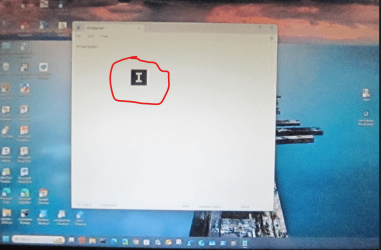
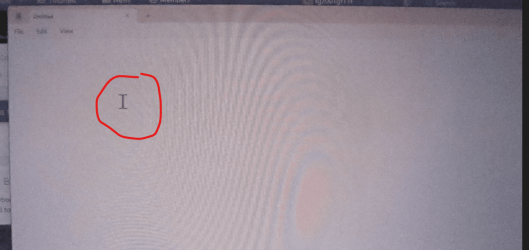
Anybody getting this weird cursor in a black square instead of the normal one? See the 2 pictures below to compare. 😵‍💫
Had to take pictures because the cursor does not show with snipping tool. 🤷‍♂️

1710381138980.png

Should look like this one below.
1710381346479.png

Edit:
Another user Isolated the problem, it only fails with the black square around the Text cursor with specific size selected for the mouse pointer.
Fails with size 3, 7, 11, 15, works fine as expected with all other sizes. 😵‍💫🤣🤣🤣
Mine was set for size 3 which causes the problem. As a workaround I changed the size to 2 or 4. 😂😂

In this machine it uses this Intel adapter and driver, but I can get the problem also with NVIDIA RTX 2060 and RTX 3060 with driver 551.76 using a size 7 on the mouse pointer. 🤣 😵‍💫

1710397122519.png
 
Last edited:

My Computer

System One

  • OS
    Windows 11 Pro 25H2
    Computer type
    PC/Desktop
    Manufacturer/Model
    Dell XPS 8930
    CPU
    Intel I9-9900K
    Memory
    64GB
    Graphics Card(s)
    NVIDIA RTX 2060
    Sound Card
    NVIDIA High Definition Audio
    Monitor(s) Displays
    4k Samsung
    Screen Resolution
    3840 x 2160
    Hard Drives
    512GB NVMe, ADATA SU 800, 2TB HDD
The new Teams all in one app is a sadly almost pointless feature.

All it is a link to the personal version inside the works Teams version instead of a desktop link.

Why do MS believe the personal feature should be a savagely cutdown version of the works version.

For crying out loud, it should be one version with ability to select a personal or a domain based account.

One slight improvement is the ability to start live captions directly from the quick assist, although you could select it from accessibility quick assist menu (one click now rather than two).

As for useless pox ridden copilot changes - zzzzzzzz!
 

My Computer

System One

  • OS
    Windows 11 Pro + Win11 Canary VM.
    Computer type
    Laptop
    Manufacturer/Model
    ASUS Zenbook 14
    CPU
    I9 13th gen i9-13900H 2.60 GHZ
    Motherboard
    Yep, Laptop has one.
    Memory
    16 GB soldered
    Graphics Card(s)
    Integrated Intel Iris XE
    Sound Card
    Realtek built in
    Monitor(s) Displays
    laptop OLED screen
    Screen Resolution
    2880x1800 touchscreen
    Hard Drives
    1 TB NVME SSD (only weakness is only one slot)
    PSU
    Internal + 65W thunderbolt USB4 charger
    Case
    Yep, got one
    Cooling
    Stella Artois (UK pint cans - 568 ml) - extra cost.
    Keyboard
    Built in UK keybd
    Mouse
    Bluetooth , wireless dongled, wired
    Internet Speed
    900 mbs (ethernet), wifi 6 typical 350-450 mb/s both up and down
    Browser
    Edge
    Antivirus
    Defender
    Other Info
    TPM 2.0, 2xUSB4 thunderbolt, 1xUsb3 (usb a), 1xUsb-c, hdmi out, 3.5 mm audio out/in combo, ASUS backlit trackpad (inc. switchable number pad)

    Macrium Reflect Home V8
    Office 365 Family (6 users each 1TB onedrive space)
    Hyper-V (a vm runs almost as fast as my older laptop)
Back
Top Bottom