Insider Windows 11 Insider Canary build 27749.1000 - Nov. 13


UPDATE 11/20:


 Windows Blogs:

Hello Windows Insiders, today we are releasing Windows 11 Insider Preview Build 27749 to the Canary Channel. We are releasing ISOs for this build – they can be downloaded here.

We are also not planning to release SDKs for 27xxx series builds for the time being.

Changes and Improvements

[Narrator]

  • We have added a new shortcut “Narrator key + control + X” to copy what Narrator last spoke to clipboard. It follows the pattern of using “Narrator key + X” which repeats the last spoken phrase out loud and is a good way to memorize similar shortcuts. You can use these shortcuts to review and copy what Narrator spoke, useful in cases you want to quickly copy some content or descriptions or codes/numbers for use.
  • Narrator will now auto-read contents of a mail in the new Outlook app similar to behavior in Outlook classic.

Fixes

[File Explorer]

  • Fixed an issue which was causing the items in the navigation pane to become very spread out (with unexpected padding between each item) for some people.
  • Fixed an underlying issue which was causing RAW images taken in portrait mode to unexpectedly display in landscape mode thumbnails.

[Taskbar & System Tray]

  • Made a change so you will now see a search box if the taskbar auto-hides when the setting for search on the taskbar is set to “Search box” (rather than an icon).

[Input]

  • Updated the mouse option “Show location of pointer when I press the CTRL key”, so that the circles displayed are now DPI-aware, and aren’t really small on high DPI monitors.

[Narrator]

  • We have addressed a performance issue where Narrator would slow down after 15 minutes of continuous use with a single application. If you continue to experience any performance delays, do report using Feedback Hub.
  • Fixed an issue where Narrator would add an additional announcement “contains style” whenever its focus is on text that has styling attributes such as bullets, numbers across applications such as Microsoft Edge, Teams, Outlook, etc.
  • Fixed an issue where few dialogs in Narrator were not adopting the 200% text scaling setting in Windows.

[Task Manager]

  • Fixed an issue causing Task Manager to show a 0 count for apps and processes.

 
Last edited:
gtx 1050it working now
 

My Computer

System One

  • OS
    Windows 11
    Computer type
    PC/Desktop
    CPU
    intel i5 9400F
    Motherboard
    asrock b365 pro4
    Memory
    16GB
    Graphics Card(s)
    nvidia geforce gtx 1050 ti
    Monitor(s) Displays
    viewsonic va2407h
    Screen Resolution
    1920x1080
I found a way to get this update finally working.
Not an easy workaround but it succeeded. 😉

View attachment 116216

Previously, starting with 27744 build and also with 27749 it kept failing as showing below, with error 0x80073CFB. Failed on every retry.
Also, got the same error uninstalling the app and trying to reinstall. 😝
View attachment 116217

To get it to work, I had to uninstall the App and then do an update/repair in place with ISO.
After that I could reinstall the App from the MS Store without getting the error. The same process worked on 4 different machines but still failed on the 5th one. 😵‍💫😂🤷‍♂️
MS magic mysteries! 😂😂🤷‍♂️
Same issue here with both Canary builds just like you and the same exact error.... Maybe eventually like the other one we both saw, someone will post a workaround to fix it.... Looks like it's been reported on Feedback Hub. I just uninstalled mines and it won't reinstall either just like you said...
 

My Computer

System One

  • OS
    WindowsXP/7/8/8.1/10/11,Linux,Android,FreeBSD Unix
    Computer type
    Laptop
    Manufacturer/Model
    Dell XPS 15 9570
    CPU
    Intel® Core™ i7-8750H 8th Gen 2.2Ghz up to 4.1Ghz
    Motherboard
    Dell XPS 15 9570
    Memory
    64GB using 2x32GB CL16 Mushkin redLine modules
    Graphics Card(s)
    Intel UHD 630 & NVIDIA GeForce GTX 1050 Ti with 4GB DDR5
    Sound Card
    Realtek ALC3266-CG
    Monitor(s) Displays
    15.6" 4K Touch UltraHD 3840x2160 made by Sharp
    Screen Resolution
    3840x2160 4K UltraHD
    Hard Drives
    Samsung MZ-V9P4T0B/AM 990 PRO 4TB PCIe®4.0 NVMe™ M.2 SSD was Toshiba KXG60ZNV1T02 NVMe 1TB SSD
    PSU
    Dell XPS 15 9570
    Case
    Dell XPS 15 9570
    Cooling
    Stock
    Keyboard
    Stock
    Mouse
    SwitftPoint ProPoint
    Internet Speed
    Comcast/XFinity 1.44Gbps/42.5Mbps
    Browser
    Microsoft EDGE (Chromium based) & Google Chrome
    Antivirus
    Windows Defender that came with Windows
Jeepers, the purpose of autohiding the taskbar is to make it not visible when not needed.

.Why on earth would I want the search bar to still be visible?

Perhaps MS developers attention span is so limited that they are incapable of realising the search bar is hidden and only have to move the cursor to show it?

1731594627623.png

edit: hooray - this does not work.
Does item mean something else - if so what!?
 
Last edited:

My Computer

System One

  • OS
    Windows 11 Pro + Win11 Canary VM.
    Computer type
    Laptop
    Manufacturer/Model
    ASUS Zenbook 14
    CPU
    I9 13th gen i9-13900H 2.60 GHZ
    Motherboard
    Yep, Laptop has one.
    Memory
    16 GB soldered
    Graphics Card(s)
    Integrated Intel Iris XE
    Sound Card
    Realtek built in
    Monitor(s) Displays
    laptop OLED screen
    Screen Resolution
    2880x1800 touchscreen
    Hard Drives
    1 TB NVME SSD (only weakness is only one slot)
    PSU
    Internal + 65W thunderbolt USB4 charger
    Case
    Yep, got one
    Cooling
    Stella Artois (UK pint cans - 568 ml) - extra cost.
    Keyboard
    Built in UK keybd
    Mouse
    Bluetooth , wireless dongled, wired
    Internet Speed
    900 mbs (ethernet), wifi 6 typical 350-450 mb/s both up and down
    Browser
    Edge
    Antivirus
    Defender
    Other Info
    TPM 2.0, 2xUSB4 thunderbolt, 1xUsb3 (usb a), 1xUsb-c, hdmi out, 3.5 mm audio out/in combo, ASUS backlit trackpad (inc. switchable number pad)

    Macrium Reflect Home V8
    Office 365 Family (6 users each 1TB onedrive space)
    Hyper-V (a vm runs almost as fast as my older laptop)
Why on earth would I want the search bar to still be visible?
MS's obsession with cosmetic fiddle-faddle!
I don't see the point of a Search Box at all when you can press the WinKey and start typing!!! 🤷‍♂️
 

My Computers

System One System Two

  • OS
    Windows 11 Pro
    Computer type
    PC/Desktop
    Manufacturer/Model
    ASUS ROG Strix
  • Operating System
    Windows 11 Pro
    Computer type
    Laptop
    Manufacturer/Model
    ASUS VivoBook

My Computer

System One

  • OS
    Win 11 Insider Release Preview and Beta channels.
    Computer type
    Laptop
    Manufacturer/Model
    HP ENVY Bought: March 2017
    CPU
    i5 Core [email protected] (Unsupported for Win 11)
    Motherboard
    HP 81AD (U3E1)
    Memory
    12GB
    Graphics Card(s)
    Generic PnP Monitor (1920x1080@60Hz) Intel HD Graphics 620 (HP)
    Sound Card
    Conexant ISST audio
    Monitor(s) Displays
    Generic PnP Monitor
    Screen Resolution
    1536x864 pixels
    Hard Drives
    HGST HTS721010A9E630
    PSU
    Well...PSU you too!! What's this mean?
    Case
    HP ENVY SILVER
    Cooling
    A fan.
    Keyboard
    USA
    Mouse
    Logitec Anywhere 2
    Internet Speed
    Good enough for me! Fast!
    Browser
    Edge/Waterfox
    Antivirus
    Windows Defender
    Other Info
    No 'mo.
Yeah..., I don't know what the deal is!
My accent color just vanished from all title bars!
In this Build, all title bars are some pukey off white color or, some dark mica shade! 🤷‍♂️
And, tons of lag!
 

My Computers

System One System Two

  • OS
    Windows 11 Pro
    Computer type
    PC/Desktop
    Manufacturer/Model
    ASUS ROG Strix
  • Operating System
    Windows 11 Pro
    Computer type
    Laptop
    Manufacturer/Model
    ASUS VivoBook
Yeah..., I don't know what the deal is!
My accent color just vanished from all title bars!
In this Build, all title bars are some pukey off white color or, some dark mica shade! 🤷‍♂️
And, tons of lag!
til now i thought something is wrong with my pc, computer feels laggy somehow the last 3 builds. did not think it could be the OS itself.
 

My Computers

System One System Two

  • OS
    Windows 11 24h2 ltsc
    Computer type
    PC/Desktop
    Manufacturer/Model
    Gigabyte/Intel
    CPU
    i7 3770
    Motherboard
    Gigabyte
    Memory
    24 GB 1700 mHz with tighter timings
    Graphics Card(s)
    GT 710 with fan mod
    Hard Drives
    many, 2xSSD and 13xHDD
    PSU
    some EVGA
    Cooling
    old Corsair Fan double side taped on top of stock cooler
    Internet Speed
    300 down/75 up
    Browser
    Firefox
    Antivirus
    Defender
  • Operating System
    Win 11 24h2 ltsc
    Computer type
    PC/Desktop
    Manufacturer/Model
    ECS/Intel
    CPU
    Pentium G2030
    Motherboard
    ECS
    Memory
    6Gb 1333mhz with much tighter timings
    Graphics card(s)
    HD 5450
    Monitor(s) Displays
    LG
    Screen Resolution
    1600x900
    Hard Drives
    128gb SSD, 150GB Stripeset from 2 HDDs 7200 rpm
    PSU
    Gigabyte
    Cooling
    Stock cooler from i7
    Keyboard
    Genius
    Mouse
    x-tech Stauros
    Browser
    Firefox
    Antivirus
    Defender
    Other Info
    i always try to get the most/best out of "older" hardware
Within performance options Animate windows when minimizing and maximizing is unchecked however windows is Animating minimizing and maximizing, when you click and uncheck again it fixes it but on reboot it reverts back to animating wont keep the setting to stay off
 

My Computer

System One

  • OS
    Windows 11
    Computer type
    PC/Desktop
    Manufacturer/Model
    MI5
    CPU
    AMD Ryzen 9 5950X
    Motherboard
    ASUS ROG Strix X570-F Gaming
    Memory
    Corsair Vengeance RGB PRO SL 32GB
    Graphics Card(s)
    AMD Radeon RX6900XT
    Sound Card
    Auzentech X-Fi Prelude 7.1
    Monitor(s) Displays
    GIGABYTE AORUS FV43U
    Screen Resolution
    3840x2160
    Hard Drives
    4 x 2TB 990 Pro SSD
    PSU
    Corsair
    Case
    Corsair
    Cooling
    Liquid
    Keyboard
    Corsair K95
    Mouse
    Two buttons
    Internet Speed
    As quick as I need
    Browser
    FireFox Nightly
    Antivirus
    Default
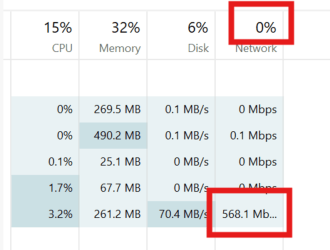
With Canary Build 27749, did anybody notice if task manager header for the network ever shows a value other than 0%?

1731664674818.png
 

My Computer

System One

  • OS
    Windows 11 Pro 25H2
    Computer type
    PC/Desktop
    Manufacturer/Model
    Dell XPS 8930
    CPU
    Intel I9-9900K
    Memory
    64GB
    Graphics Card(s)
    NVIDIA RTX 2060
    Sound Card
    NVIDIA High Definition Audio
    Monitor(s) Displays
    4k Samsung
    Screen Resolution
    3840 x 2160
    Hard Drives
    512GB NVMe, ADATA SU 800, 2TB HDD
Is anyone running this channel on unsupported CPU? Does it run alright? Just curious.
Yes on a Intel i7 6700k 1st 27744 and now 27749 yesterday no problems, although intially getting 27744 to run properly took maybe 4/5 reinstalls, with constant rebooting loop etc then i think adding a TPM 1.2 module to the Asus Z170i board seem to do the trick, cant be certain as i had only just aquired the Mini ITX bundle MB CPU & Ram . i did a lot of fiddling and cant recall what worked and what did not, but it seems to be running fine,

intially i tried that flybyscript exe no luck, so i used good old RUFUS rufus-4.6p.exe portable with bypasses enabled and bingo i used the MICROSOFT 27744 iso , not the UUPDump
 

My Computer

System One

  • OS
    Win 11
    Computer type
    Laptop
    Manufacturer/Model
    ASUS
    CPU
    AMD Ryzen 7 3700u
    Motherboard
    ASUS
    Graphics Card(s)
    AMD Radeon Vega 10
    Browser
    EDGE
    Antivirus
    None Windows defender works ok,
  • We’re investigating reports that some Insiders are still experiencing rollbacks (with error code 0xc190010) when attempting to install the latest Canary builds.
Yep. Still rolling back. And of course nagging me because it is been expired for a while too.

I was trying to get some older-ish builds so maybe at leaast the naggin will end but not having much luck with uupdump. Those builds don't stay around I guess?

Will a fresh install lead to the same result or I'm better off waiting for better builds?
 

My Computer

System One

  • OS
    Windows 11
    Computer type
    PC/Desktop
    Manufacturer/Model
    Self built
    CPU
    AMD Ryzen 9 5900X
    Motherboard
    Gigabyte X570 AORUS ELITE
    Memory
    32GB Crucial DDR4-3200
    Graphics Card(s)
    Gigabyte GeForce RTX 3070
    Monitor(s) Displays
    BenQ PD3200U
    Screen Resolution
    3840x2160
    Hard Drives
    16TB Western Digital WDC WUH721816ALE6L4
    8TB Western Digital WDC WD8004FRYZ-01VAEB0
    500GB Crucial CT500MX500SSD1 (SSD)
    1TB Western Digital WDC WD10EADS-00L5B1
    1TB Western Digital WDC WD10EADS-00L5B1
    4TB Western Digital WDC WD40EFRX-68N32N0
    1TB Samsung SSD 980 (SSD)
    Browser
    Firefox
hello, could some one pls be so kind and help me? trying to open this on my canary PC but it does not open. i tried for an hour now. is it my PC or this version of win11? pls download and tell me if its working for you. thanks in advance
 

My Computers

System One System Two

  • OS
    Windows 11 24h2 ltsc
    Computer type
    PC/Desktop
    Manufacturer/Model
    Gigabyte/Intel
    CPU
    i7 3770
    Motherboard
    Gigabyte
    Memory
    24 GB 1700 mHz with tighter timings
    Graphics Card(s)
    GT 710 with fan mod
    Hard Drives
    many, 2xSSD and 13xHDD
    PSU
    some EVGA
    Cooling
    old Corsair Fan double side taped on top of stock cooler
    Internet Speed
    300 down/75 up
    Browser
    Firefox
    Antivirus
    Defender
  • Operating System
    Win 11 24h2 ltsc
    Computer type
    PC/Desktop
    Manufacturer/Model
    ECS/Intel
    CPU
    Pentium G2030
    Motherboard
    ECS
    Memory
    6Gb 1333mhz with much tighter timings
    Graphics card(s)
    HD 5450
    Monitor(s) Displays
    LG
    Screen Resolution
    1600x900
    Hard Drives
    128gb SSD, 150GB Stripeset from 2 HDDs 7200 rpm
    PSU
    Gigabyte
    Cooling
    Stock cooler from i7
    Keyboard
    Genius
    Mouse
    x-tech Stauros
    Browser
    Firefox
    Antivirus
    Defender
    Other Info
    i always try to get the most/best out of "older" hardware
hello, could some one pls be so kind and help me? trying to open this on my canary PC but it does not open. i tried for an hour now. is it my PC or this version of win11? pls download and tell me if its working for you. thanks in advance

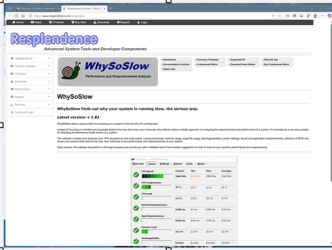
Do you mean this tool?

1731721414497.png
 

My Computer

System One

  • OS
    Windows 11 Pro 25H2
    Computer type
    PC/Desktop
    Manufacturer/Model
    Dell XPS 8930
    CPU
    Intel I9-9900K
    Memory
    64GB
    Graphics Card(s)
    NVIDIA RTX 2060
    Sound Card
    NVIDIA High Definition Audio
    Monitor(s) Displays
    4k Samsung
    Screen Resolution
    3840 x 2160
    Hard Drives
    512GB NVMe, ADATA SU 800, 2TB HDD
yea, i cant run it. it wont open
 

My Computers

System One System Two

  • OS
    Windows 11 24h2 ltsc
    Computer type
    PC/Desktop
    Manufacturer/Model
    Gigabyte/Intel
    CPU
    i7 3770
    Motherboard
    Gigabyte
    Memory
    24 GB 1700 mHz with tighter timings
    Graphics Card(s)
    GT 710 with fan mod
    Hard Drives
    many, 2xSSD and 13xHDD
    PSU
    some EVGA
    Cooling
    old Corsair Fan double side taped on top of stock cooler
    Internet Speed
    300 down/75 up
    Browser
    Firefox
    Antivirus
    Defender
  • Operating System
    Win 11 24h2 ltsc
    Computer type
    PC/Desktop
    Manufacturer/Model
    ECS/Intel
    CPU
    Pentium G2030
    Motherboard
    ECS
    Memory
    6Gb 1333mhz with much tighter timings
    Graphics card(s)
    HD 5450
    Monitor(s) Displays
    LG
    Screen Resolution
    1600x900
    Hard Drives
    128gb SSD, 150GB Stripeset from 2 HDDs 7200 rpm
    PSU
    Gigabyte
    Cooling
    Stock cooler from i7
    Keyboard
    Genius
    Mouse
    x-tech Stauros
    Browser
    Firefox
    Antivirus
    Defender
    Other Info
    i always try to get the most/best out of "older" hardware

My Computer

System One

  • OS
    Windows 11 Pro 25H2
    Computer type
    PC/Desktop
    Manufacturer/Model
    Dell XPS 8930
    CPU
    Intel I9-9900K
    Memory
    64GB
    Graphics Card(s)
    NVIDIA RTX 2060
    Sound Card
    NVIDIA High Definition Audio
    Monitor(s) Displays
    4k Samsung
    Screen Resolution
    3840 x 2160
    Hard Drives
    512GB NVMe, ADATA SU 800, 2TB HDD
install went fine, but after that i cant open it. its in taskmanager but i cant see it -.-Screenshot_1.png
 

My Computers

System One System Two

  • OS
    Windows 11 24h2 ltsc
    Computer type
    PC/Desktop
    Manufacturer/Model
    Gigabyte/Intel
    CPU
    i7 3770
    Motherboard
    Gigabyte
    Memory
    24 GB 1700 mHz with tighter timings
    Graphics Card(s)
    GT 710 with fan mod
    Hard Drives
    many, 2xSSD and 13xHDD
    PSU
    some EVGA
    Cooling
    old Corsair Fan double side taped on top of stock cooler
    Internet Speed
    300 down/75 up
    Browser
    Firefox
    Antivirus
    Defender
  • Operating System
    Win 11 24h2 ltsc
    Computer type
    PC/Desktop
    Manufacturer/Model
    ECS/Intel
    CPU
    Pentium G2030
    Motherboard
    ECS
    Memory
    6Gb 1333mhz with much tighter timings
    Graphics card(s)
    HD 5450
    Monitor(s) Displays
    LG
    Screen Resolution
    1600x900
    Hard Drives
    128gb SSD, 150GB Stripeset from 2 HDDs 7200 rpm
    PSU
    Gigabyte
    Cooling
    Stock cooler from i7
    Keyboard
    Genius
    Mouse
    x-tech Stauros
    Browser
    Firefox
    Antivirus
    Defender
    Other Info
    i always try to get the most/best out of "older" hardware

My Computer

System One

  • OS
    Windows 11 Pro 25H2
    Computer type
    PC/Desktop
    Manufacturer/Model
    Dell XPS 8930
    CPU
    Intel I9-9900K
    Memory
    64GB
    Graphics Card(s)
    NVIDIA RTX 2060
    Sound Card
    NVIDIA High Definition Audio
    Monitor(s) Displays
    4k Samsung
    Screen Resolution
    3840 x 2160
    Hard Drives
    512GB NVMe, ADATA SU 800, 2TB HDD

My Computers

System One System Two

  • OS
    Windows 11 24h2 ltsc
    Computer type
    PC/Desktop
    Manufacturer/Model
    Gigabyte/Intel
    CPU
    i7 3770
    Motherboard
    Gigabyte
    Memory
    24 GB 1700 mHz with tighter timings
    Graphics Card(s)
    GT 710 with fan mod
    Hard Drives
    many, 2xSSD and 13xHDD
    PSU
    some EVGA
    Cooling
    old Corsair Fan double side taped on top of stock cooler
    Internet Speed
    300 down/75 up
    Browser
    Firefox
    Antivirus
    Defender
  • Operating System
    Win 11 24h2 ltsc
    Computer type
    PC/Desktop
    Manufacturer/Model
    ECS/Intel
    CPU
    Pentium G2030
    Motherboard
    ECS
    Memory
    6Gb 1333mhz with much tighter timings
    Graphics card(s)
    HD 5450
    Monitor(s) Displays
    LG
    Screen Resolution
    1600x900
    Hard Drives
    128gb SSD, 150GB Stripeset from 2 HDDs 7200 rpm
    PSU
    Gigabyte
    Cooling
    Stock cooler from i7
    Keyboard
    Genius
    Mouse
    x-tech Stauros
    Browser
    Firefox
    Antivirus
    Defender
    Other Info
    i always try to get the most/best out of "older" hardware
no only 27749
It does not open here either.
Looks like they install it in the Program Files folder. If it is a 32-bit program it may need to go in Program Files (x86).
Ask the support from the company that is making the program. 🤷‍♂️

1731722535995.png

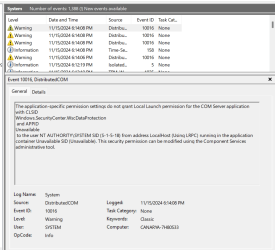
Perhaps it is a security permission problem. 🤷‍♂️
1731723459495.png
 
Last edited:

My Computer

System One

  • OS
    Windows 11 Pro 25H2
    Computer type
    PC/Desktop
    Manufacturer/Model
    Dell XPS 8930
    CPU
    Intel I9-9900K
    Memory
    64GB
    Graphics Card(s)
    NVIDIA RTX 2060
    Sound Card
    NVIDIA High Definition Audio
    Monitor(s) Displays
    4k Samsung
    Screen Resolution
    3840 x 2160
    Hard Drives
    512GB NVMe, ADATA SU 800, 2TB HDD
It does not open here either.
Looks like they install it in the Program Files folder. If it is a 32-bit program it may need to go in Program Files (x86).
Ask the support from the company that is making the program. 🤷‍♂️

View attachment 116425
k ty for helping me. i just wanted to try to find out why my computer feels laggy and unresponsive/slow sometimes the last 3 Canary builds. i will investigate further tmrw
 

My Computers

System One System Two

  • OS
    Windows 11 24h2 ltsc
    Computer type
    PC/Desktop
    Manufacturer/Model
    Gigabyte/Intel
    CPU
    i7 3770
    Motherboard
    Gigabyte
    Memory
    24 GB 1700 mHz with tighter timings
    Graphics Card(s)
    GT 710 with fan mod
    Hard Drives
    many, 2xSSD and 13xHDD
    PSU
    some EVGA
    Cooling
    old Corsair Fan double side taped on top of stock cooler
    Internet Speed
    300 down/75 up
    Browser
    Firefox
    Antivirus
    Defender
  • Operating System
    Win 11 24h2 ltsc
    Computer type
    PC/Desktop
    Manufacturer/Model
    ECS/Intel
    CPU
    Pentium G2030
    Motherboard
    ECS
    Memory
    6Gb 1333mhz with much tighter timings
    Graphics card(s)
    HD 5450
    Monitor(s) Displays
    LG
    Screen Resolution
    1600x900
    Hard Drives
    128gb SSD, 150GB Stripeset from 2 HDDs 7200 rpm
    PSU
    Gigabyte
    Cooling
    Stock cooler from i7
    Keyboard
    Genius
    Mouse
    x-tech Stauros
    Browser
    Firefox
    Antivirus
    Defender
    Other Info
    i always try to get the most/best out of "older" hardware

Latest Support Threads

Back
Top Bottom