Insider Windows 11 Insider Canary build 27898.1000 released - July 11


UPDATE 7/17:


 Windows Blogs:

Hello Windows Insiders, today we are releasing Windows 11 Insider Preview Build 27898 to the Canary Channel.

We are also not planning to release SDKs for 27xxx series builds for the time being.

What’s new in Build 27898

Taskbar icon scaling

We are starting to roll out taskbar icon scaling to Windows Insiders in the Canary Channel – an improvement to the Windows taskbar that ensures that you have quick access to more of your favorite apps, even when your taskbar is full. With taskbar icon scaling, when your taskbar starts to get crowded with pinned or open apps, the icons will automatically scale down to a smaller size. This means you can keep more apps visible and accessible without the need to dive into a secondary menu. It’s all about making your workflow smoother and more efficient.


The taskbar with small taskbar icons with setting highlighted in a red box.

We understand that everyone has their own preferences, so we’ve included settings to tailor this feature to your liking. You can choose when Windows will show smaller taskbar buttons:
  • When taskbar is full: By default, taskbar icons will automatically turn smaller when the taskbar is full. This helps you maintain access to more apps without any extra effort.
  • Never: For users who prefer their icons to remain the same size as before, regardless of how many apps are open, there’s an option to prevent the icons from scaling down.
  • Always: If you love the look of smaller icons and want them to stay that way all the time, you can set your taskbar icons to always be small.
To customize your taskbar icon scaling settings, simply right-click an empty region of your taskbar and select “Taskbar settings”, expand “Taskbar behaviors” section, and make your selection for the setting “Show smaller taskbar buttons”.

As always, we value your feedback, so let us know what you think!

FEEDBACK: Please file feedback in Feedback Hub (WIN + F) under Desktop Environment > Taskbar.

Introducing quick machine recovery

Quick machine recovery, a feature introduced as part of the Windows Resiliency Initiative at Ignite 2024 – is available for Windows Insiders in the Canary Channel. When enabled, it automatically detects and fixes widespread issues on Windows 11 devices using the Windows Recovery Environment (WinRE). This reduces downtime and avoids the need for manual fixes. If a device experiences a widespread boot issue, it enters WinRE, connects to the internet, and Microsoft can deliver a targeted fix through Windows Update. IT admins can enable or customize this experience for their organization through the Intune Settings Catalog UI using the RemoteRemediationCSP. There is also a dedicated quick machine recovery settings page available under System > Recovery > Quick machine recovery. Today, it’s enabled by default for home users.

FEEDBACK: Please file feedback in Feedback Hub (WIN + F) under Recovery and Uninstall > Quick Machine Recovery.


Add custom words to the dictionary in voice access

We are introducing the ability for you to add your own words to the dictionary in voice access. Adding your own words, including difficult to pronounce words, to the dictionary in voice access will help improve dictation accuracy. It increases the probability of recognizing these words more accurately by creating a bias that helps voice access become more context aware and proactively understanding your specific vocabulary. The feature will be available in all the currently supported voice access languages i.e. English, French, German, Spanish and Chinese.


You can add your own words to the dictionary in voice access in a few ways:

  1. After spelling a word using “Spell that”command or making a correction using “Correct that”
  2. Anywherewhen you want to manually add a word by using “Add to Vocabulary”

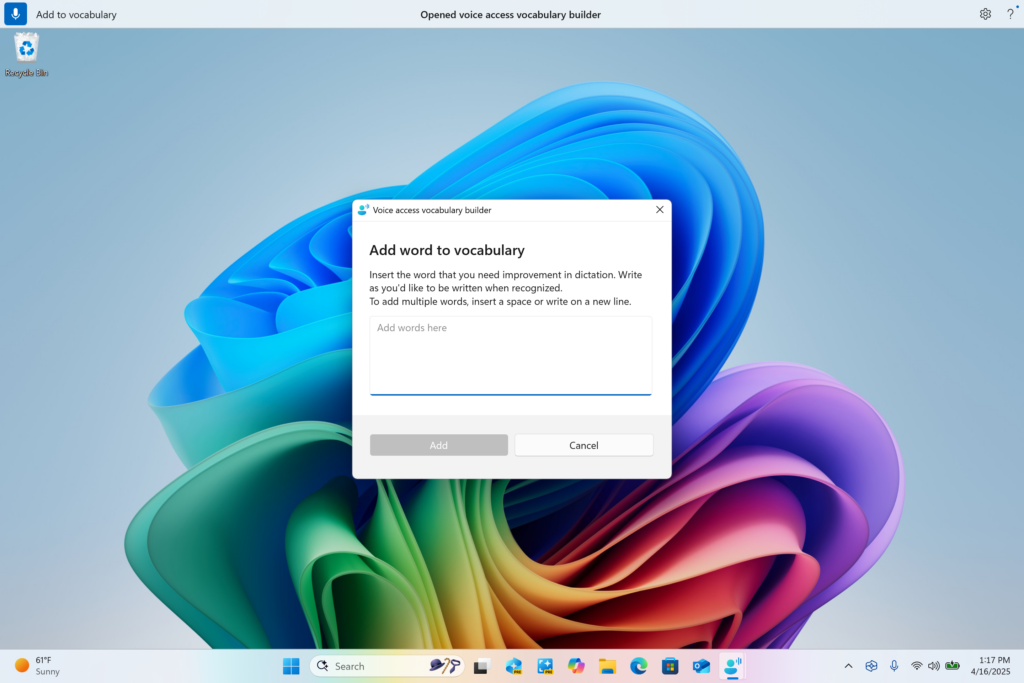
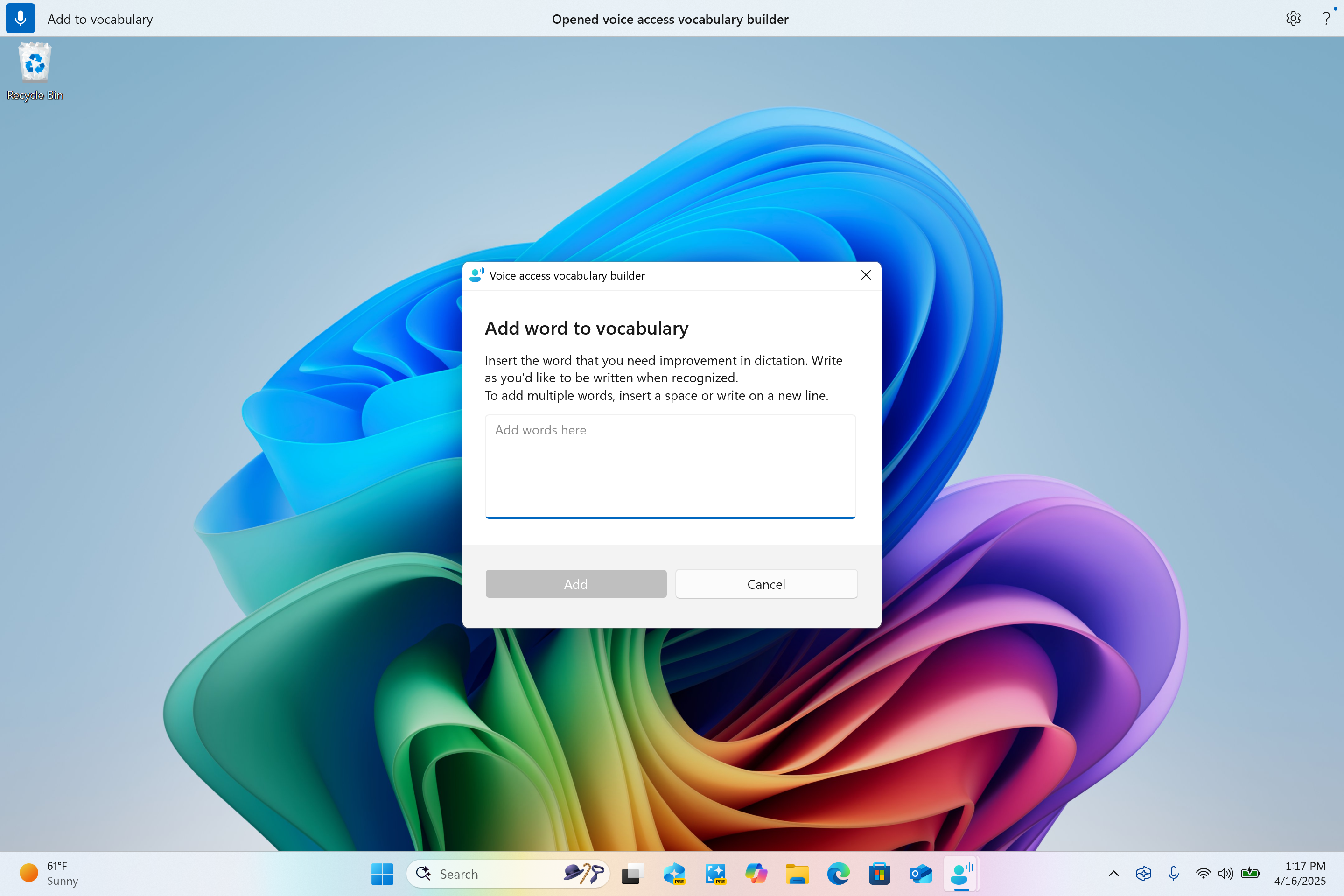
    Voice access vocabulary builder dialog for adding your own words to the dictionary.
    Voice access vocabulary builder dialog for adding your own words to the dictionary.
  3. Directly through the settings menu in voice access.

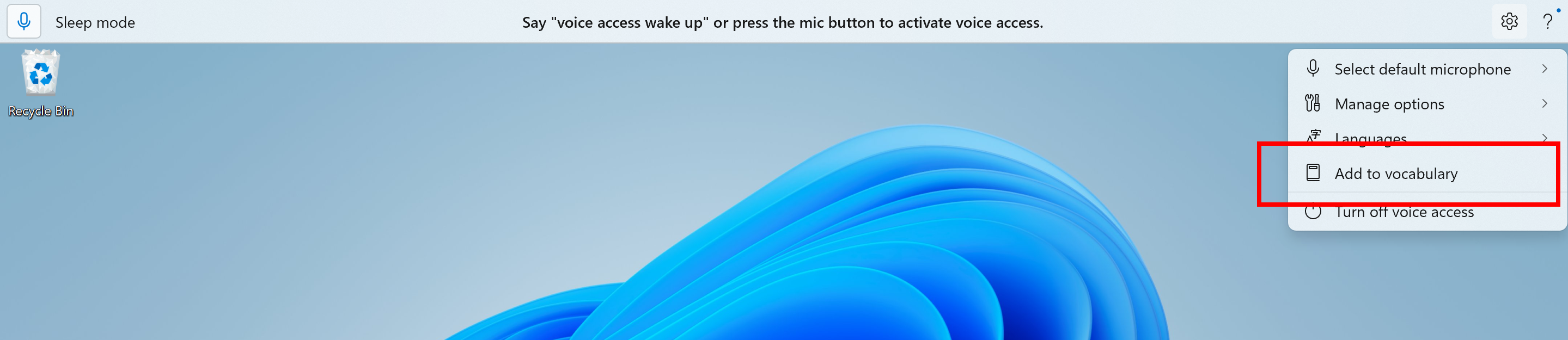
    Add to vocabulary option in voice access settings menu highlighted in a red box.
    Add to vocabulary option in voice access settings menu highlighted in a red box.
FEEDBACK: Please file feedback in Feedback Hub (WIN + F) under Accessibility > Voice access.

Screen Curtain in Narrator

The Screen Curtain feature in Narrator is designed to enhance privacy and focus for users who rely on screen reading. When activated, Screen Curtain completely blacks out the display, ensuring that only the user hears what’s on the screen through Narrator, while the visual content remains hidden from view. This is especially useful in public spaces or shared environments, allowing users to read and work with sensitive information without revealing it to others nearby.


How to enable/disable Screen Curtain:
  1. Turn On Narrator using Ctrl + Win + Enter.
  2. Press Caps + Ctrl + C to enable Screen Curtain.
  3. Try using Narrator, while your Screen Curtain is turned on.
  4. Press Caps + Ctrl + C to disable Screen Curtain.
FEEDBACK: Please file feedback in Feedback Hub (WIN + F) under Accessibility > Narrator.

Changes and Improvements

[General]

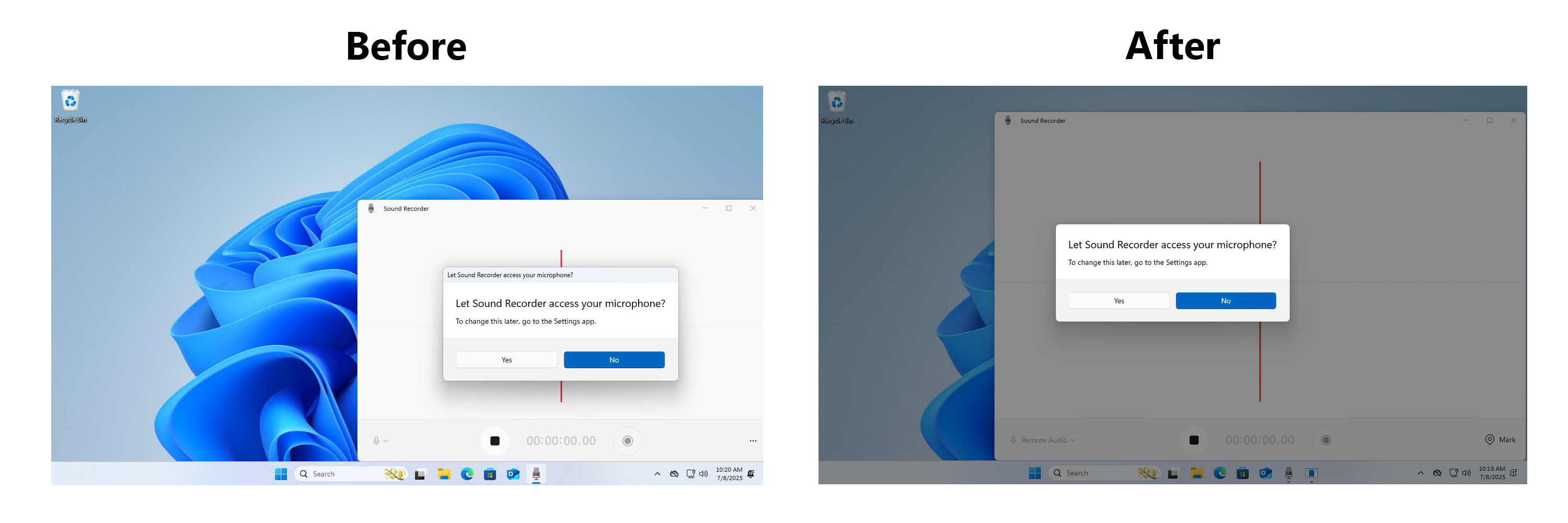
  • We’re updating the design of the privacy dialogs for app permissions. When an app requests permission to access location, camera, mic, etc., it is now a system modal dialog. When one of these dialogs appears from an app requesting permission, the screen will slightly darken now, and the privacy dialog will take focus in center screen.

    Before and after of design change for privacy dialogs.
    Before and after of design change for privacy dialogs.
  • We are rolling out a change where Microsoft Entra ID authentication requests will be rendered using WebView2 instead of WebView1.

[Taskbar & System Tray]

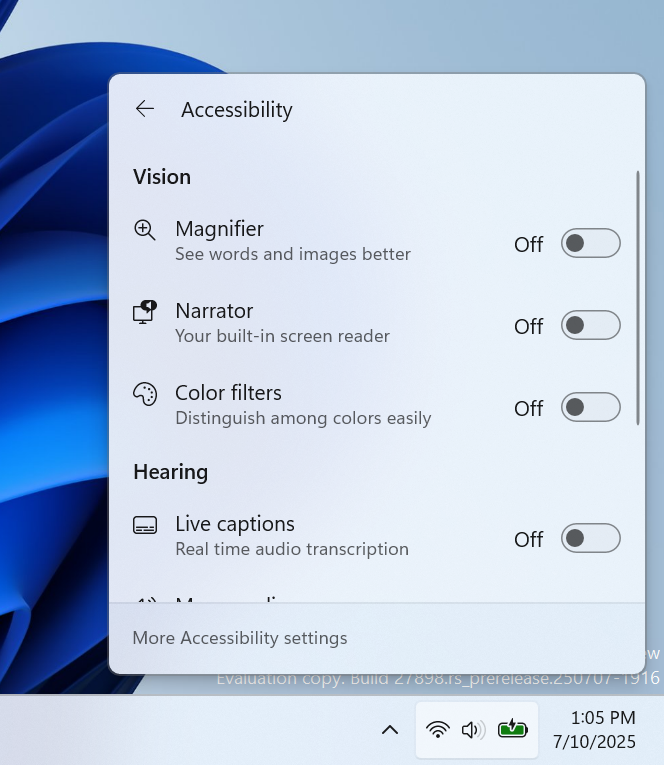
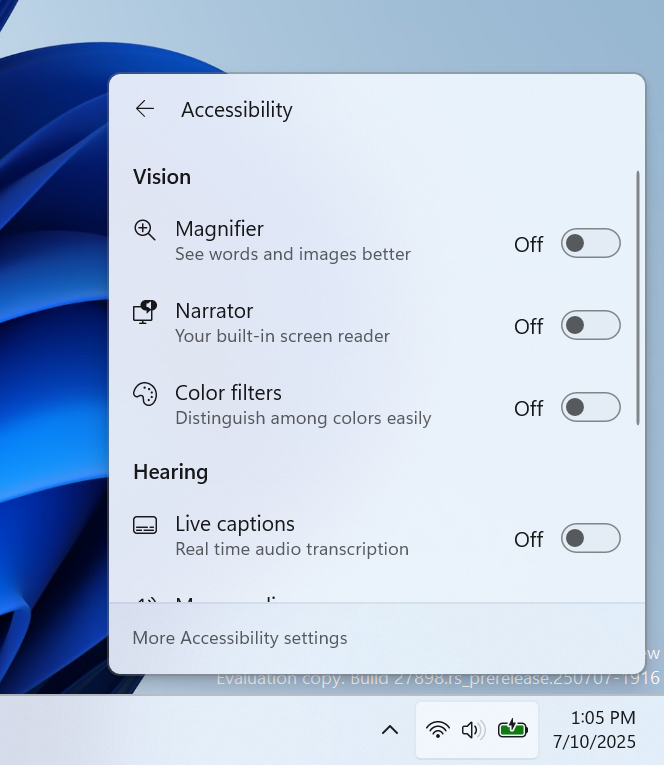
  • In addition to the new grouping of the Accessibility flyout in quick settings, we are adding text descriptions for the assistive technologies like Narrator, Voice access, etc. for easy identification and learning by the users.

    Accessibility flyout via quick setting showing text descriptions for assistive technologies like Narrator, Voice access, etc.
    Accessibility flyout via quick setting showing text descriptions for assistive technologies like Narrator, Voice access, etc.
  • Admins can now allow users to unpin specific pinned apps, ensuring they are not pinned again during the next policy refresh cycle. To enable this feature, use the new PinGeneration option. Learn more about configuring pinned apps on the taskbar.

[File Explorer]

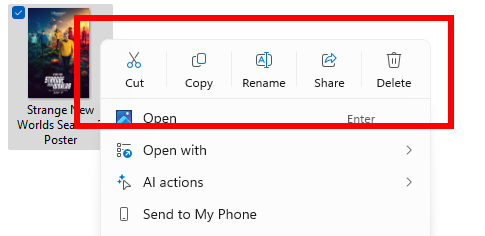
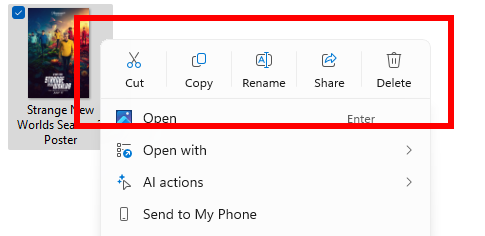
  • We have added dividers to the top-level icons that show at the top (or bottom) of the File Explorer context menu.

    Dividers between top-level icons in the File Explorer context menu.
    Dividers between top-level icons in the File Explorer context menu.

[Energy Saver]

  • We are beginning to preview adaptive energy saver. Adaptive energy saver is an opt-in feature that automatically enables and disables energy saver, without changing screen brightness, based on the power state of the device and the current system load. This will only be available on devices with a battery. As we try this experience out in the Canary Channel, some Insiders may see this experience get enabled – you can manage your energy saver settings under Settings > System > Power & battery.


    Energy saver setting with new dropdown menu for choosing adaptive energy saver.
    Energy saver setting with new dropdown menu for choosing adaptive energy saver.

[Windows Share]

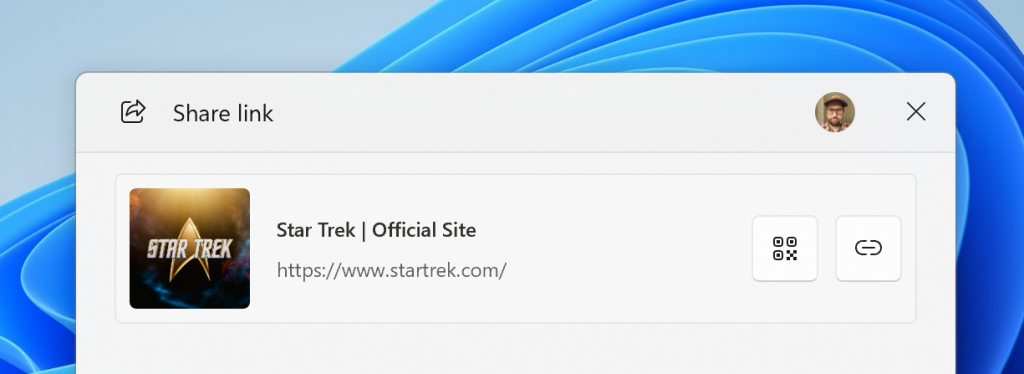
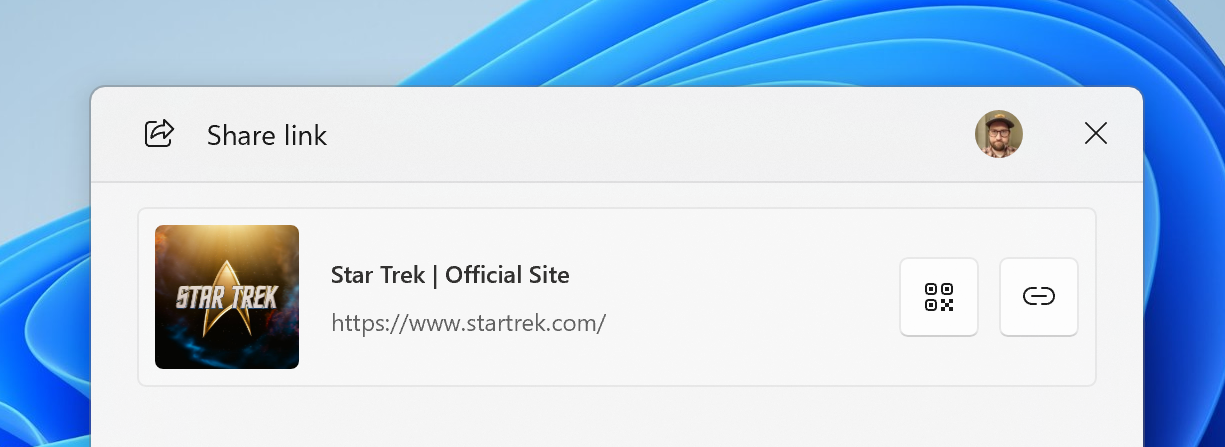
  • When you share links or web content using the Windows share window, you will see a visual preview for that content.


    Visual preview of links and web content in the Windows share window.
    Visual preview of links and web content in the Windows share window.
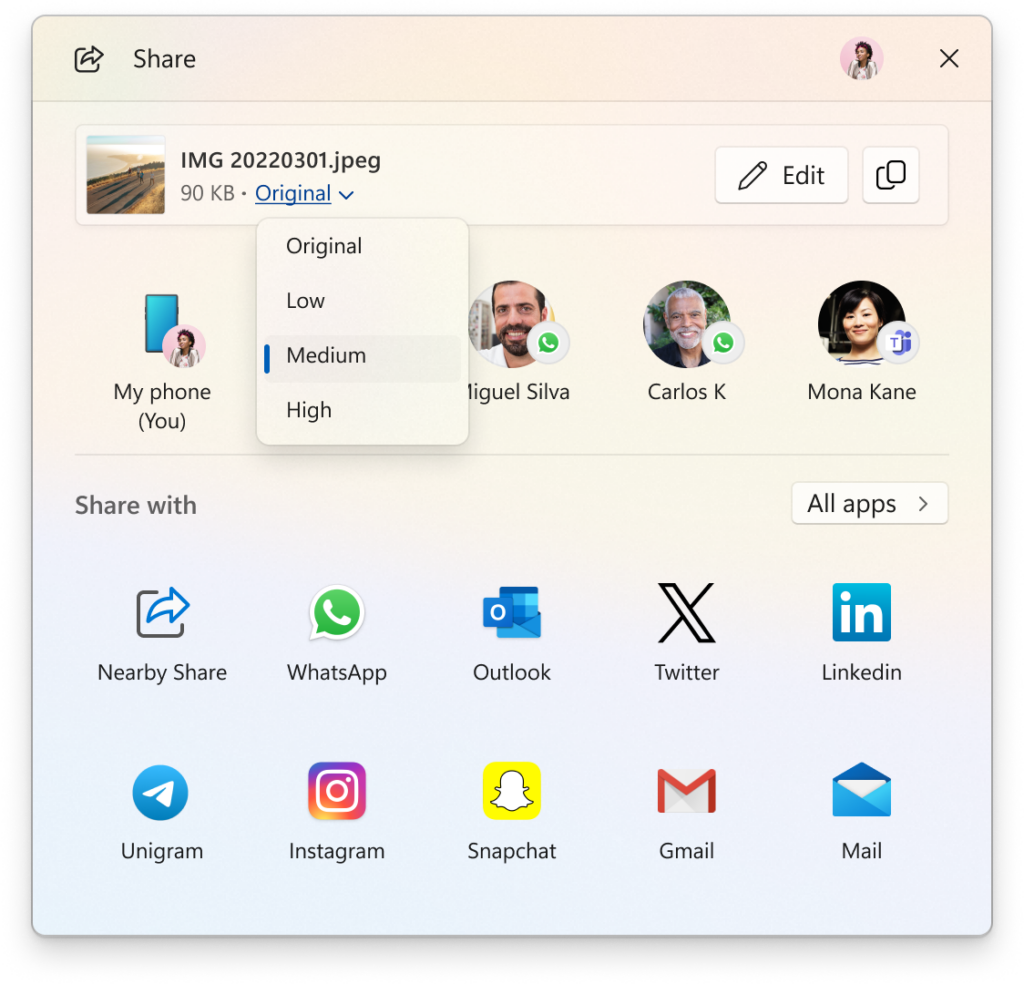
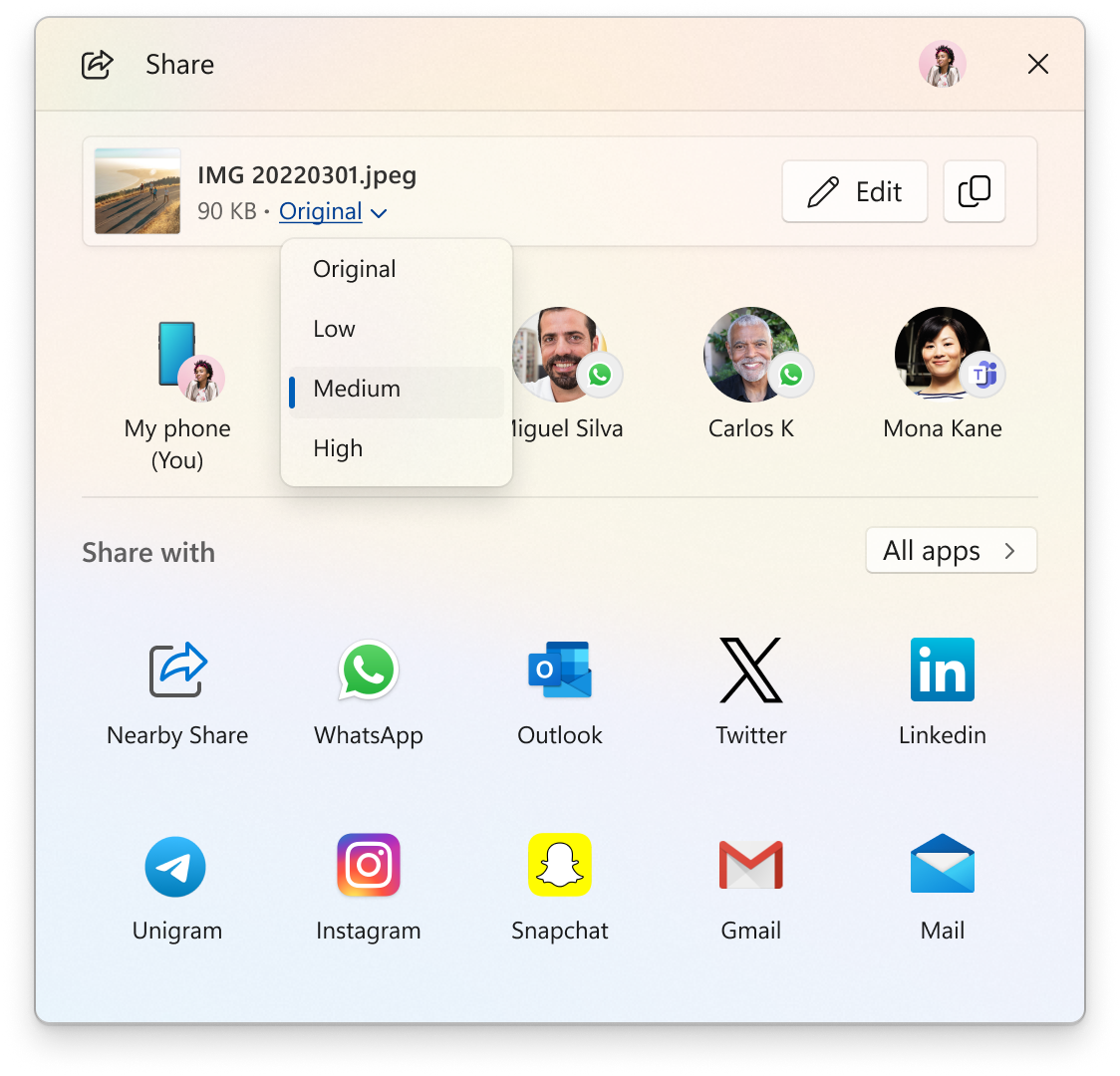
  • In the Windows share window, as part of the ability to quickly edit and enhance images while sharing, we have adjusted the UI so that now you can now select their compression scale from High, Medium, or Low Quality, instead of choosing from an entire scale ranging from 0-100.


    New drop-down menu for compression scale of high, medium, or low when sharing images in the Windows share window.
    New drop-down menu for compression scale of high, medium, or low when sharing images in the Windows share window.

[Voice access]

  • We are introducing Chinese and Japanese support for voice access. You can now use Voice access to navigate, dictate, and interact with Windows using voice commands in Simplified Chinese, Traditional Chinese, and Japanese. Japanese support is still a work-in-progress and may have some issues.

[Snipping Tool]

[Settings]

  • We have added the country or region selected during device setup under Settings > Time & language > Language & region.

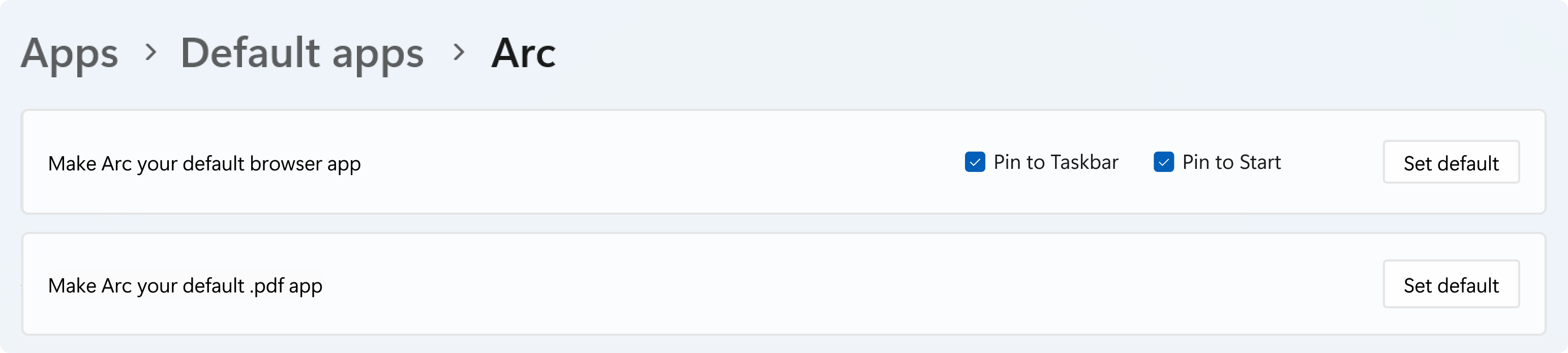
We are rolling out some small changes for your setting your browser defaults in Windows 11 via Settings > Apps > Default apps:
  1. For Add new link/file types of ‘Set Default’ button, we have added additional types for the “Set Default” button. You can now set more types.
  2. For one-click button of PDF for browser sets, we have added a new button for making your default browser also the default app for PDF files.
  3. The new default browser will be pinned to the Taskbar and Start menu unless you choose not to pin it by clearing the checkboxes.

    Browser default settings page showing new set default button for PDF files and pinning to Start and Taskbar.
    Browser default settings page showing new set default button for PDF files and pinning to Start and Taskbar.

Fixes

[File Explorer]

  • We’ve done some more work to improve the performance of extracting archive files – this will particularly help in the case of copy pasting large numbers of files out of large 7z or .rar archives.

[Input]

  • Fixed an issue where typing Japanese with the touch keyboard might stop working after switching to typing with an English keyboard and back.

[Settings]

  • Fixed an issue which could cause Settings to crash when changing mouse cursor.
  • Fixed an underlying issue which could lead to the Settings window hanging and no longer responding to input or resizing unless you closed and reopened it.

[Other]

  • Fixed an underlying issue in the previous flight which could lead to Math.Pow() not outputting the correct result, which could lead to unexpected behavior in apps and games.
  • Adjusted the error text if a Windows Update fails due to the system reserved partition not having enough free space, to make it clearer that that’s the issue.

Known issues

[General]

  • [IMPORTANT NOTE FOR COPILOT+ PCs] If you are joining the Canary Channel on a new Copilot+ PC from the Dev Channel, Beta Channel, Release Preview Channel or retail, you will lose Windows Hello pin and biometrics to sign into your PC with error 0xd0000225 and error message “Something went wrong, and your PIN isn’t available”. You should be able to re-create your PIN by clicking “Set up my PIN”.
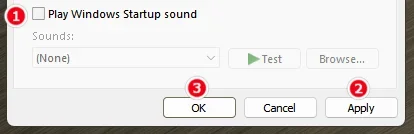
  • [ADDED] This week’s Canary Channel flight comes with a delightful blast from the past and will play the Windows Vista boot sound instead of the Windows 11 boot sound. The fix should be coming in a future Canary Channel flight soon.

[File Explorer]

  • [NEW] There’s an issue in this build where File Explorer may fail to persist any view changes. This also impacts desktop icons, which may unexpectedly move or change size back to default.

[Settings]

  • We’re investigating an issue in this build which could cause Settings to crash when interacting with the options under Settings > System > Power & Battery.

[Remote Desktop]

  • You may see extreme graphical distortion and rendering issues using remote desktop on Arm64 PCs in this build.

Reminders for Windows Insiders in the Canary Channel

  • The builds we release to the Canary Channel represent the latest platform changes early in the development cycle and should not be seen as matched to any specific release of Windows and features and experiences included in these builds may never get released as we try out different concepts and get feedback. Features may change over time, be removed, or replaced and never get released beyond Windows Insiders. Some of these features and experiences could show up in future Windows releases when they’re ready.
  • Many features in the Canary Channel are rolled out using Control Feature Rollout technology, starting with a subset of Insiders and ramping up over time as we monitor feedback to see how they land before pushing them out to everyone in this channel.
  • Some features may show up in the Dev and Beta Channels first before showing up in the Canary Channel.
  • Some features in active development we preview with Windows Insiders may not be fully localized and localization will happen over time as features are finalized. As you see issues with localization in your language, please report those issues to us via Feedback Hub.
  • To get off the Canary Channel, a clean install of Windows 11 will be required. As a reminder – Insiders can’t switch to a channel that is receiving builds with lower build numbers without doing a clean installation of Windows 11 due to technical setup requirements.
  • The desktop watermark shown at the lower right corner of the desktop is normal for these pre-release builds.
  • Check out Flight Hub for a complete look at what build is in which Insider channel.
Thanks,
Amanda & Brandon


 Source:


Check Windows Updates


UUP Dump:

64-bit ISO download:

ARM64 ISO download:

 
Last edited:
27898.webp
 

My Computers

System One System Two

  • OS
    Windows 11 Pro for Workstations
    Computer type
    PC/Desktop
    Manufacturer/Model
    Custom self build
    CPU
    Intel i7-8700K 5 GHz
    Motherboard
    ASUS ROG Maximus XI Formula Z390
    Memory
    64 GB (4x16GB) G.SKILL TridentZ RGB DDR4 3600 MHz (F4-3600C18D-32GTZR)
    Graphics Card(s)
    ASUS ROG-STRIX-GTX1080TI-O11G-GAMING (11GB GDDR5X)
    Sound Card
    Integrated Digital Audio (S/PDIF)
    Monitor(s) Displays
    2 x Samsung Odyssey G75 27"
    Screen Resolution
    2560x1440
    Hard Drives
    1TB Samsung 990 PRO M.2,
    4TB Samsung 990 PRO M.2,
    TerraMaster F8 SSD Plus NAS
    PSU
    Seasonic Prime Titanium 850W
    Case
    Thermaltake Core P3 wall mounted
    Cooling
    Corsair Hydro H115i
    Keyboard
    Amazon Basics Wired Full Keyboard MD005
    Mouse
    Logitech MX Master 4
    Internet Speed
    2 Gbps Download and 100 Mbps Upload
    Browser
    Chrome and Edge
    Antivirus
    Microsoft Defender
    Other Info
    Logitech Z625 speaker system,
    Logitech BRIO 4K Pro webcam,
    HP Color LaserJet Pro MFP M477fdn,
    CyberPower CP1500PFCLCD
    Galaxy S23 Plus phone
  • Operating System
    Windows 11 Pro
    Computer type
    Laptop
    Manufacturer/Model
    Surface Laptop 7 Copilot+ PC
    CPU
    Snapdragon X Elite (12 core) 3.42 GHz
    Memory
    16 GB LPDDR5x-7467 MHz
    Monitor(s) Displays
    15" HDR
    Screen Resolution
    2496 x 1664
    Hard Drives
    1 TB SSD
    Internet Speed
    Wi-Fi 7 and Bluetooth 5.4
    Browser
    Chrome and Edge
    Antivirus
    Microsoft Defender
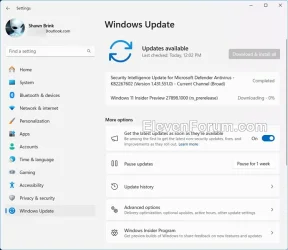
Downloading and installing.

1752254202664.webp
1752255018646.webp
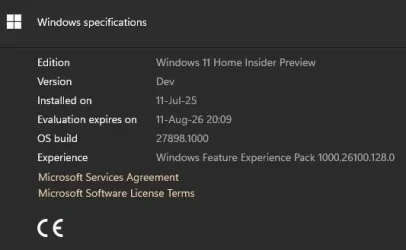
Done:

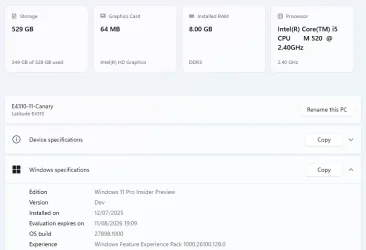
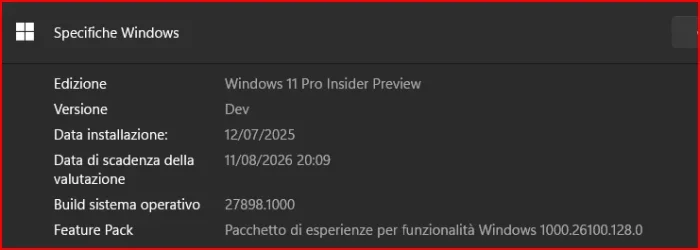
Edition Windows 11 Pro Insider Preview
Version Dev
Installed on ‎7/‎11/‎2025
Evaluation expires on ‎8/‎11/‎2026 11:09 AM
OS build 27898.1000
Experience Windows Feature Experience Pack 1000.26100.128.0
 
Last edited:

My Computer

System One

  • OS
    Windows 11 Pro 25H2
    Computer type
    PC/Desktop
    Manufacturer/Model
    Dell XPS 8930
    CPU
    Intel I9-9900K
    Memory
    64GB
    Graphics Card(s)
    NVIDIA RTX 2060
    Sound Card
    NVIDIA High Definition Audio
    Monitor(s) Displays
    4k Samsung
    Screen Resolution
    3840 x 2160
    Hard Drives
    512GB NVMe, ADATA SU 800, 2TB HDD
I have just noticed that I have certified Windows. Good to know, that it is not made in China, I was getting worried. 🙃

capture_07112025_201919.webp
 

My Computer

System One

  • OS
    Home26H2Can
    Computer type
    PC/Desktop
    CPU
    AMD Ryzen 5 8600G (07/24)
    Motherboard
    ASROCK B650M-HDV/M.2 (07/24) BIOS 4.21 AGESA ComboAM5 1.3.0.1 (04/26)
    Memory
    2x32GB Kingston FURY DDR5 5600 MHz CL36 @5200 CL36 (07/24)
    Graphics Card(s)
    ASROCK Radeon RX 6600 Challenger D 8G @48FPS (08/24)
    Sound Card
    Creative Sound BlasterX AE-5 Plus (05/24)
    Monitor(s) Displays
    24" Philips 24M1N3200ZS/00 (05/24)
    Screen Resolution
    1920×1080@165Hz via DP1.4
    Hard Drives
    Kingston KC3000 NVMe 2TB (05/24)
    ADATA XPG GAMMIX S11 Pro 512GB (07/19)
    PSU
    Seasonic Core GM 550 Gold (04/24)
    Case
    Fractal Design Define 7 Mini with 3x Noctua NF-P14s/12@555rpm (04/24)
    Cooling
    Noctua NH-U12S with Noctua NF-P12 (04/24)
    Keyboard
    HP Pavilion Wired Keyboard 300 (07/24) + Rabalux 76017 Parker (01/24)
    Mouse
    Logitech M330 Silent Plus (01/26)
    Internet Speed
    500/100 Mbps via RouterOS (05/21) & TCP Optimizer
    Browser
    Edge, Brave for YouTube, LibreWolf for FB
    Antivirus
    NextDNS blocking 1/3 Traffic
    Other Info
    Phone: Motorola Moto G86 (02/26)
    Backup: Hasleo Backup Suite (PreOS)
    Headphones: Sennheiser RS170 (09/10)
    Chair: Huzaro Force 4.4 Grey Mesh (05/24)
    Notifier: Xiaomi Mi Band 9 Milanese (10/24)
    FlexCore USB-C 3.2 Gen 1 (M) to LAN (F) (08/25)
Finger print sensor stopped working so luckily 'only allow Windows Hello...' was off and could use PIN or password to log in.:eyeroll:
 

My Computers

System One System Two

  • OS
    Win 11 Pro
    Computer type
    Laptop
    Manufacturer/Model
    ASUS Vivobook
    CPU
    AMD Ryzen™ 7 7730U
    Motherboard
    M1605YA
    Memory
    24GB Dual-Channel DDR4 @ 1596MHz (22-22-22-52)
    Graphics Card(s)
    512MB ATI AMD Radeon Graphics (ASUStek Computer Inc)
    Monitor(s) Displays
    Generic PnP Monitor (1920x1200@60Hz) - P1 PLUS (1920x1080@59Hz)
    Screen Resolution
    1920 X 1200
    Hard Drives
    953GB Western Digital WD
    PSU
    45 Watts
    Mouse
    Lenovo Bluetooth.
    Internet Speed
    500 Mbps
    Browser
    Edge
    Antivirus
    Defender
  • Operating System
    Windows 11
    Computer type
    Laptop
    Manufacturer/Model
    ACER NITRO
    CPU
    AMD Ryzen 7 5800H / 3.2 GHz
    Motherboard
    CZ Scala_CAS (FP6)
    Memory
    32 GB DDR4 SDRAM 3200 MHz
    Graphics card(s)
    NVIDIA GeForce RTX 3060 6 GB GDDR6 SDRAM
    Sound Card
    Realtek Audio. NVIDIA High Definition Audio
    Monitor(s) Displays
    15.6" LED backlight 1920 x 1080 (Full HD) 144 Hz
    Screen Resolution
    1920 x 1080 (Full HD)
    Hard Drives
    Samsung 970 Evo Plus 2TB NVMe M.2
    PSU
    180 Watt, 19.5 V
    Mouse
    Lenovo Bluetooth
    Internet Speed
    500 Mbps
    Browser
    Edge
    Antivirus
    Defender
Enable the aforementioned ID to get adaptive energy saver in Canary 27898. (Also, it's no longer present in Dev/Beta.)

vivetool /enable /id:56401475


My Computers

System One System Two

  • OS
    Windows 11 Pro for Workstations
    Computer type
    PC/Desktop
    Manufacturer/Model
    Custom self build
    CPU
    Intel i7-8700K 5 GHz
    Motherboard
    ASUS ROG Maximus XI Formula Z390
    Memory
    64 GB (4x16GB) G.SKILL TridentZ RGB DDR4 3600 MHz (F4-3600C18D-32GTZR)
    Graphics Card(s)
    ASUS ROG-STRIX-GTX1080TI-O11G-GAMING (11GB GDDR5X)
    Sound Card
    Integrated Digital Audio (S/PDIF)
    Monitor(s) Displays
    2 x Samsung Odyssey G75 27"
    Screen Resolution
    2560x1440
    Hard Drives
    1TB Samsung 990 PRO M.2,
    4TB Samsung 990 PRO M.2,
    TerraMaster F8 SSD Plus NAS
    PSU
    Seasonic Prime Titanium 850W
    Case
    Thermaltake Core P3 wall mounted
    Cooling
    Corsair Hydro H115i
    Keyboard
    Amazon Basics Wired Full Keyboard MD005
    Mouse
    Logitech MX Master 4
    Internet Speed
    2 Gbps Download and 100 Mbps Upload
    Browser
    Chrome and Edge
    Antivirus
    Microsoft Defender
    Other Info
    Logitech Z625 speaker system,
    Logitech BRIO 4K Pro webcam,
    HP Color LaserJet Pro MFP M477fdn,
    CyberPower CP1500PFCLCD
    Galaxy S23 Plus phone
  • Operating System
    Windows 11 Pro
    Computer type
    Laptop
    Manufacturer/Model
    Surface Laptop 7 Copilot+ PC
    CPU
    Snapdragon X Elite (12 core) 3.42 GHz
    Memory
    16 GB LPDDR5x-7467 MHz
    Monitor(s) Displays
    15" HDR
    Screen Resolution
    2496 x 1664
    Hard Drives
    1 TB SSD
    Internet Speed
    Wi-Fi 7 and Bluetooth 5.4
    Browser
    Chrome and Edge
    Antivirus
    Microsoft Defender

My Computer

System One

  • OS
    Windows 11 Pro 25H2
    Computer type
    PC/Desktop
    Manufacturer/Model
    Dell XPS 8930
    CPU
    Intel I9-9900K
    Memory
    64GB
    Graphics Card(s)
    NVIDIA RTX 2060
    Sound Card
    NVIDIA High Definition Audio
    Monitor(s) Displays
    4k Samsung
    Screen Resolution
    3840 x 2160
    Hard Drives
    512GB NVMe, ADATA SU 800, 2TB HDD
This build has a problem that was previously seen in Dev, it resizes and rearranges the desktop icons after every reboot.
The same problem on 3 different machines. 🤬🤷‍♂️

And it was clearly posted in the release notes for this flight.

[File Explorer]

  • [NEW] There’s an issue in this build where File Explorer may fail to persist any view changes. This also impacts desktop icons, which may unexpectedly move or change size back to default.
 

My Computers

System One System Two

  • OS
    All Branches but Release
    Computer type
    Laptop
    Manufacturer/Model
    Acer Nitro ANV15-51
    CPU
    AMD Ryzen 7 7735HS 3200-4500 Mhz 8 cores x 2
    Motherboard
    Sportage_RBH
    Memory
    32 GB DDR5
    Graphics Card(s)
    Radeon Graphic / NVIDIA GeForce RTX 4060 8 GB GDDR6
    Sound Card
    AMD/Realtek(R) Audio
    Monitor(s) Displays
    Integrated Monitor (15.3"vis)
    Screen Resolution
    FHD 1920X1080 16:9 144Hz
    Hard Drives
    KINGSTON OM8SEP4512Q-AA 1TB
    Western Digital 256GB
    PSU
    19V DC 6.32 A 120 W
    Cooling
    Dual Fans
    Mouse
    MS Bluetooth
    Internet Speed
    Fiber 1GB Cox -us & 1GB Orange-fr
    Browser
    Edge Canary- Firefox Nightly-Chrome Dev-Chrome Dev
    Antivirus
    Windows Defender
  • Operating System
    Windows 11 Beta
    Computer type
    Laptop
    Manufacturer/Model
    Asus X751BP
    CPU
    AMD A9-9420
    Memory
    8 GB of DDR4
    Graphics card(s)
    AMD Radeon R5
    Screen Resolution
    1600x900
    Hard Drives
    Seagate 1 TB
And it was clearly posted in the release notes for this release.

[File Explorer]

  • [NEW] There’s an issue in this build where File Explorer may fail to persist any view changes. This also impacts desktop icons, which may unexpectedly move or change size back to default.
I saw that. This happened before on Dev Build. They carried on the same bug.
 

My Computer

System One

  • OS
    Windows 11 Pro 25H2
    Computer type
    PC/Desktop
    Manufacturer/Model
    Dell XPS 8930
    CPU
    Intel I9-9900K
    Memory
    64GB
    Graphics Card(s)
    NVIDIA RTX 2060
    Sound Card
    NVIDIA High Definition Audio
    Monitor(s) Displays
    4k Samsung
    Screen Resolution
    3840 x 2160
    Hard Drives
    512GB NVMe, ADATA SU 800, 2TB HDD
  • Like
Reactions: OAT
I saw that. This happened before on Dev Build. They carried on the same bug.
Then there is a good chance it will be fixed in the next release.
One can hope anyway as it is annoying.
 

My Computers

System One System Two

  • OS
    All Branches but Release
    Computer type
    Laptop
    Manufacturer/Model
    Acer Nitro ANV15-51
    CPU
    AMD Ryzen 7 7735HS 3200-4500 Mhz 8 cores x 2
    Motherboard
    Sportage_RBH
    Memory
    32 GB DDR5
    Graphics Card(s)
    Radeon Graphic / NVIDIA GeForce RTX 4060 8 GB GDDR6
    Sound Card
    AMD/Realtek(R) Audio
    Monitor(s) Displays
    Integrated Monitor (15.3"vis)
    Screen Resolution
    FHD 1920X1080 16:9 144Hz
    Hard Drives
    KINGSTON OM8SEP4512Q-AA 1TB
    Western Digital 256GB
    PSU
    19V DC 6.32 A 120 W
    Cooling
    Dual Fans
    Mouse
    MS Bluetooth
    Internet Speed
    Fiber 1GB Cox -us & 1GB Orange-fr
    Browser
    Edge Canary- Firefox Nightly-Chrome Dev-Chrome Dev
    Antivirus
    Windows Defender
  • Operating System
    Windows 11 Beta
    Computer type
    Laptop
    Manufacturer/Model
    Asus X751BP
    CPU
    AMD A9-9420
    Memory
    8 GB of DDR4
    Graphics card(s)
    AMD Radeon R5
    Screen Resolution
    1600x900
    Hard Drives
    Seagate 1 TB
Installer stuck after reboot. Auto repair failed too.

Will have to restore last backup and start again.... or maybe time to quit Canary
 

My Computers

System One System Two

  • OS
    Windows 10 Pro, Windows 11 Dev
    Computer type
    PC/Desktop
    Manufacturer/Model
    Homebuilt
    CPU
    Intel I3 10100
    Motherboard
    ASUS B460M
    Memory
    16 GB DDR4 Crucial
    Graphics Card(s)
    Intel on chip
    Sound Card
    Realtek onboard
    Monitor(s) Displays
    ASUS 24, LG 24
    Screen Resolution
    Full HD x 2
    Hard Drives
    kingston A2000 NVMe PCIe 500 GB
    PSU
    LC Power 650W
    Case
    Noname
    Cooling
    Air 2x 120mm
    Keyboard
    Cherry G-81
    Mouse
    Logitech M500
    Internet Speed
    100/20
    Browser
    Firefox, Vivaldi
    Antivirus
    MS Defender
  • Operating System
    Windows 10 Home
    Computer type
    Laptop
    Manufacturer/Model
    ASUS/Vivobook Flip 14
    CPU
    Ryzen 7 4700u
    Memory
    8 GB DDR4
    Graphics card(s)
    AMD Vega
    Sound Card
    Realtek onboard
    Monitor(s) Displays
    14"
    Screen Resolution
    FullHD
    Hard Drives
    512 Samsung NVMe PCIe
    PSU
    -
    Case
    Laptop
    Mouse
    Touchpad, Touchscreen
    Internet Speed
    100/20
    Browser
    Firefox, Vivaldi
    Antivirus
    MS Defender
ASUS restarting..., incompatible dinosaur HP lagging...
 

My Computers

System One System Two

  • OS
    Windows 11 Pro
    Computer type
    PC/Desktop
    Manufacturer/Model
    ASUS ROG Strix
  • Operating System
    Windows 11 Pro
    Computer type
    Laptop
    Manufacturer/Model
    ASUS VivoBook
Installer stuck after reboot. Auto repair failed too.

Will have to restore last backup and start again.... or maybe time to quit Canary
I had been out for the day, so I didn't start updating my two Canary builds until a couple of hours ago.

My (supported) System Five has just completed successfully.

1752274876051.webp

My (unsupported) System Two is at 'installing - 95%' and should be ready to restart any time now.

---edit---

ASUS restarting..., incompatible dinosaur HP lagging...
My 'incompatible dinosaur' has a 1st gen i5 for a brain, but also got there in the end....

1752277016041.webp
 
Last edited:

My Computers

System One System Two

  • OS
    Windows 11 Home
    Computer type
    Laptop
    Manufacturer/Model
    Acer Aspire 3 A315-23-R9VY
    CPU
    AMD Athlon Silver 3050U
    Memory
    8GB
    Graphics Card(s)
    Radeon Graphics
    Monitor(s) Displays
    laptop screen
    Screen Resolution
    1366x768 native resolution, up to 2560x1440 with Radeon Virtual Super Resolution
    Hard Drives
    1TB Samsung EVO 870 SSD (from April 2026: 250GB EVO 850)
    Internet Speed
    150 Mbps
    Browser
    Edge, Firefox
    Antivirus
    Defender
    Other Info
    fully 'Windows 11 ready' laptop. Windows 10 C: partition migrated from my old unsupported 'main machine' then upgraded to 11. A test migration ran Insider builds for 2 months. When 11 was released on 5th October 2021 it was re-imaged back to 10 and was offered the upgrade in Windows Update on 20th October. Windows Update offered the 22H2 Feature Update on 20th September 2022. It got the 23H2 Feature Update on 4th November 2023 through Windows Update, 24H2 on 3rd October 2024 through Windows Update by setting the Target Release Version for 24H2, and 25H2 on 30th September 2025 through Windows Update by setting the Target Release Version for 25H2.

    UPDATE - 11 April 2026: due to mechanical deterioration this PC has been retired from active duty. The OS with all software and files has been migrated to my System Seven below to carry on as my general purpose 'main machine'.

    My SYSTEM THREE is a Dell Latitude 5410, i7-10610U, 32GB RAM, 512GB NVMe ssd, supported device running Windows 11 Pro.

    My SYSTEM FOUR is a 2-in-1 convertible Lenovo Yoga 11e 20DA, Celeron N2930, 8GB RAM, 256GB ssd. Unsupported device: currently running Win10 Pro, plus Win11 Pro RTM and Insider Dev, Beta, and RP 24H2 as native boot vhdx.

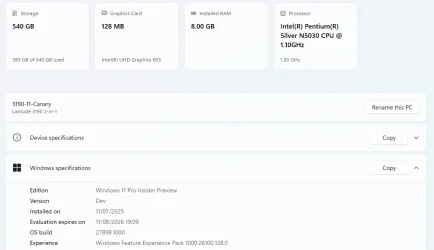
    My SYSTEM FIVE is a Dell Latitude 3190 2-in-1, Pentium Silver N5030, 8GB RAM, 1TB NVMe ssd, supported device running Windows 11 Pro, plus Insider Beta, Dev, and Canary builds (and a few others) as a native boot .vhdx.

    My SYSTEM SIX is a Dell Latitude 5550, Core Ultra 7 165H, 64GB RAM, 1TB NVMe SSD, supported device, Windows 11 Pro 24H2, Hyper-V host machine. Updated to 25H2 on 30th September 2025.

    My SYSTEM SEVEN is a Lenovo Thinkpad T580, Intel Core i7-8650U, 16GB RAM, 512GB NVMe SSD + 2nd 512GB NVMe SSD, a supported device for Windows 11. This is my current general purpose 'main machine'. The installed Windows 11 Home from my System One has been migrated to this machine.
  • Operating System
    Windows 11 Pro
    Computer type
    Laptop
    Manufacturer/Model
    Dell Latitude E4310
    CPU
    Intel® Core™ i5-520M
    Motherboard
    0T6M8G
    Memory
    8GB
    Graphics card(s)
    (integrated graphics) Intel HD Graphics
    Screen Resolution
    1366x768
    Hard Drives
    500GB Crucial MX500 SSD
    Browser
    Firefox, Edge
    Antivirus
    Defender
    Other Info
    unsupported machine: Legacy bios, MBR, TPM 1.2, upgraded from W10 to W11 using W10/W11 hybrid install media workaround. In-place upgrade to 22H2 using ISO and a workaround. Feature Update to 23H2 by manually installing the Enablement Package. In-place upgrade to 24H2 using hybrid 23H2/24H2 install media. Upgraded to 25H2 by Enablement Package. Also running Insider Dev, and Canary builds and Windows 10 as native boot .vhdx.

    My SYSTEM THREE is a Dell Latitude 5410, i7-10610U, 32GB RAM, 512GB NVMe ssd, supported device running Windows 11 Pro.

    My SYSTEM FOUR is a 2-in-1 convertible Lenovo Yoga 11e 20DA, Celeron N2930, 8GB RAM, 256GB ssd. Unsupported device: currently running Win10 Pro, plus Win11 Pro RTM and Insider Dev, Beta, and RP 24H2 as native boot vhdx.

    My SYSTEM FIVE is a Dell Latitude 3190 2-in-1, Pentium Silver N5030, 8GB RAM, 1TB NVMe ssd, supported device running Windows 11 Pro, plus Insider Beta, Dev, and Canary builds (and a few others) as a native boot .vhdx.

    My SYSTEM SIX is a Dell Latitude 5550, Core Ultra 7 165H, 64GB RAM, 1TB NVMe SSD, supported device, Windows 11 Pro 24H2, Hyper-V host machine. Updated to 25H2 on 30th September 2025.

    My SYSTEM SEVEN is a Lenovo Thinkpad T580, Intel Core i7-8650U, 16GB RAM, 512GB NVMe SSD + 2nd 512GB NVMe SSD, a supported device for Windows 11. This is my current general purpose 'main machine'. The installed Windows 11 Home from my System One has been migrated to this machine.
1752304182761.webp
I found the new build when I turned on the PC..
 

My Computer

System One

  • OS
    Windows 11 Pro Insider Preview Dev
    Computer type
    PC/Desktop
    Manufacturer/Model
    To be filled by O.E.M.
    CPU
    AMD Ryzen™ 5 5600G with Radeon Graphics 3.90 GHz
    Motherboard
    MSI B450 GAMING PLUS MAX
    Memory
    16,0 GB
    Graphics Card(s)
    NVIDIA GeForce GT 720, NVIDIA compatible
    Sound Card
    NVIDIA High Definition Audio
    Monitor(s) Displays
    BenQ GW2270 Color Profile.D6500
    Screen Resolution
    1920 x 1080
    Hard Drives
    Samsung SSD 850 EVO 250GB + CT1000BX500SSD1 + ST2000DM006-2DM164 + WDC WD5000AAKS-07TMA0 +WDC WD10EARX-00N0YB0
    PSU
    EVGA 600 W2, 80+ WHITE 600W, 3 Year Warranty, Power Supply 100-W2-0600-K2 (EU)
    Case
    RAIJINTEK Agos - mid tower - ATX
    Cooling
    Cooler Master Hyper 212 Evo heatsink + Fans: 2 front+1 back+1 up
    Keyboard
    Logitech Internet 350 Keyboard
    Mouse
    Logitech MX Revolution
    Internet Speed
    Download 159.29 Mbps - Upload 80.14 Mbps
    Browser
    Google Crome Dev
    Antivirus
    Microsoft Windows Security
There’s an issue in this build where File Explorer may fail to persist any view changes. This also impacts desktop icons, which may unexpectedly move or change size back to default.
Lame!
Going back!

Nothing beneficial in the last 37 Builds! Sometimes I wonder why I even bother!
 

My Computers

System One System Two

  • OS
    Windows 11 Pro
    Computer type
    PC/Desktop
    Manufacturer/Model
    ASUS ROG Strix
  • Operating System
    Windows 11 Pro
    Computer type
    Laptop
    Manufacturer/Model
    ASUS VivoBook
Lame!
Going back!

Nothing beneficial in the last 37 Builds! Sometimes I wonder why I even bother!
On my PowerSpec B746 I'm now using the release builds of 24H2 as my main OS. On my older PowerSpec G156 I'm only staying on tha Canary builds because I have a few programs that I can't move. My main complaint with the Canary builds is that they have become boring.
 

My Computers

System One System Two

  • OS
    Windows 11 Pro 25H2
    Computer type
    PC/Desktop
    Manufacturer/Model
    PowerSpec B746
    CPU
    Intel Core i7-10700K
    Motherboard
    ASRock Z490 Phantom Gaming 4/ax
    Memory
    16GB (8GB PC4-19200 DDR4 SDRAM x2)
    Graphics Card(s)
    NVIDIA GeForce GTX 1050 TI
    Sound Card
    Realtek Audio
    Monitor(s) Displays
    #1. LG ULTRAWIDE 34" #2. AOC Q32G2WG3 32"
    Screen Resolution
    #1. 3440 X 1440 #2. 1920 x 1080
    Hard Drives
    NVMe WDC WDS100T2B0C-00PXH0 1TB
    Samsung SSD 860 EVO 1TB
    PSU
    750 Watts (62.5A)
    Case
    PowerSpec/Lian Li ATX 205
    Keyboard
    Logitech K270
    Mouse
    Logitech M185
    Browser
    Microsoft Edge and Firefox
    Antivirus
    Webroot SecureAnywhere CE 26.1
  • Operating System
    Windows 11 Canary Channel
    Computer type
    PC/Desktop
    Manufacturer/Model
    PowerSpec G156
    CPU
    Intel Core i5-8400 CPU @ 2.80GHz
    Motherboard
    AsusTeK Prime B360M-A
    Memory
    16 MB DDR 4-2666
    Monitor(s) Displays
    23" Speptre HDMI 75Hz
    Screen Resolution
    1920x1080
    Hard Drives
    Samsung 970 EVO 500GB NVMe
    Keyboard
    Logitek K270
    Mouse
    Logitek M185
    Browser
    Firefox, Edge and Edge Canary
    Antivirus
    Windows Defender
[ADDED] This week’s Canary Channel flight comes with a delightful blast from the past and will play the Windows Vista boot sound instead of the Windows 11 boot sound. The fix should be coming in a future Canary Channel flight soon.

 

My Computers

System One System Two

  • OS
    Windows 11 Pro for Workstations
    Computer type
    PC/Desktop
    Manufacturer/Model
    Custom self build
    CPU
    Intel i7-8700K 5 GHz
    Motherboard
    ASUS ROG Maximus XI Formula Z390
    Memory
    64 GB (4x16GB) G.SKILL TridentZ RGB DDR4 3600 MHz (F4-3600C18D-32GTZR)
    Graphics Card(s)
    ASUS ROG-STRIX-GTX1080TI-O11G-GAMING (11GB GDDR5X)
    Sound Card
    Integrated Digital Audio (S/PDIF)
    Monitor(s) Displays
    2 x Samsung Odyssey G75 27"
    Screen Resolution
    2560x1440
    Hard Drives
    1TB Samsung 990 PRO M.2,
    4TB Samsung 990 PRO M.2,
    TerraMaster F8 SSD Plus NAS
    PSU
    Seasonic Prime Titanium 850W
    Case
    Thermaltake Core P3 wall mounted
    Cooling
    Corsair Hydro H115i
    Keyboard
    Amazon Basics Wired Full Keyboard MD005
    Mouse
    Logitech MX Master 4
    Internet Speed
    2 Gbps Download and 100 Mbps Upload
    Browser
    Chrome and Edge
    Antivirus
    Microsoft Defender
    Other Info
    Logitech Z625 speaker system,
    Logitech BRIO 4K Pro webcam,
    HP Color LaserJet Pro MFP M477fdn,
    CyberPower CP1500PFCLCD
    Galaxy S23 Plus phone
  • Operating System
    Windows 11 Pro
    Computer type
    Laptop
    Manufacturer/Model
    Surface Laptop 7 Copilot+ PC
    CPU
    Snapdragon X Elite (12 core) 3.42 GHz
    Memory
    16 GB LPDDR5x-7467 MHz
    Monitor(s) Displays
    15" HDR
    Screen Resolution
    2496 x 1664
    Hard Drives
    1 TB SSD
    Internet Speed
    Wi-Fi 7 and Bluetooth 5.4
    Browser
    Chrome and Edge
    Antivirus
    Microsoft Defender
The fix should be coming in a future Canary Channel flight soon.
Here's the fix...


10200.webp
 

My Computers

System One System Two

  • OS
    Windows 11 Pro
    Computer type
    PC/Desktop
    Manufacturer/Model
    ASUS ROG Strix
  • Operating System
    Windows 11 Pro
    Computer type
    Laptop
    Manufacturer/Model
    ASUS VivoBook
Whole Windows 11 have become boring and screwed up 🙃
 

My Computers

System One System Two

  • OS
    Win 11 Pro 25H2 26200.8457 / Linux Mint 22.3
    Computer type
    Laptop
    Manufacturer/Model
    Lenovo A485
    CPU
    Ryzen 7 2700U Pro
    Motherboard
    Lenovo (WiFi/BT module upgraded to Intel Wireless-AC-9260)
    Memory
    32GB
    Graphics Card(s)
    iGPU Vega 10
    Sound Card
    Realtek
    Monitor(s) Displays
    14" FHD (built-in) + 14" Lenovo Thinkvision M14t (touch+pen) + 32" Asus PB328
    Screen Resolution
    FHD + FHD + 1440p
    Hard Drives
    Intel 660p m.2 nVME PCIe3.0 x2 512GB
    PSU
    125W(Dock)/65W(Travel Adapter)
    Keyboard
    Thinkpad / Logitech MX Keys
    Mouse
    Logitech MX Master 2S
    Internet Speed
    1/1Gbit
    Browser
    Firefox
    Antivirus
    Windows Defender
    Other Info
    SecureBoot: Enabled
    TPM2.0: Enabled
    AMD-V: Enabled
  • Operating System
    Win 11 Pro 25H2 26200.8521(RP)
    Computer type
    PC/Desktop
    Manufacturer/Model
    Custom
    CPU
    i7-7700k @4.8GHz
    Motherboard
    Asus PRIME Z270-A
    Memory
    32GB 2x16GB 2133MHz CL15
    Graphics card(s)
    EVGA GTX1080Ti FTW 11GB
    Sound Card
    Integrated
    Monitor(s) Displays
    32" 10-bit Asus PB328Q
    Screen Resolution
    WQHD 2560x1440
    Hard Drives
    512GB ADATA SX8000NP NVMe PCIe Gen 3 x4
    PSU
    850W
    Case
    Fractal Design Define 7
    Cooling
    Noctua NH-D15 chromax.black
    Keyboard
    Logitech MX Keys
    Mouse
    Logitech MX Master 2S
    Internet Speed
    1/1Gbit
    Browser
    Firefox
    Antivirus
    Windows Defender
    Other Info
    AC WiFi Card

Latest Support Threads

Back
Top Bottom