Microsoft Support:
Changes and improvements gradually being rolled out*
- This update includes a small set of general improvements and fixes that improve the overall experience for Insiders running this build on their PCs.
[Manage camera, microphone, and location access for desktop apps]
- Windows Insiders can now manage camera, microphone, and location permissions for individual desktop apps. Previously, access for traditional desktop applications was managed through a single device-wide setting.
- With this update, you can review and control access on an app-by-app basis, giving you greater visibility into which apps are requesting access to sensitive resources and more control over your privacy choices. Our goal is to make privacy permissions easier to understand and manage across the wide range of desktop apps people use every day.

Enable or Disable Apps Access to Camera in Windows 11
This tutorial will show you how to allow or deny apps access to the camera for your account or all users in Windows 11. Many apps and services request and use the camera, and Windows settings give you control over which apps can use your camera. There are three types of cameras that apps and... www.elevenforum.com
Enable or Disable Apps Access to Microphone in Windows 11
This tutorial will show you how to allow or deny apps access to the microphone for your account or all users in Windows 11. Many apps and services request and use the microphone, and Windows settings give you control over which apps can use your microphone. You can choose which apps can access...
www.elevenforum.com

Turn On or Off Let Apps Access Location in Windows 11
This tutorial will show you how to turn on or off "Let apps access your location" and "Let desktop apps access your location" for your account Windows 11. Microsoft operates a location service that helps determine the precise geographic location of your Windows device. The precise location of...
www.elevenforum.com
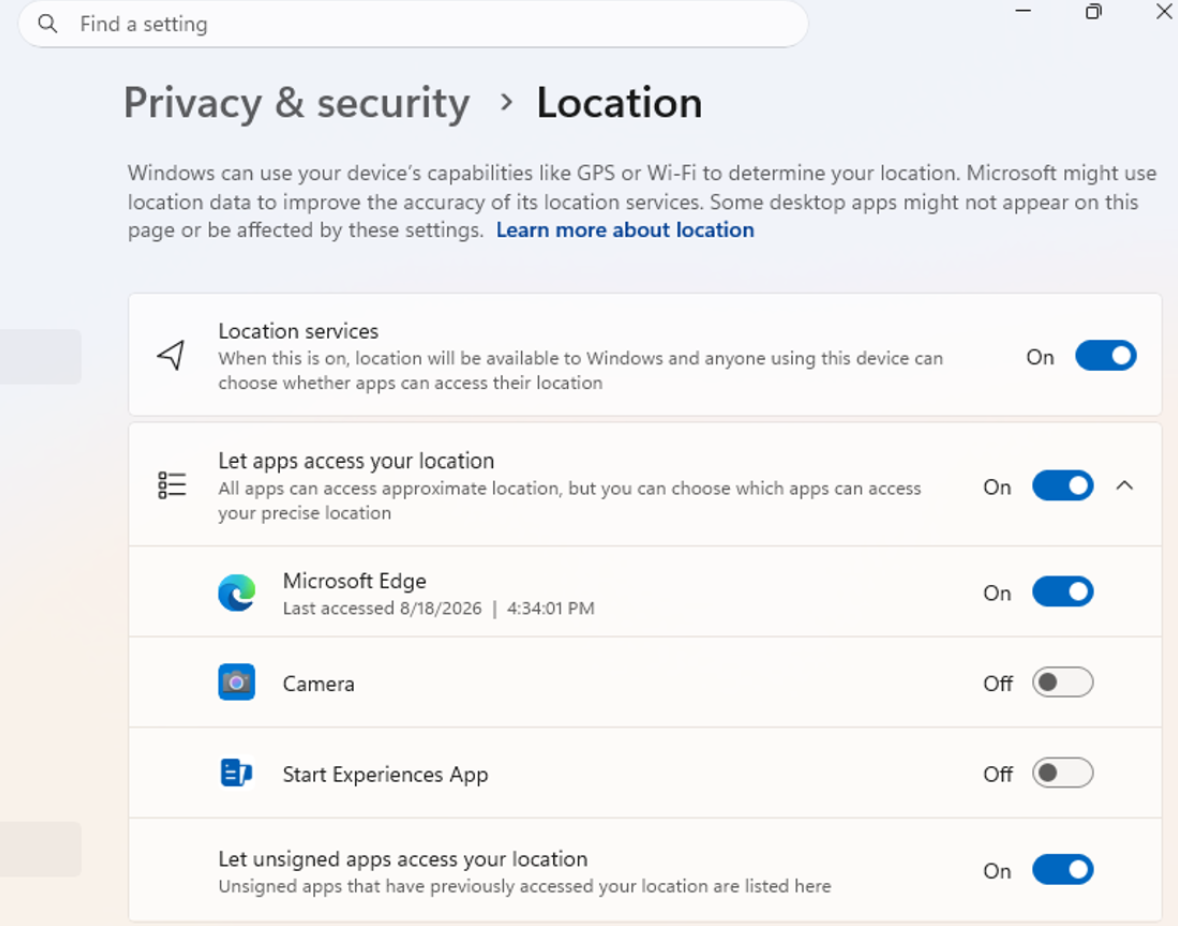
UI showing the new privacy controls for individual desktop apps in Settings.
[Taskbar]
- Improved the underlying state persistence of taskbar settings related to multiple monitors across monitor connections and disconnections.
[File Explorer]
- Fixed an issue where the message when permanently deleting files from the Recycle Bin wasn't displaying the text correctly.
[Windows design]
- We are temporarily rolling back the solid (donut) spinners across some of the key Windows scenarios including Boot, Logon, Restart, Shutdown, and Update as we work on a bug. We expect to resume rolling it out soon.
[Known issues]
- We are aware of an issue affecting Fortnite Battle Royale where the game will hang during matchmaking in some instances. We are investigating the issue.
Reminder for Windows Insiders in the Experimental (Future Platforms) channel
- These builds can be unstable and might be released with limited documentation.
- The builds released to these channels represent the latest platform changes early in the development cycle and shouldn't be seen as matched to any specific release of Windows. Features and experiences included in these builds might never get released as we try out different concepts and get feedback. Features might change over time, be removed, or replaced, and never get released beyond Windows Insiders. Some of these features and experiences could show up in future Windows releases when they're ready.
- Many features are rolled out using Controlled Feature Rollout technology, starting with a subset of Insiders and ramping up over time. We monitor feedback to see how they land before pushing them out to everyone in this channel.
- The desktop watermark shown at the lower right corner of the desktop is normal for Windows Insider pre-release builds.
- Some features in active development we preview with Windows Insiders might not be fully localized, and localization will happen over time as features are finalized. As you see issues with localization in your language, report those issues to us via Feedback Hub.
Source:

Windows 11 Insider Experimental (Future Platforms) Preview Build 29698.1000 - Windows Insider Program
Release notes for Windows 11 Insider Experimental (Future Platforms) Preview Build 29698.1000
learn.microsoft.com

Announcing new builds for 30 October 2026
Hello Windows Insiders, Today, we’re releasing new Windows 11 Insider Preview builds to the Beta and Experimental channels, as well as introducing a new commercial Feedback Hub policy for commercial customers. New builds this week
 blogs.windows.com
Check Windows Updates
UUP Dump:
64-bit ISO download:

Select language for Windows 11 Insider Preview 29698.1000 (rs_prerelease) amd64
Select language for Windows 11 Insider Preview 29698.1000 (rs_prerelease) amd64 on UUP dump. UUP dump lets you download Unified Update Platform files, like Windows Insider updates, directly from Windows Update.
uupdump.net
ARM64 ISO download:
Select language for Windows 11 Insider Preview 29698.1000 (rs_prerelease) arm64
Select language for Windows 11 Insider Preview 29698.1000 (rs_prerelease) arm64 on UUP dump. UUP dump lets you download Unified Update Platform files, like Windows Insider updates, directly from Windows Update.
uupdump.net

UUP Dump - Download Windows Insider ISO
UUP Dump is the most practical and easy way to get ISO images of any Insider Windows 10 or Windows 11 version, as soon as Microsoft has released a new build. UUP Dump creates a download configuration file according to your choices, downloads necessary files directly from Microsoft servers, and...
www.elevenforum.com
Last edited: