Windows 11 knows my EXACT location even though it shouldn't


weirdedie

New member
Local time
10:31 PM
Posts
3
OS
Windows 11

I installed Windows 11 Home 24H2 on real hardware for testing purposes.

I performed the installation without Internet access because the installer did not include drivers for my wireless card.
I used an online account requirement bypass and disabled location services during initial configuration.
When the desktop appeared, I confirmed that location services were disabled. I transferred the network card driver from USB stick, installed it and updated the system.
After several restarts I had a fully up-to-date system. Windows did not change the location setting on its own, so it remained disabled.

Imagine my surprise when it turned out that the weather widget in the left corner of the taskbar shows the weather for my exact location (a small village with only a couple of houses).
It is impossible for Windows to have obtained it from the IP address, because according to several websites, this address points to the nearest large city, which is over 100 km away, or to the ISP headquarters, which is several hundred kilometers away.

It gets even stranger, because the weather app, as set up in settings, does not have access to the location, it probably uses the system language to determine location and displays the weather for the capital city.

For reasons unknown to me, the widget on the taskbar knows my exact location. On what basis? Is this a mistake on Microsoft's part, which failed to ensure that the system appeared to respect user settings in every place and inadvertently shared its spy findings with the user?

If this isn't the right place to ask this question, I apologize and hope you can give me some advice where to ask. I originally wanted to ask on Reddit about privacy, but it turns out you have to wait seven days after creating an account and farm some karma points just to ask one simple question.
I also tried searching for solutions online, but all I found were overly confident comments saying that it was definitely the location based on the IP address, which doesn't make sense in my case. Copilot's suggestions are complete nonsense as always.
 
Windows Build/Version
24H2

My Computer

System One

  • OS
    Windows 11
Hello Edie, and welcome to the forum. :alien:

You can check using the tutorial below to see if it may be from what was set for "Default location".

You can set a default location for your device that Windows, apps, and services can use when a more exact location can’t be detected using GPS or other methods.


My Computers

System One System Two

  • OS
    Windows 11 Pro for Workstations
    Computer type
    PC/Desktop
    Manufacturer/Model
    Custom self build
    CPU
    Intel i7-8700K 5 GHz
    Motherboard
    ASUS ROG Maximus XI Formula Z390
    Memory
    64 GB (4x16GB) G.SKILL TridentZ RGB DDR4 3600 MHz (F4-3600C18D-32GTZR)
    Graphics Card(s)
    ASUS ROG-STRIX-GTX1080TI-O11G-GAMING (11GB GDDR5X)
    Sound Card
    Integrated Digital Audio (S/PDIF)
    Monitor(s) Displays
    2 x Samsung Odyssey G75 27"
    Screen Resolution
    2560x1440
    Hard Drives
    1TB Samsung 990 PRO M.2,
    4TB Samsung 990 PRO M.2,
    TerraMaster F8 SSD Plus NAS
    PSU
    Seasonic Prime Titanium 850W
    Case
    Thermaltake Core P3 wall mounted
    Cooling
    Corsair Hydro H115i
    Keyboard
    Amazon Basics Wired Full Keyboard MD005
    Mouse
    Logitech MX Master 4
    Internet Speed
    2 Gbps Download and 100 Mbps Upload
    Browser
    Chrome and Edge
    Antivirus
    Microsoft Defender
    Other Info
    Logitech Z625 speaker system,
    Logitech BRIO 4K Pro webcam,
    HP Color LaserJet Pro MFP M477fdn,
    CyberPower CP1500PFCLCD
    Galaxy S23 Plus phone
  • Operating System
    Windows 11 Pro
    Computer type
    Laptop
    Manufacturer/Model
    Surface Laptop 7 Copilot+ PC
    CPU
    Snapdragon X Elite (12 core) 3.42 GHz
    Memory
    16 GB LPDDR5x-7467 MHz
    Monitor(s) Displays
    15" HDR
    Screen Resolution
    2496 x 1664
    Hard Drives
    1 TB SSD
    Internet Speed
    Wi-Fi 7 and Bluetooth 5.4
    Browser
    Chrome and Edge
    Antivirus
    Microsoft Defender
I cannot give you exact answer, but if you use the local WiFi access point, Microsoft could memorise its location if it has been determined in the past, for example, by another PC where the location permission was turned on. I have met such situations using the public WiFi access points in the hotels.
 

My Computer

System One

  • OS
    Windows 11 Pro 25H2
    Computer type
    Laptop
    Manufacturer/Model
    Lenovo Legion 5-15ARH05
    CPU
    AMD Rysen 5 4600H
    Memory
    32 GB (2 x 16 GB Samsung SO-DIMM DDR4-3200)
    Graphics Card(s)
    GeForce GTX 1650 Ti, 4 GB GDDR6
    Screen Resolution
    1920x1080
    Hard Drives
    SSD M.2 512 GB SAMSUNG MZALQ512; SSD M.2 1 TB Seagate FireCuda 530
    Mouse
    Logitech M650L in Bluetooth mode
An IP address is enough to determine down to the city you are in.
Ask Google what is my ip then search for "geo ip" and throw that IP in and you get either your exact city or fairly close
 

My Computer

System One

  • OS
    Linux Mint
    Computer type
    Laptop
    Manufacturer/Model
    System76 Lemur Pro
@neemobeerAs I wrote in my first post, I tried geo tracking, and at best it was the nearest large city. Such IP-based location tracking makes no sense for a tiny village with just a few houses.

The answers above are more likely, but very disturbing, because there is nothing that can be done about it, and the only thing that setting the location does is hiding it from applications, while the system still knows the exact location of the computer down to a specific house.
 

My Computer

System One

  • OS
    Windows 11
The answers above are more likely, but very disturbing, because there is nothing that can be done about it, and the only thing that setting the location does is hiding it from applications, while the system still knows the exact location of the computer down to a specific house.
Sorry but doesn't your ISP know where you live?
And doesn't your ISP provide you with an IP address via the use of a router so you can get on the internet?
Your OS can not block that as it can't go before the router.
The moment you are connected, there is always a way to track you, regardless of what some VPN providers might claim.
 

My Computers

System One System Two

  • OS
    All Branches but Release
    Computer type
    Laptop
    Manufacturer/Model
    Acer Nitro ANV15-51
    CPU
    AMD Ryzen 7 7735HS 3200-4500 Mhz 8 cores x 2
    Motherboard
    Sportage_RBH
    Memory
    32 GB DDR5
    Graphics Card(s)
    Radeon Graphic / NVIDIA GeForce RTX 4060 8 GB GDDR6
    Sound Card
    AMD/Realtek(R) Audio
    Monitor(s) Displays
    Integrated Monitor (15.3"vis)
    Screen Resolution
    FHD 1920X1080 16:9 144Hz
    Hard Drives
    KINGSTON OM8SEP4512Q-AA 1TB
    Western Digital 256GB
    PSU
    19V DC 6.32 A 120 W
    Cooling
    Dual Fans
    Mouse
    MS Bluetooth
    Internet Speed
    Fiber 1GB Cox -us & 1GB Orange-fr
    Browser
    Edge Canary- Firefox Nightly-Chrome Dev-Chrome Dev
    Antivirus
    Windows Defender
  • Operating System
    Windows 11 Beta
    Computer type
    Laptop
    Manufacturer/Model
    Asus X751BP
    CPU
    AMD A9-9420
    Memory
    8 GB of DDR4
    Graphics card(s)
    AMD Radeon R5
    Screen Resolution
    1600x900
    Hard Drives
    Seagate 1 TB
It's mobile internet but I think by base station location my ISP definitely knows where I am. But what worries me is that Microsoft knows about it and I wonder how they found out. I didn't sign a contract with them.

And I don't like the fact that there's no way to block it, contrary to what Microsoft itself suggests in the location settings. Heck, my device doesn't even have GPS! That's why I was surprised.
 

My Computer

System One

  • OS
    Windows 11
It's mobile internet but I think by base station location my ISP definitely knows where I am. But what worries me is that Microsoft knows about it and I wonder how they found out. I didn't sign a contract with them.

And I don't like the fact that there's no way to block it, contrary to what Microsoft itself suggests in the location settings. Heck, my device doesn't even have GPS! That's why I was surprised.
Please use some geo-location tools from :


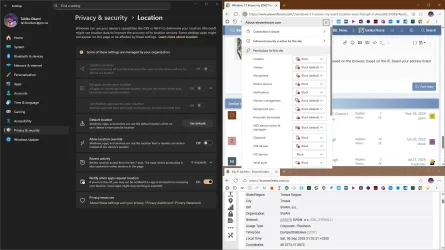
On the page What is my geolocation, use the drop-down options to demonstrate which methods could be used to track you,at the browser level, regardless of your OS.

Screenshot 2025-09-06 191410.webp

 
Last edited:

My Computers

System One System Two

  • OS
    All Branches but Release
    Computer type
    Laptop
    Manufacturer/Model
    Acer Nitro ANV15-51
    CPU
    AMD Ryzen 7 7735HS 3200-4500 Mhz 8 cores x 2
    Motherboard
    Sportage_RBH
    Memory
    32 GB DDR5
    Graphics Card(s)
    Radeon Graphic / NVIDIA GeForce RTX 4060 8 GB GDDR6
    Sound Card
    AMD/Realtek(R) Audio
    Monitor(s) Displays
    Integrated Monitor (15.3"vis)
    Screen Resolution
    FHD 1920X1080 16:9 144Hz
    Hard Drives
    KINGSTON OM8SEP4512Q-AA 1TB
    Western Digital 256GB
    PSU
    19V DC 6.32 A 120 W
    Cooling
    Dual Fans
    Mouse
    MS Bluetooth
    Internet Speed
    Fiber 1GB Cox -us & 1GB Orange-fr
    Browser
    Edge Canary- Firefox Nightly-Chrome Dev-Chrome Dev
    Antivirus
    Windows Defender
  • Operating System
    Windows 11 Beta
    Computer type
    Laptop
    Manufacturer/Model
    Asus X751BP
    CPU
    AMD A9-9420
    Memory
    8 GB of DDR4
    Graphics card(s)
    AMD Radeon R5
    Screen Resolution
    1600x900
    Hard Drives
    Seagate 1 TB
May be you logged in with the same account on a mobile browser and web browser like chrome in both place.
 

My Computer

System One

  • OS
    Windows 11
    Computer type
    PC/Desktop
    Manufacturer/Model
    Asus
    CPU
    Intel Core i9 11900k
    Motherboard
    Asus Maximus Hero 10
    Memory
    Corsair 3200 64GB
    Graphics Card(s)
    Asus Rog RTX 3070ti
    Monitor(s) Displays
    LG 27un850-w
    Screen Resolution
    3840 x 2160
    Hard Drives
    Samsung 1 TB Nvme SSD
    PSU
    Corsair 750w
    Case
    Corsair
    Cooling
    Corsair H100
    Antivirus
    Awast
There is a location based on Windows, based on the browser, based on the IP, based your address listed in any account and etc.

capture_09062025_213438.webp

Code:
https://account.live.com/Activity
Anyway, MS uses your location to prevent or to notify you about a suspicious logins. Maybe 11 has set the default location?


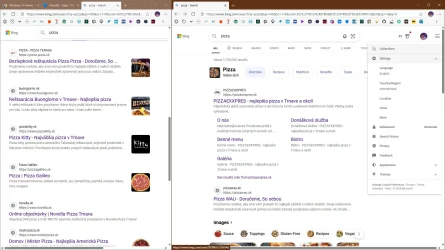
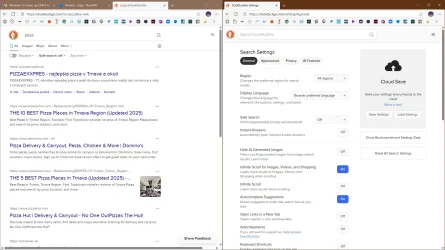
That is why I can not use Bing, I have set my location to US/EN, yet Bing shows local results and language, annoying, unusable. :ffs:

capture_09062025_215315.webpcapture_09062025_215159.webp

Unless you use VPN, you can not really complain about location leaks. 🤷‍♂️
Make sure you use an encrypted DNS, that prevents the most common leaks.
 
Last edited:

My Computer

System One

  • OS
    Home26H2Can
    Computer type
    PC/Desktop
    CPU
    AMD Ryzen 5 8600G (07/24)
    Motherboard
    ASROCK B650M-HDV/M.2 (07/24) BIOS 4.21 AGESA ComboAM5 1.3.0.1 (04/26)
    Memory
    2x32GB Kingston FURY DDR5 5600 MHz CL36 @5200 CL36 (07/24)
    Graphics Card(s)
    ASROCK Radeon RX 6600 Challenger D 8G @48FPS (08/24)
    Sound Card
    Creative Sound BlasterX AE-5 Plus (05/24)
    Monitor(s) Displays
    24" Philips 24M1N3200ZS/00 (05/24)
    Screen Resolution
    1920×1080@165Hz via DP1.4
    Hard Drives
    Kingston KC3000 NVMe 2TB (05/24)
    ADATA XPG GAMMIX S11 Pro 512GB (07/19)
    PSU
    Seasonic Core GM 550 Gold (04/24)
    Case
    Fractal Design Define 7 Mini with 3x Noctua NF-P14s/12@555rpm (04/24)
    Cooling
    Noctua NH-U12S with Noctua NF-P12 (04/24)
    Keyboard
    HP Pavilion Wired Keyboard 300 (07/24) + Rabalux 76017 Parker (01/24)
    Mouse
    Logitech M330 Silent Plus (01/26)
    Internet Speed
    500/100 Mbps via RouterOS (05/21) & TCP Optimizer
    Browser
    Edge, Brave for YouTube, LibreWolf for FB
    Antivirus
    NextDNS blocking 1/3 Traffic
    Other Info
    Phone: Motorola Moto G86 (02/26)
    Backup: Hasleo Backup Suite (PreOS)
    Headphones: Sennheiser RS170 (09/10)
    Chair: Huzaro Force 4.4 Grey Mesh (05/24)
    Notifier: Xiaomi Mi Band 9 Milanese (10/24)
    FlexCore USB-C 3.2 Gen 1 (M) to LAN (F) (08/25)
The other half of users constantly complain Windows can't figure out exactly where they live, and gives them the wrong Weather forecasts.
 

My Computer

System One

  • OS
    Windows 7
The other half of users constantly complain Windows can't figure out exactly where they live, and gives them the wrong Weather forecasts.
Just like my Xiaomi Band watch, it uses GPS instead of my manually set location. GPS uses the weather station miles away. :cautious:
 

My Computer

System One

  • OS
    Home26H2Can
    Computer type
    PC/Desktop
    CPU
    AMD Ryzen 5 8600G (07/24)
    Motherboard
    ASROCK B650M-HDV/M.2 (07/24) BIOS 4.21 AGESA ComboAM5 1.3.0.1 (04/26)
    Memory
    2x32GB Kingston FURY DDR5 5600 MHz CL36 @5200 CL36 (07/24)
    Graphics Card(s)
    ASROCK Radeon RX 6600 Challenger D 8G @48FPS (08/24)
    Sound Card
    Creative Sound BlasterX AE-5 Plus (05/24)
    Monitor(s) Displays
    24" Philips 24M1N3200ZS/00 (05/24)
    Screen Resolution
    1920×1080@165Hz via DP1.4
    Hard Drives
    Kingston KC3000 NVMe 2TB (05/24)
    ADATA XPG GAMMIX S11 Pro 512GB (07/19)
    PSU
    Seasonic Core GM 550 Gold (04/24)
    Case
    Fractal Design Define 7 Mini with 3x Noctua NF-P14s/12@555rpm (04/24)
    Cooling
    Noctua NH-U12S with Noctua NF-P12 (04/24)
    Keyboard
    HP Pavilion Wired Keyboard 300 (07/24) + Rabalux 76017 Parker (01/24)
    Mouse
    Logitech M330 Silent Plus (01/26)
    Internet Speed
    500/100 Mbps via RouterOS (05/21) & TCP Optimizer
    Browser
    Edge, Brave for YouTube, LibreWolf for FB
    Antivirus
    NextDNS blocking 1/3 Traffic
    Other Info
    Phone: Motorola Moto G86 (02/26)
    Backup: Hasleo Backup Suite (PreOS)
    Headphones: Sennheiser RS170 (09/10)
    Chair: Huzaro Force 4.4 Grey Mesh (05/24)
    Notifier: Xiaomi Mi Band 9 Milanese (10/24)
    FlexCore USB-C 3.2 Gen 1 (M) to LAN (F) (08/25)

Latest Support Threads

Back
Top Bottom