
Solved Windows 11 Laptop Taking 4 Minutes to Connect to Wireless Network


Try Safe Mode with Networking to see if connection is quick. This will eliminate some app interfering with wifi.

Press WIN + R....type msconfig....press enter...select the Boot tab....tick safe mode and select network.
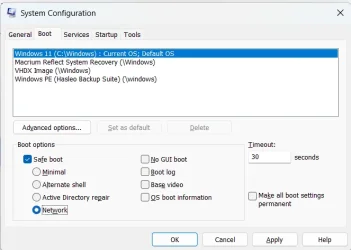
1777962646694.webp

To undo, press WIN + R...type msconfig...press Enter...go to the General tab and select Normal startup.
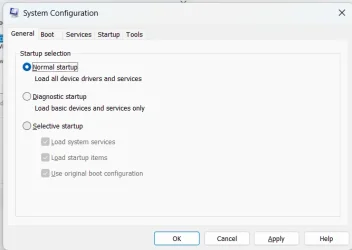
1777962747740.webp
 

My Computers My Computers

  • At a glance

    Windows 11 Pro 25H2 26200.8655AMD Ryzen 7 5825U with Radeon Graphics16GB
    OS
    Windows 11 Pro 25H2 26200.8655
    Computer type
    Laptop
    Manufacturer/Model
    Acemagic LX15PRO
    CPU
    AMD Ryzen 7 5825U with Radeon Graphics
    Motherboard
    BIOS CT_BI_AMI_LX15PRO_AB8139_A-004
    Memory
    16GB
    Screen Resolution
    1920 x 1080
    Hard Drives
    SSD 2TB
    Internet Speed
    30 Mbps
    Browser
    Brave
    Antivirus
    Defender/Windows Security
    Other Info
    System 3

    Acer Swift SF114-34 laptop
    OS Windows 11 Pro 26200.8655
    CPU Pentium Silver N6000
    RAM 4GB
    BIOS v1.17
    SSD Samsung 970 EVO Plus SSD 2TB (an upgrade)
  • At a glance

    Windows 11 Pro 23H2 22631.2506Atom N450 1.66GHz2GB
    Operating System
    Windows 11 Pro 23H2 22631.2506
    Computer type
    Laptop
    Manufacturer/Model
    HP Mini 210-1090NR PC (bought in late 2009!)
    CPU
    Atom N450 1.66GHz
    Memory
    2GB
    Browser
    Brave
    Antivirus
    Webroot
Have you tried sfc /scannow in a CMD prompt?
 

My Computers My Computers

  • At a glance

    Windows 11 Pro 25H2 26200.8655AMD Ryzen 7 5825U with Radeon Graphics16GB
    OS
    Windows 11 Pro 25H2 26200.8655
    Computer type
    Laptop
    Manufacturer/Model
    Acemagic LX15PRO
    CPU
    AMD Ryzen 7 5825U with Radeon Graphics
    Motherboard
    BIOS CT_BI_AMI_LX15PRO_AB8139_A-004
    Memory
    16GB
    Screen Resolution
    1920 x 1080
    Hard Drives
    SSD 2TB
    Internet Speed
    30 Mbps
    Browser
    Brave
    Antivirus
    Defender/Windows Security
    Other Info
    System 3

    Acer Swift SF114-34 laptop
    OS Windows 11 Pro 26200.8655
    CPU Pentium Silver N6000
    RAM 4GB
    BIOS v1.17
    SSD Samsung 970 EVO Plus SSD 2TB (an upgrade)
  • At a glance

    Windows 11 Pro 23H2 22631.2506Atom N450 1.66GHz2GB
    Operating System
    Windows 11 Pro 23H2 22631.2506
    Computer type
    Laptop
    Manufacturer/Model
    HP Mini 210-1090NR PC (bought in late 2009!)
    CPU
    Atom N450 1.66GHz
    Memory
    2GB
    Browser
    Brave
    Antivirus
    Webroot
Try Safe Mode with Networking to see if connection is quick. This will eliminate some app interfering with wifi.

Press WIN + R....type msconfig....press enter...select the Boot tab....tick safe mode and select network.

View attachment 170607

To undo, press WIN + R...type msconfig...press Enter...go to the General tab and select Normal startup.

View attachment 170608

This sounded especially promising. Very interestingly, perhaps, when I chose safe mode with networking and restarted, after 7 minutes the laptop had still not identified any available networks. Thinking it might never, I changed back to normal startup and got connected in about 4 minutes.

So why would it not connect at all in safe mode with networking checked? I guess I should have let it go for longer than 7 minutes
 

My Computer My Computer

At a glance

Windows 11Processor Intel(R) Core(TM) i7-8565U CPU @ 1....Installed Physical Memory (RAM) 16.0 GB
OS
Windows 11
Computer type
Laptop
Manufacturer/Model
Dell
CPU
Processor Intel(R) Core(TM) i7-8565U CPU @ 1.80GHz, 199
Motherboard
BaseBoard Manufacturer Dell Inc. BaseBoard Product 08YRWT BaseBoard Version A00
Memory
Installed Physical Memory (RAM) 16.0 GB
have you tried static addressing for the WiFi connection
IP address
subnet mask
gateway address
DNS

then check the connection to see if there is any improvement.
best of luck Steve ..
I've not changed any settings on my gateway for fear of disrupting other devices, all of which connect quickly and reliably.
 

My Computer My Computer

At a glance

Windows 11Processor Intel(R) Core(TM) i7-8565U CPU @ 1....Installed Physical Memory (RAM) 16.0 GB
OS
Windows 11
Computer type
Laptop
Manufacturer/Model
Dell
CPU
Processor Intel(R) Core(TM) i7-8565U CPU @ 1.80GHz, 199
Motherboard
BaseBoard Manufacturer Dell Inc. BaseBoard Product 08YRWT BaseBoard Version A00
Memory
Installed Physical Memory (RAM) 16.0 GB
Boot from a Linux distro (Mint is a good flavour) and test the connection
I have a desktop running Linux Mint. I just fired it up. In about 1.5 minutes, it had booted up and connected to same wireless network my Windows 11 laptop has been struggling with.
Ultimate drastic step ... swap out the drive for a blank one. Clean install Win 11. Test. You can then replace the old drive and decide what to do next
This is too much for me, but I do appreciate the suggestion.
Can't see it being asked previously, and at the risk of stating the bleedin' obvious ...
- no VPNs, I assume
- has the DNS settings been changed (physically check, not just assume)

In respect of the DNS, if no change, try a DNS change - Google iPV4 8.8.8.8 (primary) and 8.8.4.4 (secondary)

there's a great little progam called DNS Jumper tha can do that for you
Dns Jumper v2.3 (only this one from sordum, others are a bit iffy)
Not sure what you're suggesting here, but I'm loathe to change any router settings, since all my other devices connect quickly and reliably.
 

My Computer My Computer

At a glance

Windows 11Processor Intel(R) Core(TM) i7-8565U CPU @ 1....Installed Physical Memory (RAM) 16.0 GB
OS
Windows 11
Computer type
Laptop
Manufacturer/Model
Dell
CPU
Processor Intel(R) Core(TM) i7-8565U CPU @ 1.80GHz, 199
Motherboard
BaseBoard Manufacturer Dell Inc. BaseBoard Product 08YRWT BaseBoard Version A00
Memory
Installed Physical Memory (RAM) 16.0 GB
Have you tried sfc /scannow in a CMD prompt?
I just ran sfc /scannow with the following results:

C:\Windows\System32>sfc /scannow

Beginning system scan. This process will take some time.

Beginning verification phase of system scan.
Verification 100% complete.

Windows Resource Protection found corrupt files and successfully repaired them.
For online repairs, details are included in the CBS log file located at
windir\Logs\CBS\CBS.log. For example C:\Windows\Logs\CBS\CBS.log. For offline
repairs, details are included in the log file provided by the /OFFLOGFILE flag.

C:\Windows\System32>

Seems like something was wrong and was repaired. I've accessed the log file but I'm not sure what I should be looking for, if anything. I'll try restarting again now and see what happens.

Edited to add: No joy. Still taking between 4 and 5 minutes to connect.
 
Last edited:

My Computer My Computer

At a glance

Windows 11Processor Intel(R) Core(TM) i7-8565U CPU @ 1....Installed Physical Memory (RAM) 16.0 GB
OS
Windows 11
Computer type
Laptop
Manufacturer/Model
Dell
CPU
Processor Intel(R) Core(TM) i7-8565U CPU @ 1.80GHz, 199
Motherboard
BaseBoard Manufacturer Dell Inc. BaseBoard Product 08YRWT BaseBoard Version A00
Memory
Installed Physical Memory (RAM) 16.0 GB
I just ran sfc /scannow with the following results:

C:\Windows\System32>sfc /scannow

Beginning system scan. This process will take some time.

Beginning verification phase of system scan.
Verification 100% complete.

Windows Resource Protection found corrupt files and successfully repaired them.
For online repairs, details are included in the CBS log file located at
windir\Logs\CBS\CBS.log. For example C:\Windows\Logs\CBS\CBS.log. For offline
repairs, details are included in the log file provided by the /OFFLOGFILE flag.

C:\Windows\System32>

Seems like something was wrong and was repaired. I've accessed the log file but I'm not sure what I should be looking for, if anything. I'll try restarting again now and see what happens.
I can't understand the log files, don't worry about them. You did not say if the fact that sfc fixed files made any difference AFTER a reboot
 

My Computers My Computers

  • At a glance

    Windows 11 Pro 25H2 26200.8655AMD Ryzen 7 5825U with Radeon Graphics16GB
    OS
    Windows 11 Pro 25H2 26200.8655
    Computer type
    Laptop
    Manufacturer/Model
    Acemagic LX15PRO
    CPU
    AMD Ryzen 7 5825U with Radeon Graphics
    Motherboard
    BIOS CT_BI_AMI_LX15PRO_AB8139_A-004
    Memory
    16GB
    Screen Resolution
    1920 x 1080
    Hard Drives
    SSD 2TB
    Internet Speed
    30 Mbps
    Browser
    Brave
    Antivirus
    Defender/Windows Security
    Other Info
    System 3

    Acer Swift SF114-34 laptop
    OS Windows 11 Pro 26200.8655
    CPU Pentium Silver N6000
    RAM 4GB
    BIOS v1.17
    SSD Samsung 970 EVO Plus SSD 2TB (an upgrade)
  • At a glance

    Windows 11 Pro 23H2 22631.2506Atom N450 1.66GHz2GB
    Operating System
    Windows 11 Pro 23H2 22631.2506
    Computer type
    Laptop
    Manufacturer/Model
    HP Mini 210-1090NR PC (bought in late 2009!)
    CPU
    Atom N450 1.66GHz
    Memory
    2GB
    Browser
    Brave
    Antivirus
    Webroot
I can't understand the log files, don't worry about them. You did not say if the fact that sfc fixed files made any difference AFTER a reboot
The fixed files made no difference after a reboot. Sorry for any confusion.
 

My Computer My Computer

At a glance

Windows 11Processor Intel(R) Core(TM) i7-8565U CPU @ 1....Installed Physical Memory (RAM) 16.0 GB
OS
Windows 11
Computer type
Laptop
Manufacturer/Model
Dell
CPU
Processor Intel(R) Core(TM) i7-8565U CPU @ 1.80GHz, 199
Motherboard
BaseBoard Manufacturer Dell Inc. BaseBoard Product 08YRWT BaseBoard Version A00
Memory
Installed Physical Memory (RAM) 16.0 GB
The fixed files made no difference after a reboot. Sorry for any confus
OK. I still think you should buy a USB to Ethernet adapter for pennies and see how your laptop performs when connected by Ethernet directly to the router,

Alternatively, can you connect to a wifi in a public area such as a bar, club or a neighbour's house?
 

My Computers My Computers

  • At a glance

    Windows 11 Pro 25H2 26200.8655AMD Ryzen 7 5825U with Radeon Graphics16GB
    OS
    Windows 11 Pro 25H2 26200.8655
    Computer type
    Laptop
    Manufacturer/Model
    Acemagic LX15PRO
    CPU
    AMD Ryzen 7 5825U with Radeon Graphics
    Motherboard
    BIOS CT_BI_AMI_LX15PRO_AB8139_A-004
    Memory
    16GB
    Screen Resolution
    1920 x 1080
    Hard Drives
    SSD 2TB
    Internet Speed
    30 Mbps
    Browser
    Brave
    Antivirus
    Defender/Windows Security
    Other Info
    System 3

    Acer Swift SF114-34 laptop
    OS Windows 11 Pro 26200.8655
    CPU Pentium Silver N6000
    RAM 4GB
    BIOS v1.17
    SSD Samsung 970 EVO Plus SSD 2TB (an upgrade)
  • At a glance

    Windows 11 Pro 23H2 22631.2506Atom N450 1.66GHz2GB
    Operating System
    Windows 11 Pro 23H2 22631.2506
    Computer type
    Laptop
    Manufacturer/Model
    HP Mini 210-1090NR PC (bought in late 2009!)
    CPU
    Atom N450 1.66GHz
    Memory
    2GB
    Browser
    Brave
    Antivirus
    Webroot
OK. I still think you should buy a USB to Ethernet adapter for pennies and see how your laptop performs when connected by Ethernet directly to the router,

Alternatively, can you connect to a wifi in a public area such as a bar, club or a neighbour's house?
I can take the laptop to my daughter's house next time I'm there. I can also set up a hotspot with my phone and see what happens. I'll do that latter thing first and report back.

Edited to add: I set up a hotspot with my phone and rebooted the laptop. It took between 4 and 5 minutes to identify available connections, as it has been. It automatically connected to my gateway, as expected. I connected to the phone SSID and set it to "automatic", then deselected automatic from both the 5G and 2.4G SSIDs of the gateway. Then I rebooted again. It took almost 5 minutes to connect to the phone hotspot "automatically".

The above suggests to me that the wifi access point is irrelevant; the PC is taking 4-5 minutes to connect regardless. But I'm no expert, so I'm happy to stand corrected. :-)

Meanwhile, I have a desktop running Windows 11 Home Version 10.0.26200 Build 26200. I have both ethernet and wifi capabilities on that. I just switched from ethernet to wifi and rebooted. It connected to the same wifi SSID that I use for the laptop almost immediately, with no discernable delay.

This seems to continue to imply that the problem is with the laptop.

Thanks for sticking with me!
 
Last edited:

My Computer My Computer

At a glance

Windows 11Processor Intel(R) Core(TM) i7-8565U CPU @ 1....Installed Physical Memory (RAM) 16.0 GB
OS
Windows 11
Computer type
Laptop
Manufacturer/Model
Dell
CPU
Processor Intel(R) Core(TM) i7-8565U CPU @ 1.80GHz, 199
Motherboard
BaseBoard Manufacturer Dell Inc. BaseBoard Product 08YRWT BaseBoard Version A00
Memory
Installed Physical Memory (RAM) 16.0 GB
I can take the laptop to my daughter's house next time I'm there. I can also set up a hotspot with my phone and see what happens. I'll do that latter thing first and report back.

Meanwhile, I have a desktop running Windows 11 Home Version 10.0.26200 Build 26200. I have both ethernet and wifi capabilities on that. I just switched from ethernet to wifi and rebooted. It connected to the same wifi SSID that I use for the laptop almost immediately, with no discernable delay.

This seems to continue to imply that the problem is with the laptop.

Thanks for sticking with me!

it is a joy to find a poster who sticks with us!

As an inside, have you tried asking an AI to help? ChatGPT will help and is endlessly patient. She has solved many of my IT issues and will stay engaged 24/7/365 without copping an attitude as long as you tell it not to equivocate and not to paraphrase.
 

My Computers My Computers

  • At a glance

    Windows 11 Pro 25H2 26200.8655AMD Ryzen 7 5825U with Radeon Graphics16GB
    OS
    Windows 11 Pro 25H2 26200.8655
    Computer type
    Laptop
    Manufacturer/Model
    Acemagic LX15PRO
    CPU
    AMD Ryzen 7 5825U with Radeon Graphics
    Motherboard
    BIOS CT_BI_AMI_LX15PRO_AB8139_A-004
    Memory
    16GB
    Screen Resolution
    1920 x 1080
    Hard Drives
    SSD 2TB
    Internet Speed
    30 Mbps
    Browser
    Brave
    Antivirus
    Defender/Windows Security
    Other Info
    System 3

    Acer Swift SF114-34 laptop
    OS Windows 11 Pro 26200.8655
    CPU Pentium Silver N6000
    RAM 4GB
    BIOS v1.17
    SSD Samsung 970 EVO Plus SSD 2TB (an upgrade)
  • At a glance

    Windows 11 Pro 23H2 22631.2506Atom N450 1.66GHz2GB
    Operating System
    Windows 11 Pro 23H2 22631.2506
    Computer type
    Laptop
    Manufacturer/Model
    HP Mini 210-1090NR PC (bought in late 2009!)
    CPU
    Atom N450 1.66GHz
    Memory
    2GB
    Browser
    Brave
    Antivirus
    Webroot
it is a joy to find a poster who sticks with us!

As an inside, have you tried asking an AI to help? ChatGPT will help and is endlessly patient. She has solved many of my IT issues and will stay engaged 24/7/365 without copping an attitude as long as you tell it not to equivocate and not to paraphrase.
I've never used ChatGPT but I'll give it a try.

I'm starting to sense that Microsoft screwed up something about network connectivity in a "recent" release. I've done more than a couple internet searches and have seen a lot of chatter about that. That, however, does not explain why my desktop is connecting so quickly. It's running the same version of Windows the laptop was running when I started this thread.
 

My Computer My Computer

At a glance

Windows 11Processor Intel(R) Core(TM) i7-8565U CPU @ 1....Installed Physical Memory (RAM) 16.0 GB
OS
Windows 11
Computer type
Laptop
Manufacturer/Model
Dell
CPU
Processor Intel(R) Core(TM) i7-8565U CPU @ 1.80GHz, 199
Motherboard
BaseBoard Manufacturer Dell Inc. BaseBoard Product 08YRWT BaseBoard Version A00
Memory
Installed Physical Memory (RAM) 16.0 GB
Basically using clues in your posts, on what has not been covered:
"it seems like other things are starting up and preventing available networks from being identified. It's almost as if network connectivity has been pushed back in the startup process."

"I've watched my systray carefully on startup. Time, battery status, and speakers/headphones show up immediately on Windows startup. nWindows proceeds to run all services and startup programs in sysconfig before any network information is even displayed. To an amateur like me, it seems like something has affected the order in which "programs" are run on Windows startup.*

Exactly.
Look carefully at all your Icons bottom right, systray, on the Task Bar. I have only 4 on startup - battery,speaker,network, Windows security. The first 3 seem to be combined in to one now.

You can have Apps putting icons in there that will interfere with others, or startup processes.
Remove any that are not necessary by configuring the Apps concerned, and/or Task Manager.

We do not know what you have installed and configured, you have to go thru them all yourself.

* As an example, I had a problem with Avast AV many years ago messing with systray stuff. Fortunately Avast AV had a delayed start option and that fixed it.

"In addition to the laptop, I connect an Android phone, an iPhone, an iPad,
two Roku TVs and a Raspberry Pi to this wireless network with no problems."
"I'm loathe to mess with my router settings."

Are there any other users on your Network that have knowledge about configuring Routers. It is not unknown to have others alter router settings to benefit themselves as regards priorities and traffic.
You will have at least to look and check settings, particularly the priorities and traffic settings.

"I installed BootRacer. In case it's helpful,"
I have tried such Apps in the past, however they in themselves slowed things up doing the analysis, sort of counterproductive.
 

My Computer My Computer

At a glance

Windows 11
OS
Windows 11
To follow this theory, you would need to check if networks are actually recognized before anything shows up in the System Tray.

Immediately after restarting Windows, open a command prompt:
Code:
> netsh wlan show interfaces

> netsh wlan show networks

Does the interface think it's configured, but System Tray is lagging by 4 minutes, or has the network not actually configured itself?
 

My Computer My Computer

At a glance

Windows 7
OS
Windows 7
Basically using clues in your posts, on what has not been covered:
"it seems like other things are starting up and preventing available networks from being identified. It's almost as if network connectivity has been pushed back in the startup process."

"I've watched my systray carefully on startup. Time, battery status, and speakers/headphones show up immediately on Windows startup. nWindows proceeds to run all services and startup programs in sysconfig before any network information is even displayed. To an amateur like me, it seems like something has affected the order in which "programs" are run on Windows startup.*

Exactly.
Look carefully at all your Icons bottom right, systray, on the Task Bar. I have only 4 on startup - battery,speaker,network, Windows security. The first 3 seem to be combined in to one now.

You can have Apps putting icons in there that will interfere with others, or startup processes.
Remove any that are not necessary by configuring the Apps concerned, and/or Task Manager.
I have several apps configured to run on startup. Earlier in this thread, I disabled all of them plus any non-Microsoft services that "automatically" run on startup. There was no impact on connect time.
We do not know what you have installed and configured, you have to go thru them all yourself.

* As an example, I had a problem with Avast AV many years ago messing with systray stuff. Fortunately Avast AV had a delayed start option and that fixed it.

"In addition to the laptop, I connect an Android phone, an iPhone, an iPad,
two Roku TVs and a Raspberry Pi to this wireless network with no problems."
"I'm loathe to mess with my router settings."

Are there any other users on your Network that have knowledge about configuring Routers. It is not unknown to have others alter router settings to benefit themselves as regards priorities and traffic.
No other users.
You will have at least to look and check settings, particularly the priorities and traffic settings.

"I installed BootRacer. In case it's helpful,"
I have tried such Apps in the past, however they in themselves slowed things up doing the analysis, sort of counterproductive.
Good point. I uninstalled BootRacer. It wasn't helping anyway.
 

My Computer My Computer

At a glance

Windows 11Processor Intel(R) Core(TM) i7-8565U CPU @ 1....Installed Physical Memory (RAM) 16.0 GB
OS
Windows 11
Computer type
Laptop
Manufacturer/Model
Dell
CPU
Processor Intel(R) Core(TM) i7-8565U CPU @ 1.80GHz, 199
Motherboard
BaseBoard Manufacturer Dell Inc. BaseBoard Product 08YRWT BaseBoard Version A00
Memory
Installed Physical Memory (RAM) 16.0 GB
If you fresh restart the pc, and then use airplane mode or just turn wiifi off and back on, does it connect faster?
 

My Computers My Computers

  • At a glance

    Windows 11 ProRyzen 7 5700 X3D64 GB DDR4 3600mhz Gskill Ripjaws VRTX 4070 Super , 12GB VRAM Asus EVO Overclock
    OS
    Windows 11 Pro
    Computer type
    PC/Desktop
    Manufacturer/Model
    Custom Built
    CPU
    Ryzen 7 5700 X3D
    Motherboard
    MSI MPG B550 GAMING PLUS
    Memory
    64 GB DDR4 3600mhz Gskill Ripjaws V
    Graphics Card(s)
    RTX 4070 Super , 12GB VRAM Asus EVO Overclock
    Monitor(s) Displays
    Gigabyte M27Q (rev. 2.0) 2560 x 1440 @ 170hz HDR
    Hard Drives
    2TB Samsung nvme ssd
    4TB Western Digital nvme ssd
    PSU
    CORSAIR RMx SHIFT Series™ RM750x 80 PLUS Gold Fully Modular ATX Power Supply
    Case
    CORSAIR 3500X ARGB Mid-Tower ATX PC Case – Black
    Cooling
    ID-COOLING FROSTFLOW X 240 CPU Water Cooler
    Keyboard
    Logitech G213
    Mouse
    Logitech G203
    Internet Speed
    1.2gbps Fiber 😎
  • At a glance

    Chrome OSIntel Pentium Quad Core4GB LPDDR4
    Operating System
    Chrome OS
    Computer type
    Laptop
    Manufacturer/Model
    HP Chromebook
    CPU
    Intel Pentium Quad Core
    Memory
    4GB LPDDR4
    Monitor(s) Displays
    14 Inch HD SVA anti glare micro edge display
    Hard Drives
    64 GB emmc
To follow this theory, you would need to check if networks are actually recognized before anything shows up in the System Tray.

Immediately after restarting Windows, open a command prompt:
Code:
> netsh wlan show interfaces

> netsh wlan show networksI

Does the interface think it's configured, but System Tray is lagging by 4 minutes, or has the network not actually configured itself?
I issued the netsh wlan show interfaces command immediately after Windows restarted. It just sat there, with no response, until just before the wifi icon hit the systray, when it reported that there were no interfaces. I re-issued the command and it came back with full details. Hence, the interface does not think it's configured until the wifi icon shows up in the systray.
 

My Computer My Computer

At a glance

Windows 11Processor Intel(R) Core(TM) i7-8565U CPU @ 1....Installed Physical Memory (RAM) 16.0 GB
OS
Windows 11
Computer type
Laptop
Manufacturer/Model
Dell
CPU
Processor Intel(R) Core(TM) i7-8565U CPU @ 1.80GHz, 199
Motherboard
BaseBoard Manufacturer Dell Inc. BaseBoard Product 08YRWT BaseBoard Version A00
Memory
Installed Physical Memory (RAM) 16.0 GB
If you fresh restart the pc, and then use airplane mode or just turn wiifi off and back on, does it connect faster?
If Windows is running and I turn airplane mode on, then back off, connection occurs within 5 seconds.

Edited to add: To me, this suggests that some program or service that enables or connects wifi is not running until way late in the startup process, but it's running when I turn airplane mode off then back on.
 

My Computer My Computer

At a glance

Windows 11Processor Intel(R) Core(TM) i7-8565U CPU @ 1....Installed Physical Memory (RAM) 16.0 GB
OS
Windows 11
Computer type
Laptop
Manufacturer/Model
Dell
CPU
Processor Intel(R) Core(TM) i7-8565U CPU @ 1.80GHz, 199
Motherboard
BaseBoard Manufacturer Dell Inc. BaseBoard Product 08YRWT BaseBoard Version A00
Memory
Installed Physical Memory (RAM) 16.0 GB
That sounds like a Fast Startup or power management issue. The driver doesn't fully re-initialize until you switch out of Airplane mode. Either that, or the latest version of the driver is flaky and you need to roll back to an earlier driver version.

Wifi only works after toggling airplane mode
 

My Computer My Computer

At a glance

Windows 7
OS
Windows 7
That sounds like a Fast Startup or power management issue. The driver doesn't fully re-initialize until you switch out of Airplane mode. Either that, or the latest version of the driver is flaky and you need to roll back to an earlier driver version.

Wifi only works after toggling airplane mode
Fast Startup is disabled on my laptop because hibernate is disabled. There is no place in device manager for me to allow or prohibit Windows from powering down the driver when Windows sleeps. Moreover, in my power settings, I've prohibited Windows from going to sleep.

I've installed "different" drivers 3 times now. I guess I'll try again with that.

Edited to add: I installed the driver indicated for my laptop on Dell's site. This one as a date of 2023 on it. The laptop was running quite well back then. But this driver makes no difference now. The laptop still requires 4-5 minutes to identify available networks and connect to one of them.

I went to the link you posted above. My problem is not the same as the one reported there. In particular, I only have a problem with wifi on startup, and during this long period, I don't have a wifi connection and windows has not identified any available wifi networks. The reported issue above suggests that wifi is connected and working, but available networks are not shown. (Or I've misinterpreted that link.)
 
Last edited:

My Computer My Computer

At a glance

Windows 11Processor Intel(R) Core(TM) i7-8565U CPU @ 1....Installed Physical Memory (RAM) 16.0 GB
OS
Windows 11
Computer type
Laptop
Manufacturer/Model
Dell
CPU
Processor Intel(R) Core(TM) i7-8565U CPU @ 1.80GHz, 199
Motherboard
BaseBoard Manufacturer Dell Inc. BaseBoard Product 08YRWT BaseBoard Version A00
Memory
Installed Physical Memory (RAM) 16.0 GB

Latest Support Threads

Back
Top Bottom




