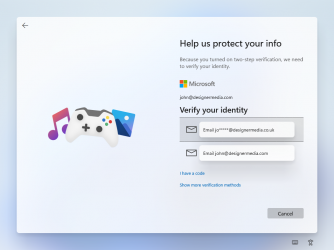
Windows 11 Leak Screenshots


Its best to test Windows 11 in a virtual machine. I would recommend VirtualBox.
 

My Computer My Computer

At a glance

Windows 7Processor: AMD Ryzen 7 - 1800X - 8 Core Proce...16 GB RAM.NVIDIA GeForce GTX 1060 6GB.
OS
Windows 7
Computer type
PC/Desktop
Manufacturer/Model
BIOS: BIOS Date: 08/20/18 12:33:01 Ver: 05.0000D.
CPU
Processor: AMD Ryzen 7 - 1800X - 8 Core Processor - (16 CPUs) - 3.6GHz.
Motherboard
AMD Ryzen 7 - 1800X - 8 Core Processor.
Memory
16 GB RAM.
Graphics Card(s)
NVIDIA GeForce GTX 1060 6GB.
Sound Card
NVIDIA/Realtek High Definition Audio.
Monitor(s) Displays
Generic PnP Monitor.
Screen Resolution
1920x1080.
Hard Drives
My desktop PC has two 8TB hard drives. I plan to add more 8TB hard drives in the future so that I can install Windows 8, 8.1, 10, and 11.
PSU
Current Setting: {5C67A112-A4C9-483F-B4A7-1D473BECAFDC} (Quality).
Case
Antec.
Cooling
N/A.
Keyboard
HID Keyboard Device.
Mouse
HID Compliant Mouse.
Internet Speed
Broadband 20MB.
Browser
Microsoft Edge, Internet Explorer, Google Chrome, Opera Web Browser.
Antivirus
Microsoft Security Essentials, Win/MS Defender, Malwarebytes.
Other Info
My desktop PC has a UEFI BIOS and TPM 2.0 system requirements which means that my system meets the minimum requirements to install Windows 11 in the future.
Just join Windows Insider program Dev Channel from any computer running any version of Windows 10. Windows Update then finds official Windows 11 and upgrades to it. There's absolutely no need to install the leaked W11 build.

Kari
Thanks Kari!!
 

My Computer My Computer

At a glance

Windows 11Intel Core i7 6700 @ 3.40GHz Skylake Tecnolog...16,0GB Single-Channel DDR3 @ 800 Mhz (11-11-1...4096MB ATI Radeon RX 580 Series (Gigabyte)
OS
Windows 11
Computer type
PC/Desktop
CPU
Intel Core i7 6700 @ 3.40GHz Skylake Tecnology 14 nm
Motherboard
Gigabyte Technology Co. Ltd. B150M-D3H DDR3-CF (U3E1)
Memory
16,0GB Single-Channel DDR3 @ 800 Mhz (11-11-11-28)
Graphics Card(s)
4096MB ATI Radeon RX 580 Series (Gigabyte)
Sound Card
Realtek High Definition Audio
Monitor(s) Displays
SAMSUNG S22E310
Screen Resolution
(1920x1080@60Hz)
Hard Drives
931GB Seagate ST1000LM024 HN-M101MBB (SATA )
465GB Samsung SSD 980 500GB (Desconhecido (SSD))
2794GB Seagate Expansion Desk USB Device (USB (SATA) )
PSU
Seventeam
Case
Nilko
Keyboard
Logitech
Mouse
Logitech M90
Internet Speed
600 / 300 mbps
Browser
MS Edge / Google Chrome
Antivirus
Windows Defender
:)
 

My Computer My Computer

At a glance

Windows 7Processor: AMD Ryzen 7 - 1800X - 8 Core Proce...16 GB RAM.NVIDIA GeForce GTX 1060 6GB.
OS
Windows 7
Computer type
PC/Desktop
Manufacturer/Model
BIOS: BIOS Date: 08/20/18 12:33:01 Ver: 05.0000D.
CPU
Processor: AMD Ryzen 7 - 1800X - 8 Core Processor - (16 CPUs) - 3.6GHz.
Motherboard
AMD Ryzen 7 - 1800X - 8 Core Processor.
Memory
16 GB RAM.
Graphics Card(s)
NVIDIA GeForce GTX 1060 6GB.
Sound Card
NVIDIA/Realtek High Definition Audio.
Monitor(s) Displays
Generic PnP Monitor.
Screen Resolution
1920x1080.
Hard Drives
My desktop PC has two 8TB hard drives. I plan to add more 8TB hard drives in the future so that I can install Windows 8, 8.1, 10, and 11.
PSU
Current Setting: {5C67A112-A4C9-483F-B4A7-1D473BECAFDC} (Quality).
Case
Antec.
Cooling
N/A.
Keyboard
HID Keyboard Device.
Mouse
HID Compliant Mouse.
Internet Speed
Broadband 20MB.
Browser
Microsoft Edge, Internet Explorer, Google Chrome, Opera Web Browser.
Antivirus
Microsoft Security Essentials, Win/MS Defender, Malwarebytes.
Other Info
My desktop PC has a UEFI BIOS and TPM 2.0 system requirements which means that my system meets the minimum requirements to install Windows 11 in the future.
Back
Top Bottom