Windows 11 must be put to sleep twice


Atmos

Member
Local time
1:41 AM
Posts
4
OS
Windows 11
Hello! Any feedback is greatly appreciated!


I recently installed Windows 11 and been having a single consistent issue. I have to put the computer to sleep twice. The PC immediately wakes upon 1st sleep. 2nd sleep always works if done within a couple minutes of 1st sleep. I'm not sure on the exact time frame yet, but it seems if I do not put the computer back to sleep within 1-5min of 1st sleep, I will have the same issue and will need to put windows to sleep twice.

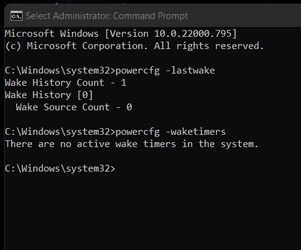
All peripherals are wake disabled under device manager, and nothing appears in the "lastwake" command

Any ideas? o_O
 
Windows Build/Version
22000.795

Attachments

  • Screenshot 2022-07-20 205018 Last wake.png
    Screenshot 2022-07-20 205018 Last wake.png
    6.9 KB · Views: 6

My Computer My Computer

At a glance

Windows 11Ryzen 5600x32gb Trident Z 3600RTX 3080ti
OS
Windows 11
Computer type
PC/Desktop
CPU
Ryzen 5600x
Motherboard
ASUS Crosshair VIII Hero X570
Memory
32gb Trident Z 3600
Graphics Card(s)
RTX 3080ti
Monitor(s) Displays
SAMSUNG Odyssey G9
Screen Resolution
5120 x 1440
Hard Drives
Dual Sabrent 1TB Rocket NVMe 4.0 Gen4 PCIe M.2
PSU
Gamemax 1050w
Case
NZXT h710i
Cooling
NZXT Kraken Z73 360mm
Internet Speed
Over 9,000
All peripherals are wake disabled
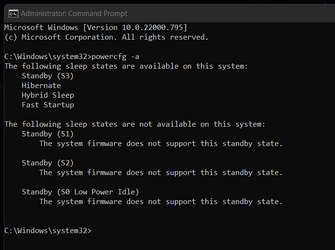
Hello, and welcome to the forum. So the only way you have set to wake your system is using the sleep button on your case? First, we need to make sure you are actually using sleep rather than hibernate. Open a command prompt as administrator and type powercfg -a
Please post a screenshot of the results.

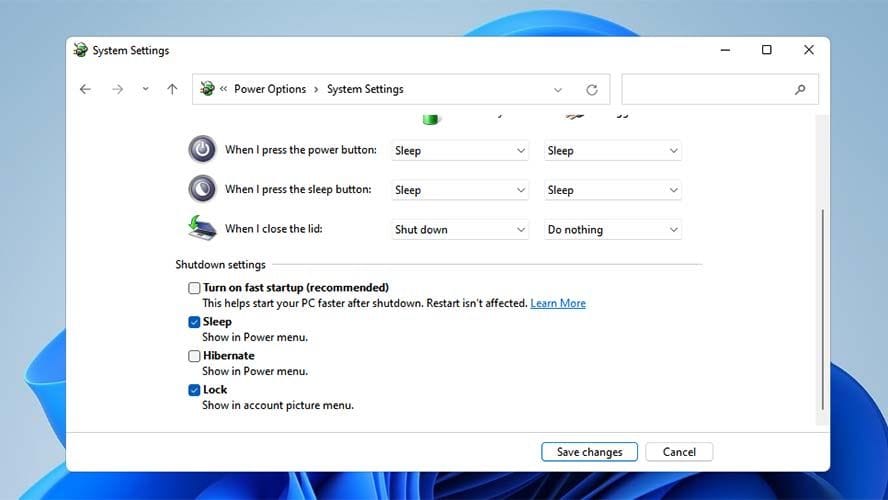
Also post a screenshot of control panel-power options-choose what the power buttons do
 

My Computers My Computers

  • At a glance

    Windows 11 Pro 25H2 26200.8655i9-10900 10 core 20 threads32 gbnone-Intel UHD Graphics 630
    OS
    Windows 11 Pro 25H2 26200.8655
    Computer type
    PC/Desktop
    Manufacturer/Model
    Dell Optiplex 7080
    CPU
    i9-10900 10 core 20 threads
    Motherboard
    DELL 0J37VM
    Memory
    32 gb
    Graphics Card(s)
    none-Intel UHD Graphics 630
    Sound Card
    Integrated Realtek
    Monitor(s) Displays
    Benq 27
    Screen Resolution
    2560x1440
    Hard Drives
    2x1tb Solidigm m.2 nvme /External drives 512gb Samsung m.2 sata+2tb Kingston m2.nvme
    PSU
    500w
    Case
    MT
    Cooling
    Dell Premium
    Keyboard
    Logitech wired
    Mouse
    Logitech wireless
    Internet Speed
    so slow I'm too embarrassed to tell
    Browser
    #1 Edge #2 Firefox
    Antivirus
    Defender+MWB Premium
  • At a glance

    Windows 11 Pro 24H2 26200.8457AMD Ryzen 7 6800U32 gbintegrated
    Operating System
    Windows 11 Pro 24H2 26200.8457
    Computer type
    PC/Desktop
    Manufacturer/Model
    Beelink Mini PC SER5
    CPU
    AMD Ryzen 7 6800U
    Memory
    32 gb
    Graphics card(s)
    integrated
    Sound Card
    integrated
    Monitor(s) Displays
    Benq 27
    Screen Resolution
    2560x1440
    Hard Drives
    1TB Crucial nvme
    Keyboard
    Logitech wired
    Mouse
    Logitech wireless
    Internet Speed
    still too embarrassed to tell
    Browser
    Firefox
    Antivirus
    Defender
    Other Info
    System 3 is non compliant Dell 9020 i7-4770/24gb ram Win11 PRO 26200.8457
I agree that running PowerCfg -a is the necessary first step in understanding the situation.

I also think you need to test whether or not Sleep works normally for another user account.

I bet, if this matter is not resolved quickly, that I will suggest going to your computer/motherboard/display card maker to download & re-install your display driver just to eliminate driver corruption as being the cause of the problem. There is no test for this so, if the other user account also has this problem, only re-installation can eliminate it as a possibility.

I can, if necessary, give you instructions for setting up an Event viewer, Custom view to monitor your sleep-hibernate-etc transitions. I'd like to see the PowerCfg -a results first.

Best of luck,
Denis
 

My Computer My Computer

At a glance

Windows 11 Home x64 Version 25H2 Build 26200....
OS
Windows 11 Home x64 Version 25H2 Build 26200.8037
Hello, and welcome to the forum. So the only way you have set to wake your system is using the sleep button on your case? First, we need to make sure you are actually using sleep rather than hibernate. Open a command prompt as administrator and type powercfg -a
Please post a screenshot of the results.

Also post a screenshot of control panel-power options-choose what the power buttons do

Hi Glasskuter,

My mouse has an on/off switch. I do have mouse wake enabled, but it will not wake the computer until I flip the power switch on. I have been doing this for many years with Windows 10. I temporarily disabled mouse wake to be sure it's not the mouse


I agree that running PowerCfg -a is the necessary first step in understanding the situation.

I also think you need to test whether or not Sleep works normally for another user account.

I bet, if this matter is not resolved quickly, that I will suggest going to your computer/motherboard/display card maker to download & re-install your display driver just to eliminate driver corruption as being the cause of the problem. There is no test for this so, if the other user account also has this problem, only re-installation can eliminate it as a possibility.

I can, if necessary, give you instructions for setting up an Event viewer, Custom view to monitor your sleep-hibernate-etc transitions. I'd like to see the PowerCfg -a results first.

Best of luck,
Denis


Thanks for these ideas Denis. I have some screenshots posted below. I will try making a 2nd user account later this evening and report back. I will also reinstall the NVIDIA drivers.
 

Attachments

  • Screenshot 2022-07-25 091734.png
    Screenshot 2022-07-25 091734.png
    12.5 KB · Views: 7
  • Screenshot 2022-07-25 092337.png
    Screenshot 2022-07-25 092337.png
    19.1 KB · Views: 7

My Computer My Computer

At a glance

Windows 11Ryzen 5600x32gb Trident Z 3600RTX 3080ti
OS
Windows 11
Computer type
PC/Desktop
CPU
Ryzen 5600x
Motherboard
ASUS Crosshair VIII Hero X570
Memory
32gb Trident Z 3600
Graphics Card(s)
RTX 3080ti
Monitor(s) Displays
SAMSUNG Odyssey G9
Screen Resolution
5120 x 1440
Hard Drives
Dual Sabrent 1TB Rocket NVMe 4.0 Gen4 PCIe M.2
PSU
Gamemax 1050w
Case
NZXT h710i
Cooling
NZXT Kraken Z73 360mm
Internet Speed
Over 9,000
If you have fast startup turned on, you are not sleeping but hibernating. This tells you how to check as well as how to turn it off.
 

My Computers My Computers

  • At a glance

    Windows 11 Pro 25H2 26200.8655i9-10900 10 core 20 threads32 gbnone-Intel UHD Graphics 630
    OS
    Windows 11 Pro 25H2 26200.8655
    Computer type
    PC/Desktop
    Manufacturer/Model
    Dell Optiplex 7080
    CPU
    i9-10900 10 core 20 threads
    Motherboard
    DELL 0J37VM
    Memory
    32 gb
    Graphics Card(s)
    none-Intel UHD Graphics 630
    Sound Card
    Integrated Realtek
    Monitor(s) Displays
    Benq 27
    Screen Resolution
    2560x1440
    Hard Drives
    2x1tb Solidigm m.2 nvme /External drives 512gb Samsung m.2 sata+2tb Kingston m2.nvme
    PSU
    500w
    Case
    MT
    Cooling
    Dell Premium
    Keyboard
    Logitech wired
    Mouse
    Logitech wireless
    Internet Speed
    so slow I'm too embarrassed to tell
    Browser
    #1 Edge #2 Firefox
    Antivirus
    Defender+MWB Premium
  • At a glance

    Windows 11 Pro 24H2 26200.8457AMD Ryzen 7 6800U32 gbintegrated
    Operating System
    Windows 11 Pro 24H2 26200.8457
    Computer type
    PC/Desktop
    Manufacturer/Model
    Beelink Mini PC SER5
    CPU
    AMD Ryzen 7 6800U
    Memory
    32 gb
    Graphics card(s)
    integrated
    Sound Card
    integrated
    Monitor(s) Displays
    Benq 27
    Screen Resolution
    2560x1440
    Hard Drives
    1TB Crucial nvme
    Keyboard
    Logitech wired
    Mouse
    Logitech wireless
    Internet Speed
    still too embarrassed to tell
    Browser
    Firefox
    Antivirus
    Defender
    Other Info
    System 3 is non compliant Dell 9020 i7-4770/24gb ram Win11 PRO 26200.8457

My Computer My Computer

At a glance

Windows 11 Home x64 Version 25H2 Build 26200....
OS
Windows 11 Home x64 Version 25H2 Build 26200.8037
@Try3 Hibernation has caused a lot of trouble for some people. Since his computer can S3 sleep it might not have the same issues as hibernation.
@Atmos if you choose to go this route, after turning off fast startup ,from command prompt as admin type powercfg.exe /hibernate off
You can then go into power settings and verify when you want computer to sleep.
Then type powercfg -a
post another screenshot of this screen.

You can then add sleep to your power options menu-control panel-power options-choose what power buttons do- change settings that are currently unavailable-check sleep in shutdown settings-save

Put it to sleep manually from the power option menu a couple of times. Let us know if this fixed the issue.
 

My Computers My Computers

  • At a glance

    Windows 11 Pro 25H2 26200.8655i9-10900 10 core 20 threads32 gbnone-Intel UHD Graphics 630
    OS
    Windows 11 Pro 25H2 26200.8655
    Computer type
    PC/Desktop
    Manufacturer/Model
    Dell Optiplex 7080
    CPU
    i9-10900 10 core 20 threads
    Motherboard
    DELL 0J37VM
    Memory
    32 gb
    Graphics Card(s)
    none-Intel UHD Graphics 630
    Sound Card
    Integrated Realtek
    Monitor(s) Displays
    Benq 27
    Screen Resolution
    2560x1440
    Hard Drives
    2x1tb Solidigm m.2 nvme /External drives 512gb Samsung m.2 sata+2tb Kingston m2.nvme
    PSU
    500w
    Case
    MT
    Cooling
    Dell Premium
    Keyboard
    Logitech wired
    Mouse
    Logitech wireless
    Internet Speed
    so slow I'm too embarrassed to tell
    Browser
    #1 Edge #2 Firefox
    Antivirus
    Defender+MWB Premium
  • At a glance

    Windows 11 Pro 24H2 26200.8457AMD Ryzen 7 6800U32 gbintegrated
    Operating System
    Windows 11 Pro 24H2 26200.8457
    Computer type
    PC/Desktop
    Manufacturer/Model
    Beelink Mini PC SER5
    CPU
    AMD Ryzen 7 6800U
    Memory
    32 gb
    Graphics card(s)
    integrated
    Sound Card
    integrated
    Monitor(s) Displays
    Benq 27
    Screen Resolution
    2560x1440
    Hard Drives
    1TB Crucial nvme
    Keyboard
    Logitech wired
    Mouse
    Logitech wireless
    Internet Speed
    still too embarrassed to tell
    Browser
    Firefox
    Antivirus
    Defender
    Other Info
    System 3 is non compliant Dell 9020 i7-4770/24gb ram Win11 PRO 26200.8457
The network card is not selected as "Allow this device to wake computer" is it? I know that wakes are turned off, but this one may have been missed and Windows update seems to turn it back on once in a while on my machine.
 

My Computer My Computer

At a glance

Win 11 Pro 25H2Intel i7 13700KF32 GB Team Group DDR5 - 6000 CL 30ASUS TUF GAMING RTX 3070 Ti
OS
Win 11 Pro 25H2
Computer type
PC/Desktop
Manufacturer/Model
Self build
CPU
Intel i7 13700KF
Motherboard
Gigabyte Z790 UD AC
Memory
32 GB Team Group DDR5 - 6000 CL 30
Graphics Card(s)
ASUS TUF GAMING RTX 3070 Ti
Sound Card
On board Realtek
Monitor(s) Displays
ACER 34 inch
Screen Resolution
4K
Hard Drives
1 TB Samsung 980 Pro Nvme, 1 TB Samsung 970 EVO Nvme, 2 x Samsung 970 2TB SSD SATA
PSU
EVGA 1000Q
Case
Rosewill something or other
Cooling
Noctua NH-D15. A whole schwak of Noctua case fans. $$$
Keyboard
Logitech G815
Mouse
Logitech G502 Hero
Internet Speed
700 up, 600 down
Browser
Firefox
Antivirus
MalwareBytes
I just hit the computer with a bat. That puts it right to sleep. :D
 

My Computers My Computers

  • At a glance

    Win 11 Home ♦♦♦26200.8655 ♦♦♦♦♦♦♦25H2AMD Ryzen 7 3700XG.Skill (F4-3200C14D-16GTZKW)EVGA RTX 2070 (08G-P4-2171-KR)
    OS
    Win 11 Home ♦♦♦26200.8655 ♦♦♦♦♦♦♦25H2
    Computer type
    PC/Desktop
    Manufacturer/Model
    Built by Ghot® [May 2020]
    CPU
    AMD Ryzen 7 3700X
    Motherboard
    Asus Pro WS X570-ACE (BIOS 5302)
    Memory
    G.Skill (F4-3200C14D-16GTZKW)
    Graphics Card(s)
    EVGA RTX 2070 (08G-P4-2171-KR)
    Sound Card
    Realtek ALC1220P / ALC S1220A
    Monitor(s) Displays
    Dell U3011 30"
    Screen Resolution
    2560 x 1600
    Hard Drives
    2x Samsung 860 EVO 500GB,
    WD 4TB Black FZBX - SATA III,
    WD 8TB Black FZBX - SATA III,
    DRW-24B1ST CD/DVD Burner
    PSU
    PC Power & Cooling 750W Quad EPS12V
    Case
    Cooler Master ATCS 840 Tower
    Cooling
    CM Hyper 212 EVO (push/pull)
    Keyboard
    Ducky DK9008 Shine II Blue LED
    Mouse
    Logitech Optical M-100
    Internet Speed
    300/300
    Browser
    Firefox (latest)
    Antivirus
    Bitdefender Total Security
    Other Info
    Speakers: Klipsch Pro Media 2.1
  • At a glance

    Windows XP Pro 32bit w/SP3AMD Athlon 64 X2 5000+ (OC'd @ 3.2Ghz)TWIN2X2048-6400C4DHX (2 x 1GB, DDR2 800)EVGA 256-P2-N758-TR GeForce 8600GT SSC
    Operating System
    Windows XP Pro 32bit w/SP3
    Computer type
    PC/Desktop
    Manufacturer/Model
    Built by Ghot® (not in use)
    CPU
    AMD Athlon 64 X2 5000+ (OC'd @ 3.2Ghz)
    Motherboard
    ASUS M2N32-SLI Deluxe Wireless Edition
    Memory
    TWIN2X2048-6400C4DHX (2 x 1GB, DDR2 800)
    Graphics card(s)
    EVGA 256-P2-N758-TR GeForce 8600GT SSC
    Sound Card
    Onboard
    Monitor(s) Displays
    ViewSonic G90FB Black 19" Professional (CRT)
    Screen Resolution
    up to 2048 x 1536
    Hard Drives
    WD 36GB 10,000rpm Raptor SATA
    Seagate 80GB 7200rpm SATA
    Lite-On LTR-52246S CD/RW
    Lite-On LH-18A1P CD/DVD Burner
    PSU
    PC Power & Cooling Silencer 750 Quad EPS12V
    Case
    Generic Beige case, 80mm fans
    Cooling
    ZALMAN 9500A 92mm CPU Cooler
    Keyboard
    Logitech Classic Keybooard 200
    Mouse
    Logitech Optical M-BT96a
    Internet Speed
    300/300
    Browser
    Firefox 3.x ??
    Antivirus
    Symantec (Norton)
    Other Info
    Still assembled, still runs. Haven't turned it on for 15 years?
Very strange, but the computer has started to sleep on the first try as of two days ago. I did not change anything. No updates (that I know of). No new peripheral, no disconnected peripheral. No new hardware. Literally nothing on my end changed. I hadn't yet had a chance to try the recent fixes y'all suggested. So I'm really not sure what happened. The only think I can think of was a silent update?

But seriously, I was having this problem 100% of the time since installing Windows 11. Computer woke immediately after sleep, and 2nd sleep always worked. And now it's mysteriously fixed.

Thank you very much for y'alls time helping with this issue. Just wish I had an answer for everyone as to what changed 😅
 

My Computer My Computer

At a glance

Windows 11Ryzen 5600x32gb Trident Z 3600RTX 3080ti
OS
Windows 11
Computer type
PC/Desktop
CPU
Ryzen 5600x
Motherboard
ASUS Crosshair VIII Hero X570
Memory
32gb Trident Z 3600
Graphics Card(s)
RTX 3080ti
Monitor(s) Displays
SAMSUNG Odyssey G9
Screen Resolution
5120 x 1440
Hard Drives
Dual Sabrent 1TB Rocket NVMe 4.0 Gen4 PCIe M.2
PSU
Gamemax 1050w
Case
NZXT h710i
Cooling
NZXT Kraken Z73 360mm
Internet Speed
Over 9,000
---6 month update---

Reinstalled Windows 11 for an unrelated issue last night, and bam! Computer needs to be put to sleep twice, again. I had completely forgotten about this problem lol. This wake issue lasted for about 3-4 weeks last time before going away on its own. Once it stopped happening, it never happened again until now after reinstalling Windows 11. I just did a new google search for this issue and it seems others are having the identical problem, and will even go away on it's own. Wonder what's causing this? No solutions that I can find 🤔 Might just need to deal with it for a few weeks until it goes away again 🤷‍♂️
 

My Computer My Computer

At a glance

Windows 11Ryzen 5600x32gb Trident Z 3600RTX 3080ti
OS
Windows 11
Computer type
PC/Desktop
CPU
Ryzen 5600x
Motherboard
ASUS Crosshair VIII Hero X570
Memory
32gb Trident Z 3600
Graphics Card(s)
RTX 3080ti
Monitor(s) Displays
SAMSUNG Odyssey G9
Screen Resolution
5120 x 1440
Hard Drives
Dual Sabrent 1TB Rocket NVMe 4.0 Gen4 PCIe M.2
PSU
Gamemax 1050w
Case
NZXT h710i
Cooling
NZXT Kraken Z73 360mm
Internet Speed
Over 9,000
Back
Top Bottom