MYSTA
Well-known member
- Local time
- 9:05 AM
- Posts
- 48
- OS
- Windows 11 Pro
Hi
Background
Freshly installed Win 11 and all programs etc August 2021. Running absolutely fine.
Been running fine however picked up an Adobe process which seemed to running after unsinalling all adobe products - CCXProcess. (My stupidity but lets move on).
So deleted the offending app.
Rebooted machine and failed to boot.
Note I have not been able to capture the error codes - but in short no bootable device found (Samsung 970Pro 1TB).
Tried to repair boot using Windows boot usb, Marcium (fully licensed) boot repair and went down the diskpart repair process - same issue over and over.
So I thought its either a faulty drive or corrupt MBR.
I then tried to reimage the drive from the original backup last August.
This failed and same issue (again tried repairing and so on).
So whilst there are 3 partitions showing on the hard drive I thought maybe if I reinstall win11 and boot to desktop, I could just reinstall the o/s partion and not resintall the MBR.
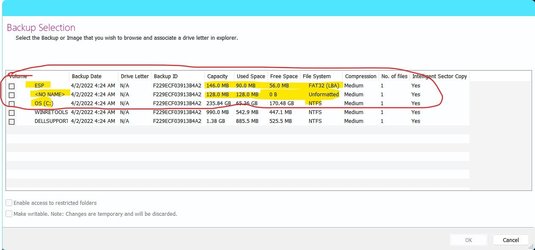
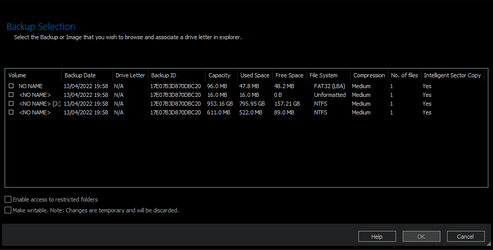
Partition 1 fat32 mbr circa 32mb
Partition 2 windows install
Partition 3 (cant recall) but appears to not be used circa 512mb.
Latest Win 11 would not install on my system - I can see since April 2022 this is a known issue.
Next step - updated bios to latest - factory settings - installed Win10 - all working and backed up.
Restored the macrium image from August 2021 partition 2 only and also tried the backup from the latest CCXprocess removed parition and do not restore MBR - again same error "couldnt find installation".
Tried to restore whole image to hard drive from both August 2021 and the latest backup which produced the error- same issue BSOD and unable to locate install.
Attempted boot menu every boot to ensure booting from the master os drive (970prO).
No luck.
Restored the working win10 and all good.
No windows 11 update available for my machine and I seem to have no way to reinstall the machine to win11 at this time.
In short it will take me over a week to reinstall win10 and all programs running and configured.
Fortunately I have backup of all my data (this runs in to TBs) but can be resolved.
What I want to achieve is restore the system to the August 2021 image where everything is installed and configured for windows 11 this will then be a shorter update process for all programs and date retrieval.
Background
Freshly installed Win 11 and all programs etc August 2021. Running absolutely fine.
Been running fine however picked up an Adobe process which seemed to running after unsinalling all adobe products - CCXProcess. (My stupidity but lets move on).
So deleted the offending app.
Rebooted machine and failed to boot.
Note I have not been able to capture the error codes - but in short no bootable device found (Samsung 970Pro 1TB).
Tried to repair boot using Windows boot usb, Marcium (fully licensed) boot repair and went down the diskpart repair process - same issue over and over.
So I thought its either a faulty drive or corrupt MBR.
I then tried to reimage the drive from the original backup last August.
This failed and same issue (again tried repairing and so on).
So whilst there are 3 partitions showing on the hard drive I thought maybe if I reinstall win11 and boot to desktop, I could just reinstall the o/s partion and not resintall the MBR.
Partition 1 fat32 mbr circa 32mb
Partition 2 windows install
Partition 3 (cant recall) but appears to not be used circa 512mb.
Latest Win 11 would not install on my system - I can see since April 2022 this is a known issue.
Next step - updated bios to latest - factory settings - installed Win10 - all working and backed up.
Restored the macrium image from August 2021 partition 2 only and also tried the backup from the latest CCXprocess removed parition and do not restore MBR - again same error "couldnt find installation".
Tried to restore whole image to hard drive from both August 2021 and the latest backup which produced the error- same issue BSOD and unable to locate install.
Attempted boot menu every boot to ensure booting from the master os drive (970prO).
No luck.
Restored the working win10 and all good.
No windows 11 update available for my machine and I seem to have no way to reinstall the machine to win11 at this time.
In short it will take me over a week to reinstall win10 and all programs running and configured.
Fortunately I have backup of all my data (this runs in to TBs) but can be resolved.
What I want to achieve is restore the system to the August 2021 image where everything is installed and configured for windows 11 this will then be a shorter update process for all programs and date retrieval.
- Windows Build/Version
- windows 11 and windows 10 (nov2021)
My Computer
At a glance
Windows 11 Proi7820x 4.6ghz (Currently stock speed not over...96GB Corsair ddr5None
- OS
- Windows 11 Pro
- Computer type
- PC/Desktop
- Manufacturer/Model
- Scan.co.uk Custom Build
- CPU
- i7820x 4.6ghz (Currently stock speed not overclocked)
- Motherboard
- ASUS ROG 570e
- Memory
- 96GB Corsair ddr5
- Graphics Card(s)
- None
- Sound Card
- RME Fireface 800
- Monitor(s) Displays
- 2 x LG UltraGear 27" oled
- Screen Resolution
- 2560 x 1440
- Hard Drives
- 4TB Nvme 5 x3
2 TD SSD
8TB Ironwolf HD x 2
- PSU
- 750W corsair
- Case
- Fractal Design XL North
- Cooling
- Airflow
- Keyboard
- Logitech
- Mouse
- Logitech 3s
- Internet Speed
- 910 mpbs