Solved Windows 11 Pro Search Box not working


Mark McDonough

New member
Local time
9:22 AM
Posts
3
OS
Windows 11 Pro
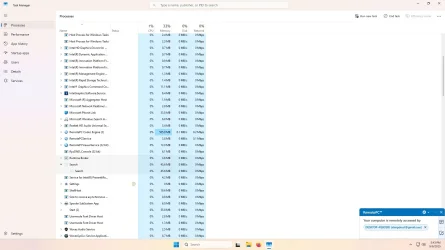
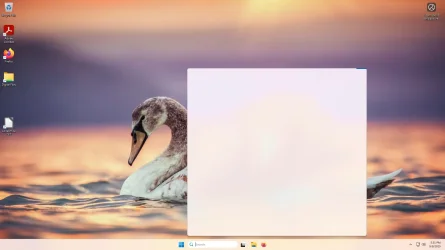
Hi. We have had a new Dell computer with Windows 11 Pro for a couple of months. Today when it booted up, the search box would not work. If I clicked into the box, a large white box with a blue running ribbon at the top edge would appear. See attached screenshot. I could type in a word like "updates" bit nothing would happen. I tried 10 or more more suggestions from the internet and Microsoft Tech Support with no luck. I was able to update Window to the most recent update available. The white box is related to the Search process and to SearchHost.exe See attached screenshot. It appears that the only solution might be re-install Windows 11. Any ideas? Thank you.
 

Attachments
  • Screenshot_09-09-2025_17-31-38-257.webp
    Screenshot_09-09-2025_17-31-38-257.webp
    71.6 KB · Views: 3
  • Screenshot_09-09-2025_17-43-10-912.webp
    Screenshot_09-09-2025_17-43-10-912.webp
    99.5 KB · Views: 3

My Computer My Computer

At a glance

Windows 11 Pro
OS
Windows 11 Pro
Computer type
PC/Desktop
Manufacturer/Model
Dell
and Microsoft Tech Support
Uhhh, exactly who did you contact for this service? Please tell us the exact website or phone number. There are many sites that make the user think they are Microsoft when they are not. Did you give someone remote access to your computer? More importantly, did you pay for this service?
 

My Computers My Computers

  • At a glance

    Windows 11 Pro 25H2 26200.8875i9-10900 10 core 20 threads32 gbnone-Intel UHD Graphics 630
    OS
    Windows 11 Pro 25H2 26200.8875
    Computer type
    PC/Desktop
    Manufacturer/Model
    Dell Optiplex 7080
    CPU
    i9-10900 10 core 20 threads
    Motherboard
    DELL 0J37VM
    Memory
    32 gb
    Graphics Card(s)
    none-Intel UHD Graphics 630
    Sound Card
    Integrated Realtek
    Monitor(s) Displays
    Benq 27
    Screen Resolution
    2560x1440
    Hard Drives
    2x1tb Solidigm m.2 nvme /External drives 512gb Samsung m.2 sata+2tb Kingston m2.nvme
    PSU
    500w
    Case
    MT
    Cooling
    Dell Premium
    Keyboard
    Logitech wired
    Mouse
    Logitech wireless
    Internet Speed
    so slow I'm too embarrassed to tell
    Browser
    #1 Edge #2 Firefox
    Antivirus
    Defender+MWB Premium
  • At a glance

    Windows 11 Pro 24H2 26200.8875AMD Ryzen 7 6800U32 gbintegrated
    Operating System
    Windows 11 Pro 24H2 26200.8875
    Computer type
    PC/Desktop
    Manufacturer/Model
    Beelink Mini PC SER5
    CPU
    AMD Ryzen 7 6800U
    Memory
    32 gb
    Graphics card(s)
    integrated
    Sound Card
    integrated
    Monitor(s) Displays
    Benq 27
    Screen Resolution
    2560x1440
    Hard Drives
    1TB Crucial nvme
    Keyboard
    Logitech wired
    Mouse
    Logitech wireless
    Internet Speed
    still too embarrassed to tell
    Browser
    Firefox
    Antivirus
    Defender
    Other Info
    System 3 is non compliant Dell 9020 i7-4770/24gb ram Win11 PRO 26200.8875
Thank you, but no I did not contact anyone or any organization. I simply searched Microsoft Tech Support website for similar questions and the variety of suggestions. I'm old but cagey.... Thanks, again.
 

My Computer My Computer

At a glance

Windows 11 Pro
OS
Windows 11 Pro
Computer type
PC/Desktop
Manufacturer/Model
Dell
After two days of trying possible solutions, nothing changed so we reset the computer to a fresh Windows 11 install. By the way, when we ran the Task Manager, you can see that the Search process is grayed out with a large "X" in the box. Microsoft Tech says this means the Search modules were corrupt.
 

My Computer My Computer

At a glance

Windows 11 Pro
OS
Windows 11 Pro
Computer type
PC/Desktop
Manufacturer/Model
Dell
Back
Top Bottom