Windows 11 Pro: Windows Update Fails at 98% and Repair Install Fails at 88%


lafargeotte

Well-known member
Member
VIP
Local time
7:40 PM
Posts
254
Location
France
OS
Windows 11 25H2
Hi everyone,

I am looking for some advice regarding a persistent update failure on my system.

Environment
  • OS: Windows 11 Pro
  • Memory: 32GB RAM
  • Storage: Multiple hard disks, all with plenty of free space

Problem
I attempted to run Windows Update yesterday (May 12th). The process proceeded normally until the post-reboot phase, where it became stuck at 98%. I left the system for over an hour before Windows determined it could not proceed and rolled back the changes. I tried again this morning with the exact same result.

What I tried
I attempted a Repair Install using Windows Update. After a couple of reboots, this process also hung, specifically at 88%. I ultimately had to boot into my rescue media and restore the system from a disk image I had fortunately created just before starting the process.

Question
Where would I find the specific Windows Update error messages or log files related to the hang at 98%?

Any help would be gratefully appreciated.
 

Attachments
  • Capture.webp
    Capture.webp
    136.1 KB · Views: 1

My Computer

System One

  • OS
    Windows 11 25H2
    Computer type
    PC/Desktop
    Manufacturer/Model
    Custom Build
    CPU
    AMD Ryzen 5 1600 - 6 Core
    Motherboard
    Asus
    Memory
    32GB
    Graphics Card(s)
    Nvidia 1030GT
    Monitor(s) Displays
    Iiyama24
Question
Where would I find the specific Windows Update error messages or log files related to the hang at 98%?

Answer
Nowhere since you did an image restore.
 

My Computers

System One System Two

  • OS
    All Branches but Release
    Computer type
    Laptop
    Manufacturer/Model
    Acer Nitro ANV15-51
    CPU
    AMD Ryzen 7 7735HS 3200-4500 Mhz 8 cores x 2
    Motherboard
    Sportage_RBH
    Memory
    32 GB DDR5
    Graphics Card(s)
    Radeon Graphic / NVIDIA GeForce RTX 4060 8 GB GDDR6
    Sound Card
    AMD/Realtek(R) Audio
    Monitor(s) Displays
    Integrated Monitor (15.3"vis)
    Screen Resolution
    FHD 1920X1080 16:9 144Hz
    Hard Drives
    KINGSTON OM8SEP4512Q-AA 1TB
    Western Digital 256GB
    PSU
    19V DC 6.32 A 120 W
    Cooling
    Dual Fans
    Mouse
    MS Bluetooth
    Internet Speed
    Fiber 1GB Cox -us & 1GB Orange-fr
    Browser
    Edge Canary- Firefox Nightly-Chrome Dev-Chrome Dev
    Antivirus
    Windows Defender
  • Operating System
    Windows 11 Beta
    Computer type
    Laptop
    Manufacturer/Model
    Asus X751BP
    CPU
    AMD A9-9420
    Memory
    8 GB of DDR4
    Graphics card(s)
    AMD Radeon R5
    Screen Resolution
    1600x900
    Hard Drives
    Seagate 1 TB
Question
Where would I find the specific Windows Update error messages or log files related to the hang at 98%?

Answer
Nowhere since you did an image restore.
Sorry, I did not make myself clear. The second Windows Update try was the most recent one with a rollback, so they will be available, I suppose.
 

My Computer

System One

  • OS
    Windows 11 25H2
    Computer type
    PC/Desktop
    Manufacturer/Model
    Custom Build
    CPU
    AMD Ryzen 5 1600 - 6 Core
    Motherboard
    Asus
    Memory
    32GB
    Graphics Card(s)
    Nvidia 1030GT
    Monitor(s) Displays
    Iiyama24
Sorry, I did not make myself clear. The second Windows Update try was the most recent one with a rollback, so they will be available, I suppose.
Please specify your current build along with the update(s) you were attempting to run.
How the update was initiated originally because you give us nothing here.
I think @zbook might be more capable than I to help since your system is not behaving as expected.
 

My Computers

System One System Two

  • OS
    All Branches but Release
    Computer type
    Laptop
    Manufacturer/Model
    Acer Nitro ANV15-51
    CPU
    AMD Ryzen 7 7735HS 3200-4500 Mhz 8 cores x 2
    Motherboard
    Sportage_RBH
    Memory
    32 GB DDR5
    Graphics Card(s)
    Radeon Graphic / NVIDIA GeForce RTX 4060 8 GB GDDR6
    Sound Card
    AMD/Realtek(R) Audio
    Monitor(s) Displays
    Integrated Monitor (15.3"vis)
    Screen Resolution
    FHD 1920X1080 16:9 144Hz
    Hard Drives
    KINGSTON OM8SEP4512Q-AA 1TB
    Western Digital 256GB
    PSU
    19V DC 6.32 A 120 W
    Cooling
    Dual Fans
    Mouse
    MS Bluetooth
    Internet Speed
    Fiber 1GB Cox -us & 1GB Orange-fr
    Browser
    Edge Canary- Firefox Nightly-Chrome Dev-Chrome Dev
    Antivirus
    Windows Defender
  • Operating System
    Windows 11 Beta
    Computer type
    Laptop
    Manufacturer/Model
    Asus X751BP
    CPU
    AMD A9-9420
    Memory
    8 GB of DDR4
    Graphics card(s)
    AMD Radeon R5
    Screen Resolution
    1600x900
    Hard Drives
    Seagate 1 TB
Try the Windows Update Troubleshooter.

Open Settings
Go to System
Select Troubleshoot
Click Other troubleshooters
Find Windows Update
Click Run

Also, open an Admin Command Propmt and run;

SFC /SCANNOW

then DISM /Online /Cleanup-Image /ScanHealth

If it finds problems, run DISM /Online /Cleanup-Image /RestoreHealth
 

My Computers

System One System Two

  • OS
    Windows 11 Pro 25H2 26200.8655
    Computer type
    Laptop
    Manufacturer/Model
    Acemagic LX15PRO
    CPU
    AMD Ryzen 7 5825U with Radeon Graphics
    Memory
    16GB
    Screen Resolution
    1920 x 1080
    Hard Drives
    SSD 2TB
    Internet Speed
    30 Mbps
    Browser
    Brave
    Antivirus
    Webroot Secure Anywhere
    Other Info
    System 3

    Acer Swift SF114-34 laptop
    OS Windows 11 Pro 26200.8524
    CPU Pentium Silver N6000
    RAM 4GB
    SSD Samsung 970 EVO Plus SSD 2TB (an upgrade)
  • Operating System
    Windows 11 Pro 23H2 22631.2506
    Computer type
    Laptop
    Manufacturer/Model
    HP Mini 210-1090NR PC (bought in late 2009!)
    CPU
    Atom N450 1.66GHz
    Memory
    2GB
    Browser
    Brave
    Antivirus
    Webroot
1) Please run the V2 log collector > post a share link


2) Run upgrade_failure_info.bat > post a share link


3) Run Tuneup plus > post a share link

https://www.tenforums.com/attachmen...-files-use-bsod-debugging-tuneup_plus_log.bat

Batch files for use in BSOD debugging - Windows 10 Help Forums


4) Open administrative command prompt and copy and paste:

fltmc

dism /online /get-drivers /format:table >c:\drivers.txt

Post share links. (the second command creates a desktop file)
 

My Computer

System One

  • OS
    Windows 10
    Computer type
    Laptop
    Manufacturer/Model
    HP
    CPU
    Intel(R) Core(TM) i7-4800MQ CPU @ 2.70GHz
    Motherboard
    Product : 190A Version : KBC Version 94.56
    Memory
    16 GB Total: Manufacturer : Samsung MemoryType : DDR3 FormFactor : SODIMM Capacity : 8GB Speed : 1600
    Graphics Card(s)
    NVIDIA Quadro K3100M; Intel(R) HD Graphics 4600
    Sound Card
    IDT High Definition Audio CODEC; PNP Device ID HDAUDIO\FUNC_01&VEN_111D&DEV_76E0
    Hard Drives
    Model Hitachi HTS727575A9E364
    Antivirus
    Microsoft Defender
    Other Info
    Mobile Workstation
1) Please run the V2 log collector > post a share link


2) Run upgrade_failure_info.bat > post a share link


3) Run Tuneup plus > post a share link

https://www.tenforums.com/attachmen...-files-use-bsod-debugging-tuneup_plus_log.bat

Batch files for use in BSOD debugging - Windows 10 Help Forums


4) Open administrative command prompt and copy and paste:

fltmc

dism /online /get-drivers /format:table >c:\drivers.txt

Post share links. (the second command creates a desktop file)

Thanks for your help. The last one has been running for almost 3 hours, so I will add that when it finishes. How long might the Tuneup plus take please?

UPDATE: I left the PC for 30 minutes or so and the Tuneup plus had disappeared!!!! I will have to run it again in the morning.
EDIT: Found this in temp folder, is this it?
Microsoft OneDrive
I hope that I have done it correctly, and attached and linked the correct files.
DESKTOP-(2026-05-13_16-34-00).zip
 

Attachments

Last edited:

My Computer

System One

  • OS
    Windows 11 25H2
    Computer type
    PC/Desktop
    Manufacturer/Model
    Custom Build
    CPU
    AMD Ryzen 5 1600 - 6 Core
    Motherboard
    Asus
    Memory
    32GB
    Graphics Card(s)
    Nvidia 1030GT
    Monitor(s) Displays
    Iiyama24
  • Like
Reactions: OAT
The logs reported a very large number of BSODs (March, April and May).


During the troubleshooting please move the page file from F: to C: then reboot.
(Run Tuneup plus after the page file is on C:) > post a share link


The Tuneup plus script is a bat file.

Most computer run times are 15 minutes or less.

Some take 50 minutes to run sfc /scannow and restorehealth.

The script was designed to run in the background.

As it runs it typically displays its progress.

At completion there are popup instructions.

It's best to run overnight.


Run administrative PS: > post share links (comment if the commands fail to run)

wevtutil epl Application "$env:USERPROFILE\Desktop\application.evtx" /ow:true

wevtutil epl System "$env:USERPROFILE\Desktop\system.evtx" /ow:true

or

Run administrative command prompt: > post share links

wevtutil epl SYSTEM "%userprofile%\Desktop\System.evt"

wevtutil epl APPLICATION "%userprofile%\Desktop\Application.evt"


Run:

reagentc /enable
reagentc /info

Post a share link.


EDIT: Found this in temp folder, is this it?
Microsoft OneDrive
This was a cab file.
It may have been related to a driver?
(it is not related to post #6 steps)


Code:
Event[28]
  Log Name: System
  Source: Microsoft-Windows-Kernel-Power
  Date: 2026-05-13T09:34:07.0850000Z
  Event ID: 41
  Task: N/A
  Level: Critical
  Opcode: Info
  Keyword: N/A
  User: S-1-5-18
  User Name: NT AUTHORITY\SYSTEM
  Computer: DESKTOP
  Description:
The system has rebooted without cleanly shutting down first. This error could be caused if the system stopped responding, crashed, or lost power unexpectedly.
 
Last edited:

My Computer

System One

  • OS
    Windows 10
    Computer type
    Laptop
    Manufacturer/Model
    HP
    CPU
    Intel(R) Core(TM) i7-4800MQ CPU @ 2.70GHz
    Motherboard
    Product : 190A Version : KBC Version 94.56
    Memory
    16 GB Total: Manufacturer : Samsung MemoryType : DDR3 FormFactor : SODIMM Capacity : 8GB Speed : 1600
    Graphics Card(s)
    NVIDIA Quadro K3100M; Intel(R) HD Graphics 4600
    Sound Card
    IDT High Definition Audio CODEC; PNP Device ID HDAUDIO\FUNC_01&VEN_111D&DEV_76E0
    Hard Drives
    Model Hitachi HTS727575A9E364
    Antivirus
    Microsoft Defender
    Other Info
    Mobile Workstation
$WINDOWS.~BT\Sources\Rollback

if you have that take a look

or

%windir%\Logs\WindowsUpdate

not as easy as it used to be
Windows Update no longer directly produces a WindowsUpdate.log file.Instead, it produces .etl files that aren't immediately readable as written.


this might be of some use


My Computers

System One System Two

  • OS
    Win7,Win11
    Computer type
    PC/Desktop
    CPU
    i7-9700
    Motherboard
    gigabyte b365m ds3h
    Memory
    2x16gb 3600mhz
    Monitor(s) Displays
    benq gw2480
    PSU
    bequiet pure power 11 400CM
    Cooling
    cryorig m9i
  • Operating System
    win7,win11
    Computer type
    PC/Desktop
    CPU
    i5-8400
    Motherboard
    gigabyte b365m ds3h
    Memory
    2x8gb 3200
    PSU
    xfx pro 450
The logs reported a very large number of BSODs (March, April and May).


During the troubleshooting please move the page file from F: to C: then reboot.
(Run Tuneup plus after the page file is on C:) > post a share link


The Tuneup plus script is a bat file.

Most computer run times are 15 minutes or less.

Some take 50 minutes to run sfc /scannow and restorehealth.

The script was designed to run in the background.

As it runs it typically displays its progress.

At completion there are popup instructions.

It's best to run overnight.


Run administrative PS: > post share links (comment if the commands fail to run)

wevtutil epl Application "$env:USERPROFILE\Desktop\application.evtx" /ow:true

wevtutil epl System "$env:USERPROFILE\Desktop\system.evtx" /ow:true

or

Run administrative command prompt: > post share links

wevtutil epl SYSTEM "%userprofile%\Desktop\System.evt"

wevtutil epl APPLICATION "%userprofile%\Desktop\Application.evt"


Run:

reagentc /enable
reagentc /info

Post a share link.


EDIT: Found this in temp folder, is this it?
Microsoft OneDrive
This was a cab file.
It may have been related to a driver?
(it is not related to post #6 steps)


Code:
Event[28]
  Log Name: System
  Source: Microsoft-Windows-Kernel-Power
  Date: 2026-05-13T09:34:07.0850000Z
  Event ID: 41
  Task: N/A
  Level: Critical
  Opcode: Info
  Keyword: N/A
  User: S-1-5-18
  User Name: NT AUTHORITY\SYSTEM
  Computer: DESKTOP
  Description:
The system has rebooted without cleanly shutting down first. This error could be caused if the system stopped responding, crashed, or lost power unexpectedly.
Hi,

Thanks for everything, Tuneup log attached and here is the readout from PS:

PS C:\WINDOWS\system32> wevtutil epl Application "$env:USERPROFILE\Desktop\application.evtx" /ow:true
PS C:\WINDOWS\system32> wevtutil epl System "$env:USERPROFILE\Desktop\system.evtx" /ow:true
PS C:\WINDOWS\system32> reagentc /enable

REAGENTC.EXE: The Windows RE image was not found.

PS C:\WINDOWS\system32> reagentc /info
Windows Recovery Environment (Windows RE) and system reset configuration
Information:

Windows RE status: Disabled
Windows RE location:
Boot Configuration Data (BCD) identifier: f9c9990e-d2b2-11ef-be32-ddeec9ab32ac
Recovery image location:
Recovery image index: 0
Custom image location:
Custom image index: 0
Windows RE Version: 0.0.0.0

REAGENTC.EXE: Operation Successful.
 

Attachments

My Computer

System One

  • OS
    Windows 11 25H2
    Computer type
    PC/Desktop
    Manufacturer/Model
    Custom Build
    CPU
    AMD Ryzen 5 1600 - 6 Core
    Motherboard
    Asus
    Memory
    32GB
    Graphics Card(s)
    Nvidia 1030GT
    Monitor(s) Displays
    Iiyama24
1) Please monitor instability / stability using reliability history:


For any BSOD please post a new V2 share link into the newest post.


2) Run diskparinfo.bat > post a share link


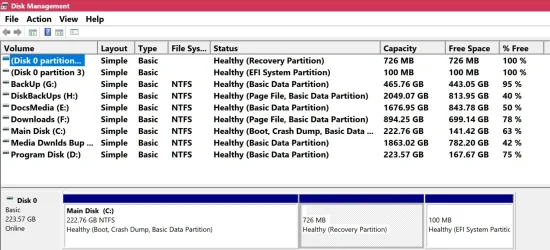
3) Please open Disk Management >adjust the column widths and row heights to make all the entries visible.
Post a share link.


4) Open event viewer:
a) System
b) Application

Post share links.


Indicate if these commands function:

Run administrative command prompt: > post share links

wevtutil epl Application "%userprofile%\Desktop\application.evtx"

wevtutil epl System "%userprofile%\Desktop\system.evtx"
 
Last edited:

My Computer

System One

  • OS
    Windows 10
    Computer type
    Laptop
    Manufacturer/Model
    HP
    CPU
    Intel(R) Core(TM) i7-4800MQ CPU @ 2.70GHz
    Motherboard
    Product : 190A Version : KBC Version 94.56
    Memory
    16 GB Total: Manufacturer : Samsung MemoryType : DDR3 FormFactor : SODIMM Capacity : 8GB Speed : 1600
    Graphics Card(s)
    NVIDIA Quadro K3100M; Intel(R) HD Graphics 4600
    Sound Card
    IDT High Definition Audio CODEC; PNP Device ID HDAUDIO\FUNC_01&VEN_111D&DEV_76E0
    Hard Drives
    Model Hitachi HTS727575A9E364
    Antivirus
    Microsoft Defender
    Other Info
    Mobile Workstation
1) Please monitor instability / stability using reliability history:


For any BSOD please post a new V2 share link into the newest post.


2) Run diskparinfo.bat > post a share link


3) Please open Disk Management >adjust the column widths and row heights to make all the entries visible.
Post a share link.


4) Open event viewer:
a) System
b) Application

Post share links.


Indicate if these commands function:

Run administrative command prompt: > post share links

wevtutil epl Application "%userprofile%\Desktop\application.evtx"

wevtutil epl System "%userprofile%\Desktop\system.evtx"
Hopefully these are what you need.
 

Attachments

My Computer

System One

  • OS
    Windows 11 25H2
    Computer type
    PC/Desktop
    Manufacturer/Model
    Custom Build
    CPU
    AMD Ryzen 5 1600 - 6 Core
    Motherboard
    Asus
    Memory
    32GB
    Graphics Card(s)
    Nvidia 1030GT
    Monitor(s) Displays
    Iiyama24
1) When available please update the progress with event viewer and disk management share links.


2) Download to a new desktop folder:


Code:
Windows Recovery Environment (Windows RE) and system reset configuration
Information:

    Windows RE status:         Enabled
    Windows RE location:       \\?\GLOBALROOT\device\harddisk0\partition2\Recovery\WindowsRE
 

My Computer

System One

  • OS
    Windows 10
    Computer type
    Laptop
    Manufacturer/Model
    HP
    CPU
    Intel(R) Core(TM) i7-4800MQ CPU @ 2.70GHz
    Motherboard
    Product : 190A Version : KBC Version 94.56
    Memory
    16 GB Total: Manufacturer : Samsung MemoryType : DDR3 FormFactor : SODIMM Capacity : 8GB Speed : 1600
    Graphics Card(s)
    NVIDIA Quadro K3100M; Intel(R) HD Graphics 4600
    Sound Card
    IDT High Definition Audio CODEC; PNP Device ID HDAUDIO\FUNC_01&VEN_111D&DEV_76E0
    Hard Drives
    Model Hitachi HTS727575A9E364
    Antivirus
    Microsoft Defender
    Other Info
    Mobile Workstation
1) When available please update the progress with event viewer and disk management share links.


2) Download to a new desktop folder:


Code:
Windows Recovery Environment (Windows RE) and system reset configuration
Information:

    Windows RE status:         Enabled
    Windows RE location:       \\?\GLOBALROOT\device\harddisk0\partition2\Recovery\WindowsRE
I am downloading the ISO.

Can you please clarify, what you want me to do with Event Viewer and Disk Management, and also what to do with:
Code:
Windows Recovery Environment (Windows RE) and system reset configuration
Information:

    Windows RE status:         Enabled
    Windows RE location:       \\?\GLOBALROOT\device\harddisk0\partition2\Recovery\WindowsRE

Thanks again.
 

My Computer

System One

  • OS
    Windows 11 25H2
    Computer type
    PC/Desktop
    Manufacturer/Model
    Custom Build
    CPU
    AMD Ryzen 5 1600 - 6 Core
    Motherboard
    Asus
    Memory
    32GB
    Graphics Card(s)
    Nvidia 1030GT
    Monitor(s) Displays
    Iiyama24
Please post share links for event viewer system and application and disk management.


Post #10 displayed:
Windows RE status: Disabled

Disk partition info reported:
Windows RE status: Enabled

So Windows RE moved from Disabled to Enabled.
 

My Computer

System One

  • OS
    Windows 10
    Computer type
    Laptop
    Manufacturer/Model
    HP
    CPU
    Intel(R) Core(TM) i7-4800MQ CPU @ 2.70GHz
    Motherboard
    Product : 190A Version : KBC Version 94.56
    Memory
    16 GB Total: Manufacturer : Samsung MemoryType : DDR3 FormFactor : SODIMM Capacity : 8GB Speed : 1600
    Graphics Card(s)
    NVIDIA Quadro K3100M; Intel(R) HD Graphics 4600
    Sound Card
    IDT High Definition Audio CODEC; PNP Device ID HDAUDIO\FUNC_01&VEN_111D&DEV_76E0
    Hard Drives
    Model Hitachi HTS727575A9E364
    Antivirus
    Microsoft Defender
    Other Info
    Mobile Workstation
Please post share links for event viewer system and application and disk management.


Post #10 displayed:
Windows RE status: Disabled

Disk partition info reported:
Windows RE status: Enabled

So Windows RE moved from Disabled to Enabled.
So Windows RE moved from Disabled to Enabled, it would appear so, but there is no RE Partition.
C:\Windows\System32>reagentc /info
Windows Recovery Environment (Windows RE) and system reset configuration
Information:

Windows RE status: Enabled
Windows RE location: \\?\GLOBALROOT\device\harddisk0\partition2\Recovery\WindowsRE
Boot Configuration Data (BCD) identifier: f9c9990e-d2b2-11ef-be32-ddeec9ab32ac
Recovery image location:
Recovery image index: 0
Custom image location:
Custom image index: 0
Windows RE Version: 10.0.26100.6901

REAGENTC.EXE: Operation Successful.

Attached files as requested.
 

Attachments

My Computer

System One

  • OS
    Windows 11 25H2
    Computer type
    PC/Desktop
    Manufacturer/Model
    Custom Build
    CPU
    AMD Ryzen 5 1600 - 6 Core
    Motherboard
    Asus
    Memory
    32GB
    Graphics Card(s)
    Nvidia 1030GT
    Monitor(s) Displays
    Iiyama24
1) Please read this link on Windows Driver Verifier (WDV):

Enable and Disable Driver Verifier in Windows 10


2) Create a new restore point


3) Learn the methods to recover from BSOD caused by WDV by booting into safe mode and running one or more of these commands:

verifier /reset

verifier /bootmode resetonbootfail


(option nine and seven)


4) Plan to run the tool with various customized test settings.

a) Test all non-Microsoft drivers

b) Test no Microsoft drivers

c) For the first run of WDV select the 3 customized tests displayed in the TF tutorial


5) Whenever the WDV tool is started if there is no immediate BSOD then open administrative command prompt and copy and paste:

verifier /querysettings

Post a share link.


Customized tests will then be posted for the next run of WDV.


WDV can run continuously during the testing.


For any BSOD post a new V2 share link into the newest post.
 

My Computer

System One

  • OS
    Windows 10
    Computer type
    Laptop
    Manufacturer/Model
    HP
    CPU
    Intel(R) Core(TM) i7-4800MQ CPU @ 2.70GHz
    Motherboard
    Product : 190A Version : KBC Version 94.56
    Memory
    16 GB Total: Manufacturer : Samsung MemoryType : DDR3 FormFactor : SODIMM Capacity : 8GB Speed : 1600
    Graphics Card(s)
    NVIDIA Quadro K3100M; Intel(R) HD Graphics 4600
    Sound Card
    IDT High Definition Audio CODEC; PNP Device ID HDAUDIO\FUNC_01&VEN_111D&DEV_76E0
    Hard Drives
    Model Hitachi HTS727575A9E364
    Antivirus
    Microsoft Defender
    Other Info
    Mobile Workstation
I don't have a RE partition, how do I set it up please?
 

My Computer

System One

  • OS
    Windows 11 25H2
    Computer type
    PC/Desktop
    Manufacturer/Model
    Custom Build
    CPU
    AMD Ryzen 5 1600 - 6 Core
    Motherboard
    Asus
    Memory
    32GB
    Graphics Card(s)
    Nvidia 1030GT
    Monitor(s) Displays
    Iiyama24
1) Please see the disk management image and results disk partition info.

Volume 1 NTFS Partition 726 MB Healthy Hidden
Partition 2 Recovery 726 MB 222 GB


2) Please create a bootable Windows 11 MCT/iso:


3) Enable regback:


Code:
Disk 0 is now the selected disk.

KINGSTON SHSS37A240G
Disk ID: {2646A4D0-4605-11E8-8811-88D7F67A53A0}
Type   : SATA
Status : Online
Path   : 0
Target : 0
LUN ID : 0
Location Path : PCIROOT(0)#PCI(0103)#PCI(0001)#ATA(C00T00L00)
Current Read-only State : No
Read-only  : No
Boot Disk  : Yes
Pagefile Disk  : Yes
Hibernation File Disk  : No
Crashdump Disk  : Yes
Clustered Disk  : No

  Volume ###  Ltr  Label        Fs     Type        Size     Status     Info
  ----------  ---  -----------  -----  ----------  -------  ---------  --------
  Volume 0     C   Main Disk    NTFS   Partition    222 GB  Healthy    Boot   
  Volume 1                      NTFS   Partition    726 MB  Healthy    Hidden 
  Volume 2                      FAT32  Partition    100 MB  Healthy    System 

  Partition ###  Type              Size     Offset
  -------------  ----------------  -------  -------
  Partition 1    Primary            222 GB  1024 KB
  Partition 2    Recovery           726 MB   222 GB
  Partition 3    System             100 MB   223 GB

Partition 1 is now the selected partition.

Partition 1
Type    : ebd0a0a2-b9e5-4433-87c0-68b6b72699c7
Hidden  : No
Required: No
Attrib  : 0000000000000000
Offset in Bytes: 1048576

  Volume ###  Ltr  Label        Fs     Type        Size     Status     Info
  ----------  ---  -----------  -----  ----------  -------  ---------  --------
* Volume 0     C   Main Disk    NTFS   Partition    222 GB  Healthy    Boot   

Partition 2 is now the selected partition.

Partition 2
Type    : de94bba4-06d1-4d40-a16a-bfd50179d6ac
Hidden  : Yes
Required: Yes
Attrib  : 0X8000000000000001
Offset in Bytes: 239188574208

  Volume ###  Ltr  Label        Fs     Type        Size     Status     Info
  ----------  ---  -----------  -----  ----------  -------  ---------  --------
* Volume 1                      NTFS   Partition    726 MB  Healthy    Hidden 

Partition 3 is now the selected partition.

Partition 3
Type    : c12a7328-f81f-11d2-ba4b-00a0c93ec93b
Hidden  : Yes
Required: No
Attrib  : 0X8000000000000000
Offset in Bytes: 239950888960

  Volume ###  Ltr  Label        Fs     Type        Size     Status     Info
  ----------  ---  -----------  -----  ----------  -------  ---------  --------
* Volume 2                      FAT32  Partition    100 MB  Healthy    System
 

My Computer

System One

  • OS
    Windows 10
    Computer type
    Laptop
    Manufacturer/Model
    HP
    CPU
    Intel(R) Core(TM) i7-4800MQ CPU @ 2.70GHz
    Motherboard
    Product : 190A Version : KBC Version 94.56
    Memory
    16 GB Total: Manufacturer : Samsung MemoryType : DDR3 FormFactor : SODIMM Capacity : 8GB Speed : 1600
    Graphics Card(s)
    NVIDIA Quadro K3100M; Intel(R) HD Graphics 4600
    Sound Card
    IDT High Definition Audio CODEC; PNP Device ID HDAUDIO\FUNC_01&VEN_111D&DEV_76E0
    Hard Drives
    Model Hitachi HTS727575A9E364
    Antivirus
    Microsoft Defender
    Other Info
    Mobile Workstation
Hi,
I'm sorry, I can get by with some IT stuff, but now you are going over my head, sorry.
I should add that I downloaded the latest ISO of Windows 11, I cannot seem to find the winre.wim. I extracted the iso, mounted it, and it does not seem to be there.
 

My Computer

System One

  • OS
    Windows 11 25H2
    Computer type
    PC/Desktop
    Manufacturer/Model
    Custom Build
    CPU
    AMD Ryzen 5 1600 - 6 Core
    Motherboard
    Asus
    Memory
    32GB
    Graphics Card(s)
    Nvidia 1030GT
    Monitor(s) Displays
    Iiyama24

Latest Support Threads

Back
Top Bottom