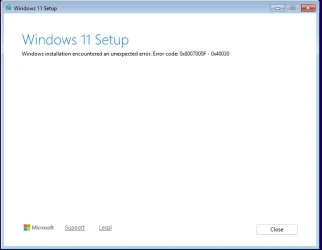
windows 11 setup error 0x800700f-040030


Rbcc

Well-known member
Local time
10:22 PM
Posts
124
OS
Windows 11 pro
windows 11 setup error 0x800700f-040030 while testing on vmware workstation 17, There are 3 files 1 is a screen shot of the error and the other 2 are my auounattend.xml and dirs.cmd. I have googled the error and it didn't work and the solution didn't work. Is there something else I can try to finish Windows Setup?Screenshot 2025-05-07 004101.webpScreenshot 2025-05-07 004101.webp
 

Attachments

My Computer My Computer

At a glance

Windows 11 proI-7 2gigaherz16Gig
OS
Windows 11 pro
Computer type
Laptop
Manufacturer/Model
Asus
CPU
I-7 2gigaherz
Motherboard
Asus
Memory
16Gig
Screen Resolution
1024x768
Hard Drives
512 SSD
1. This answer file is missing a blank or generic <ProductKey>. Without this XML block, Setup won't execute any Command's.
Code:
                <component name="Microsoft-Windows-Setup" processorArchitecture="amd64" publicKeyToken="31bf3856ad364e35" language="neutral" versionScope="nonSxS" xmlns:wcm="http://schemas.microsoft.com/WMIConfig/2002/State" xmlns:xsi="http://www.w3.org/2001/XMLSchema-instance">
... lines ...
                        <UserData>
                                <AcceptEula>true</AcceptEula>
                                <ProductKey>
                                        <Key></Key>
                                </ProductKey>
                        </UserData>
... lines ...
                </component>

2. You're calling a script from C:\ drive. WinPE boots and mounts itself as drive letter X:, but your USB media is not guaranteed to have a specific drive letter if there are other disks with a valid NTFS volume on them.

Instead you can replace that one script by doing the same work inside a RunSynchronousCommand. The difference between Synchronous and Asynchronous is Setup doesn't wait for Asynchronous to finish executing the command, before starting the next command. Generally, Synchronous is better so commands don't accidentally start or finish, out of order.
Code:
            <RunSynchronous>
                <RunSynchronousCommand wcm:action="add">
                    <Description>Dirs</Description>
                    <Order>1</Order>
                    <Path>cmd /c mkdir P:\Programs U:\Utilities T:\Temp M:\"TV Downloads" M:"\Movie Downloads"</Path>
                </RunSynchronousCommand>
            </RunSynchronous>
 
Last edited:

My Computer My Computer

At a glance

Windows 7
OS
Windows 7
Does the key have to be a the top of the xml file??
 

My Computer My Computer

At a glance

Windows 11 proI-7 2gigaherz16Gig
OS
Windows 11 pro
Computer type
Laptop
Manufacturer/Model
Asus
CPU
I-7 2gigaherz
Motherboard
Asus
Memory
16Gig
Screen Resolution
1024x768
Hard Drives
512 SSD
The order of the XML blocks or sub-blocks doesn't matter. It only matters that one unique type of block appears in each answer file. and only one unique type of sub-block exists per block. Think of them as containers. winPE pass is one unique container.

Inside winPE pass you can have different blocks for Setup component or RunSynchronous component. They can be in any order, but only one of each type inside the winPE pass.

When most users write an answer file by hand they tend to list things in sequential order. Some tools will build the same list in a different order, but they behave the same when Setup runs.
 

My Computer My Computer

At a glance

Windows 7
OS
Windows 7
Great support ,

@garlin : There is 3 Screens, two similar to that one is there a way I can not have those screens and boot into the previous version of Setup? John
 

My Computer My Computer

At a glance

Windows 11 proI-7 2gigaherz16Gig
OS
Windows 11 pro
Computer type
Laptop
Manufacturer/Model
Asus
CPU
I-7 2gigaherz
Motherboard
Asus
Memory
16Gig
Screen Resolution
1024x768
Hard Drives
512 SSD
Garlin I put in the key, and it still gave me the errror! Can you explain what the error is ? besides a crypic number! JTM
 

My Computer My Computer

At a glance

Windows 11 proI-7 2gigaherz16Gig
OS
Windows 11 pro
Computer type
Laptop
Manufacturer/Model
Asus
CPU
I-7 2gigaherz
Motherboard
Asus
Memory
16Gig
Screen Resolution
1024x768
Hard Drives
512 SSD
3. You're trying to use a page file, but didn't specify an actual filename (not a drive path). Why do you even need this feature?
Code:
            <PageFile>
                <Path>T:\</Path>
                <Size>64000</Size>
            </PageFile>
 

My Computer My Computer

At a glance

Windows 7
OS
Windows 7
you mean I should put in t:\Temp\Pagefile.sys and not just t ?
I would like to have the pagefile go to t:\temp
 

My Computer My Computer

At a glance

Windows 11 proI-7 2gigaherz16Gig
OS
Windows 11 pro
Computer type
Laptop
Manufacturer/Model
Asus
CPU
I-7 2gigaherz
Motherboard
Asus
Memory
16Gig
Screen Resolution
1024x768
Hard Drives
512 SSD
This depends on the order the components are processed in. I imagine the Run commands are executed last.

Windows wants to use T:\Temp\Pagefile.sys, and you haven't run the command to mkdir T:\Temp yet...
Remember this is the page file for WinPE, not Windows. Again, why do you need it?
PageFile specifies the location and the size of the Windows PE operating system page file to create. This setting applies only to the Windows PE page file, and not to the page file of the Windows installation.
 

My Computer My Computer

At a glance

Windows 7
OS
Windows 7
I don't think I do I will delete it!
 

My Computer My Computer

At a glance

Windows 11 proI-7 2gigaherz16Gig
OS
Windows 11 pro
Computer type
Laptop
Manufacturer/Model
Asus
CPU
I-7 2gigaherz
Motherboard
Asus
Memory
16Gig
Screen Resolution
1024x768
Hard Drives
512 SSD

Latest Support Threads

Back
Top Bottom