Windows 11 system settings only temporarily applies changes - resets upon reboot


Sure, but regardless if it was Windhawk or any other modification, I’d still do an In-Place Upgrade in hoping that it would work if performed.

Just an update, it's been at 62.3% for 5 hours now...
And I don’t believe this is normal. I’ve never had this and my PC is 11 years old.
 

My Computers My Computers

  • At a glance

    Windows 11 Pro 25H2 Build 26200.8655Intel(R) Core(TM) i7-4770K CPU @ 3.50GHz32.0 GB of I forget and the box is in storage.Gigabyte nVidia GeForce GTX 1660 Super OC 6GB
    OS
    Windows 11 Pro 25H2 Build 26200.8655
    Computer type
    PC/Desktop
    Manufacturer/Model
    Sin-built 2013
    CPU
    Intel(R) Core(TM) i7-4770K CPU @ 3.50GHz
    Motherboard
    ASUS ROG Maximus VI Formula
    Memory
    32.0 GB of I forget and the box is in storage.
    Graphics Card(s)
    Gigabyte nVidia GeForce GTX 1660 Super OC 6GB
    Sound Card
    ROG SupremeFX Formula 8-Channel High Definition Audio
    Monitor(s) Displays
    5 x LG 25MS500-B - 1 x 24MK430H-B - 1 x Wacom Pro 22" Touch Screen Tablet
    Screen Resolution
    All over the place
    Hard Drives
    Too many to list. OS on Samsung 1TB 870 QVO SATA
    PSU
    Silverstone 1500
    Case
    NZXT Phantom 820 Full-Tower Case
    Cooling
    Noctua NH-D15 Elite Class Dual Tower CPU Cooler / 6 x EziDIY 120mm / 2 x Corsair 140mm somethings / 1 x 140mm Thermaltake something / 2 x 200mm Corsair.
    Keyboard
    Corsair K95 / Logitech diNovo Edge Wireless
    Mouse
    Logitech: G402 / G502 / Mx Masters / Mx Air Cordless
    Internet Speed
    2000/500Mbps
    Browser
    All sorts
    Antivirus
    Kaspersky Premium
    Other Info
    ㅤㅤㅤㅤㅤㅤㅤㅤㅤㅤㅤㅤㅤㅤㅤㅤㅤㅤㅤㅤㅤㅤㅤㅤㅤㅤㅤㅤㅤㅤㅤㅤㅤㅤㅤㅤㅤㅤㅤㅤ⠀⠀⠀⠀⠀⠀⠀⠀⠀⠀
    TP-Link BE9300 WiFi 7 Bluetooth 5.4 (Archer TBE550E)
    TP-Link TX201 V1 2.5GB Lan

    Grandstream HT812 - VoIP
    ASUS DSL-AX82U - Mesh
    ASUS RT-AC68U - Mesh
    ASUS RT-BE88U Router

    Brother MFC-L2880DW Printer

    I’m on a horse.
  • At a glance

    Windows 11 Pro 25H2 Build 26200.8655 (Wifes)13th Generation Intel® Core™ i5-1340P Process...16GB LPDDR5-52001x Intel® Iris® Xe Graphics
    Operating System
    Windows 11 Pro 25H2 Build 26200.8655 (Wifes)
    Computer type
    Laptop
    Manufacturer/Model
    LENOVO Yoga 7 14IRL8 - Type 82YL
    CPU
    13th Generation Intel® Core™ i5-1340P Processor(Core™ i5-1340P)
    Memory
    16GB LPDDR5-5200
    Graphics card(s)
    1x Intel® Iris® Xe Graphics
    Sound Card
    Optimized with Dolby Atmos®
    Screen Resolution
    QHD 2880 x 1800 OLED
    Hard Drives
    M.2 512 GB SSD PCIe
    Mouse
    Logiteck MX Master 3S
    Internet Speed
    2000/500
    Antivirus
    Defender / Malwarebytes
    Other Info
    …still on a horse.


    Wireless Network: Wi-Fi 6E 2x2 AX; Bluetooth® 5.1 or above
    Ports: 1x 1 Novo button; 2 in 1 Audio Combo jack; Micro SD Card Reader; HDMI 1.4b; 2 x USB Type-C (TBT4)
    USB 3.2 Gen 2 DP 1.4a
    PD 3.0); 1 x USB 3.2 Gen1 Type A
    Camera
    1x 1080P FHD IR/RGB Hybrid with Privacy Shutter and Dual Array Microphone
    Graphics
    1x Intel® Iris® Xe Graphics
    Monitor
    14" WUXGA
    Form Factor
    Convertible Notebook
  • Windows 11 Pro 25H2 Build 26200.8655 (Wifes)

    Yoga 7 2-in-1 14IML9 - Type 83DJ

    Processor: Intel® Core™ Ultra 7 155H Processor(Core™ Ultra 7 155H)

    Memory: 32GB LPD5X-7467

    Hard Drive: 1 TB SSD PCIe

    Wireless Network: 1x Wi-Fi 6E 2x2 AX; Bluetooth® 5.1 or above

    Ports: 1 x HDMI 2.1 TMDS; 1 x Novo Button; 1 x Combo Audio Jack
    2 x USB-C (USB 4.0)
    1 x USB-A 3.2 Gen 1

    Camera: 1080P FHD IR Hybrid with Dual Microphone

    Graphics: Intel® Arc™ Graphics

    Monitor: 14" 2.8K

    ...Where's my horse?
I’ve never had this and my PC is 11 years old.

Yes but we had Win 7 and decent pc's back then ! :cool:
Sad - I will probably have to GIVE AWAY my 12 year old Toshiba P870 17.3" laptop. Can't even sell it for $100 these days...
 

My Computer My Computer

At a glance

Windows 11 Pro 24H2i7 Ultra16GBIntel
OS
Windows 11 Pro 24H2
Computer type
Laptop
Manufacturer/Model
LG
CPU
i7 Ultra
Memory
16GB
Graphics Card(s)
Intel
Sound Card
Intel Realtek
Monitor(s) Displays
Laptop 17" & TB4 Dell 27" QHD Ultrasharp w/integral TB4 hub
Screen Resolution
2560x1600
Hard Drives
1TB SSD, 5 external WDs
Mouse
Logitech Master MX 3S
Browser
Vivaldi
Antivirus
Kaspersky Premium Suite
definitely wouldn't have been windhawk. windhawk only injects c++ temporarily while running. it doesn't change any system files. @AaronLennon any other mods been made? reg/gpo/manually replacing dll or other system files?
I havent done any manual mods to my system files as far as I can remember. I did have to disable bitlocker and safe boot to get my Linux Windows dual boot to work, but the issue Im having now didn't start until way after that so I doubt it's directly related. I'm in the process of doing a repair install at the moment so I hope that solves the issue.
 

My Computer My Computer

At a glance

Windows 11 + Linux Fedora 41Intel(R) Core(TM) Ultra 7 155H 3.80 GHz32gbNVIDIA GeForce RTX 4060 Laptop GPU
OS
Windows 11 + Linux Fedora 41
Computer type
Laptop
Manufacturer/Model
ASUS Zephyrus G16 GU605MV_GU605MV
CPU
Intel(R) Core(TM) Ultra 7 155H 3.80 GHz
Motherboard
GU605MV
Memory
32gb
Graphics Card(s)
NVIDIA GeForce RTX 4060 Laptop GPU
definitely wouldn't have been windhawk. windhawk only injects c++ temporarily while running. it doesn't change any system files. @AaronLennon any other mods been made? reg/gpo/manually replacing dll or other system files?
Any mods used can cause adverse issues. Removing Windhawk is one thing, but did it permanently change registry entries or something, is another.

I’d suggest a repair install in-place upgrade:

So I've just finished a repair install in-place upgrade, and it hasn't fixed the issue. My settings changes still won't save upon restart.
 

My Computer My Computer

At a glance

Windows 11 + Linux Fedora 41Intel(R) Core(TM) Ultra 7 155H 3.80 GHz32gbNVIDIA GeForce RTX 4060 Laptop GPU
OS
Windows 11 + Linux Fedora 41
Computer type
Laptop
Manufacturer/Model
ASUS Zephyrus G16 GU605MV_GU605MV
CPU
Intel(R) Core(TM) Ultra 7 155H 3.80 GHz
Motherboard
GU605MV
Memory
32gb
Graphics Card(s)
NVIDIA GeForce RTX 4060 Laptop GPU
So I've just finished a repair install in-place upgrade, and it hasn't fixed the issue. My settings changes still won't save upon restart.
Have you created a new temporary user and see if the changes made by that user stick?
Problems with the user hive would not be fixed by a repair installation.
It's worth a try, short of a new installation.
 

My Computers My Computers

  • At a glance

    All Branches but ReleaseAMD Ryzen 7 7735HS 3200-4500 Mhz 8 cores x 232 GB DDR5Radeon Graphic / NVIDIA GeForce RTX 4060 8 GB...
    OS
    All Branches but Release
    Computer type
    Laptop
    Manufacturer/Model
    Acer Nitro ANV15-51
    CPU
    AMD Ryzen 7 7735HS 3200-4500 Mhz 8 cores x 2
    Motherboard
    Sportage_RBH
    Memory
    32 GB DDR5
    Graphics Card(s)
    Radeon Graphic / NVIDIA GeForce RTX 4060 8 GB GDDR6
    Sound Card
    AMD/Realtek(R) Audio
    Monitor(s) Displays
    Integrated Monitor (15.3"vis)
    Screen Resolution
    FHD 1920X1080 16:9 144Hz
    Hard Drives
    KINGSTON OM8SEP4512Q-AA 1TB
    Western Digital 256GB
    PSU
    19V DC 6.32 A 120 W
    Cooling
    Dual Fans
    Mouse
    MS Bluetooth
    Internet Speed
    Fiber 1GB Cox -us & 1GB Orange-fr
    Browser
    Edge Canary- Firefox Nightly-Chrome Dev-Chrome Dev
    Antivirus
    Windows Defender
  • At a glance

    Windows 11 BetaAMD A9-94208 GB of DDR4AMD Radeon R5
    Operating System
    Windows 11 Beta
    Computer type
    Laptop
    Manufacturer/Model
    Asus X751BP
    CPU
    AMD A9-9420
    Memory
    8 GB of DDR4
    Graphics card(s)
    AMD Radeon R5
    Screen Resolution
    1600x900
    Hard Drives
    Seagate 1 TB
Have you created a new temporary user and see if the changes made by that user stick?
One of the things I tried before making this thread was creating and logging into a new admin account and making settings changes, but it behaved the same as my actual account.
 

My Computer My Computer

At a glance

Windows 11 + Linux Fedora 41Intel(R) Core(TM) Ultra 7 155H 3.80 GHz32gbNVIDIA GeForce RTX 4060 Laptop GPU
OS
Windows 11 + Linux Fedora 41
Computer type
Laptop
Manufacturer/Model
ASUS Zephyrus G16 GU605MV_GU605MV
CPU
Intel(R) Core(TM) Ultra 7 155H 3.80 GHz
Motherboard
GU605MV
Memory
32gb
Graphics Card(s)
NVIDIA GeForce RTX 4060 Laptop GPU
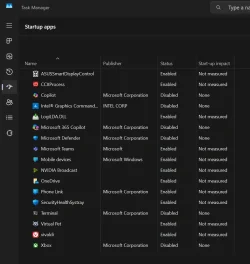
if you would, please, rt click on taskbar, choose Task Manager, choose Startup Apps and give me a screenshot of all of them.
 

My Computers My Computers

  • At a glance

    win 11Pro 25H2 26200.8246I9-13900kG.Skill Ripjaws S5 32GB Kit DDR5 6000.GeForce RTX™ 3060 Ti VISION OC 8G (rev. 2.0)
    OS
    win 11Pro 25H2 26200.8246
    Computer type
    PC/Desktop
    Manufacturer/Model
    DIY: LianLi 207 case, ASUS mobo, Arctic aio cooling
    CPU
    I9-13900k
    Motherboard
    ASUS ROG STRIX Z790-E Gaming wifi-6E, latest AMI BIOS 3107
    Memory
    G.Skill Ripjaws S5 32GB Kit DDR5 6000.
    Graphics Card(s)
    GeForce RTX™ 3060 Ti VISION OC 8G (rev. 2.0)
    Sound Card
    on mobo
    Monitor(s) Displays
    Dell S3221QS (curved 32")
    Screen Resolution
    4K but I usually display at 1K
    Hard Drives
    Sam 980 Pro 1T M.2, 990Pro, WD 570, others(all NVMe)
    PSU
    Corsair RM750e fully modular
    Case
    Lian Li 207
    Cooling
    CPU:Arctic liq frz iii Pro 360 on top, CASE: 2 front fans IN, 2 bottom fans in.
    Keyboard
    Corsair K70 RGB Core
    Mouse
    Logitech M510
    Internet Speed
    100Mbps Comcast; I226-V NIC
    Browser
    Firefox(current)
    Antivirus
    on win BitDefender AV Free
    Other Info
    Terabyte Unlimited Image
    WuMgr, StartAllBack, , Revo Uninstaller Pro Portable.

    Davinci Resolve or Wondershare Filmora Basic to process my vlogs. DJI Pocket 2
  • At a glance

    win 10, Minti7-10510U 1.8-4.9GHz16GB DDR4Nvidia Quadro P520 2GB DDR5 supports 4K exter...
    Operating System
    win 10, Mint
    Computer type
    Laptop
    Manufacturer/Model
    Lenovo P15s
    CPU
    i7-10510U 1.8-4.9GHz
    Motherboard
    Intel SoC
    Memory
    16GB DDR4
    Graphics card(s)
    Nvidia Quadro P520 2GB DDR5 supports 4K external via HDMI or USB-C
    Sound Card
    Realtek ALC3287 HD
    Monitor(s) Displays
    15.6"
    Screen Resolution
    1K
    Hard Drives
    NVMe various
if you would, please, rt click on taskbar, choose Task Manager, choose Startup Apps and give me a screenshot of all of them.
 

Attachments

  • Screenshot 2025-03-23 193421.webp
    Screenshot 2025-03-23 193421.webp
    66.7 KB · Views: 3

My Computer My Computer

At a glance

Windows 11 + Linux Fedora 41Intel(R) Core(TM) Ultra 7 155H 3.80 GHz32gbNVIDIA GeForce RTX 4060 Laptop GPU
OS
Windows 11 + Linux Fedora 41
Computer type
Laptop
Manufacturer/Model
ASUS Zephyrus G16 GU605MV_GU605MV
CPU
Intel(R) Core(TM) Ultra 7 155H 3.80 GHz
Motherboard
GU605MV
Memory
32gb
Graphics Card(s)
NVIDIA GeForce RTX 4060 Laptop GPU
Okay so start disabling them with logildl, vivaldi, and virtual pet and then test - also CCX(adobe) - then OneDrive.

My guess is that when you used Revo to remove that windhawk thing you didn't , completely.

If nothing helps, do a full CLEAN install from blank disk. don't install windhawk. (probably stuff in registry)
 

My Computers My Computers

  • At a glance

    win 11Pro 25H2 26200.8246I9-13900kG.Skill Ripjaws S5 32GB Kit DDR5 6000.GeForce RTX™ 3060 Ti VISION OC 8G (rev. 2.0)
    OS
    win 11Pro 25H2 26200.8246
    Computer type
    PC/Desktop
    Manufacturer/Model
    DIY: LianLi 207 case, ASUS mobo, Arctic aio cooling
    CPU
    I9-13900k
    Motherboard
    ASUS ROG STRIX Z790-E Gaming wifi-6E, latest AMI BIOS 3107
    Memory
    G.Skill Ripjaws S5 32GB Kit DDR5 6000.
    Graphics Card(s)
    GeForce RTX™ 3060 Ti VISION OC 8G (rev. 2.0)
    Sound Card
    on mobo
    Monitor(s) Displays
    Dell S3221QS (curved 32")
    Screen Resolution
    4K but I usually display at 1K
    Hard Drives
    Sam 980 Pro 1T M.2, 990Pro, WD 570, others(all NVMe)
    PSU
    Corsair RM750e fully modular
    Case
    Lian Li 207
    Cooling
    CPU:Arctic liq frz iii Pro 360 on top, CASE: 2 front fans IN, 2 bottom fans in.
    Keyboard
    Corsair K70 RGB Core
    Mouse
    Logitech M510
    Internet Speed
    100Mbps Comcast; I226-V NIC
    Browser
    Firefox(current)
    Antivirus
    on win BitDefender AV Free
    Other Info
    Terabyte Unlimited Image
    WuMgr, StartAllBack, , Revo Uninstaller Pro Portable.

    Davinci Resolve or Wondershare Filmora Basic to process my vlogs. DJI Pocket 2
  • At a glance

    win 10, Minti7-10510U 1.8-4.9GHz16GB DDR4Nvidia Quadro P520 2GB DDR5 supports 4K exter...
    Operating System
    win 10, Mint
    Computer type
    Laptop
    Manufacturer/Model
    Lenovo P15s
    CPU
    i7-10510U 1.8-4.9GHz
    Motherboard
    Intel SoC
    Memory
    16GB DDR4
    Graphics card(s)
    Nvidia Quadro P520 2GB DDR5 supports 4K external via HDMI or USB-C
    Sound Card
    Realtek ALC3287 HD
    Monitor(s) Displays
    15.6"
    Screen Resolution
    1K
    Hard Drives
    NVMe various
Okay so start disabling them with logildl, vivaldi, and virtual pet and then test - also CCX(adobe) - then OneDrive.

My guess is that when you used Revo to remove that windhawk thing you didn't , completely.

If nothing helps, do a full CLEAN install from blank disk. don't install windhawk. (probably stuff in registry)
Disabling all of those apps from running on startup didn't fix the issue sadly.

I completely removed windhawk using Revo previously, and then re-installed it after seeing that deleting it didn't solve the issue. Also, according to this:
definitely wouldn't have been windhawk. windhawk only injects c++ temporarily while running. it doesn't change any system files.
Windhawk shouldn't be able to cause any permanent issues.

I'm not sure I'm willing to do a full clean install from a blank disk. I have a dual os system, so a clean internal SSD isn't an option. Correct me if I'm wrong, but surely doing a full repair install of windows like I previously did would have the same outcome as a clean install, since I've essentially installed a fresh windows 11 already.
 

My Computer My Computer

At a glance

Windows 11 + Linux Fedora 41Intel(R) Core(TM) Ultra 7 155H 3.80 GHz32gbNVIDIA GeForce RTX 4060 Laptop GPU
OS
Windows 11 + Linux Fedora 41
Computer type
Laptop
Manufacturer/Model
ASUS Zephyrus G16 GU605MV_GU605MV
CPU
Intel(R) Core(TM) Ultra 7 155H 3.80 GHz
Motherboard
GU605MV
Memory
32gb
Graphics Card(s)
NVIDIA GeForce RTX 4060 Laptop GPU
if you dont want to reinstall, you could just set a scheduled task to reapply unhiding taskbar at logon
 

My Computer My Computer

At a glance

Windows 11 Pro
OS
Windows 11 Pro
if you dont want to reinstall, you could just set a scheduled task to reapply unhiding taskbar at logon
That would be a good fix for the taskbar specifically, but that still leaves the light on my front panel restoring to its obnoxious default strobe pattern upon restart.
 

My Computer My Computer

At a glance

Windows 11 + Linux Fedora 41Intel(R) Core(TM) Ultra 7 155H 3.80 GHz32gbNVIDIA GeForce RTX 4060 Laptop GPU
OS
Windows 11 + Linux Fedora 41
Computer type
Laptop
Manufacturer/Model
ASUS Zephyrus G16 GU605MV_GU605MV
CPU
Intel(R) Core(TM) Ultra 7 155H 3.80 GHz
Motherboard
GU605MV
Memory
32gb
Graphics Card(s)
NVIDIA GeForce RTX 4060 Laptop GPU
you using windows settings > dynamic lighting? all my lighting has standalone programs (ie - icue)
 

My Computer My Computer

At a glance

Windows 11 Pro
OS
Windows 11 Pro
you using windows settings > dynamic lighting? all my lighting has standalone programs (ie - icue)
No I'm using the dedicated Asus Software 'Armoury Crate'.
 

My Computer My Computer

At a glance

Windows 11 + Linux Fedora 41Intel(R) Core(TM) Ultra 7 155H 3.80 GHz32gbNVIDIA GeForce RTX 4060 Laptop GPU
OS
Windows 11 + Linux Fedora 41
Computer type
Laptop
Manufacturer/Model
ASUS Zephyrus G16 GU605MV_GU605MV
CPU
Intel(R) Core(TM) Ultra 7 155H 3.80 GHz
Motherboard
GU605MV
Memory
32gb
Graphics Card(s)
NVIDIA GeForce RTX 4060 Laptop GPU
if armoury crate is reverting back to defaults after startup, then your issue is not solely with windows. something is causing (what sounds like permissions) issues.
 

My Computer My Computer

At a glance

Windows 11 Pro
OS
Windows 11 Pro
if armoury crate is reverting back to defaults after startup, then your issue is not solely with windows. something is causing (what sounds like permissions) issues.
Must be yeah. I have folder with my old windows install on my internal SSD after the repair install, and it wont let me delete it due to not having the correct permissions, even though I am the admin. Even after going into the properties of the folder and giving all the user options full access, it still wouldn't work. It's just confusing because the permission issue isn't isolated to my account, because it was the same on the new admin account I tried.
Edit: I just rebooted to test the lighting config, and it saved properly?
Edit Edit: Ok I think the light issue is related to my Linux os, because I booted into Linux, then back into Windows, and my light was reset again. But when I simply reboot back into Windows, it stayed. Sorry about that, must be unrelated to the taskbar issue.
 
Last edited:

My Computer My Computer

At a glance

Windows 11 + Linux Fedora 41Intel(R) Core(TM) Ultra 7 155H 3.80 GHz32gbNVIDIA GeForce RTX 4060 Laptop GPU
OS
Windows 11 + Linux Fedora 41
Computer type
Laptop
Manufacturer/Model
ASUS Zephyrus G16 GU605MV_GU605MV
CPU
Intel(R) Core(TM) Ultra 7 155H 3.80 GHz
Motherboard
GU605MV
Memory
32gb
Graphics Card(s)
NVIDIA GeForce RTX 4060 Laptop GPU
Correct me if I'm wrong, but surely doing a full repair install of windows like I previously did would have the same outcome as a clean install, since I've essentially installed a fresh windows 11 already.
I'm not sure that you will get a clean registry. And if you put windhawk back on I will not suggest further. Good luck with it.
 

My Computers My Computers

  • At a glance

    win 11Pro 25H2 26200.8246I9-13900kG.Skill Ripjaws S5 32GB Kit DDR5 6000.GeForce RTX™ 3060 Ti VISION OC 8G (rev. 2.0)
    OS
    win 11Pro 25H2 26200.8246
    Computer type
    PC/Desktop
    Manufacturer/Model
    DIY: LianLi 207 case, ASUS mobo, Arctic aio cooling
    CPU
    I9-13900k
    Motherboard
    ASUS ROG STRIX Z790-E Gaming wifi-6E, latest AMI BIOS 3107
    Memory
    G.Skill Ripjaws S5 32GB Kit DDR5 6000.
    Graphics Card(s)
    GeForce RTX™ 3060 Ti VISION OC 8G (rev. 2.0)
    Sound Card
    on mobo
    Monitor(s) Displays
    Dell S3221QS (curved 32")
    Screen Resolution
    4K but I usually display at 1K
    Hard Drives
    Sam 980 Pro 1T M.2, 990Pro, WD 570, others(all NVMe)
    PSU
    Corsair RM750e fully modular
    Case
    Lian Li 207
    Cooling
    CPU:Arctic liq frz iii Pro 360 on top, CASE: 2 front fans IN, 2 bottom fans in.
    Keyboard
    Corsair K70 RGB Core
    Mouse
    Logitech M510
    Internet Speed
    100Mbps Comcast; I226-V NIC
    Browser
    Firefox(current)
    Antivirus
    on win BitDefender AV Free
    Other Info
    Terabyte Unlimited Image
    WuMgr, StartAllBack, , Revo Uninstaller Pro Portable.

    Davinci Resolve or Wondershare Filmora Basic to process my vlogs. DJI Pocket 2
  • At a glance

    win 10, Minti7-10510U 1.8-4.9GHz16GB DDR4Nvidia Quadro P520 2GB DDR5 supports 4K exter...
    Operating System
    win 10, Mint
    Computer type
    Laptop
    Manufacturer/Model
    Lenovo P15s
    CPU
    i7-10510U 1.8-4.9GHz
    Motherboard
    Intel SoC
    Memory
    16GB DDR4
    Graphics card(s)
    Nvidia Quadro P520 2GB DDR5 supports 4K external via HDMI or USB-C
    Sound Card
    Realtek ALC3287 HD
    Monitor(s) Displays
    15.6"
    Screen Resolution
    1K
    Hard Drives
    NVMe various
So I've just finished a repair install in-place upgrade, and it hasn't fixed the issue. My settings changes still won't save upon restart.

Soory about that, I hope it didn’t take too much time.


screenshot-2025-03-23-193421-webp.129229


(y) Have you tried disabling AsusSmartDisplayControl for the Taskbar issue??

Treat the Taskbar issue as you would a Browser Addon issue. Disable Autorun for all Autostart apps, If unhide Taskbar works, you might find the culprit by re-enabling Autostarts one by one.
A restart or sign out will be needed after each time you enable 1 addon. Time consuming.

It’s one possible avenue.
 
Last edited:

My Computers My Computers

  • At a glance

    Windows 11 Pro 25H2 Build 26200.8655Intel(R) Core(TM) i7-4770K CPU @ 3.50GHz32.0 GB of I forget and the box is in storage.Gigabyte nVidia GeForce GTX 1660 Super OC 6GB
    OS
    Windows 11 Pro 25H2 Build 26200.8655
    Computer type
    PC/Desktop
    Manufacturer/Model
    Sin-built 2013
    CPU
    Intel(R) Core(TM) i7-4770K CPU @ 3.50GHz
    Motherboard
    ASUS ROG Maximus VI Formula
    Memory
    32.0 GB of I forget and the box is in storage.
    Graphics Card(s)
    Gigabyte nVidia GeForce GTX 1660 Super OC 6GB
    Sound Card
    ROG SupremeFX Formula 8-Channel High Definition Audio
    Monitor(s) Displays
    5 x LG 25MS500-B - 1 x 24MK430H-B - 1 x Wacom Pro 22" Touch Screen Tablet
    Screen Resolution
    All over the place
    Hard Drives
    Too many to list. OS on Samsung 1TB 870 QVO SATA
    PSU
    Silverstone 1500
    Case
    NZXT Phantom 820 Full-Tower Case
    Cooling
    Noctua NH-D15 Elite Class Dual Tower CPU Cooler / 6 x EziDIY 120mm / 2 x Corsair 140mm somethings / 1 x 140mm Thermaltake something / 2 x 200mm Corsair.
    Keyboard
    Corsair K95 / Logitech diNovo Edge Wireless
    Mouse
    Logitech: G402 / G502 / Mx Masters / Mx Air Cordless
    Internet Speed
    2000/500Mbps
    Browser
    All sorts
    Antivirus
    Kaspersky Premium
    Other Info
    ㅤㅤㅤㅤㅤㅤㅤㅤㅤㅤㅤㅤㅤㅤㅤㅤㅤㅤㅤㅤㅤㅤㅤㅤㅤㅤㅤㅤㅤㅤㅤㅤㅤㅤㅤㅤㅤㅤㅤㅤ⠀⠀⠀⠀⠀⠀⠀⠀⠀⠀
    TP-Link BE9300 WiFi 7 Bluetooth 5.4 (Archer TBE550E)
    TP-Link TX201 V1 2.5GB Lan

    Grandstream HT812 - VoIP
    ASUS DSL-AX82U - Mesh
    ASUS RT-AC68U - Mesh
    ASUS RT-BE88U Router

    Brother MFC-L2880DW Printer

    I’m on a horse.
  • At a glance

    Windows 11 Pro 25H2 Build 26200.8655 (Wifes)13th Generation Intel® Core™ i5-1340P Process...16GB LPDDR5-52001x Intel® Iris® Xe Graphics
    Operating System
    Windows 11 Pro 25H2 Build 26200.8655 (Wifes)
    Computer type
    Laptop
    Manufacturer/Model
    LENOVO Yoga 7 14IRL8 - Type 82YL
    CPU
    13th Generation Intel® Core™ i5-1340P Processor(Core™ i5-1340P)
    Memory
    16GB LPDDR5-5200
    Graphics card(s)
    1x Intel® Iris® Xe Graphics
    Sound Card
    Optimized with Dolby Atmos®
    Screen Resolution
    QHD 2880 x 1800 OLED
    Hard Drives
    M.2 512 GB SSD PCIe
    Mouse
    Logiteck MX Master 3S
    Internet Speed
    2000/500
    Antivirus
    Defender / Malwarebytes
    Other Info
    …still on a horse.


    Wireless Network: Wi-Fi 6E 2x2 AX; Bluetooth® 5.1 or above
    Ports: 1x 1 Novo button; 2 in 1 Audio Combo jack; Micro SD Card Reader; HDMI 1.4b; 2 x USB Type-C (TBT4)
    USB 3.2 Gen 2 DP 1.4a
    PD 3.0); 1 x USB 3.2 Gen1 Type A
    Camera
    1x 1080P FHD IR/RGB Hybrid with Privacy Shutter and Dual Array Microphone
    Graphics
    1x Intel® Iris® Xe Graphics
    Monitor
    14" WUXGA
    Form Factor
    Convertible Notebook
  • Windows 11 Pro 25H2 Build 26200.8655 (Wifes)

    Yoga 7 2-in-1 14IML9 - Type 83DJ

    Processor: Intel® Core™ Ultra 7 155H Processor(Core™ Ultra 7 155H)

    Memory: 32GB LPD5X-7467

    Hard Drive: 1 TB SSD PCIe

    Wireless Network: 1x Wi-Fi 6E 2x2 AX; Bluetooth® 5.1 or above

    Ports: 1 x HDMI 2.1 TMDS; 1 x Novo Button; 1 x Combo Audio Jack
    2 x USB-C (USB 4.0)
    1 x USB-A 3.2 Gen 1

    Camera: 1080P FHD IR Hybrid with Dual Microphone

    Graphics: Intel® Arc™ Graphics

    Monitor: 14" 2.8K

    ...Where's my horse?
Must be yeah. I have folder with my old windows install on my internal SSD after the repair install, and it wont let me delete it due to not having the correct permissions, even though I am the admin. Even after going into the properties of the folder and giving all the user options full access, it still wouldn't work. It's just confusing because the permission issue isn't isolated to my account, because it was the same on the new admin account I tried.
Edit: I just rebooted to test the lighting config, and it saved properly?
Edit Edit: Ok I think the light issue is related to my Linux os, because I booted into Linux, then back into Windows, and my light was reset again. But when I simply reboot back into Windows, it stayed. Sorry about that, must be unrelated to the taskbar issue.
This should be the powershell to UNhide the taskbar via reg:
Code:
powershell -command "&{$p='HKCU:SOFTWARE\Microsoft\Windows\CurrentVersion\Explorer\StuckRects3';$v=(Get-ItemProperty -Path $p).Settings;$v[8]=2;&Set-ItemProperty -Path $p -Name Settings -Value $v;&Stop-Process -f -ProcessName explorer}"

use that as you wish (ps1, batch, scheduled task, etc)

as far as armoury crate, you'll have to find out where the settings are stored and export them once set up as you want. then create a .bat to reimport/reapply them and schedule that for login so that after booting From linux To windows, it will reapply your crate settings
 

My Computer My Computer

At a glance

Windows 11 Pro
OS
Windows 11 Pro
Must be yeah. I have folder with my old windows install on my internal SSD after the repair install, and it wont let me delete it due to not having the correct permissions, even though I am the admin. Even after going into the properties of the folder and giving all the user options full access, it still wouldn't work. It's just confusing because the permission issue isn't isolated to my account, because it was the same on the new admin account I tried.
Edit: I just rebooted to test the lighting config, and it saved properly?
Edit Edit: Ok I think the light issue is related to my Linux os, because I booted into Linux, then back into Windows, and my light was reset again. But when I simply reboot back into Windows, it stayed. Sorry about that, must be unrelated to the taskbar issue.
To remove old Windows install files, run Microsoft's Disk Cleanup.

Tap the Windows Key and then type Disk Cleanup in the search field. On Disk Cleanup, you will be offered a button labeled Clean up system files.
 
Last edited:

My Computers My Computers

  • At a glance

    Windows 11 ProIntel Series 3 Core Ultra X9 388H64GB LPDDR5x 9600 MT/sIntel Arc graphics B390 Panther Lake
    OS
    Windows 11 Pro
    Computer type
    Laptop
    Manufacturer/Model
    Dell XPS 16 DA16260
    CPU
    Intel Series 3 Core Ultra X9 388H
    Memory
    64GB LPDDR5x 9600 MT/s
    Graphics Card(s)
    Intel Arc graphics B390 Panther Lake
    Monitor(s) Displays
    16" 3.2K Tandem OLED Infinity Edge
    Screen Resolution
    3200 x 2000 16:10 236 PPI
    Hard Drives
    1 Terabyte M.2 PCIe NVMe SSD
    Case
    Black Anodized Aluminum
    Cooling
    Vapor Chamber Cooling
    Mouse
    None
    Internet Speed
    942 Mbps Netgear Mesh + 2 Satellites
    Browser
    Microsoft Edge (Chromium)
    Antivirus
    Windows Security (Defender)
    Other Info
    NPU delivering 67 TOPS
    Microsoft 365 subscription
    Microsoft Office 365
    Microsoft OneDrive 1TB Cloud
    Microsoft Visual Studio
    Microsoft Visual Studio Code
    Microsoft Sysinternals Suite
    Microsoft BitLocker
    Microsoft Copilot
    Dell Support Assist
    Dell Command | Update
    Macrium Reflect X subscription
    1Password Password Manager
    Amazon Kindle for PC
    Lightroom/Photoshop subscription
    Interactive Brokers Trader Workstation
  • At a glance

    Windows 11 ProSnapdragon® X Elite (12 Core) with Hexagon NP...32GB LPDDR5x 8448 MT/sIntegrated Adreno GPU
    Operating System
    Windows 11 Pro
    Computer type
    Laptop
    Manufacturer/Model
    Microsoft Surface Laptop 7
    CPU
    Snapdragon® X Elite (12 Core) with Hexagon NPU delivering 45 TOPS
    Memory
    32GB LPDDR5x 8448 MT/s
    Graphics card(s)
    Integrated Adreno GPU
    Sound Card
    Omnisonic speakers with Dolby Atmos spatial sound
    Monitor(s) Displays
    13.8″ PixelSense Flow touchscreen 120 Hz 600 NIT
    Screen Resolution
    2304 × 1536 (201 PPI), 3:2 aspect ratio
    Hard Drives
    1 TB PCIe NVMe Gen 4 SSD
    Case
    Black Anodized Aluminum
    Cooling
    Vapor Chamber Cooling
    Mouse
    None
    Internet Speed
    942 Mbps Netgear Mesh + 2 Satellites
    Browser
    Microsoft Edge (Chromium)
    Antivirus
    Windows Security (Defender)
    Other Info
    Microsoft 365 subscription (Office)
    Microsoft Office 365
    Microsoft OneDrive 1TB Cloud
    Microsoft Visual Studio 2026
    Microsoft Visual Studio Code
    Interactive Brokers Trader Workstation
    Lightroom/Photoshop subscription
    1Password Password Manager
    Microsoft Sysinternals
    Amazon Kindle for PC
    Microsoft BitLocker
    Microsoft Copilot

Latest Support Threads

Back
Top Bottom