Windows 11 update repeatedly fails


For Sea Tools and HD tune please post images instead of text reports.


Today is 09/27.
The CBS files were 09/22 and earlier.
Later in the thread new files can be collected as needed.


Post a new V2 share link into the newest post after completing all of the steps in posts 95.
 

My Computer

System One

  • OS
    Windows 10
    Computer type
    Laptop
    Manufacturer/Model
    HP
    CPU
    Intel(R) Core(TM) i7-4800MQ CPU @ 2.70GHz
    Motherboard
    Product : 190A Version : KBC Version 94.56
    Memory
    16 GB Total: Manufacturer : Samsung MemoryType : DDR3 FormFactor : SODIMM Capacity : 8GB Speed : 1600
    Graphics Card(s)
    NVIDIA Quadro K3100M; Intel(R) HD Graphics 4600
    Sound Card
    IDT High Definition Audio CODEC; PNP Device ID HDAUDIO\FUNC_01&VEN_111D&DEV_76E0
    Hard Drives
    Model Hitachi HTS727575A9E364
    Antivirus
    Microsoft Defender
    Other Info
    Mobile Workstation

For Sea Tools and HD tune please post images instead of text reports.


Today is 09/27.
The CBS files were 09/22 and earlier.
Later in the thread new files can be collected as needed.


Post a new V2 share link into the newest post after completing all of the steps in posts 95.
Hi zbook:
Images of SeaTools and HDTune results windows are in the share:


Versions of my CBS and CBSPersist log files, taken today, are in the "CBS Logs" folder.

I can see that my computer tried again to download and install the W11 update - still failing!
 

My Computers

System One System Two

  • OS
    Windows 10 & 11
    Computer type
    Laptop
    Manufacturer/Model
    Dell Inspiron 15 series (5565)
    CPU
    AMD A10-9600P RADEON R5, 10 COMPUTE CORES 4C+6G 2.40
    Memory
    8.00 GB (7.46 GB usable)
    Graphics Card(s)
    AMD Radeon R5 Graphics (498 MB)
    Hard Drives
    932 GB HDD ST1000LM035-1RK172
  • Operating System
    Windows 11 Home
    Computer type
    Laptop
    Manufacturer/Model
    HP Laptop 15-bs1xx
    CPU
    Intel(R) Core(TM) i5-8250U CPU @ 1.60GHz, 1801 Mhz, 4 Core(s), 8 Logical Processor(s)
    Memory
    16GB RAM
    Hard Drives
    Samsung 120GB SSD, Toshiba 1TB HDD
When available please update the progress with post #95 steps #7 - 15.
 

My Computer

System One

  • OS
    Windows 10
    Computer type
    Laptop
    Manufacturer/Model
    HP
    CPU
    Intel(R) Core(TM) i7-4800MQ CPU @ 2.70GHz
    Motherboard
    Product : 190A Version : KBC Version 94.56
    Memory
    16 GB Total: Manufacturer : Samsung MemoryType : DDR3 FormFactor : SODIMM Capacity : 8GB Speed : 1600
    Graphics Card(s)
    NVIDIA Quadro K3100M; Intel(R) HD Graphics 4600
    Sound Card
    IDT High Definition Audio CODEC; PNP Device ID HDAUDIO\FUNC_01&VEN_111D&DEV_76E0
    Hard Drives
    Model Hitachi HTS727575A9E364
    Antivirus
    Microsoft Defender
    Other Info
    Mobile Workstation

When available please update the progress with post #95 steps #7 - 15.
Hi zbook,

I have done steps 7-11 and the HD Sentinal, Chkdsk and event logs are here: 251007 – Google Drive

I have enabled Driver Verifier - I don't see any change in my system. Do I need to keep it running? Is there some kind of reporting output?
 

My Computers

System One System Two

  • OS
    Windows 10 & 11
    Computer type
    Laptop
    Manufacturer/Model
    Dell Inspiron 15 series (5565)
    CPU
    AMD A10-9600P RADEON R5, 10 COMPUTE CORES 4C+6G 2.40
    Memory
    8.00 GB (7.46 GB usable)
    Graphics Card(s)
    AMD Radeon R5 Graphics (498 MB)
    Hard Drives
    932 GB HDD ST1000LM035-1RK172
  • Operating System
    Windows 11 Home
    Computer type
    Laptop
    Manufacturer/Model
    HP Laptop 15-bs1xx
    CPU
    Intel(R) Core(TM) i5-8250U CPU @ 1.60GHz, 1801 Mhz, 4 Core(s), 8 Logical Processor(s)
    Memory
    16GB RAM
    Hard Drives
    Samsung 120GB SSD, Toshiba 1TB HDD
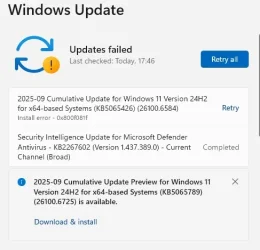
Meanwhile my computer is still trying to install the update and is still failing:
Screenshot 2025-10-07 175335_Update Fail.webp
 

My Computers

System One System Two

  • OS
    Windows 10 & 11
    Computer type
    Laptop
    Manufacturer/Model
    Dell Inspiron 15 series (5565)
    CPU
    AMD A10-9600P RADEON R5, 10 COMPUTE CORES 4C+6G 2.40
    Memory
    8.00 GB (7.46 GB usable)
    Graphics Card(s)
    AMD Radeon R5 Graphics (498 MB)
    Hard Drives
    932 GB HDD ST1000LM035-1RK172
  • Operating System
    Windows 11 Home
    Computer type
    Laptop
    Manufacturer/Model
    HP Laptop 15-bs1xx
    CPU
    Intel(R) Core(TM) i5-8250U CPU @ 1.60GHz, 1801 Mhz, 4 Core(s), 8 Logical Processor(s)
    Memory
    16GB RAM
    Hard Drives
    Samsung 120GB SSD, Toshiba 1TB HDD
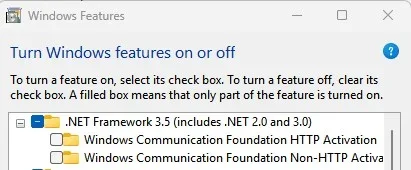
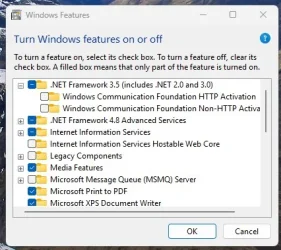
Is .Net Framework 3.5 installed?

Setting >System > Optional Features > More Windows Features

You only need the 3.5 checked not the foundation entries.

Screenshot 2025-10-07 112130.webp
 

My Computer

System One

  • OS
    Windows 11 Pro
Is .Net Framework 3.5 installed?

Setting >System > Optional Features > More Windows Features

You only need the 3.5 checked not the foundation entries.

View attachment 148070
This is what it looks like on my computer, so I am assuming yes...
NETFrame_Win Feat_Screenshot.webp
 

My Computers

System One System Two

  • OS
    Windows 10 & 11
    Computer type
    Laptop
    Manufacturer/Model
    Dell Inspiron 15 series (5565)
    CPU
    AMD A10-9600P RADEON R5, 10 COMPUTE CORES 4C+6G 2.40
    Memory
    8.00 GB (7.46 GB usable)
    Graphics Card(s)
    AMD Radeon R5 Graphics (498 MB)
    Hard Drives
    932 GB HDD ST1000LM035-1RK172
  • Operating System
    Windows 11 Home
    Computer type
    Laptop
    Manufacturer/Model
    HP Laptop 15-bs1xx
    CPU
    Intel(R) Core(TM) i5-8250U CPU @ 1.60GHz, 1801 Mhz, 4 Core(s), 8 Logical Processor(s)
    Memory
    16GB RAM
    Hard Drives
    Samsung 120GB SSD, Toshiba 1TB HDD
So try clearing out software distribution folder.

C:\Windows\SoftwareDistribution

Just delete everything in that folder as Windows will recreate the folders.

If you can not delete some of the folders/files you need to stop windows update and bits services then you can delete them.

In Administrator command prompt

net stop wuauserv
net stop bits

After you delete the files then start the services again.

net start wuauserv
net start bits

Reboot then check for updates.
 

My Computer

System One

  • OS
    Windows 11 Pro
So try clearing out software distribution folder.

C:\Windows\SoftwareDistribution

Just delete everything in that folder as Windows will recreate the folders.

If you can not delete some of the folders/files you need to stop windows update and bits services then you can delete them.

In Administrator command prompt

net stop wuauserv
net stop bits

After you delete the files then start the services again.

net start wuauserv
net start bits

Reboot then check for updates.
Thanks Kevtech - I tried that a while ago without success and I have just repeated it just now. The installation still fails.

It seems that the download is successful and it gets to 100% installed, but then just says "Update failed", always with the same error code; 0x800f081f.

It's now several weeks since this problem occurred and I just cannot get any further forward in solving it, despite my computer working absolutely fine otherwise!
 

My Computers

System One System Two

  • OS
    Windows 10 & 11
    Computer type
    Laptop
    Manufacturer/Model
    Dell Inspiron 15 series (5565)
    CPU
    AMD A10-9600P RADEON R5, 10 COMPUTE CORES 4C+6G 2.40
    Memory
    8.00 GB (7.46 GB usable)
    Graphics Card(s)
    AMD Radeon R5 Graphics (498 MB)
    Hard Drives
    932 GB HDD ST1000LM035-1RK172
  • Operating System
    Windows 11 Home
    Computer type
    Laptop
    Manufacturer/Model
    HP Laptop 15-bs1xx
    CPU
    Intel(R) Core(TM) i5-8250U CPU @ 1.60GHz, 1801 Mhz, 4 Core(s), 8 Logical Processor(s)
    Memory
    16GB RAM
    Hard Drives
    Samsung 120GB SSD, Toshiba 1TB HDD
You should just run the repair install or does that fail too?

Setting > Recovery

Screenshot 2025-10-07 121823.webp
 

My Computer

System One

  • OS
    Windows 11 Pro

My Computers

System One System Two

  • OS
    Windows 10 & 11
    Computer type
    Laptop
    Manufacturer/Model
    Dell Inspiron 15 series (5565)
    CPU
    AMD A10-9600P RADEON R5, 10 COMPUTE CORES 4C+6G 2.40
    Memory
    8.00 GB (7.46 GB usable)
    Graphics Card(s)
    AMD Radeon R5 Graphics (498 MB)
    Hard Drives
    932 GB HDD ST1000LM035-1RK172
  • Operating System
    Windows 11 Home
    Computer type
    Laptop
    Manufacturer/Model
    HP Laptop 15-bs1xx
    CPU
    Intel(R) Core(TM) i5-8250U CPU @ 1.60GHz, 1801 Mhz, 4 Core(s), 8 Logical Processor(s)
    Memory
    16GB RAM
    Hard Drives
    Samsung 120GB SSD, Toshiba 1TB HDD
If I clear out the Software distribution folder, restart and search for updates it will download the update and install, then tell me I am up to date, BUT it will then begin to download the SAME update, which then fails!

I have noticed that when I use the stop bits command it always says "The Background Intelligent Transfer Service service is not started". Not sure if that's a related issue...
 

My Computers

System One System Two

  • OS
    Windows 10 & 11
    Computer type
    Laptop
    Manufacturer/Model
    Dell Inspiron 15 series (5565)
    CPU
    AMD A10-9600P RADEON R5, 10 COMPUTE CORES 4C+6G 2.40
    Memory
    8.00 GB (7.46 GB usable)
    Graphics Card(s)
    AMD Radeon R5 Graphics (498 MB)
    Hard Drives
    932 GB HDD ST1000LM035-1RK172
  • Operating System
    Windows 11 Home
    Computer type
    Laptop
    Manufacturer/Model
    HP Laptop 15-bs1xx
    CPU
    Intel(R) Core(TM) i5-8250U CPU @ 1.60GHz, 1801 Mhz, 4 Core(s), 8 Logical Processor(s)
    Memory
    16GB RAM
    Hard Drives
    Samsung 120GB SSD, Toshiba 1TB HDD
Yes, I've tried that. It does fail too
So there should be logs available.
You can use setupdiag which will point you to why it is failing.

Run it and let it analyze the logs in C:$WINDOWS.~BT\Sources\Panther


My Computer

System One

  • OS
    Windows 11 Pro
So there should be logs available.
You can use setupdiag which will point you to why it is failing.

Run it and let it analyze the logs in C:$WINDOWS.~BT\Sources\Panther

So, I run this while windows update is running?
 

My Computers

System One System Two

  • OS
    Windows 10 & 11
    Computer type
    Laptop
    Manufacturer/Model
    Dell Inspiron 15 series (5565)
    CPU
    AMD A10-9600P RADEON R5, 10 COMPUTE CORES 4C+6G 2.40
    Memory
    8.00 GB (7.46 GB usable)
    Graphics Card(s)
    AMD Radeon R5 Graphics (498 MB)
    Hard Drives
    932 GB HDD ST1000LM035-1RK172
  • Operating System
    Windows 11 Home
    Computer type
    Laptop
    Manufacturer/Model
    HP Laptop 15-bs1xx
    CPU
    Intel(R) Core(TM) i5-8250U CPU @ 1.60GHz, 1801 Mhz, 4 Core(s), 8 Logical Processor(s)
    Memory
    16GB RAM
    Hard Drives
    Samsung 120GB SSD, Toshiba 1TB HDD
So, I run this while windows update is running?

No you should already have the folder from trying to update in recovery and from the USB.

Look in C: for $WINDOWS.~BT folder.

It will be a hidden folder so you have to turn on the folder option to show hidden files and folders.

Screenshot 2025-10-07 142851.webp
 

My Computer

System One

  • OS
    Windows 11 Pro
I have enabled Driver Verifier - I don't see any change in my system. Do I need to keep it running? Is there some kind of reporting output?


1) Please run upgrade_failure_info > post a share link


2) Read this link on Windows Driver Verifier (WDV):

Enable and Disable Driver Verifier in Windows 10


3) Create a new restore point


4) Learn the methods to recover from BSOD caused by WDV by booting into safe mode and running one or more of these commands:

verifier /reset

verifier /bootmode resetonbootfail


(option nine and seven)


5) Plan to run the tool with various customized test settings.

a) Test all non-Microsoft drivers

b) Test no Microsoft drivers

c) For the first run of WDV select the 3 customized tests displayed in the TF tutorial


6) Whenever the WDV tool is started if there is no immediate BSOD then open administrative command prompt and copy and paste:

verifier /querysettings

Post a share link.


Customized tests will then be posted for the next run of WDV.


WDV can run continuously during the testing.


For any BSOD post a new V2 share link into the newest post.
 

My Computer

System One

  • OS
    Windows 10
    Computer type
    Laptop
    Manufacturer/Model
    HP
    CPU
    Intel(R) Core(TM) i7-4800MQ CPU @ 2.70GHz
    Motherboard
    Product : 190A Version : KBC Version 94.56
    Memory
    16 GB Total: Manufacturer : Samsung MemoryType : DDR3 FormFactor : SODIMM Capacity : 8GB Speed : 1600
    Graphics Card(s)
    NVIDIA Quadro K3100M; Intel(R) HD Graphics 4600
    Sound Card
    IDT High Definition Audio CODEC; PNP Device ID HDAUDIO\FUNC_01&VEN_111D&DEV_76E0
    Hard Drives
    Model Hitachi HTS727575A9E364
    Antivirus
    Microsoft Defender
    Other Info
    Mobile Workstation
This 4 page thread goes on and on and around in circles.. The error code 0x800f081 you encountered has a very clear technical meaning: CBS_E_SOURCE_MISSING. In layman's terms, when Windows Update tried to install, it found that one or more source files it needed were not found

You've been told several times to do an repair install using the iso, not through recovery. Have you done that?


My Computers

System One System Two

  • OS
    Windows 11 Pro 25H2
    Computer type
    PC/Desktop
    Manufacturer/Model
    Dell Optiplex 7080
    CPU
    i9-10900 10 core 20 threads
    Motherboard
    DELL 0J37VM
    Memory
    32 gb
    Graphics Card(s)
    none-Intel UHD Graphics 630
    Sound Card
    Integrated Realtek
    Monitor(s) Displays
    Benq 27
    Screen Resolution
    2560x1440
    Hard Drives
    2x1tb Solidigm m.2 nvme /External drives 512gb Samsung m.2 sata+2tb Kingston m2.nvme
    PSU
    500w
    Case
    MT
    Cooling
    Dell Premium
    Keyboard
    Logitech wired
    Mouse
    Logitech wireless
    Internet Speed
    so slow I'm too embarrassed to tell
    Browser
    #1 Edge #2 Firefox
    Antivirus
    Defender+MWB Premium
  • Operating System
    Windows 11 Pro 24H2 26200.8457
    Computer type
    PC/Desktop
    Manufacturer/Model
    Beelink Mini PC SER5
    CPU
    AMD Ryzen 7 6800U
    Memory
    32 gb
    Graphics card(s)
    integrated
    Sound Card
    integrated
    Monitor(s) Displays
    Benq 27
    Screen Resolution
    2560x1440
    Hard Drives
    1TB Crucial nvme
    Keyboard
    Logitech wired
    Mouse
    Logitech wireless
    Internet Speed
    still too embarrassed to tell
    Browser
    Firefox
    Antivirus
    Defender
    Other Info
    System 3 is non compliant Dell 9020 i7-4770/24gb ram Win11 PRO 26200.8457
1) Please run upgrade_failure_info > post a share link


2) Read this link on Windows Driver Verifier (WDV):

Enable and Disable Driver Verifier in Windows 10


3) Create a new restore point


4) Learn the methods to recover from BSOD caused by WDV by booting into safe mode and running one or more of these commands:

verifier /reset

verifier /bootmode resetonbootfail


(option nine and seven)


5) Plan to run the tool with various customized test settings.

a) Test all non-Microsoft drivers

b) Test no Microsoft drivers

c) For the first run of WDV select the 3 customized tests displayed in the TF tutorial


6) Whenever the WDV tool is started if there is no immediate BSOD then open administrative command prompt and copy and paste:

verifier /querysettings

Post a share link.


Customized tests will then be posted for the next run of WDV.


WDV can run continuously during the testing.


For any BSOD post a new V2 share link into the newest post.
Hi zbook,
Upgrade failure info.bat results here: 251008 - Google Drive

I will go through the diver testing process in my evenings - I really have to catch up on my work!
 

My Computers

System One System Two

  • OS
    Windows 10 & 11
    Computer type
    Laptop
    Manufacturer/Model
    Dell Inspiron 15 series (5565)
    CPU
    AMD A10-9600P RADEON R5, 10 COMPUTE CORES 4C+6G 2.40
    Memory
    8.00 GB (7.46 GB usable)
    Graphics Card(s)
    AMD Radeon R5 Graphics (498 MB)
    Hard Drives
    932 GB HDD ST1000LM035-1RK172
  • Operating System
    Windows 11 Home
    Computer type
    Laptop
    Manufacturer/Model
    HP Laptop 15-bs1xx
    CPU
    Intel(R) Core(TM) i5-8250U CPU @ 1.60GHz, 1801 Mhz, 4 Core(s), 8 Logical Processor(s)
    Memory
    16GB RAM
    Hard Drives
    Samsung 120GB SSD, Toshiba 1TB HDD
This 4 page thread goes on and on and around in circles.. The error code 0x800f081 you encountered has a very clear technical meaning: CBS_E_SOURCE_MISSING. In layman's terms, when Windows Update tried to install, it found that one or more source files it needed were not found

You've been told several times to do an repair install using the iso, not through recovery. Have you done that?

Hi glasskuter,
I had a few attempts at a repair install using the iso (one from UUP Dump in combination with the Media Creation Tool) and, while it seemed to complete successfully, I still get a failure of this particular W11 update.

That was almost three weeks ago now, and, yes, I do seem to be just going around in circles. Happy to have another go in desperation (maybe some of the many repair routines I have gone through may have changed something?). Which repair install method do you recommend?
 

My Computers

System One System Two

  • OS
    Windows 10 & 11
    Computer type
    Laptop
    Manufacturer/Model
    Dell Inspiron 15 series (5565)
    CPU
    AMD A10-9600P RADEON R5, 10 COMPUTE CORES 4C+6G 2.40
    Memory
    8.00 GB (7.46 GB usable)
    Graphics Card(s)
    AMD Radeon R5 Graphics (498 MB)
    Hard Drives
    932 GB HDD ST1000LM035-1RK172
  • Operating System
    Windows 11 Home
    Computer type
    Laptop
    Manufacturer/Model
    HP Laptop 15-bs1xx
    CPU
    Intel(R) Core(TM) i5-8250U CPU @ 1.60GHz, 1801 Mhz, 4 Core(s), 8 Logical Processor(s)
    Memory
    16GB RAM
    Hard Drives
    Samsung 120GB SSD, Toshiba 1TB HDD
No you should already have the folder from trying to update in recovery and from the USB.

Look in C: for $WINDOWS.~BT folder.

It will be a hidden folder so you have to turn on the folder option to show hidden files and folders.

View attachment 148106
Hi KevTech,
There is no $WINDOWS.~BT folder on my C drive - only a $Windows.~WS. Should there be one?
 

My Computers

System One System Two

  • OS
    Windows 10 & 11
    Computer type
    Laptop
    Manufacturer/Model
    Dell Inspiron 15 series (5565)
    CPU
    AMD A10-9600P RADEON R5, 10 COMPUTE CORES 4C+6G 2.40
    Memory
    8.00 GB (7.46 GB usable)
    Graphics Card(s)
    AMD Radeon R5 Graphics (498 MB)
    Hard Drives
    932 GB HDD ST1000LM035-1RK172
  • Operating System
    Windows 11 Home
    Computer type
    Laptop
    Manufacturer/Model
    HP Laptop 15-bs1xx
    CPU
    Intel(R) Core(TM) i5-8250U CPU @ 1.60GHz, 1801 Mhz, 4 Core(s), 8 Logical Processor(s)
    Memory
    16GB RAM
    Hard Drives
    Samsung 120GB SSD, Toshiba 1TB HDD

Latest Support Threads

Back
Top Bottom