
cauliflowerpork
New member
- Local time
- 3:14 AM
- Posts
- 1
- OS
- Win 11
Post Body:
Hi everyone,
The Problem:
Voice typing stopped working on my Win11 laptop (shows "disconnected" error). Friend has exact same model and Win11 version and theirs works perfectly.
What I've Tried:
Hi everyone,
The Problem:
Voice typing stopped working on my Win11 laptop (shows "disconnected" error). Friend has exact same model and Win11 version and theirs works perfectly.
What I've Tried:
- Win+H opens the old toolbar, clicking mic does nothing.
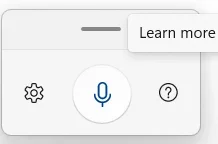
- Switched to Voice Access (Win+U → Speech → On). Toolbar appears [attached screenshot].
- Clicking the central mic button does nothing—no listening mode, no response.
- Checked Settings → System → Sound → Input: [Does the input bar move when you speak? Y/N – fill this in]
- Privacy → Microphone: Access ON, apps allowed ON.
- Privacy → Speech: Online recognition ON.
- Gear icon in Voice Access shows [what mic is selected? – fill this in].
- Restarted PC, updated Windows—no change.
- Thanks!
My Computer
At a glance
Win 11
- OS
- Win 11
- Computer type
- Laptop





