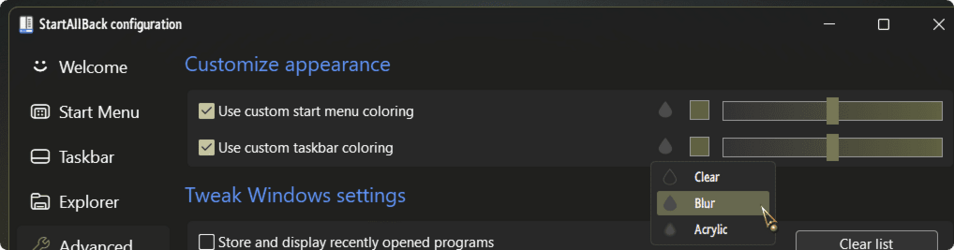
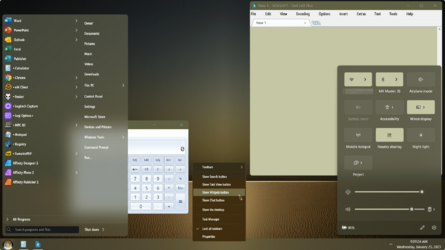
Windows 11's ''transparency'' effects


sAmUeL69

Member
Local time
11:59 AM
Posts
3
OS
Windows 11
so the question is, is there a way to set translucent surfaces to use blur instead of acrylic on windows 11's taskbar and start menu (including volume and brightness flyout and taskbar elements and context menus in general) in my opinion looks a lot obvious and cooler than that boring acrylic
nrru0s2qu1ea1.png
 
Windows Build/Version
Windows 11 Build 22000.1516
Last edited:

My Computer My Computer

At a glance

Windows 11intel Core i3-4005U4GBintel hd graphics 4400
OS
Windows 11
Computer type
Laptop
Manufacturer/Model
dell
CPU
intel Core i3-4005U
Motherboard
Unknown
Memory
4GB
Graphics Card(s)
intel hd graphics 4400
Sound Card
Built-in
Monitor(s) Displays
1
Screen Resolution
1366x768
Hard Drives
Samsung SSD 870 EVO 500GB
PSU
Unknown
Case
Unknown
Cooling
Unknown
Keyboard
Built-in
Mouse
Touchpad
Internet Speed
Unknown
Browser
Google Chrome
Antivirus
Windows Defender
... is there a way to set translucent surfaces to use blur instead of acrylic on windows 11...
Not natively..., that I know of!
 

My Computers My Computers

  • At a glance

    Windows 11 Pro
    OS
    Windows 11 Pro
    Computer type
    PC/Desktop
    Manufacturer/Model
    ASUS ROG Strix
  • At a glance

    Windows 11 Pro
    Operating System
    Windows 11 Pro
    Computer type
    Laptop
    Manufacturer/Model
    ASUS VivoBook
  • ASUS VivoBook 'Lite' ~ Windows 11 Home
lets wait i guess, eventually somebody will make an app that can achieve that
 

My Computer My Computer

At a glance

Windows 11intel Core i3-4005U4GBintel hd graphics 4400
OS
Windows 11
Computer type
Laptop
Manufacturer/Model
dell
CPU
intel Core i3-4005U
Motherboard
Unknown
Memory
4GB
Graphics Card(s)
intel hd graphics 4400
Sound Card
Built-in
Monitor(s) Displays
1
Screen Resolution
1366x768
Hard Drives
Samsung SSD 870 EVO 500GB
PSU
Unknown
Case
Unknown
Cooling
Unknown
Keyboard
Built-in
Mouse
Touchpad
Internet Speed
Unknown
Browser
Google Chrome
Antivirus
Windows Defender
Not natively..., that I know of!
the foto of the taskbar using blur was made with classic shell, which only touches the taskbar, nothing else, (flyouts, startmenu), just if somebody asks
 

My Computer My Computer

At a glance

Windows 11intel Core i3-4005U4GBintel hd graphics 4400
OS
Windows 11
Computer type
Laptop
Manufacturer/Model
dell
CPU
intel Core i3-4005U
Motherboard
Unknown
Memory
4GB
Graphics Card(s)
intel hd graphics 4400
Sound Card
Built-in
Monitor(s) Displays
1
Screen Resolution
1366x768
Hard Drives
Samsung SSD 870 EVO 500GB
PSU
Unknown
Case
Unknown
Cooling
Unknown
Keyboard
Built-in
Mouse
Touchpad
Internet Speed
Unknown
Browser
Google Chrome
Antivirus
Windows Defender

My Computers My Computers

  • At a glance

    Windows 11 Pro
    OS
    Windows 11 Pro
    Computer type
    PC/Desktop
    Manufacturer/Model
    ASUS ROG Strix
  • At a glance

    Windows 11 Pro
    Operating System
    Windows 11 Pro
    Computer type
    Laptop
    Manufacturer/Model
    ASUS VivoBook
  • ASUS VivoBook 'Lite' ~ Windows 11 Home
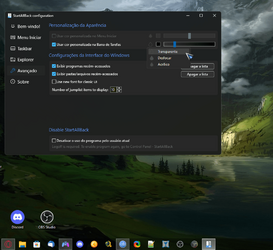
startallback - transparent 20%
1674657541962.png
 

My Computer My Computer

At a glance

Windows 11, Pro for Workstations, 22631.2861 ...Amd Ryzen 5 5500 ("Zen 3") (3.6GHz,45-65W,L3:...DDR4 OLOy Owl Black, 8GB, 3200MHZ, (x2)Colorful GeForce GTX 1650 Super
OS
Windows 11, Pro for Workstations, 22631.2861 (23H2)
Computer type
PC/Desktop
Manufacturer/Model
Custom
CPU
Amd Ryzen 5 5500 ("Zen 3") (3.6GHz,45-65W,L3:16M,6/12)
Motherboard
Asus Prime B450M Gaming/BR Chipset B450 AMD AM4 mATX DDR4 - BIOS 4002
Memory
DDR4 OLOy Owl Black, 8GB, 3200MHZ, (x2)
Graphics Card(s)
Colorful GeForce GTX 1650 Super
Sound Card
-
Monitor(s) Displays
Philips TV 43PFG5102/78
Screen Resolution
1920x1080
Hard Drives
SSD: 120GB, Sata III, Leitura 560MBs e Gravação 540MBs
HD: Seagate Barracuda 1TB, Sata III, 7200RPM, 64MB
PSU
Corsair ATX CV550 550W, 80 Plus Bronze, PFC Ativo
Case
Wheel Jack, Mid Tower, Vidro Temperado, Black
Cooling
default
Keyboard
common
Mouse
commom
Internet Speed
600mb
Browser
Opera
Antivirus
Windows Defender

My Computers My Computers

  • At a glance

    Windows11 Pro 26200.8894Intel Core i9 14900F (24 -Core, 68 MB Total C...32GB DDR5RTX 4080 Super w/610.74
    OS
    Windows11 Pro 26200.8894
    Computer type
    PC/Desktop
    Manufacturer/Model
    Dell Alienware Aurora R16
    CPU
    Intel Core i9 14900F (24 -Core, 68 MB Total Cache)
    Motherboard
    Dell Alienware
    Memory
    32GB DDR5
    Graphics Card(s)
    RTX 4080 Super w/610.74
    Sound Card
    Realtec
    Monitor(s) Displays
    Corsair XENEON 32QHD165
    Screen Resolution
    2560 X 1440
    Hard Drives
    1-2TB Samsung 990 Pro PCIe NVMe M2 SSD
    1-4TB Samsung 990 Pro PCIe NVMe M2 SSD
    PSU
    1000 Watt Platinum Dell
    Case
    Alienware
    Cooling
    Liquid Closed Loop
    Keyboard
    Corsair Strafe RGB
    Mouse
    Logitech MK270 Wireless
    Internet Speed
    100Gb's Down-20 Up
    Browser
    Firefox 152.0.6
    Antivirus
    Defender
    Other Info
    Very Quiet And Fast
    CyberPower UPS CP1500PFCLCD
  • At a glance

    PClinuxOS Mate (2025.7)13th Gen Inter(R) Core(TM) i3-1315U64 GB DDR4 @3200 MHz.Internal
    Operating System
    PClinuxOS Mate (2025.7)
    Computer type
    PC/Desktop
    Manufacturer/Model
    Intel
    CPU
    13th Gen Inter(R) Core(TM) i3-1315U
    Motherboard
    Intel
    Memory
    64 GB DDR4 @3200 MHz.
    Graphics card(s)
    Internal
    Sound Card
    None
    Monitor(s) Displays
    Dell 2419HGCF
    Screen Resolution
    1920 X 1080
    Hard Drives
    SAMSUNG 980 PRO SSD 2TB, PCIe 4.0 M.2 2280
    PSU
    Chicony 30 Watt
    Case
    Small
    Keyboard
    Dell
    Mouse
    Razor
    Internet Speed
    1GB
    Browser
    Slimjet
Doesn't almost all new UI use mica, not acrylic. But yes, I don't like it as well.
As far as I no there is no way to directly change it. At least no easy way.
 

My Computer My Computer

At a glance

Windows 11
OS
Windows 11
Back
Top Bottom