Windows changed time zone by itself. How do I stop it?


I apply my settings at shutdown and at boot, because MS just forces it's way. MS does not understand, that No means NO! 🤷‍♂️
I know, I feel like I am on a date with a rapist.
 

My Computers

System One System Two

  • OS
    Windows 11 Home
    Computer type
    PC/Desktop
    Manufacturer/Model
    Dell XPS 8940
    CPU
    Intel i7 10700
    Motherboard
    Dell
    Memory
    128gb crucial
    Graphics Card(s)
    nVidia RTX 2070 super
    Sound Card
    Dell
    Monitor(s) Displays
    2 24 inch Dell ultrasharp displays one touch enabled for video and photo editing
    Screen Resolution
    1080p
    Hard Drives
    Main Drive- XPG 2tb, Project drive - Kingston 1tb, Scratch drive - Kingston 512gb, Storage drive - Seagate barracuda 8tb
    PSU
    Dell
    Case
    Dell
    Cooling
    Custom Noctua setup
    Keyboard
    Vital Pro keyboard
    Mouse
    Vital Pro mouse
    Internet Speed
    Bell fibe 1.0 gbps
    Browser
    Edge
    Antivirus
    Defender
    Other Info
    Various printers, card readers, scanners etc for creative work. I built a NAS out of my old acer AC100 4 bay hot swap server with Xeon processor.
  • Operating System
    WIndows 11 Home
    Computer type
    Laptop
    Manufacturer/Model
    Dell Inspiron 5406 2 in 1
    CPU
    intel i7 1165G7
    Motherboard
    dell
    Memory
    64gb of Ballistix DD4 ram
    Graphics card(s)
    Iris Xe
    Sound Card
    dell
    Monitor(s) Displays
    14 inch touchscreen, plus a second 14 inch touchscreen via HDMI while on location
    Screen Resolution
    1080p
    Hard Drives
    Main drive - 2tb XPG, Storage drive - 1tb Seagate portable drive
    PSU
    dell plus a compact charger for travel
    Case
    dell
    Cooling
    repasted stock coolers
    Browser
    Edge
    Antivirus
    defender
    Other Info
    Thinking about getting an eGpu for this system to take on the road with us.
This happens to me every update. It's not only time zone either. There are a large amount of settings I have set up in my pcs that all get changed, in edge too. Typical Microsoft heavy handed ways to get you to share data, "embrace Ai " since they are losing money by the boat load because of their short sightedness on it etc. I have to go change settings back to the way I WANT, not the way they want.

I am used to it now.
At the same time that this event occurred I also got a notification from Microsoft stating that there was a problem with my account. To be fair I have a local account but I also have a separate Microsoft account that is not paired to my OS. When I attempted to repair the alleged "problem" Microsoft stated that they sent me a code to my email. I received no such code. They did the same with my backup email. Again. No such code. No, not in my junk mail, not in my "other" folder, not in my inbox, nada, zip, zero. In addition to this I received a notification that there was a problem with one of my apps. This turned out to be Microsoft PC Manager. So I ran PC Manager and got this:

MSWANTS.webp

Indeed. Only a suggestion, of course. Could it be that they want me to reset the taskbar because they can't even keep the time right? or, are they messing with the taskbar because I don't have it set the way they want it.
 

My Computer

System One

  • OS
    WIN 11, WIN 10, WIN 8.1, WIN 7 U, WIN 7 PRO, WIN 7 HOME (32 Bit), LINUX MINT
    Computer type
    PC/Desktop
    Manufacturer/Model
    DIY, ASUS, and DELL
    CPU
    Intel i7 6900K and i9-7960X / AMD 3800X (8 core)
    Motherboard
    ASUS X99E-WS USB 3.1 and ASUS X299 SAGE
    Memory
    128 GB CORSAIR DOMINATOR PLATINUM (B DIE)
    Graphics Card(s)
    NVIDIA 1070 and RTX 3070
    Sound Card
    Crystal Sound (onboard)
    Monitor(s) Displays
    single Samsung 30" 4K and 8" aux monitor
    Screen Resolution
    4K and something equally attrocious. I'll be working on this.
    Hard Drives
    A, B, C, D, E, F, G, H, I, J, K, L, M, N, O, P, Q, R, S, T, U, V, W

    Ports X, Y, and Z are reserved for USB access and removable drives.

    Drive types consist of the following: Various mechanical hard drives bearing the brand names, Seagate, Toshiba, and Western Digital. Various NVMe drives bearing the brand names Kingston, Intel, Silicon Power, Crucial, Western Digital, and Team Group. Various SATA SSDs bearing various different brand names.

    RAID arrays included:

    LSI RAID 10 (WD Velociraptors) 1115.72 GB
    LSI RAID 10 (WD SSDS) 463.80 GB

    INTEL RAID 0 (KINGSTON HYPER X) System 447.14 GB
    INTEL RAID 1 TOSHIBA ENTERPRIZE class Data 2794.52 GB
    INTEL RAID 1 SEAGATE HYBRID 931.51 GB
    PSU
    SEVERAL. I prefer my Corsair Platinum HX1000i but I also like EVGA power supplies
    Case
    ThermalTake Level 10 GT (among others)
    Cooling
    Noctua is my favorite and I use it in my main. I also own various other coolers.
    Keyboard
    all kinds.
    Mouse
    all kinds
    Internet Speed
    360 mbps - 1 gbps (depending)
    Browser
    FIREFOX
    Antivirus
    KASPERSKY (no apologies)
    Other Info
    Gave Dell touch screen with Windows 11 to daughter and got me an OTVOC. Being a PC builder I own many desktop PCs as well. I am a father of five providing PCs, laptops, and tablets for all my family, most of which I have modified, rebuilt, or simply built from scratch. I do not own a cell phone, never have, never will.
Windows has changed my time zone to Eastern (US) several times today. A little searching online shows that one of the main ways that the Windows location service determines the location is the IP address. I wonder if my ISP did something to cause the problem. To reset my IP address I restarted my Gateway. After I was back online I ran "ipconfig /all". It showed that I was assigned a new IP address.
Lease Obtained. . . . . . . . . . : Saturday, March 7, 2026 6:50:54 PM
Lease Expires . . . . . . . . . . : Monday, March 9, 2026 6:51:55 PM
It is strange that it will expire in two days. However, that may have happened anyways because of the time change on March 8th.
Update:
About 30 minutes after I restarted the Gateway I got a Windows notification that it had changed the time zone to Eastern (US) again. I have manually changed it to Central (US) again. I will check the Windows setting again after the time change.
 
Last edited:

My Computers

System One System Two

  • OS
    Windows 11 Pro 25H2 (26200.6901)
    Computer type
    Laptop
    Manufacturer/Model
    ASUS TUF Gaming A15 (2022)
    CPU
    AMD Ryzen 7 6800H with Radeon 680M GPU (486MB RAM)
    Memory
    Crucial DDR5-4800 (2400MHz) 32GB (2 x 16GB)
    Graphics Card(s)
    NVIDIA RTX 3060 Laptop (6GB RAM)
    Sound Card
    n/a
    Monitor(s) Displays
    15.6-inch
    Screen Resolution
    1920x1080 300Hz
    Hard Drives
    2 x Samsung 990 Evo Plus (2TB M.2 NVME SSD)
    PSU
    n/a
    Mouse
    Wireless Mouse M510
    Internet Speed
    2100Mbps/300Mbps
    Browser
    Firefox
    Antivirus
    Malwarebytes
  • Operating System
    Windows 11 Pro 25H2 (26200.8246)
    Computer type
    PC/Desktop
    Manufacturer/Model
    Custom build
    CPU
    AMD Ryzen 7 5700X3D
    Motherboard
    ASUS ROG Strix B550-F Gaming WiFi II
    Memory
    G.SKILL Flare X 32GB (2x16GB) DDR4
    Graphics card(s)
    ASUS ROG-STRIX-RTX3060TI-08G-V2-GAMING (RTX 3060-Ti, 8GB RAM)
    Monitor(s) Displays
    Samsung G50D IPS 27"
    Screen Resolution
    1440p/180Hz
    Hard Drives
    SAMSUNG 990 EVO Plus (2TB] M.2 NVME SSD
    SAMSUNG 990 EVO Plus (4TB) M.2 NVME SSD
    PSU
    Corsair RM750x (750 watts)
    Case
    Cooler Master MasterCase 5
    Cooling
    Scythe Mugen 6
    Keyboard
    Logitech K520 (MK540 keyboard/mouse combo)
    Mouse
    Logitech M310 (MK540 keyboard/mouse combo)
    Internet Speed
    2100 Mbps down / 300 Mbps up
    Browser
    Firefox, Edge, Chrome
    Antivirus
    Malwarebytes (Premium)
    Other Info
    ASUS Blu-ray Burner BW-16D1HT (SATA) || Western Digital Easystore 20TB USB 3.0 external hard drive used with Acronis True Image 2025 backup software || HP OfficeJet Pro 6975 Printer/Scanner
Windows has changed my time zone to Eastern (US) several times today. A little searching online shows that one of the main ways that the Windows location service determines the location is the IP address. I wonder if my ISP did something to cause the problem. To reset my IP address I restarted my Gateway. After I was back online I ran "ipconfig /all". It showed that I was assigned a new IP address.

It is strange that it will expire in two days. However, that may have happened anyways because of the time change on March 8th.

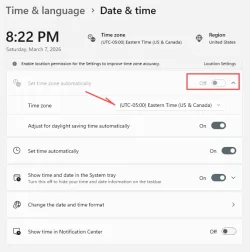
Make sure the BIOS is set to correct time/date.
Then in Settings... set your time zone manually...
Then set it like this... (RED box)

Image1.webp


NOTE: The clocks (in the US), move ahead one hour... tonight. Well, 2am Sunday morning.


Image1.webp
 
Last edited:

My Computers

System One System Two

  • OS
    Win 11 Home ♦♦♦26200.8457 ♦♦♦♦♦♦♦25H2
    Computer type
    PC/Desktop
    Manufacturer/Model
    Built by Ghot® [May 2020]
    CPU
    AMD Ryzen 7 3700X
    Motherboard
    Asus Pro WS X570-ACE (BIOS 5302)
    Memory
    G.Skill (F4-3200C14D-16GTZKW)
    Graphics Card(s)
    EVGA RTX 2070 (08G-P4-2171-KR)
    Sound Card
    Realtek ALC1220P / ALC S1220A
    Monitor(s) Displays
    Dell U3011 30"
    Screen Resolution
    2560 x 1600
    Hard Drives
    2x Samsung 860 EVO 500GB,
    WD 4TB Black FZBX - SATA III,
    WD 8TB Black FZBX - SATA III,
    DRW-24B1ST CD/DVD Burner
    PSU
    PC Power & Cooling 750W Quad EPS12V
    Case
    Cooler Master ATCS 840 Tower
    Cooling
    CM Hyper 212 EVO (push/pull)
    Keyboard
    Ducky DK9008 Shine II Blue LED
    Mouse
    Logitech Optical M-100
    Internet Speed
    300/300
    Browser
    Firefox (latest)
    Antivirus
    Bitdefender Total Security
    Other Info
    Speakers: Klipsch Pro Media 2.1
  • Operating System
    Windows XP Pro 32bit w/SP3
    Computer type
    PC/Desktop
    Manufacturer/Model
    Built by Ghot® (not in use)
    CPU
    AMD Athlon 64 X2 5000+ (OC'd @ 3.2Ghz)
    Motherboard
    ASUS M2N32-SLI Deluxe Wireless Edition
    Memory
    TWIN2X2048-6400C4DHX (2 x 1GB, DDR2 800)
    Graphics card(s)
    EVGA 256-P2-N758-TR GeForce 8600GT SSC
    Sound Card
    Onboard
    Monitor(s) Displays
    ViewSonic G90FB Black 19" Professional (CRT)
    Screen Resolution
    up to 2048 x 1536
    Hard Drives
    WD 36GB 10,000rpm Raptor SATA
    Seagate 80GB 7200rpm SATA
    Lite-On LTR-52246S CD/RW
    Lite-On LH-18A1P CD/DVD Burner
    PSU
    PC Power & Cooling Silencer 750 Quad EPS12V
    Case
    Generic Beige case, 80mm fans
    Cooling
    ZALMAN 9500A 92mm CPU Cooler
    Keyboard
    Logitech Classic Keybooard 200
    Mouse
    Logitech Optical M-BT96a
    Internet Speed
    300/300
    Browser
    Firefox 3.x ??
    Antivirus
    Symantec (Norton)
    Other Info
    Still assembled, still runs. Haven't turned it on for 15 years?
Leaving mine on manual. It's easier just to reset it myself.
 

My Computer

System One

  • OS
    WIN 11, WIN 10, WIN 8.1, WIN 7 U, WIN 7 PRO, WIN 7 HOME (32 Bit), LINUX MINT
    Computer type
    PC/Desktop
    Manufacturer/Model
    DIY, ASUS, and DELL
    CPU
    Intel i7 6900K and i9-7960X / AMD 3800X (8 core)
    Motherboard
    ASUS X99E-WS USB 3.1 and ASUS X299 SAGE
    Memory
    128 GB CORSAIR DOMINATOR PLATINUM (B DIE)
    Graphics Card(s)
    NVIDIA 1070 and RTX 3070
    Sound Card
    Crystal Sound (onboard)
    Monitor(s) Displays
    single Samsung 30" 4K and 8" aux monitor
    Screen Resolution
    4K and something equally attrocious. I'll be working on this.
    Hard Drives
    A, B, C, D, E, F, G, H, I, J, K, L, M, N, O, P, Q, R, S, T, U, V, W

    Ports X, Y, and Z are reserved for USB access and removable drives.

    Drive types consist of the following: Various mechanical hard drives bearing the brand names, Seagate, Toshiba, and Western Digital. Various NVMe drives bearing the brand names Kingston, Intel, Silicon Power, Crucial, Western Digital, and Team Group. Various SATA SSDs bearing various different brand names.

    RAID arrays included:

    LSI RAID 10 (WD Velociraptors) 1115.72 GB
    LSI RAID 10 (WD SSDS) 463.80 GB

    INTEL RAID 0 (KINGSTON HYPER X) System 447.14 GB
    INTEL RAID 1 TOSHIBA ENTERPRIZE class Data 2794.52 GB
    INTEL RAID 1 SEAGATE HYBRID 931.51 GB
    PSU
    SEVERAL. I prefer my Corsair Platinum HX1000i but I also like EVGA power supplies
    Case
    ThermalTake Level 10 GT (among others)
    Cooling
    Noctua is my favorite and I use it in my main. I also own various other coolers.
    Keyboard
    all kinds.
    Mouse
    all kinds
    Internet Speed
    360 mbps - 1 gbps (depending)
    Browser
    FIREFOX
    Antivirus
    KASPERSKY (no apologies)
    Other Info
    Gave Dell touch screen with Windows 11 to daughter and got me an OTVOC. Being a PC builder I own many desktop PCs as well. I am a father of five providing PCs, laptops, and tablets for all my family, most of which I have modified, rebuilt, or simply built from scratch. I do not own a cell phone, never have, never will.

Latest Support Threads

Back
Top Bottom