Solved Windows Explorer Search History Not Displayed


Lloyd Phillips

Active member
Local time
11:56 AM
Posts
8
OS
Windows 11 25h2
Hi, I've seen a few problems mentioned regarding windows 11 not displaying search results, and a LOT of false leads going over the same old pointless procedures.
It seems the ability was removed to have search history displayed in the Explorer search box as it was up until Windows 10.
I know history is being recorded, confirmed by the search bar history dropdown, but nothing is shown in the search bar field itself.
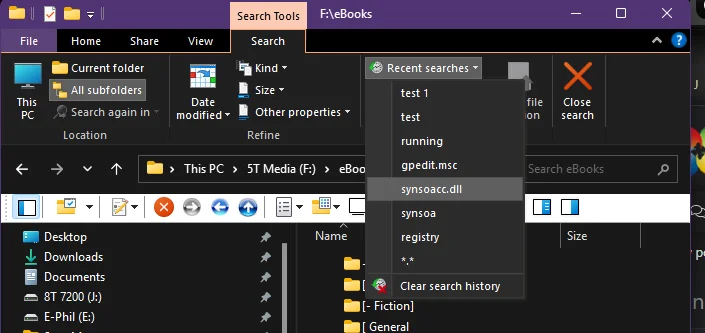
search history exists.webp
I thought it was due to the upgrade I did from Win10 to 11 or from some tweaking I did, so I did a fresh install and see it occurs there, too.

I am looking either for a fix or for confirmation that this feature has been disabled in Windows 11.
Thanks!
 

My Computer My Computer

At a glance

Windows 11 25h2i7 -12700k64 Gig GSkill RipJaws s5 6000MSI GeForce RTX 3060
OS
Windows 11 25h2
Computer type
PC/Desktop
Manufacturer/Model
Home-built
CPU
i7 -12700k
Motherboard
MSI Pro z790-A Max Wifi
Memory
64 Gig GSkill RipJaws s5 6000
Graphics Card(s)
MSI GeForce RTX 3060
Monitor(s) Displays
BenQ GL2760H
Screen Resolution
1920 x 1080
Hard Drives
[OS: Samsung-990.Pro-1T M.2 PCIe 4.0]
PSU
Seasonic-Vertex GX-1000 80+ Gold
Case
Fractal Design R5
Cooling
[CPU: Thermalright Phantom Spirit 120 SE] [Case: Fractal Design GP-14 x 3]
Keyboard
Razer Blackwidow V4 Pro + Razer Orbweaver Chroma
Mouse
Razer Deathadder V2
Browser
Chrome
Antivirus
MS Defender
That screenshot certainly doesn't look like file explorer to me. What 3rd party file explorer replacement app are you using?
Personally, I can give no great advice on file history as I do not use it and have it disabled, but see if any of these tutorials are of any help


My Computers My Computers

  • At a glance

    Windows 11 Pro 25H2 26200.8655i9-10900 10 core 20 threads32 gbnone-Intel UHD Graphics 630
    OS
    Windows 11 Pro 25H2 26200.8655
    Computer type
    PC/Desktop
    Manufacturer/Model
    Dell Optiplex 7080
    CPU
    i9-10900 10 core 20 threads
    Motherboard
    DELL 0J37VM
    Memory
    32 gb
    Graphics Card(s)
    none-Intel UHD Graphics 630
    Sound Card
    Integrated Realtek
    Monitor(s) Displays
    Benq 27
    Screen Resolution
    2560x1440
    Hard Drives
    2x1tb Solidigm m.2 nvme /External drives 512gb Samsung m.2 sata+2tb Kingston m2.nvme
    PSU
    500w
    Case
    MT
    Cooling
    Dell Premium
    Keyboard
    Logitech wired
    Mouse
    Logitech wireless
    Internet Speed
    so slow I'm too embarrassed to tell
    Browser
    #1 Edge #2 Firefox
    Antivirus
    Defender+MWB Premium
  • At a glance

    Windows 11 Pro 24H2 26200.8457AMD Ryzen 7 6800U32 gbintegrated
    Operating System
    Windows 11 Pro 24H2 26200.8457
    Computer type
    PC/Desktop
    Manufacturer/Model
    Beelink Mini PC SER5
    CPU
    AMD Ryzen 7 6800U
    Memory
    32 gb
    Graphics card(s)
    integrated
    Sound Card
    integrated
    Monitor(s) Displays
    Benq 27
    Screen Resolution
    2560x1440
    Hard Drives
    1TB Crucial nvme
    Keyboard
    Logitech wired
    Mouse
    Logitech wireless
    Internet Speed
    still too embarrassed to tell
    Browser
    Firefox
    Antivirus
    Defender
    Other Info
    System 3 is non compliant Dell 9020 i7-4770/24gb ram Win11 PRO 26200.8457
I've seen a few problems mentioned regarding windows 11 not displaying search results

Not problems. To my understanding, Windows File Explorer no longer remembers search history by design. This change was implemented in Windows 11 and now only uses instant results in File Explorer.

Use something like “Everything Search” or a 3rd party File Explorer.

Having said that, sometimes when I click in the search box, it will show some recently typed entries in the drop down. I have no idea why as I haven’t changed anything, nor do I use tweaks for File Explorer.
 

My Computers My Computers

  • At a glance

    Windows 11 Pro 25H2 Build 26200.8655Intel(R) Core(TM) i7-4770K CPU @ 3.50GHz32.0 GB of I forget and the box is in storage.Gigabyte nVidia GeForce GTX 1660 Super OC 6GB
    OS
    Windows 11 Pro 25H2 Build 26200.8655
    Computer type
    PC/Desktop
    Manufacturer/Model
    Sin-built 2013
    CPU
    Intel(R) Core(TM) i7-4770K CPU @ 3.50GHz
    Motherboard
    ASUS ROG Maximus VI Formula
    Memory
    32.0 GB of I forget and the box is in storage.
    Graphics Card(s)
    Gigabyte nVidia GeForce GTX 1660 Super OC 6GB
    Sound Card
    ROG SupremeFX Formula 8-Channel High Definition Audio
    Monitor(s) Displays
    5 x LG 25MS500-B - 1 x 24MK430H-B - 1 x Wacom Pro 22" Touch Screen Tablet
    Screen Resolution
    All over the place
    Hard Drives
    Too many to list.
    OS on Samsung 1TB 870 QVO SATA
    PSU
    Silverstone 1500
    Case
    NZXT Phantom 820 Full-Tower Case
    Cooling
    Noctua NH-D15 Elite Class Dual Tower CPU Cooler / 6 x EziDIY 120mm / 2 x Corsair 140mm somethings / 1 x 140mm Thermaltake something / 2 x 200mm Corsair.
    Keyboard
    Corsair K95 / Logitech diNovo Edge Wireless
    Mouse
    Logitech: G402 / G502 / Mx Masters / Mx Air Cordless
    Internet Speed
    2000/500Mbps
    Browser
    All sorts
    Antivirus
    Kaspersky Premium
    Other Info
    ㅤㅤㅤㅤㅤㅤㅤㅤㅤㅤㅤㅤㅤㅤㅤㅤㅤㅤㅤㅤㅤㅤㅤㅤㅤㅤㅤㅤㅤㅤㅤㅤㅤㅤㅤㅤㅤㅤㅤㅤ⠀⠀⠀⠀⠀⠀⠀⠀⠀⠀
    TP-Link BE9300 WiFi 7 Bluetooth 5.4 (Archer TBE550E)
    TP-Link TX201 V1 2.5GB Lan

    Grandstream HT812 - VoIP
    ASUS DSL-AX82U - Mesh
    ASUS RT-AC68U - Mesh
    ASUS RT-BE88U Router

    Brother MFC-L2880DW Printer

    I’m on a horse.
  • At a glance

    Windows 11 Pro 25H2 Build 26200.8655 (Wifes)Intel Core 12th Gen i5-1240P Processor (1.7 -...16GB LPDDR5 RAMIntel Iris Xe Graphics Processor
    Operating System
    Windows 11 Pro 25H2 Build 26200.8655 (Wifes)
    Computer type
    Laptop
    Manufacturer/Model
    LENOVO Yoga 7 14IRL8 - 7i EVO OLED 14" Touchscreen i5 12 Core 16GB/512GB
    CPU
    Intel Core 12th Gen i5-1240P Processor (1.7 - 4.4GHz)
    Memory
    16GB LPDDR5 RAM
    Graphics card(s)
    Intel Iris Xe Graphics Processor
    Sound Card
    Optimized with Dolby Atmos®
    Screen Resolution
    QHD 2880 x 1800 OLED
    Hard Drives
    M.2 512GB
    Antivirus
    Defender / Malwarebytes
    Other Info
    …still on a horse.
  • Yoga 7 2-in-1 14IML9 - Type 83DJ (Wifes)

    Processor: Intel® Core™ Ultra 7 155H Processor(Core™ Ultra 7 155H)
    Memory: 32GB LPD5X-7467
    Hard Drive: 1 TB SSD PCIe
    Wireless Network: 1x Wi-Fi 6E 2x2 AX; Bluetooth® 5.1 or above
    Ports: 1 x HDMI 2.1 TMDS; 1 x Novo Button; 1 x Combo Audio Jack
    2 x USB-C (USB 4.0)
    1 x USB-A 3.2 Gen 1
    Camera: 1080P FHD IR Hybrid with Dual Microphone and Privacy Shutter
    Graphics: Intel® Arc™ Graphics
    Monitor: 14" 2.8K
Not problems. To my understanding, Windows File Explorer no longer remembers search history by design. This change was implemented in Windows 11 and now only uses instant results in File Explorer.

Use something like “Everything Search” or a 3rd party File Explorer.

Having said that, sometimes when I click in the search box, it will show some recently typed entries in the drop down. I have no idea why as I haven’t changed anything, nor do I use tweaks for File Explorer.
Whether or not the loss of search history in the search box is a "problem" or not depends on one's point of view.
It is causing me a problem or I would not have posted about it.
It HAS caused problems for plenty of people. It is a problem to be forced to change the way one works.
That feature was a part of Windows for 30 years, and now it was removed.
In this case, so far it seems (as you seem to understand as well) they decided to cause the problems.
So, it seems it is not a bug, but a ..."feature"?

I do use Everything & Grep and a couple of others on occasion, but none are as quick and light as the feature they removed.
Thanks for the partial confirmation.
That screenshot certainly doesn't look like file explorer to me. What 3rd party file explorer replacement app are you using?
Personally, I can give no great advice on file history as I do not use it and have it disabled, but see if any of these tutorials are of any help

As I said, I found the same issue on a fresh install.
The top section , which I usually leave closed, is the standard Menu bar, which I dropped down to show the search history.
The lower, light-colored part is Open Shell.
 

My Computer My Computer

At a glance

Windows 11 25h2i7 -12700k64 Gig GSkill RipJaws s5 6000MSI GeForce RTX 3060
OS
Windows 11 25h2
Computer type
PC/Desktop
Manufacturer/Model
Home-built
CPU
i7 -12700k
Motherboard
MSI Pro z790-A Max Wifi
Memory
64 Gig GSkill RipJaws s5 6000
Graphics Card(s)
MSI GeForce RTX 3060
Monitor(s) Displays
BenQ GL2760H
Screen Resolution
1920 x 1080
Hard Drives
[OS: Samsung-990.Pro-1T M.2 PCIe 4.0]
PSU
Seasonic-Vertex GX-1000 80+ Gold
Case
Fractal Design R5
Cooling
[CPU: Thermalright Phantom Spirit 120 SE] [Case: Fractal Design GP-14 x 3]
Keyboard
Razer Blackwidow V4 Pro + Razer Orbweaver Chroma
Mouse
Razer Deathadder V2
Browser
Chrome
Antivirus
MS Defender
Whether or not the loss of search history in the search box is a "problem" or not depends on one's point of view.
It is causing me a problem or I would not have posted about it.

OK then, Lloyd, I’ll rephrase it. It’s not a Windows problem.


As I said, I found the same issue on a fresh install

Read my post. Search history apparently went when Windows 11 was released.

The top section , which I usually leave closed, is the standard Menu bar, which I dropped down to show the search history.

That’s not standard for File Explorer. There is no drop down that shows Recent Search options. You’re obviously using something to enhance File Explorer, like Classic Ribbon or something else. Explorer Patcher, or maybe OpenShell adds it?

Also, there is no Standard Menu Bar that I am aware of, again, you’re either using Classic Ribbon or some other enhancement. One can only guess. I’d agree that glasskuter is correct when she mentions that the screenshot doesn’t look like the native File Explorer.
 
Last edited:

My Computers My Computers

  • At a glance

    Windows 11 Pro 25H2 Build 26200.8655Intel(R) Core(TM) i7-4770K CPU @ 3.50GHz32.0 GB of I forget and the box is in storage.Gigabyte nVidia GeForce GTX 1660 Super OC 6GB
    OS
    Windows 11 Pro 25H2 Build 26200.8655
    Computer type
    PC/Desktop
    Manufacturer/Model
    Sin-built 2013
    CPU
    Intel(R) Core(TM) i7-4770K CPU @ 3.50GHz
    Motherboard
    ASUS ROG Maximus VI Formula
    Memory
    32.0 GB of I forget and the box is in storage.
    Graphics Card(s)
    Gigabyte nVidia GeForce GTX 1660 Super OC 6GB
    Sound Card
    ROG SupremeFX Formula 8-Channel High Definition Audio
    Monitor(s) Displays
    5 x LG 25MS500-B - 1 x 24MK430H-B - 1 x Wacom Pro 22" Touch Screen Tablet
    Screen Resolution
    All over the place
    Hard Drives
    Too many to list.
    OS on Samsung 1TB 870 QVO SATA
    PSU
    Silverstone 1500
    Case
    NZXT Phantom 820 Full-Tower Case
    Cooling
    Noctua NH-D15 Elite Class Dual Tower CPU Cooler / 6 x EziDIY 120mm / 2 x Corsair 140mm somethings / 1 x 140mm Thermaltake something / 2 x 200mm Corsair.
    Keyboard
    Corsair K95 / Logitech diNovo Edge Wireless
    Mouse
    Logitech: G402 / G502 / Mx Masters / Mx Air Cordless
    Internet Speed
    2000/500Mbps
    Browser
    All sorts
    Antivirus
    Kaspersky Premium
    Other Info
    ㅤㅤㅤㅤㅤㅤㅤㅤㅤㅤㅤㅤㅤㅤㅤㅤㅤㅤㅤㅤㅤㅤㅤㅤㅤㅤㅤㅤㅤㅤㅤㅤㅤㅤㅤㅤㅤㅤㅤㅤ⠀⠀⠀⠀⠀⠀⠀⠀⠀⠀
    TP-Link BE9300 WiFi 7 Bluetooth 5.4 (Archer TBE550E)
    TP-Link TX201 V1 2.5GB Lan

    Grandstream HT812 - VoIP
    ASUS DSL-AX82U - Mesh
    ASUS RT-AC68U - Mesh
    ASUS RT-BE88U Router

    Brother MFC-L2880DW Printer

    I’m on a horse.
  • At a glance

    Windows 11 Pro 25H2 Build 26200.8655 (Wifes)Intel Core 12th Gen i5-1240P Processor (1.7 -...16GB LPDDR5 RAMIntel Iris Xe Graphics Processor
    Operating System
    Windows 11 Pro 25H2 Build 26200.8655 (Wifes)
    Computer type
    Laptop
    Manufacturer/Model
    LENOVO Yoga 7 14IRL8 - 7i EVO OLED 14" Touchscreen i5 12 Core 16GB/512GB
    CPU
    Intel Core 12th Gen i5-1240P Processor (1.7 - 4.4GHz)
    Memory
    16GB LPDDR5 RAM
    Graphics card(s)
    Intel Iris Xe Graphics Processor
    Sound Card
    Optimized with Dolby Atmos®
    Screen Resolution
    QHD 2880 x 1800 OLED
    Hard Drives
    M.2 512GB
    Antivirus
    Defender / Malwarebytes
    Other Info
    …still on a horse.
  • Yoga 7 2-in-1 14IML9 - Type 83DJ (Wifes)

    Processor: Intel® Core™ Ultra 7 155H Processor(Core™ Ultra 7 155H)
    Memory: 32GB LPD5X-7467
    Hard Drive: 1 TB SSD PCIe
    Wireless Network: 1x Wi-Fi 6E 2x2 AX; Bluetooth® 5.1 or above
    Ports: 1 x HDMI 2.1 TMDS; 1 x Novo Button; 1 x Combo Audio Jack
    2 x USB-C (USB 4.0)
    1 x USB-A 3.2 Gen 1
    Camera: 1080P FHD IR Hybrid with Dual Microphone and Privacy Shutter
    Graphics: Intel® Arc™ Graphics
    Monitor: 14" 2.8K
Lloyd Phillips said:
As I said, I found the same issue on a fresh install
Read my post. Search history apparently went when Windows 11 was released.

That’s not standard for File Explorer. There is no drop down that shows Recent Search options. You’re obviously using something to enhance File Explorer, like Classic Ribbon or something else. Explorer Patcher, or maybe OpenShell adds it?

Also, there is no Standard Menu Bar that I am aware of, again, you’re either using Classic Ribbon or some other enhancement. One can only guess. I’d go as far as to say that @glasskuter is correct when she mentions that the screenshot doesn’t look like the native File Explorer.
Yes I know you said that it apparently went when Windows 11 was released.
Read MY post.
That reply was to glasskuter to clarify that I found the same thing on a fresh install.
Yes the top "standard" menu bar as well as the Open Shell are modifications.
The only reason I posted that picture was to make it clear, as i said, that a search history is being kept in some way, and the change is that it is not being displayed in the search field.
 

My Computer My Computer

At a glance

Windows 11 25h2i7 -12700k64 Gig GSkill RipJaws s5 6000MSI GeForce RTX 3060
OS
Windows 11 25h2
Computer type
PC/Desktop
Manufacturer/Model
Home-built
CPU
i7 -12700k
Motherboard
MSI Pro z790-A Max Wifi
Memory
64 Gig GSkill RipJaws s5 6000
Graphics Card(s)
MSI GeForce RTX 3060
Monitor(s) Displays
BenQ GL2760H
Screen Resolution
1920 x 1080
Hard Drives
[OS: Samsung-990.Pro-1T M.2 PCIe 4.0]
PSU
Seasonic-Vertex GX-1000 80+ Gold
Case
Fractal Design R5
Cooling
[CPU: Thermalright Phantom Spirit 120 SE] [Case: Fractal Design GP-14 x 3]
Keyboard
Razer Blackwidow V4 Pro + Razer Orbweaver Chroma
Mouse
Razer Deathadder V2
Browser
Chrome
Antivirus
MS Defender
OK then. No problem, Lloyd.

I am looking either for a fix or for confirmation that this feature has been disabled in Windows 11.
Thanks

Seems to be a moot issue now. Use a 3rd party Explorer or stick to “Everything Search”
I have never seen an Add-on for File Explorer, let alone for Search functions, so I don’t believe there is much of a choice other than to soldier on.

Cheers.
 

My Computers My Computers

  • At a glance

    Windows 11 Pro 25H2 Build 26200.8655Intel(R) Core(TM) i7-4770K CPU @ 3.50GHz32.0 GB of I forget and the box is in storage.Gigabyte nVidia GeForce GTX 1660 Super OC 6GB
    OS
    Windows 11 Pro 25H2 Build 26200.8655
    Computer type
    PC/Desktop
    Manufacturer/Model
    Sin-built 2013
    CPU
    Intel(R) Core(TM) i7-4770K CPU @ 3.50GHz
    Motherboard
    ASUS ROG Maximus VI Formula
    Memory
    32.0 GB of I forget and the box is in storage.
    Graphics Card(s)
    Gigabyte nVidia GeForce GTX 1660 Super OC 6GB
    Sound Card
    ROG SupremeFX Formula 8-Channel High Definition Audio
    Monitor(s) Displays
    5 x LG 25MS500-B - 1 x 24MK430H-B - 1 x Wacom Pro 22" Touch Screen Tablet
    Screen Resolution
    All over the place
    Hard Drives
    Too many to list.
    OS on Samsung 1TB 870 QVO SATA
    PSU
    Silverstone 1500
    Case
    NZXT Phantom 820 Full-Tower Case
    Cooling
    Noctua NH-D15 Elite Class Dual Tower CPU Cooler / 6 x EziDIY 120mm / 2 x Corsair 140mm somethings / 1 x 140mm Thermaltake something / 2 x 200mm Corsair.
    Keyboard
    Corsair K95 / Logitech diNovo Edge Wireless
    Mouse
    Logitech: G402 / G502 / Mx Masters / Mx Air Cordless
    Internet Speed
    2000/500Mbps
    Browser
    All sorts
    Antivirus
    Kaspersky Premium
    Other Info
    ㅤㅤㅤㅤㅤㅤㅤㅤㅤㅤㅤㅤㅤㅤㅤㅤㅤㅤㅤㅤㅤㅤㅤㅤㅤㅤㅤㅤㅤㅤㅤㅤㅤㅤㅤㅤㅤㅤㅤㅤ⠀⠀⠀⠀⠀⠀⠀⠀⠀⠀
    TP-Link BE9300 WiFi 7 Bluetooth 5.4 (Archer TBE550E)
    TP-Link TX201 V1 2.5GB Lan

    Grandstream HT812 - VoIP
    ASUS DSL-AX82U - Mesh
    ASUS RT-AC68U - Mesh
    ASUS RT-BE88U Router

    Brother MFC-L2880DW Printer

    I’m on a horse.
  • At a glance

    Windows 11 Pro 25H2 Build 26200.8655 (Wifes)Intel Core 12th Gen i5-1240P Processor (1.7 -...16GB LPDDR5 RAMIntel Iris Xe Graphics Processor
    Operating System
    Windows 11 Pro 25H2 Build 26200.8655 (Wifes)
    Computer type
    Laptop
    Manufacturer/Model
    LENOVO Yoga 7 14IRL8 - 7i EVO OLED 14" Touchscreen i5 12 Core 16GB/512GB
    CPU
    Intel Core 12th Gen i5-1240P Processor (1.7 - 4.4GHz)
    Memory
    16GB LPDDR5 RAM
    Graphics card(s)
    Intel Iris Xe Graphics Processor
    Sound Card
    Optimized with Dolby Atmos®
    Screen Resolution
    QHD 2880 x 1800 OLED
    Hard Drives
    M.2 512GB
    Antivirus
    Defender / Malwarebytes
    Other Info
    …still on a horse.
  • Yoga 7 2-in-1 14IML9 - Type 83DJ (Wifes)

    Processor: Intel® Core™ Ultra 7 155H Processor(Core™ Ultra 7 155H)
    Memory: 32GB LPD5X-7467
    Hard Drive: 1 TB SSD PCIe
    Wireless Network: 1x Wi-Fi 6E 2x2 AX; Bluetooth® 5.1 or above
    Ports: 1 x HDMI 2.1 TMDS; 1 x Novo Button; 1 x Combo Audio Jack
    2 x USB-C (USB 4.0)
    1 x USB-A 3.2 Gen 1
    Camera: 1080P FHD IR Hybrid with Dual Microphone and Privacy Shutter
    Graphics: Intel® Arc™ Graphics
    Monitor: 14" 2.8K
Hang on, doesn’t Everything Search add an Everything Search box to File Explorer anymore? I seem to recall it did, once?
 

My Computers My Computers

  • At a glance

    Windows 11 Pro 25H2 Build 26200.8655Intel(R) Core(TM) i7-4770K CPU @ 3.50GHz32.0 GB of I forget and the box is in storage.Gigabyte nVidia GeForce GTX 1660 Super OC 6GB
    OS
    Windows 11 Pro 25H2 Build 26200.8655
    Computer type
    PC/Desktop
    Manufacturer/Model
    Sin-built 2013
    CPU
    Intel(R) Core(TM) i7-4770K CPU @ 3.50GHz
    Motherboard
    ASUS ROG Maximus VI Formula
    Memory
    32.0 GB of I forget and the box is in storage.
    Graphics Card(s)
    Gigabyte nVidia GeForce GTX 1660 Super OC 6GB
    Sound Card
    ROG SupremeFX Formula 8-Channel High Definition Audio
    Monitor(s) Displays
    5 x LG 25MS500-B - 1 x 24MK430H-B - 1 x Wacom Pro 22" Touch Screen Tablet
    Screen Resolution
    All over the place
    Hard Drives
    Too many to list.
    OS on Samsung 1TB 870 QVO SATA
    PSU
    Silverstone 1500
    Case
    NZXT Phantom 820 Full-Tower Case
    Cooling
    Noctua NH-D15 Elite Class Dual Tower CPU Cooler / 6 x EziDIY 120mm / 2 x Corsair 140mm somethings / 1 x 140mm Thermaltake something / 2 x 200mm Corsair.
    Keyboard
    Corsair K95 / Logitech diNovo Edge Wireless
    Mouse
    Logitech: G402 / G502 / Mx Masters / Mx Air Cordless
    Internet Speed
    2000/500Mbps
    Browser
    All sorts
    Antivirus
    Kaspersky Premium
    Other Info
    ㅤㅤㅤㅤㅤㅤㅤㅤㅤㅤㅤㅤㅤㅤㅤㅤㅤㅤㅤㅤㅤㅤㅤㅤㅤㅤㅤㅤㅤㅤㅤㅤㅤㅤㅤㅤㅤㅤㅤㅤ⠀⠀⠀⠀⠀⠀⠀⠀⠀⠀
    TP-Link BE9300 WiFi 7 Bluetooth 5.4 (Archer TBE550E)
    TP-Link TX201 V1 2.5GB Lan

    Grandstream HT812 - VoIP
    ASUS DSL-AX82U - Mesh
    ASUS RT-AC68U - Mesh
    ASUS RT-BE88U Router

    Brother MFC-L2880DW Printer

    I’m on a horse.
  • At a glance

    Windows 11 Pro 25H2 Build 26200.8655 (Wifes)Intel Core 12th Gen i5-1240P Processor (1.7 -...16GB LPDDR5 RAMIntel Iris Xe Graphics Processor
    Operating System
    Windows 11 Pro 25H2 Build 26200.8655 (Wifes)
    Computer type
    Laptop
    Manufacturer/Model
    LENOVO Yoga 7 14IRL8 - 7i EVO OLED 14" Touchscreen i5 12 Core 16GB/512GB
    CPU
    Intel Core 12th Gen i5-1240P Processor (1.7 - 4.4GHz)
    Memory
    16GB LPDDR5 RAM
    Graphics card(s)
    Intel Iris Xe Graphics Processor
    Sound Card
    Optimized with Dolby Atmos®
    Screen Resolution
    QHD 2880 x 1800 OLED
    Hard Drives
    M.2 512GB
    Antivirus
    Defender / Malwarebytes
    Other Info
    …still on a horse.
  • Yoga 7 2-in-1 14IML9 - Type 83DJ (Wifes)

    Processor: Intel® Core™ Ultra 7 155H Processor(Core™ Ultra 7 155H)
    Memory: 32GB LPD5X-7467
    Hard Drive: 1 TB SSD PCIe
    Wireless Network: 1x Wi-Fi 6E 2x2 AX; Bluetooth® 5.1 or above
    Ports: 1 x HDMI 2.1 TMDS; 1 x Novo Button; 1 x Combo Audio Jack
    2 x USB-C (USB 4.0)
    1 x USB-A 3.2 Gen 1
    Camera: 1080P FHD IR Hybrid with Dual Microphone and Privacy Shutter
    Graphics: Intel® Arc™ Graphics
    Monitor: 14" 2.8K
Maybe give Seek Fast a once over look. It boasts addons for File Explorer.


IMG_5455.webp


Othr images and info here.


My Computers My Computers

  • At a glance

    Windows 11 Pro 25H2 Build 26200.8655Intel(R) Core(TM) i7-4770K CPU @ 3.50GHz32.0 GB of I forget and the box is in storage.Gigabyte nVidia GeForce GTX 1660 Super OC 6GB
    OS
    Windows 11 Pro 25H2 Build 26200.8655
    Computer type
    PC/Desktop
    Manufacturer/Model
    Sin-built 2013
    CPU
    Intel(R) Core(TM) i7-4770K CPU @ 3.50GHz
    Motherboard
    ASUS ROG Maximus VI Formula
    Memory
    32.0 GB of I forget and the box is in storage.
    Graphics Card(s)
    Gigabyte nVidia GeForce GTX 1660 Super OC 6GB
    Sound Card
    ROG SupremeFX Formula 8-Channel High Definition Audio
    Monitor(s) Displays
    5 x LG 25MS500-B - 1 x 24MK430H-B - 1 x Wacom Pro 22" Touch Screen Tablet
    Screen Resolution
    All over the place
    Hard Drives
    Too many to list.
    OS on Samsung 1TB 870 QVO SATA
    PSU
    Silverstone 1500
    Case
    NZXT Phantom 820 Full-Tower Case
    Cooling
    Noctua NH-D15 Elite Class Dual Tower CPU Cooler / 6 x EziDIY 120mm / 2 x Corsair 140mm somethings / 1 x 140mm Thermaltake something / 2 x 200mm Corsair.
    Keyboard
    Corsair K95 / Logitech diNovo Edge Wireless
    Mouse
    Logitech: G402 / G502 / Mx Masters / Mx Air Cordless
    Internet Speed
    2000/500Mbps
    Browser
    All sorts
    Antivirus
    Kaspersky Premium
    Other Info
    ㅤㅤㅤㅤㅤㅤㅤㅤㅤㅤㅤㅤㅤㅤㅤㅤㅤㅤㅤㅤㅤㅤㅤㅤㅤㅤㅤㅤㅤㅤㅤㅤㅤㅤㅤㅤㅤㅤㅤㅤ⠀⠀⠀⠀⠀⠀⠀⠀⠀⠀
    TP-Link BE9300 WiFi 7 Bluetooth 5.4 (Archer TBE550E)
    TP-Link TX201 V1 2.5GB Lan

    Grandstream HT812 - VoIP
    ASUS DSL-AX82U - Mesh
    ASUS RT-AC68U - Mesh
    ASUS RT-BE88U Router

    Brother MFC-L2880DW Printer

    I’m on a horse.
  • At a glance

    Windows 11 Pro 25H2 Build 26200.8655 (Wifes)Intel Core 12th Gen i5-1240P Processor (1.7 -...16GB LPDDR5 RAMIntel Iris Xe Graphics Processor
    Operating System
    Windows 11 Pro 25H2 Build 26200.8655 (Wifes)
    Computer type
    Laptop
    Manufacturer/Model
    LENOVO Yoga 7 14IRL8 - 7i EVO OLED 14" Touchscreen i5 12 Core 16GB/512GB
    CPU
    Intel Core 12th Gen i5-1240P Processor (1.7 - 4.4GHz)
    Memory
    16GB LPDDR5 RAM
    Graphics card(s)
    Intel Iris Xe Graphics Processor
    Sound Card
    Optimized with Dolby Atmos®
    Screen Resolution
    QHD 2880 x 1800 OLED
    Hard Drives
    M.2 512GB
    Antivirus
    Defender / Malwarebytes
    Other Info
    …still on a horse.
  • Yoga 7 2-in-1 14IML9 - Type 83DJ (Wifes)

    Processor: Intel® Core™ Ultra 7 155H Processor(Core™ Ultra 7 155H)
    Memory: 32GB LPD5X-7467
    Hard Drive: 1 TB SSD PCIe
    Wireless Network: 1x Wi-Fi 6E 2x2 AX; Bluetooth® 5.1 or above
    Ports: 1 x HDMI 2.1 TMDS; 1 x Novo Button; 1 x Combo Audio Jack
    2 x USB-C (USB 4.0)
    1 x USB-A 3.2 Gen 1
    Camera: 1080P FHD IR Hybrid with Dual Microphone and Privacy Shutter
    Graphics: Intel® Arc™ Graphics
    Monitor: 14" 2.8K
Hang on, doesn’t Everything Search add an Everything Search box to File Explorer anymore? I seem to recall it did, once?
Yes, it does.
 

My Computers My Computers

  • At a glance

    Windows 11 Pro
    OS
    Windows 11 Pro
    Computer type
    PC/Desktop
    Manufacturer/Model
    ASUS ROG Strix
  • At a glance

    Windows 11 Pro
    Operating System
    Windows 11 Pro
    Computer type
    Laptop
    Manufacturer/Model
    ASUS VivoBook
  • ASUS VivoBook 'Lite' ~ Windows 11 Home

My Computer My Computer

At a glance

Windows 11 25h2i7 -12700k64 Gig GSkill RipJaws s5 6000MSI GeForce RTX 3060
OS
Windows 11 25h2
Computer type
PC/Desktop
Manufacturer/Model
Home-built
CPU
i7 -12700k
Motherboard
MSI Pro z790-A Max Wifi
Memory
64 Gig GSkill RipJaws s5 6000
Graphics Card(s)
MSI GeForce RTX 3060
Monitor(s) Displays
BenQ GL2760H
Screen Resolution
1920 x 1080
Hard Drives
[OS: Samsung-990.Pro-1T M.2 PCIe 4.0]
PSU
Seasonic-Vertex GX-1000 80+ Gold
Case
Fractal Design R5
Cooling
[CPU: Thermalright Phantom Spirit 120 SE] [Case: Fractal Design GP-14 x 3]
Keyboard
Razer Blackwidow V4 Pro + Razer Orbweaver Chroma
Mouse
Razer Deathadder V2
Browser
Chrome
Antivirus
MS Defender
Back
Top Bottom