
Windows File Explorer: Search Box Font Size changed


insertrealname

Well-known member
Local time
11:25 AM
Posts
9
OS
Microsoft Windows 11 22H2 (OS Build 22621.1413)
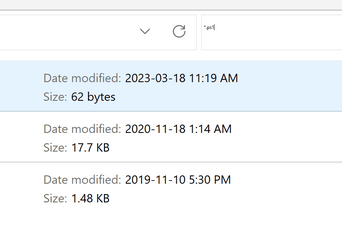
1679170167544.png
Above is a screenshot of the upper right corner of the Windows File Explorer. The font (the default Segoe UI) size is normal in all the other parts of the program, except for the typed in Search text box. I have checked that the components of Windows are correct with "dism /online /cleanup-image /scanhealth" and "sfc /scannow", I have reset the fonts to default in the options of the Windows Font Viewer, rebooted, etc., but something has suddenly changed this particular text box.

Anyone have ideas on what to do? I use Windows Search from this dialog box all the time.
 
Windows Build/Version
22H2 22621.1413 (rest of machine specs in my profile)

My Computer My Computer

At a glance

Microsoft Windows 11 22H2 (OS Build 22621.1413)Core i9-11900H32GBIntel UHD/NVIDIA GeForce RTX 3050 Ti (recent ...
OS
Microsoft Windows 11 22H2 (OS Build 22621.1413)
Computer type
Laptop
Manufacturer/Model
Dell XPS 15 9510
CPU
Core i9-11900H
Motherboard
Chipset: Intel WM 590
Memory
32GB
Graphics Card(s)
Intel UHD/NVIDIA GeForce RTX 3050 Ti (recent Intel drivers; NVidia DCH 528.49 studio drivers))
Monitor(s) Displays
Integrated UHD+ 3840 x 2400
Screen Resolution
Integrated UHD+ 3840 x 2400
Hard Drives
1x 500GB; 1x 2TB
Other Info
https://www.dell.com/support/manuals/en-ca/xps-15-9510-laptop/xps-15-9510-setup-and-specifications/specifications-of-xps-15-9510
See if changing system font or restoring default system font will help resolve the problem.

You can change the default Windows font from Segoe UI to anything you want. Here are the steps to change the default system font in Windows 10 and Windows 11.


Attachments

My Computer My Computer

At a glance

Windows 11AMD Ryzen 7 5700GMicron Technology DDR4-3200 16GBNVIDIA GeForce RTX 3060
OS
Windows 11
Computer type
PC/Desktop
Manufacturer/Model
HP Pavilion
CPU
AMD Ryzen 7 5700G
Motherboard
Erica6
Memory
Micron Technology DDR4-3200 16GB
Graphics Card(s)
NVIDIA GeForce RTX 3060
Sound Card
Realtek ALC671
Monitor(s) Displays
Samsung SyncMaster U28E590
Screen Resolution
3840 x 2160
Hard Drives
SAMSUNG MZVLQ1T0HALB-000H1
Thanks for the detailed instructions! I tried changing the default system font to "Trebuchet MS" with your command file. The default font did change, but the size of text in the search box remained very small, in fact I could not determine if it was "Trebuchet MS" or something else.

I have no idea why this problem arose. So what I shall do is to uninstall/reinstall both the NVidia and Intel graphics drivers. This problem might be a font rendering issue. Who knows, but it's worth 20 minutes to try it.
 

My Computer My Computer

At a glance

Microsoft Windows 11 22H2 (OS Build 22621.1413)Core i9-11900H32GBIntel UHD/NVIDIA GeForce RTX 3050 Ti (recent ...
OS
Microsoft Windows 11 22H2 (OS Build 22621.1413)
Computer type
Laptop
Manufacturer/Model
Dell XPS 15 9510
CPU
Core i9-11900H
Motherboard
Chipset: Intel WM 590
Memory
32GB
Graphics Card(s)
Intel UHD/NVIDIA GeForce RTX 3050 Ti (recent Intel drivers; NVidia DCH 528.49 studio drivers))
Monitor(s) Displays
Integrated UHD+ 3840 x 2400
Screen Resolution
Integrated UHD+ 3840 x 2400
Hard Drives
1x 500GB; 1x 2TB
Other Info
https://www.dell.com/support/manuals/en-ca/xps-15-9510-laptop/xps-15-9510-setup-and-specifications/specifications-of-xps-15-9510
OK, so I uninstalled all video drivers in the Apps list, and then deleted the drivers in Device Manager, to ensure that Windows did install the "in-box" WHQL drivers.

Alas, the problem is still there. I did notice one interesting thing: after all the drivers have been deleted in the Device Manager, then the display reverted to extremely tiny character display, each character being only a few pixels high. On a 15.6" (diagonal) UHD+ display, that was *very* small and pretty much the size used in the File Explorer Search Box. So I suspect some kind of programming issue in a recent update to some component of the File Explorer. I will try to follow up on the Microsoft forums as well as this one.

Grateful for any more suggestions! I have reinstalled the Dell set of drivers (the in-box drrivers don't include the graphics card control panels. These work fine, but the original issue is still present.
 

My Computer My Computer

At a glance

Microsoft Windows 11 22H2 (OS Build 22621.1413)Core i9-11900H32GBIntel UHD/NVIDIA GeForce RTX 3050 Ti (recent ...
OS
Microsoft Windows 11 22H2 (OS Build 22621.1413)
Computer type
Laptop
Manufacturer/Model
Dell XPS 15 9510
CPU
Core i9-11900H
Motherboard
Chipset: Intel WM 590
Memory
32GB
Graphics Card(s)
Intel UHD/NVIDIA GeForce RTX 3050 Ti (recent Intel drivers; NVidia DCH 528.49 studio drivers))
Monitor(s) Displays
Integrated UHD+ 3840 x 2400
Screen Resolution
Integrated UHD+ 3840 x 2400
Hard Drives
1x 500GB; 1x 2TB
Other Info
https://www.dell.com/support/manuals/en-ca/xps-15-9510-laptop/xps-15-9510-setup-and-specifications/specifications-of-xps-15-9510
See booting into Safe Mode have any change to it.
 

My Computer My Computer

At a glance

Windows 11AMD Ryzen 7 5700GMicron Technology DDR4-3200 16GBNVIDIA GeForce RTX 3060
OS
Windows 11
Computer type
PC/Desktop
Manufacturer/Model
HP Pavilion
CPU
AMD Ryzen 7 5700G
Motherboard
Erica6
Memory
Micron Technology DDR4-3200 16GB
Graphics Card(s)
NVIDIA GeForce RTX 3060
Sound Card
Realtek ALC671
Monitor(s) Displays
Samsung SyncMaster U28E590
Screen Resolution
3840 x 2160
Hard Drives
SAMSUNG MZVLQ1T0HALB-000H1
Will try that tomorrow.
 

My Computer My Computer

At a glance

Microsoft Windows 11 22H2 (OS Build 22621.1413)Core i9-11900H32GBIntel UHD/NVIDIA GeForce RTX 3050 Ti (recent ...
OS
Microsoft Windows 11 22H2 (OS Build 22621.1413)
Computer type
Laptop
Manufacturer/Model
Dell XPS 15 9510
CPU
Core i9-11900H
Motherboard
Chipset: Intel WM 590
Memory
32GB
Graphics Card(s)
Intel UHD/NVIDIA GeForce RTX 3050 Ti (recent Intel drivers; NVidia DCH 528.49 studio drivers))
Monitor(s) Displays
Integrated UHD+ 3840 x 2400
Screen Resolution
Integrated UHD+ 3840 x 2400
Hard Drives
1x 500GB; 1x 2TB
Other Info
https://www.dell.com/support/manuals/en-ca/xps-15-9510-laptop/xps-15-9510-setup-and-specifications/specifications-of-xps-15-9510
Just wanted to say welcome to the forum and say that is one heck of laptap you've got there. Congrats. Your fully listed specs is much appreciated . A link to your Dell documentation is a cherry on top. Thank you.
 
Last edited:

My Computers My Computers

  • At a glance

    Windows 11 Pro 25H2 26200.8655i9-10900 10 core 20 threads32 gbnone-Intel UHD Graphics 630
    OS
    Windows 11 Pro 25H2 26200.8655
    Computer type
    PC/Desktop
    Manufacturer/Model
    Dell Optiplex 7080
    CPU
    i9-10900 10 core 20 threads
    Motherboard
    DELL 0J37VM
    Memory
    32 gb
    Graphics Card(s)
    none-Intel UHD Graphics 630
    Sound Card
    Integrated Realtek
    Monitor(s) Displays
    Benq 27
    Screen Resolution
    2560x1440
    Hard Drives
    2x1tb Solidigm m.2 nvme /External drives 512gb Samsung m.2 sata+2tb Kingston m2.nvme
    PSU
    500w
    Case
    MT
    Cooling
    Dell Premium
    Keyboard
    Logitech wired
    Mouse
    Logitech wireless
    Internet Speed
    so slow I'm too embarrassed to tell
    Browser
    #1 Edge #2 Firefox
    Antivirus
    Defender+MWB Premium
  • At a glance

    Windows 11 Pro 24H2 26200.8457AMD Ryzen 7 6800U32 gbintegrated
    Operating System
    Windows 11 Pro 24H2 26200.8457
    Computer type
    PC/Desktop
    Manufacturer/Model
    Beelink Mini PC SER5
    CPU
    AMD Ryzen 7 6800U
    Memory
    32 gb
    Graphics card(s)
    integrated
    Sound Card
    integrated
    Monitor(s) Displays
    Benq 27
    Screen Resolution
    2560x1440
    Hard Drives
    1TB Crucial nvme
    Keyboard
    Logitech wired
    Mouse
    Logitech wireless
    Internet Speed
    still too embarrassed to tell
    Browser
    Firefox
    Antivirus
    Defender
    Other Info
    System 3 is non compliant Dell 9020 i7-4770/24gb ram Win11 PRO 26200.8457
Yes, I was very lucky when I bought it on eBay a few years ago: open-box, essentially new condition w/3 years of Dell's on-site support services should something go wrong (I subsequently extended that to the maximum period possible, since this laptop is going to be more than adequate for a long time, and repairs of any laptop are horrendously expensive...). When the price of 2TB SSDs became more reasonable I then put one in the empty 2nd NVME slot.

This XPS 15 model is slightly thinner and lighter than predecessors in the same series: all metal, but not quite the same massive machined metal solid durable feel as, for instance, the earlier 9560. Still good, but the race to ever thinner portability is getting out of hand.

I recommend this series, as it's a good compromise of screen size, portability, and performance for someone's principal computer, which is my case.
 

My Computer My Computer

At a glance

Microsoft Windows 11 22H2 (OS Build 22621.1413)Core i9-11900H32GBIntel UHD/NVIDIA GeForce RTX 3050 Ti (recent ...
OS
Microsoft Windows 11 22H2 (OS Build 22621.1413)
Computer type
Laptop
Manufacturer/Model
Dell XPS 15 9510
CPU
Core i9-11900H
Motherboard
Chipset: Intel WM 590
Memory
32GB
Graphics Card(s)
Intel UHD/NVIDIA GeForce RTX 3050 Ti (recent Intel drivers; NVidia DCH 528.49 studio drivers))
Monitor(s) Displays
Integrated UHD+ 3840 x 2400
Screen Resolution
Integrated UHD+ 3840 x 2400
Hard Drives
1x 500GB; 1x 2TB
Other Info
https://www.dell.com/support/manuals/en-ca/xps-15-9510-laptop/xps-15-9510-setup-and-specifications/specifications-of-xps-15-9510
Yes, Safe Mode restores the correct font size in the Search Box. I am going to try uninstalling as many programs that add extensions (property sheets, etc.) and which I use infrequently, and see if that does something.

Are you aware of any File Explorer DLLs I can re-register safely?
 

My Computer My Computer

At a glance

Microsoft Windows 11 22H2 (OS Build 22621.1413)Core i9-11900H32GBIntel UHD/NVIDIA GeForce RTX 3050 Ti (recent ...
OS
Microsoft Windows 11 22H2 (OS Build 22621.1413)
Computer type
Laptop
Manufacturer/Model
Dell XPS 15 9510
CPU
Core i9-11900H
Motherboard
Chipset: Intel WM 590
Memory
32GB
Graphics Card(s)
Intel UHD/NVIDIA GeForce RTX 3050 Ti (recent Intel drivers; NVidia DCH 528.49 studio drivers))
Monitor(s) Displays
Integrated UHD+ 3840 x 2400
Screen Resolution
Integrated UHD+ 3840 x 2400
Hard Drives
1x 500GB; 1x 2TB
Other Info
https://www.dell.com/support/manuals/en-ca/xps-15-9510-laptop/xps-15-9510-setup-and-specifications/specifications-of-xps-15-9510
First try changing font size maybe changing DPI scaling will help as well play around with those settings.


You can use ShellExView utility to disable third-party extensions.


My Computer My Computer

At a glance

Windows 11AMD Ryzen 7 5700GMicron Technology DDR4-3200 16GBNVIDIA GeForce RTX 3060
OS
Windows 11
Computer type
PC/Desktop
Manufacturer/Model
HP Pavilion
CPU
AMD Ryzen 7 5700G
Motherboard
Erica6
Memory
Micron Technology DDR4-3200 16GB
Graphics Card(s)
NVIDIA GeForce RTX 3060
Sound Card
Realtek ALC671
Monitor(s) Displays
Samsung SyncMaster U28E590
Screen Resolution
3840 x 2160
Hard Drives
SAMSUNG MZVLQ1T0HALB-000H1
OK, when I uninstalled Stardock "Start11" start menu enhancer (I'm an old Windows 7 fossil who can't stand the Windows 8/10/11 start menu), problem solved!

I will reinstall it and see if my problem was bitrot of my Windows 11 install, or an actual Start11 bug.
 

My Computer My Computer

At a glance

Microsoft Windows 11 22H2 (OS Build 22621.1413)Core i9-11900H32GBIntel UHD/NVIDIA GeForce RTX 3050 Ti (recent ...
OS
Microsoft Windows 11 22H2 (OS Build 22621.1413)
Computer type
Laptop
Manufacturer/Model
Dell XPS 15 9510
CPU
Core i9-11900H
Motherboard
Chipset: Intel WM 590
Memory
32GB
Graphics Card(s)
Intel UHD/NVIDIA GeForce RTX 3050 Ti (recent Intel drivers; NVidia DCH 528.49 studio drivers))
Monitor(s) Displays
Integrated UHD+ 3840 x 2400
Screen Resolution
Integrated UHD+ 3840 x 2400
Hard Drives
1x 500GB; 1x 2TB
Other Info
https://www.dell.com/support/manuals/en-ca/xps-15-9510-laptop/xps-15-9510-setup-and-specifications/specifications-of-xps-15-9510
Thanks for the reminder about the ever-helpful Nirsoft utilities! (I did try adjusting text size in Settings yesterday, but no dice.
 

My Computer My Computer

At a glance

Microsoft Windows 11 22H2 (OS Build 22621.1413)Core i9-11900H32GBIntel UHD/NVIDIA GeForce RTX 3050 Ti (recent ...
OS
Microsoft Windows 11 22H2 (OS Build 22621.1413)
Computer type
Laptop
Manufacturer/Model
Dell XPS 15 9510
CPU
Core i9-11900H
Motherboard
Chipset: Intel WM 590
Memory
32GB
Graphics Card(s)
Intel UHD/NVIDIA GeForce RTX 3050 Ti (recent Intel drivers; NVidia DCH 528.49 studio drivers))
Monitor(s) Displays
Integrated UHD+ 3840 x 2400
Screen Resolution
Integrated UHD+ 3840 x 2400
Hard Drives
1x 500GB; 1x 2TB
Other Info
https://www.dell.com/support/manuals/en-ca/xps-15-9510-laptop/xps-15-9510-setup-and-specifications/specifications-of-xps-15-9510
OK, when I uninstalled Stardock "Start11" start menu enhancer (I'm an old Windows 7 fossil who can't stand the Windows 8/10/11 start menu), problem solved!

I will reinstall it and see if my problem was bitrot of my Windows 11 install, or an actual Start11 bug.
Happy to know problem resolved!
 

My Computer My Computer

At a glance

Windows 11AMD Ryzen 7 5700GMicron Technology DDR4-3200 16GBNVIDIA GeForce RTX 3060
OS
Windows 11
Computer type
PC/Desktop
Manufacturer/Model
HP Pavilion
CPU
AMD Ryzen 7 5700G
Motherboard
Erica6
Memory
Micron Technology DDR4-3200 16GB
Graphics Card(s)
NVIDIA GeForce RTX 3060
Sound Card
Realtek ALC671
Monitor(s) Displays
Samsung SyncMaster U28E590
Screen Resolution
3840 x 2160
Hard Drives
SAMSUNG MZVLQ1T0HALB-000H1
Reinstalling Start11 recreated the problem. Will report to Stardock, this may be a bug (although other programs might be the culprit on my machine).

Looked at alternatives: StartAllBack is excellent, does exactly what I need in bringing back a usable Start menu.
 

My Computer My Computer

At a glance

Microsoft Windows 11 22H2 (OS Build 22621.1413)Core i9-11900H32GBIntel UHD/NVIDIA GeForce RTX 3050 Ti (recent ...
OS
Microsoft Windows 11 22H2 (OS Build 22621.1413)
Computer type
Laptop
Manufacturer/Model
Dell XPS 15 9510
CPU
Core i9-11900H
Motherboard
Chipset: Intel WM 590
Memory
32GB
Graphics Card(s)
Intel UHD/NVIDIA GeForce RTX 3050 Ti (recent Intel drivers; NVidia DCH 528.49 studio drivers))
Monitor(s) Displays
Integrated UHD+ 3840 x 2400
Screen Resolution
Integrated UHD+ 3840 x 2400
Hard Drives
1x 500GB; 1x 2TB
Other Info
https://www.dell.com/support/manuals/en-ca/xps-15-9510-laptop/xps-15-9510-setup-and-specifications/specifications-of-xps-15-9510
Know that this last update affected all the 3rd party apps that affect the GUI. Only install one that has recently been updated to accomodate the last windows update.
 

My Computers My Computers

  • At a glance

    Windows 11 Pro 25H2 26200.8655i9-10900 10 core 20 threads32 gbnone-Intel UHD Graphics 630
    OS
    Windows 11 Pro 25H2 26200.8655
    Computer type
    PC/Desktop
    Manufacturer/Model
    Dell Optiplex 7080
    CPU
    i9-10900 10 core 20 threads
    Motherboard
    DELL 0J37VM
    Memory
    32 gb
    Graphics Card(s)
    none-Intel UHD Graphics 630
    Sound Card
    Integrated Realtek
    Monitor(s) Displays
    Benq 27
    Screen Resolution
    2560x1440
    Hard Drives
    2x1tb Solidigm m.2 nvme /External drives 512gb Samsung m.2 sata+2tb Kingston m2.nvme
    PSU
    500w
    Case
    MT
    Cooling
    Dell Premium
    Keyboard
    Logitech wired
    Mouse
    Logitech wireless
    Internet Speed
    so slow I'm too embarrassed to tell
    Browser
    #1 Edge #2 Firefox
    Antivirus
    Defender+MWB Premium
  • At a glance

    Windows 11 Pro 24H2 26200.8457AMD Ryzen 7 6800U32 gbintegrated
    Operating System
    Windows 11 Pro 24H2 26200.8457
    Computer type
    PC/Desktop
    Manufacturer/Model
    Beelink Mini PC SER5
    CPU
    AMD Ryzen 7 6800U
    Memory
    32 gb
    Graphics card(s)
    integrated
    Sound Card
    integrated
    Monitor(s) Displays
    Benq 27
    Screen Resolution
    2560x1440
    Hard Drives
    1TB Crucial nvme
    Keyboard
    Logitech wired
    Mouse
    Logitech wireless
    Internet Speed
    still too embarrassed to tell
    Browser
    Firefox
    Antivirus
    Defender
    Other Info
    System 3 is non compliant Dell 9020 i7-4770/24gb ram Win11 PRO 26200.8457
Same problem, no Start11. Any other ideas or new data? Thanks.
 

My Computer My Computer

At a glance

Windows 11ryzen 716GRadeon
OS
Windows 11
Computer type
Laptop
Manufacturer/Model
Asus
CPU
ryzen 7
Memory
16G
Graphics Card(s)
Radeon
Monitor(s) Displays
Laptop - OLED
Hard Drives
2G
Ran sfc /scannow per web suggestion. No change.
 

My Computer My Computer

At a glance

Windows 11ryzen 716GRadeon
OS
Windows 11
Computer type
Laptop
Manufacturer/Model
Asus
CPU
ryzen 7
Memory
16G
Graphics Card(s)
Radeon
Monitor(s) Displays
Laptop - OLED
Hard Drives
2G
I am having the same problem, that i noticed today. Gonna go to safe mode and see if that restores the size. The only thing i have installed recently is PowerToys (maybe 8 weeks ago) and everything was fine after the installation until now.
 

My Computer My Computer

At a glance

Windows 1111th Gen I7-1165G7 @2.8GHz16 GB
OS
Windows 11
Computer type
Laptop
Manufacturer/Model
Dell Inspiron 7706 2n1
CPU
11th Gen I7-1165G7 @2.8GHz
Memory
16 GB
Monitor(s) Displays
17" QHD+ IPS Touch Display

Latest Support Threads

Back
Top Bottom




