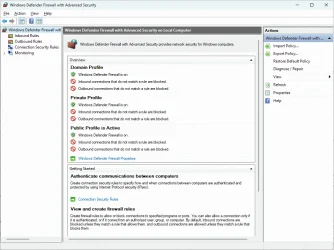
[Windows Firewall] "Your Internet access is blocked" :-/


Winfried

New member
Local time
4:54 AM
Posts
21
OS
Windows 11
Hello,

I was trying to learn about Win11's firewall.

I don't know what I did, but now, I have to turn it off so I can access the Internet :-/
Your Internet access is blocked Firewall or antivirus software may have blocked the connection.
Try:
Checking the connection
Checking firewall and antivirus configurations
Running Windows Network Diagnostics
ERR_NETWORK_ACCESS_DENIED

This site can’t be reached
The webpage at https://www.google.com/ might be temporarily down or it may have moved permanently to a new web address.
ERR_QUIC_PROTOCOL_ERROR

FWIW, I also ran "Minimal.Firewall" afterwards, but I closed it and I don't know if it means anything.

Any idea how to fix my blunder?

Thanks for any help.

--
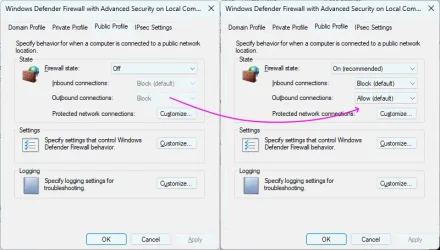
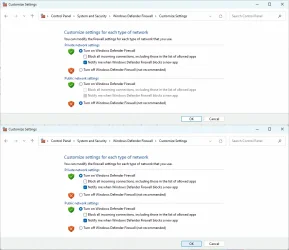
Edit: Re-enabling the Public profile and changing that setting seems to work. I'm still curious to understand what I did wrong.
 

Attachments
  • 2DC26755-625C-407F-A9A3-82D889E6E4F9.webp
    2DC26755-625C-407F-A9A3-82D889E6E4F9.webp
    87.4 KB · Views: 1
  • E4DC541B-9103-47DA-9465-1C917118D8A1.webp
    E4DC541B-9103-47DA-9465-1C917118D8A1.webp
    106.9 KB · Views: 1
  • C5FBFB2A-9BAD-406A-B822-4C9461911987.webp
    C5FBFB2A-9BAD-406A-B822-4C9461911987.webp
    49 KB · Views: 1

My Computer

System One

  • OS
    Windows 11
Run this command as Admin:
Code:
netsh advfirewall reset

Resetting the firewall may actually block some apps, which added themselves to your allow rules list. You'll have to re-approve those apps again.
 

My Computer

System One

  • OS
    Windows 7
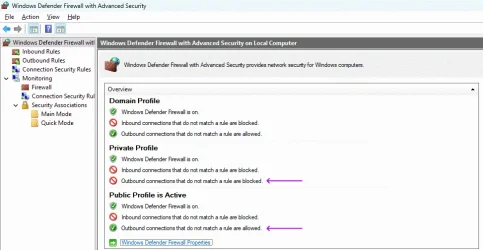
Thanks. I ran the command and it said OK.

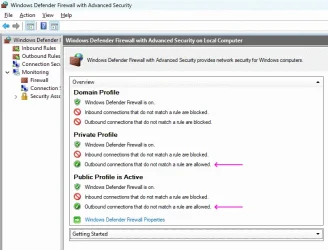
But for the Public profile, and unlike the Private profile, do I really want to allow even outgoing connections that don't match a rule, just as a fix for the "Your Internet access is blocked/This site can’t be reached"?

I'm flying blind :-/
 

Attachments

  • B4165614-F84B-42E2-A2B2-294C88375D27.webp
    B4165614-F84B-42E2-A2B2-294C88375D27.webp
    73.3 KB · Views: 1

My Computer

System One

  • OS
    Windows 11
Windows Registry Editor Version 5.00

[HKEY_LOCAL_MACHINE\SOFTWARE\Policies\Microsoft\WindowsFirewall]

[HKEY_LOCAL_MACHINE\SOFTWARE\Policies\Microsoft\WindowsFirewall\DomainProfile]
"EnableFirewall"=dword:00000001

[HKEY_LOCAL_MACHINE\SOFTWARE\Policies\Microsoft\WindowsFirewall\PrivateProfile]
"EnableFirewall"=dword:00000001

[HKEY_LOCAL_MACHINE\SOFTWARE\Policies\Microsoft\WindowsFirewall\PublicProfile]
"EnableFirewall"=dword:00000001

[HKEY_LOCAL_MACHINE\SOFTWARE\Policies\Microsoft\WindowsFirewall\StandardProfile]
"EnableFirewall"=dword:00000001
 

My Computer

System One

  • OS
    Windows 11 Iot Enterprise 21h2 22000.3260
    Computer type
    PC/Desktop
    Manufacturer/Model
    Asus
    CPU
    xeon E5-2697v2
    Motherboard
    rampage iv extreme
    Memory
    32gb 8x4gb ddr3 1333 mhz
    Graphics Card(s)
    gtx 570 poit of view
    Sound Card
    realtek HD (ALC898)
    Monitor(s) Displays
    samsung b2030
    Screen Resolution
    1600x900
    Hard Drives
    2tb hd 5400 rpm
    3tb hd 5400 rpm
    1tb nvme pcie 3.0
    PSU
    hx850w
    Keyboard
    mtek
    Internet Speed
    500/250 gpon
    Browser
    r3dfox 146.0
    Antivirus
    none
Now that things are running again, not sure I'll edit the Registry after I broke things by not knowing what I was doing :-/
 

My Computer

System One

  • OS
    Windows 11
Now that things are running again, not sure I'll edit the Registry after I broke things by not knowing what I was doing :-/


When you need to make a registry edit and you're not sure you'll do it correctly, just export that registry key.
Then do your edit, and if it doesn't work, just double click the exported registry key to merge it back into the registry.
It will take a minute or two, but you can even export the entire registry.
 

My Computers

System One System Two

  • OS
    Win 11 Home ♦♦♦26200.8655 ♦♦♦♦♦♦♦25H2
    Computer type
    PC/Desktop
    Manufacturer/Model
    Built by Ghot® [May 2020]
    CPU
    AMD Ryzen 7 3700X
    Motherboard
    Asus Pro WS X570-ACE (BIOS 5302)
    Memory
    G.Skill (F4-3200C14D-16GTZKW)
    Graphics Card(s)
    EVGA RTX 2070 (08G-P4-2171-KR)
    Sound Card
    Realtek ALC1220P / ALC S1220A
    Monitor(s) Displays
    Dell U3011 30"
    Screen Resolution
    2560 x 1600
    Hard Drives
    2x Samsung 860 EVO 500GB,
    WD 4TB Black FZBX - SATA III,
    WD 8TB Black FZBX - SATA III,
    DRW-24B1ST CD/DVD Burner
    PSU
    PC Power & Cooling 750W Quad EPS12V
    Case
    Cooler Master ATCS 840 Tower
    Cooling
    CM Hyper 212 EVO (push/pull)
    Keyboard
    Ducky DK9008 Shine II Blue LED
    Mouse
    Logitech Optical M-100
    Internet Speed
    300/300
    Browser
    Firefox (latest)
    Antivirus
    Bitdefender Total Security
    Other Info
    Speakers: Klipsch Pro Media 2.1
  • Operating System
    Windows XP Pro 32bit w/SP3
    Computer type
    PC/Desktop
    Manufacturer/Model
    Built by Ghot® (not in use)
    CPU
    AMD Athlon 64 X2 5000+ (OC'd @ 3.2Ghz)
    Motherboard
    ASUS M2N32-SLI Deluxe Wireless Edition
    Memory
    TWIN2X2048-6400C4DHX (2 x 1GB, DDR2 800)
    Graphics card(s)
    EVGA 256-P2-N758-TR GeForce 8600GT SSC
    Sound Card
    Onboard
    Monitor(s) Displays
    ViewSonic G90FB Black 19" Professional (CRT)
    Screen Resolution
    up to 2048 x 1536
    Hard Drives
    WD 36GB 10,000rpm Raptor SATA
    Seagate 80GB 7200rpm SATA
    Lite-On LTR-52246S CD/RW
    Lite-On LH-18A1P CD/DVD Burner
    PSU
    PC Power & Cooling Silencer 750 Quad EPS12V
    Case
    Generic Beige case, 80mm fans
    Cooling
    ZALMAN 9500A 92mm CPU Cooler
    Keyboard
    Logitech Classic Keybooard 200
    Mouse
    Logitech Optical M-BT96a
    Internet Speed
    300/300
    Browser
    Firefox 3.x ??
    Antivirus
    Symantec (Norton)
    Other Info
    Still assembled, still runs. Haven't turned it on for 15 years?
Now that my (still unknown) error is fixed by running "netsh advfirewall reset", what would editing the Registry do in addition?
 

My Computer

System One

  • OS
    Windows 11
Now that my (still unknown) error is fixed by running "netsh advfirewall reset", what would editing the Registry do in addition?


I'm not saying you "need" to edit the registry. If you have the problem fixed, you're good to go.
I just posted that for future reference. :-)


A lot of the tutorials, fixes and tweaks, use registry patches.
Exporting the registry gives you a backup of the registry, if things go wrong.
 

My Computers

System One System Two

  • OS
    Win 11 Home ♦♦♦26200.8655 ♦♦♦♦♦♦♦25H2
    Computer type
    PC/Desktop
    Manufacturer/Model
    Built by Ghot® [May 2020]
    CPU
    AMD Ryzen 7 3700X
    Motherboard
    Asus Pro WS X570-ACE (BIOS 5302)
    Memory
    G.Skill (F4-3200C14D-16GTZKW)
    Graphics Card(s)
    EVGA RTX 2070 (08G-P4-2171-KR)
    Sound Card
    Realtek ALC1220P / ALC S1220A
    Monitor(s) Displays
    Dell U3011 30"
    Screen Resolution
    2560 x 1600
    Hard Drives
    2x Samsung 860 EVO 500GB,
    WD 4TB Black FZBX - SATA III,
    WD 8TB Black FZBX - SATA III,
    DRW-24B1ST CD/DVD Burner
    PSU
    PC Power & Cooling 750W Quad EPS12V
    Case
    Cooler Master ATCS 840 Tower
    Cooling
    CM Hyper 212 EVO (push/pull)
    Keyboard
    Ducky DK9008 Shine II Blue LED
    Mouse
    Logitech Optical M-100
    Internet Speed
    300/300
    Browser
    Firefox (latest)
    Antivirus
    Bitdefender Total Security
    Other Info
    Speakers: Klipsch Pro Media 2.1
  • Operating System
    Windows XP Pro 32bit w/SP3
    Computer type
    PC/Desktop
    Manufacturer/Model
    Built by Ghot® (not in use)
    CPU
    AMD Athlon 64 X2 5000+ (OC'd @ 3.2Ghz)
    Motherboard
    ASUS M2N32-SLI Deluxe Wireless Edition
    Memory
    TWIN2X2048-6400C4DHX (2 x 1GB, DDR2 800)
    Graphics card(s)
    EVGA 256-P2-N758-TR GeForce 8600GT SSC
    Sound Card
    Onboard
    Monitor(s) Displays
    ViewSonic G90FB Black 19" Professional (CRT)
    Screen Resolution
    up to 2048 x 1536
    Hard Drives
    WD 36GB 10,000rpm Raptor SATA
    Seagate 80GB 7200rpm SATA
    Lite-On LTR-52246S CD/RW
    Lite-On LH-18A1P CD/DVD Burner
    PSU
    PC Power & Cooling Silencer 750 Quad EPS12V
    Case
    Generic Beige case, 80mm fans
    Cooling
    ZALMAN 9500A 92mm CPU Cooler
    Keyboard
    Logitech Classic Keybooard 200
    Mouse
    Logitech Optical M-BT96a
    Internet Speed
    300/300
    Browser
    Firefox 3.x ??
    Antivirus
    Symantec (Norton)
    Other Info
    Still assembled, still runs. Haven't turned it on for 15 years?
Hello,

I was trying to learn about Win11's firewall.

I don't know what I did, but now, I have to turn it off so I can access the Internet :-/


FWIW, I also ran "Minimal.Firewall" afterwards, but I closed it and I don't know if it means anything.

Any idea how to fix my blunder?

Thanks for any help.

--
Edit: Re-enabling the Public profile and changing that setting seems to work. I'm still curious to understand what I did wrong.
may have complicated the win defender firewall with the app from github. But cleaning it out, disabling it, and what advice that was given might return it to standard firewall setting with Win11. don't know, as I never used that app. I did give up on Norton a couple years ago after all the firewall issues they caused.
 

My Computer

System One

  • OS
    Win11
    Computer type
    PC/Desktop
    Manufacturer/Model
    Asus Home built
    CPU
    i9-13900
    Motherboard
    ASUS Strix Z790-H
    Memory
    64 GB
    Graphics Card(s)
    Nvidia RTX 5070 TI OC
    Monitor(s) Displays
    Sony 55"
    Hard Drives
    SSD
    PSU
    850 watt EVGA
    Case
    Cooler Master Haf 932
    Cooling
    CoolerMaster
    Keyboard
    RedDragon
    Mouse
    CoolerMaster
    Internet Speed
    300/300
    Antivirus
    Defender
    Other Info
    VR, Virtual Reality
The problem with Windows Firewall rules is they're internally saved as multiple, lengthy reg keys.

You'll never figure out what each key does, and you're not supposed change individual keys by hand. That's why the Firewall UI (or a 3rd-party firewall rules app) exists to do in safe manner.
 

My Computer

System One

  • OS
    Windows 7
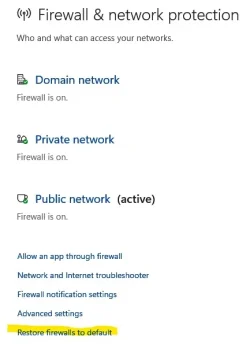
If you need to in the future you can also reset the firewall within Windows in the Firewall and network protection section.

Screenshot 2026-03-19 190104.webp
 

My Computer

System One

  • OS
    Windows 11 Pro
Thanks everyone for the help.

Unless I overlooked it, I found no book on Amazon just on WFW, so I guess it's simple enough once you're familiar with it.

Incidently, is there a reliable open-source alternative to WFW, or is it really good enough?

And what's the point of rules if "outbound connections that do not match a rule are allowed" for the Private/Public profiles anyway?

The whole reason I got interested in WFW is that I'm migrating from ADSL to fiber, and my ISP's router only allows the firewall for IPv6 to be on/off with no fine-grain tuning while I need to have one host accessible from the Net, so I'll have to leave that feature off and thus must protect all hosts with a software firewall on each.

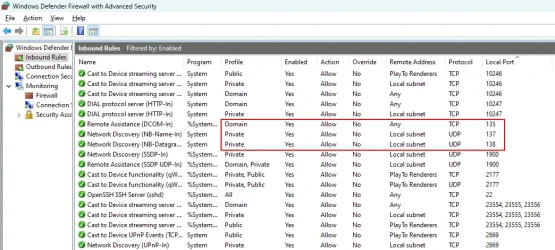
I notice inbound connections to those critical ports are only allowed from either the Domain or Private profiles, which is good:
 

Attachments

  • C4D5CEF0-A06F-46F3-8DF8-DED8E6DC04E3.webp
    C4D5CEF0-A06F-46F3-8DF8-DED8E6DC04E3.webp
    89.7 KB · Views: 1
  • 0C0A3FA7-2B6B-4062-9530-BE32003B5EFA.webp
    0C0A3FA7-2B6B-4062-9530-BE32003B5EFA.webp
    68.5 KB · Views: 1
Last edited:

My Computer

System One

  • OS
    Windows 11
Back
Top Bottom