Solved Windows Hello Facial Recognition Stopped Working


theopold

Member
Local time
10:05 PM
Posts
6
OS
Windows 11
Hey there,

Windows Hello just stopped working on my MSI laptop today. Here's what I've already tried:

- uninstalled and reinstalled, can't get past the "Make sure your face is centered in the frame" message.
- uninstalled and reinstalled the HD camera and IR camera
- reset Windows biometrics
- confirmed the camera is working, recorded test video
- stop, start, restart Windows Biometric Service
- tried setting it up under a new user account
- removed and then set up again PIN sign-in option (I don't have fingerprint sensor)

So yeah, kind of out of ideas here, lol. I haven't done any updates for about 2 weeks, no recent software installs, etc. Interesting to note, when I'm trying to set up the facial recognition, the little white light flashes and my camera indicator in the screen frame blinks, but...no "error" messages about not enough light, too close to camera, etc, etc. It just sits there doing nothing till I cancel it out. One other thing to mention...I've just purchased a new TV and I've been connecting to it via HDMI to play video content for the last 2-3 weeks. No idea why that would matter, however? And, just for the sake of completeness...was out for a bit yesterday and when I came back home and logged into my laptop, my brightness and/or contrast in Edge was waaay out of whack - super washed out. I had to reboot to get it back to normal. I mention this because when I try to set up facial recognition, the camera image is pretty dark - despite seeing a much brighter image in the regular Windows camera app, for example, under the same lighting conditions? Any suggestions?
 
Windows Build/Version
Windows 11, 24H2, OS Build 26100.3775

My Computer

System One

  • OS
    Windows 11
    Computer type
    Laptop
    Manufacturer/Model
    MSI GS76 Stealth
    CPU
    i7-11800H
    Motherboard
    MS-17M1
    Memory
    16 GB 3200 MHz
    Graphics Card(s)
    NVIDIA GeForce RTX 3060 Laptop GPU
    Hard Drives
    Samsung SSD 980 PRO 500GB
    Samsung SSD 970 EVO Plus 1TB
    Antivirus
    Bitdefender
Hi, welcome.

Full disclosure, I don’t use Windows hello. But I did read that MSI GPU’s have GPU modes?

Allegedly, switching between different GPU modes (Discrete, MSHybrid, or Integrated) can cause Windows Hello issues.

And has anything in your BIOS changed?

I also read that Core Isolation, memory integrity can cause an issue. But I am not sure that I would disable it:
Settings > Privacy & Security > Core isolation, and turn off Memory Integrity, then restart your system.
And it wouldn’t explain why it’s all of a sudden just started.

With the combined stuff happening, I am wondering if you’ve checked your GPU?
 

My Computers

System One System Two

  • OS
    Windows 11 Pro 25H2 Build 26200.8524
    Computer type
    PC/Desktop
    Manufacturer/Model
    Sin-built 2013
    CPU
    Intel(R) Core(TM) i7-4770K CPU @ 3.50GHz
    Motherboard
    ASUS ROG Maximus VI Formula
    Memory
    32.0 GB of I forget and the box is in storage.
    Graphics Card(s)
    Gigabyte nVidia GeForce GTX 1660 Super OC 6GB
    Sound Card
    Onboard thingy
    Monitor(s) Displays
    5 x LG 25MS500-B - 1 x 24MK430H-B - 1 x Wacom Pro 22" Touch Screen Tablet
    Screen Resolution
    All over the place
    Hard Drives
    Too many to list.
    OS on Samsung 1TB 870 QVO SATA
    PSU
    Silverstone 1500
    Case
    NZXT Phantom 820 Full-Tower Case
    Cooling
    Noctua NH-D15 Elite Class Dual Tower CPU Cooler / 6 x EziDIY 120mm / 2 x Corsair 140mm somethings / 1 x 140mm Thermaltake something / 2 x 200mm Corsair.
    Keyboard
    Corsair K95 / Logitech diNovo Edge Wireless
    Mouse
    Logitech: G402 / G502 / Mx Masters / Mx Air Cordless
    Internet Speed
    2000/500Mbps
    Browser
    All sorts
    Antivirus
    Kaspersky Premium
    Other Info
    ㅤㅤㅤㅤㅤㅤㅤㅤㅤㅤㅤㅤㅤㅤㅤㅤㅤㅤㅤㅤㅤㅤㅤㅤㅤㅤㅤㅤㅤㅤㅤㅤㅤㅤㅤㅤㅤㅤㅤㅤ⠀⠀⠀⠀⠀⠀⠀⠀⠀⠀
    TP-Link BE9300 WiFi 7 Bluetooth 5.4 (Archer TBE550E)
    TP-Link TX201 V1 2.5GB Lan

    Grandstream HT812 - VoIP
    ASUS DSL-AX82U - Mesh
    ASUS RT-AC68U - Mesh
    ASUS RT-BE88U Router

    Brother MFC-L2880DW Printer

    I’m on a horse.
  • Operating System
    Windows 11 Pro 25H2 Build 26200.8524
    Computer type
    Laptop
    Manufacturer/Model
    LENOVO Yoga 7 14IRL8 - 7i EVO OLED 14" Touchscreen i5 12 Core 16GB/512GB
    CPU
    Intel Core 12th Gen i5-1240P Processor (1.7 - 4.4GHz)
    Memory
    16GB LPDDR5 RAM
    Graphics card(s)
    Intel Iris Xe Graphics Processor
    Sound Card
    Optimized with Dolby Atmos®
    Screen Resolution
    QHD 2880 x 1800 OLED
    Hard Drives
    M.2 512GB
    Antivirus
    Defender / Malwarebytes
    Other Info
    …still on a horse.
There is a thread from a while back. Not sure if anything in there is useful to you. But the members issue was fixed.


My Computers

System One System Two

  • OS
    Windows 11 Pro 25H2 Build 26200.8524
    Computer type
    PC/Desktop
    Manufacturer/Model
    Sin-built 2013
    CPU
    Intel(R) Core(TM) i7-4770K CPU @ 3.50GHz
    Motherboard
    ASUS ROG Maximus VI Formula
    Memory
    32.0 GB of I forget and the box is in storage.
    Graphics Card(s)
    Gigabyte nVidia GeForce GTX 1660 Super OC 6GB
    Sound Card
    Onboard thingy
    Monitor(s) Displays
    5 x LG 25MS500-B - 1 x 24MK430H-B - 1 x Wacom Pro 22" Touch Screen Tablet
    Screen Resolution
    All over the place
    Hard Drives
    Too many to list.
    OS on Samsung 1TB 870 QVO SATA
    PSU
    Silverstone 1500
    Case
    NZXT Phantom 820 Full-Tower Case
    Cooling
    Noctua NH-D15 Elite Class Dual Tower CPU Cooler / 6 x EziDIY 120mm / 2 x Corsair 140mm somethings / 1 x 140mm Thermaltake something / 2 x 200mm Corsair.
    Keyboard
    Corsair K95 / Logitech diNovo Edge Wireless
    Mouse
    Logitech: G402 / G502 / Mx Masters / Mx Air Cordless
    Internet Speed
    2000/500Mbps
    Browser
    All sorts
    Antivirus
    Kaspersky Premium
    Other Info
    ㅤㅤㅤㅤㅤㅤㅤㅤㅤㅤㅤㅤㅤㅤㅤㅤㅤㅤㅤㅤㅤㅤㅤㅤㅤㅤㅤㅤㅤㅤㅤㅤㅤㅤㅤㅤㅤㅤㅤㅤ⠀⠀⠀⠀⠀⠀⠀⠀⠀⠀
    TP-Link BE9300 WiFi 7 Bluetooth 5.4 (Archer TBE550E)
    TP-Link TX201 V1 2.5GB Lan

    Grandstream HT812 - VoIP
    ASUS DSL-AX82U - Mesh
    ASUS RT-AC68U - Mesh
    ASUS RT-BE88U Router

    Brother MFC-L2880DW Printer

    I’m on a horse.
  • Operating System
    Windows 11 Pro 25H2 Build 26200.8524
    Computer type
    Laptop
    Manufacturer/Model
    LENOVO Yoga 7 14IRL8 - 7i EVO OLED 14" Touchscreen i5 12 Core 16GB/512GB
    CPU
    Intel Core 12th Gen i5-1240P Processor (1.7 - 4.4GHz)
    Memory
    16GB LPDDR5 RAM
    Graphics card(s)
    Intel Iris Xe Graphics Processor
    Sound Card
    Optimized with Dolby Atmos®
    Screen Resolution
    QHD 2880 x 1800 OLED
    Hard Drives
    M.2 512GB
    Antivirus
    Defender / Malwarebytes
    Other Info
    …still on a horse.
Now ain't that just a kick in the pants! Thank you very much for your reply, @antspants!! :giggle: MSI offers different default software utility apps depending on which laptop you've got - different names for relatively similar tools. In my case, the app is called, "Dragon Center". After reading your post, I opened Dragon Center and under Home/General Settings there is an option called, "GPU Switch". In my case, at least, there are only two options - "MSHybrid Graphics Mode", and "Discrete Graphics Mode". The current selection in my case was the former, MSHybrid Graphics Mode. I switched it to Discrete Graphics Mode, after which the system automatically reboots.

After the reboot, my first clue that we were onto something was the error message Windows gave me upon login. It said that my PIN was no longer working/available, and did I want to reset it. For that first login, I just switched over to my password and logged in that way. After logging in, and going to my sign-in options, it actually looked like my PIN was still set up?? But, I deleted the option anyway and then went back in and set it up fresh. After which, I went to the facial recognition option and started the setup, and...Voila! It worked!! :geek:

Just for kicks, I then went back into Dragon Center and changed the GPU Switch back to MSHybrid Graphics Mode. The system rebooted again, came back with the same error message - PIN not setup/working. I repeated the steps listed above, rebooted for good measure, and when the login screen came up, facial recognition was once again working under the MSHybrid Graphics Mode. Fascinating, isn't it, lol??

As to what may have caused the whole mess...just a guess on my part, but I've noticed my new TV will flash up an indication that it's apparently using my Nvidia GPU vs the Intel UHD Graphics when I connect my laptop via HDMI? Not sure if that has anything to do with the sudden issue I had with facial recognition, but...it's the only recent "change" I'm aware of? Regardless, the issue appears to be solved for now, so I is a Happy Camper again!! :cool:
 

My Computer

System One

  • OS
    Windows 11
    Computer type
    Laptop
    Manufacturer/Model
    MSI GS76 Stealth
    CPU
    i7-11800H
    Motherboard
    MS-17M1
    Memory
    16 GB 3200 MHz
    Graphics Card(s)
    NVIDIA GeForce RTX 3060 Laptop GPU
    Hard Drives
    Samsung SSD 980 PRO 500GB
    Samsung SSD 970 EVO Plus 1TB
    Antivirus
    Bitdefender
I love reading that things are resolved. Well done!
 

My Computers

System One System Two

  • OS
    Windows 11 Pro 25H2 Build 26200.8524
    Computer type
    PC/Desktop
    Manufacturer/Model
    Sin-built 2013
    CPU
    Intel(R) Core(TM) i7-4770K CPU @ 3.50GHz
    Motherboard
    ASUS ROG Maximus VI Formula
    Memory
    32.0 GB of I forget and the box is in storage.
    Graphics Card(s)
    Gigabyte nVidia GeForce GTX 1660 Super OC 6GB
    Sound Card
    Onboard thingy
    Monitor(s) Displays
    5 x LG 25MS500-B - 1 x 24MK430H-B - 1 x Wacom Pro 22" Touch Screen Tablet
    Screen Resolution
    All over the place
    Hard Drives
    Too many to list.
    OS on Samsung 1TB 870 QVO SATA
    PSU
    Silverstone 1500
    Case
    NZXT Phantom 820 Full-Tower Case
    Cooling
    Noctua NH-D15 Elite Class Dual Tower CPU Cooler / 6 x EziDIY 120mm / 2 x Corsair 140mm somethings / 1 x 140mm Thermaltake something / 2 x 200mm Corsair.
    Keyboard
    Corsair K95 / Logitech diNovo Edge Wireless
    Mouse
    Logitech: G402 / G502 / Mx Masters / Mx Air Cordless
    Internet Speed
    2000/500Mbps
    Browser
    All sorts
    Antivirus
    Kaspersky Premium
    Other Info
    ㅤㅤㅤㅤㅤㅤㅤㅤㅤㅤㅤㅤㅤㅤㅤㅤㅤㅤㅤㅤㅤㅤㅤㅤㅤㅤㅤㅤㅤㅤㅤㅤㅤㅤㅤㅤㅤㅤㅤㅤ⠀⠀⠀⠀⠀⠀⠀⠀⠀⠀
    TP-Link BE9300 WiFi 7 Bluetooth 5.4 (Archer TBE550E)
    TP-Link TX201 V1 2.5GB Lan

    Grandstream HT812 - VoIP
    ASUS DSL-AX82U - Mesh
    ASUS RT-AC68U - Mesh
    ASUS RT-BE88U Router

    Brother MFC-L2880DW Printer

    I’m on a horse.
  • Operating System
    Windows 11 Pro 25H2 Build 26200.8524
    Computer type
    Laptop
    Manufacturer/Model
    LENOVO Yoga 7 14IRL8 - 7i EVO OLED 14" Touchscreen i5 12 Core 16GB/512GB
    CPU
    Intel Core 12th Gen i5-1240P Processor (1.7 - 4.4GHz)
    Memory
    16GB LPDDR5 RAM
    Graphics card(s)
    Intel Iris Xe Graphics Processor
    Sound Card
    Optimized with Dolby Atmos®
    Screen Resolution
    QHD 2880 x 1800 OLED
    Hard Drives
    M.2 512GB
    Antivirus
    Defender / Malwarebytes
    Other Info
    …still on a horse.
just a guess on my part, but I've noticed my new TV will flash up an indication that it's apparently using my Nvidia GPU vs the Intel UHD Graphics when I connect my laptop via HDMI?

Very likely possibility that this is causing a change in the GPU modes. I couldn’t say for certain. Did you happen to notice a change in modes after attaching the TV?
 

My Computers

System One System Two

  • OS
    Windows 11 Pro 25H2 Build 26200.8524
    Computer type
    PC/Desktop
    Manufacturer/Model
    Sin-built 2013
    CPU
    Intel(R) Core(TM) i7-4770K CPU @ 3.50GHz
    Motherboard
    ASUS ROG Maximus VI Formula
    Memory
    32.0 GB of I forget and the box is in storage.
    Graphics Card(s)
    Gigabyte nVidia GeForce GTX 1660 Super OC 6GB
    Sound Card
    Onboard thingy
    Monitor(s) Displays
    5 x LG 25MS500-B - 1 x 24MK430H-B - 1 x Wacom Pro 22" Touch Screen Tablet
    Screen Resolution
    All over the place
    Hard Drives
    Too many to list.
    OS on Samsung 1TB 870 QVO SATA
    PSU
    Silverstone 1500
    Case
    NZXT Phantom 820 Full-Tower Case
    Cooling
    Noctua NH-D15 Elite Class Dual Tower CPU Cooler / 6 x EziDIY 120mm / 2 x Corsair 140mm somethings / 1 x 140mm Thermaltake something / 2 x 200mm Corsair.
    Keyboard
    Corsair K95 / Logitech diNovo Edge Wireless
    Mouse
    Logitech: G402 / G502 / Mx Masters / Mx Air Cordless
    Internet Speed
    2000/500Mbps
    Browser
    All sorts
    Antivirus
    Kaspersky Premium
    Other Info
    ㅤㅤㅤㅤㅤㅤㅤㅤㅤㅤㅤㅤㅤㅤㅤㅤㅤㅤㅤㅤㅤㅤㅤㅤㅤㅤㅤㅤㅤㅤㅤㅤㅤㅤㅤㅤㅤㅤㅤㅤ⠀⠀⠀⠀⠀⠀⠀⠀⠀⠀
    TP-Link BE9300 WiFi 7 Bluetooth 5.4 (Archer TBE550E)
    TP-Link TX201 V1 2.5GB Lan

    Grandstream HT812 - VoIP
    ASUS DSL-AX82U - Mesh
    ASUS RT-AC68U - Mesh
    ASUS RT-BE88U Router

    Brother MFC-L2880DW Printer

    I’m on a horse.
  • Operating System
    Windows 11 Pro 25H2 Build 26200.8524
    Computer type
    Laptop
    Manufacturer/Model
    LENOVO Yoga 7 14IRL8 - 7i EVO OLED 14" Touchscreen i5 12 Core 16GB/512GB
    CPU
    Intel Core 12th Gen i5-1240P Processor (1.7 - 4.4GHz)
    Memory
    16GB LPDDR5 RAM
    Graphics card(s)
    Intel Iris Xe Graphics Processor
    Sound Card
    Optimized with Dolby Atmos®
    Screen Resolution
    QHD 2880 x 1800 OLED
    Hard Drives
    M.2 512GB
    Antivirus
    Defender / Malwarebytes
    Other Info
    …still on a horse.
Oooh! Don't know yet. I just literally did that fix and it's still mid-afternoon here, lol. But!! I will be connecting it to my TV again later this evening and report back ;-)
 

My Computer

System One

  • OS
    Windows 11
    Computer type
    Laptop
    Manufacturer/Model
    MSI GS76 Stealth
    CPU
    i7-11800H
    Motherboard
    MS-17M1
    Memory
    16 GB 3200 MHz
    Graphics Card(s)
    NVIDIA GeForce RTX 3060 Laptop GPU
    Hard Drives
    Samsung SSD 980 PRO 500GB
    Samsung SSD 970 EVO Plus 1TB
    Antivirus
    Bitdefender
Yeah please do tell us.

What is it you plug your TV in for, again?

I connect to mine wirelessly for streaming or movies on my PC, via PLEX. Well to be more precise, it’s connected to the router, wirelessly. So it’s on the same network.
 

My Computers

System One System Two

  • OS
    Windows 11 Pro 25H2 Build 26200.8524
    Computer type
    PC/Desktop
    Manufacturer/Model
    Sin-built 2013
    CPU
    Intel(R) Core(TM) i7-4770K CPU @ 3.50GHz
    Motherboard
    ASUS ROG Maximus VI Formula
    Memory
    32.0 GB of I forget and the box is in storage.
    Graphics Card(s)
    Gigabyte nVidia GeForce GTX 1660 Super OC 6GB
    Sound Card
    Onboard thingy
    Monitor(s) Displays
    5 x LG 25MS500-B - 1 x 24MK430H-B - 1 x Wacom Pro 22" Touch Screen Tablet
    Screen Resolution
    All over the place
    Hard Drives
    Too many to list.
    OS on Samsung 1TB 870 QVO SATA
    PSU
    Silverstone 1500
    Case
    NZXT Phantom 820 Full-Tower Case
    Cooling
    Noctua NH-D15 Elite Class Dual Tower CPU Cooler / 6 x EziDIY 120mm / 2 x Corsair 140mm somethings / 1 x 140mm Thermaltake something / 2 x 200mm Corsair.
    Keyboard
    Corsair K95 / Logitech diNovo Edge Wireless
    Mouse
    Logitech: G402 / G502 / Mx Masters / Mx Air Cordless
    Internet Speed
    2000/500Mbps
    Browser
    All sorts
    Antivirus
    Kaspersky Premium
    Other Info
    ㅤㅤㅤㅤㅤㅤㅤㅤㅤㅤㅤㅤㅤㅤㅤㅤㅤㅤㅤㅤㅤㅤㅤㅤㅤㅤㅤㅤㅤㅤㅤㅤㅤㅤㅤㅤㅤㅤㅤㅤ⠀⠀⠀⠀⠀⠀⠀⠀⠀⠀
    TP-Link BE9300 WiFi 7 Bluetooth 5.4 (Archer TBE550E)
    TP-Link TX201 V1 2.5GB Lan

    Grandstream HT812 - VoIP
    ASUS DSL-AX82U - Mesh
    ASUS RT-AC68U - Mesh
    ASUS RT-BE88U Router

    Brother MFC-L2880DW Printer

    I’m on a horse.
  • Operating System
    Windows 11 Pro 25H2 Build 26200.8524
    Computer type
    Laptop
    Manufacturer/Model
    LENOVO Yoga 7 14IRL8 - 7i EVO OLED 14" Touchscreen i5 12 Core 16GB/512GB
    CPU
    Intel Core 12th Gen i5-1240P Processor (1.7 - 4.4GHz)
    Memory
    16GB LPDDR5 RAM
    Graphics card(s)
    Intel Iris Xe Graphics Processor
    Sound Card
    Optimized with Dolby Atmos®
    Screen Resolution
    QHD 2880 x 1800 OLED
    Hard Drives
    M.2 512GB
    Antivirus
    Defender / Malwarebytes
    Other Info
    …still on a horse.
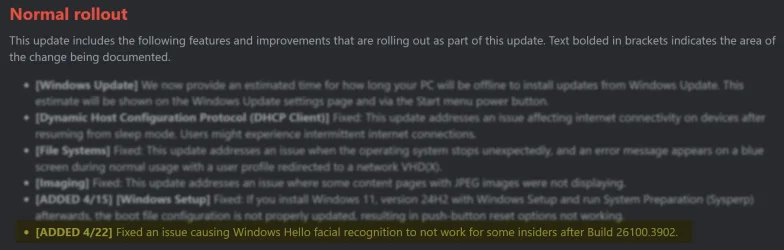
Something else to be aware of: There was a known issue with Windows Hello facial recognition just recently. The problem was introduced after your build (in 26100.3902) and then resolved in build 26100.3909. I even opened a case with Lenovo on this prior to 3909 being released.

As a result, you might consider just trying build 26100.3909 or 26100.3915 to see if it helps, even though technically the issue that it is resolving came after your build. Just thinking that since they tweaked this functionality there may be a slim chance that it helps your situation. If you prefer not to install a preview release, just wait until May 13 for the officail Patch Tuesday release.

I'm bringing this up mainly to discourage you from installing 26100.3902 since that will interfere with your troubleshooting since it has a known Windows Hello facial recognition problem.

Reference:


From the above link:

Image1.webp
 

My Computers

System One System Two

  • OS
    Win11 Pro 25H2 (RTM+)
    Computer type
    PC/Desktop
    Manufacturer/Model
    Acemagic
    CPU
    Intel i7-14650HX
    Memory
    32 GB
    Graphics Card(s)
    No GPU - Built-in Intel Graphics
    Sound Card
    Integrated
    Monitor(s) Displays
    Varies as machine will often be moved to locations with different monitors
    Screen Resolution
    Varies
    Hard Drives
    1 x 1TB Gen 4 NVMe SSD
    PSU
    120W Power Brick
    Keyboard
    Corsair K70 Max RGB Magnetic Keyboard
    Mouse
    Logitech MX Master 3
    Internet Speed
    1Gb Up / 1 Gb Down
    Browser
    Edge
    Antivirus
    Windows Defender
  • Operating System
    Win11 Pro 25H2 (RTM+)
    Computer type
    Laptop
    Manufacturer/Model
    Lenovo ThinkBook 13x Gen 2
    CPU
    Intel i7-1255U
    Memory
    16 GB
    Graphics card(s)
    Intel Iris Xe Graphics
    Sound Card
    Realtek® ALC3306-CG codec
    Monitor(s) Displays
    13.3-inch IPS Display
    Screen Resolution
    WQXGA (2560 x 1600)
    Hard Drives
    2 TB 4 x 4 NVMe SSD
    PSU
    USB-C / Thunderbolt 4 Power / Charging
    Keyboard
    Backlit, spill resistant keyboard
    Mouse
    Buttonless Glass Precision Touchpad
    Internet Speed
    1Gb Up / 1Gb Down
    Browser
    Edge
    Antivirus
    Windows Defender
    Other Info
    WiFi 6e / Bluetooth 5.1 / Facial Recognition / Fingerprint Sensor / ToF (Time of Flight) Human Presence Sensor
What is it you plug your TV in for, again?

I plug it into my TV for watching movies on my PC. I've tried connecting wirelessly via Settings/System/Display/Multiple Displays/Connect to a Display Wirelessly, but...I get lagging issues, etc.?? I haven't had a chance to try and diagnose the issue?
 

My Computer

System One

  • OS
    Windows 11
    Computer type
    Laptop
    Manufacturer/Model
    MSI GS76 Stealth
    CPU
    i7-11800H
    Motherboard
    MS-17M1
    Memory
    16 GB 3200 MHz
    Graphics Card(s)
    NVIDIA GeForce RTX 3060 Laptop GPU
    Hard Drives
    Samsung SSD 980 PRO 500GB
    Samsung SSD 970 EVO Plus 1TB
    Antivirus
    Bitdefender
As a result, you might consider just trying build 26100.3909 or 26100.3915 to see if it helps, even though technically the issue that it is resolving came after your build.

Thank you for mentioning this :) Windows Update is currently offering me 26100.3915, but I haven't opted for installing it yet. I've got some third-party apps that often lag a bit in terms of compatibility with a new build so I typically delay such updates for a bit. I will do the update soon, however - especially if the original issue reoccurs...
 

My Computer

System One

  • OS
    Windows 11
    Computer type
    Laptop
    Manufacturer/Model
    MSI GS76 Stealth
    CPU
    i7-11800H
    Motherboard
    MS-17M1
    Memory
    16 GB 3200 MHz
    Graphics Card(s)
    NVIDIA GeForce RTX 3060 Laptop GPU
    Hard Drives
    Samsung SSD 980 PRO 500GB
    Samsung SSD 970 EVO Plus 1TB
    Antivirus
    Bitdefender
I plug it into my TV for watching movies on my PC. I've tried connecting wirelessly via Settings/System/Display/Multiple Displays/Connect to a Display Wirelessly, but...I get lagging issues, etc.?? I haven't had a chance to try and diagnose the issue?

Using something like PLEX (or similar) you don’t need to connect wirelessly to the PC, just the router. being on the same network, your PC acts as a Media Server.
There are other apps like PLEX, I just don’t know what they are.
 

My Computers

System One System Two

  • OS
    Windows 11 Pro 25H2 Build 26200.8524
    Computer type
    PC/Desktop
    Manufacturer/Model
    Sin-built 2013
    CPU
    Intel(R) Core(TM) i7-4770K CPU @ 3.50GHz
    Motherboard
    ASUS ROG Maximus VI Formula
    Memory
    32.0 GB of I forget and the box is in storage.
    Graphics Card(s)
    Gigabyte nVidia GeForce GTX 1660 Super OC 6GB
    Sound Card
    Onboard thingy
    Monitor(s) Displays
    5 x LG 25MS500-B - 1 x 24MK430H-B - 1 x Wacom Pro 22" Touch Screen Tablet
    Screen Resolution
    All over the place
    Hard Drives
    Too many to list.
    OS on Samsung 1TB 870 QVO SATA
    PSU
    Silverstone 1500
    Case
    NZXT Phantom 820 Full-Tower Case
    Cooling
    Noctua NH-D15 Elite Class Dual Tower CPU Cooler / 6 x EziDIY 120mm / 2 x Corsair 140mm somethings / 1 x 140mm Thermaltake something / 2 x 200mm Corsair.
    Keyboard
    Corsair K95 / Logitech diNovo Edge Wireless
    Mouse
    Logitech: G402 / G502 / Mx Masters / Mx Air Cordless
    Internet Speed
    2000/500Mbps
    Browser
    All sorts
    Antivirus
    Kaspersky Premium
    Other Info
    ㅤㅤㅤㅤㅤㅤㅤㅤㅤㅤㅤㅤㅤㅤㅤㅤㅤㅤㅤㅤㅤㅤㅤㅤㅤㅤㅤㅤㅤㅤㅤㅤㅤㅤㅤㅤㅤㅤㅤㅤ⠀⠀⠀⠀⠀⠀⠀⠀⠀⠀
    TP-Link BE9300 WiFi 7 Bluetooth 5.4 (Archer TBE550E)
    TP-Link TX201 V1 2.5GB Lan

    Grandstream HT812 - VoIP
    ASUS DSL-AX82U - Mesh
    ASUS RT-AC68U - Mesh
    ASUS RT-BE88U Router

    Brother MFC-L2880DW Printer

    I’m on a horse.
  • Operating System
    Windows 11 Pro 25H2 Build 26200.8524
    Computer type
    Laptop
    Manufacturer/Model
    LENOVO Yoga 7 14IRL8 - 7i EVO OLED 14" Touchscreen i5 12 Core 16GB/512GB
    CPU
    Intel Core 12th Gen i5-1240P Processor (1.7 - 4.4GHz)
    Memory
    16GB LPDDR5 RAM
    Graphics card(s)
    Intel Iris Xe Graphics Processor
    Sound Card
    Optimized with Dolby Atmos®
    Screen Resolution
    QHD 2880 x 1800 OLED
    Hard Drives
    M.2 512GB
    Antivirus
    Defender / Malwarebytes
    Other Info
    …still on a horse.
Yeah please do tell us.

What is it you plug your TV in for, again?

I connect to mine wirelessly for streaming or movies on my PC, via PLEX. Well to be more precise, it’s connected to the router, wirelessly. So it’s on the same network.

Just a quick update...I've once again been connecting my PC to the TV via HDMI for the last couple of nights, and...no issues with facial recognition, it's still working fine! So yeah, not sure how/why the issue occurred previously, but I'll report back here if it ends up coming back in the near future ;)
 

My Computer

System One

  • OS
    Windows 11
    Computer type
    Laptop
    Manufacturer/Model
    MSI GS76 Stealth
    CPU
    i7-11800H
    Motherboard
    MS-17M1
    Memory
    16 GB 3200 MHz
    Graphics Card(s)
    NVIDIA GeForce RTX 3060 Laptop GPU
    Hard Drives
    Samsung SSD 980 PRO 500GB
    Samsung SSD 970 EVO Plus 1TB
    Antivirus
    Bitdefender
Hi guys. Same issue. Checked the previous convo and links. Did everything possible. Deleted and tried to add, changed pin code, login method, tried delete and add camera again, tried with chatgps, copilot, and LG support, tried to find the driver, no luck in all. I checked all the services related to Windows Hello and biometrics, turned them on manually, etc.

Long story short
LG Gram 17z90sp, at the 1st setup, all was great, and Windows Hello worked great, unlocking the laptop. But not sure at what point it stopped. Just stopped as I was not using this laptop for a couple of weeks. The problem is that there is no frame when I try to register a face, while Windows says keep your face inside the frame. LG support said they don't have any drivers to share. In the LG update app, there is nothing as well.

I can see both cameras in Device Manager - LGE Camera and LGE IR-FHD Camera. In details both say
Device USB\VID_30C9&PID_00CF&MI_00\6&559d47b&0&0000 requires further installation.
Device USB\VID_30C9&PID_00CF&MI_02\6&559d47b&0&0002 requires further installation.
When I try to choose another driver manually, Windows says it's got the best driver atm. Which is usbvideo.inf. So cameras work, the infrared sensor blinks during the face recognition. But no frame and actual recognition.

Any ideas?
 

My Computer

System One

  • OS
    Windows 11
    Computer type
    Laptop
    Manufacturer/Model
    LG

Latest Support Threads

Back
Top Bottom