Windows Hello Help


SgtStanko

Member
Member
Local time
5:21 PM
Posts
39
OS
Windows 11 Pro 26H2 (26300.9550)
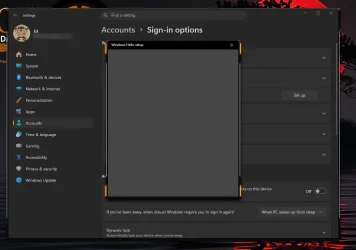
I am trying to install a biometric usb fingerprint scanner but every time I click setup all I am getting is a blank page in Windows Hello that stays open approximately thirty seconds or so then just closes on its own ???

I have tried re-installing drivers , uninstalling the device then re-booting, I have removed my Windows pin and cleared the NGC folder, nothing seems to work.

After clearing everything when I reboot , Windows does acknowledge there is a fingerprint scanner attached and offers to set it up after entering my Windows password but just skips to setting up a new pin.

Also:
For improved security only allow Windows Hello sign-in for Microsoft accounts on this device - is off
Use my sign-in info to automatically finish setting up after an update - is off

Anyone have any advice? I am stumped, I am on the lasted build of Windows 11 Pro 26H2
Windows Hello copy.webp
A
 

My Computer My Computer

At a glance

Windows 11 Pro 26H2 (26300.9550)Intel i9-12900KCorsair Vengeance 64 GB
OS
Windows 11 Pro 26H2 (26300.9550)
Computer type
PC/Desktop
Manufacturer/Model
self built
CPU
Intel i9-12900K
Motherboard
Gigabyte Z790 Gaming Plus AX
Memory
Corsair Vengeance 64 GB
Screen Resolution
1920x1080
Browser
Firefox
Antivirus
Norton 360 Deluxe
You can try clearing the tpm, but I highly recommend backing up your data and disabling bitlocker/drive encryption first.
 

My Computers My Computers

  • At a glance

    Windows 11 Pro 25H2 26200.9457i9-10900 10 core 20 threads32 gbnone-Intel UHD Graphics 630
    OS
    Windows 11 Pro 25H2 26200.9457
    Computer type
    PC/Desktop
    Manufacturer/Model
    Dell Optiplex 7080
    CPU
    i9-10900 10 core 20 threads
    Motherboard
    DELL 0J37VM
    Memory
    32 gb
    Graphics Card(s)
    none-Intel UHD Graphics 630
    Sound Card
    Integrated Realtek
    Monitor(s) Displays
    Benq 27
    Screen Resolution
    2560x1440
    Hard Drives
    2x1tb Solidigm m.2 nvme /External drives 512gb Samsung m.2 sata+2tb Kingston m2.nvme
    PSU
    500w
    Case
    MT
    Cooling
    Dell Premium
    Keyboard
    Logitech wired
    Mouse
    Logitech wireless
    Internet Speed
    so slow I'm too embarrassed to tell
    Browser
    #1 Edge #2 Firefox
    Antivirus
    Defender+MWB Premium
  • At a glance

    Windows 11 Pro 24H2 26200.9457AMD Ryzen 7 6800U32 gbintegrated
    Operating System
    Windows 11 Pro 24H2 26200.9457
    Computer type
    PC/Desktop
    Manufacturer/Model
    Beelink Mini PC SER5
    CPU
    AMD Ryzen 7 6800U
    Memory
    32 gb
    Graphics card(s)
    integrated
    Sound Card
    integrated
    Monitor(s) Displays
    Benq 27
    Screen Resolution
    2560x1440
    Hard Drives
    1TB Crucial nvme
    Keyboard
    Logitech wired
    Mouse
    Logitech wireless
    Internet Speed
    still too embarrassed to tell
    Browser
    Firefox
    Antivirus
    Defender
  • System 3 is non compliant Dell 9020 i7-4770/24gb ram Win11 PRO 26200.9457
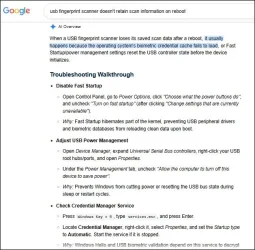
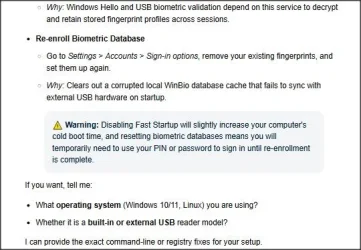
Given that it's a USB device, this may prompt thought, one simple option being to disable Fast Startup if enabled:

1.webp

2.webp
 

My Computer My Computer

At a glance

Windows 11 Proi7-8650U16GBIntel UHD 620
OS
Windows 11 Pro
Computer type
Laptop
Manufacturer/Model
Lenovo t480s
CPU
i7-8650U
Memory
16GB
Graphics Card(s)
Intel UHD 620
Screen Resolution
1920x1080
Hard Drives
C SN810 SDCPNRY-512G-1006
Browser
Edge, Firefox
Antivirus
Defender
You can try clearing the tpm, but I highly recommend backing up your data and disabling bitlocker/drive encryption first.
was trying to avoid it but did it , gritted my teeth while doing it but came through fine but still no joy , still getting the blank Windows Hello page on fingerprint setup
 

My Computer My Computer

At a glance

Windows 11 Pro 26H2 (26300.9550)Intel i9-12900KCorsair Vengeance 64 GB
OS
Windows 11 Pro 26H2 (26300.9550)
Computer type
PC/Desktop
Manufacturer/Model
self built
CPU
Intel i9-12900K
Motherboard
Gigabyte Z790 Gaming Plus AX
Memory
Corsair Vengeance 64 GB
Screen Resolution
1920x1080
Browser
Firefox
Antivirus
Norton 360 Deluxe

My Computer My Computer

At a glance

Windows 11 Pro 26H2 (26300.9550)Intel i9-12900KCorsair Vengeance 64 GB
OS
Windows 11 Pro 26H2 (26300.9550)
Computer type
PC/Desktop
Manufacturer/Model
self built
CPU
Intel i9-12900K
Motherboard
Gigabyte Z790 Gaming Plus AX
Memory
Corsair Vengeance 64 GB
Screen Resolution
1920x1080
Browser
Firefox
Antivirus
Norton 360 Deluxe
And thank you for your reply.

Try plugging it directly into a rear motherboard USB port (avoiding unpowered hubs) and install the manufacturer's official driver.
 

My Computer My Computer

At a glance

Windows 11 Proi7-8650U16GBIntel UHD 620
OS
Windows 11 Pro
Computer type
Laptop
Manufacturer/Model
Lenovo t480s
CPU
i7-8650U
Memory
16GB
Graphics Card(s)
Intel UHD 620
Screen Resolution
1920x1080
Hard Drives
C SN810 SDCPNRY-512G-1006
Browser
Edge, Firefox
Antivirus
Defender
And thank you for your reply.

Try plugging it directly into a rear motherboard USB port (avoiding unpowered hubs) and install the manufacturer's official driver.
Came to find out , this fingerprint scanner is not Windows 11 compatible although it was advertised as such. I had plugged it into every usb port on my system without any luck, after checking the Windows Update download site I came to find there are no updated Windows 11 drivers for this device.
The moment I plugged it into my sons Windows 10 system it immediately worked , guess who has a new biometric fingerprint scanner on his system?

Thanks to everyone for the suggestions , we can mark this closed .
There is just no truth in advertising anymore.
 

My Computer My Computer

At a glance

Windows 11 Pro 26H2 (26300.9550)Intel i9-12900KCorsair Vengeance 64 GB
OS
Windows 11 Pro 26H2 (26300.9550)
Computer type
PC/Desktop
Manufacturer/Model
self built
CPU
Intel i9-12900K
Motherboard
Gigabyte Z790 Gaming Plus AX
Memory
Corsair Vengeance 64 GB
Screen Resolution
1920x1080
Browser
Firefox
Antivirus
Norton 360 Deluxe

Latest Support Threads

Back
Top Bottom