Windows Installation Drive - partition questions


If this is still not working, then I have to wonder if you installed all the drivers for your system, especially stuff like chipset drivers.
Thank-you.

Last night i installed windows, all the drivers and updates and then had second thoughts about my disk usage / disk partition strategy

I just re-did it all and reinstalled windows...but forgot all the drivers, including chipset etc

Your a star.
 
Last edited:

My Computer

System One

  • OS
    Windows 11 Pro
    Computer type
    PC/Desktop
    Manufacturer/Model
    Self Built
If your system does support sleep, then search for and open Control Panel. View either by large or small icons. Select Power options. Click on "Choose what the power buttons do". Make sure that the option for sleep is checked.
OK, things are half fixed. Spoke too soon.

After a bunch of driver installs (chipset, LAN, wireless etc) and all the wondows updates, the sleep option appeared.

Clicking on it sent the PC to sleep. So I thought. But neither the keyboard or mouse (both usb) could wake the PC.

Pressing the PC power button performed a fast restart. All the fans span up to max for a sec (like on a cold boot) and then it was in windows pretty much instantly.

But this is not behaving how sleep in W10 does. Any ideas?
 

My Computer

System One

  • OS
    Windows 11 Pro
    Computer type
    PC/Desktop
    Manufacturer/Model
    Self Built
OK, things are half fixed. Spoke too soon.

After a bunch of driver installs (chipset, LAN, wireless etc) and all the wondows updates, the sleep option appeared.

Clicking on it sent the PC to sleep. So I thought. But neither the keyboard or mouse (both usb) could wake the PC.

Pressing the PC power button performed a fast restart. All the fans span up to max for a sec (like on a cold boot) and then it was in windows pretty much instantly.

But this is not behaving how sleep in W10 does. Any ideas?

On some systems the keyboard or mouse may not wake the system but there is typically an option in BIOS to resolve this. Different BIOS use different names. Sometimes it's obvious, sometimes it may reference the USB ports and you have to allow wake from USB.
 

My Computers

System One System Two

  • OS
    Win11 Pro 25H2 (RTM+)
    Computer type
    PC/Desktop
    Manufacturer/Model
    Acemagic
    CPU
    Intel i7-14650HX
    Memory
    32 GB
    Graphics Card(s)
    No GPU - Built-in Intel Graphics
    Sound Card
    Integrated
    Monitor(s) Displays
    Varies as machine will often be moved to locations with different monitors
    Screen Resolution
    Varies
    Hard Drives
    1 x 1TB Gen 4 NVMe SSD
    PSU
    120W Power Brick
    Keyboard
    Corsair K70 Max RGB Magnetic Keyboard
    Mouse
    Logitech MX Master 3
    Internet Speed
    1Gb Up / 1 Gb Down
    Browser
    Edge
    Antivirus
    Windows Defender
  • Operating System
    Win11 Pro 25H2 (RTM+)
    Computer type
    Laptop
    Manufacturer/Model
    Lenovo ThinkBook 13x Gen 2
    CPU
    Intel i7-1255U
    Memory
    16 GB
    Graphics card(s)
    Intel Iris Xe Graphics
    Sound Card
    Realtek® ALC3306-CG codec
    Monitor(s) Displays
    13.3-inch IPS Display
    Screen Resolution
    WQXGA (2560 x 1600)
    Hard Drives
    2 TB 4 x 4 NVMe SSD
    PSU
    USB-C / Thunderbolt 4 Power / Charging
    Keyboard
    Backlit, spill resistant keyboard
    Mouse
    Buttonless Glass Precision Touchpad
    Internet Speed
    1Gb Up / 1Gb Down
    Browser
    Edge
    Antivirus
    Windows Defender
    Other Info
    WiFi 6e / Bluetooth 5.1 / Facial Recognition / Fingerprint Sensor / ToF (Time of Flight) Human Presence Sensor
I can't remember who was saying that theirs contains 4 parts, but my ufei install only contains 3 parts. SYS, C: AND RECOVERY.

Before I go any further can someone weigh in please? Am I doing something wrong?
You didn't read my post # 33.
 

My Computers

System One System Two

  • OS
    Windows 11 Pro - Windows 7 HP 64 - Lubuntu
    Computer type
    PC/Desktop
    Manufacturer/Model
    custom build
    CPU
    i5 6600K - 800MHz to 4400MHz
    Motherboard
    GA-Z170-HD3P
    Memory
    4+4G GSkill DDR4 3000
    Graphics Card(s)
    IG - Intel 530
    Monitor(s) Displays
    Samsung 226BW
    Screen Resolution
    1680x1050
    Hard Drives
    (1) -1 SM951 – 128GB M.2 AHCI PCIe SSD drive for Win 11
    (2) -1 WD SATA 3 - 1T for Data
    (3) -1 WD SATA 3 - 1T for backup
    (4) -1 BX500 SSD - 256G for Windows 7 and Lubuntu
    PSU
    Thermaltake 450W TR2 gold
    Keyboard
    Old and good Chicony mechanical keyboard
    Mouse
    Logitech mX performance - 9 buttons (had to disable some)
    Internet Speed
    500 Mb/s
    Browser
    Firefox 64
  • Operating System
    Windows 11 Pro
    Computer type
    Laptop
    Manufacturer/Model
    Asus Q550LF
    CPU
    i7-4500U 800- 3000MHz
    Motherboard
    Asus Q550LF
    Memory
    (4+4)G DDR3 1600
    Graphics card(s)
    IG intel 4400 + NVIDIA GeForce GT 745M
    Sound Card
    Realtek
    Monitor(s) Displays
    LG Display LP156WF4-SPH1
    Screen Resolution
    1920 x 1080
    Hard Drives
    BX500 120G SSD for Windows and programs
    & 1T HDD for data
    Internet Speed
    500 Mb/s
    Browser
    Firefox 64
View attachment 123008

I can't remember who was saying that theirs contains 4 parts, but my ufei install only contains 3 parts. SYS, C: AND RECOVERY.
That was me.

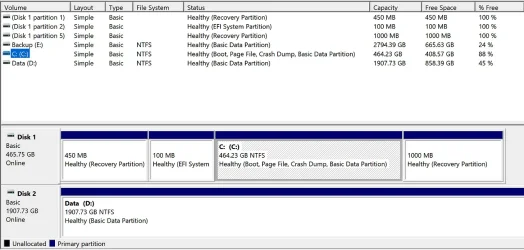
I'll try to attach a pic below of my Disk Management.

Disk 1 is my boot drive.

D is all data.

E is for backup only and contains images of Disk 1 and simple copies of everything on D.

Note 2 recovery partitions on Disk 1.

Note that Disk Management says that 3 of the 4 partitions have 100% free space. For whatever that is worth.

I've never altered these manually. Windows has some degree of control over the recovery partitions...I have 2, you have 1; the sizes of mine has changed over time. I think Windows will occasionally nibble at your C drive and add that nibble to a recovery partition.............as it sees fit. I don't interfere.
 

Attachments

  • diskmgt.webp
    diskmgt.webp
    92.6 KB · Views: 3

My Computer

System One

  • OS
    Windows 11 Pro
    Computer type
    PC/Desktop
    Manufacturer/Model
    Fishmill Special
    CPU
    Intel 265K
    Motherboard
    MSI Pro Z890-A
    Memory
    G Skill DDR5 2 x 16 kit 6000/36
    Graphics Card(s)
    none
    Sound Card
    none
    Monitor(s) Displays
    Dell 2316H
    Screen Resolution
    1600 x 900
    Hard Drives
    WD SN770 NVME 500 GB boot; Intel 660p NVME 2 TB and WD Green 3 TB storage
    PSU
    Be Quiet 13M 750 ATX 3.1
    Case
    Lancool PC-K65
    Cooling
    Noctua U12S
    Keyboard
    Logitech K120 Wired
    Mouse
    Dell MS-116
    Browser
    Chrome
    Antivirus
    Microsoft Defender and Malwarebytes
Note that Disk Management says that 3 of the 4 partitions have 100% free space. For whatever that is worth.

That is normal. I show exactly the same thing.
 

My Computers

System One System Two

  • OS
    Win11 Pro 25H2 (RTM+)
    Computer type
    PC/Desktop
    Manufacturer/Model
    Acemagic
    CPU
    Intel i7-14650HX
    Memory
    32 GB
    Graphics Card(s)
    No GPU - Built-in Intel Graphics
    Sound Card
    Integrated
    Monitor(s) Displays
    Varies as machine will often be moved to locations with different monitors
    Screen Resolution
    Varies
    Hard Drives
    1 x 1TB Gen 4 NVMe SSD
    PSU
    120W Power Brick
    Keyboard
    Corsair K70 Max RGB Magnetic Keyboard
    Mouse
    Logitech MX Master 3
    Internet Speed
    1Gb Up / 1 Gb Down
    Browser
    Edge
    Antivirus
    Windows Defender
  • Operating System
    Win11 Pro 25H2 (RTM+)
    Computer type
    Laptop
    Manufacturer/Model
    Lenovo ThinkBook 13x Gen 2
    CPU
    Intel i7-1255U
    Memory
    16 GB
    Graphics card(s)
    Intel Iris Xe Graphics
    Sound Card
    Realtek® ALC3306-CG codec
    Monitor(s) Displays
    13.3-inch IPS Display
    Screen Resolution
    WQXGA (2560 x 1600)
    Hard Drives
    2 TB 4 x 4 NVMe SSD
    PSU
    USB-C / Thunderbolt 4 Power / Charging
    Keyboard
    Backlit, spill resistant keyboard
    Mouse
    Buttonless Glass Precision Touchpad
    Internet Speed
    1Gb Up / 1Gb Down
    Browser
    Edge
    Antivirus
    Windows Defender
    Other Info
    WiFi 6e / Bluetooth 5.1 / Facial Recognition / Fingerprint Sensor / ToF (Time of Flight) Human Presence Sensor

Latest Support Threads

Back
Top Bottom