Windows installed without a USB installer connected to my system


PhilB

Well-known member
Power User
VIP
Local time
9:06 PM
Posts
772
Location
Western USA
OS
Windows 11 2H25
A system for which I had to do an emergency recovery and had a completely empty NVM drive started to install windows after I resolved the BIOS issues. But there was no USB Windows installer connected to the system. I'm wondering how all this was actually possible. How did the windows installer know which version of Windows to install? Before I started this install process I disconnected both Ethernet cable and WiFi antenna. so, I could set up windows with a local admin account rather than a Microsoft account.

When I first started this process, I erased all existing partitions on the NVMe drive. I had some issues with the existing BIOS which is downrev from the current version. That BIOS had bugs in the selection of boot drive options, for example windows manager or USB UEFI drive... I struggled and struggled and struggled but I was never able to boot the system into the windows installer USB.

I had to do an emergency recovery because a BIOS flash was corrupted. Google search helped me to do the recovery and was actually more helpful than the motherboard manufacturer tech support.(MSI X870E Carbon WiFi)

After I was able to do a successful BIOS install (thank you Google) I expected my system to boot into BIOS, because I did not have a USB Windows installer present.at that time. Instead, it booted into windows install or. However, it skipped some of the preliminary steps like the version of Windows I wanted to install, pro versus home had my license. When windows was fully installed, I had a pro version installed, just as I had with my previous Windows install.
 
Windows Build/Version
262100.8457
Last edited:

My Computer My Computer

At a glance

Windows 11 2H25AMD 9900X64 GBAMD 9070 XT
OS
Windows 11 2H25
Computer type
PC/Desktop
Manufacturer/Model
DIY
CPU
AMD 9900X
Motherboard
MSI X870E Carbon
Memory
64 GB
Graphics Card(s)
AMD 9070 XT
Sound Card
built-in
Monitor(s) Displays
Dell 24"
Hard Drives
Sabrent 1 TB NVMe, 4 x SSD (need to check models), 4 x 3.5" HDD, 8-16 TB, all WD
PSU
Seasonic 850
Case
Fractal Design North XL (which I likw)
Cooling
Corsair AIO for CPU, fans for case
Keyboard
Das Keyboard 4
Mouse
Corsair M65 (white)
Internet Speed
1 TB download
Browser
Firefox
Antivirus
Bitdefender
Other Info
Also have Lenovo T14S laptop (me) and Lenovo Slim 71 (wife)

Supposing you haven't got one of those very small sized pendrives connected, or a disc left in a DVD... I've read several times from MS that the Windows Recovery disk can reinstall what you had in Windows or something along those lines. Doing one here in my semi-powerful W10 (FX8350) or basic performance W11 (10 watts Celeron J4125) takes several hours and I've always supposed they're spent in compiling what is installed.

It sounds to what prebuilts do when first connected... The wifi antenna isn't a digital requirement, but an analog help, it's possible that the connection works w/o it.

I'd look for apps and things you had installed but aren't installed in a clean Windows install. Maybe something was able to unformat the drive. It's physically possible, but it must be programmed somewhere and Idk if such thing exists in BIOSes or in an ad hoc cloud service. I'd also suspect it could have been an "automatic repair install", totally ignorant if such things are done or in what circumstances.
 

My Computer My Computer

At a glance

Windows 11Celeron J4125 (10th gen)8GB DDR4
OS
Windows 11
Manufacturer/Model
MeLE Quieter 2Q (fanless miniPC)
CPU
Celeron J4125 (10th gen)
Memory
8GB DDR4
Monitor(s) Displays
Samsung SyncMaster T260
Screen Resolution
1920x1200
Hard Drives
256GB eMMC (Windows)
2TB USB3 HDD Toshiba (Data)
Before I started this install process I disconnected both Ethernet cable and WiFi antenna. so, I could set up windows with a local admin account rather than a Microsoft account.

You don't need to disconnect from the internet to set up a local account. Just run:

start ms-cxh:localonly


I had some issues with the existing BIOS which is downrev from the current version. That BIOS had bugs in the selection of boot drive options, for example windows manager or USB UEFI drive... I struggled and struggled and struggled but I was never able to boot the system into the windows installer USB.

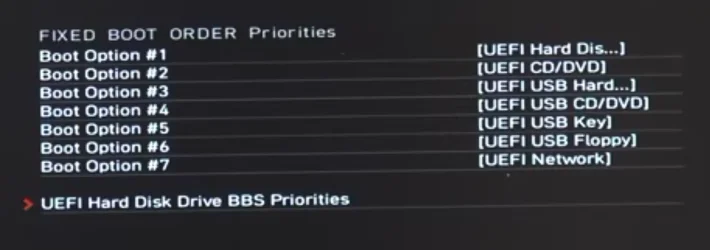
One thing to try would have been resetting the BIOS to its default settings, which restores the default boot configuration (see image below).

When a Windows 11 installation USB flash drive is connected and the system is started using the one-time boot menu key (F11 on MSI motherboards), the USB device should appear in the boot menu if it was created correctly and detected by the firmware. This allows the system to boot from the installation media without changing the permanent boot order in the BIOS.

MSI motherboard boot order priorities - 1.webp

Here is the breakdown of how MSI motherboards handle boot order priorities.

1. FIXED BOOT ORDER Priorities​

This is your Master List. It defines the order of device types.
In this menu, you aren't usually selecting a specific brand of hardware (like "Samsung 990 Pro"). Instead, you are telling the motherboard which generic category to try first.
  • Common Options: UEFI Hard Disk, UEFI USB Key, UEFI CD/DVD, UEFI Network.
  • The Logic: If "UEFI Hard Disk" is set to Boot Option #1, the motherboard will look for a storage drive to boot from. If you have three different hard drives plugged in, it then looks at the BBS Priorities to decide which of those three to use.

2. UEFI Hard Disk Drive BBS Priorities​

This is your Sub-Selection List. "BBS" stands for BIOS Boot Specification.
This menu only becomes relevant if you have multiple devices of the same type (e.g. two different M.2 NVMe SSDs or several USB sticks).
  • The Logic: This setting determines the internal ranking within the "Hard Disk" category.
  • The Example: If two Windows Boot Manager entries exist (i.e. two Windows installations, each using its own EFI system partition), this menu can influence which entry appears first in the F11 boot menu.

MSI motherboard boot order priorities - 2.webp

Windows Setup automatically creates a UEFI boot entry in NVRAM (Non-Volatile Random-Access Memory) that points to \EFI\Microsoft\Boot\bootmgfw.efi on the EFI system partition. On most UEFI/GPT systems with a single Windows installation, manual boot-order changes are usually unnecessary because the firmware automatically boots the Windows Boot Manager entry stored in NVRAM (see image above).
 
Last edited:

My Computers My Computers

  • At a glance

    Windows 11 ProAMD Ryzen 9 9950X3DKingston FURY Beast 64GB (2x32GB) DDR5 6000MT/sASUS TUF Gaming Radeon RX 9070 OC Edition 16G...
    OS
    Windows 11 Pro
    Computer type
    PC/Desktop
    CPU
    AMD Ryzen 9 9950X3D
    Motherboard
    ASRock B650E Taichi Lite
    Memory
    Kingston FURY Beast 64GB (2x32GB) DDR5 6000MT/s
    Graphics Card(s)
    ASUS TUF Gaming Radeon RX 9070 OC Edition 16GB GDDR6
    Hard Drives
    Solidigm P44 Pro 2TB M.2 NVMe SSD
  • At a glance

    Windows 11 HomeIntel Core Ultra 9 275HX64GB (2x 32GB) DDR5-6400NVIDIA GeForce RTX 5080 16GB GDDR7 Laptop GPU
    Operating System
    Windows 11 Home
    Computer type
    Laptop
    Manufacturer/Model
    Lenovo Legion Pro 7i Gen 10 16"
    CPU
    Intel Core Ultra 9 275HX
    Memory
    64GB (2x 32GB) DDR5-6400
    Graphics card(s)
    NVIDIA GeForce RTX 5080 16GB GDDR7 Laptop GPU
    Hard Drives
    2x 1TB M.2 NVMe SSD (SK Hynix)

My Computer My Computer

At a glance

Windows 11 Home x64 Version 25H2 Build 26200....
OS
Windows 11 Home x64 Version 25H2 Build 26200.8037
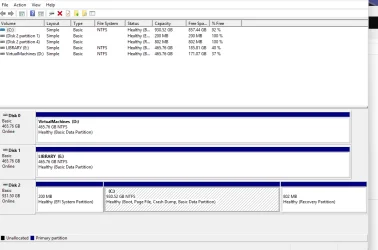
What was shown in Disk mgmt?


Denis
To reply to several post above, I need to point out that my system was bricked, according to MSI support, needing a warranty RMA to fix. Fortunately Google knew better. The key point is that once there was a successful BIOS install, the system started to install Windows without any intervention or action by me. Maybe I didn't explain that clearly enough in my OP.
 

My Computer My Computer

At a glance

Windows 11 2H25AMD 9900X64 GBAMD 9070 XT
OS
Windows 11 2H25
Computer type
PC/Desktop
Manufacturer/Model
DIY
CPU
AMD 9900X
Motherboard
MSI X870E Carbon
Memory
64 GB
Graphics Card(s)
AMD 9070 XT
Sound Card
built-in
Monitor(s) Displays
Dell 24"
Hard Drives
Sabrent 1 TB NVMe, 4 x SSD (need to check models), 4 x 3.5" HDD, 8-16 TB, all WD
PSU
Seasonic 850
Case
Fractal Design North XL (which I likw)
Cooling
Corsair AIO for CPU, fans for case
Keyboard
Das Keyboard 4
Mouse
Corsair M65 (white)
Internet Speed
1 TB download
Browser
Firefox
Antivirus
Bitdefender
Other Info
Also have Lenovo T14S laptop (me) and Lenovo Slim 71 (wife)
Supposing you haven't got one of those very small sized pendrives connected, or a disc left in a DVD..
No. Just a pendrive with a good BIOS file named MSI.ROM, and only that file. Nothing else.

It sounds to what prebuilts do when first connected... The wifi antenna isn't a digital requirement, but an analog help, it's possible that the connection works w/o it.
I didn't know that. But at one point, the installer said that i wasn't connected to the Internet.
I'd look for apps and things you had installed but aren't installed in a clean Windows install. Maybe something was able to unformat the drive. It's physically possible, but it must be programmed somewhere and Idk if such thing exists in BIOSes or in an ad hoc cloud service. I'd also suspect it could have been an "automatic repair install", totally ignorant if such things are done or in what circumstances.
If we think of Occam's Razor, how would such a program be included in an installer created with Media Creation Tool.
 

My Computer My Computer

At a glance

Windows 11 2H25AMD 9900X64 GBAMD 9070 XT
OS
Windows 11 2H25
Computer type
PC/Desktop
Manufacturer/Model
DIY
CPU
AMD 9900X
Motherboard
MSI X870E Carbon
Memory
64 GB
Graphics Card(s)
AMD 9070 XT
Sound Card
built-in
Monitor(s) Displays
Dell 24"
Hard Drives
Sabrent 1 TB NVMe, 4 x SSD (need to check models), 4 x 3.5" HDD, 8-16 TB, all WD
PSU
Seasonic 850
Case
Fractal Design North XL (which I likw)
Cooling
Corsair AIO for CPU, fans for case
Keyboard
Das Keyboard 4
Mouse
Corsair M65 (white)
Internet Speed
1 TB download
Browser
Firefox
Antivirus
Bitdefender
Other Info
Also have Lenovo T14S laptop (me) and Lenovo Slim 71 (wife)
When I first started this process, I erased all existing partitions on the NVMe drive. I had some issues with the existing BIOS which is downrev from the current version. That BIOS had bugs in the selection of boot drive options, for example windows manager or USB UEFI drive... I struggled and struggled and struggled but I was never able to boot the system into the windows installer USB.
I'm just gonna assume a few things here, take a wild stab at an explanation, and hope I'm right in my thoughts...

So it sounds like you were able to boot from the USB at first and made it to the point that you delete all partitions and select where to install Windows. Right after that the installer will create the necessary partitions, and copy the windows installer to your drive. Then it reboots the computer. Upon rebooting is when you had "bios issues" (possibly related to secure boot) I have seen this recently with my MSI motherboard and a blank drive. So it would make sense that once you got the "bios issues" sorted out that it would continue to go about finishing the Windows install that you started. It wouldn't need a usb anymore because the installer was already copied to the drive.

If that's not what happened then you can just ignore this and chalk it up to an old mans ramblings. :cool:

peace
wanna
 

My Computers My Computers

  • At a glance

    Windows 11 Pro 64 bitIntel® Core™ i5-14600KG.SKILL Ripjaws S5 Series DDR5 (2x16GB) 6400M...PNY RTX 5060 Ti OC 16GB
    OS
    Windows 11 Pro 64 bit
    Computer type
    PC/Desktop
    Manufacturer/Model
    Acme Mail Order (meep meep)
    CPU
    Intel® Core™ i5-14600K
    Motherboard
    MSI PRO Z790-A MAX WiFi bios 7E07vMA
    Memory
    G.SKILL Ripjaws S5 Series DDR5 (2x16GB) 6400MT/s CL32
    Graphics Card(s)
    PNY RTX 5060 Ti OC 16GB
    Sound Card
    Onboard Realtek® ALC4080 Codec
    Monitor(s) Displays
    2 x Dell - S3222DGM 32" LED Curved QHD FreeSync Gaming Monitor
    Screen Resolution
    2560x1440
    Hard Drives
    990 PRO PCIe 4.0 NVMe®1TB OS
    970 EVO PCIe 3.0 NVMe® SSD 500GB Games
    860 EVO SATA 2.5" SSD 1TB Storage
    PSU
    RMx Series™ RM850x — 80 PLUS® Gold
    Case
    LIAN LI PC-G70B Black Aluminum Full Tower
    Cooling
    Custom loop Optimus Foundation Block, MCP655-PWM D5 pump, MCR320 QP rad
    Keyboard
    Razer Black Widow Ultimate
    Mouse
    Razer Death Adder Elite
    Internet Speed
    500 down 20 up
    Browser
    Edge / Chrome
    Antivirus
    Microsoft Defender
    Other Info
    Always switching installs testing out the latest and greatest.
  • At a glance

    Windows 11 Pro 64 bit latest public releaseIntel® Core™ i5-11600KG.SKILL Ripjaws V Series 16GB DDR4 3600 (16-1...EVGA GeForce RTX 3060 XC GAMING 12GB
    Operating System
    Windows 11 Pro 64 bit latest public release
    Computer type
    PC/Desktop
    Manufacturer/Model
    Acme Mail Order (meep meep) Wife's PC Edition
    CPU
    Intel® Core™ i5-11600K
    Motherboard
    MSI - Z590 A Pro - bios 7D09v1B1
    Memory
    G.SKILL Ripjaws V Series 16GB DDR4 3600 (16-16-16-36)
    Graphics card(s)
    EVGA GeForce RTX 3060 XC GAMING 12GB
    Sound Card
    Onboard Realtek® ALC897 Codec
    Monitor(s) Displays
    2 x 27'' ACER S271HL
    Screen Resolution
    1920x1080
    Hard Drives
    980 PRO PCIe 4.0 NVMe® SSD 250GB OS
    Samsung 128GB 850 PRO SATA III for Storage
    PSU
    CORSAIR - CX-M Series 650W
    Case
    LIAN LI PC-A16B Black Aluminum ATX Mid Tower
    Cooling
    Thermalright Phantom Spirit 120SE Air Cooler
    Keyboard
    Logitech - K740 Illuminated
    Mouse
    Razer Death Adder Elite
    Internet Speed
    500 down 20 up
    Browser
    Chrome
    Antivirus
    Windows Defender
    Other Info
    Stock clocked, over cooled, and unmolested for a rock solid, whisper quiet, Wifey approved user experience.
I'm just gonna assume a few things here, take a wild stab at an explanation, and hope I'm right in my thoughts...

So it sounds like you were able to boot from the USB at first and made it to the point that you delete all partitions and select where to install Windows. Right after that the installer will create the necessary partitions, and copy the windows installer to your drive. Then it reboots the computer. Upon rebooting is when you had "bios issues" (possibly related to secure boot) I have seen this recently with my MSI motherboard and a blank drive. So it would make sense that once you got the "bios issues" sorted out that it would continue to go about finishing the Windows install that you started. It wouldn't need a usb anymore because the installer was already copied to the drive.

If that's not what happened then you can just ignore this and chalk it up to an old mans ramblings. :cool:

peace
wanna
@Wannagofast Actually that sounds plausible, sort of. However, I am still bothered the fact that when I was struggling with the old BIOS, I never could get past a reboot that started with the USB installer. And I doubt that I could reproduce this situation. However, it is the best explanation I have. (y)
 

My Computer My Computer

At a glance

Windows 11 2H25AMD 9900X64 GBAMD 9070 XT
OS
Windows 11 2H25
Computer type
PC/Desktop
Manufacturer/Model
DIY
CPU
AMD 9900X
Motherboard
MSI X870E Carbon
Memory
64 GB
Graphics Card(s)
AMD 9070 XT
Sound Card
built-in
Monitor(s) Displays
Dell 24"
Hard Drives
Sabrent 1 TB NVMe, 4 x SSD (need to check models), 4 x 3.5" HDD, 8-16 TB, all WD
PSU
Seasonic 850
Case
Fractal Design North XL (which I likw)
Cooling
Corsair AIO for CPU, fans for case
Keyboard
Das Keyboard 4
Mouse
Corsair M65 (white)
Internet Speed
1 TB download
Browser
Firefox
Antivirus
Bitdefender
Other Info
Also have Lenovo T14S laptop (me) and Lenovo Slim 71 (wife)

The key point is that once there was a successful BIOS install
I would suggest that there is a manufacturer's 'factory restore' partition and that once you had fixed the Bios, that was what found & installed from i.e. in the absence of any installed OS, the Bios handed over to that when the Bios had loaded.
Disk mgmt should confirm that possibility or eliminate it.


Denis
 

My Computer My Computer

At a glance

Windows 11 Home x64 Version 25H2 Build 26200....
OS
Windows 11 Home x64 Version 25H2 Build 26200.8037
I would suggest that there is a manufacturer's 'factory restore' partition and that once you had fixed the Bios, that was what found & installed from i.e. in the absence of any installed OS, the Bios handed over to that when the Bios had loaded.
Disk mgmt should confirm that possibility or eliminate it.


Denis
Since Windows is already installed, how would I is disk management to confirm or eliminate that possibility?
 

My Computer My Computer

At a glance

Windows 11 2H25AMD 9900X64 GBAMD 9070 XT
OS
Windows 11 2H25
Computer type
PC/Desktop
Manufacturer/Model
DIY
CPU
AMD 9900X
Motherboard
MSI X870E Carbon
Memory
64 GB
Graphics Card(s)
AMD 9070 XT
Sound Card
built-in
Monitor(s) Displays
Dell 24"
Hard Drives
Sabrent 1 TB NVMe, 4 x SSD (need to check models), 4 x 3.5" HDD, 8-16 TB, all WD
PSU
Seasonic 850
Case
Fractal Design North XL (which I likw)
Cooling
Corsair AIO for CPU, fans for case
Keyboard
Das Keyboard 4
Mouse
Corsair M65 (white)
Internet Speed
1 TB download
Browser
Firefox
Antivirus
Bitdefender
Other Info
Also have Lenovo T14S laptop (me) and Lenovo Slim 71 (wife)
how would I is disk management to confirm or eliminate that possibility?
By showing the partitions including any manufacturer's 'factory restore' partition [which is typically about 14GB].

Windows must have come from somewhere.


Denis
 

My Computer My Computer

At a glance

Windows 11 Home x64 Version 25H2 Build 26200....
OS
Windows 11 Home x64 Version 25H2 Build 26200.8037
You must have a Win 11 installation somewhere in your drive.
I agree with Denis. It was probably a factory recover that install Win 11. And it probably installed an old version of Win 11.
Please post a whole window Disk Manager image of ALL your drives. Don't forget to expand the columns so we can read them. How to Post a Screenshot of Disk Management
If you have a MiniTool or AOMEI Partition use it instead or Windows disk manager.
 

My Computers My Computers

  • At a glance

    Windows 11 Pro - Windows 7 HP 64 - Lubuntui5 6600K - 800MHz to 4400MHz4+4G GSkill DDR4 3000IG - Intel 530
    OS
    Windows 11 Pro - Windows 7 HP 64 - Lubuntu
    Computer type
    PC/Desktop
    Manufacturer/Model
    custom build
    CPU
    i5 6600K - 800MHz to 4400MHz
    Motherboard
    GA-Z170-HD3P
    Memory
    4+4G GSkill DDR4 3000
    Graphics Card(s)
    IG - Intel 530
    Monitor(s) Displays
    Samsung 226BW
    Screen Resolution
    1680x1050
    Hard Drives
    (1) -1 SM951 – 128GB M.2 AHCI PCIe SSD drive for Win 11
    (2) -1 WD SATA 3 - 1T for Data
    (3) -1 WD SATA 3 - 1T for backup
    (4) -1 BX500 SSD - 256G for Windows 7 and Lubuntu
    PSU
    Thermaltake 450W TR2 gold
    Keyboard
    Old and good Chicony mechanical keyboard
    Mouse
    Logitech mX performance - 9 buttons (had to disable some)
    Internet Speed
    500 Mb/s
    Browser
    Firefox 64
  • At a glance

    Windows 11 Proi7-4500U 800- 3000MHz(4+4)G DDR3 1600IG intel 4400 + NVIDIA GeForce GT 745M
    Operating System
    Windows 11 Pro
    Computer type
    Laptop
    Manufacturer/Model
    Asus Q550LF
    CPU
    i7-4500U 800- 3000MHz
    Motherboard
    Asus Q550LF
    Memory
    (4+4)G DDR3 1600
    Graphics card(s)
    IG intel 4400 + NVIDIA GeForce GT 745M
    Sound Card
    Realtek
    Monitor(s) Displays
    LG Display LP156WF4-SPH1
    Screen Resolution
    1920 x 1080
    Hard Drives
    BX500 120G SSD for Windows and programs
    & 1T HDD for data
    Internet Speed
    500 Mb/s
    Browser
    Firefox 64
Based on the assumption that the OP is referring to the computer listed in his bio a factory restore partition seems highly unlikely. There are not normally factory restore partitions on a home built DIY computer.

Peace
Wanna
 

My Computers My Computers

  • At a glance

    Windows 11 Pro 64 bitIntel® Core™ i5-14600KG.SKILL Ripjaws S5 Series DDR5 (2x16GB) 6400M...PNY RTX 5060 Ti OC 16GB
    OS
    Windows 11 Pro 64 bit
    Computer type
    PC/Desktop
    Manufacturer/Model
    Acme Mail Order (meep meep)
    CPU
    Intel® Core™ i5-14600K
    Motherboard
    MSI PRO Z790-A MAX WiFi bios 7E07vMA
    Memory
    G.SKILL Ripjaws S5 Series DDR5 (2x16GB) 6400MT/s CL32
    Graphics Card(s)
    PNY RTX 5060 Ti OC 16GB
    Sound Card
    Onboard Realtek® ALC4080 Codec
    Monitor(s) Displays
    2 x Dell - S3222DGM 32" LED Curved QHD FreeSync Gaming Monitor
    Screen Resolution
    2560x1440
    Hard Drives
    990 PRO PCIe 4.0 NVMe®1TB OS
    970 EVO PCIe 3.0 NVMe® SSD 500GB Games
    860 EVO SATA 2.5" SSD 1TB Storage
    PSU
    RMx Series™ RM850x — 80 PLUS® Gold
    Case
    LIAN LI PC-G70B Black Aluminum Full Tower
    Cooling
    Custom loop Optimus Foundation Block, MCP655-PWM D5 pump, MCR320 QP rad
    Keyboard
    Razer Black Widow Ultimate
    Mouse
    Razer Death Adder Elite
    Internet Speed
    500 down 20 up
    Browser
    Edge / Chrome
    Antivirus
    Microsoft Defender
    Other Info
    Always switching installs testing out the latest and greatest.
  • At a glance

    Windows 11 Pro 64 bit latest public releaseIntel® Core™ i5-11600KG.SKILL Ripjaws V Series 16GB DDR4 3600 (16-1...EVGA GeForce RTX 3060 XC GAMING 12GB
    Operating System
    Windows 11 Pro 64 bit latest public release
    Computer type
    PC/Desktop
    Manufacturer/Model
    Acme Mail Order (meep meep) Wife's PC Edition
    CPU
    Intel® Core™ i5-11600K
    Motherboard
    MSI - Z590 A Pro - bios 7D09v1B1
    Memory
    G.SKILL Ripjaws V Series 16GB DDR4 3600 (16-16-16-36)
    Graphics card(s)
    EVGA GeForce RTX 3060 XC GAMING 12GB
    Sound Card
    Onboard Realtek® ALC897 Codec
    Monitor(s) Displays
    2 x 27'' ACER S271HL
    Screen Resolution
    1920x1080
    Hard Drives
    980 PRO PCIe 4.0 NVMe® SSD 250GB OS
    Samsung 128GB 850 PRO SATA III for Storage
    PSU
    CORSAIR - CX-M Series 650W
    Case
    LIAN LI PC-A16B Black Aluminum ATX Mid Tower
    Cooling
    Thermalright Phantom Spirit 120SE Air Cooler
    Keyboard
    Logitech - K740 Illuminated
    Mouse
    Razer Death Adder Elite
    Internet Speed
    500 down 20 up
    Browser
    Chrome
    Antivirus
    Windows Defender
    Other Info
    Stock clocked, over cooled, and unmolested for a rock solid, whisper quiet, Wifey approved user experience.

My Computer My Computer

At a glance

Windows 11 2H25AMD 9900X64 GBAMD 9070 XT
OS
Windows 11 2H25
Computer type
PC/Desktop
Manufacturer/Model
DIY
CPU
AMD 9900X
Motherboard
MSI X870E Carbon
Memory
64 GB
Graphics Card(s)
AMD 9070 XT
Sound Card
built-in
Monitor(s) Displays
Dell 24"
Hard Drives
Sabrent 1 TB NVMe, 4 x SSD (need to check models), 4 x 3.5" HDD, 8-16 TB, all WD
PSU
Seasonic 850
Case
Fractal Design North XL (which I likw)
Cooling
Corsair AIO for CPU, fans for case
Keyboard
Das Keyboard 4
Mouse
Corsair M65 (white)
Internet Speed
1 TB download
Browser
Firefox
Antivirus
Bitdefender
Other Info
Also have Lenovo T14S laptop (me) and Lenovo Slim 71 (wife)
The only explanation I can think of, given that you deleted all partitions on NVMe disk so there was no Recovery partition, that the Windows setup files were saved in some dedicated ROM in BIOS. The BIOS detected the disk was empty and started installing Windows from the ROM.
 

My Computers My Computers

  • At a glance

    Windows 11 Pro 23H2 (5699), 25H2 (8655)Mobile DualCore Intel Core 2 Duo T7250, 2000 MHz4GBMobile Intel(R) GMA 4500M (Mobile 4 series)
    OS
    Windows 11 Pro 23H2 (5699), 25H2 (8655)
    Computer type
    Laptop
    Manufacturer/Model
    Acer Extensa 5630EZ
    CPU
    Mobile DualCore Intel Core 2 Duo T7250, 2000 MHz
    Motherboard
    Acer Extensa 5630
    Memory
    4GB
    Graphics Card(s)
    Mobile Intel(R) GMA 4500M (Mobile 4 series)
    Sound Card
    Realtek ALC268 @ Intel 82801IB ICH9 - High Definition Audio Controller
    Monitor(s) Displays
    1
    Screen Resolution
    1280x800
    Hard Drives
    Samsung SSD 850 EVO 250GB SATA Device (250 GB, SATA-III)
    Internet Speed
    VDSL 50 Mbps
    Browser
    MICROSOFT EDGE
    Antivirus
    WINDOWS DEFENDER
    Other Info
    Legacy MBR installation, no TPM, no Secure Boot, no WDDM 2.0 graphics drivers, no SSE4.2, cannot get more unsupported ;) This is only my test laptop. I had installed Windows 11 here before upgrading my main PC. For my main PC I use everyday see my 2nd system specs.
  • At a glance

    Windows 11 Pro v25H2 (build 26200.8655)Intel Core-i7 3770 3.40GHz s1155 (3rd generat...2x Kingston Hyper-X Blu 8GB DDR3-1600GIGABYTE GeForce RTX 3050 WINDFORCE OC V2 6GB...
    Operating System
    Windows 11 Pro v25H2 (build 26200.8655)
    Computer type
    PC/Desktop
    Manufacturer/Model
    Custom-built PC
    CPU
    Intel Core-i7 3770 3.40GHz s1155 (3rd generation)
    Motherboard
    Asus P8H61 s1155 ATX
    Memory
    2x Kingston Hyper-X Blu 8GB DDR3-1600
    Graphics card(s)
    GIGABYTE GeForce RTX 3050 WINDFORCE OC V2 6GB (GV-N3050WF2OCV2-6GD)
    Sound Card
    Realtek HD audio (ALC887)
    Monitor(s) Displays
    Sony Bravia KDL-19L4000 19" LCD TV via VGA
    Screen Resolution
    1440x900 32-bit 60Hz
    Hard Drives
    WD Blue SA510 2.5 1000GB SSD as system disk, Western Digital Caviar Purple 4TB SATA III (WD40PURZ) as second
    PSU
    Thermaltake Litepower RGB 550W Full Wired
    Case
    SUPERCASE MIDI-TOWER
    Cooling
    Deepcool Gamma Archer CPU cooler, 1x 8cm fan at the back
    Keyboard
    Mitsumi 101-key PS/2
    Mouse
    Sunnyline OptiEye PS/2
    Internet Speed
    100Mbps
    Browser
    Microsoft Edge, Mozilla Firefox
    Antivirus
    Microsoft Windows Defender
    Other Info
    Legacy BIOS (MBR) installation, no TPM, no Secure Boot, WDDM 3.0 graphics drivers, WEI score 7.4
The only explanation I can think of, given that you deleted all partitions on NVMe disk so there was no Recovery partition, that the Windows setup files were saved in some dedicated ROM in BIOS. The BIOS detected the disk was empty and started installing Windows from the ROM.
Windows install images have been larger than 1-2 GB for over two decades. No OEM is dedicating that much ROM or flash memory to hold something you might hardly use. Plus the chips would have to take up board space.
 

My Computer My Computer

At a glance

Windows 7
OS
Windows 7
Based on the assumption that the OP is referring to the computer listed in his bio a factory restore partition seems highly unlikely. There are not normally factory restore partitions on a home built DIY computer.

Peace
Wanna
I agree.
To install Win 11 you must be running a OS (Windows, Win PE, Win RE)
- It wasn't from a Factory recovery partition.
- It wasn't from the internet
- It wasn't from a USB drive
So the question is: Where did the installation files came from?
 

My Computers My Computers

  • At a glance

    Windows 11 Pro - Windows 7 HP 64 - Lubuntui5 6600K - 800MHz to 4400MHz4+4G GSkill DDR4 3000IG - Intel 530
    OS
    Windows 11 Pro - Windows 7 HP 64 - Lubuntu
    Computer type
    PC/Desktop
    Manufacturer/Model
    custom build
    CPU
    i5 6600K - 800MHz to 4400MHz
    Motherboard
    GA-Z170-HD3P
    Memory
    4+4G GSkill DDR4 3000
    Graphics Card(s)
    IG - Intel 530
    Monitor(s) Displays
    Samsung 226BW
    Screen Resolution
    1680x1050
    Hard Drives
    (1) -1 SM951 – 128GB M.2 AHCI PCIe SSD drive for Win 11
    (2) -1 WD SATA 3 - 1T for Data
    (3) -1 WD SATA 3 - 1T for backup
    (4) -1 BX500 SSD - 256G for Windows 7 and Lubuntu
    PSU
    Thermaltake 450W TR2 gold
    Keyboard
    Old and good Chicony mechanical keyboard
    Mouse
    Logitech mX performance - 9 buttons (had to disable some)
    Internet Speed
    500 Mb/s
    Browser
    Firefox 64
  • At a glance

    Windows 11 Proi7-4500U 800- 3000MHz(4+4)G DDR3 1600IG intel 4400 + NVIDIA GeForce GT 745M
    Operating System
    Windows 11 Pro
    Computer type
    Laptop
    Manufacturer/Model
    Asus Q550LF
    CPU
    i7-4500U 800- 3000MHz
    Motherboard
    Asus Q550LF
    Memory
    (4+4)G DDR3 1600
    Graphics card(s)
    IG intel 4400 + NVIDIA GeForce GT 745M
    Sound Card
    Realtek
    Monitor(s) Displays
    LG Display LP156WF4-SPH1
    Screen Resolution
    1920 x 1080
    Hard Drives
    BX500 120G SSD for Windows and programs
    & 1T HDD for data
    Internet Speed
    500 Mb/s
    Browser
    Firefox 64
Unless he deleted all the partitions without deleting the recovery partition because Disk Management inside Windows prevents this so as not to accidentally make the system unrecoverable in case of failure.
 

My Computers My Computers

  • At a glance

    Windows 11 Pro 23H2 (5699), 25H2 (8655)Mobile DualCore Intel Core 2 Duo T7250, 2000 MHz4GBMobile Intel(R) GMA 4500M (Mobile 4 series)
    OS
    Windows 11 Pro 23H2 (5699), 25H2 (8655)
    Computer type
    Laptop
    Manufacturer/Model
    Acer Extensa 5630EZ
    CPU
    Mobile DualCore Intel Core 2 Duo T7250, 2000 MHz
    Motherboard
    Acer Extensa 5630
    Memory
    4GB
    Graphics Card(s)
    Mobile Intel(R) GMA 4500M (Mobile 4 series)
    Sound Card
    Realtek ALC268 @ Intel 82801IB ICH9 - High Definition Audio Controller
    Monitor(s) Displays
    1
    Screen Resolution
    1280x800
    Hard Drives
    Samsung SSD 850 EVO 250GB SATA Device (250 GB, SATA-III)
    Internet Speed
    VDSL 50 Mbps
    Browser
    MICROSOFT EDGE
    Antivirus
    WINDOWS DEFENDER
    Other Info
    Legacy MBR installation, no TPM, no Secure Boot, no WDDM 2.0 graphics drivers, no SSE4.2, cannot get more unsupported ;) This is only my test laptop. I had installed Windows 11 here before upgrading my main PC. For my main PC I use everyday see my 2nd system specs.
  • At a glance

    Windows 11 Pro v25H2 (build 26200.8655)Intel Core-i7 3770 3.40GHz s1155 (3rd generat...2x Kingston Hyper-X Blu 8GB DDR3-1600GIGABYTE GeForce RTX 3050 WINDFORCE OC V2 6GB...
    Operating System
    Windows 11 Pro v25H2 (build 26200.8655)
    Computer type
    PC/Desktop
    Manufacturer/Model
    Custom-built PC
    CPU
    Intel Core-i7 3770 3.40GHz s1155 (3rd generation)
    Motherboard
    Asus P8H61 s1155 ATX
    Memory
    2x Kingston Hyper-X Blu 8GB DDR3-1600
    Graphics card(s)
    GIGABYTE GeForce RTX 3050 WINDFORCE OC V2 6GB (GV-N3050WF2OCV2-6GD)
    Sound Card
    Realtek HD audio (ALC887)
    Monitor(s) Displays
    Sony Bravia KDL-19L4000 19" LCD TV via VGA
    Screen Resolution
    1440x900 32-bit 60Hz
    Hard Drives
    WD Blue SA510 2.5 1000GB SSD as system disk, Western Digital Caviar Purple 4TB SATA III (WD40PURZ) as second
    PSU
    Thermaltake Litepower RGB 550W Full Wired
    Case
    SUPERCASE MIDI-TOWER
    Cooling
    Deepcool Gamma Archer CPU cooler, 1x 8cm fan at the back
    Keyboard
    Mitsumi 101-key PS/2
    Mouse
    Sunnyline OptiEye PS/2
    Internet Speed
    100Mbps
    Browser
    Microsoft Edge, Mozilla Firefox
    Antivirus
    Microsoft Windows Defender
    Other Info
    Legacy BIOS (MBR) installation, no TPM, no Secure Boot, WDDM 3.0 graphics drivers, WEI score 7.4
If this PC has a MSI motherboard, there won't be an OEM recovery partition and to my knowledge, MSI doesn't provide a vendor tool to create a recovery USB image or make a factory recovery partition for you.

@Wannagofast's theory makes the most sense. At some point, a Windows install or recovery USB drive started the install or recovery process. Typically this involves extracting an install image to a mounted filesystem. When finished, Setup runs bcdboot to prepare the BIOS to boot into the freshly extracted Windows to continue the rest of the install.

Assuming there was a corrupted BCD store or bad BIOS settings, then it can't find the boot manager. After clearing up the problem, BIOS detects there's a valid EFI volume with a working boot manager. So it boots into the unfinished Windows and continues processing.

The question would have been AT THE TIME, what version of Windows was installed? Not what version it may have ended up, because Windows Update would have patched the system. If you knew the exact Windows version it would rule out different possibilities as to where it came from.

A too recent initial Windows build would rule out something left over from when the PC was purchased.
A too old initial Windows build would rule a recent recovery image that was built.
 

My Computer My Computer

At a glance

Windows 7
OS
Windows 7
Unless he deleted all the partitions without deleting the recovery partition because Disk Management inside Windows prevents this so as not to accidentally make the system unrecoverable in case of failure.
Possibly. I don't remember the method that I used to clear out all the partitions, except that the NVMe drive was reported empty.
 

My Computer My Computer

At a glance

Windows 11 2H25AMD 9900X64 GBAMD 9070 XT
OS
Windows 11 2H25
Computer type
PC/Desktop
Manufacturer/Model
DIY
CPU
AMD 9900X
Motherboard
MSI X870E Carbon
Memory
64 GB
Graphics Card(s)
AMD 9070 XT
Sound Card
built-in
Monitor(s) Displays
Dell 24"
Hard Drives
Sabrent 1 TB NVMe, 4 x SSD (need to check models), 4 x 3.5" HDD, 8-16 TB, all WD
PSU
Seasonic 850
Case
Fractal Design North XL (which I likw)
Cooling
Corsair AIO for CPU, fans for case
Keyboard
Das Keyboard 4
Mouse
Corsair M65 (white)
Internet Speed
1 TB download
Browser
Firefox
Antivirus
Bitdefender
Other Info
Also have Lenovo T14S laptop (me) and Lenovo Slim 71 (wife)
Back
Top Bottom