
Windows Lock Screen Pin


jwent333

Member
Local time
1:36 PM
Posts
29
OS
Windows 11pro
Good morning,

I am pretty sure I am posting in the right thread, if not, please move to appropriate thread.

Running Windows 11 Pro 25H2 build 26200.7623 and I am having issue getting windows to lcok my pc agter the display shuts off.

Power options are as follows:

Turn off the display after 10 minutes.
Hibernate set to never.
Sleep set to never.
Screen saver set to run after 10 minutes and on resume, display logon screen box is checked.

Screen saver set to blank.

Reason I have hibernate and sleep set to off is because if turned on, I cannot remote in to pc with Windows RDC.

So the only time logon screen works is after a restart or power up from a shutdown (which I never really do because PC is on 24/7)

Any help or suggestions is greatly appreciated.

Jeff
 
Windows Build/Version
Windows 11 Pro 25H2 build 26200.7623

My Computer My Computer

At a glance

Windows 11proIntel Core i7-14700K Raptor Lake-S Refresh 3....Crucial Pro 96GB (2 x 48GB) DDR5-5600 PC5-44800PNY NVIDIA GeForce RTX 5080 EPIC-X RGB Overcl...
OS
Windows 11pro
Computer type
PC/Desktop
Manufacturer/Model
Homebuilt
CPU
Intel Core i7-14700K Raptor Lake-S Refresh 3.4GHz
Motherboard
MSI Z790 MAG Tomahawk Max WiFi Intel LGA 1700 ATX Motherboard
Memory
Crucial Pro 96GB (2 x 48GB) DDR5-5600 PC5-44800
Graphics Card(s)
PNY NVIDIA GeForce RTX 5080 EPIC-X RGB Overclocked Triple Fan 16GB GDDR7
Sound Card
Onkyo AVR TX-NR656 5.1
Monitor(s) Displays
3X -LG 32GN650-B Ultragear Gaming Monitor 32” QHD (2560 x 1440) Display, 165Hz Refresh Rate
Screen Resolution
2560 x 1440)
Hard Drives
Wat to many.
PSU
Corsair RM1000e Fully Modular Low-Noise Power Supply - ATX 3.1 & PCIe 5.1
Case
Lian Li LANCOOL 207 DIGITAL Tempered Glass ATX Mid-Tower
Cooling
Thermaltake TH240
Keyboard
Corsair K95 RGB Platinum
Browser
Brave
Antivirus
Defender
Other Info
This is 1 of 5 HTPC also have built a PC for Blue Iris security software.
i am assuming you want to disable log in
this maybe of help

best of luck Steve ..
 

My Computers My Computers

  • At a glance

    Windows 11 HomeRyzen 7 5825u64GB DDR4 3200Ryzen 7 5825u
    OS
    Windows 11 Home
    Computer type
    PC/Desktop
    Manufacturer/Model
    HP 24" AiO
    CPU
    Ryzen 7 5825u
    Motherboard
    HP
    Memory
    64GB DDR4 3200
    Graphics Card(s)
    Ryzen 7 5825u
    Sound Card
    RealTek
    Monitor(s) Displays
    24" HP AiO
    Screen Resolution
    1920 x 1080 @60 Hz
    Hard Drives
    1TB WD Blue SN580 M2 SSD Partitioned.
    2x 1TB USB HDD External Backup/Storage.
    PSU
    90W external power brick
    Case
    24" All in One
    Cooling
    Default Air Cooling
    Keyboard
    HP WiFi UK extended
    Mouse
    HP WiFi 3 Button
    Internet Speed
    1GB full fibre
    Browser
    Edge & Firefox
    Antivirus
    AVG Internet Security/Windows Defender
    Other Info
    Mainly Open Source Software
  • At a glance

    Ubuntu 22.04.5 LTSi5 7200u16GB DDR4Intel
    Operating System
    Ubuntu 22.04.5 LTS
    Computer type
    Laptop
    Manufacturer/Model
    Dell 13" Latitude 2017
    CPU
    i5 7200u
    Motherboard
    Dell
    Memory
    16GB DDR4
    Graphics card(s)
    Intel
    Sound Card
    Intel
    Monitor(s) Displays
    13" Dell Laptop
    Hard Drives
    250GB Crucial 2.5" SSD
    Mouse
    Generic WiFi 3 button
    Internet Speed
    WiFi only
    Browser
    Firefox
    Antivirus
    ClamAV TK
    Other Info
    Mainly Open Source Software
Welcome to the forum.

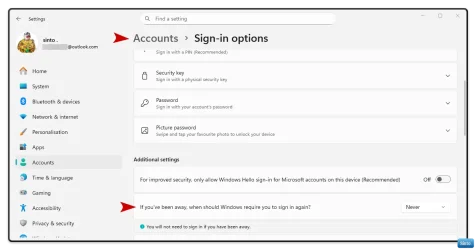
Check; Accounts > Sign in options
Make sure that the following is set correctly.
Set it to Never, or When PC wakes from sleep, depending on what you want to do:

Win-2018.webp
 

My Computers My Computers

  • At a glance

    Windows 11 Pro 25H2 Build 26200.8894Intel(R) Core(TM) i7-4770K CPU @ 3.50GHz32.0 GB of I forget and the box is in storage.Gigabyte nVidia GeForce GTX 1660 Super OC 6GB
    OS
    Windows 11 Pro 25H2 Build 26200.8894
    Computer type
    PC/Desktop
    Manufacturer/Model
    Sin-built 2013
    CPU
    Intel(R) Core(TM) i7-4770K CPU @ 3.50GHz
    Motherboard
    ASUS ROG Maximus VI Formula
    Memory
    32.0 GB of I forget and the box is in storage.
    Graphics Card(s)
    Gigabyte nVidia GeForce GTX 1660 Super OC 6GB
    Sound Card
    ROG SupremeFX Formula 8-Channel High Definition Audio
    Monitor(s) Displays
    5 x LG 25MS500-B - 1 x 24MK430H-B - 1 x Wacom Pro 22" Touch Screen Tablet
    Screen Resolution
    All over the place
    Hard Drives
    Too many to list. OS on Samsung 1TB 870 QVO SATA
    PSU
    Silverstone 1500
    Case
    NZXT Phantom 820 Full-Tower Case
    Cooling
    Noctua NH-D15 Elite Class Dual Tower CPU Cooler / 6 x EziDIY 120mm / 2 x Corsair 140mm somethings / 1 x 140mm Thermaltake something / 2 x 200mm Corsair.
    Keyboard
    Corsair K95 / Logitech diNovo Edge Wireless
    Mouse
    Logitech: G402 / G502 / Mx Masters / Mx Air Cordless
    Internet Speed
    2000/500Mbps
    Browser
    All sorts
    Antivirus
    Kaspersky Premium
    Other Info
    ㅤㅤㅤㅤㅤㅤㅤㅤㅤㅤㅤㅤㅤㅤㅤㅤㅤㅤㅤㅤㅤㅤㅤㅤㅤㅤㅤㅤㅤㅤㅤㅤㅤㅤㅤㅤㅤㅤㅤㅤ⠀⠀⠀⠀⠀⠀⠀⠀⠀⠀
    TP-Link BE9300 WiFi 7 Bluetooth 5.4 (Archer TBE550E)
    TP-Link TX201 V1 2.5GB Lan

    Grandstream HT812 - VoIP
    ASUS DSL-AX82U - Mesh
    ASUS RT-AC68U - Mesh
    ASUS RT-BE88U Router

    Brother MFC-L2880DW Printer

    I’m on a horse.
  • At a glance

    Windows 11 Pro 25H2 Build 26200.8894 (Wifes)13th Generation Intel® Core™ i5-1340P Process...16GB LPDDR5-52001x Intel® Iris® Xe Graphics
    Operating System
    Windows 11 Pro 25H2 Build 26200.8894 (Wifes)
    Computer type
    Laptop
    Manufacturer/Model
    LENOVO Yoga 7 14IRL8 - Type 82YL
    CPU
    13th Generation Intel® Core™ i5-1340P Processor(Core™ i5-1340P)
    Memory
    16GB LPDDR5-5200
    Graphics card(s)
    1x Intel® Iris® Xe Graphics
    Sound Card
    Optimized with Dolby Atmos®
    Screen Resolution
    QHD 2880 x 1800 OLED
    Hard Drives
    M.2 512 GB SSD PCIe
    Mouse
    Logiteck MX Master 3S
    Internet Speed
    2000/500
    Antivirus
    Defender / Malwarebytes
    Other Info
    …still on a horse.


    Wireless Network: Wi-Fi 6E 2x2 AX; Bluetooth® 5.1 or above
    Ports: 1x 1 Novo button; 2 in 1 Audio Combo jack; Micro SD Card Reader; HDMI 1.4b; 2 x USB Type-C (TBT4)
    USB 3.2 Gen 2 DP 1.4a
    PD 3.0); 1 x USB 3.2 Gen1 Type A
    Camera
    1x 1080P FHD IR/RGB Hybrid with Privacy Shutter and Dual Array Microphone
    Graphics
    1x Intel® Iris® Xe Graphics
    Monitor
    14" WUXGA
    Form Factor
    Convertible Notebook
  • Windows 11 Pro 25H2 Build 26200.8894 (Wifes)

    Yoga 7 2-in-1 14IML9 - Type 83DJ

    Processor: Intel® Core™ Ultra 7 155H Processor(Core™ Ultra 7 155H)

    Memory: 32GB LPD5X-7467

    Hard Drive: 1 TB SSD PCIe

    Wireless Network: 1x Wi-Fi 6E 2x2 AX; Bluetooth® 5.1 or above

    Ports: 1 x HDMI 2.1 TMDS; 1 x Novo Button; 1 x Combo Audio Jack
    2 x USB-C (USB 4.0)
    1 x USB-A 3.2 Gen 1

    Camera: 1080P FHD IR Hybrid with Dual Microphone

    Graphics: Intel® Arc™ Graphics

    Monitor: 14" 2.8K

    ...Where's my horse?
i am assuming you want to disable log in
this maybe of help

best of luck Steve ..
I am trying to enable not disable.

Went to the linked thread and I have all those settings on.

Just downloaded and installed Enable_require_password_on_wakeup.reg.

Is it only possible to enable the pin (login) if the Pc is set to sleep or hibernate?

I do not use either one because if I do I cannot remote into my pc for some reason.

Thanks for the reply.
 

My Computer My Computer

At a glance

Windows 11proIntel Core i7-14700K Raptor Lake-S Refresh 3....Crucial Pro 96GB (2 x 48GB) DDR5-5600 PC5-44800PNY NVIDIA GeForce RTX 5080 EPIC-X RGB Overcl...
OS
Windows 11pro
Computer type
PC/Desktop
Manufacturer/Model
Homebuilt
CPU
Intel Core i7-14700K Raptor Lake-S Refresh 3.4GHz
Motherboard
MSI Z790 MAG Tomahawk Max WiFi Intel LGA 1700 ATX Motherboard
Memory
Crucial Pro 96GB (2 x 48GB) DDR5-5600 PC5-44800
Graphics Card(s)
PNY NVIDIA GeForce RTX 5080 EPIC-X RGB Overclocked Triple Fan 16GB GDDR7
Sound Card
Onkyo AVR TX-NR656 5.1
Monitor(s) Displays
3X -LG 32GN650-B Ultragear Gaming Monitor 32” QHD (2560 x 1440) Display, 165Hz Refresh Rate
Screen Resolution
2560 x 1440)
Hard Drives
Wat to many.
PSU
Corsair RM1000e Fully Modular Low-Noise Power Supply - ATX 3.1 & PCIe 5.1
Case
Lian Li LANCOOL 207 DIGITAL Tempered Glass ATX Mid-Tower
Cooling
Thermaltake TH240
Keyboard
Corsair K95 RGB Platinum
Browser
Brave
Antivirus
Defender
Other Info
This is 1 of 5 HTPC also have built a PC for Blue Iris security software.

Welcome to the forum.

Check; Accounts > Sign in options
Make sure that the following is set correctly.
Set it to Never, or When PC wakes from sleep, depending on what you want to do:

View attachment 160593
Yes have that option enabled.

The only 2 options are never and When PC wakes up from sleep.

My pc is not set to sleep or hibernate because I cannot remote in the when either one is enabled.

Thank you for the reply.

been following this forum for years, excellent resources on here.
 

My Computer My Computer

At a glance

Windows 11proIntel Core i7-14700K Raptor Lake-S Refresh 3....Crucial Pro 96GB (2 x 48GB) DDR5-5600 PC5-44800PNY NVIDIA GeForce RTX 5080 EPIC-X RGB Overcl...
OS
Windows 11pro
Computer type
PC/Desktop
Manufacturer/Model
Homebuilt
CPU
Intel Core i7-14700K Raptor Lake-S Refresh 3.4GHz
Motherboard
MSI Z790 MAG Tomahawk Max WiFi Intel LGA 1700 ATX Motherboard
Memory
Crucial Pro 96GB (2 x 48GB) DDR5-5600 PC5-44800
Graphics Card(s)
PNY NVIDIA GeForce RTX 5080 EPIC-X RGB Overclocked Triple Fan 16GB GDDR7
Sound Card
Onkyo AVR TX-NR656 5.1
Monitor(s) Displays
3X -LG 32GN650-B Ultragear Gaming Monitor 32” QHD (2560 x 1440) Display, 165Hz Refresh Rate
Screen Resolution
2560 x 1440)
Hard Drives
Wat to many.
PSU
Corsair RM1000e Fully Modular Low-Noise Power Supply - ATX 3.1 & PCIe 5.1
Case
Lian Li LANCOOL 207 DIGITAL Tempered Glass ATX Mid-Tower
Cooling
Thermaltake TH240
Keyboard
Corsair K95 RGB Platinum
Browser
Brave
Antivirus
Defender
Other Info
This is 1 of 5 HTPC also have built a PC for Blue Iris security software.
Turn off the display after 10 minutes.
Hibernate set to never.
Sleep set to never.
Screen saver set to run after 10 minutes and on resume, display logon screen box is checked.

So I did this and it works for me.

Turn off the display after 10 minutes.


Try changing this to NEVER
Set Screen saver to 1 minute to test
Check the display logon screen box as you have
 

My Computers My Computers

  • At a glance

    Windows 11 Pro 25H2 Build 26200.8894Intel(R) Core(TM) i7-4770K CPU @ 3.50GHz32.0 GB of I forget and the box is in storage.Gigabyte nVidia GeForce GTX 1660 Super OC 6GB
    OS
    Windows 11 Pro 25H2 Build 26200.8894
    Computer type
    PC/Desktop
    Manufacturer/Model
    Sin-built 2013
    CPU
    Intel(R) Core(TM) i7-4770K CPU @ 3.50GHz
    Motherboard
    ASUS ROG Maximus VI Formula
    Memory
    32.0 GB of I forget and the box is in storage.
    Graphics Card(s)
    Gigabyte nVidia GeForce GTX 1660 Super OC 6GB
    Sound Card
    ROG SupremeFX Formula 8-Channel High Definition Audio
    Monitor(s) Displays
    5 x LG 25MS500-B - 1 x 24MK430H-B - 1 x Wacom Pro 22" Touch Screen Tablet
    Screen Resolution
    All over the place
    Hard Drives
    Too many to list. OS on Samsung 1TB 870 QVO SATA
    PSU
    Silverstone 1500
    Case
    NZXT Phantom 820 Full-Tower Case
    Cooling
    Noctua NH-D15 Elite Class Dual Tower CPU Cooler / 6 x EziDIY 120mm / 2 x Corsair 140mm somethings / 1 x 140mm Thermaltake something / 2 x 200mm Corsair.
    Keyboard
    Corsair K95 / Logitech diNovo Edge Wireless
    Mouse
    Logitech: G402 / G502 / Mx Masters / Mx Air Cordless
    Internet Speed
    2000/500Mbps
    Browser
    All sorts
    Antivirus
    Kaspersky Premium
    Other Info
    ㅤㅤㅤㅤㅤㅤㅤㅤㅤㅤㅤㅤㅤㅤㅤㅤㅤㅤㅤㅤㅤㅤㅤㅤㅤㅤㅤㅤㅤㅤㅤㅤㅤㅤㅤㅤㅤㅤㅤㅤ⠀⠀⠀⠀⠀⠀⠀⠀⠀⠀
    TP-Link BE9300 WiFi 7 Bluetooth 5.4 (Archer TBE550E)
    TP-Link TX201 V1 2.5GB Lan

    Grandstream HT812 - VoIP
    ASUS DSL-AX82U - Mesh
    ASUS RT-AC68U - Mesh
    ASUS RT-BE88U Router

    Brother MFC-L2880DW Printer

    I’m on a horse.
  • At a glance

    Windows 11 Pro 25H2 Build 26200.8894 (Wifes)13th Generation Intel® Core™ i5-1340P Process...16GB LPDDR5-52001x Intel® Iris® Xe Graphics
    Operating System
    Windows 11 Pro 25H2 Build 26200.8894 (Wifes)
    Computer type
    Laptop
    Manufacturer/Model
    LENOVO Yoga 7 14IRL8 - Type 82YL
    CPU
    13th Generation Intel® Core™ i5-1340P Processor(Core™ i5-1340P)
    Memory
    16GB LPDDR5-5200
    Graphics card(s)
    1x Intel® Iris® Xe Graphics
    Sound Card
    Optimized with Dolby Atmos®
    Screen Resolution
    QHD 2880 x 1800 OLED
    Hard Drives
    M.2 512 GB SSD PCIe
    Mouse
    Logiteck MX Master 3S
    Internet Speed
    2000/500
    Antivirus
    Defender / Malwarebytes
    Other Info
    …still on a horse.


    Wireless Network: Wi-Fi 6E 2x2 AX; Bluetooth® 5.1 or above
    Ports: 1x 1 Novo button; 2 in 1 Audio Combo jack; Micro SD Card Reader; HDMI 1.4b; 2 x USB Type-C (TBT4)
    USB 3.2 Gen 2 DP 1.4a
    PD 3.0); 1 x USB 3.2 Gen1 Type A
    Camera
    1x 1080P FHD IR/RGB Hybrid with Privacy Shutter and Dual Array Microphone
    Graphics
    1x Intel® Iris® Xe Graphics
    Monitor
    14" WUXGA
    Form Factor
    Convertible Notebook
  • Windows 11 Pro 25H2 Build 26200.8894 (Wifes)

    Yoga 7 2-in-1 14IML9 - Type 83DJ

    Processor: Intel® Core™ Ultra 7 155H Processor(Core™ Ultra 7 155H)

    Memory: 32GB LPD5X-7467

    Hard Drive: 1 TB SSD PCIe

    Wireless Network: 1x Wi-Fi 6E 2x2 AX; Bluetooth® 5.1 or above

    Ports: 1 x HDMI 2.1 TMDS; 1 x Novo Button; 1 x Combo Audio Jack
    2 x USB-C (USB 4.0)
    1 x USB-A 3.2 Gen 1

    Camera: 1080P FHD IR Hybrid with Dual Microphone

    Graphics: Intel® Arc™ Graphics

    Monitor: 14" 2.8K

    ...Where's my horse?
Was just fooling around with this on a spare machine - I think your screen-off after 10 mins setting means the screensaver never starts so the "on resume display logon screen" option doesn't get triggered.
Setting screensaver 2 mins, screen off 3 mins - upon resume from the switched-off display I get the logon screen.
 

My Computer My Computer

At a glance

Win11Pro 24H2 (26100.7462)i7-12700f32gb ddr4nvidia rtx3060ti
OS
Win11Pro 24H2 (26100.7462)
Computer type
PC/Desktop
Manufacturer/Model
self-built
CPU
i7-12700f
Motherboard
gigabyte auros b660
Memory
32gb ddr4
Graphics Card(s)
nvidia rtx3060ti
Sound Card
onboard realtek
Monitor(s) Displays
1 x benq, 2 x lg
Screen Resolution
1 at 2560x1080, 2 at 1920x1080
Hard Drives
nvme 1tb crucial ssd
sata 1tb samsung ssd
1tb HDD, 3tb HDD
PSU
corsair rm750
Case
NZXT H710
Cooling
BeQuiet Dark Rock
Keyboard
steelseries apex 3
Mouse
generic usb
Internet Speed
500 down 20 up
Browser
librewolf
Antivirus
eset nod32
Was just fooling around with this on a spare machine - I think your screen-off after 10 mins setting means the screensaver never starts so the "on resume display logon screen" option doesn't get triggered.
Setting screensaver 2 mins, screen off 3 mins - upon resume from the switched-off display I get the logon screen.
Yes. If you're going to use both the monitor and screen saver settings, the monitor settings need to be longer than the time set for the screen saver to start. e.x.
Screen saver > 10min
Turn off Monitors > 15min (Must be longer, but better to set to never for this issue, or an extended period)

You may have an issue where that lock screen may not display when the Monitors have been turned off however it should. It may be overriding the screen saver lock screen settings.

Hence the suggestion:

Try changing this to NEVER
Set Screen saver to 1 minute to test
Check the display logon screen box as you have
 

My Computers My Computers

  • At a glance

    Windows 11 Pro 25H2 Build 26200.8894Intel(R) Core(TM) i7-4770K CPU @ 3.50GHz32.0 GB of I forget and the box is in storage.Gigabyte nVidia GeForce GTX 1660 Super OC 6GB
    OS
    Windows 11 Pro 25H2 Build 26200.8894
    Computer type
    PC/Desktop
    Manufacturer/Model
    Sin-built 2013
    CPU
    Intel(R) Core(TM) i7-4770K CPU @ 3.50GHz
    Motherboard
    ASUS ROG Maximus VI Formula
    Memory
    32.0 GB of I forget and the box is in storage.
    Graphics Card(s)
    Gigabyte nVidia GeForce GTX 1660 Super OC 6GB
    Sound Card
    ROG SupremeFX Formula 8-Channel High Definition Audio
    Monitor(s) Displays
    5 x LG 25MS500-B - 1 x 24MK430H-B - 1 x Wacom Pro 22" Touch Screen Tablet
    Screen Resolution
    All over the place
    Hard Drives
    Too many to list. OS on Samsung 1TB 870 QVO SATA
    PSU
    Silverstone 1500
    Case
    NZXT Phantom 820 Full-Tower Case
    Cooling
    Noctua NH-D15 Elite Class Dual Tower CPU Cooler / 6 x EziDIY 120mm / 2 x Corsair 140mm somethings / 1 x 140mm Thermaltake something / 2 x 200mm Corsair.
    Keyboard
    Corsair K95 / Logitech diNovo Edge Wireless
    Mouse
    Logitech: G402 / G502 / Mx Masters / Mx Air Cordless
    Internet Speed
    2000/500Mbps
    Browser
    All sorts
    Antivirus
    Kaspersky Premium
    Other Info
    ㅤㅤㅤㅤㅤㅤㅤㅤㅤㅤㅤㅤㅤㅤㅤㅤㅤㅤㅤㅤㅤㅤㅤㅤㅤㅤㅤㅤㅤㅤㅤㅤㅤㅤㅤㅤㅤㅤㅤㅤ⠀⠀⠀⠀⠀⠀⠀⠀⠀⠀
    TP-Link BE9300 WiFi 7 Bluetooth 5.4 (Archer TBE550E)
    TP-Link TX201 V1 2.5GB Lan

    Grandstream HT812 - VoIP
    ASUS DSL-AX82U - Mesh
    ASUS RT-AC68U - Mesh
    ASUS RT-BE88U Router

    Brother MFC-L2880DW Printer

    I’m on a horse.
  • At a glance

    Windows 11 Pro 25H2 Build 26200.8894 (Wifes)13th Generation Intel® Core™ i5-1340P Process...16GB LPDDR5-52001x Intel® Iris® Xe Graphics
    Operating System
    Windows 11 Pro 25H2 Build 26200.8894 (Wifes)
    Computer type
    Laptop
    Manufacturer/Model
    LENOVO Yoga 7 14IRL8 - Type 82YL
    CPU
    13th Generation Intel® Core™ i5-1340P Processor(Core™ i5-1340P)
    Memory
    16GB LPDDR5-5200
    Graphics card(s)
    1x Intel® Iris® Xe Graphics
    Sound Card
    Optimized with Dolby Atmos®
    Screen Resolution
    QHD 2880 x 1800 OLED
    Hard Drives
    M.2 512 GB SSD PCIe
    Mouse
    Logiteck MX Master 3S
    Internet Speed
    2000/500
    Antivirus
    Defender / Malwarebytes
    Other Info
    …still on a horse.


    Wireless Network: Wi-Fi 6E 2x2 AX; Bluetooth® 5.1 or above
    Ports: 1x 1 Novo button; 2 in 1 Audio Combo jack; Micro SD Card Reader; HDMI 1.4b; 2 x USB Type-C (TBT4)
    USB 3.2 Gen 2 DP 1.4a
    PD 3.0); 1 x USB 3.2 Gen1 Type A
    Camera
    1x 1080P FHD IR/RGB Hybrid with Privacy Shutter and Dual Array Microphone
    Graphics
    1x Intel® Iris® Xe Graphics
    Monitor
    14" WUXGA
    Form Factor
    Convertible Notebook
  • Windows 11 Pro 25H2 Build 26200.8894 (Wifes)

    Yoga 7 2-in-1 14IML9 - Type 83DJ

    Processor: Intel® Core™ Ultra 7 155H Processor(Core™ Ultra 7 155H)

    Memory: 32GB LPD5X-7467

    Hard Drive: 1 TB SSD PCIe

    Wireless Network: 1x Wi-Fi 6E 2x2 AX; Bluetooth® 5.1 or above

    Ports: 1 x HDMI 2.1 TMDS; 1 x Novo Button; 1 x Combo Audio Jack
    2 x USB-C (USB 4.0)
    1 x USB-A 3.2 Gen 1

    Camera: 1080P FHD IR Hybrid with Dual Microphone

    Graphics: Intel® Arc™ Graphics

    Monitor: 14" 2.8K

    ...Where's my horse?
So I did this and it works for me.


Try changing this to NEVER
Set Screen saver to 1 minute to test
Check the display logon screen box as you have
This did it.

Thank you.
 

My Computer My Computer

At a glance

Windows 11proIntel Core i7-14700K Raptor Lake-S Refresh 3....Crucial Pro 96GB (2 x 48GB) DDR5-5600 PC5-44800PNY NVIDIA GeForce RTX 5080 EPIC-X RGB Overcl...
OS
Windows 11pro
Computer type
PC/Desktop
Manufacturer/Model
Homebuilt
CPU
Intel Core i7-14700K Raptor Lake-S Refresh 3.4GHz
Motherboard
MSI Z790 MAG Tomahawk Max WiFi Intel LGA 1700 ATX Motherboard
Memory
Crucial Pro 96GB (2 x 48GB) DDR5-5600 PC5-44800
Graphics Card(s)
PNY NVIDIA GeForce RTX 5080 EPIC-X RGB Overclocked Triple Fan 16GB GDDR7
Sound Card
Onkyo AVR TX-NR656 5.1
Monitor(s) Displays
3X -LG 32GN650-B Ultragear Gaming Monitor 32” QHD (2560 x 1440) Display, 165Hz Refresh Rate
Screen Resolution
2560 x 1440)
Hard Drives
Wat to many.
PSU
Corsair RM1000e Fully Modular Low-Noise Power Supply - ATX 3.1 & PCIe 5.1
Case
Lian Li LANCOOL 207 DIGITAL Tempered Glass ATX Mid-Tower
Cooling
Thermaltake TH240
Keyboard
Corsair K95 RGB Platinum
Browser
Brave
Antivirus
Defender
Other Info
This is 1 of 5 HTPC also have built a PC for Blue Iris security software.
Yes. If you're going to use both the monitor and screen saver settings, the monitor settings need to be longer than the time set for the screen saver to start. e.x.
Screen saver > 10min
Turn off Monitors > 15min (Must be longer, but better to set to never for this issue, or an extended period)

You may have an issue where that lock screen may not display when the Monitors have been turned off however it should. It may be overriding the screen saver lock screen settings.

Hence the suggestion:
Thank you.
 

My Computer My Computer

At a glance

Windows 11proIntel Core i7-14700K Raptor Lake-S Refresh 3....Crucial Pro 96GB (2 x 48GB) DDR5-5600 PC5-44800PNY NVIDIA GeForce RTX 5080 EPIC-X RGB Overcl...
OS
Windows 11pro
Computer type
PC/Desktop
Manufacturer/Model
Homebuilt
CPU
Intel Core i7-14700K Raptor Lake-S Refresh 3.4GHz
Motherboard
MSI Z790 MAG Tomahawk Max WiFi Intel LGA 1700 ATX Motherboard
Memory
Crucial Pro 96GB (2 x 48GB) DDR5-5600 PC5-44800
Graphics Card(s)
PNY NVIDIA GeForce RTX 5080 EPIC-X RGB Overclocked Triple Fan 16GB GDDR7
Sound Card
Onkyo AVR TX-NR656 5.1
Monitor(s) Displays
3X -LG 32GN650-B Ultragear Gaming Monitor 32” QHD (2560 x 1440) Display, 165Hz Refresh Rate
Screen Resolution
2560 x 1440)
Hard Drives
Wat to many.
PSU
Corsair RM1000e Fully Modular Low-Noise Power Supply - ATX 3.1 & PCIe 5.1
Case
Lian Li LANCOOL 207 DIGITAL Tempered Glass ATX Mid-Tower
Cooling
Thermaltake TH240
Keyboard
Corsair K95 RGB Platinum
Browser
Brave
Antivirus
Defender
Other Info
This is 1 of 5 HTPC also have built a PC for Blue Iris security software.
Back
Top Bottom




