Windows Media Player Legacy maximises when a USB stick is inserted in the PC


MrYossu

Well-known member
Member
Local time
1:24 PM
Posts
113
OS
Win11
If I have WMP in mini-play view (my preferred), and I insert a USB stick into the PC, WMP maximises itself.

I had this on my Win10 installation, and it was annoying. I just installed Win11, struggled with the new WMP for a few days, then went back to the legacy one, and found it does the same thing.

However, when it does it now, it seems to maximise it slightly larger than the screen, so the button to return to mini-player is off the screen.

Anyone any ideas how to stop it maximising?

Thanks

P.S. Here are my system specs in case it helps.
 
Windows Build/Version
Windows 11 Pro 64-bit, version 22H2, build 22621.900

My Computer My Computer

At a glance

Win11AMD Ryzen 9 3900X96Gb2047MB NVIDIA NVS 510
OS
Win11
CPU
AMD Ryzen 9 3900X
Motherboard
Aorus X570 Elite
Memory
96Gb
Graphics Card(s)
2047MB NVIDIA NVS 510
Monitor(s) Displays
ASUS PB278 (2560x1440@59Hz), DELL S2721DS (2560x1440@59Hz), F22 (1920x1080@60Hz), DELL E2311H (1920x1080@60Hz)
Hard Drives
931GB Force MP600 primary drive
931GB Western Digital WDC WD10EALX-759BA1 data drive
5589GB Seagate Backup+ Hub BK SCSI Disk Device (USB (SATA)) external backup
Other Info
See http://speccy.piriform.com/results/a0tsEUMm6hE5R4aEwpTCg3a for full specs

My Computers My Computers

  • At a glance

    Windows 11 Pro
    OS
    Windows 11 Pro
    Computer type
    PC/Desktop
    Manufacturer/Model
    ASUS ROG Strix
  • At a glance

    Windows 11 Pro
    Operating System
    Windows 11 Pro
    Computer type
    Laptop
    Manufacturer/Model
    ASUS VivoBook
  • ASUS VivoBook 'Lite' ~ Windows 11 Home
Ah, never thought of that! I just disabled AutoPlay completely. I'll see what happens over the next few days.

Thanks
 

My Computer My Computer

At a glance

Win11AMD Ryzen 9 3900X96Gb2047MB NVIDIA NVS 510
OS
Win11
CPU
AMD Ryzen 9 3900X
Motherboard
Aorus X570 Elite
Memory
96Gb
Graphics Card(s)
2047MB NVIDIA NVS 510
Monitor(s) Displays
ASUS PB278 (2560x1440@59Hz), DELL S2721DS (2560x1440@59Hz), F22 (1920x1080@60Hz), DELL E2311H (1920x1080@60Hz)
Hard Drives
931GB Force MP600 primary drive
931GB Western Digital WDC WD10EALX-759BA1 data drive
5589GB Seagate Backup+ Hub BK SCSI Disk Device (USB (SATA)) external backup
Other Info
See http://speccy.piriform.com/results/a0tsEUMm6hE5R4aEwpTCg3a for full specs
@Edwin Thanks again for the suggestion, but it just did it again. I double-checked and I definitely have AutoPlay disabled.

Any other ideas? Thanks
 

My Computer My Computer

At a glance

Win11AMD Ryzen 9 3900X96Gb2047MB NVIDIA NVS 510
OS
Win11
CPU
AMD Ryzen 9 3900X
Motherboard
Aorus X570 Elite
Memory
96Gb
Graphics Card(s)
2047MB NVIDIA NVS 510
Monitor(s) Displays
ASUS PB278 (2560x1440@59Hz), DELL S2721DS (2560x1440@59Hz), F22 (1920x1080@60Hz), DELL E2311H (1920x1080@60Hz)
Hard Drives
931GB Force MP600 primary drive
931GB Western Digital WDC WD10EALX-759BA1 data drive
5589GB Seagate Backup+ Hub BK SCSI Disk Device (USB (SATA)) external backup
Other Info
See http://speccy.piriform.com/results/a0tsEUMm6hE5R4aEwpTCg3a for full specs

My Computers My Computers

  • At a glance

    Windows 11 Pro
    OS
    Windows 11 Pro
    Computer type
    PC/Desktop
    Manufacturer/Model
    ASUS ROG Strix
  • At a glance

    Windows 11 Pro
    Operating System
    Windows 11 Pro
    Computer type
    Laptop
    Manufacturer/Model
    ASUS VivoBook
  • ASUS VivoBook 'Lite' ~ Windows 11 Home
Oh well, at least it's not just me!

I guess I'll live with it. Irritating, but not worth clogging up my PC with more software. Trying to keep it as clean as possible.

Thanks again.
 

My Computer My Computer

At a glance

Win11AMD Ryzen 9 3900X96Gb2047MB NVIDIA NVS 510
OS
Win11
CPU
AMD Ryzen 9 3900X
Motherboard
Aorus X570 Elite
Memory
96Gb
Graphics Card(s)
2047MB NVIDIA NVS 510
Monitor(s) Displays
ASUS PB278 (2560x1440@59Hz), DELL S2721DS (2560x1440@59Hz), F22 (1920x1080@60Hz), DELL E2311H (1920x1080@60Hz)
Hard Drives
931GB Force MP600 primary drive
931GB Western Digital WDC WD10EALX-759BA1 data drive
5589GB Seagate Backup+ Hub BK SCSI Disk Device (USB (SATA)) external backup
Other Info
See http://speccy.piriform.com/results/a0tsEUMm6hE5R4aEwpTCg3a for full specs
If you check the root folder of the USB stick in Windows Explorer, does it have a file called WMPInfo.xml? If not, switch back to WMP and go to Tools - Options - Devices (press Ctrl+M if you don't see the Tools menu). You should see the USB stick listed, double-click it and tick or untick Create folder hierarchy on device, then click OK.

Changing this or any other setting in Sync settings should cause WMP to create a WMPInfo.xml file in the root of the drive. The presence of such a file should prevent WMP from popping up or automatically scanning the stick the next time it's inserted.
 

My Computer My Computer

At a glance

Windows 10
OS
Windows 10
If you check the root folder of the USB stick in Windows Explorer, does it have a file called WMPInfo.xml? If not, switch back to WMP and go to Tools - Options - Devices (press Ctrl+M if you don't see the Tools menu). You should see the USB stick listed, double-click it and tick or untick Create folder hierarchy on device, then click OK.

Changing this or any other setting in Sync settings should cause WMP to create a WMPInfo.xml file in the root of the drive. The presence of such a file should prevent WMP from popping up or automatically scanning the stick the next time it's inserted.
Interesting, but a bit impractical, as this happens with every USB stick I use. As many of them are not mine, I can't really start creating files and folders on other people's.

Thanks anyway.
 

My Computer My Computer

At a glance

Win11AMD Ryzen 9 3900X96Gb2047MB NVIDIA NVS 510
OS
Win11
CPU
AMD Ryzen 9 3900X
Motherboard
Aorus X570 Elite
Memory
96Gb
Graphics Card(s)
2047MB NVIDIA NVS 510
Monitor(s) Displays
ASUS PB278 (2560x1440@59Hz), DELL S2721DS (2560x1440@59Hz), F22 (1920x1080@60Hz), DELL E2311H (1920x1080@60Hz)
Hard Drives
931GB Force MP600 primary drive
931GB Western Digital WDC WD10EALX-759BA1 data drive
5589GB Seagate Backup+ Hub BK SCSI Disk Device (USB (SATA)) external backup
Other Info
See http://speccy.piriform.com/results/a0tsEUMm6hE5R4aEwpTCg3a for full specs
how do you even start windows media player legacy in win 11, i can't find it anywhere.
 

My Computer My Computer

At a glance

win11
OS
win11

My Computer My Computer

At a glance

Windows 11 Pro 25H2 (Build 26300.9278)Intel Core Ultra 9 285 5.6 GHz32.00 GBIntel Integrated Graphics (128 MB)
OS
Windows 11 Pro 25H2 (Build 26300.9278)
Computer type
PC/Desktop
Manufacturer/Model
Dell Pro Max Tower T2 FCT2250
CPU
Intel Core Ultra 9 285 5.6 GHz
Motherboard
64-bit operating system, x64-based processor
Memory
32.00 GB
Graphics Card(s)
Intel Integrated Graphics (128 MB)
Sound Card
Realtek Audio
Monitor(s) Displays
Dell P2714H Monitor
Screen Resolution
1920 x 1080
Hard Drives
1 x 512GB M.2 XG10d SED KIOXIA PCIe solid state drive (Internal)
1 x 2TB Seagate ST2000DM008-2UB102 HDD (Internal)
1 x 4TB Seagate STGX4000400 External HDD
1 x 6TB WD Elements AE 2689 External HDD
PSU
500 Watts
Cooling
Air
Keyboard
Microsoft Wired Keyboard 600
Mouse
Microsoft USB Basic Optical Mouse v2.0
Browser
Firefox
Antivirus
Windows Defender + Malwarebytes Premium
Other Info
BaseBoard Manufacturer Dell Inc.
BaseBoard Product 022RY57
BaseBoard Version A01
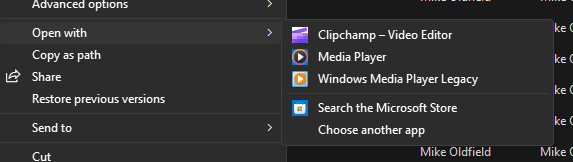
Right-click an .mp3 file and choose "Open with", you should see it. See screenshot.

If not, click "Choose another app" and you should see it.
 

Attachments

  • Screenshot 2023-03-13 140357.png
    Screenshot 2023-03-13 140357.png
    5 KB · Views: 3

My Computer My Computer

At a glance

Win11AMD Ryzen 9 3900X96Gb2047MB NVIDIA NVS 510
OS
Win11
CPU
AMD Ryzen 9 3900X
Motherboard
Aorus X570 Elite
Memory
96Gb
Graphics Card(s)
2047MB NVIDIA NVS 510
Monitor(s) Displays
ASUS PB278 (2560x1440@59Hz), DELL S2721DS (2560x1440@59Hz), F22 (1920x1080@60Hz), DELL E2311H (1920x1080@60Hz)
Hard Drives
931GB Force MP600 primary drive
931GB Western Digital WDC WD10EALX-759BA1 data drive
5589GB Seagate Backup+ Hub BK SCSI Disk Device (USB (SATA)) external backup
Other Info
See http://speccy.piriform.com/results/a0tsEUMm6hE5R4aEwpTCg3a for full specs

Latest Support Threads

Back
Top Bottom