Windows Media Player


CaptainEgg

New member
Local time
5:50 AM
Posts
1
OS
Windows 11
Downloaded all the clips from my dash cam, I figured out how to watch it non stop, but I want to be able to combine the one minute clips and then download the movie to a flash drive
 

My Computer My Computer

At a glance

Windows 11
OS
Windows 11
Computer type
PC/Desktop
Manufacturer/Model
HP
Windows 11 includes the Clip Champ app. Although not all its features are free, it should do what you want but I have never used it. If you have uninstalled Clip Chap app, it can be gotten from the MS store. Otherwise any video editing software can merge clips into one video. There are many out there, both installable and online. I use Canva Free.
 

My Computers My Computers

  • At a glance

    Windows 11 Pro 25H2 26200.8655i9-10900 10 core 20 threadsDELL 0J37VM32 gb
    OS
    Windows 11 Pro 25H2 26200.8655
    Computer type
    PC/Desktop
    Manufacturer/Model
    Dell Optiplex 7080
    CPU
    i9-10900 10 core 20 threads
    Motherboard
    DELL 0J37VM
    Memory
    32 gb
    Graphics Card(s)
    none-Intel UHD Graphics 630
    Sound Card
    Integrated Realtek
    Monitor(s) Displays
    Benq 27
    Screen Resolution
    2560x1440
    Hard Drives
    2x1tb Solidigm m.2 nvme /External drives 512gb Samsung m.2 sata+2tb Kingston m2.nvme
    PSU
    500w
    Case
    MT
    Cooling
    Dell Premium
    Keyboard
    Logitech wired
    Mouse
    Logitech wireless
    Internet Speed
    so slow I'm too embarrassed to tell
    Browser
    #1 Edge #2 Firefox
    Antivirus
    Defender+MWB Premium
  • Operating System
    Windows 11 Pro 24H2 26200.8457
    Computer type
    PC/Desktop
    Manufacturer/Model
    Beelink Mini PC SER5
    CPU
    AMD Ryzen 7 6800U
    Memory
    32 gb
    Graphics card(s)
    integrated
    Sound Card
    integrated
    Monitor(s) Displays
    Benq 27
    Screen Resolution
    2560x1440
    Hard Drives
    1TB Crucial nvme
    Keyboard
    Logitech wired
    Mouse
    Logitech wireless
    Internet Speed
    still too embarrassed to tell
    Browser
    Firefox
    Antivirus
    Defender
    Other Info
    System 3 is non compliant Dell 9020 i7-4770/24gb ram Win11 PRO 26200.8457
You can also try Avidemux. It is free and will join your clips for you. Simply drag each clip on to the window, one after the other and then save the file.

You will need to set the correct video and audio types, but that is easy enough to do.


My Computer My Computer

At a glance

Windows 11 ProRyzen 9 3900XASUS ROG Strix X570-E GamingG-Skill RipjawsV F4-3600C18 (16GB x 2)
OS
Windows 11 Pro
Computer type
PC/Desktop
CPU
Ryzen 9 3900X
Motherboard
ASUS ROG Strix X570-E Gaming
Memory
G-Skill RipjawsV F4-3600C18 (16GB x 2)
Graphics Card(s)
Gigabyte RX 5700 XT Gaming OC
Sound Card
Realtek ALC1220P
Monitor(s) Displays
ASUS VE278 (x 2)
Screen Resolution
1920x1080
Hard Drives
Samsung 850 Pro 256GB
Samsung 970 Pro NVMe 512GB (x 2)
ST10000VN0004 10TB (x 2)
ST10000VN0008 10TB (x 2)
ST4000VN000 4TB (x 2)
PSU
Corsair HX1000
Case
Corsair Carbide 400R
Cooling
AMD Wraith Prism (Stock)
Keyboard
Logitech G213
Mouse
Logitech G502
Internet Speed
100Mbps down / 40Mbps up
Browser
Firefox - Chrome - Edge
Antivirus
Windows Defender - Clamwin
Vouch Avidemux. I use it my self and I'm A/V challenged. :-)

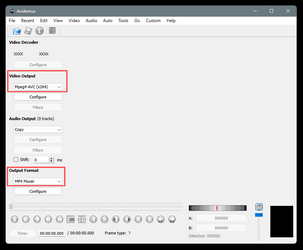
The only hard part for me, was making sure to select these two options (for working in .mp4 format)

Image1.png
 
Last edited:

My Computers My Computers

  • At a glance

    Win 11 Home ♦♦♦26200.8655 ♦♦♦♦♦♦♦25H2AMD Ryzen 7 3700XAsus Pro WS X570-ACE (BIOS 5302)G.Skill (F4-3200C14D-16GTZKW)
    OS
    Win 11 Home ♦♦♦26200.8655 ♦♦♦♦♦♦♦25H2
    Computer type
    PC/Desktop
    Manufacturer/Model
    Built by Ghot® [May 2020]
    CPU
    AMD Ryzen 7 3700X
    Motherboard
    Asus Pro WS X570-ACE (BIOS 5302)
    Memory
    G.Skill (F4-3200C14D-16GTZKW)
    Graphics Card(s)
    EVGA RTX 2070 (08G-P4-2171-KR)
    Sound Card
    Realtek ALC1220P / ALC S1220A
    Monitor(s) Displays
    Dell U3011 30"
    Screen Resolution
    2560 x 1600
    Hard Drives
    2x Samsung 860 EVO 500GB,
    WD 4TB Black FZBX - SATA III,
    WD 8TB Black FZBX - SATA III,
    DRW-24B1ST CD/DVD Burner
    PSU
    PC Power & Cooling 750W Quad EPS12V
    Case
    Cooler Master ATCS 840 Tower
    Cooling
    CM Hyper 212 EVO (push/pull)
    Keyboard
    Ducky DK9008 Shine II Blue LED
    Mouse
    Logitech Optical M-100
    Internet Speed
    300/300
    Browser
    Firefox (latest)
    Antivirus
    Bitdefender Total Security
    Other Info
    Speakers: Klipsch Pro Media 2.1
  • Operating System
    Windows XP Pro 32bit w/SP3
    Computer type
    PC/Desktop
    Manufacturer/Model
    Built by Ghot® (not in use)
    CPU
    AMD Athlon 64 X2 5000+ (OC'd @ 3.2Ghz)
    Motherboard
    ASUS M2N32-SLI Deluxe Wireless Edition
    Memory
    TWIN2X2048-6400C4DHX (2 x 1GB, DDR2 800)
    Graphics card(s)
    EVGA 256-P2-N758-TR GeForce 8600GT SSC
    Sound Card
    Onboard
    Monitor(s) Displays
    ViewSonic G90FB Black 19" Professional (CRT)
    Screen Resolution
    up to 2048 x 1536
    Hard Drives
    WD 36GB 10,000rpm Raptor SATA
    Seagate 80GB 7200rpm SATA
    Lite-On LTR-52246S CD/RW
    Lite-On LH-18A1P CD/DVD Burner
    PSU
    PC Power & Cooling Silencer 750 Quad EPS12V
    Case
    Generic Beige case, 80mm fans
    Cooling
    ZALMAN 9500A 92mm CPU Cooler
    Keyboard
    Logitech Classic Keybooard 200
    Mouse
    Logitech Optical M-BT96a
    Internet Speed
    300/300
    Browser
    Firefox 3.x ??
    Antivirus
    Symantec (Norton)
    Other Info
    Still assembled, still runs. Haven't turned it on for 15 years?
Yes, it is important that you select the correct Video codec and the correct Output muxer. If you get those wrong, strange things can happen when you try to play the video in Windows Media Player for example. Some players such as VLC, have very good error correction, so you may not see any anomalies during playback, but rest assured, you are bound to experience poor playback at some stage if you have the codec and muxer wrong.

For .mp4, you always want to select the x264 and AAC (FDK or lav) audio codecs along with the MP4 Muxer. These are the only fully supported codecs to use for .mp4 and the MP4 specification actually tells you that. Some encoders/players allow mixing and matching of codecs, but that is generally not supported by the MP4 specification.

If you leave the Video Output set to copy (which you should do when adding multiple .mp4 clips together), then it does just that and it will copy the Video into a new container using the MP4 Muxer. Likewise for Audio.

For .mkv, you may select any of the video or audio codecs, but they are not guaranteed to work with your video playback software or device. It is usually best to select HEVC (x265) and AC3 (lav or Aften) Audio along with the MKV Muxer for .mkv files since these are the most supported codecs for .mkv.

 
Last edited:

My Computer My Computer

At a glance

Windows 11 ProRyzen 9 3900XASUS ROG Strix X570-E GamingG-Skill RipjawsV F4-3600C18 (16GB x 2)
OS
Windows 11 Pro
Computer type
PC/Desktop
CPU
Ryzen 9 3900X
Motherboard
ASUS ROG Strix X570-E Gaming
Memory
G-Skill RipjawsV F4-3600C18 (16GB x 2)
Graphics Card(s)
Gigabyte RX 5700 XT Gaming OC
Sound Card
Realtek ALC1220P
Monitor(s) Displays
ASUS VE278 (x 2)
Screen Resolution
1920x1080
Hard Drives
Samsung 850 Pro 256GB
Samsung 970 Pro NVMe 512GB (x 2)
ST10000VN0004 10TB (x 2)
ST10000VN0008 10TB (x 2)
ST4000VN000 4TB (x 2)
PSU
Corsair HX1000
Case
Corsair Carbide 400R
Cooling
AMD Wraith Prism (Stock)
Keyboard
Logitech G213
Mouse
Logitech G502
Internet Speed
100Mbps down / 40Mbps up
Browser
Firefox - Chrome - Edge
Antivirus
Windows Defender - Clamwin
Back
Top Bottom