Insider Windows Photos app gets Generative erase and AI editing features


 Windows Blogs:

UPDATED!

Hello Windows Insiders,

We’re excited to share with you our latest editing capability available for the Photos app, Generative erase. Plus, all our recently released AI edit features, including Blur background, Remove and replace background, and Generative erase, are also now available in the Photos app for Arm64 devices and Windows 10. This update is beginning to roll out to Windows Insiders in all channels today (including Windows Insiders on Windows 10 in the Release Preview Channel). Make sure to update your app to version number 2024.11020.21001.0 or higher.


Generative Erase​

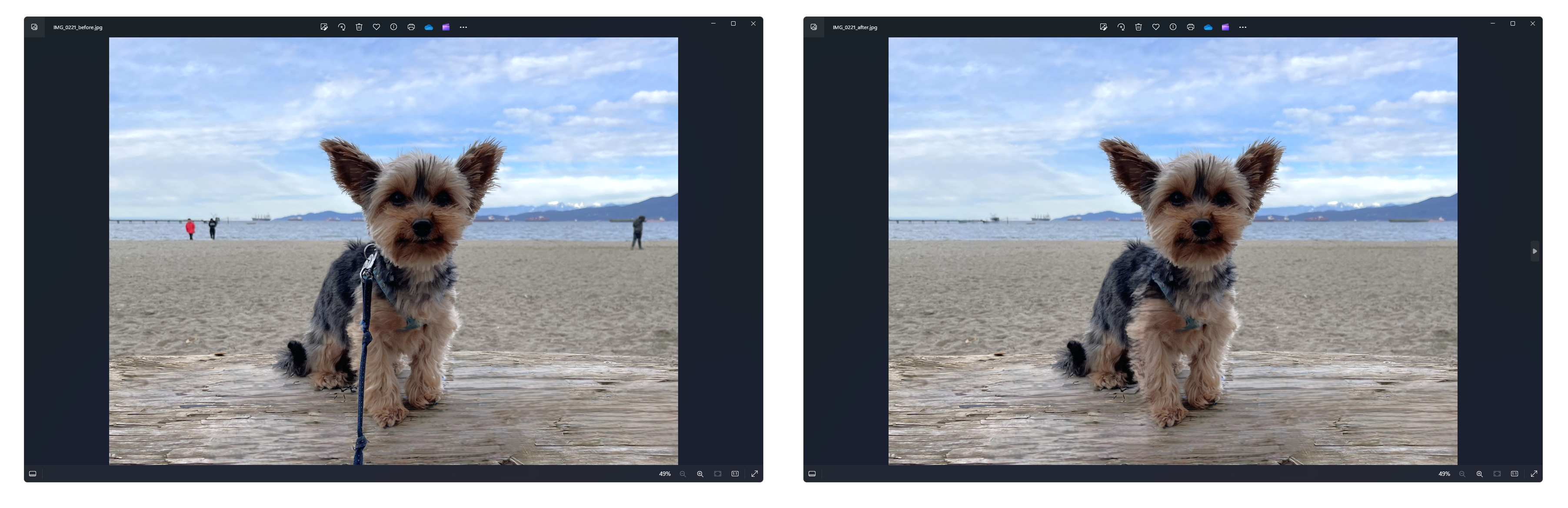
Our well-known Spot fix tool has received a boost with the help of AI and is now known as Generative erase in the app. This feature allows you to fix and remove distractions from your photos, like background objects or miscellaneous visual clutter. Compared to Spot fix, Generative erase creates a more seamless and realistic result after objects are erased from the photo, even when erasing large areas.


Before and after using generative erase to remove unwanted objects from the photo.

To use Generative erase, go to Edit Image and select the Erase option. Brush over the objects or areas you want to remove. Adjust the brush size to get the right level of precision you need.
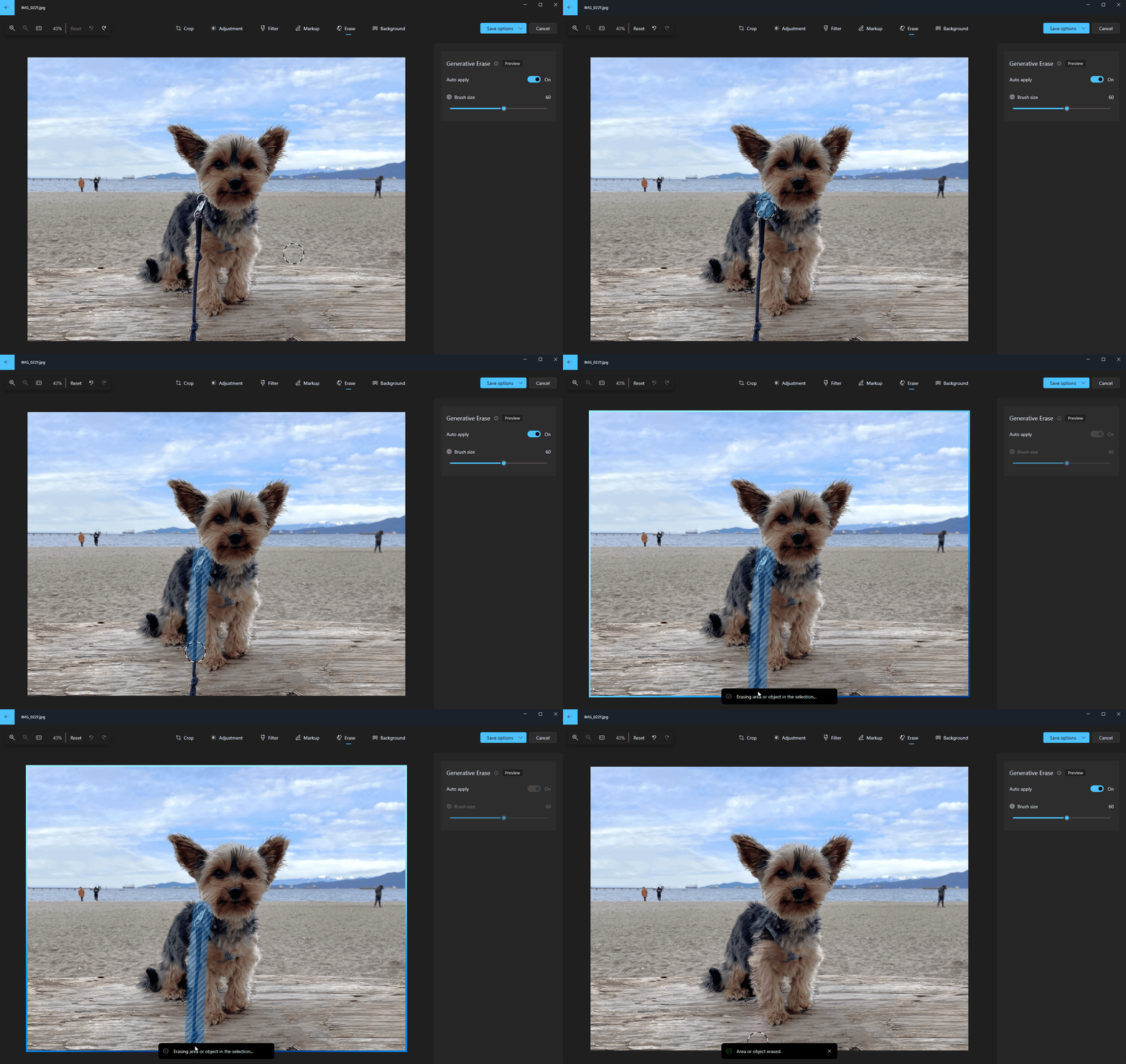
Select the areas you want removed and watch unwanted objects disappear.Select the areas you want removed and watch unwanted objects disappear.

For even finer control or removing multiple objects at once, you can disable Auto Apply to add or remove masks, where each mask represents an area that will be erased.
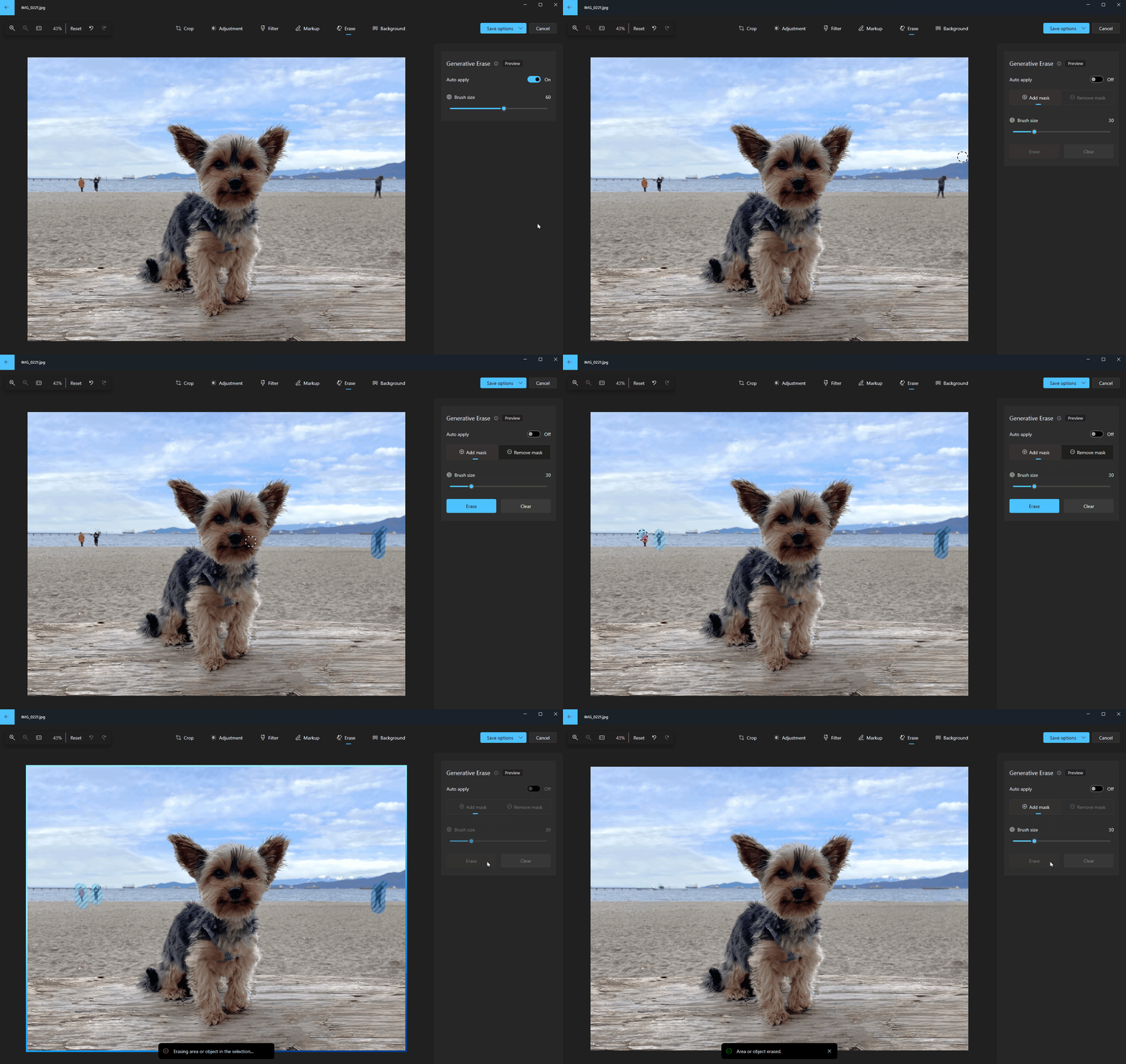
Add masks to remove multiple objects at once.

Other fixes and improvements​

  • All of the current Photos app AI edit features, including Blur background, Remove and Replace background, and Generative erase are now available in the Photos app for Windows 11 for Arm64 devices.
  • For the first time, Windows 10 will be receiving all of the AI editing features that were previously available only on Windows 11, including Blur background, Remove and Replace background, and Generative erase.
  • Various stability fixes and improvements.
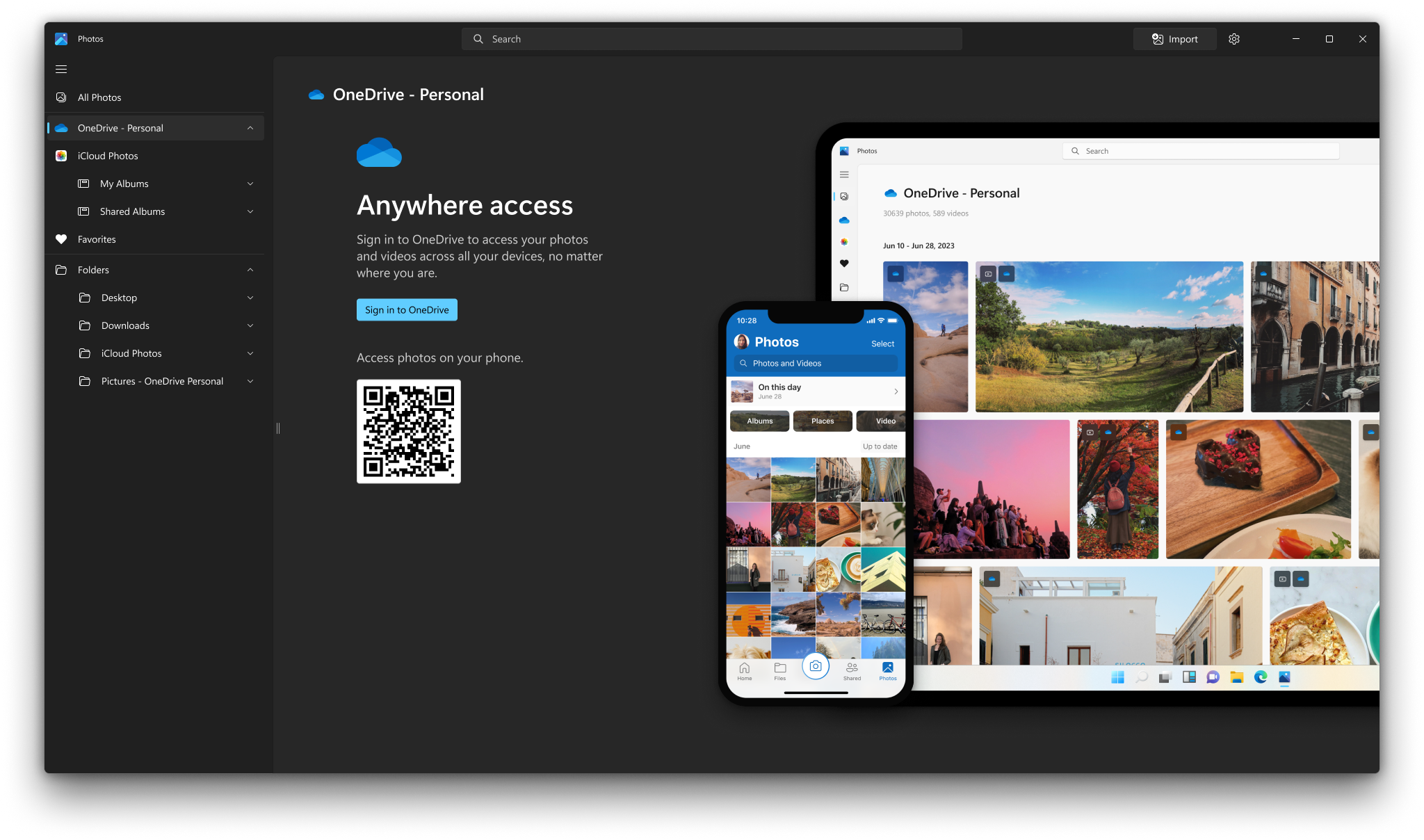
[ADDED 3/14/2024] We’ve added a QR code to download the OneDrive iOS/Android mobile app and set up photo backup in a few new places – so you can access photos captured on your phone right here in the Photos app. If you’re already signed in to OneDrive Personal on Windows, you will now be automatically signed in to the mobile app, so the setup is easier than ever before.

QR code to download the OneDrive iOS/Android mobile app so you can access photos captured on your phone right here in the Photos app.

We appreciate your comments and suggestions, so please share your feedback with us!

FEEDBACK: Please file feedback in Feedback Hub (WIN + F) under Apps > Photos.

Thanks,
Mala Srivatsa, Senior Product Manager – Windows Photos


 Source:

 
Last edited:
Updated via MS Store. :thumbsup:
 

My Computer My Computer

At a glance

Windows 11 26H2 Pro (RP 26300.9550)
OS
Windows 11 26H2 Pro (RP 26300.9550)
Computer type
PC/Desktop
Manufacturer/Model
Alienware
Really like these new additions (y)
 

My Computers My Computers

  • At a glance

    Windows 11 26H2Intel i9 14900KF64GB Corsair Vengeance RGBMSI 4090 Suprim X
    OS
    Windows 11 26H2
    Computer type
    PC/Desktop
    Manufacturer/Model
    Custom Built
    CPU
    Intel i9 14900KF
    Motherboard
    ASUS Z790 ProArt Creator WiFi
    Memory
    64GB Corsair Vengeance RGB
    Graphics Card(s)
    MSI 4090 Suprim X
    Sound Card
    Onboard
    Monitor(s) Displays
    1 x Asus 24". 1 x Asus 32"
    Screen Resolution
    1920 x 1080 & 2560 x 1440 (4K DSR)
    Hard Drives
    Multiple
    PSU
    Corsair 1200HX
    Case
    Corsair 7000D RGB
    Cooling
    Corsair H150I Capellix XT
    Keyboard
    Corsair K70 RGB PRO
    Mouse
    Corsair M55 RGB Pro
    Internet Speed
    1000Mbps
    Browser
    Edge
    Antivirus
    Windows Default
  • At a glance

    Windows 11 25H2Intel i7 6800K32GB DDR4 (Corsair)ASUS GTX 1080ti
    Operating System
    Windows 11 25H2
    Computer type
    PC/Desktop
    Manufacturer/Model
    Custom Built
    CPU
    Intel i7 6800K
    Motherboard
    ASUS Z99 Deluxe
    Memory
    32GB DDR4 (Corsair)
    Graphics card(s)
    ASUS GTX 1080ti
    Sound Card
    Onboard
    Monitor(s) Displays
    1x Viewsonic 24" 1x LG 19"
    Screen Resolution
    1920 x 1080 & 1600 x 900
    Hard Drives
    3 x SATA SSD
    PSU
    650W Gigabyte Bronze
    Case
    Coolermaster HAF-X
    Cooling
    Noctua NH-15 Chroma black
    Keyboard
    Generic RGB
    Mouse
    Microsoft Basic
    Internet Speed
    1000Mbps
    Browser
    Edge
    Antivirus
    Windows Default

My Computer My Computer

At a glance

Windows 11 26H2 Pro (RP 26300.9550)
OS
Windows 11 26H2 Pro (RP 26300.9550)
Computer type
PC/Desktop
Manufacturer/Model
Alienware
I just got 2024.11020.23002.0 as well, and there is no "Erase" between Markup and Background? Is this the wrong version?
 

My Computer My Computer

At a glance

Windows 11Apple M1 Max 10 core/4 CPU assigned to Parall...64GB/24GB assigned to Parallels 17 VMApple 32 core GPU
OS
Windows 11
Computer type
Laptop
Manufacturer/Model
Apple MacBook Pro 16" 2021
CPU
Apple M1 Max 10 core/4 CPU assigned to Parallels 17 VM
Motherboard
Apple Silicon M1 Max
Memory
64GB/24GB assigned to Parallels 17 VM
Graphics Card(s)
Apple 32 core GPU
Sound Card
Apple
Monitor(s) Displays
16.2" Liquid Retina XDR
Screen Resolution
3456-by-2234 native resolution at 254 psi
Hard Drives
4TB SSD
PSU
Apple
Case
Apple
Cooling
Apple
Keyboard
Apple
Mouse
N/A; Apple Trackpad
Internet Speed
1.2Gb/42Gb
Browser
Parallels 17 VM: MS Edge
Antivirus
Parallels 17 VM: MS Defender
I just got 2024.11020.23002.0 as well, and there is no "Erase" between Markup and Background? Is this the wrong version?
Hello mate, :alien:

Do you have a latest Windows Insider build installed?
 

My Computers My Computers

  • At a glance

    Windows 11 Pro for WorkstationsIntel i7-8700K 5 GHz64 GB (4x16GB) G.SKILL TridentZ RGB DDR4 3600...ASUS ROG-STRIX-GTX1080TI-O11G-GAMING (11GB GD...
    OS
    Windows 11 Pro for Workstations
    Computer type
    PC/Desktop
    Manufacturer/Model
    Custom self build
    CPU
    Intel i7-8700K 5 GHz
    Motherboard
    ASUS ROG Maximus XI Formula Z390
    Memory
    64 GB (4x16GB) G.SKILL TridentZ RGB DDR4 3600 MHz (F4-3600C18D-32GTZR)
    Graphics Card(s)
    ASUS ROG-STRIX-GTX1080TI-O11G-GAMING (11GB GDDR5X)
    Sound Card
    Integrated Digital Audio (S/PDIF)
    Monitor(s) Displays
    2 x Samsung Odyssey G75 27"
    Screen Resolution
    2560x1440
    Hard Drives
    1TB Samsung 990 PRO M.2,
    4TB Samsung 990 PRO M.2,
    TerraMaster F8 SSD Plus NAS
    PSU
    Seasonic Prime Titanium 850W
    Case
    Thermaltake Core P3 wall mounted
    Cooling
    Corsair Hydro H115i
    Keyboard
    Amazon Basics Wired Full Keyboard MD005
    Mouse
    Logitech MX Master 4
    Internet Speed
    2 Gbps Download and 100 Mbps Upload
    Browser
    Chrome and Edge
    Antivirus
    Microsoft Defender
    Other Info
    Logitech Z625 speaker system,
    Logitech BRIO 4K Pro webcam,
    HP Color LaserJet Pro MFP M477fdn,
    CyberPower CP1500PFCLCD
    Galaxy S23 Plus phone
  • At a glance

    Windows 11 ProSnapdragon X Elite (12 core) 3.42 GHz16 GB LPDDR5x-7467 MHz
    Operating System
    Windows 11 Pro
    Computer type
    Laptop
    Manufacturer/Model
    Surface Laptop 7 Copilot+ PC
    CPU
    Snapdragon X Elite (12 core) 3.42 GHz
    Memory
    16 GB LPDDR5x-7467 MHz
    Monitor(s) Displays
    15" HDR
    Screen Resolution
    2496 x 1664
    Hard Drives
    1 TB SSD
    Internet Speed
    Wi-Fi 7 and Bluetooth 5.4
    Browser
    Chrome and Edge
    Antivirus
    Microsoft Defender
It's avaliable in Windows 10 (Not 11 now).
 

My Computer My Computer

At a glance

26200.8037i5-11400F32GBGeforce GT-1030
OS
26200.8037
Computer type
PC/Desktop
CPU
i5-11400F
Motherboard
Gigabyte
Memory
32GB
Graphics Card(s)
Geforce GT-1030
Keyboard
Logitech K400
Mouse
Logitech M720
Internet Speed
600 Mb
Browser
Edge
Ah - I am on Insiders beta, version 22635.3209. I'll wait until it comes to Windows 11, thanks!
 

My Computer My Computer

At a glance

Windows 11Apple M1 Max 10 core/4 CPU assigned to Parall...64GB/24GB assigned to Parallels 17 VMApple 32 core GPU
OS
Windows 11
Computer type
Laptop
Manufacturer/Model
Apple MacBook Pro 16" 2021
CPU
Apple M1 Max 10 core/4 CPU assigned to Parallels 17 VM
Motherboard
Apple Silicon M1 Max
Memory
64GB/24GB assigned to Parallels 17 VM
Graphics Card(s)
Apple 32 core GPU
Sound Card
Apple
Monitor(s) Displays
16.2" Liquid Retina XDR
Screen Resolution
3456-by-2234 native resolution at 254 psi
Hard Drives
4TB SSD
PSU
Apple
Case
Apple
Cooling
Apple
Keyboard
Apple
Mouse
N/A; Apple Trackpad
Internet Speed
1.2Gb/42Gb
Browser
Parallels 17 VM: MS Edge
Antivirus
Parallels 17 VM: MS Defender

My Computer My Computer

At a glance

Windows 11 26H2 Pro (RP 26300.9550)
OS
Windows 11 26H2 Pro (RP 26300.9550)
Computer type
PC/Desktop
Manufacturer/Model
Alienware

My Computers My Computers

  • At a glance

    Windows 11 Pro for WorkstationsIntel i7-8700K 5 GHz64 GB (4x16GB) G.SKILL TridentZ RGB DDR4 3600...ASUS ROG-STRIX-GTX1080TI-O11G-GAMING (11GB GD...
    OS
    Windows 11 Pro for Workstations
    Computer type
    PC/Desktop
    Manufacturer/Model
    Custom self build
    CPU
    Intel i7-8700K 5 GHz
    Motherboard
    ASUS ROG Maximus XI Formula Z390
    Memory
    64 GB (4x16GB) G.SKILL TridentZ RGB DDR4 3600 MHz (F4-3600C18D-32GTZR)
    Graphics Card(s)
    ASUS ROG-STRIX-GTX1080TI-O11G-GAMING (11GB GDDR5X)
    Sound Card
    Integrated Digital Audio (S/PDIF)
    Monitor(s) Displays
    2 x Samsung Odyssey G75 27"
    Screen Resolution
    2560x1440
    Hard Drives
    1TB Samsung 990 PRO M.2,
    4TB Samsung 990 PRO M.2,
    TerraMaster F8 SSD Plus NAS
    PSU
    Seasonic Prime Titanium 850W
    Case
    Thermaltake Core P3 wall mounted
    Cooling
    Corsair Hydro H115i
    Keyboard
    Amazon Basics Wired Full Keyboard MD005
    Mouse
    Logitech MX Master 4
    Internet Speed
    2 Gbps Download and 100 Mbps Upload
    Browser
    Chrome and Edge
    Antivirus
    Microsoft Defender
    Other Info
    Logitech Z625 speaker system,
    Logitech BRIO 4K Pro webcam,
    HP Color LaserJet Pro MFP M477fdn,
    CyberPower CP1500PFCLCD
    Galaxy S23 Plus phone
  • At a glance

    Windows 11 ProSnapdragon X Elite (12 core) 3.42 GHz16 GB LPDDR5x-7467 MHz
    Operating System
    Windows 11 Pro
    Computer type
    Laptop
    Manufacturer/Model
    Surface Laptop 7 Copilot+ PC
    CPU
    Snapdragon X Elite (12 core) 3.42 GHz
    Memory
    16 GB LPDDR5x-7467 MHz
    Monitor(s) Displays
    15" HDR
    Screen Resolution
    2496 x 1664
    Hard Drives
    1 TB SSD
    Internet Speed
    Wi-Fi 7 and Bluetooth 5.4
    Browser
    Chrome and Edge
    Antivirus
    Microsoft Defender
His tag says Windows 11 Pro, @cute two said it was only on Windows 10 for now? I am in the same boat as @asturias7 (Win 11 Pro, on beta/Insiders, Photos version 2024.11020.23002.0)
 

My Computer My Computer

At a glance

Windows 11Apple M1 Max 10 core/4 CPU assigned to Parall...64GB/24GB assigned to Parallels 17 VMApple 32 core GPU
OS
Windows 11
Computer type
Laptop
Manufacturer/Model
Apple MacBook Pro 16" 2021
CPU
Apple M1 Max 10 core/4 CPU assigned to Parallels 17 VM
Motherboard
Apple Silicon M1 Max
Memory
64GB/24GB assigned to Parallels 17 VM
Graphics Card(s)
Apple 32 core GPU
Sound Card
Apple
Monitor(s) Displays
16.2" Liquid Retina XDR
Screen Resolution
3456-by-2234 native resolution at 254 psi
Hard Drives
4TB SSD
PSU
Apple
Case
Apple
Cooling
Apple
Keyboard
Apple
Mouse
N/A; Apple Trackpad
Internet Speed
1.2Gb/42Gb
Browser
Parallels 17 VM: MS Edge
Antivirus
Parallels 17 VM: MS Defender
Hmm, not sure why you don't have it then. MS didn't mention any regional restrictions.

I'm having no issues/problems. I simply posted that I got a newer version via MS Store. :thumbsup:
 

My Computer My Computer

At a glance

Windows 11 26H2 Pro (RP 26300.9550)
OS
Windows 11 26H2 Pro (RP 26300.9550)
Computer type
PC/Desktop
Manufacturer/Model
Alienware

My Computers My Computers

  • At a glance

    Windows 11 Pro for WorkstationsIntel i7-8700K 5 GHz64 GB (4x16GB) G.SKILL TridentZ RGB DDR4 3600...ASUS ROG-STRIX-GTX1080TI-O11G-GAMING (11GB GD...
    OS
    Windows 11 Pro for Workstations
    Computer type
    PC/Desktop
    Manufacturer/Model
    Custom self build
    CPU
    Intel i7-8700K 5 GHz
    Motherboard
    ASUS ROG Maximus XI Formula Z390
    Memory
    64 GB (4x16GB) G.SKILL TridentZ RGB DDR4 3600 MHz (F4-3600C18D-32GTZR)
    Graphics Card(s)
    ASUS ROG-STRIX-GTX1080TI-O11G-GAMING (11GB GDDR5X)
    Sound Card
    Integrated Digital Audio (S/PDIF)
    Monitor(s) Displays
    2 x Samsung Odyssey G75 27"
    Screen Resolution
    2560x1440
    Hard Drives
    1TB Samsung 990 PRO M.2,
    4TB Samsung 990 PRO M.2,
    TerraMaster F8 SSD Plus NAS
    PSU
    Seasonic Prime Titanium 850W
    Case
    Thermaltake Core P3 wall mounted
    Cooling
    Corsair Hydro H115i
    Keyboard
    Amazon Basics Wired Full Keyboard MD005
    Mouse
    Logitech MX Master 4
    Internet Speed
    2 Gbps Download and 100 Mbps Upload
    Browser
    Chrome and Edge
    Antivirus
    Microsoft Defender
    Other Info
    Logitech Z625 speaker system,
    Logitech BRIO 4K Pro webcam,
    HP Color LaserJet Pro MFP M477fdn,
    CyberPower CP1500PFCLCD
    Galaxy S23 Plus phone
  • At a glance

    Windows 11 ProSnapdragon X Elite (12 core) 3.42 GHz16 GB LPDDR5x-7467 MHz
    Operating System
    Windows 11 Pro
    Computer type
    Laptop
    Manufacturer/Model
    Surface Laptop 7 Copilot+ PC
    CPU
    Snapdragon X Elite (12 core) 3.42 GHz
    Memory
    16 GB LPDDR5x-7467 MHz
    Monitor(s) Displays
    15" HDR
    Screen Resolution
    2496 x 1664
    Hard Drives
    1 TB SSD
    Internet Speed
    Wi-Fi 7 and Bluetooth 5.4
    Browser
    Chrome and Edge
    Antivirus
    Microsoft Defender
No offer for 2024.11020.21001.0 here. On 2024.11010.23003.0. Dev build 26058.1100.
 

My Computer My Computer

At a glance

Windows 115900X64GB Crucial DDR36003070 Ti
OS
Windows 11
Computer type
PC/Desktop
CPU
5900X
Motherboard
AORUS X570S Master
Memory
64GB Crucial DDR3600
Graphics Card(s)
3070 Ti
Sound Card
Denon AVR
Monitor(s) Displays
ASUS PG279Q
Screen Resolution
1440p
Hard Drives
2xM.2 NVMe
An update to Photos came out today - I downloaded 2024.11020.18003.0. Erase function is there now!

I was starting to wonder if I needed Copilot for it to work, as I am pretty sure that's disabled.

I did try erase on a photo - it was kind of a difficult erase imho, I wanted to see what it would do if I tried to erase the towel draped around the neck and shoulders of a baby. It didn't do very well at all, actually.
 

My Computer My Computer

At a glance

Windows 11Apple M1 Max 10 core/4 CPU assigned to Parall...64GB/24GB assigned to Parallels 17 VMApple 32 core GPU
OS
Windows 11
Computer type
Laptop
Manufacturer/Model
Apple MacBook Pro 16" 2021
CPU
Apple M1 Max 10 core/4 CPU assigned to Parallels 17 VM
Motherboard
Apple Silicon M1 Max
Memory
64GB/24GB assigned to Parallels 17 VM
Graphics Card(s)
Apple 32 core GPU
Sound Card
Apple
Monitor(s) Displays
16.2" Liquid Retina XDR
Screen Resolution
3456-by-2234 native resolution at 254 psi
Hard Drives
4TB SSD
PSU
Apple
Case
Apple
Cooling
Apple
Keyboard
Apple
Mouse
N/A; Apple Trackpad
Internet Speed
1.2Gb/42Gb
Browser
Parallels 17 VM: MS Edge
Antivirus
Parallels 17 VM: MS Defender
An update to Photos came out today - I downloaded 2024.11020.18003.0. Erase function is there now!

I was starting to wonder if I needed Copilot for it to work, as I am pretty sure that's disabled.

I did try erase on a photo - it was kind of a difficult erase imho, I wanted to see what it would do if I tried to erase the towel draped around the neck and shoulders of a baby. It didn't do very well at all, actually.

You sure it's not 2024.11020.28003.0? This is the update I got via MS Store.
 

My Computer My Computer

At a glance

Windows 11 26H2 Pro (RP 26300.9550)
OS
Windows 11 26H2 Pro (RP 26300.9550)
Computer type
PC/Desktop
Manufacturer/Model
Alienware
Yep sorry, typo…j
 

My Computer My Computer

At a glance

Windows 11Apple M1 Max 10 core/4 CPU assigned to Parall...64GB/24GB assigned to Parallels 17 VMApple 32 core GPU
OS
Windows 11
Computer type
Laptop
Manufacturer/Model
Apple MacBook Pro 16" 2021
CPU
Apple M1 Max 10 core/4 CPU assigned to Parallels 17 VM
Motherboard
Apple Silicon M1 Max
Memory
64GB/24GB assigned to Parallels 17 VM
Graphics Card(s)
Apple 32 core GPU
Sound Card
Apple
Monitor(s) Displays
16.2" Liquid Retina XDR
Screen Resolution
3456-by-2234 native resolution at 254 psi
Hard Drives
4TB SSD
PSU
Apple
Case
Apple
Cooling
Apple
Keyboard
Apple
Mouse
N/A; Apple Trackpad
Internet Speed
1.2Gb/42Gb
Browser
Parallels 17 VM: MS Edge
Antivirus
Parallels 17 VM: MS Defender
I'll soon be able to ditch Lightroom given this rate of development!
 

My Computer My Computer

At a glance

Windows 11 ProCore i7-13700K64 GB Kingston Fury Beast DDR5Gigabyte GeForce RTX 2060 Super Gaming OC 8G
OS
Windows 11 Pro
Computer type
PC/Desktop
Manufacturer/Model
Self build
CPU
Core i7-13700K
Motherboard
Asus TUF Gaming Plus WiFi Z790
Memory
64 GB Kingston Fury Beast DDR5
Graphics Card(s)
Gigabyte GeForce RTX 2060 Super Gaming OC 8G
Sound Card
Realtek S1200A
Monitor(s) Displays
Viewsonic VP2770 & Dell (secondary)
Screen Resolution
2560 x 1440
Hard Drives
Kingston KC3000 2TB NVME SSD & SATA HDDs & SSD
PSU
EVGA SuperNova G2 850W
Case
Nanoxia Deep Silence 1
Cooling
Noctua NH-D14
Keyboard
Microsoft Digital Media Pro
Mouse
Logitech Wireless
Internet Speed
80 Mb / s
Browser
Chrome
Antivirus
Defender, Malwarebytes Free & AdwCleaner
My Photos app was updated to version 2024.11030.12003.0 via MS Store (I'm on Beta).
 

My Computer My Computer

At a glance

Windows 11 26H2 Pro (RP 26300.9550)
OS
Windows 11 26H2 Pro (RP 26300.9550)
Computer type
PC/Desktop
Manufacturer/Model
Alienware
[ADDED 3/14/2024] We’ve added a QR code to download the OneDrive iOS/Android mobile app and set up photo backup in a few new places – so you can access photos captured on your phone right here in the Photos app. If you’re already signed in to OneDrive Personal on Windows, you will now be automatically signed in to the mobile app, so the setup is easier than ever before.
 

My Computers My Computers

  • At a glance

    Windows 11 Pro for WorkstationsIntel i7-8700K 5 GHz64 GB (4x16GB) G.SKILL TridentZ RGB DDR4 3600...ASUS ROG-STRIX-GTX1080TI-O11G-GAMING (11GB GD...
    OS
    Windows 11 Pro for Workstations
    Computer type
    PC/Desktop
    Manufacturer/Model
    Custom self build
    CPU
    Intel i7-8700K 5 GHz
    Motherboard
    ASUS ROG Maximus XI Formula Z390
    Memory
    64 GB (4x16GB) G.SKILL TridentZ RGB DDR4 3600 MHz (F4-3600C18D-32GTZR)
    Graphics Card(s)
    ASUS ROG-STRIX-GTX1080TI-O11G-GAMING (11GB GDDR5X)
    Sound Card
    Integrated Digital Audio (S/PDIF)
    Monitor(s) Displays
    2 x Samsung Odyssey G75 27"
    Screen Resolution
    2560x1440
    Hard Drives
    1TB Samsung 990 PRO M.2,
    4TB Samsung 990 PRO M.2,
    TerraMaster F8 SSD Plus NAS
    PSU
    Seasonic Prime Titanium 850W
    Case
    Thermaltake Core P3 wall mounted
    Cooling
    Corsair Hydro H115i
    Keyboard
    Amazon Basics Wired Full Keyboard MD005
    Mouse
    Logitech MX Master 4
    Internet Speed
    2 Gbps Download and 100 Mbps Upload
    Browser
    Chrome and Edge
    Antivirus
    Microsoft Defender
    Other Info
    Logitech Z625 speaker system,
    Logitech BRIO 4K Pro webcam,
    HP Color LaserJet Pro MFP M477fdn,
    CyberPower CP1500PFCLCD
    Galaxy S23 Plus phone
  • At a glance

    Windows 11 ProSnapdragon X Elite (12 core) 3.42 GHz16 GB LPDDR5x-7467 MHz
    Operating System
    Windows 11 Pro
    Computer type
    Laptop
    Manufacturer/Model
    Surface Laptop 7 Copilot+ PC
    CPU
    Snapdragon X Elite (12 core) 3.42 GHz
    Memory
    16 GB LPDDR5x-7467 MHz
    Monitor(s) Displays
    15" HDR
    Screen Resolution
    2496 x 1664
    Hard Drives
    1 TB SSD
    Internet Speed
    Wi-Fi 7 and Bluetooth 5.4
    Browser
    Chrome and Edge
    Antivirus
    Microsoft Defender

Latest Support Threads

Back
Top Bottom