Solved Windows Problem with Large 7-Zip Archive. Anyone Else?


BuddhaNature

Well-known member
Member
VIP
Local time
7:09 PM
Posts
136
Location
Scotland
OS
Win 11 Pro. 25H2
I have a large 7-Zip archive on my system. When I click on it in Explorer to look inside I get this warning from Windows:

Windows 7-Zip Archive Warning.webp

I tried the following with 7-Zip itself:

(1) Had it test the archive – it tested as fine.
(2) Extracted the archive – it extracted fine.
(3) Tested the file content of the archive against a working copy of the file used on the system using SHA-256 – it tested as fine.
(4) Updated 7-Zip to the latest current version, rebooted, and try to look in the archive in Windows Explorer – same result 'Catastrophic failure'.

I have other 7-Zip archives on my system and Windows Explorer looks into them just fine. So it's not a problem per se with the .7z archive format and Windows Explorer.

The only thing unusual (for me) is the size of the reported errant archive, it is 2.55 GB in size. (All my other .7z archives are small.)

Anyone else having this problem with large 7-Zip archives on their system?
 
Windows Build/Version
Windows 11 Pro. 25H2 (Build 26200.6901)

My Computers My Computers

  • At a glance

    Win 11 Pro. 25H2Intel Core i7-14700 (Raptor Lake)32GB Corsair Vengeance LPX (DDR4)Intel UHD 770 — onboard standard as supplied ...
    OS
    Win 11 Pro. 25H2
    Computer type
    PC/Desktop
    Manufacturer/Model
    Customised "Chillblast Apex Intel Core i7 Office PC"
    CPU
    Intel Core i7-14700 (Raptor Lake)
    Motherboard
    ASUS Prime B760M-A WiFi D4
    Memory
    32GB Corsair Vengeance LPX (DDR4)
    Graphics Card(s)
    Intel UHD 770 — onboard standard as supplied by Intel/Asus
    Monitor(s) Displays
    Dell P2421 24 inch WUXGA (1920x1200) 16:10 Monitor
    Screen Resolution
    1920x1200
    Hard Drives
    First (Boot Drive Only): 2TB Samsung SSD 990 Pro.
    Second (Data Drive) 2TB Samsung SSD 990 Pro.
    PSU
    850W Corsair RM850x 80 Plus Gold
    Cooling
    Just standard fans for both the case and CPU.
    Keyboard
    Unicomp Model M (IBM Style keyboard)
    Mouse
    Wired Mouse
    Internet Speed
    1.6 MB/s
    Browser
    Firefox
    Antivirus
    Microsoft's Defender
  • At a glance

    Win 11 Pro. 25H214th Generation Intel® Core™ i9-14900HX32 GB DDR5-5600MHzNVIDIA® GeForce RTX™ 4080 Laptop GPU 12GB GDDR6
    Operating System
    Win 11 Pro. 25H2
    Computer type
    Laptop
    Manufacturer/Model
    Lenovo Legion Pro 7i Gen 9 (16" Intel)
    CPU
    14th Generation Intel® Core™ i9-14900HX
    Memory
    32 GB DDR5-5600MHz
    Graphics card(s)
    NVIDIA® GeForce RTX™ 4080 Laptop GPU 12GB GDDR6
    Monitor(s) Displays
    16" WQXGA (2560 x 1600), IPS, Anti-Glare, Non-Touch, HDR 40
    Screen Resolution
    2560 x 1600
    Hard Drives
    First (Boot): 1 TB SSD M.2 2280 PCIe Gen4 TLC
    Second (Data): 1 TB SSD M.2 2280 PCIe Gen4 TLC
    Keyboard
    Per-Key RGB-Coloured Backlit - English (UK)
    Mouse
    Wired Mouse
    Internet Speed
    1.6 MB/s
    Browser
    Firefox
    Antivirus
    Microsoft's Defender
try open 7z on winrar

8MOCBf.png
 

My Computer My Computer

At a glance

Windows 11 Iot Enterprise 21h2 22000.3260xeon E5-2697v232gb 8x4gb ddr3 1333 mhzgtx 570 poit of view
OS
Windows 11 Iot Enterprise 21h2 22000.3260
Computer type
PC/Desktop
Manufacturer/Model
Asus
CPU
xeon E5-2697v2
Motherboard
rampage iv extreme
Memory
32gb 8x4gb ddr3 1333 mhz
Graphics Card(s)
gtx 570 poit of view
Sound Card
realtek HD (ALC898)
Monitor(s) Displays
samsung b2030
Screen Resolution
1600x900
Hard Drives
2tb hd 5400 rpm
3tb hd 5400 rpm
1tb nvme pcie 3.0
PSU
hx850w
Keyboard
mtek
Internet Speed
500/250 gpon
Browser
r3dfox 146.0
Antivirus
none
I can test, open, and extract, the file just fine with 7-Zip. Why would I want to try with WinRAR? I have a licenced copy of WinRAR, had it for years, but prefer 7-Zip as it generally produces smaller archives.
 

My Computers My Computers

  • At a glance

    Win 11 Pro. 25H2Intel Core i7-14700 (Raptor Lake)32GB Corsair Vengeance LPX (DDR4)Intel UHD 770 — onboard standard as supplied ...
    OS
    Win 11 Pro. 25H2
    Computer type
    PC/Desktop
    Manufacturer/Model
    Customised "Chillblast Apex Intel Core i7 Office PC"
    CPU
    Intel Core i7-14700 (Raptor Lake)
    Motherboard
    ASUS Prime B760M-A WiFi D4
    Memory
    32GB Corsair Vengeance LPX (DDR4)
    Graphics Card(s)
    Intel UHD 770 — onboard standard as supplied by Intel/Asus
    Monitor(s) Displays
    Dell P2421 24 inch WUXGA (1920x1200) 16:10 Monitor
    Screen Resolution
    1920x1200
    Hard Drives
    First (Boot Drive Only): 2TB Samsung SSD 990 Pro.
    Second (Data Drive) 2TB Samsung SSD 990 Pro.
    PSU
    850W Corsair RM850x 80 Plus Gold
    Cooling
    Just standard fans for both the case and CPU.
    Keyboard
    Unicomp Model M (IBM Style keyboard)
    Mouse
    Wired Mouse
    Internet Speed
    1.6 MB/s
    Browser
    Firefox
    Antivirus
    Microsoft's Defender
  • At a glance

    Win 11 Pro. 25H214th Generation Intel® Core™ i9-14900HX32 GB DDR5-5600MHzNVIDIA® GeForce RTX™ 4080 Laptop GPU 12GB GDDR6
    Operating System
    Win 11 Pro. 25H2
    Computer type
    Laptop
    Manufacturer/Model
    Lenovo Legion Pro 7i Gen 9 (16" Intel)
    CPU
    14th Generation Intel® Core™ i9-14900HX
    Memory
    32 GB DDR5-5600MHz
    Graphics card(s)
    NVIDIA® GeForce RTX™ 4080 Laptop GPU 12GB GDDR6
    Monitor(s) Displays
    16" WQXGA (2560 x 1600), IPS, Anti-Glare, Non-Touch, HDR 40
    Screen Resolution
    2560 x 1600
    Hard Drives
    First (Boot): 1 TB SSD M.2 2280 PCIe Gen4 TLC
    Second (Data): 1 TB SSD M.2 2280 PCIe Gen4 TLC
    Keyboard
    Per-Key RGB-Coloured Backlit - English (UK)
    Mouse
    Wired Mouse
    Internet Speed
    1.6 MB/s
    Browser
    Firefox
    Antivirus
    Microsoft's Defender
I can test, open, and extract, the file just fine with 7-Zip. Why would I want to try with WinRAR? I have a licenced copy of WinRAR, had it for years, but prefer 7-Zip as it generally produces smaller archives.
Well, if it failed in all versions with 7-Zip, it doesn't hurt to try WinRAR; maybe it will work there. It's just a test. If it doesn't open there either, then we already know which file 7-Zip corrupted, so if that's the case, it would be difficult to fix.
 

My Computer My Computer

At a glance

Windows 11 Iot Enterprise 21h2 22000.3260xeon E5-2697v232gb 8x4gb ddr3 1333 mhzgtx 570 poit of view
OS
Windows 11 Iot Enterprise 21h2 22000.3260
Computer type
PC/Desktop
Manufacturer/Model
Asus
CPU
xeon E5-2697v2
Motherboard
rampage iv extreme
Memory
32gb 8x4gb ddr3 1333 mhz
Graphics Card(s)
gtx 570 poit of view
Sound Card
realtek HD (ALC898)
Monitor(s) Displays
samsung b2030
Screen Resolution
1600x900
Hard Drives
2tb hd 5400 rpm
3tb hd 5400 rpm
1tb nvme pcie 3.0
PSU
hx850w
Keyboard
mtek
Internet Speed
500/250 gpon
Browser
r3dfox 146.0
Antivirus
none
maur0, you really are misreading my post. I you read it carefully you will see that the archive opens just fine in 7-Zip, no problems. To my own thinking I looks like a problem with Windows, not with 7-Zip at all.
 

My Computers My Computers

  • At a glance

    Win 11 Pro. 25H2Intel Core i7-14700 (Raptor Lake)32GB Corsair Vengeance LPX (DDR4)Intel UHD 770 — onboard standard as supplied ...
    OS
    Win 11 Pro. 25H2
    Computer type
    PC/Desktop
    Manufacturer/Model
    Customised "Chillblast Apex Intel Core i7 Office PC"
    CPU
    Intel Core i7-14700 (Raptor Lake)
    Motherboard
    ASUS Prime B760M-A WiFi D4
    Memory
    32GB Corsair Vengeance LPX (DDR4)
    Graphics Card(s)
    Intel UHD 770 — onboard standard as supplied by Intel/Asus
    Monitor(s) Displays
    Dell P2421 24 inch WUXGA (1920x1200) 16:10 Monitor
    Screen Resolution
    1920x1200
    Hard Drives
    First (Boot Drive Only): 2TB Samsung SSD 990 Pro.
    Second (Data Drive) 2TB Samsung SSD 990 Pro.
    PSU
    850W Corsair RM850x 80 Plus Gold
    Cooling
    Just standard fans for both the case and CPU.
    Keyboard
    Unicomp Model M (IBM Style keyboard)
    Mouse
    Wired Mouse
    Internet Speed
    1.6 MB/s
    Browser
    Firefox
    Antivirus
    Microsoft's Defender
  • At a glance

    Win 11 Pro. 25H214th Generation Intel® Core™ i9-14900HX32 GB DDR5-5600MHzNVIDIA® GeForce RTX™ 4080 Laptop GPU 12GB GDDR6
    Operating System
    Win 11 Pro. 25H2
    Computer type
    Laptop
    Manufacturer/Model
    Lenovo Legion Pro 7i Gen 9 (16" Intel)
    CPU
    14th Generation Intel® Core™ i9-14900HX
    Memory
    32 GB DDR5-5600MHz
    Graphics card(s)
    NVIDIA® GeForce RTX™ 4080 Laptop GPU 12GB GDDR6
    Monitor(s) Displays
    16" WQXGA (2560 x 1600), IPS, Anti-Glare, Non-Touch, HDR 40
    Screen Resolution
    2560 x 1600
    Hard Drives
    First (Boot): 1 TB SSD M.2 2280 PCIe Gen4 TLC
    Second (Data): 1 TB SSD M.2 2280 PCIe Gen4 TLC
    Keyboard
    Per-Key RGB-Coloured Backlit - English (UK)
    Mouse
    Wired Mouse
    Internet Speed
    1.6 MB/s
    Browser
    Firefox
    Antivirus
    Microsoft's Defender
Have you checked your system for corruption?

Dism /Online /Cleanup-Image /ScanHealth

sfc /scannow
 

My Computer My Computer

At a glance

Windows 11 Pro
OS
Windows 11 Pro
Although it may seem unconventional, temporarily disable your antivirus software to see if you still get that error. The antivirus software may be interfering in some way.

On the other hand, make sure you open the 7z file with the native 7-zip program, and not with Windows Explorer itself. Remember that since 24H2, Windows is capable of decompressing 7z files.

This isn't the first time I've read that Windows doesn't handle 7z files well, so in the end you have to use the native 7-zip program.
 

My Computer My Computer

At a glance

Win 11 Pro 23H213700K32GB DDR5 Kingston Fury Renegade @6400MSI GeForce RTX 4070 Ti Gaming X Slim White 12G
OS
Win 11 Pro 23H2
Computer type
PC/Desktop
CPU
13700K
Motherboard
MAG Z790 TOMAHAWK WIFI (7D91vHH - 0x12F)
Memory
32GB DDR5 Kingston Fury Renegade @6400
Graphics Card(s)
MSI GeForce RTX 4070 Ti Gaming X Slim White 12G
Sound Card
Creative Sound Blaster Z SE
Monitor(s) Displays
ASUS VA24DQ
Hard Drives
WD Black SN850X 2TB (main)
SAMSUNG SSD 990 Pro 2TB
WD Blue 1TB 7200rpm
PSU
Corsair RM1000x SHIFT
Case
DeepCool CH560 WH
Cooling
Noctua NH-D15S
Keyboard
Ducky One 3 Pro Nazca Line
Mouse
Logitech G403 HERO
I have a large 7-Zip archive on my system. When I click on it in Explorer to look inside I get this warning from Windows:

View attachment 152104

I tried the following with 7-Zip itself:

(1) Had it test the archive – it tested as fine.
(2) Extracted the archive – it extracted fine.
(3) Tested the file content of the archive against a working copy of the file used on the system using SHA-256 – it tested as fine.
(4) Updated 7-Zip to the latest current version, rebooted, and try to look in the archive in Windows Explorer – same result 'Catastrophic failure'.

I have other 7-Zip archives on my system and Windows Explorer looks into them just fine. So it's not a problem per se with the .7z archive format and Windows Explorer.

The only thing unusual (for me) is the size of the reported errant archive, it is 2.55 GB in size. (All my other .7z archives are small.)

Anyone else having this problem with large 7-Zip archives on their system?
Your screenshot suggests you tried to open the file with File Explorer (aka Windows Explorer) instead of 7-Zip and failed. This usually happens if the file is protected with a password or an unknown compression format that File Explorer cannot extract. Probably instead of associating the format with 7-Zip for some reason it reverted to default File Explorer after upgrading to the newer version. This could be caused by some Windows update. To verify it, right-click and select Open with and 7-Zip. To make it always open with 7-Zip, right-click, select Open with and then go to the bottom, Select app. Click on 7-Zip and then on Always button.
 

My Computers My Computers

  • At a glance

    Windows 11 Pro 23H2 (5699), 25H2 (8875)Mobile DualCore Intel Core 2 Duo T7250, 2000 MHz4GBMobile Intel(R) GMA 4500M (Mobile 4 series)
    OS
    Windows 11 Pro 23H2 (5699), 25H2 (8875)
    Computer type
    Laptop
    Manufacturer/Model
    Acer Extensa 5630EZ
    CPU
    Mobile DualCore Intel Core 2 Duo T7250, 2000 MHz
    Motherboard
    Acer Extensa 5630
    Memory
    4GB
    Graphics Card(s)
    Mobile Intel(R) GMA 4500M (Mobile 4 series)
    Sound Card
    Realtek ALC268 @ Intel 82801IB ICH9 - High Definition Audio Controller
    Monitor(s) Displays
    1
    Screen Resolution
    1280x800
    Hard Drives
    Samsung SSD 850 EVO 250GB SATA Device (250 GB, SATA-III)
    Internet Speed
    VDSL 50 Mbps
    Browser
    MICROSOFT EDGE
    Antivirus
    WINDOWS DEFENDER
    Other Info
    Legacy MBR installation, no TPM, no Secure Boot, no WDDM 2.0 graphics drivers, no SSE4.2, cannot get more unsupported ;) This is only my test laptop. I had installed Windows 11 here before upgrading my main PC. For my main PC I use everyday see my 2nd system specs.
  • At a glance

    Windows 11 Pro v25H2 (build 26200.8875)Intel Core-i7 3770 3.40GHz s1155 (3rd generat...2x Kingston Hyper-X Blu 8GB DDR3-1600GIGABYTE GeForce RTX 3050 WINDFORCE OC V2 6GB...
    Operating System
    Windows 11 Pro v25H2 (build 26200.8875)
    Computer type
    PC/Desktop
    Manufacturer/Model
    Custom-built PC
    CPU
    Intel Core-i7 3770 3.40GHz s1155 (3rd generation)
    Motherboard
    Asus P8H61 s1155 ATX
    Memory
    2x Kingston Hyper-X Blu 8GB DDR3-1600
    Graphics card(s)
    GIGABYTE GeForce RTX 3050 WINDFORCE OC V2 6GB (GV-N3050WF2OCV2-6GD)
    Sound Card
    Realtek HD audio (ALC887)
    Monitor(s) Displays
    Sony Bravia KDL-19L4000 19" LCD TV via VGA
    Screen Resolution
    1440x900 32-bit 60Hz
    Hard Drives
    WD Blue SA510 2.5 1000GB SSD as system disk, Western Digital Caviar Purple 4TB SATA III (WD40PURZ) as second
    PSU
    Thermaltake Litepower RGB 550W Full Wired
    Case
    SUPERCASE MIDI-TOWER
    Cooling
    Deepcool Gamma Archer CPU cooler, 1x 8cm fan at the back
    Keyboard
    Mitsumi 101-key PS/2
    Mouse
    Sunnyline OptiEye PS/2
    Internet Speed
    100Mbps
    Browser
    Microsoft Edge, Mozilla Firefox
    Antivirus
    Microsoft Windows Defender
    Other Info
    Legacy BIOS (MBR) installation, no TPM, no Secure Boot, WDDM 3.0 graphics drivers, WEI score 7.4
Anyone else having this problem with large 7-Zip archives on their system?


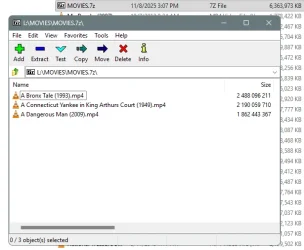
No problem here. 7zip version: 24.08 (opens with 7zip File Manager, doesn't open with 7zip Console)
I also opened it with... Open with > Windows Explorer.

Image1.webp


I use Bitdefender Total Security instead of Microsoft Defender.
 
Last edited:

My Computers My Computers

  • At a glance

    Win 11 Home ♦♦♦26200.8875 ♦♦♦♦♦♦♦25H2AMD Ryzen 7 3700XG.Skill (F4-3200C14D-16GTZKW)EVGA RTX 2070 (08G-P4-2171-KR)
    OS
    Win 11 Home ♦♦♦26200.8875 ♦♦♦♦♦♦♦25H2
    Computer type
    PC/Desktop
    Manufacturer/Model
    Built by Ghot® [May 2020]
    CPU
    AMD Ryzen 7 3700X
    Motherboard
    Asus Pro WS X570-ACE (BIOS 5302)
    Memory
    G.Skill (F4-3200C14D-16GTZKW)
    Graphics Card(s)
    EVGA RTX 2070 (08G-P4-2171-KR)
    Sound Card
    Realtek ALC1220P / ALC S1220A
    Monitor(s) Displays
    Dell U3011 30"
    Screen Resolution
    2560 x 1600
    Hard Drives
    2x Samsung 860 EVO 500GB,
    WD 4TB Black FZBX - SATA III,
    WD 8TB Black FZBX - SATA III,
    DRW-24B1ST CD/DVD Burner
    PSU
    PC Power & Cooling 750W Quad EPS12V
    Case
    Cooler Master ATCS 840 Tower
    Cooling
    CM Hyper 212 EVO (push/pull)
    Keyboard
    Ducky DK9008 Shine II Blue LED
    Mouse
    Logitech Optical M-100
    Internet Speed
    300/300
    Browser
    Firefox (latest)
    Antivirus
    Bitdefender Total Security
    Other Info
    Speakers: Klipsch Pro Media 2.1
  • At a glance

    Windows XP Pro 32bit w/SP3AMD Athlon 64 X2 5000+ (OC'd @ 3.2Ghz)TWIN2X2048-6400C4DHX (2 x 1GB, DDR2 800)EVGA 256-P2-N758-TR GeForce 8600GT SSC
    Operating System
    Windows XP Pro 32bit w/SP3
    Computer type
    PC/Desktop
    Manufacturer/Model
    Built by Ghot® (not in use)
    CPU
    AMD Athlon 64 X2 5000+ (OC'd @ 3.2Ghz)
    Motherboard
    ASUS M2N32-SLI Deluxe Wireless Edition
    Memory
    TWIN2X2048-6400C4DHX (2 x 1GB, DDR2 800)
    Graphics card(s)
    EVGA 256-P2-N758-TR GeForce 8600GT SSC
    Sound Card
    Onboard
    Monitor(s) Displays
    ViewSonic G90FB Black 19" Professional (CRT)
    Screen Resolution
    up to 2048 x 1536
    Hard Drives
    WD 36GB 10,000rpm Raptor SATA
    Seagate 80GB 7200rpm SATA
    Lite-On LTR-52246S CD/RW
    Lite-On LH-18A1P CD/DVD Burner
    PSU
    PC Power & Cooling Silencer 750 Quad EPS12V
    Case
    Generic Beige case, 80mm fans
    Cooling
    ZALMAN 9500A 92mm CPU Cooler
    Keyboard
    Logitech Classic Keybooard 200
    Mouse
    Logitech Optical M-BT96a
    Internet Speed
    300/300
    Browser
    Firefox 3.x ??
    Antivirus
    Symantec (Norton)
    Other Info
    Still assembled, still runs. Haven't turned it on for 15 years?
Create a mew archive with 7Zip with the contents from the corrupted file.
Or create a new archie with WinRAR and see if either of those work.
 

My Computer My Computer

At a glance

Windows 11 Pro Insider 64 bit 25H2 26200.5742Intel Core i7 9700K 3.6016 GBnVidia GEForce RTX 2060 Super
OS
Windows 11 Pro Insider 64 bit 25H2 26200.5742
Computer type
PC/Desktop
Manufacturer/Model
Gigabyte Z390 UD
CPU
Intel Core i7 9700K 3.60
Motherboard
Gigabyte Z390 UD
Memory
16 GB
Graphics Card(s)
nVidia GEForce RTX 2060 Super
Sound Card
onboard
Monitor(s) Displays
Two 27" Dell 4K monitors
Screen Resolution
3840 x 2160
Hard Drives
M.2 NVME SSD, 500 GB; Two 2TB Mechanical HDD's
PSU
850w PSU
Case
Cyberpower PC
Cooling
Water cooled
Keyboard
Backlit Cyberpower gaming keyboard
Mouse
Backlit Cyberpower gaming mouse
Internet Speed
1 GB mbps
Browser
Brave
Antivirus
Windows Security
Thank you for all the responses. Thanks to Ghot for testing on his own system with a large archive. I did double-check that .7z files were correctly associated to the system, as per spapakons suggestion, and all was well in that regard. I also tried creating a new archive, as suggested by Spunk (great idea!), but it made no difference, Windows Explorer still throws up the same error for that new archive, so I just deleted that new archive. For the archive that Windows claims is 'invalid'. I had 7-Zip (again) test the so called 'invalid' archive and got this result:

Windows 7-Zip Archive Testing OK.webp

Added to this, the 'invalid' archive can be opened and viewed in 7-Zip and can be unpacked by 7-Zip with no problems of any kind.

I tested that Windows Explorer could look into every 7-Zip archive I have on my system, 38 archives in all, and Windows Explorer looks into and unpacks the contents in them without problems at all.

I tried disabling Windows Defender Anti-virus but the issue with the 'invalid' archive remained.

In all I'm having to conclude that the issue with one archive is some glitch on the part of Windows Explorer for that one archive, as per the general comment by Win11raider. Why Widows Explorer is acting in this way is completely unsolved.

P.S. I did try 'Dism' and 'sfc' as suggested by KevTech, one slight issue found and repaired – made no difference to the archive problem though.

Thanks all, again.
 

My Computers My Computers

  • At a glance

    Win 11 Pro. 25H2Intel Core i7-14700 (Raptor Lake)32GB Corsair Vengeance LPX (DDR4)Intel UHD 770 — onboard standard as supplied ...
    OS
    Win 11 Pro. 25H2
    Computer type
    PC/Desktop
    Manufacturer/Model
    Customised "Chillblast Apex Intel Core i7 Office PC"
    CPU
    Intel Core i7-14700 (Raptor Lake)
    Motherboard
    ASUS Prime B760M-A WiFi D4
    Memory
    32GB Corsair Vengeance LPX (DDR4)
    Graphics Card(s)
    Intel UHD 770 — onboard standard as supplied by Intel/Asus
    Monitor(s) Displays
    Dell P2421 24 inch WUXGA (1920x1200) 16:10 Monitor
    Screen Resolution
    1920x1200
    Hard Drives
    First (Boot Drive Only): 2TB Samsung SSD 990 Pro.
    Second (Data Drive) 2TB Samsung SSD 990 Pro.
    PSU
    850W Corsair RM850x 80 Plus Gold
    Cooling
    Just standard fans for both the case and CPU.
    Keyboard
    Unicomp Model M (IBM Style keyboard)
    Mouse
    Wired Mouse
    Internet Speed
    1.6 MB/s
    Browser
    Firefox
    Antivirus
    Microsoft's Defender
  • At a glance

    Win 11 Pro. 25H214th Generation Intel® Core™ i9-14900HX32 GB DDR5-5600MHzNVIDIA® GeForce RTX™ 4080 Laptop GPU 12GB GDDR6
    Operating System
    Win 11 Pro. 25H2
    Computer type
    Laptop
    Manufacturer/Model
    Lenovo Legion Pro 7i Gen 9 (16" Intel)
    CPU
    14th Generation Intel® Core™ i9-14900HX
    Memory
    32 GB DDR5-5600MHz
    Graphics card(s)
    NVIDIA® GeForce RTX™ 4080 Laptop GPU 12GB GDDR6
    Monitor(s) Displays
    16" WQXGA (2560 x 1600), IPS, Anti-Glare, Non-Touch, HDR 40
    Screen Resolution
    2560 x 1600
    Hard Drives
    First (Boot): 1 TB SSD M.2 2280 PCIe Gen4 TLC
    Second (Data): 1 TB SSD M.2 2280 PCIe Gen4 TLC
    Keyboard
    Per-Key RGB-Coloured Backlit - English (UK)
    Mouse
    Wired Mouse
    Internet Speed
    1.6 MB/s
    Browser
    Firefox
    Antivirus
    Microsoft's Defender
Last thing to try: Uninstall 7-Zip, restart and reinstall latest version of 7-Zip.
 

My Computers My Computers

  • At a glance

    Windows 11 Pro 23H2 (5699), 25H2 (8875)Mobile DualCore Intel Core 2 Duo T7250, 2000 MHz4GBMobile Intel(R) GMA 4500M (Mobile 4 series)
    OS
    Windows 11 Pro 23H2 (5699), 25H2 (8875)
    Computer type
    Laptop
    Manufacturer/Model
    Acer Extensa 5630EZ
    CPU
    Mobile DualCore Intel Core 2 Duo T7250, 2000 MHz
    Motherboard
    Acer Extensa 5630
    Memory
    4GB
    Graphics Card(s)
    Mobile Intel(R) GMA 4500M (Mobile 4 series)
    Sound Card
    Realtek ALC268 @ Intel 82801IB ICH9 - High Definition Audio Controller
    Monitor(s) Displays
    1
    Screen Resolution
    1280x800
    Hard Drives
    Samsung SSD 850 EVO 250GB SATA Device (250 GB, SATA-III)
    Internet Speed
    VDSL 50 Mbps
    Browser
    MICROSOFT EDGE
    Antivirus
    WINDOWS DEFENDER
    Other Info
    Legacy MBR installation, no TPM, no Secure Boot, no WDDM 2.0 graphics drivers, no SSE4.2, cannot get more unsupported ;) This is only my test laptop. I had installed Windows 11 here before upgrading my main PC. For my main PC I use everyday see my 2nd system specs.
  • At a glance

    Windows 11 Pro v25H2 (build 26200.8875)Intel Core-i7 3770 3.40GHz s1155 (3rd generat...2x Kingston Hyper-X Blu 8GB DDR3-1600GIGABYTE GeForce RTX 3050 WINDFORCE OC V2 6GB...
    Operating System
    Windows 11 Pro v25H2 (build 26200.8875)
    Computer type
    PC/Desktop
    Manufacturer/Model
    Custom-built PC
    CPU
    Intel Core-i7 3770 3.40GHz s1155 (3rd generation)
    Motherboard
    Asus P8H61 s1155 ATX
    Memory
    2x Kingston Hyper-X Blu 8GB DDR3-1600
    Graphics card(s)
    GIGABYTE GeForce RTX 3050 WINDFORCE OC V2 6GB (GV-N3050WF2OCV2-6GD)
    Sound Card
    Realtek HD audio (ALC887)
    Monitor(s) Displays
    Sony Bravia KDL-19L4000 19" LCD TV via VGA
    Screen Resolution
    1440x900 32-bit 60Hz
    Hard Drives
    WD Blue SA510 2.5 1000GB SSD as system disk, Western Digital Caviar Purple 4TB SATA III (WD40PURZ) as second
    PSU
    Thermaltake Litepower RGB 550W Full Wired
    Case
    SUPERCASE MIDI-TOWER
    Cooling
    Deepcool Gamma Archer CPU cooler, 1x 8cm fan at the back
    Keyboard
    Mitsumi 101-key PS/2
    Mouse
    Sunnyline OptiEye PS/2
    Internet Speed
    100Mbps
    Browser
    Microsoft Edge, Mozilla Firefox
    Antivirus
    Microsoft Windows Defender
    Other Info
    Legacy BIOS (MBR) installation, no TPM, no Secure Boot, WDDM 3.0 graphics drivers, WEI score 7.4
Last thing to try: Uninstall 7-Zip, restart and reinstall latest version of 7-Zip.
Did that now and installed 7-Zip 25.01 (2025-08-03) x64. Same result, the errant archive still considered 'invalid' by Windows Explorer. All other archives okay as far as Windows Explorer is concerned.
 

My Computers My Computers

  • At a glance

    Win 11 Pro. 25H2Intel Core i7-14700 (Raptor Lake)32GB Corsair Vengeance LPX (DDR4)Intel UHD 770 — onboard standard as supplied ...
    OS
    Win 11 Pro. 25H2
    Computer type
    PC/Desktop
    Manufacturer/Model
    Customised "Chillblast Apex Intel Core i7 Office PC"
    CPU
    Intel Core i7-14700 (Raptor Lake)
    Motherboard
    ASUS Prime B760M-A WiFi D4
    Memory
    32GB Corsair Vengeance LPX (DDR4)
    Graphics Card(s)
    Intel UHD 770 — onboard standard as supplied by Intel/Asus
    Monitor(s) Displays
    Dell P2421 24 inch WUXGA (1920x1200) 16:10 Monitor
    Screen Resolution
    1920x1200
    Hard Drives
    First (Boot Drive Only): 2TB Samsung SSD 990 Pro.
    Second (Data Drive) 2TB Samsung SSD 990 Pro.
    PSU
    850W Corsair RM850x 80 Plus Gold
    Cooling
    Just standard fans for both the case and CPU.
    Keyboard
    Unicomp Model M (IBM Style keyboard)
    Mouse
    Wired Mouse
    Internet Speed
    1.6 MB/s
    Browser
    Firefox
    Antivirus
    Microsoft's Defender
  • At a glance

    Win 11 Pro. 25H214th Generation Intel® Core™ i9-14900HX32 GB DDR5-5600MHzNVIDIA® GeForce RTX™ 4080 Laptop GPU 12GB GDDR6
    Operating System
    Win 11 Pro. 25H2
    Computer type
    Laptop
    Manufacturer/Model
    Lenovo Legion Pro 7i Gen 9 (16" Intel)
    CPU
    14th Generation Intel® Core™ i9-14900HX
    Memory
    32 GB DDR5-5600MHz
    Graphics card(s)
    NVIDIA® GeForce RTX™ 4080 Laptop GPU 12GB GDDR6
    Monitor(s) Displays
    16" WQXGA (2560 x 1600), IPS, Anti-Glare, Non-Touch, HDR 40
    Screen Resolution
    2560 x 1600
    Hard Drives
    First (Boot): 1 TB SSD M.2 2280 PCIe Gen4 TLC
    Second (Data): 1 TB SSD M.2 2280 PCIe Gen4 TLC
    Keyboard
    Per-Key RGB-Coloured Backlit - English (UK)
    Mouse
    Wired Mouse
    Internet Speed
    1.6 MB/s
    Browser
    Firefox
    Antivirus
    Microsoft's Defender
Windows11 (from 24H2 onwards) has its own software for handling .7z and other non zip archives directlywithin explorer. It seems that it can't handle your archive created with 7-zip.

There are various options available within 7-zip that affect the speed and size of the resultant archive. It's possible that the Microsoft supplied software doesn't understand the newer options. Try creating a test archive with an older version of 7zip, or figure how to change the options on your new version. For instance, the latest versions have larger default dictionary sizes for highest compression levels.

Unless you are creating archives for other people, I wouldn't worry about this. If it works with 7-zip, isn't that good enough?
 

My Computers My Computers

  • At a glance

    Windows 11 25H2 Pro Build 26200i3-1215U8GB
    OS
    Windows 11 25H2 Pro Build 26200
    Computer type
    PC/Desktop
    Manufacturer/Model
    MSI PRO ADL-U Cubi 5 (MS-B0A8)
    CPU
    i3-1215U
    Memory
    8GB
    Monitor(s) Displays
    Sony 43" 4k TV
    Screen Resolution
    3840x2160
    Hard Drives
    250GB NVMe M.2 PCIe Gen 3 SSD
    PSU
    External 65W
    Case
    Mini PC
    Browser
    FireFox
    Antivirus
    MS
  • At a glance

    Windows 11 Pro 25H2Intel i3-910016GB DDR4
    Operating System
    Windows 11 Pro 25H2
    Computer type
    PC/Desktop
    Manufacturer/Model
    Dell Optiplex 3070 SFF
    CPU
    Intel i3-9100
    Memory
    16GB DDR4
    Monitor(s) Displays
    Dell S2721
    Screen Resolution
    3840 x 2160
    Hard Drives
    Samsung 500GB nvMe
    Case
    Dell small form factor
    Keyboard
    Cherry mechanical (Blue)
    Mouse
    Microsoft
    Antivirus
    MS Defender
Thanks for the additional information, Mike. I didn't know that Microsoft were involved in trying to handle .7z files natively, but I don't think I'm going to pursue this any further.

Unless you are creating archives for other people, I wouldn't worry about this. If it works with 7-zip, isn't that good enough?

Yes this is my think too – it is only one archive out of several, so:

WhatMeWorry.webp

Thanks again all for the help.
 

My Computers My Computers

  • At a glance

    Win 11 Pro. 25H2Intel Core i7-14700 (Raptor Lake)32GB Corsair Vengeance LPX (DDR4)Intel UHD 770 — onboard standard as supplied ...
    OS
    Win 11 Pro. 25H2
    Computer type
    PC/Desktop
    Manufacturer/Model
    Customised "Chillblast Apex Intel Core i7 Office PC"
    CPU
    Intel Core i7-14700 (Raptor Lake)
    Motherboard
    ASUS Prime B760M-A WiFi D4
    Memory
    32GB Corsair Vengeance LPX (DDR4)
    Graphics Card(s)
    Intel UHD 770 — onboard standard as supplied by Intel/Asus
    Monitor(s) Displays
    Dell P2421 24 inch WUXGA (1920x1200) 16:10 Monitor
    Screen Resolution
    1920x1200
    Hard Drives
    First (Boot Drive Only): 2TB Samsung SSD 990 Pro.
    Second (Data Drive) 2TB Samsung SSD 990 Pro.
    PSU
    850W Corsair RM850x 80 Plus Gold
    Cooling
    Just standard fans for both the case and CPU.
    Keyboard
    Unicomp Model M (IBM Style keyboard)
    Mouse
    Wired Mouse
    Internet Speed
    1.6 MB/s
    Browser
    Firefox
    Antivirus
    Microsoft's Defender
  • At a glance

    Win 11 Pro. 25H214th Generation Intel® Core™ i9-14900HX32 GB DDR5-5600MHzNVIDIA® GeForce RTX™ 4080 Laptop GPU 12GB GDDR6
    Operating System
    Win 11 Pro. 25H2
    Computer type
    Laptop
    Manufacturer/Model
    Lenovo Legion Pro 7i Gen 9 (16" Intel)
    CPU
    14th Generation Intel® Core™ i9-14900HX
    Memory
    32 GB DDR5-5600MHz
    Graphics card(s)
    NVIDIA® GeForce RTX™ 4080 Laptop GPU 12GB GDDR6
    Monitor(s) Displays
    16" WQXGA (2560 x 1600), IPS, Anti-Glare, Non-Touch, HDR 40
    Screen Resolution
    2560 x 1600
    Hard Drives
    First (Boot): 1 TB SSD M.2 2280 PCIe Gen4 TLC
    Second (Data): 1 TB SSD M.2 2280 PCIe Gen4 TLC
    Keyboard
    Per-Key RGB-Coloured Backlit - English (UK)
    Mouse
    Wired Mouse
    Internet Speed
    1.6 MB/s
    Browser
    Firefox
    Antivirus
    Microsoft's Defender
Reading the info of the last cumulative preview update for 245H2 and 25H2 (KB5067036), I found this fix:
  • Fixed: Extracting very large archive folders (1.5gb+) might fail with a “Catastrophic Error” (error code 0x8000FFFF).

So your problem was an Explorer issue.
 

My Computer My Computer

At a glance

Win 11 Pro 23H213700K32GB DDR5 Kingston Fury Renegade @6400MSI GeForce RTX 4070 Ti Gaming X Slim White 12G
OS
Win 11 Pro 23H2
Computer type
PC/Desktop
CPU
13700K
Motherboard
MAG Z790 TOMAHAWK WIFI (7D91vHH - 0x12F)
Memory
32GB DDR5 Kingston Fury Renegade @6400
Graphics Card(s)
MSI GeForce RTX 4070 Ti Gaming X Slim White 12G
Sound Card
Creative Sound Blaster Z SE
Monitor(s) Displays
ASUS VA24DQ
Hard Drives
WD Black SN850X 2TB (main)
SAMSUNG SSD 990 Pro 2TB
WD Blue 1TB 7200rpm
PSU
Corsair RM1000x SHIFT
Case
DeepCool CH560 WH
Cooling
Noctua NH-D15S
Keyboard
Ducky One 3 Pro Nazca Line
Mouse
Logitech G403 HERO
I downloaded and installed "Preview Update (KB5067036) (26200.7019)". The problem was fixed.

Well done Win11raider! Well done Microsoft. Thanks all again.
 

My Computers My Computers

  • At a glance

    Win 11 Pro. 25H2Intel Core i7-14700 (Raptor Lake)32GB Corsair Vengeance LPX (DDR4)Intel UHD 770 — onboard standard as supplied ...
    OS
    Win 11 Pro. 25H2
    Computer type
    PC/Desktop
    Manufacturer/Model
    Customised "Chillblast Apex Intel Core i7 Office PC"
    CPU
    Intel Core i7-14700 (Raptor Lake)
    Motherboard
    ASUS Prime B760M-A WiFi D4
    Memory
    32GB Corsair Vengeance LPX (DDR4)
    Graphics Card(s)
    Intel UHD 770 — onboard standard as supplied by Intel/Asus
    Monitor(s) Displays
    Dell P2421 24 inch WUXGA (1920x1200) 16:10 Monitor
    Screen Resolution
    1920x1200
    Hard Drives
    First (Boot Drive Only): 2TB Samsung SSD 990 Pro.
    Second (Data Drive) 2TB Samsung SSD 990 Pro.
    PSU
    850W Corsair RM850x 80 Plus Gold
    Cooling
    Just standard fans for both the case and CPU.
    Keyboard
    Unicomp Model M (IBM Style keyboard)
    Mouse
    Wired Mouse
    Internet Speed
    1.6 MB/s
    Browser
    Firefox
    Antivirus
    Microsoft's Defender
  • At a glance

    Win 11 Pro. 25H214th Generation Intel® Core™ i9-14900HX32 GB DDR5-5600MHzNVIDIA® GeForce RTX™ 4080 Laptop GPU 12GB GDDR6
    Operating System
    Win 11 Pro. 25H2
    Computer type
    Laptop
    Manufacturer/Model
    Lenovo Legion Pro 7i Gen 9 (16" Intel)
    CPU
    14th Generation Intel® Core™ i9-14900HX
    Memory
    32 GB DDR5-5600MHz
    Graphics card(s)
    NVIDIA® GeForce RTX™ 4080 Laptop GPU 12GB GDDR6
    Monitor(s) Displays
    16" WQXGA (2560 x 1600), IPS, Anti-Glare, Non-Touch, HDR 40
    Screen Resolution
    2560 x 1600
    Hard Drives
    First (Boot): 1 TB SSD M.2 2280 PCIe Gen4 TLC
    Second (Data): 1 TB SSD M.2 2280 PCIe Gen4 TLC
    Keyboard
    Per-Key RGB-Coloured Backlit - English (UK)
    Mouse
    Wired Mouse
    Internet Speed
    1.6 MB/s
    Browser
    Firefox
    Antivirus
    Microsoft's Defender
Back
Top Bottom