Windows recovery environment can no longer be started from installation USB stick.


Cameraman1955

Active member
Member
Local time
4:45 AM
Posts
72
OS
Windows 11 Pro 25H2 26200.7019
I wanted to restore my Windows 11 using a system image. Previously, I could boot from the installation USB stick, but with the latest installation stick, I can no longer start the recovery environment; the computer restarts. When I use the installation CD-ROM, it works with Secure Boot disabled. Is this new?
 

My Computer

System One

  • OS
    Windows 11 Pro 25H2 26200.7019
    Computer type
    PC/Desktop
    Manufacturer/Model
    Self built midi tower
    CPU
    Intel Core i7-8700K
    Motherboard
    Gigabyte Z390GX
    Memory
    Corsair 32GB 4x DDR4-2998 / PC4-23900 DDR4 SDRAM UDIMM
    Graphics Card(s)
    AMD RX570
    Sound Card
    Sound Blaster Z
    Monitor(s) Displays
    2x IIyama Prolite X2380HS
    Screen Resolution
    1920x1080
    Hard Drives
    Samsung SSD 970 EVO Plus NVMe 1TB
    Samsung SSD 970 EVO Plus NVMe 500GB
    PSU
    Seasonic 550W
    Cooling
    Noctua fans
    Keyboard
    Logitech G213
    Mouse
    Logitech Marble Mouse
    Browser
    Chrome
    Antivirus
    Norton
    Other Info
    Video/Audio editting machine
but with the latest installation stick, I can no longer start the recovery environment; the computer restarts.

There is a bug in Version 10.0.26200.8457.

Select the option "Download Windows 11 Disk Image (ISO) for x64 devices" and then create a bootable USB with Rufus.

This doesn't work:

Windows 11 installation ISO created by MCT:

Version : 10.0.26200
ServicePack Build : 8457

This works:

Download Windows 11 Disk Image (ISO) for x64 devices:

Version : 10.0.26200
ServicePack Build : 8037
 

My Computers

System One System Two

  • OS
    Windows 11 Pro
    Computer type
    PC/Desktop
    CPU
    AMD Ryzen 9 9950X3D
    Motherboard
    ASRock B650E Taichi Lite
    Memory
    Kingston FURY Beast 64GB (2x32GB) DDR5 6000MT/s
    Graphics Card(s)
    ASUS TUF Gaming Radeon RX 9070 OC Edition 16GB GDDR6
    Hard Drives
    Solidigm P44 Pro 2TB M.2 NVMe SSD
  • Operating System
    Windows 11 Home
    Computer type
    Laptop
    Manufacturer/Model
    Lenovo Legion Pro 7i Gen 10 16"
    CPU
    Intel Core Ultra 9 275HX
    Memory
    64GB (2x 32GB) DDR5-6400
    Graphics card(s)
    NVIDIA GeForce RTX 5080 16GB GDDR7 Laptop GPU
    Hard Drives
    2x 1TB M.2 NVMe SSD (SK Hynix)
I wanted to restore my Windows 11 using a system image. Previously, I could boot from the installation USB stick, but with the latest installation stick, I can no longer start the recovery environment; the computer restarts. When I use the installation CD-ROM, it works with Secure Boot disabled. Is this new?

Could be the changes caused by the 2023 secure update.
Did you try recreating the USB?
 

My Computers

System One System Two

  • OS
    Windows 11 Pro 25H2 Build 26200.8524
    Computer type
    PC/Desktop
    Manufacturer/Model
    Sin-built 2013
    CPU
    Intel(R) Core(TM) i7-4770K CPU @ 3.50GHz
    Motherboard
    ASUS ROG Maximus VI Formula
    Memory
    32.0 GB of I forget and the box is in storage.
    Graphics Card(s)
    Gigabyte nVidia GeForce GTX 1660 Super OC 6GB
    Sound Card
    Onboard thingy
    Monitor(s) Displays
    5 x LG 25MS500-B - 1 x 24MK430H-B - 1 x Wacom Pro 22" Touch Screen Tablet
    Screen Resolution
    All over the place
    Hard Drives
    Too many to list.
    OS on Samsung 1TB 870 QVO SATA
    PSU
    Silverstone 1500
    Case
    NZXT Phantom 820 Full-Tower Case
    Cooling
    Noctua NH-D15 Elite Class Dual Tower CPU Cooler / 6 x EziDIY 120mm / 2 x Corsair 140mm somethings / 1 x 140mm Thermaltake something / 2 x 200mm Corsair.
    Keyboard
    Corsair K95 / Logitech diNovo Edge Wireless
    Mouse
    Logitech: G402 / G502 / Mx Masters / Mx Air Cordless
    Internet Speed
    2000/500Mbps
    Browser
    All sorts
    Antivirus
    Kaspersky Premium
    Other Info
    ㅤㅤㅤㅤㅤㅤㅤㅤㅤㅤㅤㅤㅤㅤㅤㅤㅤㅤㅤㅤㅤㅤㅤㅤㅤㅤㅤㅤㅤㅤㅤㅤㅤㅤㅤㅤㅤㅤㅤㅤ⠀⠀⠀⠀⠀⠀⠀⠀⠀⠀
    TP-Link BE9300 WiFi 7 Bluetooth 5.4 (Archer TBE550E)
    TP-Link TX201 V1 2.5GB Lan

    Grandstream HT812 - VoIP
    ASUS DSL-AX82U - Mesh
    ASUS RT-AC68U - Mesh
    ASUS RT-BE88U Router

    Brother MFC-L2880DW Printer

    I’m on a horse.
  • Operating System
    Windows 11 Pro 25H2 Build 26200.8524
    Computer type
    Laptop
    Manufacturer/Model
    LENOVO Yoga 7 14IRL8 - 7i EVO OLED 14" Touchscreen i5 12 Core 16GB/512GB
    CPU
    Intel Core 12th Gen i5-1240P Processor (1.7 - 4.4GHz)
    Memory
    16GB LPDDR5 RAM
    Graphics card(s)
    Intel Iris Xe Graphics Processor
    Sound Card
    Optimized with Dolby Atmos®
    Screen Resolution
    QHD 2880 x 1800 OLED
    Hard Drives
    M.2 512GB
    Antivirus
    Defender / Malwarebytes
    Other Info
    …still on a horse.
  • Like
Reactions: Gas

My Computer

System One

  • OS
    W11, always updated with latest builds
    Computer type
    PC/Desktop
    Manufacturer/Model
    Self-made
    CPU
    AMD Ryzen 9 9900X
    Motherboard
    ASUS TUF Gaming B850-Plus WiFi
    Memory
    G.Skill Trident Z5 Neo RGB 32GB Kit DDR5-6000 CL30 (F5-6000J3038F16GX2-TZ5NR)
    Graphics Card(s)
    ASUS Dual GeForce RTX™ 3060 V2 OC Edition 12GB GDDR6
    Monitor(s) Displays
    Eizo CS240, Calibrated with Datacolr SpyderX
    Screen Resolution
    1920X1200
    Hard Drives
    Crucial T705 SSD 1TB PCIe Gen5 NVMe M.2- SO+Archive
    Lexar EQ790 1TB SSD M.2 2280 PCIe Gen4x4 NVMe 1.4- LR& PS Workspace
    PHIXERO SSD P5000-512GB M.2 2280 PCIe Gen4- Backups
    Seagate ST8000DM04- Photo Archive, SATA HD
    Western Digital WD2002FAEX- Generic archive, SATA HD
    PSU
    Be Quiet 850W Pure Power 12M per Pc ATX
    Case
    Phanteks XT Pro
    Cooling
    Be quiet Pure loop 2 360mm
    Keyboard
    Logitech
    Mouse
    Logitech
    Internet Speed
    D/L-700/800 Mbps; U/L 250/300 Mbps WiFi 7 from motherboard
    Browser
    Edge
    Antivirus
    Avast
    Other Info
    Mostly used for photo retouching software & some video slideshows.
I had a similar problem; to solve it I cleared the Securboot keys, that worked for me.
 

My Computer

System One

  • OS
    W11, always updated with latest builds
    Computer type
    PC/Desktop
    Manufacturer/Model
    Self-made
    CPU
    AMD Ryzen 9 9900X
    Motherboard
    ASUS TUF Gaming B850-Plus WiFi
    Memory
    G.Skill Trident Z5 Neo RGB 32GB Kit DDR5-6000 CL30 (F5-6000J3038F16GX2-TZ5NR)
    Graphics Card(s)
    ASUS Dual GeForce RTX™ 3060 V2 OC Edition 12GB GDDR6
    Monitor(s) Displays
    Eizo CS240, Calibrated with Datacolr SpyderX
    Screen Resolution
    1920X1200
    Hard Drives
    Crucial T705 SSD 1TB PCIe Gen5 NVMe M.2- SO+Archive
    Lexar EQ790 1TB SSD M.2 2280 PCIe Gen4x4 NVMe 1.4- LR& PS Workspace
    PHIXERO SSD P5000-512GB M.2 2280 PCIe Gen4- Backups
    Seagate ST8000DM04- Photo Archive, SATA HD
    Western Digital WD2002FAEX- Generic archive, SATA HD
    PSU
    Be Quiet 850W Pure Power 12M per Pc ATX
    Case
    Phanteks XT Pro
    Cooling
    Be quiet Pure loop 2 360mm
    Keyboard
    Logitech
    Mouse
    Logitech
    Internet Speed
    D/L-700/800 Mbps; U/L 250/300 Mbps WiFi 7 from motherboard
    Browser
    Edge
    Antivirus
    Avast
    Other Info
    Mostly used for photo retouching software & some video slideshows.
The correct solution is to update the USB media's boot files (or temporarily disable Secure Boot while performing an install/recovery).

Here's a batch file which can help. Leave the USB drive plugged in, and the script will find any removable drives and update them.
 

Attachments

My Computer

System One

  • OS
    Windows 7
I've recently had this problem. The Rufus boot USB worked for me. But there are other options.
First boot to BIOS and make sure USB is first boot device. Second you may have to disable Secure Boot in BIOS. There are a few other possibilities

Gemini says:
To fix a Windows 11 USB not booting in UEFI mode, ensure the USB drive is formatted with the GPT partition style. Next, access your BIOS/UEFI settings to temporarily disable Secure Boot, enable UEFI mode (or CSM/Legacy if it isn't listed), and adjust the boot priority. [1, 2]
Follow these steps to diagnose and fix the issue:

1. Verify and Recreate the Bootable USB
Windows 11 strictly requires a UEFI boot environment, which means your USB flash drive must be formatted as GPT (not MBR). [1, 2]
  • If you created the USB using the official Microsoft Windows 11 Installation Media Tool, it will automatically configure it for UEFI.
  • If you are using an ISO file and a tool like Rufus, ensure you select GPT under the Partition Scheme and UEFI (non-CSM) under the Target System. [1, 2, 3]


2. Configure BIOS/UEFI Settings
If your USB is properly created but the PC still skips it, your motherboard firmware settings are likely blocking it. Restart your computer and repeatedly press the manufacturer's boot key (usually F12, F11, F10, F2, or Esc). Once in the BIOS/UEFI, make the following changes: [1, 2]
  • Disable Secure Boot: Secure Boot enforces UEFI, but sometimes blocks unverified or freshly created USB installers. Temporarily set it to Disabled.
  • Enable UEFI Mode: Look for a setting related to Boot Mode or OS Mode and ensure it is set to UEFI (not Legacy/CSM). (Note: If your USB doesn't show up in pure UEFI mode, temporarily enable CSM/Legacy just long enough to boot into the installer).
  • Change Boot Priority: Move your USB drive to the top of the boot order. Alternatively, look for a Boot Menu or Boot Override option, which lets you select the USB to boot from just once without changing permanent settings. [1, 2, 3, 4, 5]

3. Hardware and Port Troubleshooting
  • Use a USB 2.0 Port: Plug your USB into a USB 2.0 port (usually black) rather than a USB 3.0 port (usually blue). Sometimes the UEFI firmware does not load USB 3.0 drivers before the operating system boots.
  • Try a Different Port: If your drive is not detecting, try a different USB port on your PC (preferably the ones on the back of the motherboard if using a desktop).
  • Test the USB: Insert the USB into a working computer. If it fails to show up or open there, the flash drive may be corrupted. [1, 2, 3, 4]

 

My Computers

System One System Two

  • OS
    Windows 11 Pro
    Computer type
    Laptop
    Manufacturer/Model
    Dell xps 17 9710
    Other Info
    Sandisk Extreme Portable USB backup with Macrium 8 free
  • Operating System
    Windows 11
    Computer type
    PC/Desktop
    Manufacturer/Model
    Dell xps 8940, 8950
I wanted to restore my Windows 11 using a system image. Previously, I could boot from the installation USB stick, but with the latest installation stick, I can no longer start the recovery environment; the computer restarts. When I use the installation CD-ROM, it works with Secure Boot disabled. Is this new?

There is a bug in Version 10.0.26200.8457.

Yes there is.

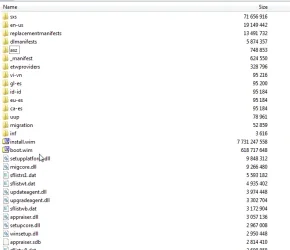
you can used winre.wim instead it works fine as afr as I can tell.

simple way:

rename boot.wim on the usb media to something else e.g. boot-original.wim

use 7-zip to copy winre.wim out of any image from install.wim\windows\system32\recovery . copy it into the usb\sources folder. rename it to boot.wim

that is because the default bcd entry is pointing at \sources\boot.wim

you could change it or add an extra entry but it is simpler to do the renaming as above.
 
Last edited:

My Computers

System One System Two

  • OS
    Win7,Win11
    Computer type
    PC/Desktop
    CPU
    i7-9700
    Motherboard
    gigabyte b365m ds3h
    Memory
    2x16gb 3600mhz
    Monitor(s) Displays
    benq gw2480
    PSU
    bequiet pure power 11 400CM
    Cooling
    cryorig m9i
  • Operating System
    win7,win11
    Computer type
    PC/Desktop
    CPU
    i5-8400
    Motherboard
    gigabyte b365m ds3h
    Memory
    2x8gb 3200
    PSU
    xfx pro 450
I had a similar problem; to solve it I cleared the Securboot keys, that worked for me.
Of course, the securboot keys on the BIOS have been recreated after the installation.
 

My Computer

System One

  • OS
    W11, always updated with latest builds
    Computer type
    PC/Desktop
    Manufacturer/Model
    Self-made
    CPU
    AMD Ryzen 9 9900X
    Motherboard
    ASUS TUF Gaming B850-Plus WiFi
    Memory
    G.Skill Trident Z5 Neo RGB 32GB Kit DDR5-6000 CL30 (F5-6000J3038F16GX2-TZ5NR)
    Graphics Card(s)
    ASUS Dual GeForce RTX™ 3060 V2 OC Edition 12GB GDDR6
    Monitor(s) Displays
    Eizo CS240, Calibrated with Datacolr SpyderX
    Screen Resolution
    1920X1200
    Hard Drives
    Crucial T705 SSD 1TB PCIe Gen5 NVMe M.2- SO+Archive
    Lexar EQ790 1TB SSD M.2 2280 PCIe Gen4x4 NVMe 1.4- LR& PS Workspace
    PHIXERO SSD P5000-512GB M.2 2280 PCIe Gen4- Backups
    Seagate ST8000DM04- Photo Archive, SATA HD
    Western Digital WD2002FAEX- Generic archive, SATA HD
    PSU
    Be Quiet 850W Pure Power 12M per Pc ATX
    Case
    Phanteks XT Pro
    Cooling
    Be quiet Pure loop 2 360mm
    Keyboard
    Logitech
    Mouse
    Logitech
    Internet Speed
    D/L-700/800 Mbps; U/L 250/300 Mbps WiFi 7 from motherboard
    Browser
    Edge
    Antivirus
    Avast
    Other Info
    Mostly used for photo retouching software & some video slideshows.

Latest Support Threads

Back
Top Bottom