
Windows Security blank window after update


atinfo

Well-known member
Power User
VIP
Local time
11:35 AM
Posts
1,171
OS
Win 11 Enterprise
Hi forum,

Sometimes, after the WS app (Windows Security) update, the main window is blank (WS doesn't show any message about a restart need). Also, sometimes, after the WS update, the AIMP player (app) doesn't run. AIMP is downloaded from its main website, and I have never heard anything about AIMP's suspicious behaviour!
After restarting, all problems go well!
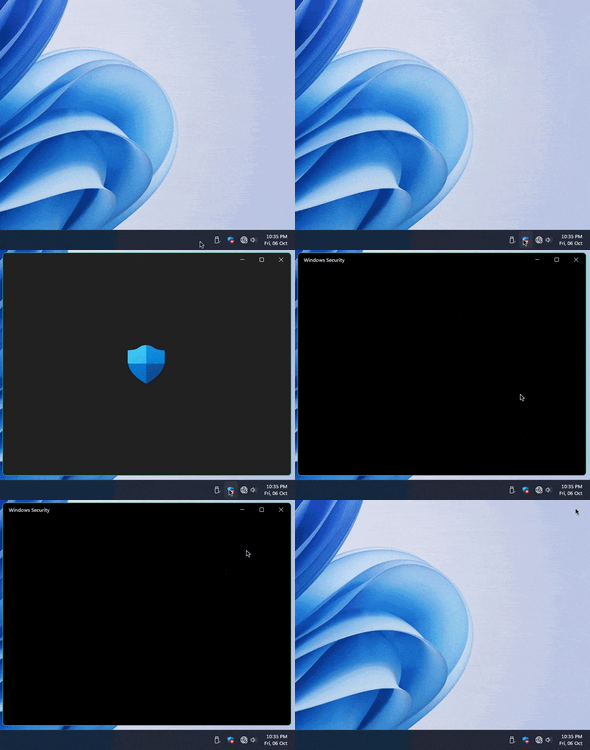
g1.gif

Does anybody have these problems? WS bug?

I don't know why the WS update has no scheduled settings. I have to set an update task in Task Scheduler for it!
 

My Computer My Computer

At a glance

Win 11 Enterprisei7
OS
Win 11 Enterprise
Computer type
Laptop
CPU
i7
Hard Drives
SSD
I havn't opened my in months as it always seems to crash! I havnt had a right click or tootip for ages, I think Microsoft stopped trying to fix it now, best left alone!
You can repair Windows security in settings > apps but it will still bug, or mine soes after a while.

However, I don't have a red X, and it will open the first screen.
 

My Computer My Computer

At a glance

11 ProI7 14700k2 X Corsair Vengeance DDR4 @ 3600 32 gb totalMSI RTX 5070ti Ventus 3x OC
OS
11 Pro
Computer type
PC/Desktop
CPU
I7 14700k
Motherboard
Gigabyte Z690 Aorus Elite
Memory
2 X Corsair Vengeance DDR4 @ 3600 32 gb total
Graphics Card(s)
MSI RTX 5070ti Ventus 3x OC
Sound Card
onboard
Monitor(s) Displays
Iiyama 27"
Screen Resolution
2560 x 1440
Hard Drives
4 TB Crucial M.2
PSU
Corsair 850 watt modular
Case
Fractal Meshify 2
Cooling
AIO on CPU trinity on GPU
Keyboard
Redragon K75 wireless
Mouse
Steelseries Rival 3 Gen 2 wireless
Internet Speed
52gb
Browser
Edge Chrome
Antivirus
Defender
It's OK (the Swiss flag/white X with a red circle). I disabled it temporarily before the update.
 

My Computer My Computer

At a glance

Win 11 Enterprisei7
OS
Win 11 Enterprise
Computer type
Laptop
CPU
i7
Hard Drives
SSD
Learn how to fix blank Windows Security screen In Windows 11 and Windows 10 using the many solutions.


My Computer My Computer

At a glance

Windows 11AMD Ryzen 7 5700GMicron Technology DDR4-3200 16GBNVIDIA GeForce RTX 3060
OS
Windows 11
Computer type
PC/Desktop
Manufacturer/Model
HP Pavilion
CPU
AMD Ryzen 7 5700G
Motherboard
Erica6
Memory
Micron Technology DDR4-3200 16GB
Graphics Card(s)
NVIDIA GeForce RTX 3060
Sound Card
Realtek ALC671
Monitor(s) Displays
Samsung SyncMaster U28E590
Screen Resolution
3840 x 2160
Hard Drives
SAMSUNG MZVLQ1T0HALB-000H1

Latest Support Threads

Back
Top Bottom




