
Windows Security shows “Action needed” but everything is green inside the app


Manesh

New member
Member
Local time
10:02 PM
Posts
18
OS
Windows 11 Pro
Hi everyone, I’m running Windows 11 Pro 25H2 (build 26200.9168) and I’ve noticed something odd. From time to time, the Windows Security icon in the taskbar shows a yellow warning triangle indicating that “action is needed.”

However, when I open Windows Security, every category is green and reports that no action is required. There are no pending updates, no disabled features, and no alerts inside the app.

Has anyone else experienced this behavior on the same build? Do you know what might be causing these false warnings?
 

Attachments
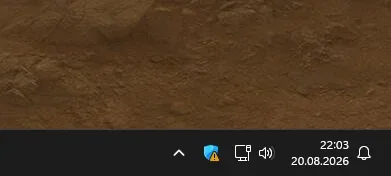
  • Zrzut ekranu 2026-08-20 220333.webp
    Zrzut ekranu 2026-08-20 220333.webp
    6.8 KB · Views: 4

My Computer My Computer

At a glance

Windows 11 Pro
OS
Windows 11 Pro
Computer type
PC/Desktop
Hi everyone, I’m running Windows 11 Pro 25H2 (build 26200.9168) and I’ve noticed something odd. From time to time, the Windows Security icon in the taskbar shows a yellow warning triangle indicating that “action is needed.”

However, when I open Windows Security, every category is green and reports that no action is required. There are no pending updates, no disabled features, and no alerts inside the app.

Has anyone else experienced this behavior on the same build? Do you know what might be causing these false warnings?
Hi Manesh,
Try right clicking or hover over the icon next time to see if you get some kind of info besides Action is needed.
 

My Computers My Computers

  • At a glance

    All Branches but StableAMD Ryzen 7 7735HS 3200-4500 Mhz 8 cores x 232 GB DDR5Radeon Graphic / NVIDIA GeForce RTX 4060 8 GB...
    OS
    All Branches but Stable
    Computer type
    Laptop
    Manufacturer/Model
    Acer Nitro ANV15-51
    CPU
    AMD Ryzen 7 7735HS 3200-4500 Mhz 8 cores x 2
    Motherboard
    Sportage_RBH
    Memory
    32 GB DDR5
    Graphics Card(s)
    Radeon Graphic / NVIDIA GeForce RTX 4060 8 GB GDDR6
    Sound Card
    AMD/Realtek(R) Audio
    Monitor(s) Displays
    Integrated Monitor (15.3"vis)
    Screen Resolution
    FHD 1920X1080 16:9 144Hz
    Hard Drives
    KINGSTON OM8SEP4512Q-AA 1TB
    Western Digital 256GB
    PSU
    19V DC 6.32 A 120 W
    Cooling
    Dual Fans
    Mouse
    MS Bluetooth
    Internet Speed
    Fiber 1GB Cox -us & 1GB Orange-fr
    Browser
    Edge Canary- Firefox Nightly-Chrome Dev-Chrome Dev
    Antivirus
    Windows Defender
  • At a glance

    Windows 11 BetaAMD A9-94208 GB of DDR4AMD Radeon R5
    Operating System
    Windows 11 Beta
    Computer type
    Laptop
    Manufacturer/Model
    Asus X751BP
    CPU
    AMD A9-9420
    Memory
    8 GB of DDR4
    Graphics card(s)
    AMD Radeon R5
    Screen Resolution
    1600x900
    Hard Drives
    Seagate 1 TB
Hi Manesh,
Try right clicking or hover over the icon next time to see if you get some kind of info besides Action is needed.

When I hover over the icon, it only says that an action is needed. But when I actually click the icon and open Windows Security, everything is fine - all sections are green and show no issues.
 

My Computer My Computer

At a glance

Windows 11 Pro
OS
Windows 11 Pro
Computer type
PC/Desktop
In Windows Security click on each of the categories (ie: from virus & threat protection down to device security) to see if anything is flagged..

Also while in virus & threat protection. CLick on protection History,
Is there anything listed there. If there is, when you select the individual entries, it tells you what it detected and if it resolved it and how.
 

My Computers My Computers

  • At a glance

    Windows 11 Pro 26H2 26300.9457i9-10900 10 core 20 threads32 gbnone-Intel UHD Graphics 630
    OS
    Windows 11 Pro 26H2 26300.9457
    Computer type
    PC/Desktop
    Manufacturer/Model
    Dell Optiplex 7080
    CPU
    i9-10900 10 core 20 threads
    Motherboard
    DELL 0J37VM
    Memory
    32 gb
    Graphics Card(s)
    none-Intel UHD Graphics 630
    Sound Card
    Integrated Realtek
    Monitor(s) Displays
    Benq 27
    Screen Resolution
    2560x1440
    Hard Drives
    2x1tb Solidigm m.2 nvme /External drives 512gb Samsung m.2 sata+2tb Kingston m2.nvme
    PSU
    500w
    Case
    MT
    Cooling
    Dell Premium
    Keyboard
    Logitech wired
    Mouse
    Logitech wireless
    Internet Speed
    so slow I'm too embarrassed to tell
    Browser
    #1 Edge #2 Firefox
    Antivirus
    Defender+MWB Premium
  • At a glance

    Windows 11 Pro 24H2 26200.9457AMD Ryzen 7 6800U32 gbintegrated
    Operating System
    Windows 11 Pro 24H2 26200.9457
    Computer type
    PC/Desktop
    Manufacturer/Model
    Beelink Mini PC SER5
    CPU
    AMD Ryzen 7 6800U
    Memory
    32 gb
    Graphics card(s)
    integrated
    Sound Card
    integrated
    Monitor(s) Displays
    Benq 27
    Screen Resolution
    2560x1440
    Hard Drives
    1TB Crucial nvme
    Keyboard
    Logitech wired
    Mouse
    Logitech wireless
    Internet Speed
    still too embarrassed to tell
    Browser
    Firefox
    Antivirus
    Defender
  • System 3 is non compliant Dell 9020 i7-4770/24gb ram Win11 PRO 26200.9457
In Windows Security click on each of the categories (ie: from virus & threat protection down to device security) to see if anything is flagged..

Also while in virus & threat protection. CLick on protection History,
Is there anything listed there. If there is, when you select the individual entries, it tells you what it detected and if it resolved it and how.

I checked each category in Windows Security — from Virus & Threat Protection all the way down to Device Security — and everything is green with no warnings or actions required. Nothing is flagged anywhere.

I also looked at Protection History under Virus & Threat Protection. It’s completely empty, no detections, no blocked items, nothing that would explain the warning icon.

What’s strange is that the Windows Security icon is green right after boot, but after a few minutes it suddenly shows the yellow exclamation mark. When I click it, all sections are still green with no alerts. After a short while, the icon goes back to green again on its own. So far I haven’t found anything inside Windows Security that indicates what’s causing it.

This behavior started right after installing update KB5121003 (build 26200.9168). Before that update, I never had any warnings or this kind of random icon change. So at this point it’s a bit of a mystery to me and I’m not sure how to diagnose what’s triggering it.
 

My Computer My Computer

At a glance

Windows 11 Pro
OS
Windows 11 Pro
Computer type
PC/Desktop
Back
Top Bottom




