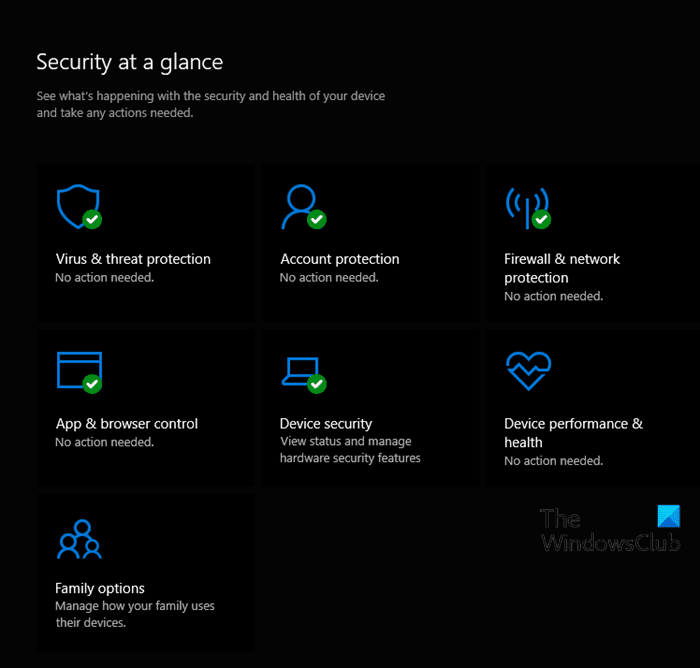
Windows Security shows green tick in Icon but does not show info when clicked.


midgo

Well-known member
Local time
2:18 AM
Posts
16
OS
Win11 Pro 24H2 Build Latest
So I just installed latest Win 11 ISO as an upgrade over Win 10 on an unsupported PC.
All went well and the PC runs well.
Only issue so far is I cannot get Windows Security Centre to open up at all.
Clicking on the icon starts the display but it disappears after a seconds or so.
Can not start quick scan or any other function within the centre.
I have tried most of the solutions on the web.
I have also tried two in place upgrades again with no success.
Has anyone had this issue and been able to resolve it.
Any help appreciated.
 
Windows Build/Version
Win 11 21H2 Build 22000.348
Last edited:

My Computer My Computer

At a glance

Win11 Pro 24H2 Build LatestAMD RYZEN 9 5950X 16 CORE PROCESSOR 3325 MHZ64 GB DDR4NVIDIA GeFORCE GTX 1660 SUPER
OS
Win11 Pro 24H2 Build Latest
Computer type
PC/Desktop
Manufacturer/Model
ASUS
CPU
AMD RYZEN 9 5950X 16 CORE PROCESSOR 3325 MHZ
Motherboard
ROG Crosshair VIII Formula
Memory
64 GB DDR4
Graphics Card(s)
NVIDIA GeFORCE GTX 1660 SUPER
Sound Card
STRIX RAID DLX
Monitor(s) Displays
Kogan 32 inch.
Screen Resolution
1920 x 1080
Hard Drives
1000 GB SSD system drive.
7 mechanical hard drives.
4 External Storage Drives attached
PSU
CORSAIR 850
Case
EVOLV X
Cooling
Liquid Cooling.
Keyboard
Wired
Mouse
Wireless
Internet Speed
100MBDown/40 MB Up
Browser
Floorp-Latest
Antivirus
Bitdefender

My Computer My Computer

At a glance

Windows 11AMD Ryzen 7 5700GMicron Technology DDR4-3200 16GBNVIDIA GeForce RTX 3060
OS
Windows 11
Computer type
PC/Desktop
Manufacturer/Model
HP Pavilion
CPU
AMD Ryzen 7 5700G
Motherboard
Erica6
Memory
Micron Technology DDR4-3200 16GB
Graphics Card(s)
NVIDIA GeForce RTX 3060
Sound Card
Realtek ALC671
Monitor(s) Displays
Samsung SyncMaster U28E590
Screen Resolution
3840 x 2160
Hard Drives
SAMSUNG MZVLQ1T0HALB-000H1

My Computer My Computer

At a glance

Win11 Pro 24H2 Build LatestAMD RYZEN 9 5950X 16 CORE PROCESSOR 3325 MHZ64 GB DDR4NVIDIA GeFORCE GTX 1660 SUPER
OS
Win11 Pro 24H2 Build Latest
Computer type
PC/Desktop
Manufacturer/Model
ASUS
CPU
AMD RYZEN 9 5950X 16 CORE PROCESSOR 3325 MHZ
Motherboard
ROG Crosshair VIII Formula
Memory
64 GB DDR4
Graphics Card(s)
NVIDIA GeFORCE GTX 1660 SUPER
Sound Card
STRIX RAID DLX
Monitor(s) Displays
Kogan 32 inch.
Screen Resolution
1920 x 1080
Hard Drives
1000 GB SSD system drive.
7 mechanical hard drives.
4 External Storage Drives attached
PSU
CORSAIR 850
Case
EVOLV X
Cooling
Liquid Cooling.
Keyboard
Wired
Mouse
Wireless
Internet Speed
100MBDown/40 MB Up
Browser
Floorp-Latest
Antivirus
Bitdefender
You will need to clean install if the repair install won't resolve the problem.


My Computer My Computer

At a glance

Windows 11AMD Ryzen 7 5700GMicron Technology DDR4-3200 16GBNVIDIA GeForce RTX 3060
OS
Windows 11
Computer type
PC/Desktop
Manufacturer/Model
HP Pavilion
CPU
AMD Ryzen 7 5700G
Motherboard
Erica6
Memory
Micron Technology DDR4-3200 16GB
Graphics Card(s)
NVIDIA GeForce RTX 3060
Sound Card
Realtek ALC671
Monitor(s) Displays
Samsung SyncMaster U28E590
Screen Resolution
3840 x 2160
Hard Drives
SAMSUNG MZVLQ1T0HALB-000H1
You will need to clean install if the repair install won't resolve the problem.

I have also done 2 repair installs as well.
They did not fix this issue.
I don't want to do a clean install as everything else works fine.
I will use a 3rd part AV app instead.
Too bad as I was using Defender on Win 10 with no issues.
Thanks for your help...
 

My Computer My Computer

At a glance

Win11 Pro 24H2 Build LatestAMD RYZEN 9 5950X 16 CORE PROCESSOR 3325 MHZ64 GB DDR4NVIDIA GeFORCE GTX 1660 SUPER
OS
Win11 Pro 24H2 Build Latest
Computer type
PC/Desktop
Manufacturer/Model
ASUS
CPU
AMD RYZEN 9 5950X 16 CORE PROCESSOR 3325 MHZ
Motherboard
ROG Crosshair VIII Formula
Memory
64 GB DDR4
Graphics Card(s)
NVIDIA GeFORCE GTX 1660 SUPER
Sound Card
STRIX RAID DLX
Monitor(s) Displays
Kogan 32 inch.
Screen Resolution
1920 x 1080
Hard Drives
1000 GB SSD system drive.
7 mechanical hard drives.
4 External Storage Drives attached
PSU
CORSAIR 850
Case
EVOLV X
Cooling
Liquid Cooling.
Keyboard
Wired
Mouse
Wireless
Internet Speed
100MBDown/40 MB Up
Browser
Floorp-Latest
Antivirus
Bitdefender

My Computer My Computer

At a glance

Windows 11AMD Ryzen 7 5700GMicron Technology DDR4-3200 16GBNVIDIA GeForce RTX 3060
OS
Windows 11
Computer type
PC/Desktop
Manufacturer/Model
HP Pavilion
CPU
AMD Ryzen 7 5700G
Motherboard
Erica6
Memory
Micron Technology DDR4-3200 16GB
Graphics Card(s)
NVIDIA GeForce RTX 3060
Sound Card
Realtek ALC671
Monitor(s) Displays
Samsung SyncMaster U28E590
Screen Resolution
3840 x 2160
Hard Drives
SAMSUNG MZVLQ1T0HALB-000H1

My Computer My Computer

At a glance

Win11 Pro 24H2 Build LatestAMD RYZEN 9 5950X 16 CORE PROCESSOR 3325 MHZ64 GB DDR4NVIDIA GeFORCE GTX 1660 SUPER
OS
Win11 Pro 24H2 Build Latest
Computer type
PC/Desktop
Manufacturer/Model
ASUS
CPU
AMD RYZEN 9 5950X 16 CORE PROCESSOR 3325 MHZ
Motherboard
ROG Crosshair VIII Formula
Memory
64 GB DDR4
Graphics Card(s)
NVIDIA GeFORCE GTX 1660 SUPER
Sound Card
STRIX RAID DLX
Monitor(s) Displays
Kogan 32 inch.
Screen Resolution
1920 x 1080
Hard Drives
1000 GB SSD system drive.
7 mechanical hard drives.
4 External Storage Drives attached
PSU
CORSAIR 850
Case
EVOLV X
Cooling
Liquid Cooling.
Keyboard
Wired
Mouse
Wireless
Internet Speed
100MBDown/40 MB Up
Browser
Floorp-Latest
Antivirus
Bitdefender
Could be Kaspersky is doing that.
 

My Computers My Computers

  • At a glance

    Win 11 ProAMD Ryzen™ 7 7730U24GB Dual-Channel DDR4 @ 1596MHz (22-22-22-52)512MB ATI AMD Radeon Graphics (ASUStek Comput...
    OS
    Win 11 Pro
    Computer type
    Laptop
    Manufacturer/Model
    ASUS Vivobook
    CPU
    AMD Ryzen™ 7 7730U
    Motherboard
    M1605YA
    Memory
    24GB Dual-Channel DDR4 @ 1596MHz (22-22-22-52)
    Graphics Card(s)
    512MB ATI AMD Radeon Graphics (ASUStek Computer Inc)
    Monitor(s) Displays
    Generic PnP Monitor (1920x1200@60Hz) - P1 PLUS (1920x1080@59Hz)
    Screen Resolution
    1920 X 1200
    Hard Drives
    953GB Western Digital WD
    PSU
    45 Watts
    Mouse
    Lenovo Bluetooth.
    Internet Speed
    500 Mbps
    Browser
    Edge
    Antivirus
    Defender
  • At a glance

    Windows 11AMD Ryzen 7 5800H / 3.2 GHz32 GB DDR4 SDRAM 3200 MHzNVIDIA GeForce RTX 3060 6 GB GDDR6 SDRAM
    Operating System
    Windows 11
    Computer type
    Laptop
    Manufacturer/Model
    ACER NITRO
    CPU
    AMD Ryzen 7 5800H / 3.2 GHz
    Motherboard
    CZ Scala_CAS (FP6)
    Memory
    32 GB DDR4 SDRAM 3200 MHz
    Graphics card(s)
    NVIDIA GeForce RTX 3060 6 GB GDDR6 SDRAM
    Sound Card
    Realtek Audio. NVIDIA High Definition Audio
    Monitor(s) Displays
    15.6" LED backlight 1920 x 1080 (Full HD) 144 Hz
    Screen Resolution
    1920 x 1080 (Full HD)
    Hard Drives
    Samsung 970 Evo Plus 2TB NVMe M.2
    PSU
    180 Watt, 19.5 V
    Mouse
    Lenovo Bluetooth
    Internet Speed
    500 Mbps
    Browser
    Edge
    Antivirus
    Defender

My Computer My Computer

At a glance

Win11 Pro 24H2 Build LatestAMD RYZEN 9 5950X 16 CORE PROCESSOR 3325 MHZ64 GB DDR4NVIDIA GeFORCE GTX 1660 SUPER
OS
Win11 Pro 24H2 Build Latest
Computer type
PC/Desktop
Manufacturer/Model
ASUS
CPU
AMD RYZEN 9 5950X 16 CORE PROCESSOR 3325 MHZ
Motherboard
ROG Crosshair VIII Formula
Memory
64 GB DDR4
Graphics Card(s)
NVIDIA GeFORCE GTX 1660 SUPER
Sound Card
STRIX RAID DLX
Monitor(s) Displays
Kogan 32 inch.
Screen Resolution
1920 x 1080
Hard Drives
1000 GB SSD system drive.
7 mechanical hard drives.
4 External Storage Drives attached
PSU
CORSAIR 850
Case
EVOLV X
Cooling
Liquid Cooling.
Keyboard
Wired
Mouse
Wireless
Internet Speed
100MBDown/40 MB Up
Browser
Floorp-Latest
Antivirus
Bitdefender
Since you say the problem existed before Kapersky, you've done your troubleshooting out of order as well as failed to perform essential additional steps. The original problem should have been solved BEFORE you installed Kapersky because third party AV programs register themselves with Defender and in this case defender wasn't working so adding Kapersky to the mix compounded the issue. You'll need to uninstall Kapersky to troubleshoot the original problem first.
Use the Kapersky removal tool, NOT the normal uninstall a program. Removal tool for Kaspersky applications (kavremover)
(If you installed any other anti-virus programs make sure those are uninstalled as well using the official uninstall tools from their website)
Restart

Verify that Windows defender is still not working. Run through the following steps, checking defender after each one.

1. Reset Windows Security as @FreeBooter suggested in post #2
2. Search services.msc and open the services app. Make sure Windows Defender Advanced Threat Protection and Windows Firewall are started.
3. Open command prompt as administrator type sfc /scannow (note space after sfc) If its log says it found something that it was unable to fix,
repair the component store by following Brink's tutorial HERE.

If defender is still not working, this is the point where a repair install or system reset would benefit you.
 

My Computers My Computers

  • At a glance

    Windows 11 Pro 25H2 26200.8655i9-10900 10 core 20 threads32 gbnone-Intel UHD Graphics 630
    OS
    Windows 11 Pro 25H2 26200.8655
    Computer type
    PC/Desktop
    Manufacturer/Model
    Dell Optiplex 7080
    CPU
    i9-10900 10 core 20 threads
    Motherboard
    DELL 0J37VM
    Memory
    32 gb
    Graphics Card(s)
    none-Intel UHD Graphics 630
    Sound Card
    Integrated Realtek
    Monitor(s) Displays
    Benq 27
    Screen Resolution
    2560x1440
    Hard Drives
    2x1tb Solidigm m.2 nvme /External drives 512gb Samsung m.2 sata+2tb Kingston m2.nvme
    PSU
    500w
    Case
    MT
    Cooling
    Dell Premium
    Keyboard
    Logitech wired
    Mouse
    Logitech wireless
    Internet Speed
    so slow I'm too embarrassed to tell
    Browser
    #1 Edge #2 Firefox
    Antivirus
    Defender+MWB Premium
  • At a glance

    Windows 11 Pro 24H2 26200.8457AMD Ryzen 7 6800U32 gbintegrated
    Operating System
    Windows 11 Pro 24H2 26200.8457
    Computer type
    PC/Desktop
    Manufacturer/Model
    Beelink Mini PC SER5
    CPU
    AMD Ryzen 7 6800U
    Memory
    32 gb
    Graphics card(s)
    integrated
    Sound Card
    integrated
    Monitor(s) Displays
    Benq 27
    Screen Resolution
    2560x1440
    Hard Drives
    1TB Crucial nvme
    Keyboard
    Logitech wired
    Mouse
    Logitech wireless
    Internet Speed
    still too embarrassed to tell
    Browser
    Firefox
    Antivirus
    Defender
    Other Info
    System 3 is non compliant Dell 9020 i7-4770/24gb ram Win11 PRO 26200.8457
Since you say the problem existed before Kapersky, you've done your troubleshooting out of order as well as failed to perform essential additional steps. The original problem should have been solved BEFORE you installed Kapersky because third party AV programs register themselves with Defender and in this case defender wasn't working so adding Kapersky to the mix compounded the issue. You'll need to uninstall Kapersky to troubleshoot the original problem first.
Use the Kapersky removal tool, NOT the normal uninstall a program. Removal tool for Kaspersky applications (kavremover)
(If you installed any other anti-virus programs make sure those are uninstalled as well using the official uninstall tools from their website)
Restart

Verify that Windows defender is still not working. Run through the following steps, checking defender after each one.

1. Reset Windows Security as @FreeBooter suggested in post #2
2. Search services.msc and open the services app. Make sure Windows Defender Advanced Threat Protection and Windows Firewall are started.
3. Open command prompt as administrator type sfc /scannow (note space after sfc) If its log says it found something that it was unable to fix,
repair the component store by following Brink's tutorial HERE.

If defender is still not working, this is the point where a repair install or system reset would benefit you.
Thanks for the detailed reply.
I had already done all the above and other suggestions from the web after installing the Win 11 upgrade and discovering the Windows Security Issue, before posting on the forum and before installing Kaspersky.
However I uninstalled it using the tool recommended and repeated all the above again.
Sadly the issue still remains.
I can live with it as I don't intend to do a clean install which looks like the only way to fix this issue.
Thanks again for your assistance.
 
Last edited:

My Computer My Computer

At a glance

Win11 Pro 24H2 Build LatestAMD RYZEN 9 5950X 16 CORE PROCESSOR 3325 MHZ64 GB DDR4NVIDIA GeFORCE GTX 1660 SUPER
OS
Win11 Pro 24H2 Build Latest
Computer type
PC/Desktop
Manufacturer/Model
ASUS
CPU
AMD RYZEN 9 5950X 16 CORE PROCESSOR 3325 MHZ
Motherboard
ROG Crosshair VIII Formula
Memory
64 GB DDR4
Graphics Card(s)
NVIDIA GeFORCE GTX 1660 SUPER
Sound Card
STRIX RAID DLX
Monitor(s) Displays
Kogan 32 inch.
Screen Resolution
1920 x 1080
Hard Drives
1000 GB SSD system drive.
7 mechanical hard drives.
4 External Storage Drives attached
PSU
CORSAIR 850
Case
EVOLV X
Cooling
Liquid Cooling.
Keyboard
Wired
Mouse
Wireless
Internet Speed
100MBDown/40 MB Up
Browser
Floorp-Latest
Antivirus
Bitdefender
Sorry @midgo that I wasn't able to help. A system reset would reinstall windows and keep your personal files but would remove applications you have installed.
 

My Computers My Computers

  • At a glance

    Windows 11 Pro 25H2 26200.8655i9-10900 10 core 20 threads32 gbnone-Intel UHD Graphics 630
    OS
    Windows 11 Pro 25H2 26200.8655
    Computer type
    PC/Desktop
    Manufacturer/Model
    Dell Optiplex 7080
    CPU
    i9-10900 10 core 20 threads
    Motherboard
    DELL 0J37VM
    Memory
    32 gb
    Graphics Card(s)
    none-Intel UHD Graphics 630
    Sound Card
    Integrated Realtek
    Monitor(s) Displays
    Benq 27
    Screen Resolution
    2560x1440
    Hard Drives
    2x1tb Solidigm m.2 nvme /External drives 512gb Samsung m.2 sata+2tb Kingston m2.nvme
    PSU
    500w
    Case
    MT
    Cooling
    Dell Premium
    Keyboard
    Logitech wired
    Mouse
    Logitech wireless
    Internet Speed
    so slow I'm too embarrassed to tell
    Browser
    #1 Edge #2 Firefox
    Antivirus
    Defender+MWB Premium
  • At a glance

    Windows 11 Pro 24H2 26200.8457AMD Ryzen 7 6800U32 gbintegrated
    Operating System
    Windows 11 Pro 24H2 26200.8457
    Computer type
    PC/Desktop
    Manufacturer/Model
    Beelink Mini PC SER5
    CPU
    AMD Ryzen 7 6800U
    Memory
    32 gb
    Graphics card(s)
    integrated
    Sound Card
    integrated
    Monitor(s) Displays
    Benq 27
    Screen Resolution
    2560x1440
    Hard Drives
    1TB Crucial nvme
    Keyboard
    Logitech wired
    Mouse
    Logitech wireless
    Internet Speed
    still too embarrassed to tell
    Browser
    Firefox
    Antivirus
    Defender
    Other Info
    System 3 is non compliant Dell 9020 i7-4770/24gb ram Win11 PRO 26200.8457
Sorry @midgo that I wasn't able to help. A system reset would reinstall windows and keep your personal files but would remove applications you have installed.
Thanks for all your help.
I have further found that the Windows Defender Advanced Threat Protection is the one service that will not start no matter what I try.
Access is denied.
Error code 5.
It is stuck on Manual.
Without that of course Windows Security will not function.
 

My Computer My Computer

At a glance

Win11 Pro 24H2 Build LatestAMD RYZEN 9 5950X 16 CORE PROCESSOR 3325 MHZ64 GB DDR4NVIDIA GeFORCE GTX 1660 SUPER
OS
Win11 Pro 24H2 Build Latest
Computer type
PC/Desktop
Manufacturer/Model
ASUS
CPU
AMD RYZEN 9 5950X 16 CORE PROCESSOR 3325 MHZ
Motherboard
ROG Crosshair VIII Formula
Memory
64 GB DDR4
Graphics Card(s)
NVIDIA GeFORCE GTX 1660 SUPER
Sound Card
STRIX RAID DLX
Monitor(s) Displays
Kogan 32 inch.
Screen Resolution
1920 x 1080
Hard Drives
1000 GB SSD system drive.
7 mechanical hard drives.
4 External Storage Drives attached
PSU
CORSAIR 850
Case
EVOLV X
Cooling
Liquid Cooling.
Keyboard
Wired
Mouse
Wireless
Internet Speed
100MBDown/40 MB Up
Browser
Floorp-Latest
Antivirus
Bitdefender

Latest Support Threads

Back
Top Bottom