Solved Windows Spotlight lock screen image not changing


pwcrickman

Well-known member
Member
Local time
11:54 AM
Posts
23
Location
Marriottsville, MD
OS
Windows 11 Home 25H2
I have Windows Spotlight configured for both my Personalization settings for Lock Screen and Desktop background. Recently the Lock screen image stop changing - it is set to the Montrouis, Haiti image, but the desktop background image continues to change on a routine basis. I have executed the Reset Tutorial instructions found on this site and others. The lock screen image still does not change.

Is it the case that the Haiti image is corrupt or is there another explanation for the current behavior? Can it be removed from the Spotlight image library in the appropriate folder without causing additional problems?

Any help would be appreciated.
 
Windows Build/Version
Windows 11 Build 22H2 (22621.2134)

My Computer My Computer

At a glance

Windows 11 Home 25H211th Gen Intel(R) Core(TM) i7-11390H @ 3.40GHz16 GB
OS
Windows 11 Home 25H2
Computer type
Laptop
Manufacturer/Model
Dell Inspiron 15 5510
CPU
11th Gen Intel(R) Core(TM) i7-11390H @ 3.40GHz
Memory
16 GB
Screen Resolution
1920 x 1080
Hard Drives
512 GB SSD
Browser
Chrome (latest)
There have been several others complaining about the same thing recently.
Is this the tutorial you tried?
Did you follow all the steps in the tutorial? It sometimes takes 24-48 hours for spotlight to resync afterwards.

If it doesn't work for you, make sure you have no corrupt system files. Open command prompt as admin. Type sfc /scannow.
If sfc found and fixed issues, run through the tutorial again. Restart and wait.

Resetting and re-registering works for most people but not everyone. As a workaround, some have chosen to use the dynamic theme app from the Microsoft store .
Others have chosen to use a folder of their own photos instead.
 
Last edited:

My Computers My Computers

  • At a glance

    Windows 11 Pro 25H2 26200.9457i9-10900 10 core 20 threads32 gbnone-Intel UHD Graphics 630
    OS
    Windows 11 Pro 25H2 26200.9457
    Computer type
    PC/Desktop
    Manufacturer/Model
    Dell Optiplex 7080
    CPU
    i9-10900 10 core 20 threads
    Motherboard
    DELL 0J37VM
    Memory
    32 gb
    Graphics Card(s)
    none-Intel UHD Graphics 630
    Sound Card
    Integrated Realtek
    Monitor(s) Displays
    Benq 27
    Screen Resolution
    2560x1440
    Hard Drives
    2x1tb Solidigm m.2 nvme /External drives 512gb Samsung m.2 sata+2tb Kingston m2.nvme
    PSU
    500w
    Case
    MT
    Cooling
    Dell Premium
    Keyboard
    Logitech wired
    Mouse
    Logitech wireless
    Internet Speed
    so slow I'm too embarrassed to tell
    Browser
    #1 Edge #2 Firefox
    Antivirus
    Defender+MWB Premium
  • At a glance

    Windows 11 Pro 24H2 26200.9457AMD Ryzen 7 6800U32 gbintegrated
    Operating System
    Windows 11 Pro 24H2 26200.9457
    Computer type
    PC/Desktop
    Manufacturer/Model
    Beelink Mini PC SER5
    CPU
    AMD Ryzen 7 6800U
    Memory
    32 gb
    Graphics card(s)
    integrated
    Sound Card
    integrated
    Monitor(s) Displays
    Benq 27
    Screen Resolution
    2560x1440
    Hard Drives
    1TB Crucial nvme
    Keyboard
    Logitech wired
    Mouse
    Logitech wireless
    Internet Speed
    still too embarrassed to tell
    Browser
    Firefox
    Antivirus
    Defender
  • System 3 is non compliant Dell 9020 i7-4770/24gb ram Win11 PRO 26200.9457
Yes I followed all the steps in the tutorial. It has been longer than 48 hours since I performed the reset.

I will run the System File Checker as you suggest.
 

My Computer My Computer

At a glance

Windows 11 Home 25H211th Gen Intel(R) Core(TM) i7-11390H @ 3.40GHz16 GB
OS
Windows 11 Home 25H2
Computer type
Laptop
Manufacturer/Model
Dell Inspiron 15 5510
CPU
11th Gen Intel(R) Core(TM) i7-11390H @ 3.40GHz
Memory
16 GB
Screen Resolution
1920 x 1080
Hard Drives
512 GB SSD
Browser
Chrome (latest)
My spotlight lock screen image also stuck in Haiti image in both laptop and desktop. Cannot proceed to new image no matter what I tried. It's been about a month since I first started having this issue.

Desktop
Edition Windows 11 Pro
Version 22H2
OS build 22621.2134
Experience Windows Feature Experience Pack 1000.22659.1000.0

Laptop
Edition Windows 11 Pro
Version 22H2
OS build 22621.2134
Experience Windows Feature Experience Pack 1000.22659.1000.0
 

My Computer My Computer

At a glance

Windows 11 Pro
OS
Windows 11 Pro
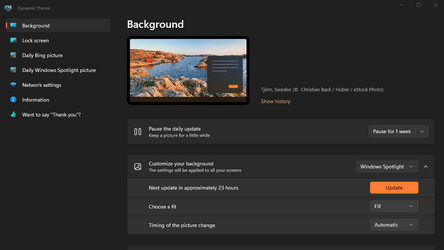
I find the APP Dynamic Theme from MS Store very helpful at refreshing and manipulating Windows Spotlight images.
It' s very easy to use and is free and 7 MB.

Screenshot 2023-08-28 153354.png
 

My Computers My Computers

  • At a glance

    All Branches but StableAMD Ryzen 7 7735HS 3200-4500 Mhz 8 cores x 232 GB DDR5Radeon Graphic / NVIDIA GeForce RTX 4060 8 GB...
    OS
    All Branches but Stable
    Computer type
    Laptop
    Manufacturer/Model
    Acer Nitro ANV15-51
    CPU
    AMD Ryzen 7 7735HS 3200-4500 Mhz 8 cores x 2
    Motherboard
    Sportage_RBH
    Memory
    32 GB DDR5
    Graphics Card(s)
    Radeon Graphic / NVIDIA GeForce RTX 4060 8 GB GDDR6
    Sound Card
    AMD/Realtek(R) Audio
    Monitor(s) Displays
    Integrated Monitor (15.3"vis)
    Screen Resolution
    FHD 1920X1080 16:9 144Hz
    Hard Drives
    KINGSTON OM8SEP4512Q-AA 1TB
    Western Digital 256GB
    PSU
    19V DC 6.32 A 120 W
    Cooling
    Dual Fans
    Mouse
    MS Bluetooth
    Internet Speed
    Fiber 1GB Cox -us & 1GB Orange-fr
    Browser
    Edge Canary- Firefox Nightly-Chrome Dev-Chrome Dev
    Antivirus
    Windows Defender
  • At a glance

    Windows 11 BetaAMD A9-94208 GB of DDR4AMD Radeon R5
    Operating System
    Windows 11 Beta
    Computer type
    Laptop
    Manufacturer/Model
    Asus X751BP
    CPU
    AMD A9-9420
    Memory
    8 GB of DDR4
    Graphics card(s)
    AMD Radeon R5
    Screen Resolution
    1600x900
    Hard Drives
    Seagate 1 TB
I find the APP Dynamic Theme from MS Store very helpful at refreshing and manipulating Windows Spotlight images.
It' s very easy to use and is free and 7 MB.

Yes I gave it a try and it's fine.

But it's quite odd to have the Spotlight stuck on the same Haiti image for multiple users.
 

My Computer My Computer

At a glance

Windows 11 Pro
OS
Windows 11 Pro
I have now gone through the following sequence three times since reporting this issue.

  • Reset background and lock screen using bat file provided in the tutorial and run a SFC scan (no corruption found)
  • Runs fine for approximately two or three weeks
  • Stops changing lock screen image followed soon thereafter with a static, non-changing background image.
I have to conclude that the Spotlight app is either being overwritten by an update or is just faulty to start with.
 

My Computer My Computer

At a glance

Windows 11 Home 25H211th Gen Intel(R) Core(TM) i7-11390H @ 3.40GHz16 GB
OS
Windows 11 Home 25H2
Computer type
Laptop
Manufacturer/Model
Dell Inspiron 15 5510
CPU
11th Gen Intel(R) Core(TM) i7-11390H @ 3.40GHz
Memory
16 GB
Screen Resolution
1920 x 1080
Hard Drives
512 GB SSD
Browser
Chrome (latest)
I"m stuck with a young lioness. But as backaground image. So I use a folder to display images
 

My Computers My Computers

  • At a glance

    Windows 11 ProIntel Core i9-14900HX32 GBIntel UHD Graphics, NVIDIA RTX 4070 Laptop
    OS
    Windows 11 Pro
    Computer type
    Laptop
    Manufacturer/Model
    Lenovo Legion 7i 16IRX9
    CPU
    Intel Core i9-14900HX
    Motherboard
    LENOVO LNVNB161216 Chipset HM 770
    Memory
    32 GB
    Graphics Card(s)
    Intel UHD Graphics, NVIDIA RTX 4070 Laptop
    Sound Card
    Realtek in-built
    Screen Resolution
    3200x2000 200% Scale
    Hard Drives
    C: HDD 1 TB SAMSUNG MZVL21T0HCLR-00BL2
    D: HDD 1 TB CRUCIAL CT1000P3PSSD8
    Antivirus
    BitDefender Free
  • At a glance

    Windows 11 ProI7 10750H32 GBIntel UHD - NVIDIA 1650 Ti Max-Q
    Operating System
    Windows 11 Pro
    Computer type
    Laptop
    Manufacturer/Model
    Lenovo ThinkPad X1 3Gen Extreme
    CPU
    I7 10750H
    Motherboard
    Intel MW-490
    Memory
    32 GB
    Graphics card(s)
    Intel UHD - NVIDIA 1650 Ti Max-Q
    Sound Card
    Realtek in-built
    Screen Resolution
    3840x2160 225% Scale
    Hard Drives
    C: WDC PC SN730 SDBQNTY-1T00-1001 (1 TB)
    D: KINGSTON SNV2S2000G (2 TB)
    Antivirus
    BitDefender
Spotlight is bug prone. I now use the Dynamic Theme app.
 

My Computer My Computer

At a glance

Windows 11 ProCore i7-13700K64 GB Kingston Fury Beast DDR5Gigabyte GeForce RTX 2060 Super Gaming OC 8G
OS
Windows 11 Pro
Computer type
PC/Desktop
Manufacturer/Model
Self build
CPU
Core i7-13700K
Motherboard
Asus TUF Gaming Plus WiFi Z790
Memory
64 GB Kingston Fury Beast DDR5
Graphics Card(s)
Gigabyte GeForce RTX 2060 Super Gaming OC 8G
Sound Card
Realtek S1200A
Monitor(s) Displays
Viewsonic VP2770 & Dell (secondary)
Screen Resolution
2560 x 1440
Hard Drives
Kingston KC3000 2TB NVME SSD & SATA HDDs & SSD
PSU
EVGA SuperNova G2 850W
Case
Nanoxia Deep Silence 1
Cooling
Noctua NH-D14
Keyboard
Microsoft Digital Media Pro
Mouse
Logitech Wireless
Internet Speed
80 Mb / s
Browser
Chrome
Antivirus
Defender, Malwarebytes Free & AdwCleaner

Latest Support Threads

Back
Top Bottom