Hello,
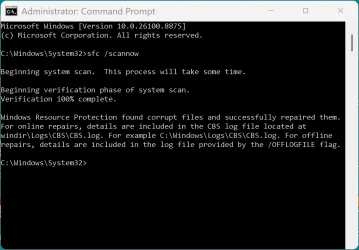
I started the download/installation yesterday about 1pm and now it has been almost 24 hours and the installation is at 99% which has been there for almost an hour, and it took quite sometime to download three updates to begin with. Why did it take so long this time? Normally I don't have any issues, the previous updates usually took about 5 hours but this time is one of the longest.
Any comments/suggestions are much appreciated.
Thank you.
PS: The download/installation for .NET Framework Security and Windows Malicious Software Removal Tool x64 were pretty fast though.
I started the download/installation yesterday about 1pm and now it has been almost 24 hours and the installation is at 99% which has been there for almost an hour, and it took quite sometime to download three updates to begin with. Why did it take so long this time? Normally I don't have any issues, the previous updates usually took about 5 hours but this time is one of the longest.
Any comments/suggestions are much appreciated.
Thank you.
PS: The download/installation for .NET Framework Security and Windows Malicious Software Removal Tool x64 were pretty fast though.
- Windows Build/Version
- Windows 11 Home / Version 24H2 / OS build: 26100.8655
Last edited:
My Computer
At a glance
Windows 11 Home Version 24H2 OS build 26100.8875Intel(R) Core(TM) i5-1035G1 CPU @ 1.00GHz (1....32.0 GBIntel(R) UHD Graphics (128 MB)
- OS
- Windows 11 Home Version 24H2 OS build 26100.8875
- Computer type
- Laptop
- Manufacturer/Model
- Dell Inspiron 3793
- CPU
- Intel(R) Core(TM) i5-1035G1 CPU @ 1.00GHz (1.19 GHz)
- Memory
- 32.0 GB
- Graphics Card(s)
- Intel(R) UHD Graphics (128 MB)
- Monitor(s) Displays
- Internal Dell Display and Dell P2715Q
- Screen Resolution
- 1920 x 1080, 60.13 Hz / 1920 x 1080, 60 Hz
- Hard Drives
- Seagate ST1000LM035-1RK172
- Keyboard
- Dell Laptop Keyboard
- Mouse
- Logitech M705
- Browser
- Google Chrome, Firefox
- Antivirus
- AVG, Malwarebytes, SuperAntispyware, CCleaner